MathJax is a JavaScript library, not a hosted service. You load it from a CDN with one <script> tag, and it finds LaTeX in your page and draws it as formatted math. Here it is used in a single HTML file, no build step.
Here is the smallest working page. Formulas go between \( and \) for inline math and \[ and \] for a block on its own line.
<!doctype html>
<html lang="en">
<head>
<meta charset="utf-8">
<meta name="viewport" content="width=device-width, initial-scale=1">
<title>MathJax basics</title>
<style>
  body { font-family: system-ui, sans-serif; margin: 0; padding: 18px; line-height: 1.6; color: #1d2330; }
  h1 { font-size: 18px; margin: 0 0 8px; }
  p { margin: 0 0 10px; }
</style>
<!-- the one line that adds MathJax: pinned version, TeX in, HTML out -->
<script defer src="https://cdn.jsdelivr.net/npm/mathjax@4.1.3/tex-mml-chtml.js"></script>
</head>
<body>
<h1>Two kinds of formula</h1>
<p>Inline: Euler wrote \( e^{i\pi} + 1 = 0 \) inside a sentence.</p>
<p>On its own line:</p>
\[ x = \frac{-b \pm \sqrt{b^2 - 4ac}}{2a} \]
<p>Sums too: \( \sum_{k=1}^{n} k = \frac{n(n+1)}{2} \).</p>
</body>
</html>
The whole setup is the single script tag in the head:
<script defer src="https://cdn.jsdelivr.net/npm/mathjax@4.1.3/tex-mml-chtml.js"></script>
What that script tag loads
The file name tex-mml-chtml.js is a combined component. It contains the TeX input, the MathML input and the CommonHTML output, a font, the contextual menu and the assistive tools, so one request is all the page needs.
The @4.1.3 part pins the version. On 2026-10-01 it was the latest release, and a pinned address keeps the page behaving the same even after newer versions appear.
MathJax also fetches its font files and speech data when it first draws a formula. In our test they all came from the same CDN host as the script.
The defer attribute makes the browser run the script after the page has been parsed, and before the DOMContentLoaded event.
Which delimiters MathJax reads
MathJax only looks for math between delimiters. Anything outside them is left as ordinary text.
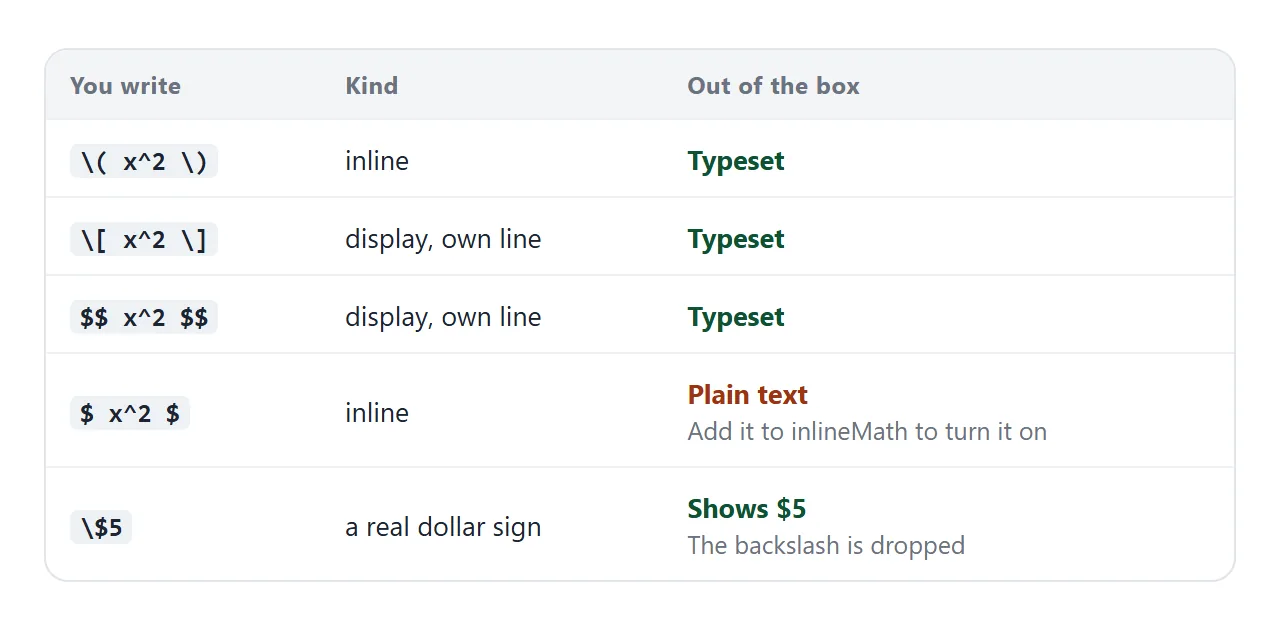
Out of the box, inline math uses backslash-parenthesis and display math uses backslash-bracket or double dollar signs. A single dollar sign is not a delimiter until you add it, and a backslash before a dollar sign gives you a literal dollar sign.
The next example turns single dollars on and shows both escapes at work.
<!doctype html>
<html lang="en">
<head>
<meta charset="utf-8">
<meta name="viewport" content="width=device-width, initial-scale=1">
<title>MathJax delimiters</title>
<style>
  body { font-family: system-ui, sans-serif; margin: 0; padding: 16px; line-height: 1.6; color: #1d2330; }
  h2 { font-size: 15px; margin: 0 0 6px; }
  .box { border: 1px solid #e1e4ea; border-radius: 10px; padding: 10px 14px; margin-bottom: 12px; }
  .box p { margin: 4px 0; }
  code, pre { font-family: ui-monospace, Consolas, monospace; font-size: 13px; }
  pre { background: #f4f5f7; padding: 8px 10px; border-radius: 8px; margin: 6px 0 0; overflow-x: auto; }
</style>
<script>
  // This block must come BEFORE the MathJax script tag.
  window.MathJax = {
    tex: { inlineMath: { '[+]': [['$', '$']] } }   // add $...$ to the default \( ... \)
  };
</script>
<script defer src="https://cdn.jsdelivr.net/npm/mathjax@4.1.3/tex-mml-chtml.js"></script>
</head>
<body>
<div class="box">
  <h2>Both inline styles now work</h2>
  <p>Backslash-paren: \( a^2 + b^2 = c^2 \)</p>
  <p>Dollar signs: $ \alpha + \beta = \gamma $</p>
</div>
<div class="box">
  <h2>A real price: escape the dollar</h2>
  <p>The ticket costs \$5 and the bag costs \$8.</p>
</div>
<div class="box">
  <h2>Code is skipped on purpose</h2>
  <p>Inside <code>pre</code> and <code>code</code> the text stays as typed:</p>
  <pre>\( x^2 \)  and  $y$</pre>
</div>
</body>
</html>
Put your settings before the script
Settings live in a global object named window.MathJax. MathJax reads it once, when it starts, so the object has to exist first.
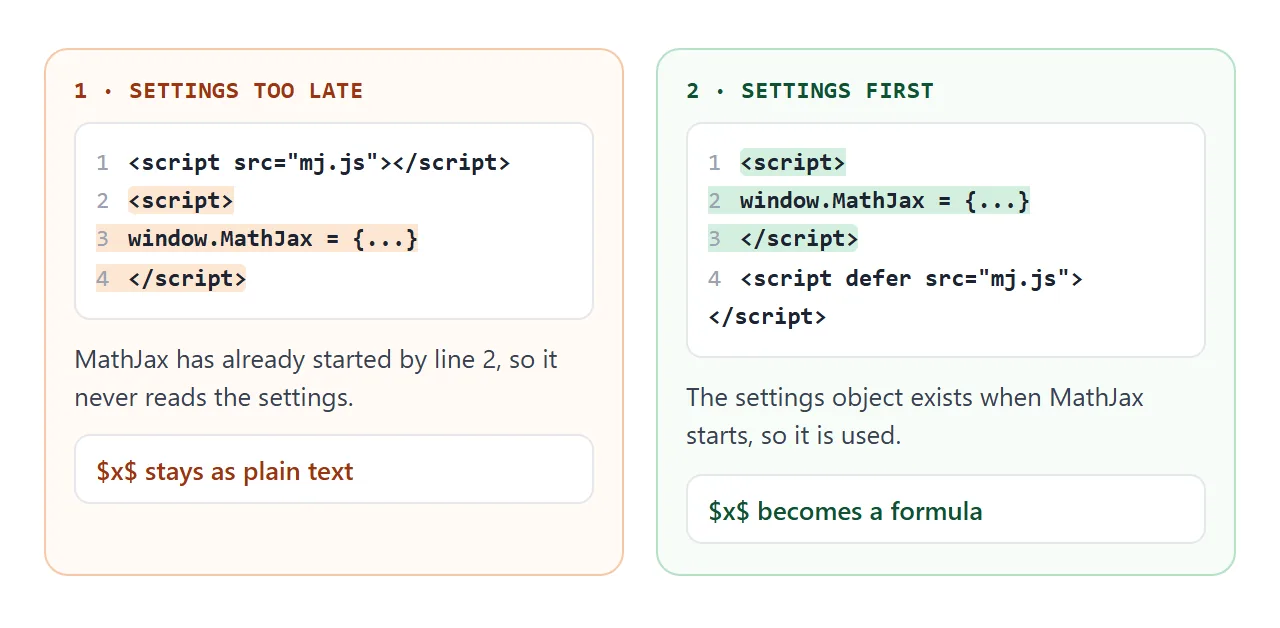
In our test, a block placed after a script tag without defer was ignored, and the dollar signs stayed as plain text. Put the settings block above the MathJax script tag and it works whether or not you use defer.
<script>
  window.MathJax = {
    tex: { inlineMath: { '[+]': [['$', '$']] } }
  };
</script>
<script defer src="https://cdn.jsdelivr.net/npm/mathjax@4.1.3/tex-mml-chtml.js"></script>
Math that changes after the page loads
MathJax typesets the page once, when it starts. Text that your own JavaScript writes later is not scanned, so the delimiters just sit there as plain characters.
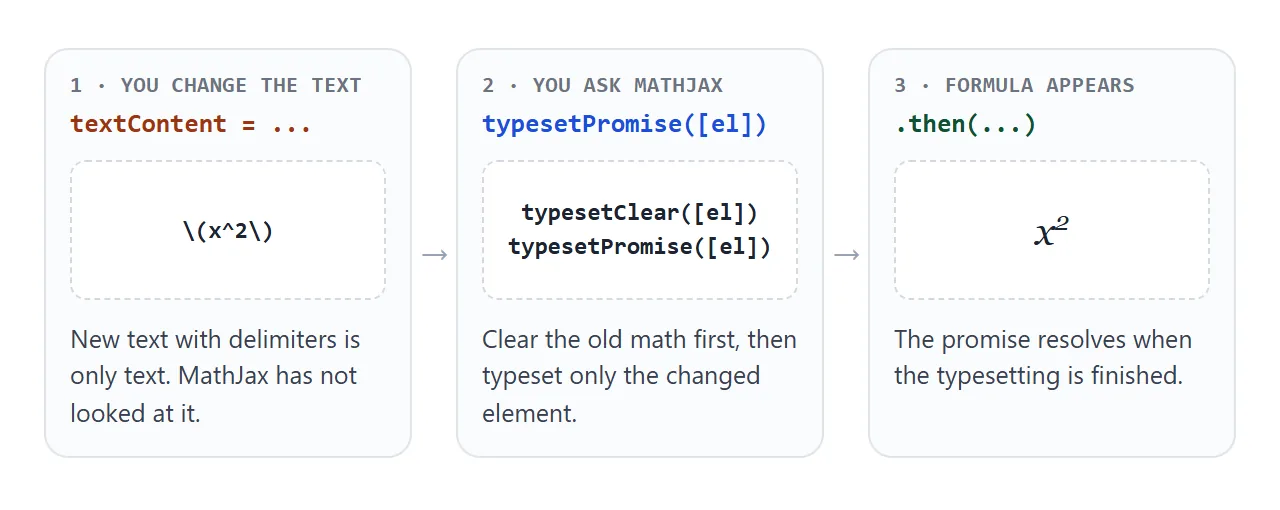
The fix is to ask. Call MathJax.typesetPromise([element]) with the element you changed. If that element already holds typeset math, call MathJax.typesetClear([element]) first so the old math is forgotten.
MathJax.typesetClear([out]);
out.textContent = '\\[' + tex + '\\]';
MathJax.typesetPromise([out]).then(() => { /* done */ });
The editor below does exactly that on every keystroke. It sets textContent, which stores your typing as plain text rather than HTML, so a stray angle bracket cannot become markup.
<!doctype html>
<html lang="en">
<head>
<meta charset="utf-8">
<meta name="viewport" content="width=device-width, initial-scale=1">
<title>Live formula editor</title>
<style>
body { font-family: system-ui, sans-serif; margin: 0; padding: 16px; color: #1d2330; }
label { font-weight: 600; font-size: 14px; }
textarea {
display: block; width: 100%; box-sizing: border-box; margin: 6px 0 10px;
height: 76px; padding: 8px 10px; font: 14px ui-monospace, Consolas, monospace;
border: 1px solid #c9ced8; border-radius: 8px; resize: vertical;
}
.presets button {
font: inherit; font-size: 13px; padding: 5px 10px; margin: 0 6px 6px 0;
border: 1px solid #c9ced8; border-radius: 999px; background: #fff; cursor: pointer;
}
.presets button:hover { background: #f4f5f7; }
#out {
min-height: 70px; border: 1px dashed #c9ced8; border-radius: 10px;
padding: 10px 14px; overflow-x: auto; background: #fafbfc;
}
#status { font-size: 12px; color: #6b7280; margin-top: 6px; }
</style>
<script defer src="https://cdn.jsdelivr.net/npm/mathjax@4.1.3/tex-mml-chtml.js"></script>
</head>
<body>
<label for="src">Type LaTeX</label>
<textarea id="src" spellcheck="false">\int_0^\infty e^{-x^2}\,dx = \frac{\sqrt{\pi}}{2}</textarea>
<div class="presets" id="presets">
<button type="button" data-tex="\frac{a}{b} + \frac{c}{d} = \frac{ad + bc}{bd}">Fractions</button>
<button type="button" data-tex="\begin{pmatrix} 1 & 2 \\ 3 & 4 \end{pmatrix}">Matrix</button>
<button type="button" data-tex="\lim_{n \to \infty} \left(1 + \frac{1}{n}\right)^n = e">Limit</button>
</div>
<div id="out"></div>
<div id="status">Waiting for MathJax...</div>
<script>
const src = document.getElementById('src');
const out = document.getElementById('out');
const status = document.getElementById('status');
function render() {
if (!window.MathJax || !MathJax.typesetPromise) return; // library not ready yet
MathJax.typesetClear([out]); // forget the math that is being replaced
out.textContent = '\\[' + src.value + '\\]'; // textContent: typed text can never become HTML
MathJax.typesetPromise([out]).then(() => { status.textContent = 'Typeset.'; });
}
src.addEventListener('input', render);
document.getElementById('presets').addEventListener('click', (e) => {
const t = e.target.closest('button');
if (!t) return;
src.value = t.dataset.tex;
render();
});
// The first render waits until MathJax has finished loading.
const wait = setInterval(() => {
if (window.MathJax && MathJax.typesetPromise) { clearInterval(wait); render(); }
}, 100);
</script>
</body>
</html>
Watch the backslashes in JavaScript strings
Inside a JavaScript string, a backslash followed by a character that is not an escape code is dropped. The string '\(' therefore becomes a plain parenthesis, and MathJax never sees a delimiter.
In our test, writing a formula with single backslashes in a JavaScript string left (x^2) on the page. Double each backslash in the source: write '\\(' to get one backslash in the result.
Text MathJax skips on purpose
By default MathJax does not look inside these elements: script, noscript, style, textarea, pre, code, math, select, option and its own output.
That is why a formula inside a code block stays as typed, which suits showing LaTeX source. To change it, edit the skipped tag list. Or give an element the class mathjax_ignore to skip it, or mathjax_process to force it back in.
MathJax or plain MathML?
Browsers can draw MathML written directly in the page, with no library. The math tag guide covers that route. MathJax is the choice when you would rather type LaTeX, or when you want one syntax for the whole page.
When it does not work
| What you see | Cause | Fix |
|---|---|---|
Raw \( x^2 \) on the page |
The script did not load or run | Check the script address and that the page can reach the CDN host |
$x$ stays as text |
Single dollars are off by default | Add the pair to inlineMath |
| Settings have no effect | The settings block is below a plain script tag | Move it above the MathJax script tag |
| Formulas written by JavaScript stay raw | MathJax scanned the page before they existed | Call MathJax.typesetPromise on the element |
(x^2) with no backslashes |
The string literal dropped them | Double each backslash |
| Formula in a code or pre block stays raw | Those tags are skipped | Use a div, or add mathjax_process |
| An unfinished formula stays as raw text | A brace is not closed | Close the brace and reload |
For other scripts that do nothing, JavaScript not working in HTML lists the usual causes.
Share it as a link
A MathJax page is meant to be read in a browser. Attached as a file, it may open as plain code on a phone, and the formulas never appear.
To send the working version, paste the page into a NOS document and choose Create share link. HTML to link walks through it.
The page renders as written, and its scripts run, including scripts loaded from cdn.jsdelivr.net. The people you send it to can type into the live formula themselves. If you change the code later, the same link shows the new version.