The CSS font-language-override property tells a font which language's letter forms to use. By default the browser works that out from the lang attribute. Setting a quoted OpenType language tag, such as "SRB" for Serbian, replaces that choice for the font only.
Try it. Both lines are Macedonian text in Cambria italic. The second one also has font-language-override, and the menu sets its value.
<!doctype html>
<html lang="en">
<head>
<meta charset="utf-8">
<meta name="viewport" content="width=device-width, initial-scale=1">
<title>font-language-override basics</title>
<style>
  /* Cambria ships with Windows. Declaring it through @font-face lets the script
     below redraw the text in Chrome and Edge. */
  @font-face {
    font-family: 'My Cambria';
    src: local('Cambria Italic');
  }

  body { margin: 0; padding: 16px; font-family: system-ui, sans-serif; background: #f4f5f7; color: #1d2330; }
  .card { background: #fff; border-radius: 12px; padding: 12px 14px; margin-bottom: 10px; }
  .label { font: 13px ui-monospace, Consolas, monospace; color: #5b6472; }
  .text { font-family: 'My Cambria', Cambria, serif; font-style: italic; font-size: 28px; margin: 4px 0 0; }
  #over { font-language-override: "SRB"; }   /* the one line that matters */
  select { font: inherit; font-size: 14px; }
  .note { font-size: 13px; color: #9a3412; margin: 8px 0 0; }
</style>
</head>
<body>
<div class="card">
  <div class="label">lang="mk"</div>
  <p class="text" lang="mk">б г д п т · Никој човек</p>
</div>
<div class="card">
  <div class="label">lang="mk" + font-language-override:
    <select id="pick">
      <option value='"SRB"'>"SRB"</option>
      <option value="normal">normal</option>
      <option value='"srb"'>"srb"</option>
      <option value='"XYZ"'>"XYZ"</option>
    </select>
  </div>
  <p class="text" id="over" lang="mk">б г д п т · Никој човек</p>
</div>
<p class="note" id="note" hidden></p>

<script>
  const over = document.getElementById('over');
  const note = document.getElementById('note');

  // Set the property from the menu
  document.getElementById('pick').addEventListener('change', (e) => {
    over.style.fontLanguageOverride = e.target.value;
    // Chrome and Edge kept the old glyphs in our test until the text was rebuilt
    over.innerHTML = over.innerHTML;
  });

  // Tell the reader when the example cannot show a difference
  function warn(text) { note.textContent = text; note.hidden = false; }
  if (!CSS.supports('font-language-override', 'normal')) {
    warn('This browser does not support font-language-override, so both lines look the same.');
  } else {
    const face = [...document.fonts].find((f) => f.family.includes('My Cambria'));
    face.load().catch(() => warn('Cambria is not installed here, so both lines look the same.'));
  }
</script>
</body>
</html>
The example needs Cambria, which ships with Windows. Elsewhere it shows a note, because the difference depends on forms stored inside the font.
The steps for any text:
- Mark the language with
lang, for examplelang="mk". - Find a tag the font supports, from a related language whose forms fit.
- Set the property, in capitals and in quotes, after any
fontshorthand.
:lang(mk) { font-language-override: "SRB"; }
What font-language-override changes
An OpenType font can hold different forms for the same letter, grouped by language system. The browser normally asks for the language system that matches the content language. With lang="mk", that is Macedonian, tag MKD.
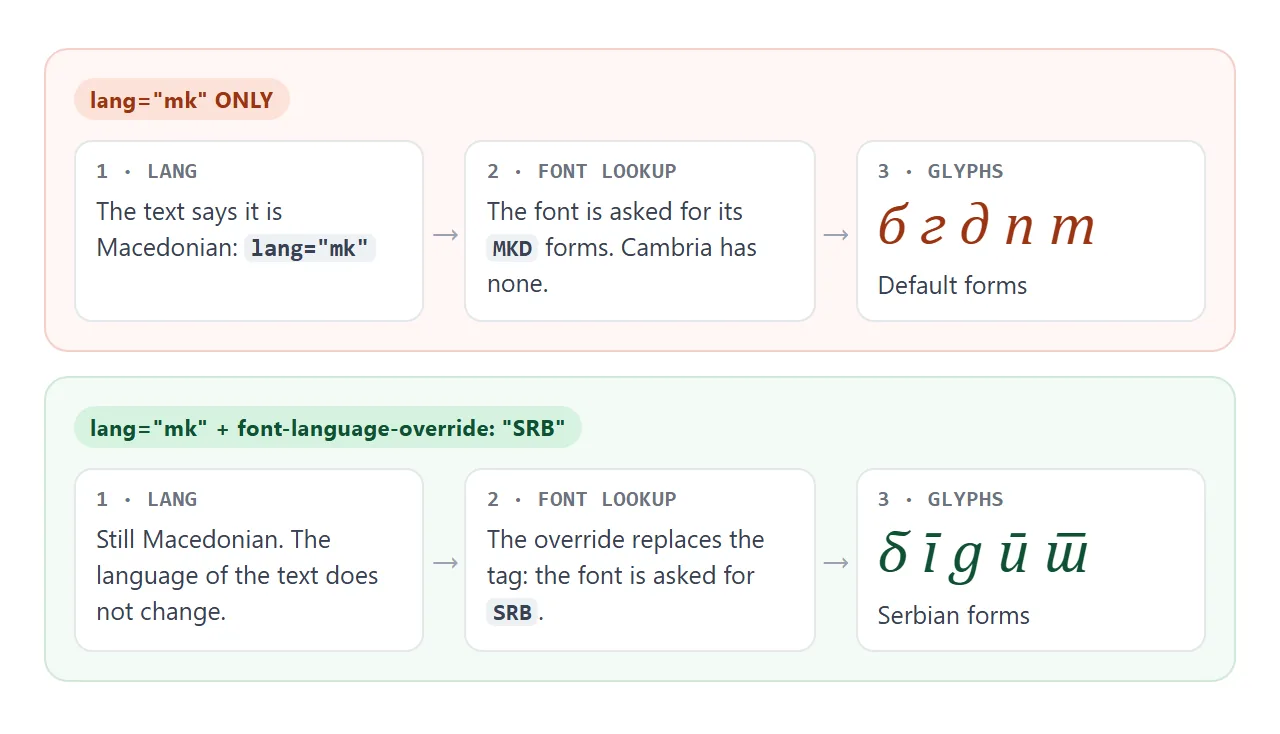
Cambria has Serbian forms but no Macedonian ones, so Macedonian text gets the default shapes. The CSS Fonts spec uses this exact case as its example: a Macedonian page set to "SRB" to borrow Serbian typographic conventions from a font that has them.
MDN gives a similar case with Azeri text in a font without Azeri rules, where Turkish forms can be forced instead.
The property is inherited and its initial value is normal. normal means the browser infers the language system from the content language, as it does without the property.
The value: a quoted OpenType tag
The value is either normal or a string holding one OpenType language system tag. The tags come from the registry Microsoft publishes with the OpenType spec.
| Language | Tag | lang value |
|---|---|---|
| Serbian | "SRB" |
sr |
| Macedonian | "MKD" |
mk |
| Bulgarian | "BGR" |
bg |
| Romanian | "ROM" |
ro |
| Russian | "RUS" |
ru |
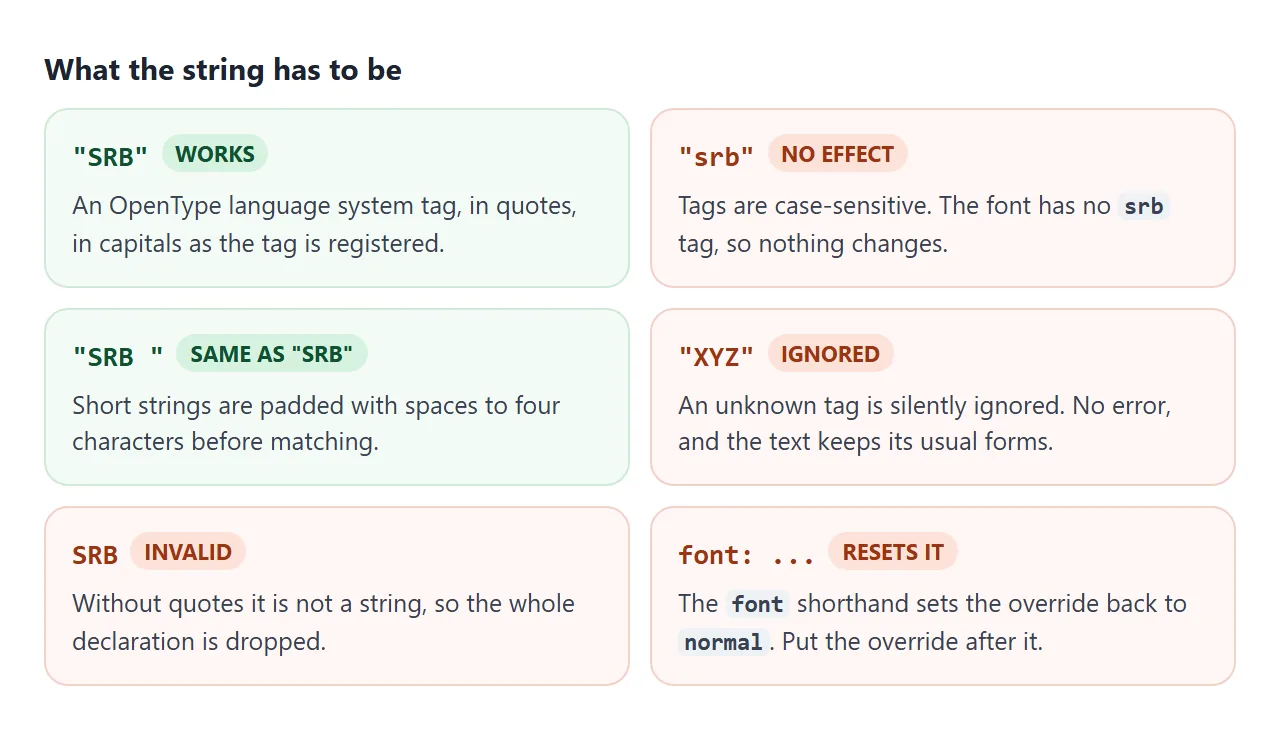
A few rules decide whether the value does anything:
- Case matters. The spec defines the tag as case-sensitive.
"srb"did nothing in our tests. - Padding is automatic. Registry tags are four characters, like
'SRB 'with a trailing space. The spec pads shorter strings with spaces before matching. - Unknown tags are ignored. The spec says so, and
"XYZ"left the text unchanged. - Quotes are required. Without them the value is not a string, and the declaration is invalid.
lang or font-language-override?
lang says what language the text is. The override only changes which glyph set of the font is used. The text stays Macedonian for :lang(mk) selectors and for hyphens: auto, which picks hyphenation rules from the language.
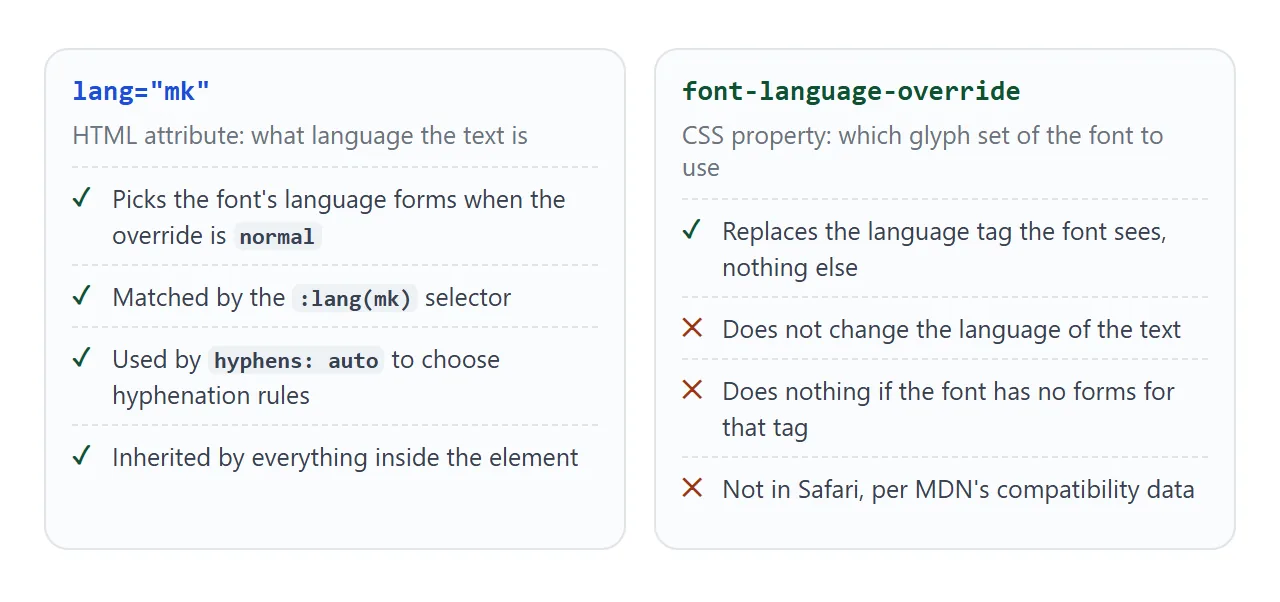
So set lang correctly first. When the font already has forms for that language, you do not need the override at all.
The property also cannot add forms a font does not have. If the font has no language-specific forms for the tag, OpenType falls back to its default set, and nothing visible changes.
Compare lang, the override and the traps
The Cambria rows use the same five letters. Look at which rows match the Macedonian row at the top and which match the Serbian one.
<!doctype html>
<html lang="en">
<head>
<meta charset="utf-8">
<meta name="viewport" content="width=device-width, initial-scale=1">
<title>lang vs font-language-override</title>
<style>
  body { margin: 0; padding: 14px; font-family: system-ui, sans-serif; background: #f4f5f7; color: #1d2330; }
  .row { display: grid; grid-template-columns: minmax(0, 1fr) auto; align-items: center; gap: 4px 10px;
         background: #fff; border-radius: 10px; padding: 8px 12px; margin-bottom: 6px; }
  code { font: 12.5px ui-monospace, Consolas, monospace; color: #5b6472; }
  .s { font-family: Cambria, serif; font-style: italic; font-size: 26px; white-space: nowrap; }
  .note { font-size: 13px; color: #5b6472; margin: 0 0 8px; }
  .ro { font-family: Verdana, sans-serif; font-style: normal; font-size: 24px; }

  .srb { font-language-override: "SRB"; }
  .rus { font-language-override: "RUS"; }
  .low { font-language-override: "srb"; }                 /* tags are case-sensitive */
  .reset { font-language-override: "SRB"; font: italic 26px Cambria; }  /* font resets it */
  .rom { font-language-override: "ROM"; }
  .xyz { font-language-override: "XYZ"; }                 /* unknown tags are ignored */
</style>
</head>
<body>
<p class="note">Needs Cambria and Verdana, which ship with Windows. Without them, every row looks the same.</p>
<div class="row"><code>lang="mk"</code><span class="s" lang="mk">б г д п т</span></div>
<div class="row"><code>lang="sr"</code><span class="s" lang="sr">б г д п т</span></div>
<div class="row"><code>lang="mk" + "SRB"</code><span class="s srb" lang="mk">б г д п т</span></div>
<div class="row"><code>lang="sr" + "RUS"</code><span class="s rus" lang="sr">б г д п т</span></div>
<div class="row"><code>lang="mk" + "srb"</code><span class="s low" lang="mk">б г д п т</span></div>
<div class="row"><code>"SRB", then font: ...</code><span class="s reset" lang="mk">б г д п т</span></div>
<div class="row"><code>lang="mk" + "XYZ"</code><span class="s xyz" lang="mk">б г д п т</span></div>
<div class="row"><code>lang="en"</code><span class="ro" lang="en">Ş ş Ţ ţ</span></div>
<div class="row"><code>lang="en" + "ROM"</code><span class="ro rom" lang="en">Ş ş Ţ ţ</span></div>
</body>
</html>
What the rows show:
lang="sr"alone gets the Serbian forms, because the font has them.lang="mk"+"SRB"gets them too. That is the property doing its job.lang="sr"+"RUS"goes the other way: the override wins over the language."srb"and"XYZ"change nothing.- A
fontshorthand written after the override resets it tonormal, as the spec lists it among the properties the shorthand resets.
The font-variant shorthand, unlike font, does not reset it. Low-level OpenType switches live in a separate property; font-feature-settings covers those.
Browser support
MDN's compatibility data lists font-language-override in Chrome, Edge and Firefox, with support in Chrome added recently. It lists no support in Safari.
The CSS Fonts 4 spec lists the property as at risk, a W3C term for features that may be dropped before the spec is finished.
In our tests, WebKit ignored the property while still using lang, so the text kept the forms that lang alone gives. To show a note where it is missing, test for it in CSS:
@supports not (font-language-override: normal) {
  .warn { display: block; }
}
Chrome needed extra care in our tests. It kept the old glyphs after a script changed the value, until the text was rebuilt. The examples here run el.innerHTML = el.innerHTML after each change.
That rebuild only helped with a font declared in @font-face with src: local(). With the installed font named directly in font-family, even a rebuild did not redraw it. The font-palette guide uses the same local() declaration.
Two more Chrome cases:
- Identical text. When the same text in the same font and size appeared earlier on the page, the later copy sometimes reused its shapes. Compare with different words.
- Child elements. A child element inheriting the value sometimes kept the default forms. A
:lang(mk)rule, which matches every element in the passage, avoided it.
A finished example: a Macedonian quote
A page in English quotes a passage in Macedonian. One rule gives every Macedonian passage the Serbian forms, and the English text is untouched.
<!doctype html>
<html lang="en">
<head>
<meta charset="utf-8">
<meta name="viewport" content="width=device-width, initial-scale=1">
<title>A Macedonian quote with Serbian forms</title>
<style>
  @font-face { font-family: 'My Cambria'; src: local('Cambria Italic'); }

  body { margin: 0; padding: 16px; font-family: system-ui, sans-serif; background: #f4f5f7; color: #1d2330; }
  article { background: #fff; border-radius: 12px; padding: 14px 16px; max-width: 560px; }
  h2 { margin: 0 0 6px; font-size: 18px; }
  p { margin: 0 0 10px; font-size: 15px; line-height: 1.5; }
  blockquote { margin: 0 0 10px; padding: 8px 14px; border-left: 4px solid #0f766e; background: #f0fdfa;
               font-family: 'My Cambria', Cambria, serif; font-style: italic; font-size: 21px; line-height: 1.4; }

  /* The whole fix: every Macedonian passage uses the font's Serbian forms */
  .fix :lang(mk) { font-language-override: "SRB"; }

  label { display: flex; gap: 8px; align-items: center; font-size: 14px; }
  output { display: block; font: 13px ui-monospace, Consolas, monospace; color: #5b6472; margin-top: 6px; }
  .warn { display: none; font-size: 13px; color: #9a3412; margin-top: 8px; }
  @supports not (font-language-override: normal) { .warn.support { display: block; } }
</style>
</head>
<body class="fix">
<article>
  <h2>Article 9</h2>
  <p>No one shall be subjected to arbitrary arrest, detention or exile. In Macedonian:</p>
  <blockquote lang="mk" id="q">Никој човек нема да биде подложен на произволно апсење, притвор или прогонување.</blockquote>
  <label><input type="checkbox" id="on" checked> Apply <code>:lang(mk)</code> rule</label>
  <output id="out"></output>
  <p class="warn support">This browser does not support font-language-override, so the switch changes nothing.</p>
  <p class="warn" id="nofont">Cambria is not installed here, so the switch changes nothing.</p>
</article>

<script>
  const q = document.getElementById('q');
  const out = document.getElementById('out');

  function show() {
    // Read back what the browser actually uses for the quote
    out.textContent = 'computed: ' + (getComputedStyle(q).fontLanguageOverride || 'not supported');
  }
  document.getElementById('on').addEventListener('change', (e) => {
    document.body.classList.toggle('fix', e.target.checked);
    q.innerHTML = q.innerHTML;  // Chrome and Edge redrew the glyphs only after this in our test
    show();
  });
  show();

  // Only worth checking the font where the property is supported
  if (CSS.supports('font-language-override', 'normal')) {
    const face = [...document.fonts].find((f) => f.family.includes('My Cambria'));
    face.load().catch(() => { document.getElementById('nofont').style.display = 'block'; });
  }
</script>
</body>
</html>
- One rule for the language:
.fix :lang(mk)matches the quote and anything inside it, so new quotes need onlylang="mk". - A switch to compare: the checkbox toggles the class on
<body>and rebuilds the quote's text for Chrome. - Read it back: the script prints the computed value, so you can see what the browser holds. Where the property is unsupported, it has no value to read.
- Two notes: one for browsers without support, one when Cambria is not installed.
out.textContent = getComputedStyle(q).fontLanguageOverride;
When it does not work
| What you see | Cause | Fix |
|---|---|---|
| Nothing changes | The font has no forms for that tag | Use a font that has them, or another tag |
| Nothing changes | Lower-case or unknown tag | Use the registered tag in capitals |
| The declaration is dropped | The tag is not in quotes | Write "SRB", not SRB |
| Works, then stops | A later font shorthand reset it |
Put the override after font |
| No change in Safari | Not supported there | Rely on lang; show a note with @supports |
| No change after a script sets it (Chrome) | Text already drawn keeps its glyphs | Rebuild the text; declare the font with local() |
| A child element keeps the old forms (Chrome) | Inherited value not applied | Target :lang(mk) instead of a parent class |
Share it as a link
A screenshot of glyph shapes only shows how they look in one browser. The difference depends on the fonts installed and on support, so a reviewer should open the page in their own browser.
To send the working version, paste the page into a NOS document and choose Create share link. HTML to link walks through it.
The page renders as written and its scripts run, so the people you send it to can try the menu and the switch themselves. If you change the code later, the same link shows the new version.