The CSS font-palette property chooses which color palette a color font draws with. Pair it with an @font-palette-values rule and you can replace individual colors in the font, while the shapes and shading stay as the font maker drew them.
The color property does not reach these glyphs. Windows ships a color font that works for this: Segoe UI Emoji. The example below turns its green square purple by replacing four palette entries.
<!doctype html>
<html lang="en">
<head>
<meta charset="utf-8">
<meta name="viewport" content="width=device-width, initial-scale=1">
<title>font-palette basics</title>
<style>
/* 1. Give the installed color font a name of your own */
@font-face {
font-family: 'Emoji';
src: local('Segoe UI Emoji');
}
/* 2. Describe a palette: which color slots to replace, and with what */
@font-palette-values --purple {
font-family: 'Emoji';
override-colors:
4751 #5b21b6, /* was dark green */
6419 #7c3aed,
12013 #8b5cf6,
17867 #c4b5fd; /* was light green */
}
body { margin: 0; padding: 18px; font-family: system-ui, sans-serif; background: #f4f5f7; color: #1d2330; }
.row { display: flex; gap: 14px; flex-wrap: wrap; }
figure { margin: 0; flex: 1 1 140px; background: #fff; border-radius: 12px; padding: 14px; text-align: center; }
.emoji { font-family: 'Emoji'; font-size: 88px; line-height: 1.1; }
.recolored { font-palette: --purple; } /* 3. Use the palette */
figcaption { font-size: 14px; }
code { font: 13px ui-monospace, Consolas, monospace; background: #eef1f5; padding: 1px 4px; border-radius: 4px; }
.note { font-size: 13px; color: #5b6472; margin: 12px 0 0; }
</style>
</head>
<body>
<div class="row">
<figure><div class="emoji">🟩</div><figcaption>Default palette</figcaption></figure>
<figure><div class="emoji recolored">🟩</div><figcaption><code>font-palette: --purple</code></figcaption></figure>
</div>
<p class="note">Uses the Segoe UI Emoji color font that ships with Windows. On other systems both squares keep their own emoji colors.</p>
</body>
</html>
On a Mac or a phone, the emoji comes from a different font and both squares stay green. That is expected: the rule names one font, so it changes only that font.
How font-palette works: three pieces
A palette change always has the same three parts. The font gets a family name, a palette is described for that family, and an element uses the palette by name.
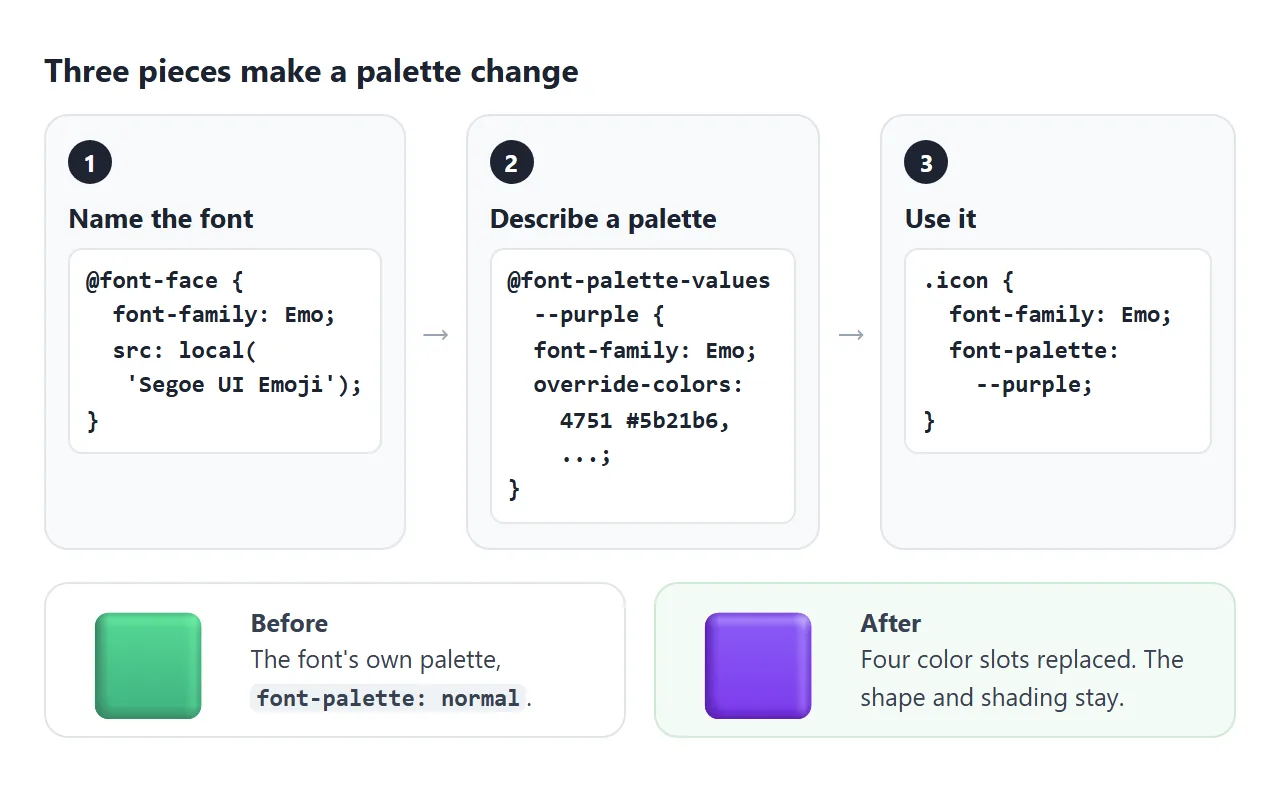
@font-face {
  font-family: 'Emoji';
  src: local('Segoe UI Emoji');   /* the font already on the computer */
}

@font-palette-values --purple {
  font-family: 'Emoji';           /* must match the family the text uses */
  override-colors: 4751 #5b21b6, 6419 #7c3aed, 12013 #8b5cf6, 17867 #c4b5fd;
}

.icon {
  font-family: 'Emoji';
  font-palette: --purple;
}
The palette name must start with two dashes, like a custom property. src: local() uses a font installed on the viewer's device, so nothing is downloaded. For fonts you ship yourself, see web fonts.
Palettes are numbered color slots
A COLR color font does not store colors inside each glyph. Each shape points at an entry in a table called CPAL, and the entry holds the color. override-colors swaps the color in an entry, and every shape that points at it changes.
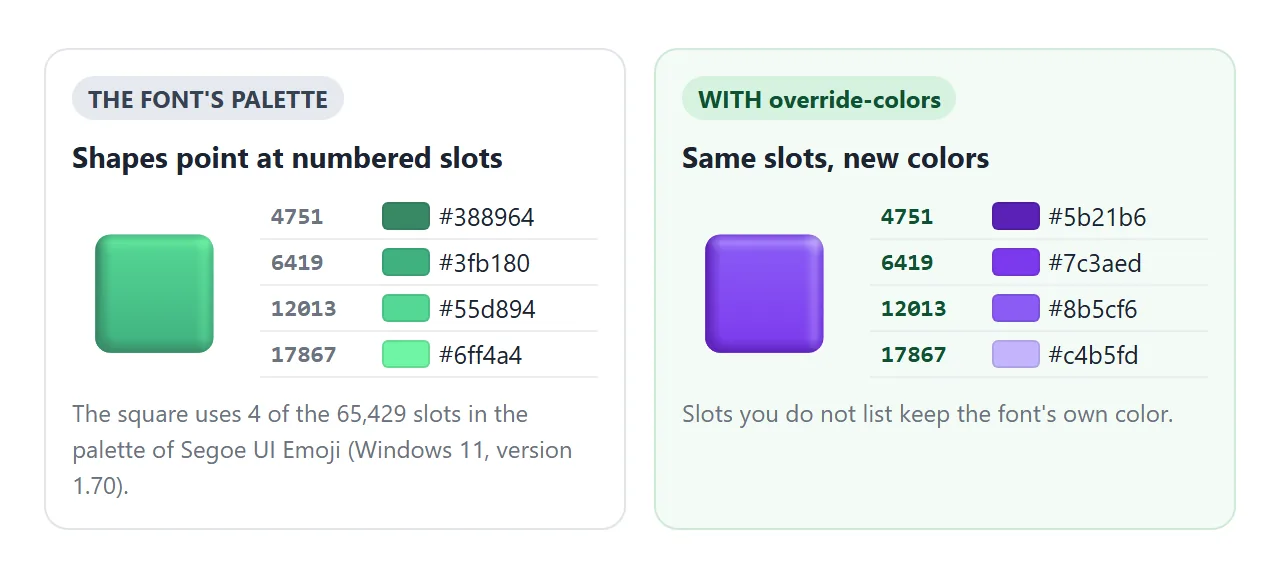
Segoe UI Emoji on our Windows 11 machine (font version 1.70) has one palette with 65,429 entries. The green square uses 4 of them. Entries you do not list keep the font's own color.
The font-palette property itself takes these values:
| Value | What it picks | Segoe UI Emoji, measured |
|---|---|---|
normal |
The font's default palette | The usual emoji colors |
light |
A palette the font flags for light backgrounds | No change: the font has no flagged palette |
dark |
A palette the font flags for dark backgrounds | No change, for the same reason |
--name |
A palette you defined with @font-palette-values |
The listed entries change |
Inside @font-palette-values, base-palette chooses which of the font's palettes to start from, by number. With only one palette in this font, base-palette: 1 fell back to the default palette in Chromium, Edge and Firefox.
Finding the index numbers
The numbers come from the font file, not from CSS. This Python script uses the fontTools library to list the entries one emoji draws with. Put the emoji you want to inspect in the glyph = line.
from fontTools.ttLib import TTFont

font = TTFont(r'C:\Windows\Fonts\seguiemj.ttf')
colr = font['COLR'].table
palette = font['CPAL'].palettes[0]
paints = {r.BaseGlyph: r.Paint for r in colr.BaseGlyphList.BaseGlyphPaintRecord}
layers = colr.LayerList.Paint

def slots(paint, found):
    if hasattr(paint, 'PaletteIndex'):
        found.add(paint.PaletteIndex)
    if hasattr(paint, 'ColorLine'):
        found.update(stop.PaletteIndex for stop in paint.ColorLine.ColorStop)
    if paint.Format == 1:  # a list of layers
        for p in layers[paint.FirstLayerIndex:paint.FirstLayerIndex + paint.NumLayers]:
            slots(p, found)
    if paint.Format == 11:  # reuses another glyph's drawing
        slots(paints[paint.Glyph], found)
    for child in ('Paint', 'SourcePaint', 'BackdropPaint'):
        if hasattr(paint, child):
            slots(getattr(paint, child), found)
    return found

glyph = font.getBestCmap()[ord('\U0001F7E9')]  # the emoji to inspect
for i in sorted(slots(paints[glyph], set())):
    c = palette[i]
    print(i, '#%02x%02x%02x' % (c.red, c.green, c.blue))
For the green square it prints 4751 #388964, 6419 #3fb180, 12013 #55d894 and 17867 #6ff4a4, darkest to lightest. Map each one to a new shade of similar lightness and the 3D shading survives.
This font has two drawings per emoji: a newer one (COLR version 1, with gradients) and an older flat one with its own index numbers. Chromium, Edge and Firefox drew the newer one in our test, so the script reads that table.
The numbers are tied to this font version and may change after a Windows update.
Why a system font needs @font-face local()
The palette rule names a family. The obvious choice is the installed name, 'Segoe UI Emoji'. Firefox accepted that, but Chromium and Edge ignored the palette. Declaring the same font through @font-face with src: local() made it work everywhere the feature worked at all.
<!doctype html>
<html lang="en">
<head>
<meta charset="utf-8">
<meta name="viewport" content="width=device-width, initial-scale=1">
<title>Naming the font directly vs @font-face local()</title>
<style>
/* The same four color slots, pointed at two different family names */
@font-palette-values --direct {
font-family: 'Segoe UI Emoji'; /* the installed font's own name */
override-colors: 4751 #c2410c, 6419 #ea580c, 12013 #f97316, 17867 #fdba74;
}
@font-face {
font-family: 'Emoji';
src: local('Segoe UI Emoji'); /* the same file, under a name you declared */
}
@font-palette-values --viaFace {
font-family: 'Emoji';
override-colors: 4751 #c2410c, 6419 #ea580c, 12013 #f97316, 17867 #fdba74;
}
body { margin: 0; padding: 18px; font-family: system-ui, sans-serif; background: #f4f5f7; color: #1d2330; }
.row { display: flex; gap: 14px; flex-wrap: wrap; }
figure { margin: 0; flex: 1 1 150px; background: #fff; border-radius: 12px; padding: 14px; text-align: center; }
.emoji { font-size: 80px; line-height: 1.1; }
.a { font-family: 'Segoe UI Emoji'; font-palette: --direct; }
.b { font-family: 'Emoji'; font-palette: --viaFace; }
figcaption { font-size: 14px; line-height: 1.45; }
code { font: 12.5px ui-monospace, Consolas, monospace; background: #eef1f5; padding: 1px 4px; border-radius: 4px; }
.note { font-size: 13px; color: #5b6472; margin: 12px 0 0; }
</style>
</head>
<body>
<div class="row">
<figure><div class="emoji a">🟩</div><figcaption>Named directly<br><code>'Segoe UI Emoji'</code></figcaption></figure>
<figure><div class="emoji b">🟩</div><figcaption>Through <code>@font-face</code><br><code>local('Segoe UI Emoji')</code></figcaption></figure>
</div>
<p class="note">Orange means the palette applied. Open this in more than one browser on Windows to compare.</p>
</body>
</html>
We ran each demo in Playwright's Chromium, Firefox and WebKit builds and in installed Microsoft Edge, on Windows 11:
| Engine (Windows 11) | Font named directly | Through @font-face local() |
|---|---|---|
| Chromium | Not applied | Applied |
| Microsoft Edge | Not applied | Applied |
| Firefox | Applied | Applied |
| WebKit (Playwright build) | Not applied | Not applied |
WebKit drew the emoji in color and reported font-palette as supported in CSS.supports(), yet kept the original colors. So a feature check does not prove the palette renders.
Safari on a Mac was not tested, and Segoe UI Emoji is not installed there. The same local() workaround helped with variable font axes on Windows.
Overrides reach every glyph that shares an index
Palette entries are shared. In Segoe UI Emoji, the blue square badges such as NEW, FREE, UP! and the P parking sign use the same four blue entries. A palette that turns one of them green turns all of them green, wherever font-palette applies.
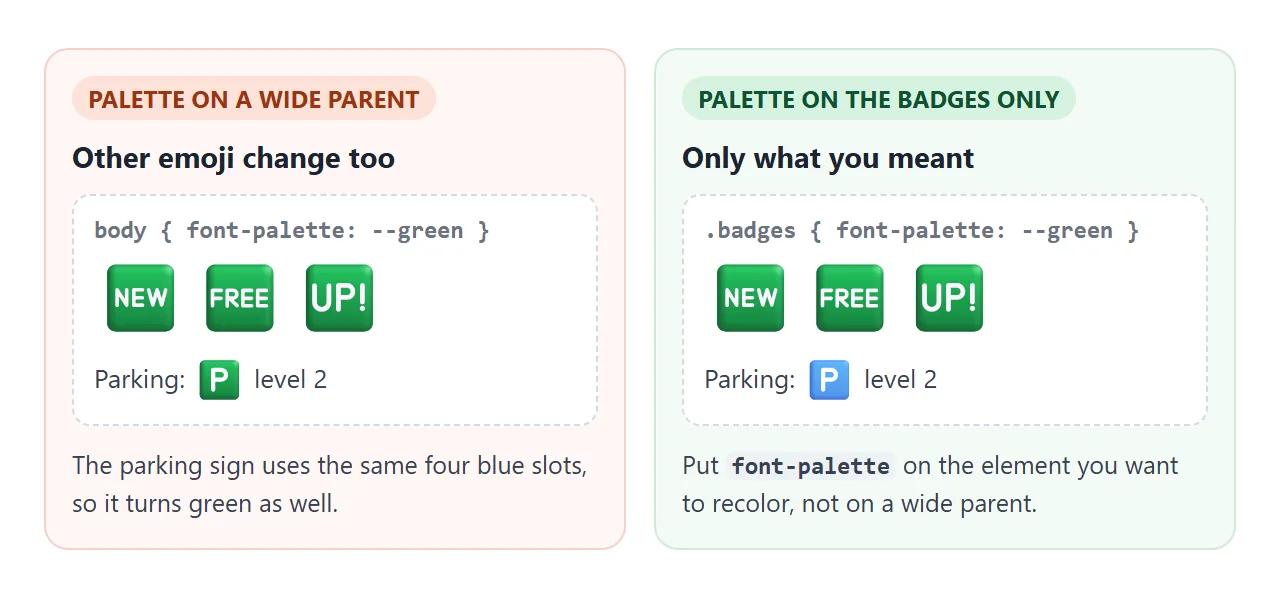
font-palette is inherited, so setting it on body reaches every emoji on the page. Put it on the element that holds the icons you mean to change, and leave running text alone.
A finished example: emoji badges in theme colors
Five badges share the same four blue entries, so three short palettes give three themes. A button sets data-theme on the body, and one CSS rule per theme picks the palette.
<!doctype html>
<html lang="en">
<head>
<meta charset="utf-8">
<meta name="viewport" content="width=device-width, initial-scale=1">
<title>Emoji badges in theme colors</title>
<style>
@font-face { font-family: 'Emoji'; src: local('Segoe UI Emoji'); }
/* These blue badges share four color slots, dark to light */
@font-palette-values --green {
font-family: 'Emoji';
override-colors: 6372 #166534, 10958 #15803d, 13390 #22c55e, 20467 #86efac;
}
@font-palette-values --orange {
font-family: 'Emoji';
override-colors: 6372 #9a3412, 10958 #c2410c, 13390 #f97316, 20467 #fdba74;
}
@font-palette-values --grey {
font-family: 'Emoji';
override-colors: 6372 #374151, 10958 #4b5563, 13390 #6b7280, 20467 #9ca3af;
}
body { margin: 0; padding: 18px; font-family: system-ui, sans-serif; background: #f4f5f7; color: #1d2330; }
.badges { font-family: 'Emoji'; font-size: 44px; line-height: 1.2; background: #fff; border-radius: 12px; padding: 12px 14px; letter-spacing: 6px; }
/* font-palette is inherited, so setting it on the box reaches every badge */
[data-theme="green"] .badges { font-palette: --green; }
[data-theme="orange"] .badges { font-palette: --orange; }
[data-theme="grey"] .badges { font-palette: --grey; }
.themes { display: flex; gap: 8px; flex-wrap: wrap; margin: 14px 0 8px; }
button { font: 600 14px system-ui, sans-serif; padding: 8px 14px; border-radius: 99px; border: 1px solid #cfd4dc; background: #fff; cursor: pointer; }
button[aria-pressed="true"] { background: #1d2330; color: #fff; border-color: #1d2330; }
.out { font: 13px ui-monospace, Consolas, monospace; color: #374151; }
</style>
</head>
<body data-theme="blue">
<div class="badges" id="badges">🆕🆓🆒🆙🆗</div>
<div class="themes" id="themes">
<button data-theme="blue" aria-pressed="true">Blue (font default)</button>
<button data-theme="green" aria-pressed="false">Green</button>
<button data-theme="orange" aria-pressed="false">Orange</button>
<button data-theme="grey" aria-pressed="false">Grey</button>
</div>
<div class="out" id="out">font-palette: normal</div>
<script>
const themes = document.getElementById('themes');
const out = document.getElementById('out');
themes.addEventListener('click', (e) => {
const btn = e.target.closest('button');
if (!btn) return;
document.body.dataset.theme = btn.dataset.theme; // CSS picks the palette
themes.querySelectorAll('button').forEach((b) => b.setAttribute('aria-pressed', b === btn));
// show the computed value the badges ended up with
out.textContent = 'font-palette: ' + getComputedStyle(document.getElementById('badges')).fontPalette;
});
</script>
</body>
</html>
- One palette per theme: each
@font-palette-valuesrule lists the same four indices with different colors. - CSS does the switching:
[data-theme="green"] .badgessetsfont-palette: --green. The script only changes the attribute. - Reading it back:
getComputedStyle(el).fontPalettereturnsnormalor the palette name, which the demo prints under the buttons.
To follow the system dark mode instead of buttons, set font-palette inside a prefers-color-scheme media query. Dark mode in CSS covers that query. For one-color text and icons, font color is still the color property.
When it does not work
| What you see | Cause | Fix |
|---|---|---|
| No change in Chrome or Edge, works in Firefox | The palette names the installed font directly | Declare it with @font-face and src: local(), and use that family |
| No change in any browser | The family in @font-palette-values differs from the text's font-family |
Use the same family name in both |
| No change on a Mac or phone | The emoji comes from a different font there | Expected. The palette only applies to the named font |
| Only part of the glyph changed | Other shapes use entries you did not list | List every index the glyph uses |
| Emoji elsewhere on the page changed | Shared entries, and font-palette is inherited |
Set font-palette on a narrower element |
light or dark look the same as normal |
The font has no palettes flagged for light or dark | Define your own palette with override-colors |
| Worked before, now wrong colors | A font update renumbered the entries | Run the index script again |
Share it as a link
A palette change is a visual result, and it depends on the fonts of the device that shows it. A shared page lets people on Windows see the recolored emoji in their own browser, and lets you compare engines by opening one address.
To send the working version, paste the page into a NOS document and choose Create share link. HTML to link walks through it.
The page renders as written and its scripts run, so the people you send it to can switch the themes themselves. If you change the palettes later, the same link shows the new version.