To use a font's hidden OpenType features in CSS, start with the font-variant properties. font-variant-numeric: tabular-nums gives digits of equal width, font-variant-ligatures controls ligatures, and font-variant-caps: small-caps asks for small capitals. font-feature-settings is the low-level fallback for anything else.
One catch comes before any code: a feature only works if the font contains it. This page uses fonts already on your device, such as system-ui, Georgia and Consolas, so what you see depends on what is installed.
Watch the two timers. Pick a few fonts and read the line under the menu.
<!doctype html>
<html lang="en">
<head>
<meta charset="utf-8">
<meta name="viewport" content="width=device-width, initial-scale=1">
<title>Proportional vs tabular numbers</title>
<style>
  body { margin: 0; padding: 14px; font-family: system-ui, sans-serif; background: #f4f5f7; color: #1d2330; }
  .bar { display: flex; flex-wrap: wrap; gap: 8px; align-items: center; font-size: 14px; }
  select { font: inherit; padding: 4px 6px; }
  #status { margin: 8px 0 0; font-size: 13px; line-height: 1.45; padding: 8px 10px; border-radius: 8px; background: #fff; }
  .cols { display: grid; grid-template-columns: repeat(auto-fit, minmax(170px, 1fr)); gap: 12px; margin-top: 12px; }
  .col { background: #fff; border-radius: 12px; padding: 12px 14px; }
  .col h3 { margin: 0 0 8px; font: 600 12.5px ui-monospace, Consolas, monospace; color: #6b7280; }
  .timer { display: inline-block; font-size: 38px; font-weight: 600; background: #e8eefc; border-radius: 6px; padding: 0 4px; }
  table { width: 100%; border-collapse: collapse; font-size: 15px; margin-top: 10px; }
  td { padding: 4px 0; border-bottom: 1px solid #eceef1; }
  td + td { text-align: right; }

  /* the only difference between the two columns */
  .prop { font-variant-numeric: proportional-nums; }
  .tab  { font-variant-numeric: tabular-nums; }
</style>
</head>
<body>
<div class="bar">
  <label for="font">Font:</label>
  <select id="font">
    <option value="system-ui, sans-serif">system-ui</option>
    <option value="Georgia, serif">Georgia</option>
    <option value="Arial, sans-serif">Arial</option>
    <option value="'Times New Roman', serif">Times New Roman</option>
    <option value="Calibri, sans-serif">Calibri</option>
    <option value="Consolas, monospace">Consolas</option>
  </select>
</div>
<p id="status"></p>

<div class="cols" id="cols">
  <div class="col prop">
    <h3>proportional-nums</h3>
    <span class="timer">00:00.00</span>
    <table>
      <tr><td>Coffee</td><td>$1.11</td></tr>
      <tr><td>Lunch</td><td>$18.40</td></tr>
      <tr><td>Books</td><td>$111.11</td></tr>
      <tr><td>Rent</td><td>$980.00</td></tr>
    </table>
  </div>
  <div class="col tab">
    <h3>tabular-nums</h3>
    <span class="timer">00:00.00</span>
    <table>
      <tr><td>Coffee</td><td>$1.11</td></tr>
      <tr><td>Lunch</td><td>$18.40</td></tr>
      <tr><td>Books</td><td>$111.11</td></tr>
      <tr><td>Rent</td><td>$980.00</td></tr>
    </table>
  </div>
</div>

<script>
  const cols = document.getElementById('cols');
  const select = document.getElementById('font');
  const status = document.getElementById('status');

  // Are ten 1s as wide as ten 0s? If yes, the digits are tabular.
  function sameWidthDigits(numeric) {
    const s = document.createElement('span');
    s.style.cssText = 'position:absolute;visibility:hidden;white-space:pre;font-size:40px';
    s.style.fontFamily = select.value;
    s.style.fontVariantNumeric = numeric;
    document.body.append(s);
    s.textContent = '1111111111'; const ones = s.getBoundingClientRect().width;
    s.textContent = '0000000000'; const zeros = s.getBoundingClientRect().width;
    s.remove();
    return Math.abs(ones - zeros) < 0.5;
  }

  function report() {
    cols.style.fontFamily = select.value;
    const prop = sameWidthDigits('proportional-nums');
    const tab = sameWidthDigits('tabular-nums');
    if (!prop && tab) status.textContent = 'Supported: this font has proportional digits and tabular ones (tnum). The left timer jiggles, the right one stays still.';
    else if (!prop && !tab) status.textContent = 'No tabular digits in this font: tabular-nums changes nothing, so both sides jiggle.';
    else if (prop && tab) status.textContent = 'This font\'s digits are one width either way, so both sides look the same. Try another font.';
    else status.textContent = 'Unusual result: tabular-nums made the digits uneven in this font.';
  }

  select.addEventListener('change', report);

  // Start on the first font in the menu that shows the difference on this device
  const good = [...select.options].find((o) => {
    select.value = o.value;
    return !sameWidthDigits('proportional-nums') && sameWidthDigits('tabular-nums');
  });
  select.value = good ? good.value : select.options[0].value;
  report();

  // Running timer: minutes, seconds, hundredths
  const timers = document.querySelectorAll('.timer');
  const start = performance.now();
  function tick(now) {
    const cs = Math.floor((now - start) / 10);
    const text = String(Math.floor(cs / 6000) % 60).padStart(2, '0') + ':' +
      String(Math.floor(cs / 100) % 60).padStart(2, '0') + '.' + String(cs % 100).padStart(2, '0');
    timers.forEach((t) => { t.textContent = text; });
    requestAnimationFrame(tick);
  }
  requestAnimationFrame(tick);
</script>
</body>
</html>
Why numbers jiggle: proportional and tabular digits
Many fonts give each digit its own width by default. A 1 is narrow and a 0 is wide. That looks good inside a sentence.
In a running timer, though, the text gets wider and narrower every tick, and in a right-aligned column the decimal points drift.
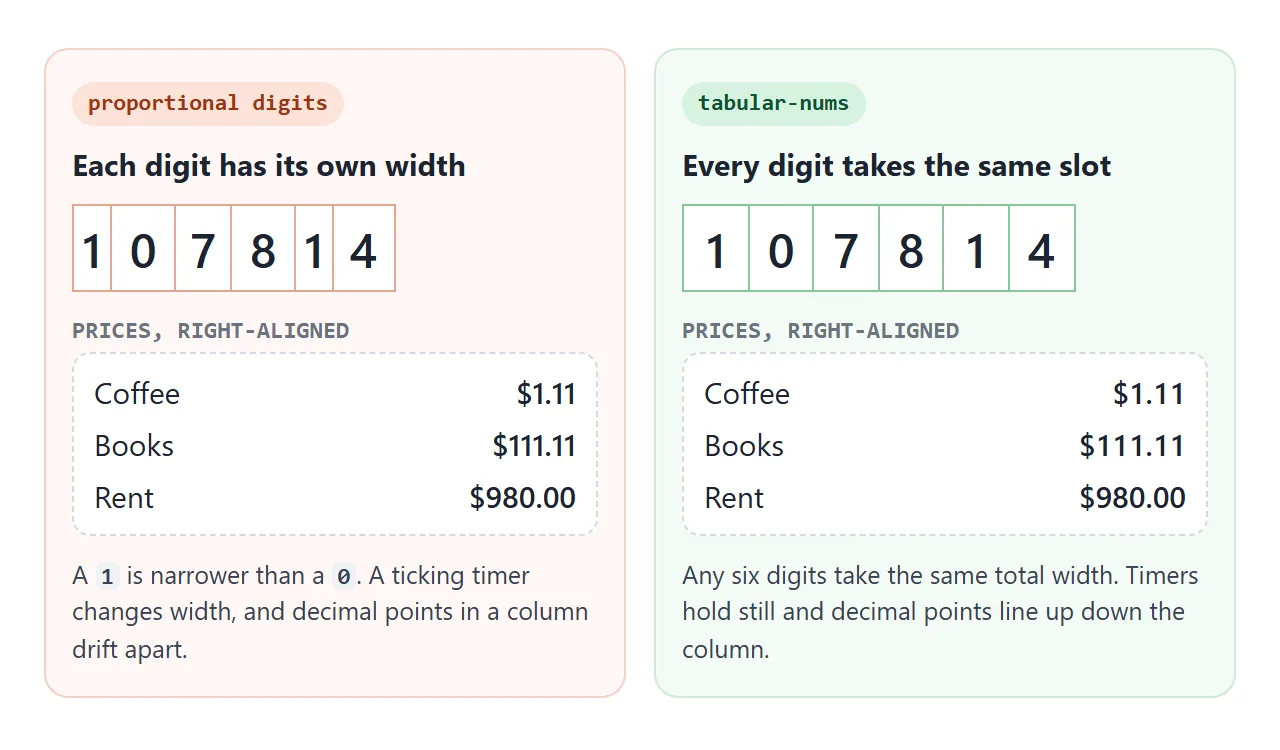
The fix is one line on the element that holds the numbers:
.timer, td.amount {
  font-variant-numeric: tabular-nums;
}
Some fonts already use tabular digits by default. Then the line changes nothing, and nothing needs to. If you build a countdown with setTimeout or setInterval, add this before you ship it.
The font-variant-numeric values
font-variant-numeric takes several keywords at once, separated by spaces. Each maps to an OpenType feature tag, the four-letter code that fonts use internally.
| Value | Feature tag | What it does |
|---|---|---|
tabular-nums |
tnum |
All digits the same width |
proportional-nums |
pnum |
Each digit its own width |
lining-nums |
lnum |
Digits the height of capitals |
oldstyle-nums |
onum |
Digits that rise and fall like lowercase letters |
slashed-zero |
zero |
A zero with a slash, unlike the letter O |
diagonal-fractions |
frac |
1/2 drawn as a small fraction |
ordinal |
ordn |
Raised letters, as in 1st |
Combine them in one declaration: font-variant-numeric: tabular-nums slashed-zero;. Two separate font-variant-numeric declarations on the same element do not add up, because the later one wins.
Ligatures, small caps and the rest
Tick the boxes below and switch fonts. Each row states what the page could measure about the current font. The CSS at the bottom shows the declarations the ticked boxes add up to.
<!doctype html>
<html lang="en">
<head>
<meta charset="utf-8">
<meta name="viewport" content="width=device-width, initial-scale=1">
<title>OpenType feature toggles</title>
<style>
  body { margin: 0; padding: 14px; font-family: system-ui, sans-serif; background: #f4f5f7; color: #1d2330; }
  .bar { display: flex; flex-wrap: wrap; gap: 8px; align-items: center; font-size: 14px; margin-bottom: 10px; }
  select { font: inherit; padding: 4px 6px; }
  .row { background: #fff; border-radius: 10px; padding: 9px 12px; margin-bottom: 8px; }
  .row label { display: flex; gap: 8px; align-items: center; font: 600 12.5px ui-monospace, Consolas, monospace; color: #374151; }
  .sample { font-size: 26px; margin: 4px 0 2px; }
  .note { font-size: 12.5px; color: #6b7280; }
  .note.yes { color: #0f5132; } .note.no { color: #9a3412; }
  pre { margin: 10px 0 0; padding: 10px 12px; border-radius: 10px; background: #1d2330; color: #e5e7eb; font-size: 12.5px; white-space: pre-wrap; }
</style>
</head>
<body>
<div class="bar">
  <label for="font">Font:</label>
  <select id="font">
    <option value="system-ui, sans-serif">system-ui</option>
    <option value="Georgia, serif">Georgia</option>
    <option value="Calibri, sans-serif">Calibri</option>
    <option value="Cambria, serif">Cambria</option>
    <option value="'Times New Roman', serif">Times New Roman</option>
    <option value="Consolas, monospace">Consolas</option>
  </select>
</div>

<div id="rows"></div>
<pre id="css"></pre>

<script>
  // Each feature: the high-level property, its value when on and off, and sample text.
  const features = [
    { name: 'Ligatures', prop: 'font-variant-ligatures', on: 'normal', off: 'none', tag: '"liga"', test: '"liga" 0', text: 'office fluff affinity', checked: true },
    { name: 'Small caps', prop: 'font-variant-caps', on: 'small-caps', off: 'normal', tag: '"smcp"', text: 'Small Caps Label' },
    { name: 'Slashed zero', prop: 'font-variant-numeric', on: 'slashed-zero', off: 'normal', tag: '"zero"', text: 'Code 0O0 1020' },
    { name: 'Fractions', prop: 'font-variant-numeric', on: 'diagonal-fractions', off: 'normal', tag: '"frac"', text: 'Add 1/2 cup, 3/4 tsp' },
    { name: 'Oldstyle numbers', prop: 'font-variant-numeric', on: 'oldstyle-nums', off: 'normal', tag: '"onum"', text: 'Since 1987: 2,450 sold' },
    { name: 'Stylistic set 1', prop: 'font-feature-settings', on: '"ss01"', off: 'normal', tag: '"ss01"', text: 'agy aqg 0123' },
  ];
  const select = document.getElementById('font');
  const rowsBox = document.getElementById('rows');

  // Width of some text with one extra CSS declaration
  function width(text, prop, value) {
    const s = document.createElement('span');
    s.style.cssText = 'position:absolute;visibility:hidden;white-space:pre;font-size:40px';
    s.style.fontFamily = select.value;
    if (prop) s.style.setProperty(prop, value);
    s.textContent = text;
    document.body.append(s);
    const w = s.getBoundingClientRect().width;
    s.remove();
    return w;
  }

  // What the width test says about the current font
  function verdict(f) {
    if (f.tag === '"zero"') return ['', 'A slashed zero keeps the same width, so this cannot be measured. Look at the zeros.'];
    // font-feature-settings never fakes a feature, so it tests the font itself
    const changed = Math.abs(width(f.text) - width(f.text, 'font-feature-settings', f.test || f.tag)) > 0.3;
    if (changed) return ['yes', 'This font has ' + f.tag + ': the width changed.'];
    if (f.tag === '"smcp"') return ['no', 'No real small caps here. The browser fakes them by shrinking capitals.'];
    return ['', 'No width change. The font may lack ' + f.tag + ', or swaps glyphs at the same width. Check by eye.'];
  }

  function render() {
    rowsBox.innerHTML = '';
    features.forEach((f) => {
      const row = document.createElement('div');
      row.className = 'row';
      const [cls, msg] = verdict(f);
      row.innerHTML = '<label><input type="checkbox"> ' + f.prop + ': ' + f.on + '</label>' +
        '<div class="sample"></div><div class="note ' + cls + '">' + msg + '</div>';
      const box = row.querySelector('input');
      const sample = row.querySelector('.sample');
      box.checked = !!f.checked;
      sample.textContent = f.text;
      sample.style.fontFamily = select.value;
      const apply = () => {
        f.checked = box.checked;
        sample.style.setProperty(f.prop, box.checked ? f.on : f.off);
        showCss();
      };
      box.addEventListener('change', apply);
      apply();
      rowsBox.append(row);
    });
  }

  // Show the CSS the boxes add up to. Values for the same property share one line.
  function showCss() {
    const byProp = {};
    features.forEach((f) => {
      const value = f.checked ? f.on : f.off;
      if (value === 'normal') return;
      (byProp[f.prop] = byProp[f.prop] || []).push(value);
    });
    const lines = Object.keys(byProp).map((p) => '  ' + p + ': ' + byProp[p].join(' ') + ';');
    const body = lines.length ? lines.join('\n') : '  /* defaults only */';
    document.getElementById('css').textContent = '.sample {\n' + body + '\n}';
  }

  select.addEventListener('change', render);

  // Start on the menu font where the width test finds the most features
  let best = select.options[0].value, most = -1;
  [...select.options].forEach((o) => {
    select.value = o.value;
    const found = features.filter((f) => verdict(f)[0] === 'yes').length;
    if (found > most) { most = found; best = o.value; }
  });
  select.value = best;
  render();
</script>
</body>
</html>
- Ligatures. Common ligatures such as fi and fl are on by default.
font-variant-ligatures: noneturns them off.discretionary-ligaturesasks for decorative ones, if the font has any. - Small caps.
font-variant-caps: small-capsuses the font'ssmcpfeature.all-small-capsalso turns the capitals into small caps. For plain capitals, use text-transform instead. - Kerning.
font-kerning: normalapplies the font's spacing for pairs such as AV.noneturns it off, and the defaultautolets the browser decide.
Real small caps and fake ones
When a font has no small capitals, the browser does not give up. It shrinks the capital letters and uses them instead. The result is readable, but the shrunken strokes look lighter than the full capitals next to them.
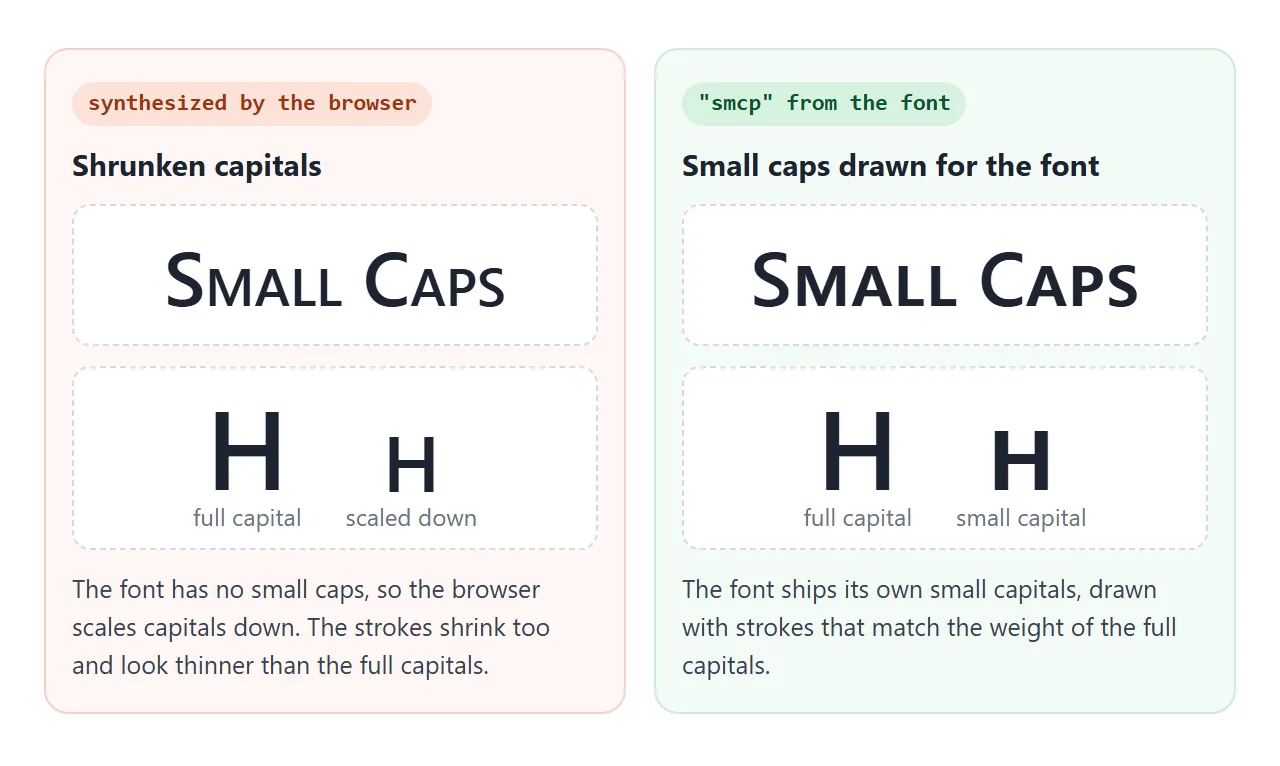
To see which one you get, compare font-feature-settings: "smcp" with font-variant-caps: small-caps. The low-level property never fakes anything, so if it leaves the text unchanged, the font has no small caps. You can also stop the faking with font-synthesis-small-caps: none.
font-feature-settings: the low-level switch
font-feature-settings takes feature tags in quotes. A tag alone means on, and 0 means off:
.stats { font-feature-settings: "tnum", "zero"; }
.code  { font-feature-settings: "liga" 0; }
.title { font-feature-settings: "ss01"; }  /* stylistic set 1 */
Stylistic sets such as ss01 are alternate letter shapes, and every font defines its own. This is the main job for font-feature-settings, since the high-level route to them needs extra setup with @font-feature-values.
The trap is that the property holds one list. A later rule replaces the whole list instead of adding to it.
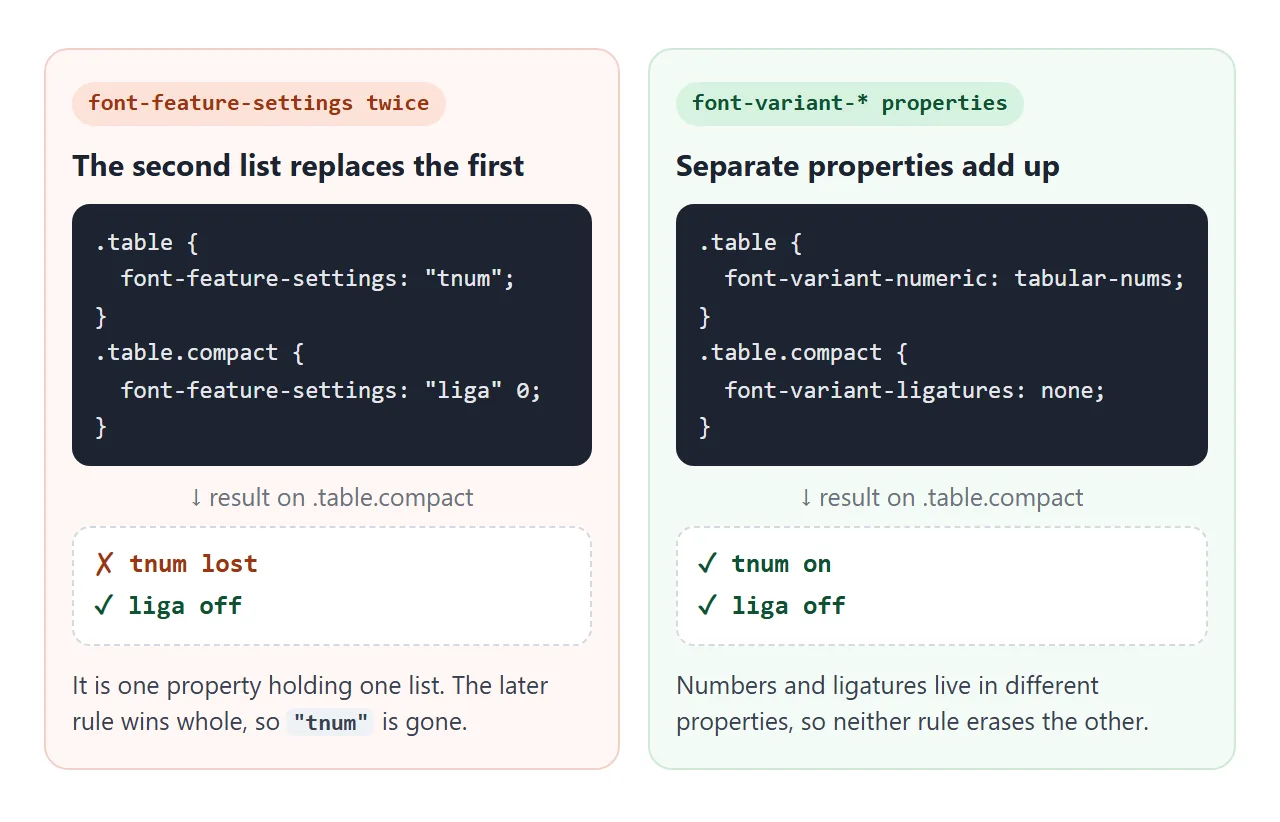
So prefer the font-variant properties wherever a keyword exists. When the two disagree, font-feature-settings wins, which is useful for a deliberate override and confusing by accident.
A finished scoreboard
Everything that changes here uses tabular-nums slashed-zero. The points column and the countdown stay put while the numbers change. The heading asks for discretionary ligatures and oldstyle digits, which appear only where the font has them.
<!doctype html>
<html lang="en">
<head>
<meta charset="utf-8">
<meta name="viewport" content="width=device-width, initial-scale=1">
<title>Live scoreboard</title>
<style>
  body { margin: 0; padding: 14px; font-family: system-ui, sans-serif; background: #eceef1; color: #1d2330; }
  .board { max-width: 520px; margin: 0 auto; background: #fff; border-radius: 14px; padding: 16px 18px; box-shadow: 0 4px 16px rgba(0, 0, 0, .08); }

  /* Heading: extra typographic features, used only where the font has them */
  h1 {
    margin: 0; font: 600 30px/1.15 Georgia, 'Times New Roman', serif;
    font-variant-ligatures: common-ligatures discretionary-ligatures;
    font-variant-numeric: oldstyle-nums;
  }
  .sub { margin: 4px 0 12px; color: #6b7280; font-size: 14px; font-variant-caps: all-small-caps; }

  /* Every changing number: tabular so columns and the clock never shift */
  .num { font-variant-numeric: tabular-nums slashed-zero; text-align: right; }

  table { width: 100%; border-collapse: collapse; font-size: 17px; }
  th { font-size: 12px; color: #6b7280; text-align: left; font-weight: 600; padding: 0 0 6px; }
  th.num { text-align: right; }
  td { padding: 7px 0; border-top: 1px solid #eceef1; }
  td.num { padding-left: 12px; }
  tr.flash td { background: #eaf6ee; }
  .foot { display: flex; justify-content: space-between; align-items: center; margin-top: 12px; font-size: 14px; color: #6b7280; }
  .clock { font-size: 22px; font-weight: 600; color: #1d2330; }
  button { font: inherit; padding: 6px 14px; border-radius: 8px; border: 1px solid #cfd4dc; background: #fff; cursor: pointer; }
</style>
</head>
<body>
<div class="board">
  <h1>Office Pub Quiz, Round 7</h1>
  <p class="sub">Live scores for the 2026 season</p>
  <table>
    <thead><tr><th>Team</th><th class="num">Answers</th><th class="num">Points</th></tr></thead>
    <tbody id="rows"></tbody>
  </table>
  <div class="foot">
    <span>Time left <span class="clock num" id="clock">10:00.0</span></span>
    <button id="pause" type="button">Pause</button>
  </div>
</div>

<script>
  const teams = [
    { name: 'Fluffy Office Cats', answers: 11, points: 1110 },
    { name: 'The Infinite Loop', answers: 10, points: 980 },
    { name: 'Quiz Khalifa', answers: 9, points: 1041 },
    { name: 'Les Quizérables', answers: 8, points: 799 },
  ];
  const rows = document.getElementById('rows');
  const clock = document.getElementById('clock');
  let running = true, left = 6000;  // tenths of a second

  function draw(changed) {
    teams.sort((a, b) => b.points - a.points);
    rows.innerHTML = '';
    teams.forEach((t) => {
      const tr = document.createElement('tr');
      if (t === changed) tr.className = 'flash';
      tr.innerHTML = '<td></td><td class="num">' + t.answers + '</td><td class="num">' + t.points.toLocaleString('en-US') + '</td>';
      tr.firstChild.textContent = t.name;
      rows.append(tr);
    });
  }

  // A random team scores every 1.2 seconds
  setInterval(() => {
    if (!running) return;
    const t = teams[Math.floor(Math.random() * teams.length)];
    t.answers += 1;
    t.points += 10 + Math.floor(Math.random() * 90);
    draw(t);
  }, 1200);

  // Countdown clock in tenths
  setInterval(() => {
    if (!running || left === 0) return;
    left -= 1;
    const m = Math.floor(left / 600), s = Math.floor(left / 10) % 60;
    clock.textContent = String(m).padStart(2, '0') + ':' + String(s).padStart(2, '0') + '.' + (left % 10);
  }, 100);

  document.getElementById('pause').addEventListener('click', (e) => {
    running = !running;
    e.target.textContent = running ? 'Pause' : 'Resume';
  });

  draw();
</script>
</body>
</html>
.num { font-variant-numeric: tabular-nums slashed-zero; text-align: right; }
h1   { font-variant-ligatures: common-ligatures discretionary-ligatures;
       font-variant-numeric: oldstyle-nums; }
Features the font lacks are skipped without an error, so extra features in a heading are safe. If a feature really matters, choose a font that has it. Web fonts let you ship that font with the page.
A last property, text-rendering: optimizeLegibility, asks the browser to favour legibility over speed and turns on kerning and optional ligatures. The specific properties above say what you want more directly.
When it does not work
| What you see | Cause | Fix |
|---|---|---|
| Nothing changes at all | The font has no such feature | Check with the measuring demos, or pick a font that has it |
| An earlier feature stopped working | A later font-feature-settings replaced the whole list |
List every tag in one declaration, or use font-variant-* |
| Only one numeric keyword applies | Two font-variant-numeric declarations, the later wins |
Put the keywords in one declaration |
| Numbers still jiggle | The font has only proportional digits | Use a font with tnum, or a monospace font |
| Small caps look thin and uneven | No smcp in the font; the browser shrank capitals |
Use a font with small caps |
| fi and fl split after adding letter-spacing | Browsers skip optional ligatures when spacing is not zero | Keep letter-spacing: normal there |
| Pairs like AV look loose with letter-spacing | The spacing is added on top of kerning | Use less spacing on large headings |
Spacing between letters is its own subject, covered in CSS letter-spacing.
Share it as a link
Font features depend on the fonts of the device that opens the page, so a screenshot shows only your result. The demos above measure the fonts on whoever opens them.
To let others check on their own devices, paste the page into a NOS document and choose Create share link. HTML to link walks through it.
The page renders as written and its scripts run, so the timers tick and the width tests report on their fonts. If you change the code later, the same link shows the new version.