The page jumps when content is added above the part you are reading: an image finishes loading, an ad gets its height, older posts are inserted. Scroll anchoring is the browser feature that stops this. It is on by default, and the CSS property overflow-anchor switches it off.
Scroll down a few posts in the box below, or leave it where it starts, then load posts above.
<!doctype html>
<html lang="en">
<head>
<meta charset="utf-8">
<meta name="viewport" content="width=device-width, initial-scale=1">
<title>Insert content above</title>
<style>
  body { margin: 0; padding: 14px; font-family: system-ui, sans-serif; background: #f4f5f7; color: #1d2330; }
  .bar { display: flex; flex-wrap: wrap; gap: 8px; align-items: center; margin-bottom: 10px; }
  button { font: inherit; padding: 8px 12px; border: 0; border-radius: 8px; background: #2563eb; color: #fff; cursor: pointer; }
  #box {
    height: 250px; overflow-y: auto; position: relative;  /* the scroll container */
    background: #fff; border: 1px solid #d5d9e0; border-radius: 10px;
  }
  .post { padding: 14px 16px; border-bottom: 1px solid #eef0f3; }
  .post.new { background: #fff7e6; }
  #out { font-size: 13px; color: #4b5563; }
</style>
</head>
<body>
<div class="bar">
  <button id="load">Load 3 posts above</button>
  <span id="out">You are reading post 8.</span>
</div>
<div id="box"></div>

<script>
  const box = document.getElementById('box');
  const out = document.getElementById('out');
  let older = 0;

  function post(text, isNew) {
    const p = document.createElement('div');
    p.className = 'post' + (isNew ? ' new' : '');
    p.textContent = text;
    return p;
  }

  for (let i = 1; i <= 20; i++) box.append(post('Post ' + i));
  // start in the middle, at post 8, after the first layout
  requestAnimationFrame(() => box.scrollTop = box.children[7].offsetTop);

  document.getElementById('load').addEventListener('click', () => {
    const before = box.scrollTop;
    for (let i = 0; i < 3; i++) box.prepend(post('Older post ' + (++older), true));
    // no JavaScript adjusts the scroll: the browser does it (scroll anchoring)
    requestAnimationFrame(() => {
      out.textContent = 'scrollTop ' + Math.round(before) + ' -> ' + Math.round(box.scrollTop);
    });
  });
</script>
</body>
</html>
In Chromium and Firefox, the readout shows scrollTop growing by the height of the three new posts, and the post you were reading does not move. In the WebKit build we tested (Playwright WebKit 26.4), scrollTop stays the same and the new posts push your place down.
What scroll anchoring does
Without anchoring, the scroll position is a plain number of pixels from the top. Insert 120 pixels of content above the view and the number stays 500, so everything below the insert slides down by 120 pixels.
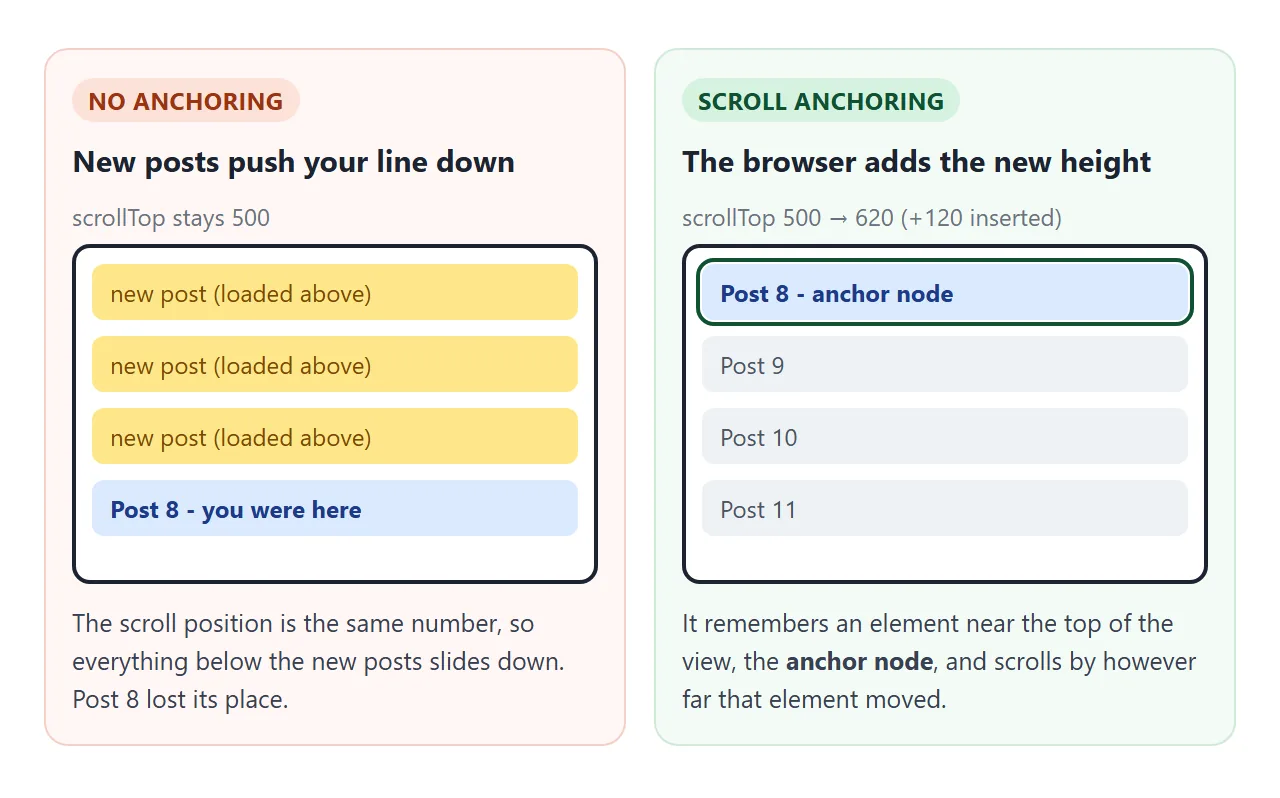
With anchoring, the browser picks an element near the top of the visible area, the anchor node, and notes where it is. After the layout changes, it scrolls by exactly the distance that element moved. In our Chromium and Firefox test, 500 became 620 after a 120-pixel insert.
It works for any scroll container, not only the page. The same rule applies to a div with overflow: auto, which the CSS overflow guide explains.
overflow-anchor: auto vs none
The property has two values. auto is the default and lets an element take part. none excludes it. Put none on the scroll container and anchoring is off for that whole box.
<!doctype html>
<html lang="en">
<head>
<meta charset="utf-8">
<meta name="viewport" content="width=device-width, initial-scale=1">
<title>overflow-anchor: auto vs none</title>
<style>
  body { margin: 0; padding: 14px; font-family: system-ui, sans-serif; background: #f4f5f7; color: #1d2330; }
  .bar { display: flex; gap: 8px; margin-bottom: 10px; }
  button { font: inherit; padding: 8px 12px; border: 0; border-radius: 8px; background: #2563eb; color: #fff; cursor: pointer; }
  button.alt { background: #e5e7eb; color: #1d2330; }
  .cols { display: grid; grid-template-columns: 1fr 1fr; gap: 10px; }
  h3 { font-size: 13px; margin: 0 0 6px; font-family: ui-monospace, Consolas, monospace; }
  .box {
    height: 220px; overflow-y: auto; position: relative;
    background: #fff; border: 1px solid #d5d9e0; border-radius: 10px;
  }
  .none { overflow-anchor: none; }   /* scroll anchoring switched off */
  .banner { height: 0; background: linear-gradient(135deg, #fde68a, #fca5a5); transition: none; }
  .row { padding: 12px; border-bottom: 1px solid #eef0f3; font-size: 14px; }
  .top { font-size: 12px; color: #4b5563; margin-top: 6px; }
</style>
</head>
<body>
<div class="bar">
  <button id="grow">Banner loads above</button>
  <button id="reset" class="alt">Reset</button>
</div>
<div class="cols">
  <div><h3>overflow-anchor: auto</h3><div class="box" id="a"></div><div class="top" id="ta"></div></div>
  <div><h3>overflow-anchor: none</h3><div class="box none" id="b"></div><div class="top" id="tb"></div></div>
</div>

<script>
  const boxes = [document.getElementById('a'), document.getElementById('b')];
  const labels = [document.getElementById('ta'), document.getElementById('tb')];

  function build(box) {
    box.innerHTML = '<div class="banner"></div>';
    for (let i = 1; i <= 15; i++) box.insertAdjacentHTML('beforeend', '<div class="row">Line ' + i + '</div>');
    box.scrollTop = box.children[5].offsetTop;  // start at line 5
  }

  // which line sits at the top edge of the box right now
  function topLine(box) {
    const edge = box.getBoundingClientRect().top + 1;
    for (const r of box.querySelectorAll('.row')) {
      if (r.getBoundingClientRect().bottom > edge) return r.textContent;
    }
  }

  function report() {
    boxes.forEach((b, i) => labels[i].textContent = 'Top line: ' + topLine(b));
  }

  function reset() { boxes.forEach(build); requestAnimationFrame(report); }

  // an image or ad above the reading position finishes loading and gets its height
  document.getElementById('grow').addEventListener('click', () => {
    boxes.forEach(b => b.querySelector('.banner').style.height = '150px');
    requestAnimationFrame(report);
  });
  document.getElementById('reset').addEventListener('click', reset);
  requestAnimationFrame(reset);  // after the first layout
</script>
</body>
</html>
Where you set overflow-anchor: none |
What happens |
|---|---|
On a scrolling div |
No anchoring inside that box |
On html or body |
No anchoring for the page scroll (we measured both) |
| On some children only | Those children are never picked as the anchor node |
| Nowhere | Anchoring is on (the default) |
To turn it off for a whole page:
body { overflow-anchor: none; }
You rarely want that. The main reason to switch it off is covered further down: your own script already corrects the position.
When the page still moves
Anchoring does not cover every case, even in the engines that support it.
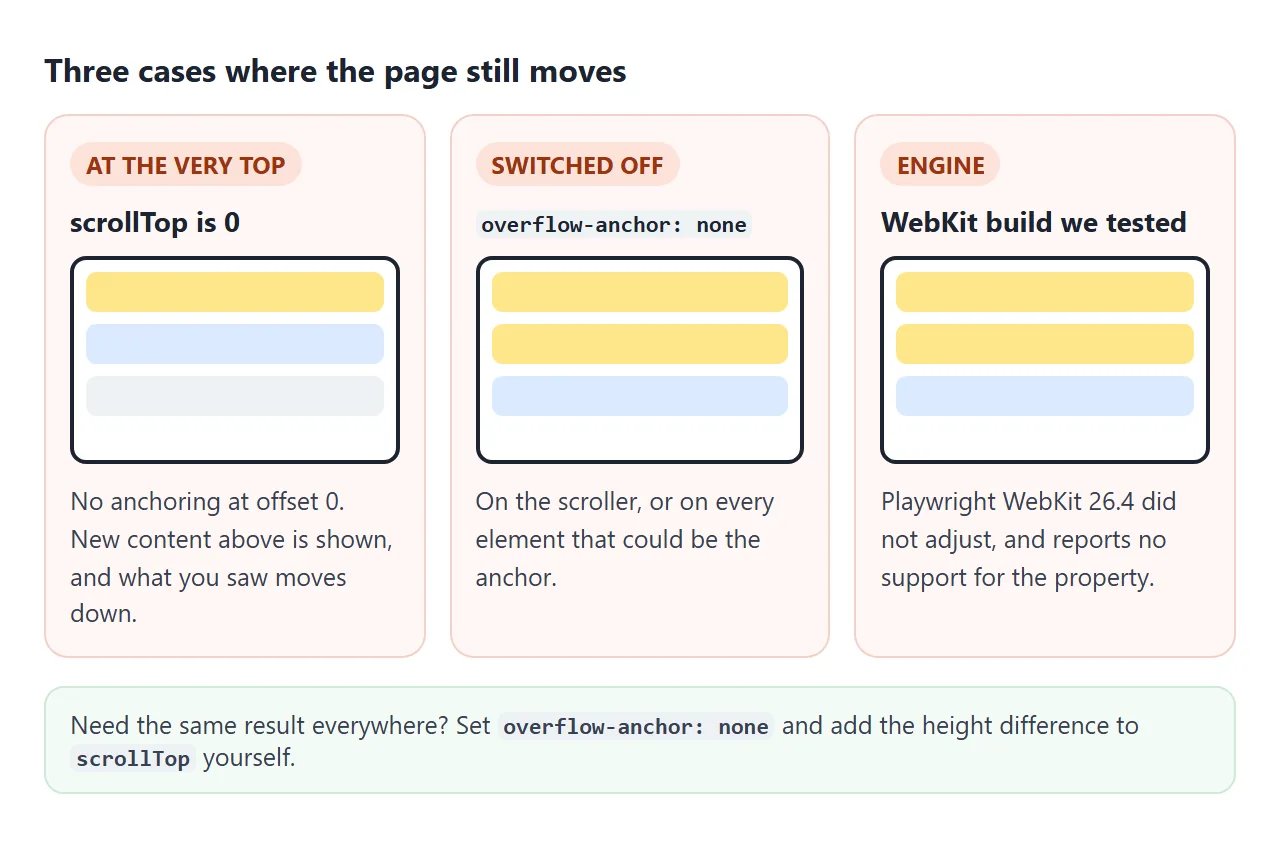
- At the very top. When scrollTop is 0, nothing is adjusted. New content above appears, and what you saw moves down. This is deliberate: at the top, the reader sees the new content.
- Switched off.
overflow-anchor: noneon the scroller, or on every element that could be the anchor. - The engine. Playwright WebKit 26.4 did not adjust, and
CSS.supports()returned false for the property. Chromium 147 and Firefox 148 adjusted.
For late images, the fix that works in every engine is to reserve their space before they load. Give the img its width and height attributes, or use aspect-ratio, so nothing above the reader changes height.
A chat log that sticks to the bottom
Chats add content at the end, not above. Anchoring does not help there: a new message below the view does not move anything you can see. What you want is a rule.
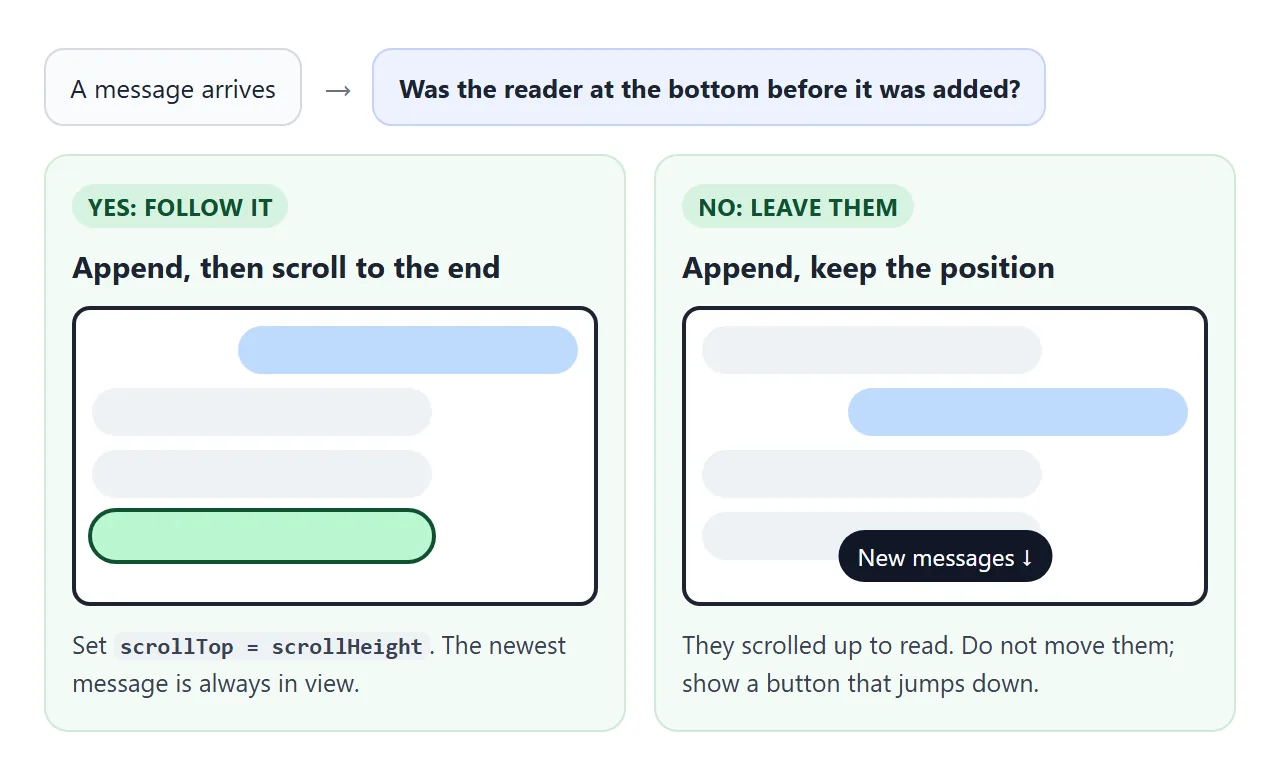
- Before appending, check whether the reader is at the bottom.
- Append the message.
- If they were at the bottom, scroll to the end. If they were not, leave the position and show a New messages button.
The check is one line:
const atBottom = () =>
  log.scrollHeight - log.scrollTop - log.clientHeight < 8;
Test it before appending. After the new message is in, the reader is no longer at the bottom, so the test would always fail.
Loading older messages without a jump
Loading history adds content above the view, which is scroll anchoring territory. The catch is that WebKit did not anchor in our test, so a chat that relies on it jumps there. Correcting the position yourself works in all three engines.
const before = log.scrollHeight;
log.prepend(...olderMessages);
log.scrollTop += log.scrollHeight - before;
Now the browser must not correct it as well. With overflow-anchor left on, Chromium and Firefox moved the view twice in our test: once for anchoring, once for the script. That is why the finished example sets overflow-anchor: none on the log.
<!doctype html>
<html lang="en">
<head>
<meta charset="utf-8">
<meta name="viewport" content="width=device-width, initial-scale=1">
<title>Chat log that sticks to the bottom</title>
<style>
body { margin: 0; padding: 12px; font-family: system-ui, sans-serif; background: #f4f5f7; color: #1d2330; }
.chat { position: relative; max-width: 460px; margin: 0 auto; background: #fff; border: 1px solid #d5d9e0; border-radius: 12px; overflow: hidden; }
#log {
height: 320px; overflow-y: auto; padding: 10px;
overflow-anchor: none; /* this script keeps the position itself, in every browser */
}
#older { display: block; margin: 0 auto 8px; font: 13px system-ui, sans-serif; padding: 6px 10px; border: 1px solid #d5d9e0; border-radius: 99px; background: #fff; cursor: pointer; }
.msg { max-width: 75%; margin: 6px 0; padding: 8px 12px; border-radius: 14px; background: #eef1f5; font-size: 14px; line-height: 1.4; }
.msg.me { margin-left: auto; background: #2563eb; color: #fff; }
#pill {
position: absolute; left: 50%; bottom: 62px; transform: translateX(-50%);
display: none; padding: 6px 12px; border: 0; border-radius: 99px;
background: #111827; color: #fff; font: 13px system-ui, sans-serif; cursor: pointer;
}
form { display: flex; gap: 6px; padding: 8px; border-top: 1px solid #eef0f3; }
input { flex: 1; min-width: 0; font: inherit; padding: 8px 10px; border: 1px solid #d5d9e0; border-radius: 8px; }
form button { font: inherit; padding: 8px 14px; border: 0; border-radius: 8px; background: #2563eb; color: #fff; }
</style>
</head>
<body>
<div class="chat">
<div id="log"><button id="older" type="button">Load older messages</button></div>
<button id="pill" type="button">New messages ↓</button>
<form id="form"><input id="text" placeholder="Type a message" autocomplete="off"><button>Send</button></form>
</div>
<script>
const log = document.getElementById('log');
const pill = document.getElementById('pill');
const olderBtn = document.getElementById('older');
let n = 0, old = 0;
function bubble(text, mine) {
const m = document.createElement('div');
m.className = 'msg' + (mine ? ' me' : '');
m.textContent = text;
return m;
}
// "at the bottom" = within a few pixels of the end
const atBottom = () => log.scrollHeight - log.scrollTop - log.clientHeight < 8;
const toBottom = () => { log.scrollTop = log.scrollHeight; pill.style.display = 'none'; };
// new message at the end: follow it only if the reader was already at the bottom
function add(text, mine) {
const stick = atBottom();
log.append(bubble(text, mine));
if (stick || mine) toBottom();
else pill.style.display = 'block';
}
// older messages at the start: keep the reader on the same message
olderBtn.addEventListener('click', () => {
const before = log.scrollHeight;
for (let i = 0; i < 5; i++) olderBtn.after(bubble('Older message ' + (++old), i % 2));
log.scrollTop += log.scrollHeight - before;
});
log.addEventListener('scroll', () => { if (atBottom()) pill.style.display = 'none'; });
pill.addEventListener('click', toBottom);
document.getElementById('form').addEventListener('submit', (e) => {
e.preventDefault();
const input = document.getElementById('text');
if (input.value.trim()) add(input.value.trim(), true);
input.value = '';
});
for (let i = 0; i < 12; i++) add('Message ' + (++n), i % 3 === 0);
requestAnimationFrame(toBottom); // after the first layout
// a reply arrives every 3 seconds; scroll up and it will not pull you down
setInterval(() => add('Reply ' + (++n)), 3000);
</script>
</body>
</html>
Two CSS-only shortcuts
Both work in some cases, and both have limits we measured.
| Approach | What we saw | Limit |
|---|---|---|
flex-direction: column-reverse on the log |
Starts at the bottom in all three engines; new items stay in view | Newest message must come first in the HTML, and scrollTop counts in negative numbers |
| A 1px anchor element at the end | Log follows new messages in Chromium and Firefox | Only after the log is already scrolled to the bottom; no effect in WebKit |
The anchor element trick excludes every message and leaves only a small element at the end as the anchor:
.log * { overflow-anchor: none; }
.log .anchor { overflow-anchor: auto; height: 1px; }
With column-reverse, screen readers and the Tab key follow the HTML order, which is newest first. The flex-direction guide covers that reversed order.
When it does not work
| What you see | Cause | Fix |
|---|---|---|
| Page jumps when an image above loads | No space reserved, or an engine without anchoring | width/height on the img, or aspect-ratio |
| New posts above push your place down | scrollTop was 0 | Expected at the top; anchoring starts once scrolled |
| Loading older messages overshoots | Your script and anchoring both corrected | overflow-anchor: none on the log |
| Chat pulls the reader down while they read | Always scrolling to the end | Check atBottom() before appending |
| Chat stops following new messages | Checked after appending | Check before appending |
| Infinite scroll loads twice | Anchoring fired a scroll event | Load on an observer, not on every scroll |
For that last row, an IntersectionObserver watching a marker at the end of the list does not depend on scroll events at all.
Share it as a link
Scroll behaviour is hard to show in a screenshot: the whole point is what moves and what does not. A link to the working page lets someone scroll, load and watch it for themselves.
To send it, paste the page into a NOS document and choose Create share link. HTML to link walks through it. The page renders as written and its scripts run, so the chat keeps receiving replies for whoever opens it. If you change the code later, the same link shows the new version.