IntersectionObserver runs a function when an element enters or leaves an area, usually the visible part of the page. You create one observer and hand it elements with observe().
The browser then calls you back only when something crosses the line. No scroll listener and no measuring on every frame.
The basic shape:
const observer = new IntersectionObserver((entries) => {
  entries.forEach((entry) => {
    if (entry.isIntersecting) entry.target.classList.add('in');
  });
}, { threshold: 0.5 });

document.querySelectorAll('.box').forEach((el) => observer.observe(el));
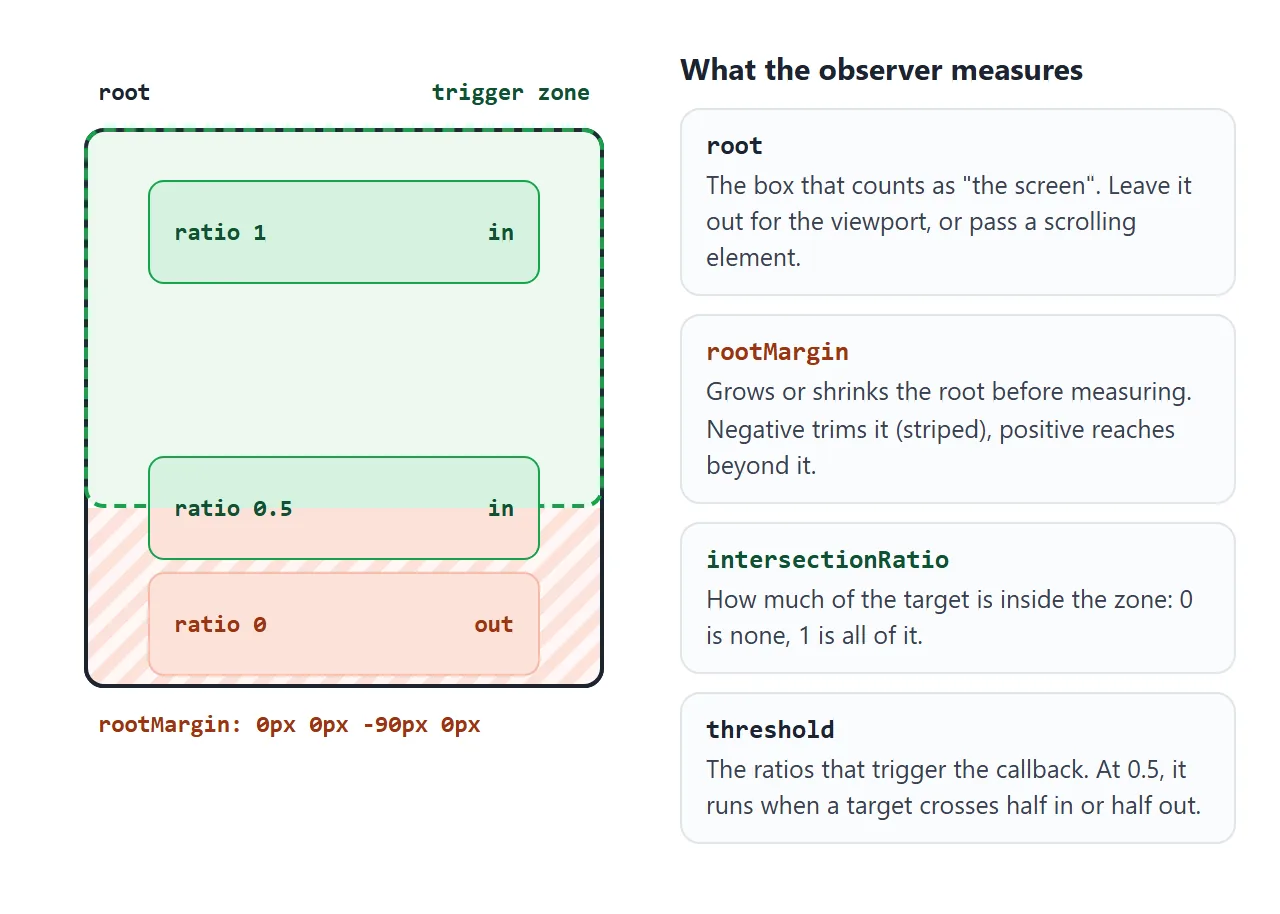
Try the options first. The green dashed outline is the trigger zone. Scroll the box, change threshold and drag the rootMargin slider.
<!doctype html>
<html lang="en">
<head>
<meta charset="utf-8">
<meta name="viewport" content="width=device-width, initial-scale=1">
<title>IntersectionObserver visualiser</title>
<style>
  body { margin: 0; padding: 12px; font-family: system-ui, sans-serif; background: #f4f5f7; color: #1d2330; }
  .controls { display: flex; flex-wrap: wrap; gap: 8px 16px; align-items: center; font-size: 13px; margin-bottom: 10px; }
  .controls output { font: 600 12px ui-monospace, Consolas, monospace; }
  .wrap { position: relative; margin: 34px 0; }        /* room to draw a zone bigger than the box */
  .box { height: 260px; overflow-y: auto; border-radius: 10px; background: #fff; border: 1px solid #d5d9e0; }
  .zone {                                              /* the trigger zone: root box + rootMargin */
    position: absolute; left: 0; right: 0; pointer-events: none;
    border: 2px dashed #16a34a; background: rgba(22, 163, 74, .08); border-radius: 10px;
  }
  .item {
    margin: 70px 16px; padding: 14px; border-radius: 8px; height: 70px;
    background: #fde2da; border: 1px solid #f3b8a6; font-size: 13px;
    display: flex; justify-content: space-between; align-items: center;
  }
  .item.in { background: #d6f2df; border-color: #8fd3a5; }
  .item b { font: 600 13px ui-monospace, Consolas, monospace; }
  .log { font: 12px ui-monospace, Consolas, monospace; color: #5b6270; }
</style>
</head>
<body>
<div class="controls">
  <label>threshold
    <select id="th">
      <option value="0">0</option>
      <option value="0.5">0.5</option>
      <option value="1">1</option>
      <option value="0,0.25,0.5,0.75,1">[0, .25, .5, .75, 1]</option>
    </select>
  </label>
  <label>rootMargin
    <input id="rm" type="range" min="-100" max="30" step="10" value="0">
    <output id="rmOut">0px</output>
  </label>
</div>

<div class="wrap">
  <div class="box" id="box"></div>
  <div class="zone" id="zone"></div>
</div>
<div class="log" id="log">callbacks: 0</div>

<script>
  const box = document.getElementById('box');
  const zone = document.getElementById('zone');
  const log = document.getElementById('log');
  let calls = 0, observer;

  // six targets inside the scrolling box
  for (let i = 1; i <= 6; i++) {
    box.insertAdjacentHTML('beforeend', `<div class="item">Target ${i} <b>ratio 0.00</b></div>`);
  }

  function start() {
    const m = Number(document.getElementById('rm').value);
    const threshold = document.getElementById('th').value.split(',').map(Number);
    document.getElementById('rmOut').textContent = m + 'px';

    // draw the zone: negative margin shrinks it, positive grows it
    zone.style.top = -m + 'px';
    zone.style.bottom = -m + 'px';

    if (observer) observer.disconnect();       // stop the old observer
    observer = new IntersectionObserver((entries) => {
      calls++;
      log.textContent = `callbacks: ${calls} (last one had ${entries.length} entr${entries.length > 1 ? 'ies' : 'y'})`;
      entries.forEach((e) => {
        e.target.classList.toggle('in', e.isIntersecting);
        e.target.querySelector('b').textContent = 'ratio ' + e.intersectionRatio.toFixed(2);
      });
    }, {
      root: box,                                // watch against the box, not the page
      rootMargin: `${m}px 0px ${m}px 0px`,      // top and bottom only
      threshold,
    });
    box.querySelectorAll('.item').forEach((el) => observer.observe(el));
  }

  document.getElementById('th').addEventListener('change', start);
  document.getElementById('rm').addEventListener('input', start);
  start();
</script>
</body>
</html>
Two things to notice. The callback count goes up as soon as the page loads, before you scroll. And the ratio only updates when a threshold is crossed, not on every pixel.
The three options: root, rootMargin, threshold
| Option | What it sets | Default |
|---|---|---|
root |
The area to check against: an element that scrolls, or document |
The top-level viewport |
rootMargin |
Grows (positive) or shrinks (negative) that area, like CSS margin |
'0px' |
threshold |
The ratio, or list of ratios, that trigger the callback | 0 |
rootMargin takes one to four values in px or %, in the same order as CSS margin: top, right, bottom, left.
'0px 0px -20% 0px' ends the zone 20% above the bottom edge. '0px 0px 300px 0px' reaches 300px below it, so things start before they are visible.
threshold is a number from 0 to 1, or an array. An array does not mean "all of these at once". It means "call me each time the ratio crosses any of these".
What is in an entry
The callback receives an array of IntersectionObserverEntry objects, one per target that changed. Several targets can arrive in the same call.
| Property | Meaning |
|---|---|
isIntersecting |
true if the target is in the zone now |
intersectionRatio |
How much of the target is inside, from 0 to 1 |
target |
The element this entry is about |
boundingClientRect |
The target's box, as getBoundingClientRect() would return it |
rootBounds |
The zone after rootMargin, or null in a frame from another origin |
boundingClientRect.top tells you which way the target left. A negative value means it went off the top, so the reader scrolled past it.
Why not a scroll listener
A scroll handler runs for every scroll event. To know whether an element is visible, it has to call getBoundingClientRect() on each target, on the main thread, while the page is moving. See addEventListener for how those listeners attach.
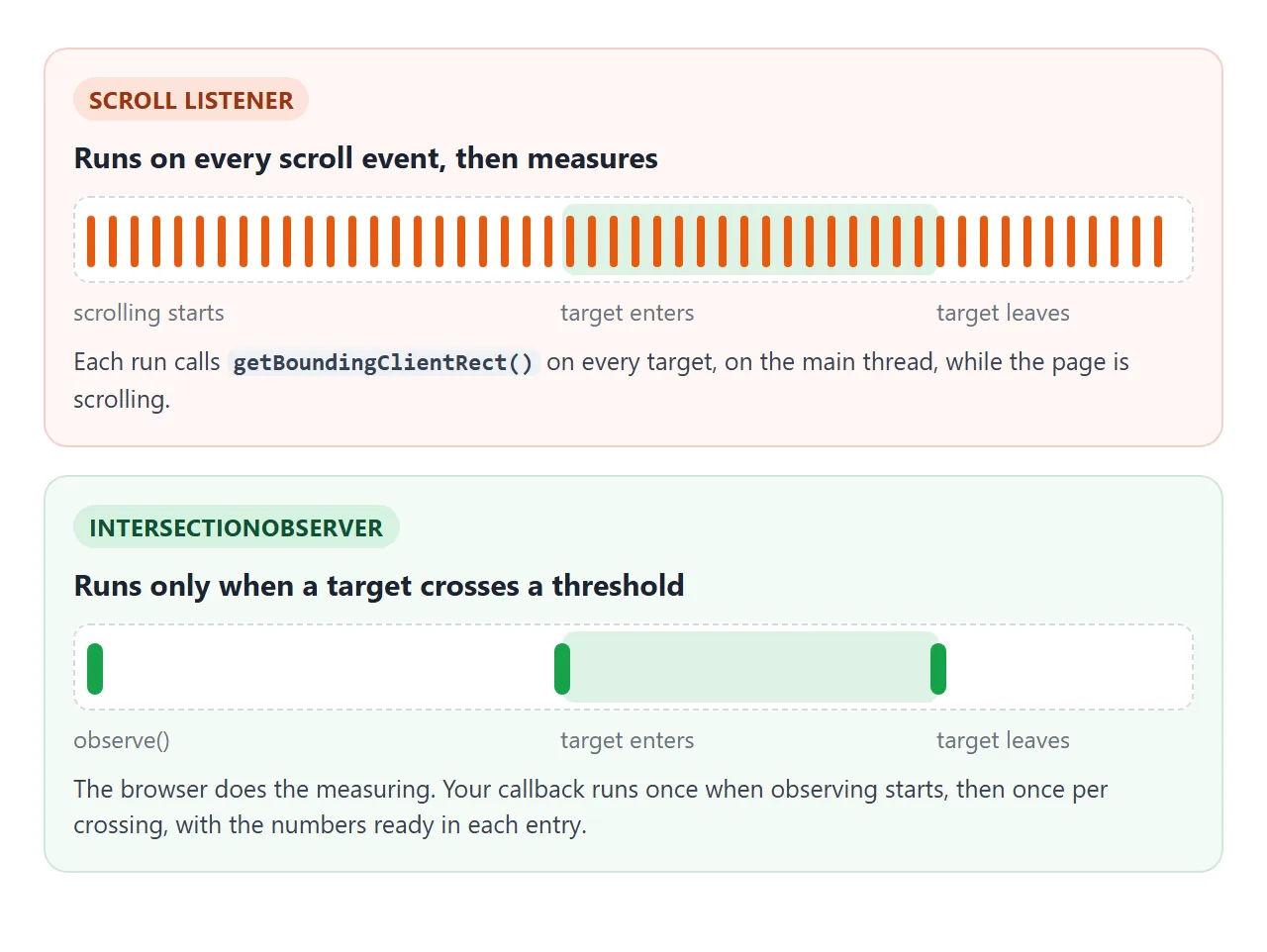
The observer moves the measuring into the browser. Your code runs only at the moments you asked about, and the numbers arrive ready in each entry.
Reveal on scroll, once
The most common use: content slides in as the reader reaches it. Scroll inside this example and watch the counter.
<!doctype html>
<html lang="en" class="js">
<head>
<meta charset="utf-8">
<meta name="viewport" content="width=device-width, initial-scale=1">
<title>Reveal on scroll</title>
<style>
  body { margin: 0; font-family: system-ui, sans-serif; background: #f4f5f7; color: #1d2330; }
  .bar {
    position: sticky; top: 0; z-index: 1; padding: 10px 14px; font-size: 13px;
    background: #1d2330; color: #fff;
  }
  main { padding: 14px 14px 120px; }
  .hint { margin: 0 0 280px; color: #5b6270; font-size: 14px; }
  .card { margin: 0 0 40px; padding: 18px; border-radius: 12px; background: #fff; box-shadow: 0 4px 14px rgba(0, 0, 0, .08); }
  .card h3 { margin: 0 0 6px; font-size: 16px; }
  .card p { margin: 0; font-size: 14px; color: #5b6270; }

  /* hidden state only when the script is running, so the page still works without it */
  .js .reveal { opacity: 0; transform: translateY(24px); transition: opacity .5s, transform .5s; }
  .js .reveal.in { opacity: 1; transform: none; }

  /* reduced motion: appear at once, no slide */
  @media (prefers-reduced-motion: reduce) {
    .js .reveal { transform: none; transition: none; }
  }
</style>
</head>
<body>
<div class="bar" id="bar">Watching 6 cards</div>
<main>
  <p class="hint">Scroll down. Each card fades in once, then the observer stops watching it.</p>
  <div class="card reveal"><h3>One</h3><p>Revealed when 20% of it is on screen.</p></div>
  <div class="card reveal"><h3>Two</h3><p>Scroll back up: it stays visible.</p></div>
  <div class="card reveal"><h3>Three</h3><p>unobserve() means no more callbacks for it.</p></div>
  <div class="card reveal"><h3>Four</h3><p>The counter above goes down as cards are revealed.</p></div>
  <div class="card reveal"><h3>Five</h3><p>With reduced motion on, cards appear without sliding.</p></div>
  <div class="card reveal"><h3>Six</h3><p>That is the last one.</p></div>
</main>

<script>
  const bar = document.getElementById('bar');
  const cards = document.querySelectorAll('.reveal');
  let watching = cards.length;

  const observer = new IntersectionObserver((entries) => {
    entries.forEach((e) => {
      if (!e.isIntersecting) return;     // the first callback also reports cards that are off screen
      e.target.classList.add('in');
      observer.unobserve(e.target);      // reveal once, then forget it
      watching--;
      bar.textContent = watching ? `Watching ${watching} cards` : 'All cards revealed. Observer is idle.';
    });
  }, {
    root: document,                      // the page's own viewport, even inside a frame
    rootMargin: '0px 0px -10% 0px',      // trigger a little above the bottom edge
    threshold: 0.2,
  });

  cards.forEach((el) => observer.observe(el));
</script>
</body>
</html>
Three details make it behave:
- Skip entries that are not intersecting. The first callback reports every card, including the ones far below.
- Call
unobserve()after revealing. The card stays visible and stops costing callbacks. - Hide cards only when the script runs. The
.jsclass on<html>gates the hidden state, so without the script nothing stays invisible.
For readers who turned on reduced motion, a prefers-reduced-motion: reduce media query removes the slide and the transition. HTML animation on page load covers animation that runs before any scrolling.
Lazy loading: use the attribute first
For images and iframes, you do not need an observer. loading="lazy" asks the browser to wait until they are near the screen, as shown in the img tag guide.
An observer earns its place for the rest: starting a video when it comes into view, drawing a chart, or fetching the next page of a list.
Inside an iframe, rootMargin needs a root
A page can run inside a frame: an embed, an online editor, or the example boxes on this page. Without a root, the observer measures against the top-level viewport, which is the outer page's window, not your frame's.
If the frame comes from another origin, the specification tells browsers to ignore rootMargin in that case and report rootBounds as null. Your -20% band or 300px preload distance silently becomes zero.
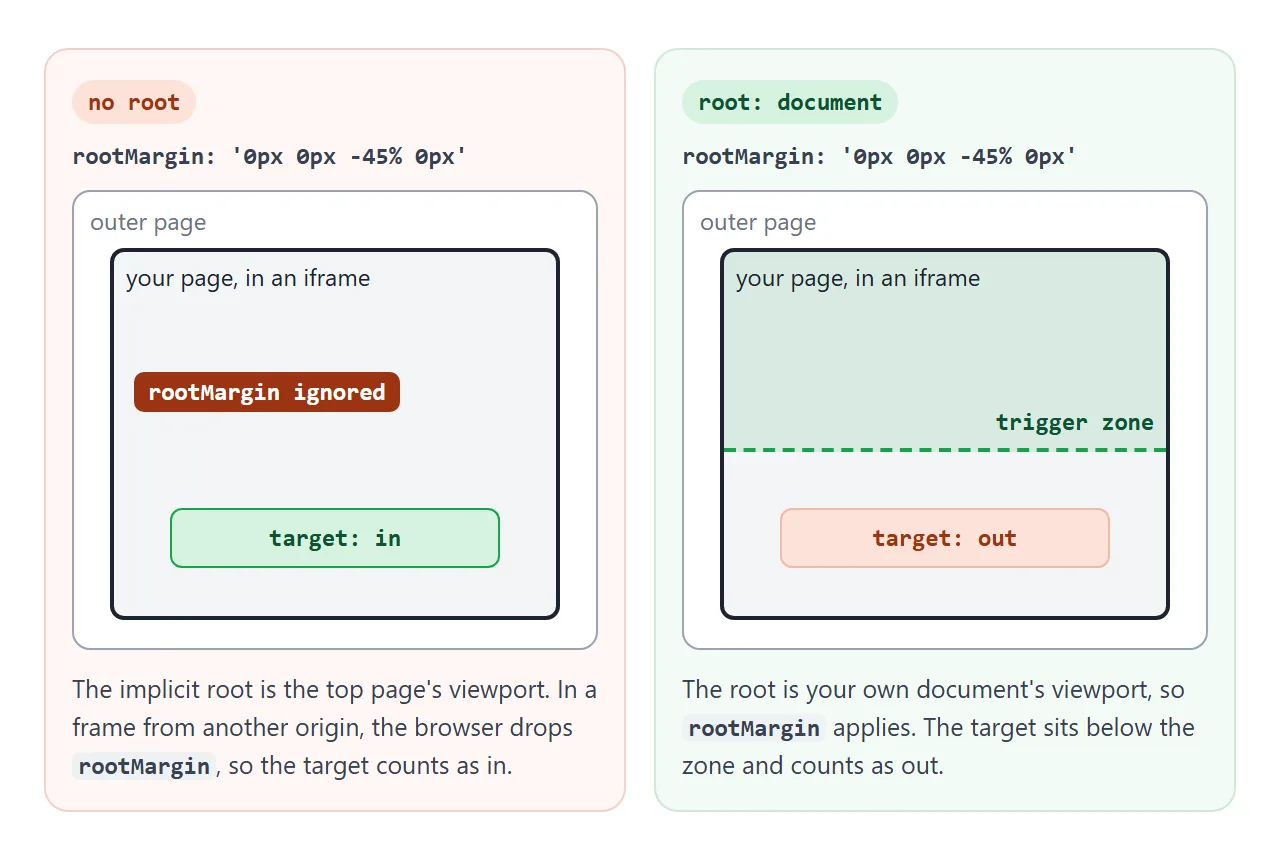
The fix is one option:
new IntersectionObserver(callback, {
  root: document,          // this document's own viewport
  rootMargin: '0px 0px -10% 0px',
});
root: document makes the root your page's own viewport, wherever the page is shown, and the margin applies again. A scrolling element as the root, as in the first example, is not affected.
Smooth scroll CSS uses the same option for its menu that follows the section in view.
A finished example: infinite list and seen tracking
This list uses three observers for three jobs. Scroll to the bottom.
<!doctype html>
<html lang="en">
<head>
<meta charset="utf-8">
<meta name="viewport" content="width=device-width, initial-scale=1">
<title>Infinite list with a sentinel</title>
<style>
  body { margin: 0; font-family: system-ui, sans-serif; background: #f4f5f7; color: #1d2330; }
  .bar {
    position: sticky; top: 0; z-index: 1; padding: 9px 14px 11px;
    background: #1d2330; color: #fff; font-size: 13px;
    display: flex; justify-content: space-between; gap: 10px;
  }
  .progress { position: absolute; left: 0; bottom: 0; height: 3px; width: 0; background: #4ade80; }
  main { padding: 8px 14px 20px; }
  h2 { margin: 18px 0 8px; font-size: 14px; color: #5b6270; }
  .item { margin-bottom: 8px; padding: 14px; border-radius: 10px; background: #fff; box-shadow: 0 2px 8px rgba(0, 0, 0, .06); font-size: 14px; }
  .item.seen { box-shadow: inset 4px 0 0 #16a34a, 0 2px 8px rgba(0, 0, 0, .06); }
  .sentinel { padding: 16px; text-align: center; font-size: 13px; color: #5b6270; }
</style>
</head>
<body>
<div class="bar"><span id="where">Page 1</span><span id="seen">Seen 0 of 0</span><div class="progress" id="progress"></div></div>
<main id="list"></main>
<div class="sentinel" id="sentinel">Loading more...</div>

<script>
  const list = document.getElementById('list');
  const sentinel = document.getElementById('sentinel');
  const LAST_PAGE = 5, PER_PAGE = 8;
  let page = 0, seen = 0, total = 0;

  // 1. Seen analytics: an item counts once 60% of it has been on screen
  const seenObserver = new IntersectionObserver((entries) => {
    entries.forEach((e) => {
      if (!e.isIntersecting) return;
      e.target.classList.add('seen');
      seenObserver.unobserve(e.target);   // count each item once
      seen++;
      updateBar();
    });
  }, { root: document, threshold: 0.6 });

  // 2. Active section: which page heading crossed the band near the top
  const pageObserver = new IntersectionObserver((entries) => {
    entries.forEach((e) => {
      if (e.isIntersecting) document.getElementById('where').textContent = e.target.textContent;
    });
  }, { root: document, rootMargin: '0px 0px -80% 0px' });

  // 3. Infinite scroll: load the next page when the sentinel is 200px away
  const loadObserver = new IntersectionObserver((entries) => {
    if (entries[0].isIntersecting) loadPage();
  }, { root: document, rootMargin: '0px 0px 200px 0px' });

  function loadPage() {
    page++;
    const h = document.createElement('h2');
    h.textContent = `Page ${page} of ${LAST_PAGE}`;
    list.append(h);
    pageObserver.observe(h);
    for (let i = 1; i <= PER_PAGE; i++) {
      const item = document.createElement('div');
      item.className = 'item';
      item.textContent = `Item ${(page - 1) * PER_PAGE + i}`;
      list.append(item);
      seenObserver.observe(item);          // observe after it is in the DOM
    }
    total += PER_PAGE;
    if (page === LAST_PAGE) {
      loadObserver.disconnect();           // nothing left to load
      sentinel.textContent = 'End of the list';
    } else {
      // re-observe: if the sentinel is still in range, this gives a fresh callback
      loadObserver.unobserve(sentinel);
      loadObserver.observe(sentinel);
    }
    updateBar();
  }

  function updateBar() {
    document.getElementById('seen').textContent = `Seen ${seen} of ${total}`;
    document.getElementById('progress').style.width = (page / LAST_PAGE) * 100 + '%';
  }

  loadObserver.observe(sentinel);          // its first callback loads page 1
</script>
</body>
</html>
- Sentinel. An empty element sits after the list. When it comes within
200pxof the bottom, the next page is added. At the last page,disconnect()stops the observer. - Current page. Each page heading is watched with
rootMargin: '0px 0px -80% 0px', a band across the top fifth of the screen. - Seen. Each item counts once when 60% of it has been on screen, then it is unobserved. Send that count to your analytics instead of showing it.
After adding a page, the example calls unobserve(sentinel) and observe(sentinel) again. Observing produces a fresh first report. Without it, a short first page leaves the sentinel inside the zone, nothing crosses, and loading stops.
When it does not work
| What you see | Cause | Fix |
|---|---|---|
| The callback runs as soon as the page loads | The first report for every target | Check entry.isIntersecting |
| rootMargin has no effect inside a frame | No root, frame from another origin |
Add root: document |
| rootMargin throws a SyntaxError | A bare 0, or a unit other than px or % |
Write '0px 0px -10% 0px' |
| threshold 1 never fires | The target is taller than the root | Use a smaller threshold |
| An array threshold fires many times | It fires at every listed ratio | Check intersectionRatio in the callback |
| An element never counts as in | It has display: none, so no box |
Observe a visible element |
| Nothing is observed | The script ran before the elements existed, or new items were not passed to observe() |
Run the script at the end of body, and observe items as you add them |
| Infinite list stops after the first page | The sentinel never left the zone | Unobserve and observe it after each load |
Share it as a link
Scroll effects are hard to show in a screenshot, and an .html attachment may not open on the other person's phone. To send the working version, paste the page into a NOS document and choose Create share link. HTML to link walks through it.
The page renders as written and its scripts run, so the people you send it to can scroll it and watch the cards appear. If you change the code later, the same link shows the new version.