To detect DOM changes in JavaScript, create a MutationObserver and tell it which element to watch and which kinds of change to report. After a change, the browser calls your function with a list of records: what changed, where, and what was added or removed.
const observer = new MutationObserver((records) => {
  for (const r of records) console.log(r.type, r.target);
});
observer.observe(document.getElementById('box'), { childList: true, subtree: true });
Try it. Tick the options, press the buttons, and watch which changes reach the log.
<!doctype html>
<html lang="en">
<head>
<meta charset="utf-8">
<meta name="viewport" content="width=device-width, initial-scale=1">
<title>MutationObserver record log</title>
<style>
  body { margin: 0; padding: 12px; font-family: system-ui, sans-serif; background: #f4f5f7; color: #1d2330; font-size: 14px; }
  .opts { display: flex; flex-wrap: wrap; gap: 4px 12px; margin-bottom: 8px; }
  .opts label { font: 13px ui-monospace, Consolas, monospace; white-space: nowrap; }
  .btns { display: flex; flex-wrap: wrap; gap: 6px; margin-bottom: 10px; }
  button { font: inherit; font-size: 13px; padding: 6px 10px; border: 1px solid #c9cdd4; border-radius: 8px; background: #fff; cursor: pointer; }
  #box { background: #fff; border: 2px solid #c9cdd4; border-radius: 10px; padding: 8px 12px; }
  #box.hot { border-color: #2563eb; }
  #box ul { margin: 4px 0 0; padding-left: 20px; }
  #log {
    margin-top: 10px; height: 190px; overflow: auto; padding: 8px 10px; border-radius: 10px;
    background: #111827; color: #d1d5db; font: 12px/1.5 ui-monospace, Consolas, monospace; white-space: pre-wrap; overflow-wrap: anywhere;
  }
  #log .cb { color: #86efac; }
  #log .err { color: #fca5a5; }
</style>
</head>
<body>
<div class="opts">
  <label><input type="checkbox" id="childList" checked> childList</label>
  <label><input type="checkbox" id="subtree"> subtree</label>
  <label><input type="checkbox" id="attributes" checked> attributes</label>
  <label><input type="checkbox" id="attributeOldValue"> attributeOldValue</label>
  <label><input type="checkbox" id="characterData"> characterData</label>
</div>
<div class="btns">
  <button id="addTop">Add line to box</button>
  <button id="addLi">Add list item</button>
  <button id="removeLi">Remove list item</button>
  <button id="toggleClass">Toggle box class</button>
  <button id="setData">Change item data-n</button>
  <button id="editText">Edit item text</button>
  <button id="clear">Clear log</button>
</div>

<div id="box">
  <b>Watched box</b>
  <ul id="list"><li data-n="1">Item 1</li></ul>
</div>
<div id="log"></div>

<script>
  const box = document.getElementById('box');
  const list = document.getElementById('list');
  const log = document.getElementById('log');
  const names = ['childList', 'subtree', 'attributes', 'attributeOldValue', 'characterData'];
  let calls = 0, n = 1;

  function write(text, cls) {
    const line = document.createElement('div');
    line.textContent = text;
    if (cls) line.className = cls;
    log.append(line);
    log.scrollTop = log.scrollHeight;
  }

  function label(node) {
    if (node.nodeType === Node.TEXT_NODE) return '#text "' + node.data + '"';
    return '<' + node.nodeName.toLowerCase() + (node.id ? '#' + node.id : '') + '>';
  }

  // The callback gets every record queued since the last call
  const observer = new MutationObserver((records) => {
    write('callback #' + (++calls) + ': ' + records.length + ' record(s)', 'cb');
    for (const r of records) {
      let s = '  ' + r.type + ' on ' + label(r.target);
      if (r.addedNodes.length) s += ' | added ' + [...r.addedNodes].map(label).join(', ');
      if (r.removedNodes.length) s += ' | removed ' + [...r.removedNodes].map(label).join(', ');
      if (r.attributeName) s += ' | attributeName: ' + r.attributeName;
      if (r.type !== 'childList') s += ' | oldValue: ' + JSON.stringify(r.oldValue);
      write(s);
    }
  });

  function start() {
    observer.disconnect();
    const opt = {};
    for (const k of names) opt[k] = document.getElementById(k).checked;
    if (!opt.attributes) delete opt.attributeOldValue;  // attributeOldValue needs attributes
    try {
      observer.observe(box, opt);
      write('observe(box, ' + JSON.stringify(opt) + ')', 'cb');
    } catch (err) {
      write(err.name + ': pick childList, attributes or characterData', 'err');
    }
  }
  names.forEach((k) => document.getElementById(k).addEventListener('change', start));

  document.getElementById('addTop').addEventListener('click', () => {
    const p = document.createElement('p');
    p.textContent = 'Line added to the box itself';
    box.append(p);
  });
  document.getElementById('addLi').addEventListener('click', () => {
    const li = document.createElement('li');
    li.textContent = 'Item ' + (++n);
    li.dataset.n = n;
    list.append(li);
  });
  document.getElementById('removeLi').addEventListener('click', () => list.lastElementChild?.remove());
  document.getElementById('toggleClass').addEventListener('click', () => box.classList.toggle('hot'));
  document.getElementById('setData').addEventListener('click', () => {
    const li = list.firstElementChild;
    if (li) li.dataset.n = Number(li.dataset.n) + 10;
  });
  document.getElementById('editText').addEventListener('click', () => {
    const li = list.firstElementChild;
    if (li) li.firstChild.data += '!';  // change the text node itself
  });
  document.getElementById('clear').addEventListener('click', () => { log.textContent = ''; calls = 0; });

  start();
</script>
</body>
</html>
It works no matter who makes the change: your code, another script, a browser extension or the user editing a contenteditable area.
The options: what the observer watches
observe(target, options) needs at least one of childList, attributes or characterData. With none of them, it throws a TypeError. Everything else narrows or widens what those three catch.
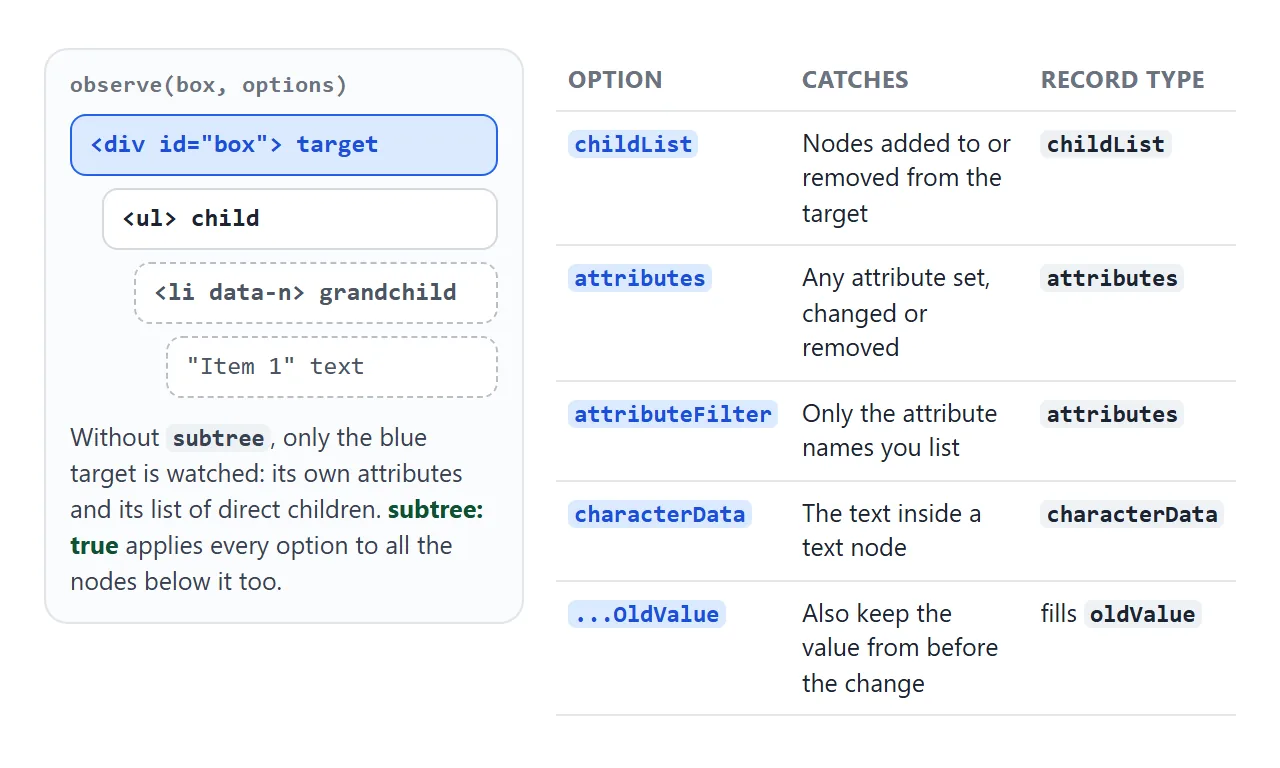
| Option | What it reports |
|---|---|
childList |
Children added to or removed from the target |
subtree |
Apply the other options to every descendant, not just the target |
attributes |
Attribute changes, including class, style and data-* |
attributeFilter |
An array of names; only those attributes are reported |
attributeOldValue |
Keep the attribute value from before the change |
characterData |
Changes to the text inside text nodes |
characterDataOldValue |
Keep the text from before the change |
Setting attributeFilter or attributeOldValue without attributes turns attributes on for you. The same goes for characterDataOldValue and characterData. Watching only what you need also keeps the callback quiet.
// Only react when data-state changes, anywhere inside #app
observer.observe(app, { subtree: true, attributeFilter: ['data-state'], attributeOldValue: true });
Reading a MutationRecord
Each record describes one change. Start with type, because it decides which other fields mean anything.
typeis'childList','attributes'or'characterData'.targetis the node that changed. For childList it is the parent; for text it is the text node itself.addedNodes/removedNodesare node lists, filled only for childList. They can contain text nodes, so checknodeTypebefore calling element methods.attributeNameis the name of the changed attribute.oldValueis the previous attribute value or text, only if you asked for it. Otherwise it isnull.
Toggling a class in the demo gives an attributes record with attributeName: class. If you change classes with classList, this is how another part of the page can react to it.
Callbacks are batched
The callback does not run in the middle of your code. Records queue up while your code runs, then the callback runs once, in a microtask, with all of them. That is why the log in the next demo prints "handler finished" before "callback #1".
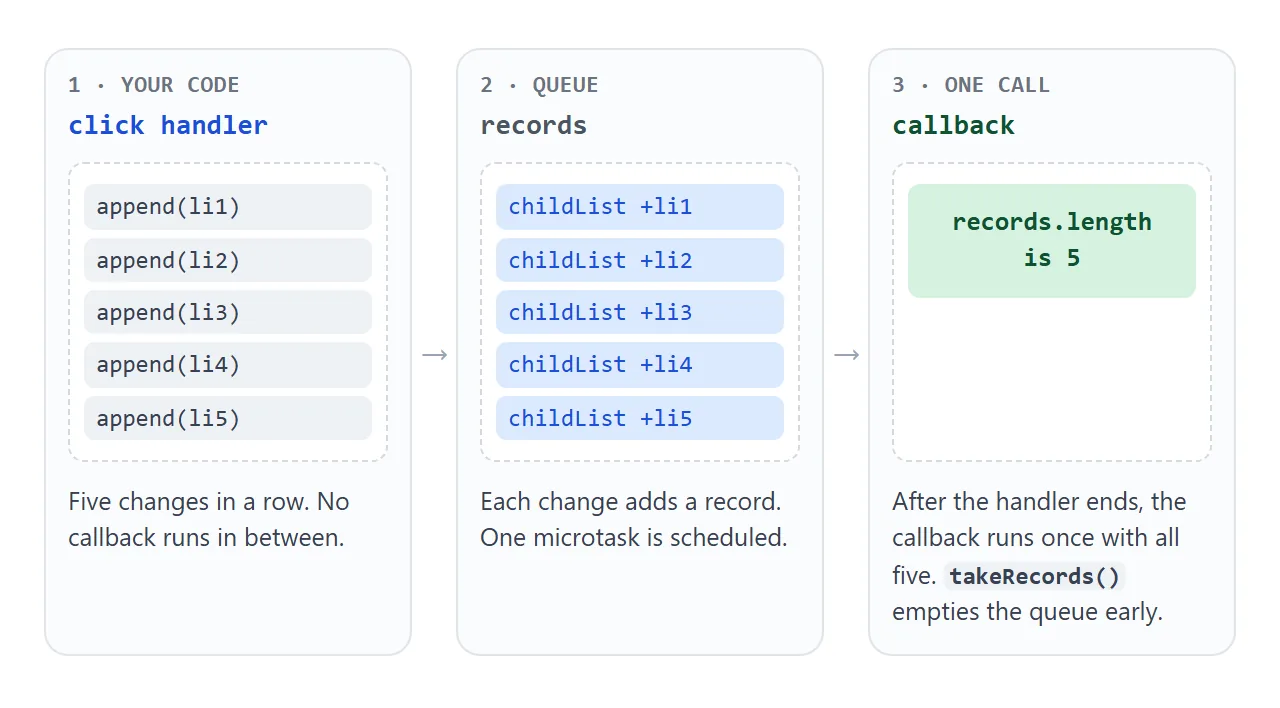
If you need the pending records right now, observer.takeRecords() returns them and empties the queue, so the callback will not see them again. A common use is just before disconnect(), to handle the last changes yourself.
The infinite-loop trap
If the callback changes something it is watching, that change creates a new record, which calls the callback again, which changes it again. Each round is a new microtask, so the page stops responding.
<!doctype html>
<html lang="en">
<head>
<meta charset="utf-8">
<meta name="viewport" content="width=device-width, initial-scale=1">
<title>MutationObserver batching and the loop trap</title>
<style>
  body { margin: 0; padding: 12px; font-family: system-ui, sans-serif; background: #f4f5f7; color: #1d2330; font-size: 14px; }
  .modes { display: flex; flex-wrap: wrap; gap: 4px 14px; margin-bottom: 8px; font-size: 13px; }
  .btns { display: flex; flex-wrap: wrap; gap: 6px; margin-bottom: 10px; }
  button { font: inherit; font-size: 13px; padding: 6px 10px; border: 1px solid #c9cdd4; border-radius: 8px; background: #fff; cursor: pointer; }
  #area { background: #fff; border: 1px solid #c9cdd4; border-radius: 10px; padding: 8px 12px; }
  #badge { display: inline-block; min-width: 22px; text-align: center; padding: 1px 7px; border-radius: 99px; background: #2563eb; color: #fff; font-size: 12px; }
  #list { margin: 6px 0 0; padding-left: 20px; max-height: 70px; overflow: auto; }
  #log {
    margin-top: 10px; height: 200px; overflow: auto; padding: 8px 10px; border-radius: 10px;
    background: #111827; color: #d1d5db; font: 12px/1.5 ui-monospace, Consolas, monospace; white-space: pre-wrap; overflow-wrap: anywhere;
  }
  #log .bad { color: #fdba74; }
  #log .good { color: #86efac; }
</style>
</head>
<body>
<div class="modes">
  <b>Callback updates the badge:</b>
  <label><input type="radio" name="mode" value="naive" checked> naive</label>
  <label><input type="radio" name="mode" value="guard"> guard</label>
  <label><input type="radio" name="mode" value="pause"> disconnect / reconnect</label>
</div>
<div class="btns">
  <button id="add1">Add 1 item</button>
  <button id="add5">Add 5 items in one click</button>
  <button id="clear">Clear log</button>
</div>

<div id="area">
  Items: <span id="badge">0</span>
  <ul id="list"></ul>
</div>
<div id="log"></div>

<script>
  const area = document.getElementById('area');
  const list = document.getElementById('list');
  const badge = document.getElementById('badge');
  const log = document.getElementById('log');
  const opts = { childList: true, subtree: true };  // the badge is inside the watched area
  let calls = 0, count = 0;

  function write(text, cls) {
    const line = document.createElement('div');
    line.textContent = text;
    if (cls) line.className = cls;
    log.append(line);
    log.scrollTop = log.scrollHeight;
  }

  const observer = new MutationObserver((records) => {
    calls++;
    write('callback #' + calls + ': ' + records.length + ' record(s)');
    if (calls >= 20) {  // demo safety stop, so the page does not hang
      observer.disconnect();
      write('Stopped after 20 callbacks from one click. The callback keeps triggering itself.', 'bad');
      return;
    }

    const mode = document.querySelector('input[name=mode]:checked').value;
    const n = String(list.children.length);

    if (mode === 'naive') {
      badge.textContent = n;                 // a new text node every time: another record
    } else if (mode === 'guard') {
      if (badge.textContent !== n) badge.textContent = n;  // write only when it changes
    } else {
      observer.disconnect();                 // stop watching
      badge.textContent = n;                 // this change is not recorded
      observer.observe(area, opts);          // watch again
    }
  });
  observer.observe(area, opts);

  function add(k) {
    calls = 0;
    observer.observe(area, opts);  // re-arm after a safety stop (same options, no harm)
    write('click: adding ' + k + ' item(s)', 'good');
    for (let i = 0; i < k; i++) {
      const li = document.createElement('li');
      li.textContent = 'Item ' + (++count);
      list.append(li);                        // each append queues one record
    }
    write('click handler finished; callback has not run yet', 'good');
  }

  document.getElementById('add1').addEventListener('click', () => add(1));
  document.getElementById('add5').addEventListener('click', () => add(5));
  document.getElementById('clear').addEventListener('click', () => { log.textContent = ''; });
</script>
</body>
</html>
Setting textContent always replaces the text node, even with the same text, and setAttribute records a change even when the value is identical. So "it is the same value" does not stop the loop. Two fixes work:
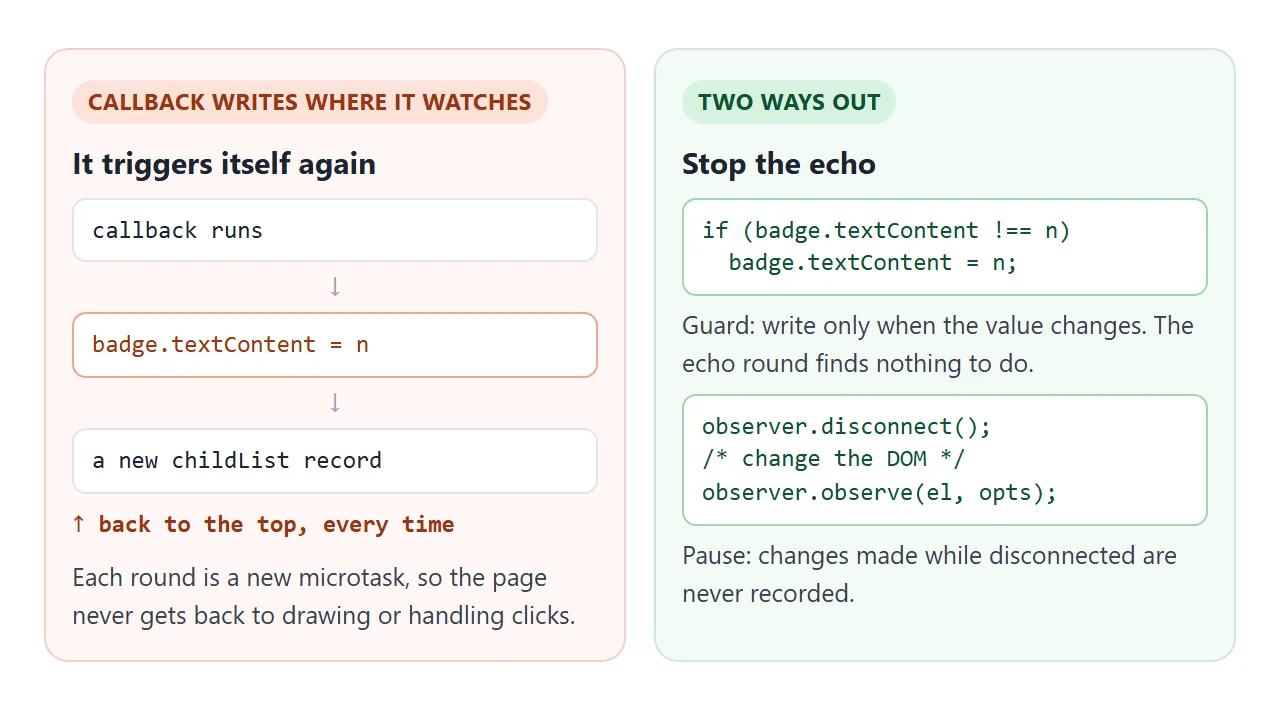
- Guard: compare before writing, and skip the write if nothing would change.
- Pause: call
disconnect(), make your change, then callobserve()again with the same options. Changes made in between are never recorded.
A third option is to filter records: ignore those whose target is an element you own, such as a badge or counter. That works too, but the callback still runs once more per write.
A finished example: word counter and auto-link
A contenteditable area is where an observer earns its place. Typing inside a line changes a text node (characterData), while Enter, paste and delete add or remove nodes (childList). Exactly which nodes change can differ between browsers, so watch both, with subtree.
<!doctype html>
<html lang="en">
<head>
<meta charset="utf-8">
<meta name="viewport" content="width=device-width, initial-scale=1">
<title>Word counter and auto-link with MutationObserver</title>
<style>
  body { margin: 0; padding: 12px; font-family: system-ui, sans-serif; background: #eceef1; color: #1d2330; }
  .bar { display: flex; flex-wrap: wrap; align-items: center; gap: 8px 14px; margin-bottom: 8px; font-size: 13px; }
  .stat b { font-size: 16px; }
  button { font: inherit; font-size: 13px; padding: 6px 10px; border: 1px solid #c9cdd4; border-radius: 8px; background: #fff; cursor: pointer; }
  #editor {
    min-height: 200px; padding: 12px 14px; border-radius: 10px; background: #fff;
    border: 1px solid #c9cdd4; font-size: 15px; line-height: 1.55; outline: none;
  }
  #editor:focus { border-color: #2563eb; box-shadow: 0 0 0 3px rgba(37, 99, 235, .18); }
  #editor a { color: #1d4ed8; background: #e0ecff; border-radius: 4px; padding: 0 2px; }
  #status { margin-top: 8px; font: 12px ui-monospace, Consolas, monospace; color: #5b6270; }
</style>
</head>
<body>
<div class="bar">
  <span class="stat"><b id="words">0</b> words</span>
  <span class="stat"><b id="chars">0</b> characters</span>
  <span class="stat"><b id="links">0</b> links</span>
  <button id="inject">Insert text from another script</button>
</div>

<div id="editor" contenteditable="true"><p>Type here. Links turn blue after the space: https://example.com is one.</p></div>
<div id="status">waiting for changes</div>

<script>
  const editor = document.getElementById('editor');
  const opts = { childList: true, subtree: true, characterData: true };
  const URL_DONE = /https?:\/\/[^\s<]+(?=\s)/;  // a URL followed by a space: finished typing

  // Wrap the first finished URL in each plain text node. Returns true if it changed anything.
  function linkify() {
    const walker = document.createTreeWalker(editor, NodeFilter.SHOW_TEXT);
    const found = [];
    while (walker.nextNode()) {
      const t = walker.currentNode;
      if (!t.parentElement.closest('a') && URL_DONE.test(t.data)) found.push(t);
    }
    const sel = getSelection();
    for (const t of found) {
      const m = t.data.match(URL_DONE);
      const caretHere = sel.anchorNode === t ? sel.anchorOffset : -1;
      const urlNode = t.splitText(m.index);           // text before stays in t
      const rest = urlNode.splitText(m[0].length);    // text after the URL
      const a = document.createElement('a');
      a.href = m[0];
      a.title = m[0];
      urlNode.replaceWith(a);
      a.append(urlNode);
      // keep the caret where the user was typing
      if (caretHere >= m.index + m[0].length) sel.collapse(rest, caretHere - m.index - m[0].length);
    }
    return found.length > 0;
  }

  function count() {
    const text = editor.innerText.trim();
    document.getElementById('words').textContent = text ? text.split(/\s+/).length : 0;
    document.getElementById('chars').textContent = text.length;
    document.getElementById('links').textContent = editor.querySelectorAll('a').length;
  }

  const observer = new MutationObserver((records) => {
    observer.disconnect();              // our own edits below must not trigger the callback
    const linked = linkify();
    observer.observe(editor, opts);
    count();
    const types = [...new Set(records.map((r) => r.type))].join(', ');
    document.getElementById('status').textContent =
      records.length + ' record(s): ' + types + (linked ? ' | link added' : '');
  });
  observer.observe(editor, opts);

  // Any code can change the editor. The observer sees it the same way as typing.
  document.getElementById('inject').addEventListener('click', () => {
    const p = document.createElement('p');
    p.textContent = 'Added by another script. Docs at https://developer.mozilla.org and more.';
    editor.append(p);
  });

  linkify();  // enhance what is already there
  count();
</script>
</body>
</html>
- Counting: the counters live outside the editor, so updating them never triggers the observer.
- Auto-link: wrapping a URL in
<a>changes the editor, so the callback disconnects, edits, and observes again. - Enhancing new elements: the "another script" button shows the other common use. Whatever adds content, the observer upgrades it.
MutationObserver vs polling and mutation events
| Approach | How it notices | Cost and caveats |
|---|---|---|
Polling with setInterval |
Compares the DOM every few hundred ms | Runs even when nothing changed; misses fast back-and-forth changes |
Mutation events (DOMNodeInserted, DOMSubtreeModified) |
Fired synchronously on every change | Deprecated, and some browsers have removed them |
| MutationObserver | Records every change, delivers them in one batch | Needs the right options; you must avoid re-triggering |
For size or visibility changes, use the observers built for those. ResizeObserver reports size changes, and IntersectionObserver tells you when an element enters the viewport. MutationObserver reports changes to the DOM tree itself, as described in the DOM guide.
When it does not work
| What you see | Cause | Fix |
|---|---|---|
| Nothing is logged | The change is inside a child, and subtree is off; or attributes/characterData is not set |
Add the missing option |
| TypeError when calling observe | None of childList, attributes or characterData is true | Turn at least one on |
| The callback floods or the page freezes | The callback changes what it watches | Guard the write, or disconnect and observe again |
oldValue is null |
attributeOldValue or characterDataOldValue is off |
Turn on the matching OldValue option |
| TypeError saying the target is not a Node | The script ran before the element existed | Run it after the element, use defer, or observe a parent that already exists |
| Callbacks keep coming after a component closes | The observer was never stopped | Call observer.disconnect() when you are done |
When you cannot wait for an element, observe document.body with childList and subtree, check addedNodes for the element, and disconnect once it appears.
Share it as a link
An observer is easier to understand by pressing the buttons than by reading the log in a screenshot. To send a working page instead, paste it into a NOS document and choose Create share link. HTML to link walks through it.
The page renders as written and its scripts run, so the person you send it to can try it themselves. If you change the code later, the same link shows the new version.