ReportingObserver is a browser JavaScript API, part of the Reporting API. You create one with a callback and call observe(). The browser then calls your function with reports about your own page, such as a blocked script or a deprecated feature. Nothing to install.
Try it first. Each button makes the browser file a report, and the page shows what arrived.
<!doctype html>
<html lang="en">
<head>
<meta charset="utf-8">
<meta name="viewport" content="width=device-width, initial-scale=1">
<!-- only scripts with this nonce may run, so a script added without it is blocked and reported -->
<meta http-equiv="Content-Security-Policy" content="script-src 'nonce-demo' 'report-sample'">
<title>ReportingObserver basics</title>
<style>
body { margin: 0; padding: 14px; font-family: system-ui, sans-serif; background: #f4f5f7; color: #1d2330; }
h1 { font-size: 16px; margin: 0 0 4px; }
#support { font-size: 13px; margin: 0 0 10px; color: #374151; }
.row { display: flex; flex-wrap: wrap; gap: 8px; margin-bottom: 10px; }
button { font: inherit; font-size: 13px; padding: 8px 12px; border: 1px solid #c9ced8; border-radius: 8px; background: #fff; cursor: pointer; }
button:hover { background: #eef1f5; }
#log { list-style: none; margin: 0; padding: 0; display: grid; gap: 8px; }
#log li { background: #fff; border: 1px solid #e1e4ea; border-left: 4px solid #2563eb; border-radius: 8px; padding: 8px 10px; font-size: 13px; line-height: 1.4; overflow-wrap: anywhere; }
#log li.dep { border-left-color: #d97706; }
#log li b { font-family: ui-monospace, Consolas, monospace; font-size: 12px; }
#log li.note { border-left-color: #9aa3b2; color: #4b5563; }
</style>
</head>
<body>
<h1>What did the browser report?</h1>
<p id="support"></p>
<div class="row">
<button id="injectBtn">Add a script (blocked by CSP)</button>
<button id="xhrBtn">Use synchronous XHR (deprecated)</button>
</div>
<ul id="log"></ul>
<script nonce="demo">
const log = document.getElementById('log');
const support = document.getElementById('support');
function add(text, cls) {
const li = document.createElement('li');
if (cls) li.className = cls;
li.innerHTML = text;
log.prepend(li);
}
function esc(s) { return String(s).replace(/[&<>]/g, (c) => ({ '&': '&', '<': '<', '>': '>' }[c])); }
if (!('ReportingObserver' in window)) {
support.textContent = 'This browser has no ReportingObserver, so nothing below will report.';
} else {
support.textContent = 'ReportingObserver is available. Press a button.';
// One observer for every report type this browser can deliver to the page
const observer = new ReportingObserver((reports) => {
for (const r of reports) {
const b = r.body;
const what = r.type === 'csp-violation'
? 'blocked: ' + esc(b.blockedURL) + ' by ' + esc(b.effectiveDirective) + '<br>sample: ' + esc(b.sample)
: esc(b.id) + '<br>' + esc(b.message);
add('<b>' + esc(r.type) + '</b> ' + what, r.type === 'deprecation' ? 'dep' : '');
}
}, { buffered: true });
observer.observe();
}
let count = 0;
document.getElementById('injectBtn').addEventListener('click', () => {
const s = document.createElement('script'); // no nonce attribute, so the policy refuses it
s.textContent = 'var injected' + (++count) + ' = true;';
document.body.appendChild(s);
});
document.getElementById('xhrBtn').addEventListener('click', () => {
const before = log.children.length;
const xhr = new XMLHttpRequest();
xhr.open('GET', 'data:,hello', false); // false = synchronous
xhr.send();
setTimeout(() => {
if (log.children.length === before) {
add('No new report. A browser may report a given deprecation only once per page load.', 'note');
}
}, 400);
});
</script>
</body>
</html>
The core of the page is these lines:
const observer = new ReportingObserver((reports, observer) => {
  for (const report of reports) {
    console.log(report.type, report.url, report.body);
  }
}, { types: ['csp-violation', 'deprecation'], buffered: true });

observer.observe();
Where reports come from
The browser creates a report when something it cares about happens on your page. Each report can go to two places: to a ReportingObserver in the page, or to a server endpoint that you name in an HTTP header.
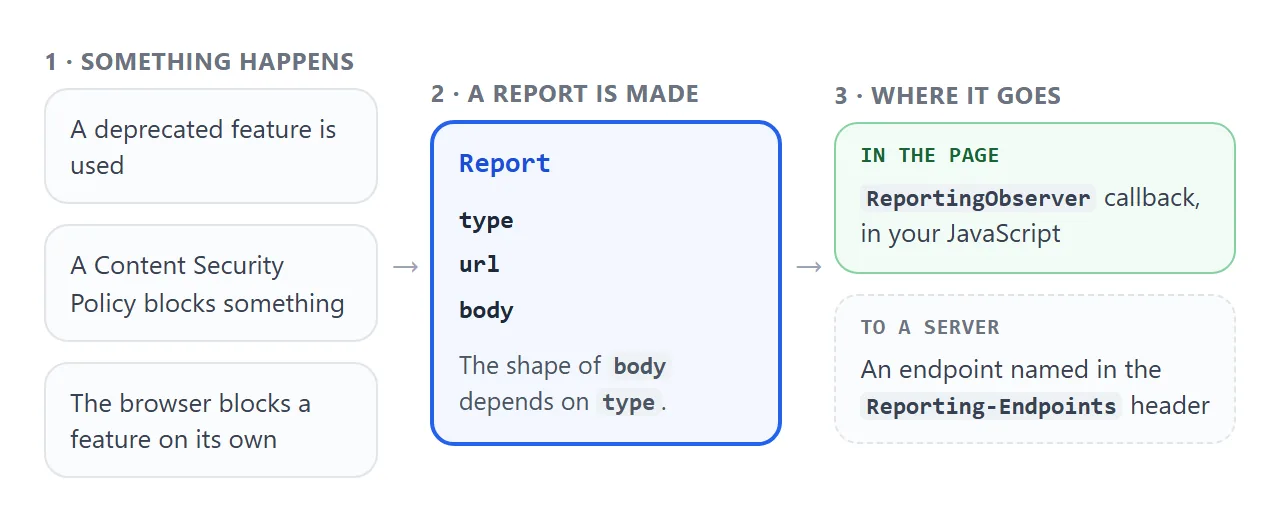
This guide is about the first outlet, the one you can try in a single HTML file. The server outlet needs response headers, so it is covered in a code sketch below.
What is inside a report
Every report has three fields. type names the kind of report, url is the document that made it, and body holds the details. What sits in body depends on the type.
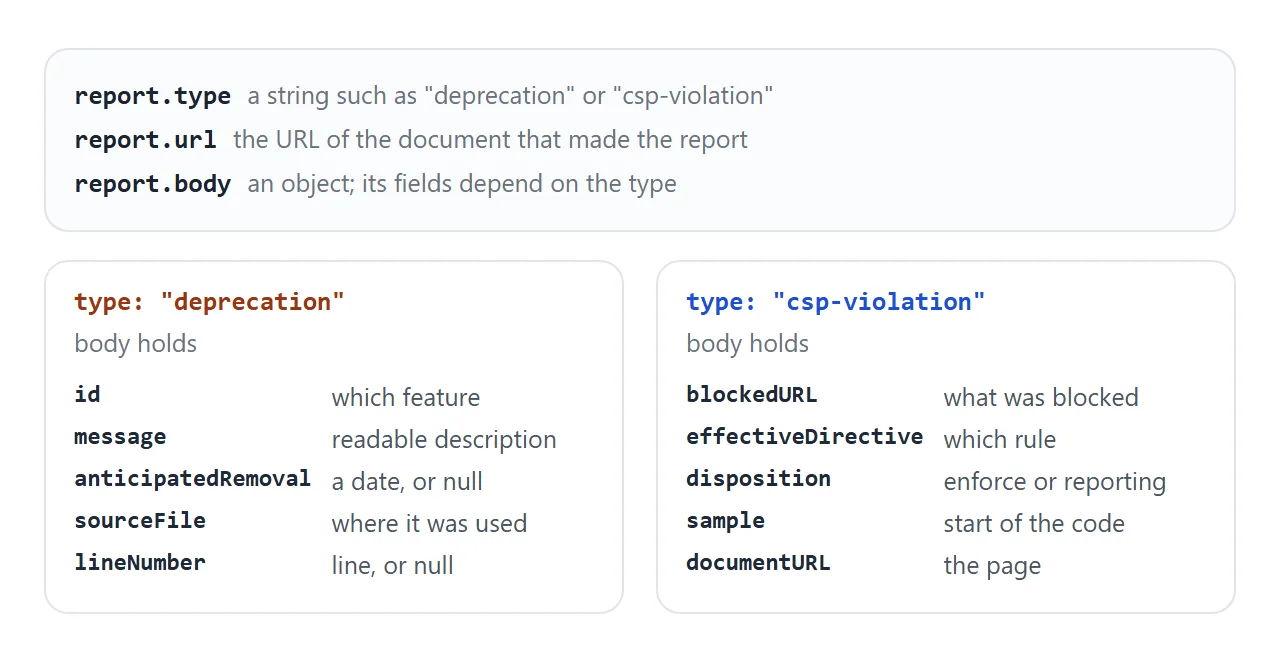
| Type | What it reports |
|---|---|
deprecation |
A deprecated feature was used |
csp-violation |
A Content Security Policy rule blocked or flagged something |
intervention |
The browser blocked a feature for security, performance or annoyance |
coep |
A Cross-Origin-Embedder-Policy violation |
permissions-policy-violation |
A Permissions-Policy violation |
integrity-violation |
An integrity policy violation |
MDN also lists crash and coop as report types. Crash reports cannot be seen in JavaScript, since the observing page has crashed. MDN marks the intervention report as deprecated, so do not build on it.
If you leave types out, the observer collects all the types the browser supports.
Make a report happen on purpose
Reports only appear when something goes wrong, which makes the API hard to try. A Content Security Policy fixes that, because you can write a rule your own page breaks. A <meta> tag is enough:
<meta http-equiv="Content-Security-Policy"
      content="script-src 'nonce-demo' 'report-sample'">
Only scripts that carry nonce="demo" may run now. A script element that the page adds without the nonce is blocked, and the browser files a csp-violation report. The 'report-sample' keyword puts the first 40 characters of the blocked code into body.sample.
A fixed nonce is fine for a demo. On a real site the server makes a new random nonce for every response. The Content Security Policy guide explains the rules.
Scripts are not the only trigger. When a policy has script-src and no 'unsafe-eval', calls to eval(), the Function() constructor and setTimeout() with a string are blocked too.
In our tests in Chromium, the same violation from the same place was reported once. A repeated click that changed nothing gave no second report, so the demos change the blocked code each time.
Options: types, buffered, takeRecords, disconnect
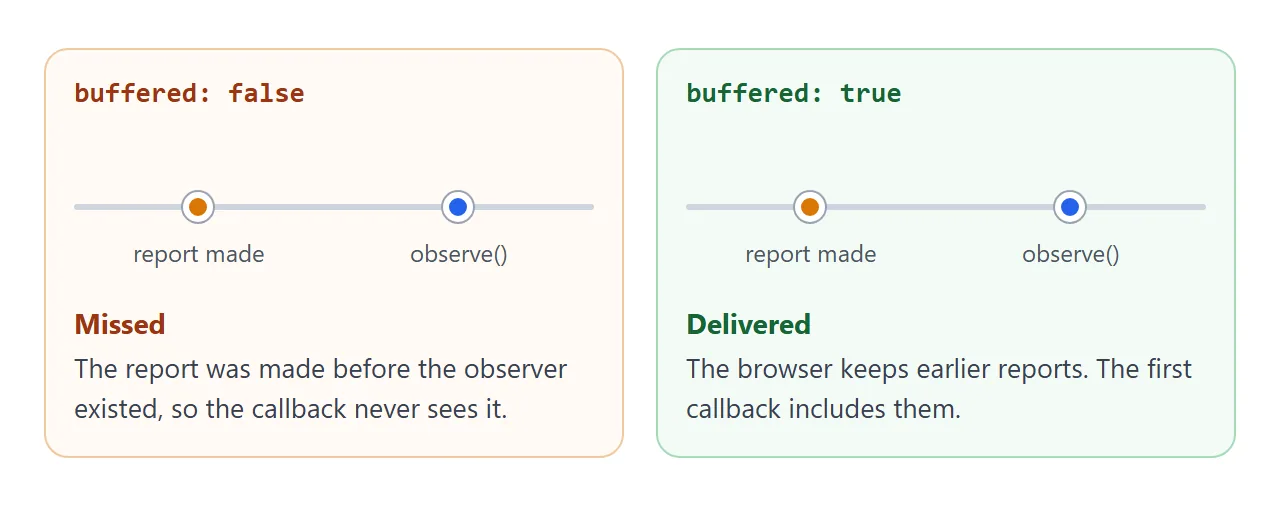
The options object has two keys. types is an array of report types to keep. buffered decides whether reports made before the observer existed are delivered too.
<!doctype html>
<html lang="en">
<head>
<meta charset="utf-8">
<meta name="viewport" content="width=device-width, initial-scale=1">
<meta http-equiv="Content-Security-Policy" content="script-src 'nonce-demo' 'report-sample'">
<title>ReportingObserver options</title>
<style>
  body { margin: 0; padding: 14px; font-family: system-ui, sans-serif; background: #f4f5f7; color: #1d2330; font-size: 14px; }
  h1 { font-size: 16px; margin: 0 0 8px; }
  fieldset { border: 1px solid #d5d9e0; border-radius: 10px; background: #fff; margin: 0 0 10px; padding: 8px 12px 10px; }
  legend { font-size: 12px; color: #6b7280; padding: 0 4px; }
  label { display: block; padding: 3px 0; }
  code { font: 600 12.5px ui-monospace, Consolas, monospace; background: #eef1f5; border-radius: 4px; padding: 0 3px; }
  .row { display: flex; flex-wrap: wrap; gap: 8px; margin-bottom: 10px; }
  button { font: inherit; font-size: 13px; padding: 8px 12px; border: 1px solid #c9ced8; border-radius: 8px; background: #fff; cursor: pointer; }
  button:hover { background: #eef1f5; }
  button.go { background: #166534; color: #fff; border-color: #166534; }
  #state { font-size: 13px; margin: 0 0 8px; color: #374151; }
  #log { list-style: none; margin: 0; padding: 0; display: grid; gap: 6px; max-height: 190px; overflow: auto; }
  #log li { background: #fff; border: 1px solid #e1e4ea; border-radius: 8px; padding: 6px 10px; font: 12.5px/1.4 ui-monospace, Consolas, monospace; overflow-wrap: anywhere; }
  #log li.cb { border-left: 4px solid #16a34a; }
  #log li.tk { border-left: 4px solid #2563eb; }
  #log li.info { border-left: 4px solid #9aa3b2; color: #4b5563; }
</style>
</head>
<body>
<h1>Options lab</h1>

<fieldset>
  <legend>Observer options</legend>
  <label><input type="checkbox" id="tCsp" checked> <code>types: ['csp-violation']</code></label>
  <label><input type="checkbox" id="tDep"> <code>types: ['deprecation']</code> (none will arrive here)</label>
  <label><input type="checkbox" id="buf"> <code>buffered: true</code></label>
</fieldset>

<div class="row">
  <button id="start" class="go">Create + observe()</button>
  <button id="fire">Add a blocked script</button>
  <button id="take">Add one, then takeRecords()</button>
  <button id="stop">disconnect()</button>
</div>
<p id="state">No observer yet. One blocked script was added when this page loaded.</p>
<ul id="log"></ul>

<script nonce="demo">
  const log = document.getElementById('log');
  const state = document.getElementById('state');
  let observer = null;
  let n = 0;

  function add(text, cls) {
    const li = document.createElement('li');
    li.className = cls;
    li.textContent = text;
    log.prepend(li);
  }
  let count = 0;
  function blocked() {
    const s = document.createElement('script');  // no nonce, so the policy blocks it
    s.textContent = 'var injected' + (++count) + ' = true;';
    document.body.appendChild(s);
  }
  function line(r) { return r.type + ' | ' + r.body.effectiveDirective + ' | ' + r.body.sample; }

  // Runs before any observer exists: only buffered: true can see this one
  blocked();

  document.getElementById('start').addEventListener('click', () => {
    if (!('ReportingObserver' in window)) { add('No ReportingObserver in this browser', 'info'); return; }
    if (observer) observer.disconnect();
    const types = [];
    if (document.getElementById('tCsp').checked) types.push('csp-violation');
    if (document.getElementById('tDep').checked) types.push('deprecation');
    const options = { buffered: document.getElementById('buf').checked };
    if (types.length) options.types = types;  // leave types out to get every type

    const id = ++n;
    observer = new ReportingObserver((reports) => {
      for (const r of reports) add('observer #' + id + ' callback: ' + line(r), 'cb');
    }, options);
    observer.observe();
    state.textContent = 'Observer #' + id + ' running with ' + JSON.stringify(options);
  });

  document.getElementById('fire').addEventListener('click', () => {
    blocked();
    if (!observer) add('Script blocked, but no observer is listening', 'info');
  });

  document.getElementById('take').addEventListener('click', () => {
    if (!observer) { add('Create an observer first', 'info'); return; }
    blocked();
    const taken = observer.takeRecords();  // queue is emptied, so the callback never sees these
    add('takeRecords() returned ' + taken.length + (taken.length ? ': ' + line(taken[0]) : ''), 'tk');
  });

  document.getElementById('stop').addEventListener('click', () => {
    if (observer) { observer.disconnect(); state.textContent = 'Observer #' + n + ' disconnected'; }
  });
</script>
</body>
</html>
Two methods finish the picture:
takeRecords()returns the reports waiting in the observer's queue and empties it. The callback never receives those.disconnect()stops the observer from collecting more reports.
In the demo, the takeRecords button adds a blocked script and calls takeRecords() straight away. It returns the report, and the callback stays silent for it.
Send reports to a server
Reading reports in the page is useful in development. To collect them from visitors you need somewhere to send them. There are two routes, and both need a server, so they do not run in a single HTML file.
The browser can deliver reports itself. A response header names an endpoint, and a directive such as report-to points at it:
Reporting-Endpoints: csp-endpoint="https://example.com/csp-reports"
Content-Security-Policy: default-src 'self'; report-to csp-endpoint
Or your page can forward what the observer receives, with navigator.sendBeacon(), which sends a small POST request without waiting for a response:
const observer = new ReportingObserver((reports) => {
  navigator.sendBeacon('/report-endpoint', JSON.stringify(reports));
}, { buffered: true });
observer.observe();
Here /report-endpoint is a placeholder for a route on your own server.
A finished example: a violation collector
An observer becomes useful when it summarises. This page counts violations per directive, keeps the latest sample, and shows the JSON you would send to a server.
<!doctype html>
<html lang="en">
<head>
<meta charset="utf-8">
<meta name="viewport" content="width=device-width, initial-scale=1">
<!-- scripts need the nonce, and style attributes are refused; 'report-sample' puts a snippet in the report -->
<meta http-equiv="Content-Security-Policy" content="script-src 'nonce-demo' 'report-sample'; style-src-attr 'none' 'report-sample'">
<title>Violation collector</title>
<style>
  body { margin: 0; padding: 14px; font-family: system-ui, sans-serif; background: #f4f5f7; color: #1d2330; font-size: 14px; }
  h1 { font-size: 16px; margin: 0 0 8px; }
  .row { display: flex; flex-wrap: wrap; gap: 8px; margin-bottom: 10px; }
  button { font: inherit; font-size: 13px; padding: 8px 12px; border: 1px solid #c9ced8; border-radius: 8px; background: #fff; cursor: pointer; }
  button:hover { background: #eef1f5; }
  table { width: 100%; border-collapse: collapse; background: #fff; border: 1px solid #e1e4ea; border-radius: 8px; font-size: 13px; margin-bottom: 10px; }
  th, td { text-align: left; padding: 6px 8px; border-bottom: 1px solid #eef0f4; }
  th { font-size: 12px; color: #6b7280; }
  td.n { font-weight: 700; width: 44px; }
  td.empty { color: #6b7280; }
  h2 { font-size: 13px; margin: 0 0 4px; color: #374151; }
  pre { margin: 0; padding: 10px; background: #1d2330; color: #e5e7eb; border-radius: 8px; font: 12px/1.45 ui-monospace, Consolas, monospace; white-space: pre-wrap; overflow-wrap: anywhere; min-height: 90px; }
</style>
</head>
<body>
<h1>Violation collector</h1>
<div class="row">
  <button id="scriptBtn">Add a script</button>
  <button id="styleBtn">Set a style attribute</button>
  <button id="clearBtn">Clear</button>
</div>

<table>
  <thead><tr><th>Count</th><th>Directive</th><th>Last sample</th></tr></thead>
  <tbody id="rows"><tr><td colspan="3" class="empty">Nothing reported yet.</td></tr></tbody>
</table>

<h2>What you would send to a server (shown, not sent)</h2>
<pre id="payload">[]</pre>

<script nonce="demo">
  const groups = new Map();  // one row per directive: {directive, sample, count}
  const rows = document.getElementById('rows');
  const payload = document.getElementById('payload');

  function render() {
    rows.textContent = '';
    if (!groups.size) {
      rows.innerHTML = '<tr><td colspan="3" class="empty">Nothing reported yet.</td></tr>';
    }
    for (const g of groups.values()) {
      const tr = document.createElement('tr');
      for (const [text, cls] of [[g.count, 'n'], [g.directive, ''], [g.sample, '']]) {
        const td = document.createElement('td');
        td.textContent = text;
        if (cls) td.className = cls;
        tr.appendChild(td);
      }
      rows.appendChild(tr);
    }
    // In a real page: navigator.sendBeacon('/report-endpoint', json) - not called here
    payload.textContent = JSON.stringify([...groups.values()], null, 2);
  }

  if ('ReportingObserver' in window) {
    const observer = new ReportingObserver((reports) => {
      for (const r of reports) {
        if (r.type !== 'csp-violation') continue;
        const key = r.body.effectiveDirective;
        const g = groups.get(key) || { directive: key, sample: '', count: 0 };
        g.count++;
        g.sample = r.body.sample;
        groups.set(key, g);
      }
      render();
    }, { types: ['csp-violation'] });
    observer.observe();
  } else {
    payload.textContent = 'This browser has no ReportingObserver.';
  }

  let n = 0;
  document.getElementById('scriptBtn').addEventListener('click', () => {
    const el = document.createElement('script');  // no nonce: blocked
    el.textContent = 'var injected' + (++n) + ' = true;';
    document.body.appendChild(el);
  });
  document.getElementById('styleBtn').addEventListener('click', () => {
    document.createElement('span').setAttribute('style', 'color: #' + (100 + (++n)));  // inline style attribute: blocked
  });
  document.getElementById('clearBtn').addEventListener('click', () => { groups.clear(); render(); });
</script>
</body>
</html>
- Group by directive:
body.effectiveDirectivenames the rule that was broken, so it makes a good key. - Filter by type: the observer asks for
csp-violationonly, so other reports are never delivered. - Show, do not send: the page does not contact any server. The JSON stands in for what
sendBeacon()would send.
Browser support
MDN currently lists ReportingObserver as Baseline 2026, newly available since March 2026. MDN also says it might not work in older browsers, and marks the DeprecationReport type as limited availability. It is available in Web Workers too.
So check for it, and do not rely on it for anything a visitor needs:
if ('ReportingObserver' in window) {
  // create the observer
}
Treat reports as a development and monitoring aid. They help you find problems, and your page must work when none arrive.
When it does not work
| Symptom | Cause | Fix |
|---|---|---|
| The callback never runs | Nothing was reported yet | Cause one, for example with a CSP rule your page breaks |
| Reports made at page load are missing | The observer was created after them | Pass buffered: true |
| Only some report types arrive | A types array filters the rest |
Add the type, or omit types |
| ReferenceError: ReportingObserver is not defined | The browser has no support | Test 'ReportingObserver' in window first |
| A second click gives no report | The browser reported the same thing once | Change what you trigger, or reload |
takeRecords() returns an empty array |
The callback already took the queue | Call it right after the event, or skip it |
| Reports do not reach the server | The header or endpoint is wrong | Check Reporting-Endpoints and the report-to name |
Open the browser's developer tools as well. The DevTools guide shows where console messages appear. A deprecation report's message typically matches what the browser prints there.
Share it as a link
An observer is easier to understand when you can press the buttons than when you read a log. Sent as an attachment, a page may open as plain code or not at all.
To send a working version, paste the page into a NOS document and choose Create share link. HTML to link walks through it.
The page renders as written and its scripts run, so the person you send it to can trigger the reports themselves. If you change the code later, the same link shows the new version.