Infinite scroll needs three parts: a list, an empty marker after it called a sentinel, and an IntersectionObserver that watches the sentinel. When the sentinel comes into view, the callback adds the next batch of items.
No library is needed, and the whole thing fits in one HTML file. Scroll the list below to the bottom and it keeps growing.
<!doctype html>
<html lang="en">
<head>
<meta charset="utf-8">
<meta name="viewport" content="width=device-width, initial-scale=1">
<title>Infinite scroll, smallest version</title>
<style>
  * { box-sizing: border-box; }
  body { margin: 0; font-family: system-ui, sans-serif; background: #f4f5f7; color: #1d2330; }
  .bar { height: 36px; padding: 0 14px; display: flex; align-items: center; justify-content: space-between;
         font-size: 13px; background: #fff; border-bottom: 1px solid #e1e4ea; }
  #feed { height: 300px; overflow-y: auto; padding: 10px 14px; }  /* the box that scrolls */
  ul { list-style: none; margin: 0; padding: 0; }
  li { padding: 12px 14px; margin-bottom: 8px; background: #fff; border-radius: 10px;
       box-shadow: 0 1px 3px rgba(0, 0, 0, .1); }
  #sentinel { height: 1px; }  /* empty marker after the list */
</style>
</head>
<body>
<div class="bar"><b>Scroll the list</b><span id="status">0 items</span></div>
<div id="feed">
  <ul id="list"></ul>
  <div id="sentinel"></div>
</div>

<script>
  const feed = document.getElementById('feed');
  const list = document.getElementById('list');
  const sentinel = document.getElementById('sentinel');
  let count = 0;

  function addItems(n) {
    for (let i = 0; i < n; i++) {
      const li = document.createElement('li');
      li.textContent = 'Item ' + (++count);
      list.append(li);
    }
    document.getElementById('status').textContent = count + ' items';
  }

  const observer = new IntersectionObserver((entries) => {
    if (!entries[0].isIntersecting) return;
    addItems(10);
    // Observe again so the browser re-checks: a short list can leave the sentinel in view
    observer.unobserve(sentinel);
    observer.observe(sentinel);
  }, { root: feed, rootMargin: '0px 0px 200px 0px' });  // start 200px before the end

  observer.observe(sentinel);
</script>
</body>
</html>
The items here are made up by a small function. A real page would ask a server for them, and the finished example further down shows where that call goes.
How it works, step by step
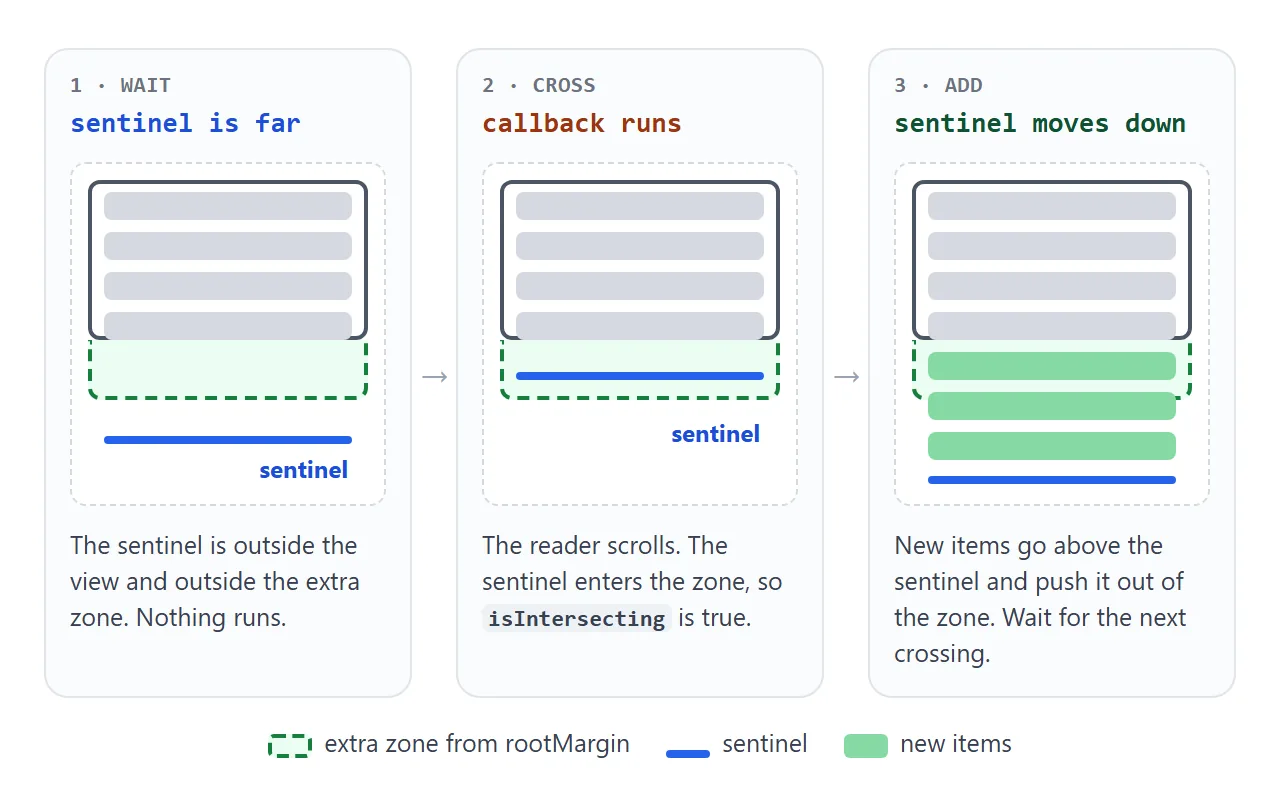
- Make a box that scrolls. Give the list container a fixed height and
overflow-y: auto. This box becomes the observer'sroot. - Add a sentinel. An empty
<div>right after the list. It is the thing the observer watches. - Create the observer. Call
new IntersectionObserver()with a callback and the optionsrootandrootMargin. TherootMarginstring works like a CSS margin and grows the watched area. - Add items when it intersects. In the callback, check
entries[0].isIntersectingand append the next batch above the sentinel. - Observe the sentinel again. Call
unobserve()and thenobserve()on it after each batch, so the browser reports its position once more. - Stop at the end. When nothing is left to load, call
observer.disconnect().
Step 5 is the one people miss. The callback runs when the sentinel's state changes, and a short batch can leave the sentinel inside the zone. Nothing then crosses, so the list stops growing after one batch.
observe() registers the sentinel as if it were new, so the browser reports it again. That second report is what fills a tall screen.
To scroll the whole page instead of a box, leave out root. The observer then watches the viewport. Inside an embedded frame the margin can be ignored, which the IntersectionObserver guide explains. A scrolling box as root avoids that.
Scroll event or IntersectionObserver
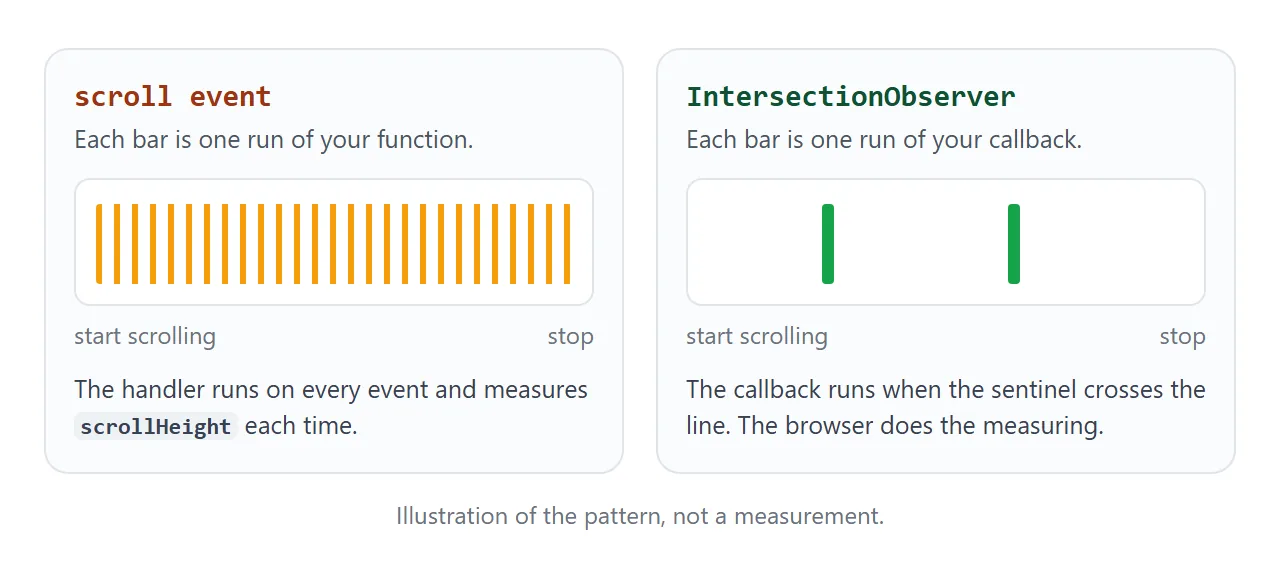
The other common approach listens to scroll on the box and works out how far from the end it is:
const left = box.scrollHeight - box.scrollTop - box.clientHeight;
if (left < 200) addItems();  // 200px or less still hidden below
This works, but it runs for every scroll event. Press the button and compare the two counters.
<!doctype html>
<html lang="en">
<head>
<meta charset="utf-8">
<meta name="viewport" content="width=device-width, initial-scale=1">
<title>Scroll event vs IntersectionObserver</title>
<style>
  * { box-sizing: border-box; }
  body { margin: 0; padding: 10px; font-family: system-ui, sans-serif; background: #f4f5f7; color: #1d2330; }
  .top { display: flex; align-items: center; justify-content: space-between; gap: 8px; margin-bottom: 8px; font-size: 13px; }
  button { font: inherit; padding: 6px 12px; border: 0; border-radius: 8px; background: #2563eb; color: #fff; cursor: pointer; }
  button:disabled { background: #9aa3b2; cursor: default; }
  .cols { display: grid; grid-template-columns: 1fr 1fr; gap: 10px; }
  h3 { margin: 0 0 4px; font-size: 13px; }
  .count { font-size: 12px; color: #4b5563; margin-bottom: 6px; min-height: 32px; }
  .count b { color: #1d2330; font-size: 15px; }
  .feed { height: 270px; overflow-y: auto; padding: 6px; background: #fff; border-radius: 10px; border: 1px solid #e1e4ea; }
  .feed div.item { padding: 8px 10px; margin-bottom: 6px; background: #f4f5f7; border-radius: 6px; font-size: 13px; }
  .sentinel { height: 1px; }
</style>
</head>
<body>
<div class="top"><span>Same list, two ways to know "near the end".</span><button id="go">Scroll both</button></div>
<div class="cols">
  <div>
    <h3>scroll event</h3>
    <div class="count">handler ran <b id="a-runs">0</b> times<br><span id="a-items">0</span> items</div>
    <div class="feed" id="a"></div>
  </div>
  <div>
    <h3>IntersectionObserver</h3>
    <div class="count">callback ran <b id="b-runs">0</b> times<br><span id="b-items">0</span> items</div>
    <div class="feed" id="b"><div class="sentinel" id="b-sentinel"></div></div>
  </div>
</div>

<script>
  const a = document.getElementById('a');
  const b = document.getElementById('b');
  const sentinel = document.getElementById('b-sentinel');
  let aRuns = 0, bRuns = 0, aCount = 0, bCount = 0;

  function makeItem(n) {
    const d = document.createElement('div');
    d.className = 'item';
    d.textContent = 'Item ' + n;
    return d;
  }

  // Left: a scroll listener has to measure on every event
  function checkA() {
    aRuns++;
    const left = a.scrollHeight - a.scrollTop - a.clientHeight;  // pixels still below the view
    if (left < 200) {
      for (let i = 0; i < 10; i++) a.append(makeItem(++aCount));
    }
    document.getElementById('a-runs').textContent = aRuns;
    document.getElementById('a-items').textContent = aCount;
  }
  a.addEventListener('scroll', checkA);
  checkA();  // fill the first screen

  // Right: the browser calls back only when the sentinel crosses the line
  const observer = new IntersectionObserver((entries) => {
    bRuns++;
    if (entries[0].isIntersecting) {
      const items = [];
      for (let i = 0; i < 10; i++) items.push(makeItem(++bCount));
      sentinel.before(...items);  // add the batch above the sentinel
      observer.unobserve(sentinel);
      observer.observe(sentinel);
    }
    document.getElementById('b-runs').textContent = bRuns;
    document.getElementById('b-items').textContent = bCount;
  }, { root: b, rootMargin: '0px 0px 200px 0px' });
  observer.observe(sentinel);

  // The button scrolls both lists the same distance, a few pixels per frame
  document.getElementById('go').addEventListener('click', (e) => {
    const btn = e.currentTarget;
    btn.disabled = true;
    let moved = 0;
    (function step() {
      a.scrollTop += 12;
      b.scrollTop += 12;
      moved += 12;
      if (moved < 1500) requestAnimationFrame(step);
      else btn.disabled = false;
    })();
  });
</script>
</body>
</html>
| Scroll event | IntersectionObserver | |
|---|---|---|
| Runs | On scroll events, which can fire at a high rate | When the sentinel crosses the zone edge |
| You measure | scrollHeight, scrollTop, clientHeight |
Nothing, read isIntersecting |
| First screen | You call the check once yourself | The first report arrives after observe() |
| Stop | removeEventListener |
disconnect() |
If you choose the scroll event, do not compare with ===. scrollTop can have a decimal part while scrollHeight and clientHeight are rounded, so test for "close enough" with a small tolerance, as MDN's own example does. See addEventListener for the listener basics.
Load before the reader reaches the end
With the default margin, loading starts only when the sentinel touches the edge of the box. The reader arrives first and waits.
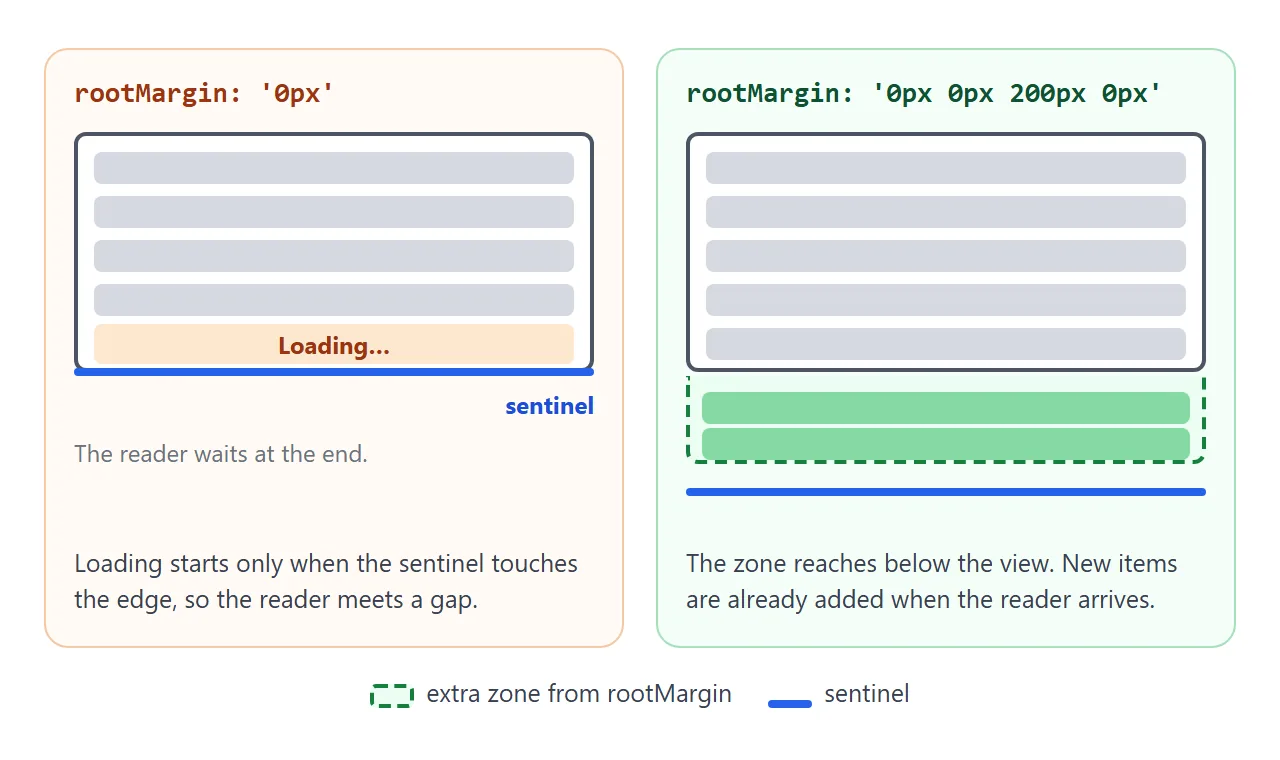
The fix is one option: rootMargin: '0px 0px 200px 0px'. The four values are top, right, bottom and left, in px or %. A positive bottom value reaches below the box, so the callback runs while the sentinel is still out of sight.
A larger value starts loading earlier. A value of 0px starts at the edge.
A finished feed: loading, retry and an end
The smallest version assumes loading is instant and never fails. A real feed needs a few more lines.
<!doctype html>
<html lang="en">
<head>
<meta charset="utf-8">
<meta name="viewport" content="width=device-width, initial-scale=1">
<title>Infinite feed with loading, retry and an end</title>
<style>
  * { box-sizing: border-box; }
  body { margin: 0; font-family: system-ui, sans-serif; background: #f4f5f7; color: #1d2330; }
  header { height: 48px; padding: 0 14px; display: flex; align-items: center; gap: 10px; flex-wrap: wrap;
           background: #fff; border-bottom: 1px solid #e1e4ea; font-size: 13px; }
  header .grow { flex: 1; }
  header button { font: inherit; padding: 4px 10px; border: 1px solid #cfd5df; border-radius: 8px; background: #fff; cursor: pointer; }
  #feed { height: 432px; overflow-y: auto; padding: 10px 14px; }
  ul { list-style: none; margin: 0; padding: 0; }
  li { display: flex; gap: 12px; align-items: center; padding: 10px; margin-bottom: 8px;
       background: #fff; border-radius: 10px; box-shadow: 0 1px 3px rgba(0, 0, 0, .1); }
  .pic { width: 48px; height: 48px; flex: none; border-radius: 8px; }
  li b { display: block; font-size: 14px; }
  li span { font-size: 12px; color: #6b7280; }
  #foot { text-align: center; padding: 10px 0 16px; font-size: 13px; color: #4b5563; }
  #foot button { font: inherit; margin-top: 6px; padding: 7px 16px; border: 0; border-radius: 8px; background: #2563eb; color: #fff; cursor: pointer; }
  #foot.error #msg { color: #b45309; }
  .spin { display: inline-block; width: 12px; height: 12px; margin-right: 6px; vertical-align: -2px; border: 2px solid #cfd5df;
          border-top-color: #2563eb; border-radius: 50%; animation: r .8s linear infinite; }
  @keyframes r { to { transform: rotate(360deg); } }
  @media (prefers-reduced-motion: reduce) { .spin { animation: none; } }
</style>
</head>
<body>
<header>
  <b>Photos</b>
  <span id="status">0 of 60</span>
  <span class="grow"></span>
  <label><input type="checkbox" id="fail"> Next load fails</label>
  <button id="top" type="button">Top</button>
</header>
<div id="feed">
  <ul id="list"></ul>
  <div id="foot"><div id="msg"></div><button id="more" type="button">Load more</button></div>
</div>

<script>
  const TOTAL = 60, PAGE = 10;
  const feed = document.getElementById('feed');
  const list = document.getElementById('list');
  const foot = document.getElementById('foot');
  const msg = document.getElementById('msg');
  const more = document.getElementById('more');
  let loaded = 0;
  let busy = false;  // true while a request is pending

  // Stand-in for fetch(): answers after 500 ms with the next page of numbers
  function getPage(from) {
    return new Promise((resolve, reject) => {
      setTimeout(() => {
        const failBox = document.getElementById('fail');
        if (failBox.checked) { failBox.checked = false; reject(new Error('network')); return; }
        resolve(Array.from({ length: Math.min(PAGE, TOTAL - from) }, (_, i) => from + i + 1));
      }, 500);
    });
  }

  function makeItem(n) {
    const li = document.createElement('li');
    li.innerHTML = '<div class="pic"></div><div><b></b><span></span></div>';
    li.querySelector('.pic').style.background =
      'linear-gradient(135deg, hsl(' + (n * 47 % 360) + ' 70% 62%), hsl(' + (n * 47 % 360 + 40) + ' 70% 45%))';
    li.querySelector('b').textContent = 'Photo ' + n;
    li.querySelector('span').textContent = 'Page ' + Math.ceil(n / PAGE);
    return li;
  }

  async function loadMore() {
    if (busy || loaded >= TOTAL) return;  // one request at a time
    busy = true;
    foot.className = '';
    more.hidden = true;
    msg.innerHTML = '<span class="spin"></span>Loading';
    try {
      const nums = await getPage(loaded);
      list.append(...nums.map(makeItem));
      loaded += nums.length;
    } catch (err) {
      foot.className = 'error';
      msg.textContent = 'Could not load the next page.';
      more.textContent = 'Retry';
      more.hidden = false;
      busy = false;
      return;  // do not re-observe: wait for a click, so a failure cannot loop
    }
    busy = false;
    document.getElementById('status').textContent = loaded + ' of ' + TOTAL;
    if (loaded >= TOTAL) {
      observer.disconnect();  // nothing left to load
      msg.textContent = 'You reached the end.';
      return;
    }
    msg.textContent = '';
    more.textContent = 'Load more';
    more.hidden = false;
    observer.unobserve(foot);
    observer.observe(foot);  // check again in case the page did not fill the screen
  }

  const observer = new IntersectionObserver((entries) => {
    if (entries[0].isIntersecting) loadMore();
  }, { root: feed, rootMargin: '0px 0px 200px 0px' });
  observer.observe(foot);

  more.addEventListener('click', loadMore);  // manual route, same function
  document.getElementById('top').addEventListener('click', () => feed.scrollTo({ top: 0 }));
</script>
</body>
</html>
- One request at a time. A
busyflag at the top ofloadMore()ignores calls while a request is pending. - Visible state. A spinner row while loading, and an error message with a Retry button.
- No automatic retry loop. After a failure the function returns before observing again, so the next attempt waits for a click.
- A manual route. The Load more button calls the same function.
- An end. On the last page the code calls
disconnect()and shows a closing message.
In the example, getPage() waits 500 ms and returns numbers. To use a server, replace its body:
async function getPage(from) {
  const res = await fetch('/api/items?from=' + from);
  if (!res.ok) throw new Error('HTTP ' + res.status);  // 404 does not reject by itself
  return res.json();
}
fetch() fulfills with a response even for a 404 or 500, so check res.ok and throw yourself. In NOS, fetch to other sites is blocked, so a shared page keeps its data inside the page, as these examples do.
Do you need a library?
For a growing list, one observer and one function are the whole feature, so a library is optional. If you want one anyway, NOS loads scripts from cdnjs.cloudflare.com, cdn.jsdelivr.net and unpkg.com. Pin the version in the URL.
Every appended item stays in the page. For a feed that could grow very long, content-visibility: auto lets the browser skip rendering work for items that are off screen. CSS content-visibility shows how to set it with a size hint.
Adding items at the top of a list, as a chat does with older messages, is a different job. CSS overflow-anchor covers it.
When it does not work
| What you see | Cause | Fix |
|---|---|---|
| It loads once, then stops | The sentinel never left the zone, so nothing crossed | unobserve() then observe() after each batch |
| The same page loads twice | A scroll handler runs again while a request is pending | A busy flag, or an observer |
| The reader sees a gap at the end | rootMargin is 0px |
Add a bottom margin such as 200px |
| A failed request repeats forever | The error path observes again | Return early and offer Retry |
| Footer links are out of reach | The list grows each time the bottom is reached | Put links outside the scrolling box, or end the list |
| The end check never fires | scrollTop has a decimal part |
Compare with a tolerance, not === |
| The list gets very long | Nothing ever removes old items | content-visibility: auto, or a cap |
| The preload distance has no effect in an embedded page | rootMargin can be ignored when root is left out |
Use the scrolling box as root |
Share it as a link
Infinite scroll is something you feel by scrolling, and a screenshot only shows a still list. An .html attachment may open as plain code, or not at all, on a phone.
To send the working version, paste the page into a NOS document and choose Create share link. HTML to link walks through it.
The page renders as written and its scripts run, so anyone with the link can open it without an account and scroll the list themselves. If you change the code later, the same link shows the new version.
Single-file HTML apps has more ideas of this size.