A scroll reveal needs two pieces. CSS describes a hidden state and a shown state, with a transition between them. JavaScript watches the elements with IntersectionObserver and adds a class when each one comes into view. The browser animates the change.
Scroll inside this example.
<!doctype html>
<html lang="en">
<head>
<meta charset="utf-8">
<meta name="viewport" content="width=device-width, initial-scale=1">
<title>Scroll reveal</title>
<style>
  body { margin: 0; font-family: system-ui, sans-serif; background: #f4f5f7; color: #1d2330; }
  main { padding: 16px 16px 140px; max-width: 520px; margin: 0 auto; }
  .hint { margin: 0 0 300px; color: #5b6270; font-size: 15px; }
  .box { margin: 0 0 36px; padding: 20px; border-radius: 12px; background: #fff; box-shadow: 0 4px 14px rgba(0, 0, 0, .08); }
  .box h2 { margin: 0 0 6px; font-size: 17px; }
  .box p { margin: 0; font-size: 14px; color: #5b6270; }

  /* the hidden state applies only after the script adds .js to <html> */
  .js .reveal {
    opacity: 0;
    transform: translateY(28px);
    transition: opacity .6s ease, transform .6s ease;
  }
  .js .reveal.in { opacity: 1; transform: none; }
</style>
</head>
<body>
<main>
  <p class="hint">Scroll down inside this box. Each block fades up as it comes into view.</p>
  <section class="box reveal"><h2>First</h2><p>Hidden until it enters the view, then it fades up.</p></section>
  <section class="box reveal"><h2>Second</h2><p>Scroll back up: it stays visible. It is revealed once.</p></section>
  <section class="box reveal"><h2>Third</h2><p>Only opacity and transform change, so nothing else moves.</p></section>
  <section class="box reveal"><h2>Fourth</h2><p>Without the script, every block is simply visible.</p></section>
</main>

<script>
  if ('IntersectionObserver' in window) {
    document.documentElement.classList.add('js');  // turn the hidden state on

    const observer = new IntersectionObserver((entries) => {
      entries.forEach((entry) => {
        if (!entry.isIntersecting) return;   // skip blocks that are still off screen
        entry.target.classList.add('in');    // CSS runs the transition
        observer.unobserve(entry.target);    // once is enough
      });
    }, {
      root: document,                    // this page's own viewport, even inside a frame
      rootMargin: '0px 0px -10% 0px',    // start a little above the bottom edge
    });

    document.querySelectorAll('.reveal').forEach((el) => observer.observe(el));
  }
</script>
</body>
</html>
The script never touches opacity or position. It only adds .in, so every effect lives in the stylesheet, where it is easy to change.
The two states in CSS
The hidden state is the starting point of the animation. The shown state is the element's normal look.
.js .reveal {
  opacity: 0;
  transform: translateY(28px);
  transition: opacity .6s ease, transform .6s ease;
}
.js .reveal.in { opacity: 1; transform: none; }
Animate opacity and transform only. A transform moves the element visually without changing layout, so text below it does not jump. Animating margin or top pushes the rest of the page around while it plays.
Swap the transform value to change the effect. The CSS transition guide covers timing and easing.
| Effect | Hidden state |
|---|---|
| Fade up | translateY(28px) |
| Slide in from the left | translateX(-40px) |
| Zoom | scale(.85) |
| Fade only | No transform, opacity alone |
The observer: one class per element
const observer = new IntersectionObserver((entries) => {
  entries.forEach((entry) => {
    if (!entry.isIntersecting) return;
    entry.target.classList.add('in');
    observer.unobserve(entry.target);
  });
}, { root: document, rootMargin: '0px 0px -10% 0px' });

document.querySelectorAll('.reveal').forEach((el) => observer.observe(el));
The first callback reports every element, including ones far below the screen, so skip entries that are not intersecting. The negative bottom margin starts each reveal a little above the bottom edge, where the reader can see it play.
root: document keeps that margin working when the page runs inside a frame from another origin. The IntersectionObserver guide explains the options and the frame case in detail.
Never hide content for good
If the stylesheet hides elements for everyone, the page depends on the script to show them. When the script fails to load, throws an error earlier on, or JavaScript is off, the content stays invisible.
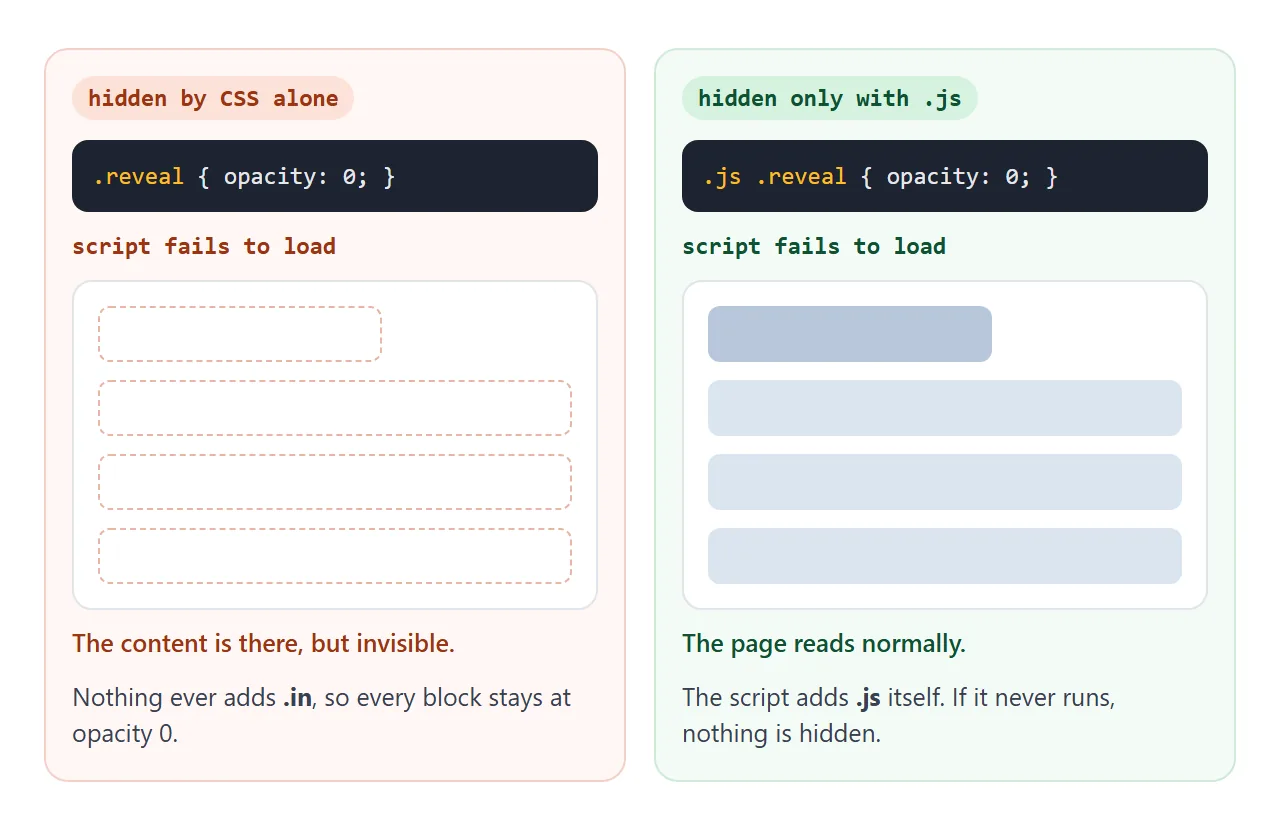
The fix is to hide only when the script is running:
- Write the hidden state under
.js, not on.revealalone. - Add
.jsto thehtmlelement from the same script that creates the observer. - Check for
IntersectionObserverfirst. Without it, do not add the class.
A <noscript> block in the head that overrides the hidden state also works for the JavaScript-off case, as shown in the noscript guide. It does not help when the script loads but fails, which the class approach covers.
Printing is the other trap. Elements the reader never scrolled to are still at opacity 0 on paper. A print rule shows them:
@media print {
  .js .reveal { opacity: 1; transform: none; transition: none; }
}
Once or every time
A one-time reveal calls unobserve() after adding the class. Scrolling back up leaves the element as it is. For an effect that plays each time, keep observing and remove the class when the element leaves.
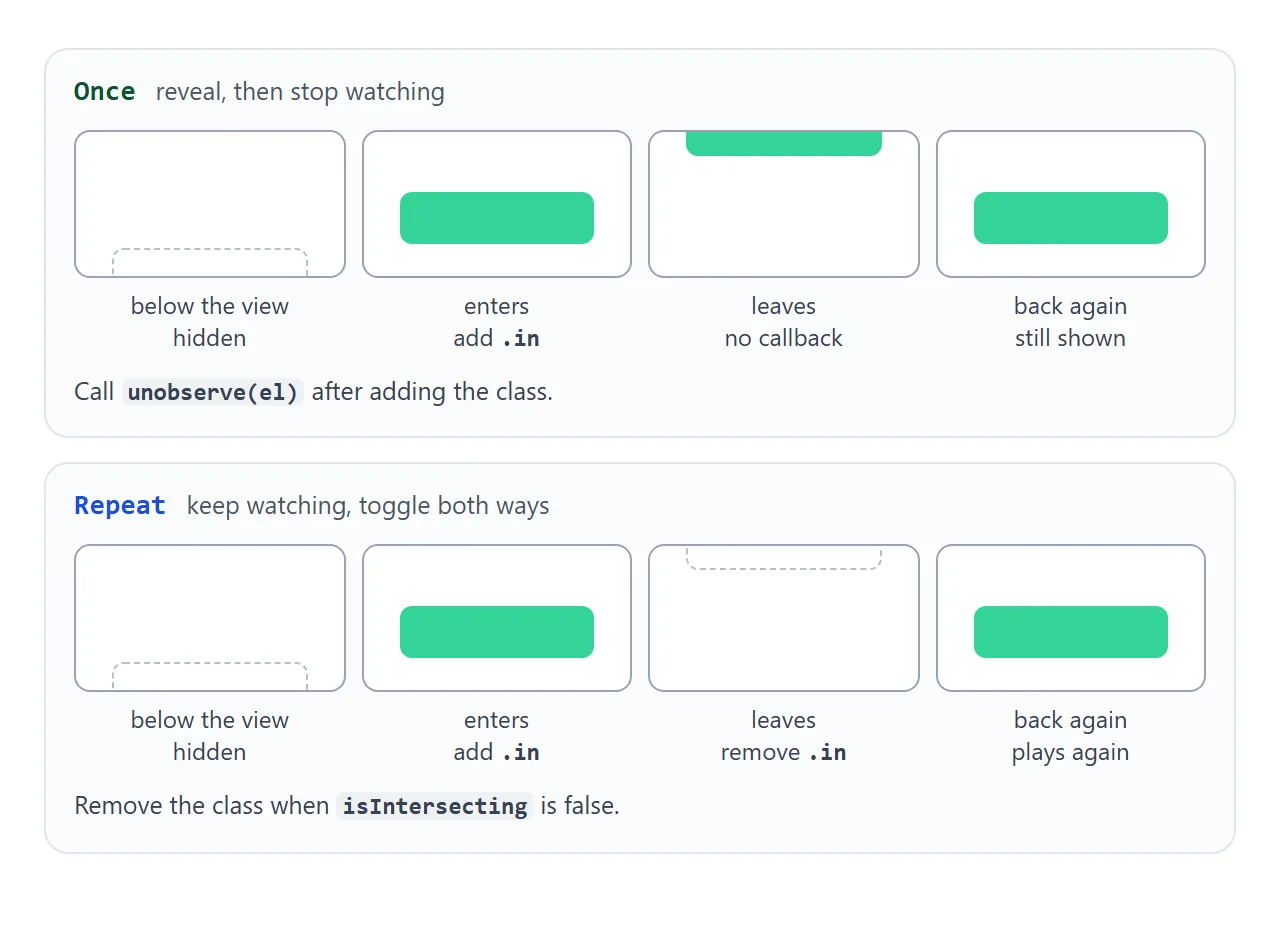
if (entry.isIntersecting) el.classList.add('in');
else el.classList.remove('in');
Try both, along with the effects from the table and a stagger:
<!doctype html>
<html lang="en">
<head>
<meta charset="utf-8">
<meta name="viewport" content="width=device-width, initial-scale=1">
<title>Reveal options</title>
<style>
  body { margin: 0; font-family: system-ui, sans-serif; background: #f4f5f7; color: #1d2330; }
  .bar {
    position: sticky; top: 0; z-index: 2; display: flex; flex-wrap: wrap; gap: 8px 14px; align-items: center;
    padding: 10px 12px; background: #1d2330; color: #fff; font-size: 14px;
  }
  .bar label { display: flex; align-items: center; gap: 5px; }
  .bar select { font: inherit; font-size: 14px; }
  #count { margin-left: auto; font-size: 13px; color: #b9c0cc; }
  main { padding: 14px 12px 120px; }
  .hint { margin: 0 0 260px; color: #5b6270; font-size: 14px; }
  .grid { display: grid; grid-template-columns: repeat(3, 1fr); gap: 10px; margin-bottom: 10px; }
  .tile {
    height: 84px; border-radius: 10px; display: grid; place-items: center;
    background: linear-gradient(135deg, #34d399, #2563eb); color: #fff; font-weight: 700; font-size: 18px;
  }

  .js .reveal { opacity: 0; transition: opacity .5s ease, transform .5s ease; }
  /* the delay sits on .in only, so hiding again (repeat mode) starts at once */
  .js .reveal.in { opacity: 1; transform: none; transition-delay: calc(var(--i, 0) * 90ms); }

  /* one starting position per effect */
  .fx-up .reveal { transform: translateY(30px); }
  .fx-left .reveal { transform: translateX(-40px); }
  .fx-zoom .reveal { transform: scale(.8); }
</style>
</head>
<body class="fx-up">
<div class="bar">
  <label>Effect
    <select id="fx">
      <option value="up">Fade up</option>
      <option value="left">Slide in</option>
      <option value="zoom">Zoom</option>
      <option value="fade">Fade only</option>
    </select>
  </label>
  <label><input type="checkbox" id="repeat"> Repeat</label>
  <label><input type="checkbox" id="stagger" checked> Stagger</label>
  <span id="count">Reveals: 0</span>
</div>
<main>
  <p class="hint">Pick an effect, then scroll. Turn on Repeat and scroll back up: tiles hide again when they leave.</p>
  <div class="grid">
    <div class="tile reveal">1</div><div class="tile reveal">2</div><div class="tile reveal">3</div>
    <div class="tile reveal">4</div><div class="tile reveal">5</div><div class="tile reveal">6</div>
  </div>
  <div class="grid">
    <div class="tile reveal">7</div><div class="tile reveal">8</div><div class="tile reveal">9</div>
    <div class="tile reveal">10</div><div class="tile reveal">11</div><div class="tile reveal">12</div>
  </div>
  <div class="grid">
    <div class="tile reveal">13</div><div class="tile reveal">14</div><div class="tile reveal">15</div>
  </div>
</main>

<script>
  const tiles = document.querySelectorAll('.reveal');
  const fx = document.getElementById('fx');
  const repeat = document.getElementById('repeat');
  const stagger = document.getElementById('stagger');
  const count = document.getElementById('count');
  let reveals = 0;
  document.documentElement.classList.add('js');

  const observer = new IntersectionObserver((entries) => {
    let n = 0;  // position within this batch, for the stagger delay
    entries.forEach((entry) => {
      const el = entry.target;
      if (entry.isIntersecting) {
        el.style.setProperty('--i', stagger.checked ? n++ : 0);
        el.classList.add('in');
        count.textContent = 'Reveals: ' + (++reveals);
        if (!repeat.checked) observer.unobserve(el);  // once: stop watching
      } else if (repeat.checked) {
        el.classList.remove('in');                    // repeat: hide when it leaves
      }
    });
  }, { root: document, rootMargin: '0px 0px -10% 0px' });

  function start() {
    observer.disconnect();
    tiles.forEach((el) => { el.classList.remove('in'); observer.observe(el); });
  }

  fx.addEventListener('change', () => { document.body.className = 'fx-' + fx.value; start(); });
  repeat.addEventListener('change', start);
  stagger.addEventListener('change', start);
  start();
</script>
</body>
</html>
Repeat suits a short showcase. On a long page of text, content that disappears whenever it leaves the screen can get in the reader's way, so a one-time reveal is the safer choice there.
Stagger: one after another
Cards that enter together all animate at the same moment. A stagger gives each one a slightly longer delay. Store the position in a CSS variable and let CSS turn it into a delay:
.js .reveal.in {
  transition-delay: calc(var(--i, 0) * 100ms);
}
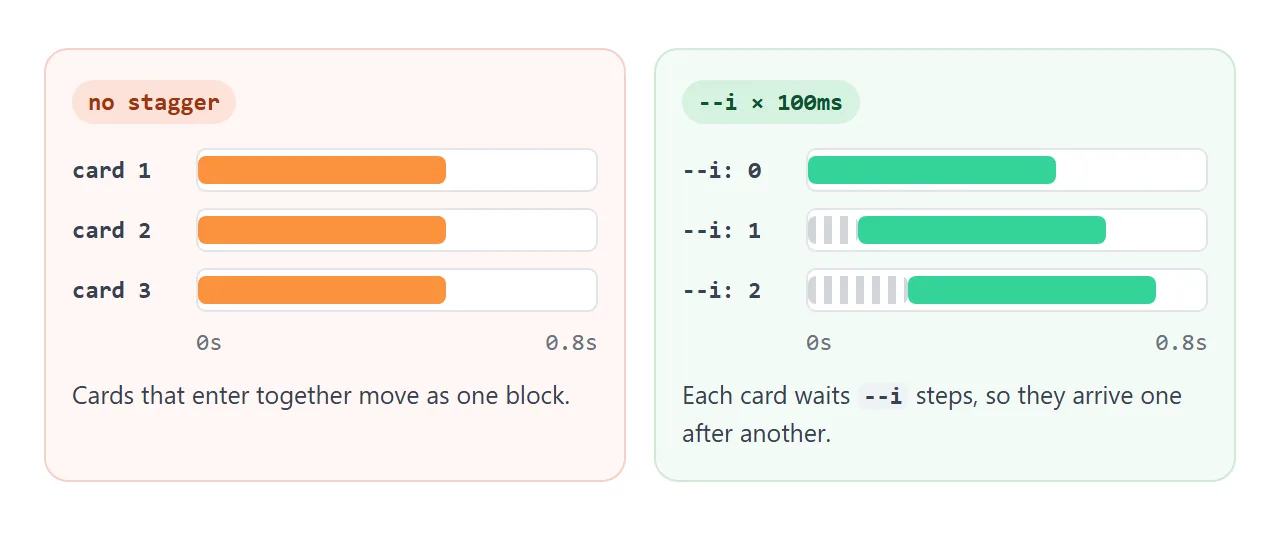
Set --i from the script. The second example numbers the entries that arrive in the same callback. The finished page below numbers the items inside each group instead. More on the variable itself is in CSS variables.
The delay sits on the .in rule only. In repeat mode, hiding then starts at once instead of waiting for the stagger.
Reduced motion
Some readers turn on a reduced motion setting in their system. The prefers-reduced-motion: reduce media query matches it. Inside it, keep the content appearing but drop the movement and the delay:
@media (prefers-reduced-motion: reduce) {
  .js .reveal { transform: none; transition: opacity .2s linear; }
  .js .reveal.in { transition-delay: 0s; }
}
To read the setting from JavaScript, use matchMedia with the same query. The finished page uses it to report which mode is active.
A finished page
This page puts it all together: three effects set with a data-reveal attribute, groups that stagger their children, reduced motion, a print rule and the .js gate. The bar at the top counts the items still hidden.
<!doctype html>
<html lang="en">
<head>
<meta charset="utf-8">
<meta name="viewport" content="width=device-width, initial-scale=1">
<title>Scroll reveal page</title>
<style>
  * { box-sizing: border-box; }
  body { margin: 0; font-family: system-ui, sans-serif; background: #fff; color: #1d2330; line-height: 1.5; }
  .status { position: sticky; top: 0; z-index: 2; padding: 8px 14px; font-size: 13px; background: #1d2330; color: #fff; }
  header { padding: 40px 18px 50px; background: linear-gradient(160deg, #ecfdf5, #eff6ff); }
  header h1 { margin: 0 0 8px; font-size: 26px; line-height: 1.2; }
  header p { margin: 0; color: #4b5563; }
  section { padding: 40px 18px; max-width: 640px; margin: 0 auto; }
  h2 { margin: 0 0 14px; font-size: 20px; }
  .cards { display: grid; grid-template-columns: repeat(auto-fit, minmax(150px, 1fr)); gap: 12px; }
  .card { padding: 16px; border-radius: 12px; background: #f4f5f7; }
  .card b { display: block; margin-bottom: 4px; }
  .split { display: flex; gap: 14px; align-items: center; }
  .pic { flex: 0 0 110px; height: 110px; border-radius: 14px; background: linear-gradient(135deg, #fbbf24, #f97316); }
  .split p { margin: 0; }
  .quote { font-size: 18px; border-left: 4px solid #34d399; padding-left: 14px; margin: 0; }
  footer { padding: 40px 18px 80px; text-align: center; color: #6b7280; font-size: 14px; }

  /* 1. hidden only when the script is running */
  .js [data-reveal] { opacity: 0; transition: opacity .6s ease, transform .6s ease; }
  .js [data-reveal="up"] { transform: translateY(30px); }
  .js [data-reveal="left"] { transform: translateX(-40px); }
  .js [data-reveal="zoom"] { transform: scale(.85); }
  .js [data-reveal].in { opacity: 1; transform: none; transition-delay: calc(var(--i, 0) * 100ms); }

  /* 2. reduced motion: no movement, a short fade, no delay */
  @media (prefers-reduced-motion: reduce) {
    .js [data-reveal] { transform: none; transition: opacity .2s linear; }
    .js [data-reveal].in { transition-delay: 0s; }
  }

  /* 3. printing: show everything, revealed or not */
  @media print {
    .js [data-reveal] { opacity: 1; transform: none; transition: none; }
  }
</style>
</head>
<body>
<div class="status" id="status">Scroll reveal is off: everything is shown</div>
<header>
  <h1 data-reveal="up">Plan trips with friends</h1>
  <p data-reveal="up">One page for the dates, the route and who pays for what.</p>
</header>
<section>
  <h2 data-reveal="up">What it does</h2>
  <div class="cards" data-stagger>
    <div class="card" data-reveal="up"><b>Dates</b>Everyone marks the days they can go.</div>
    <div class="card" data-reveal="up"><b>Route</b>Stops in order, with travel times.</div>
    <div class="card" data-reveal="up"><b>Costs</b>Split the bill when you get home.</div>
  </div>
</section>
<section class="split">
  <div class="pic" data-reveal="zoom"></div>
  <p data-reveal="left">Photos from each stop collect in one place, so nobody has to ask for them afterwards.</p>
</section>
<section>
  <p class="quote" data-reveal="up">"We stopped using four chat threads for one weekend away."</p>
</section>
<section>
  <h2 data-reveal="up">Plans</h2>
  <div class="cards" data-stagger>
    <div class="card" data-reveal="zoom"><b>Free</b>Up to 5 people.</div>
    <div class="card" data-reveal="zoom"><b>Group</b>Up to 20 people.</div>
    <div class="card" data-reveal="zoom"><b>Club</b>No limit.</div>
  </div>
</section>
<footer data-reveal="up">That is the whole page.</footer>

<script>
  const status = document.getElementById('status');

  // no observer, no hiding: the page stays fully visible
  if ('IntersectionObserver' in window) {
    const still = matchMedia('(prefers-reduced-motion: reduce)').matches;
    const items = document.querySelectorAll('[data-reveal]');
    let left = items.length;
    document.documentElement.classList.add('js');

    // stagger: the items inside each [data-stagger] group get --i = 0, 1, 2...
    document.querySelectorAll('[data-stagger]').forEach((group) => {
      group.querySelectorAll('[data-reveal]').forEach((el, i) => el.style.setProperty('--i', i));
    });

    const show = () => {
      status.textContent = (still ? 'Reduced motion: fade only. ' : 'Motion on. ')
        + (left ? left + ' items still hidden' : 'All items revealed');
    };

    const observer = new IntersectionObserver((entries) => {
      entries.forEach((entry) => {
        if (!entry.isIntersecting) return;
        entry.target.classList.add('in');
        observer.unobserve(entry.target);
        left--;
      });
      show();
    }, { root: document, rootMargin: '0px 0px -8% 0px' });

    items.forEach((el) => observer.observe(el));
    show();
  }
</script>
</body>
</html>
If you want the effect tied to scroll position instead of a one-time trigger, CSS scroll-driven animations do it without a script.
In our test with Playwright's Chromium, Firefox and WebKit builds, Firefox did not support animation-timeline: view(), so the observer approach is the safer default.
When it does not work
| What you see | Cause | Fix |
|---|---|---|
| Blank page when the script fails or JavaScript is off | CSS hides elements for everyone | Hide under .js, added by the script |
| Everything reveals at once on load | Elements are already in view, or the hidden state is missing | Check the .js class and the hidden rule |
| A very tall section never reveals | threshold is larger than the part of it that fits on screen |
Use the default threshold of 0 |
| Blocks above are still hidden after a jump link | They were skipped, never in view | They reveal when scrolled to; this is expected |
| The page below jumps during the animation | margin or top is animated |
Animate transform and opacity |
| Hiding in repeat mode lags | transition-delay is on the hidden state |
Put the delay on the .in rule |
| rootMargin has no effect inside a frame | No root in a frame from another origin |
Add root: document |
| Blank areas in print | Unrevealed items are still at opacity 0 | Add an @media print rule |
Share it as a link
A reveal effect only shows while someone scrolls. A screenshot shows the end state, and an .html attachment may not open on the other person's phone.
To send the working version, paste the page into a NOS document and choose Create share link. HTML to link walks through it.
The page renders as written and its scripts run, so the people you send it to can scroll it and watch each section appear. If you change the code later, the same link shows the new version.