"Animate on scroll" can mean two things. This guide covers the AOS library: a stylesheet and a script that animate an element when it scrolls into view. The other meaning, an animation tied to the scroll position itself, is covered in CSS scroll-driven animations.
To use AOS in one HTML file, link the stylesheet, load the script, call AOS.init(), and put data-aos="fade-up" on any element. Scroll inside this example.
<!doctype html>
<html lang="en">
<head>
<meta charset="utf-8">
<meta name="viewport" content="width=device-width, initial-scale=1">
<title>Animate on scroll with AOS</title>
<!-- 1. the stylesheet: it holds every animation -->
<link rel="stylesheet" href="https://cdnjs.cloudflare.com/ajax/libs/aos/2.3.4/aos.css">
<style>
  body { margin: 0; padding: 18px 16px 60px; font-family: system-ui, sans-serif; background: #f4f5f7; color: #1d2330; }
  h1 { font-size: 20px; margin: 0 0 4px; }
  .hint { margin: 0 0 90px; color: #5b6472; font-size: 14px; }
  .card { margin: 0 0 90px; padding: 18px; border-radius: 12px; background: #fff; box-shadow: 0 4px 16px rgba(0, 0, 0, .1); }
  .card b { display: block; margin-bottom: 4px; }
</style>
</head>
<body>
<h1>Scroll down</h1>
<p class="hint">Each card is plain HTML with one attribute.</p>

<!-- 3. the attribute: data-aos names the animation -->
<div class="card" data-aos="fade-up"><b>fade-up</b>Fades in while moving up.</div>
<div class="card" data-aos="fade-right"><b>fade-right</b>Slides in from the left.</div>
<div class="card" data-aos="zoom-in"><b>zoom-in</b>Grows from a smaller size.</div>
<div class="card" data-aos="flip-left"><b>flip-left</b>Turns around a vertical axis.</div>

<!-- 2. the script, then one call to start it -->
<script src="https://cdnjs.cloudflare.com/ajax/libs/aos/2.3.4/aos.js"></script>
<script>
  AOS.init();
</script>
</body>
</html>
The animations come from the stylesheet. Your own code is the attribute and a single call.
The three pieces
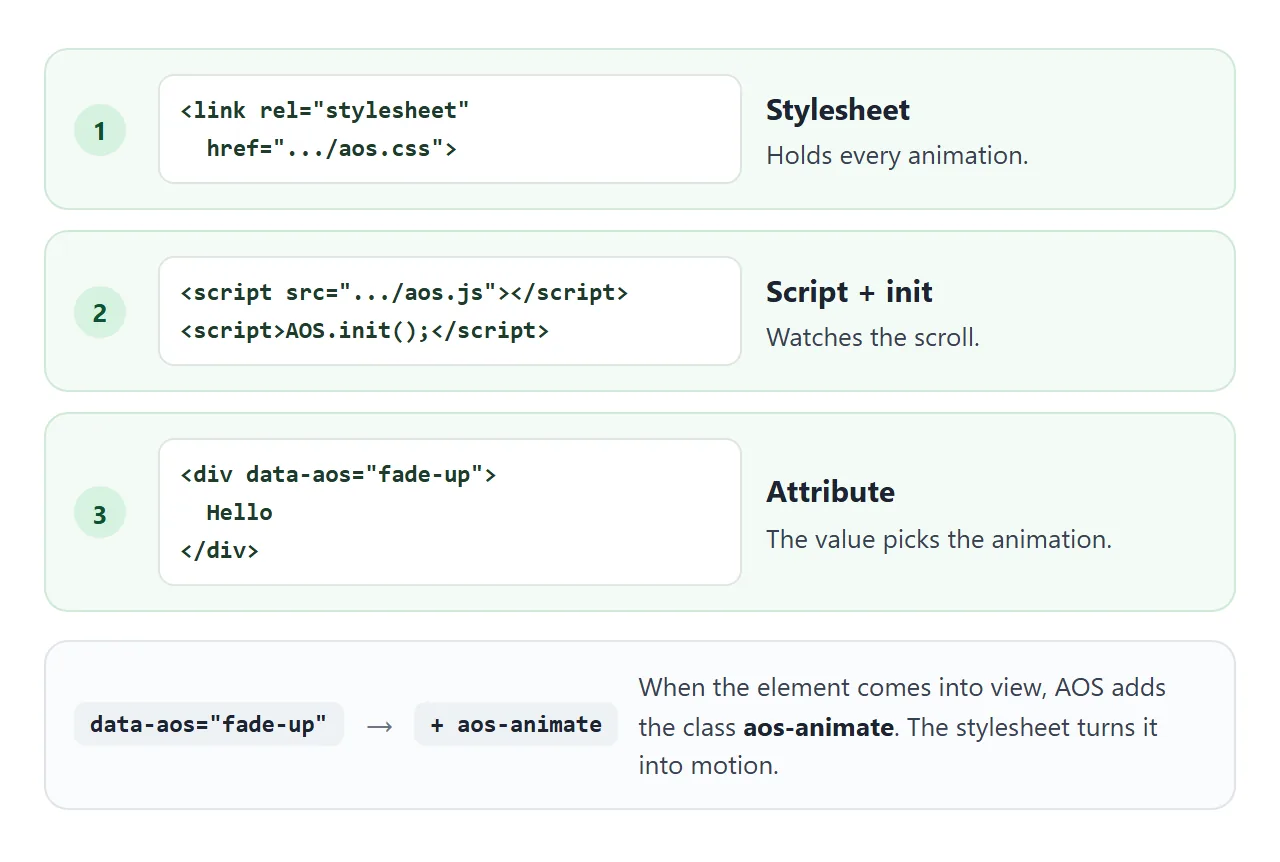
- The stylesheet holds the start look and end look for every animation name.
- The script watches scrolling and resizing. When an element should play, it adds the class
aos-animate. - The attribute
data-aosnames the animation for one element.
The script can go at the end of the body, as in the example. The call to AOS.init() must come after the script tag that loads it.
Which version to load
The AOS repository page on GitHub documents AOS@next, a v3 beta. The npm latest tag and the cdnjs version were both 2.3.4 on 1 October 2026.
This guide uses 2.3.4 and pins it in the address, so the page does not change when a new release appears.
<link rel="stylesheet" href="https://cdnjs.cloudflare.com/ajax/libs/aos/2.3.4/aos.css">
<script src="https://cdnjs.cloudflare.com/ajax/libs/aos/2.3.4/aos.js"></script>
<script>AOS.init();</script>
The same files are on jsDelivr at https://cdn.jsdelivr.net/npm/aos@2.3.4/dist/ and on unpkg at https://unpkg.com/aos@2.3.4/dist/. AOS is released under the MIT licence.
Because the files load from a CDN, the page needs an internet connection. A self-contained file has no such dependency, which is the trade you make for the ready-made animations.
Animation names
Each name is a start look. The element moves from it to its normal look when AOS adds aos-animate.
| Family | Names |
|---|---|
| Fade | fade, fade-up, fade-down, fade-left, fade-right, plus four diagonals such as fade-up-right |
| Flip | flip-up, flip-down, flip-left, flip-right |
| Slide | slide-up, slide-down, slide-left, slide-right |
| Zoom | zoom-in and zoom-out, each with -up, -down, -left or -right variants |
A name AOS does not know is not an error. The element simply shows with no animation, so check the spelling when nothing moves.
Settings: global and per element
Pass settings to AOS.init() to set them for the whole page. Add the matching data-aos-* attribute to override one element.
| Setting | Attribute | Default | Effect |
|---|---|---|---|
| offset | data-aos-offset | 120 | Pixels past the screen edge before the animation starts |
| duration | data-aos-duration | 400 | Milliseconds, 50 to 3000, in steps of 50 |
| delay | data-aos-delay | 0 | Milliseconds before it starts, in steps of 50 |
| easing | data-aos-easing | ease | Timing function, for example ease-out-back |
| once | data-aos-once | false | Play one time, or every time it re-enters |
Try them. Each change resets the page and runs the cards again.
<!doctype html>
<html lang="en">
<head>
<meta charset="utf-8">
<meta name="viewport" content="width=device-width, initial-scale=1">
<title>AOS options</title>
<link rel="stylesheet" href="https://cdnjs.cloudflare.com/ajax/libs/aos/2.3.4/aos.css">
<style>
  body { margin: 0; font-family: system-ui, sans-serif; background: #f4f5f7; color: #1d2330; }
  .bar { position: sticky; top: 0; z-index: 5; display: flex; flex-wrap: wrap; gap: 8px 12px; align-items: center;
         padding: 10px 14px; background: #fff; border-bottom: 1px solid #e1e4ea; font-size: 13px; }
  .bar label { display: inline-flex; align-items: center; gap: 5px; }
  select { font: inherit; padding: 3px 4px; }
  .out { width: 100%; color: #5b6472; }
  .out b { color: #1d2330; }
  .stage { padding: 14px 14px 140px; }
  .item { margin: 0 0 80px; padding: 16px; border-radius: 12px; background: #fff; box-shadow: 0 4px 16px rgba(0, 0, 0, .1); }
  .stage.clip { overflow-x: hidden; }
</style>
</head>
<body>
<div class="bar">
  <label>Animation
    <select id="anim">
      <option>fade-up</option><option>fade-left</option><option>zoom-in</option>
      <option>flip-up</option><option>slide-right</option>
    </select>
  </label>
  <label>Duration
    <select id="dur"><option>200</option><option selected>600</option><option>1200</option></select> ms
  </label>
  <label><input type="checkbox" id="once"> Once</label>
  <label><input type="checkbox" id="stagger"> Stagger</label>
  <label><input type="checkbox" id="clip"> Clip sideways</label>
  <div class="out">Animated now: <b id="n">0</b> of <b id="total">0</b> · Page wider than screen: <b id="wide">no</b></div>
</div>

<div class="stage" id="stage">
  <div class="item" data-aos="fade-up">Item 1</div>
  <div class="item" data-aos="fade-up">Item 2</div>
  <div class="item" data-aos="fade-up">Item 3</div>
  <div class="item" data-aos="fade-up">Item 4</div>
  <div class="item" data-aos="fade-up">Item 5</div>
  <div class="item" data-aos="fade-up">Item 6</div>
</div>

<script src="https://cdnjs.cloudflare.com/ajax/libs/aos/2.3.4/aos.js"></script>
<script>
  AOS.init();

  const items = document.querySelectorAll('.item');
  const $ = (id) => document.getElementById(id);

  function report() {
    $('n').textContent = document.querySelectorAll('.item.aos-animate').length;
    $('total').textContent = items.length;
    const root = document.documentElement;
    $('wide').textContent = root.scrollWidth > root.clientWidth ? 'yes' : 'no';
  }

  function apply() {
    items.forEach((el, i) => {
      el.setAttribute('data-aos', $('anim').value);
      el.setAttribute('data-aos-duration', $('dur').value);
      el.setAttribute('data-aos-once', $('once').checked ? 'true' : 'false');
      el.setAttribute('data-aos-delay', $('stagger').checked ? i * 100 : 0);
      el.classList.remove('aos-animate');
    });
    $('stage').classList.toggle('clip', $('clip').checked);
    AOS.refreshHard();       // tell AOS the attributes changed
    window.scrollTo(0, 0);
    setTimeout(report, 150);
  }

  document.querySelectorAll('select, input').forEach((c) => c.addEventListener('change', apply));
  window.addEventListener('scroll', () => setTimeout(report, 150));
  apply();
</script>
</body>
</html>
The demo sets attributes from a script, so it calls AOS.refreshHard() afterwards. AOS notices new elements on its own, but not an attribute changed on an element it already knows.
When the animation plays
Each element has a trigger line. With the default offset of 120, AOS adds the class when the element's top edge is more than 120 pixels above the bottom of the screen.
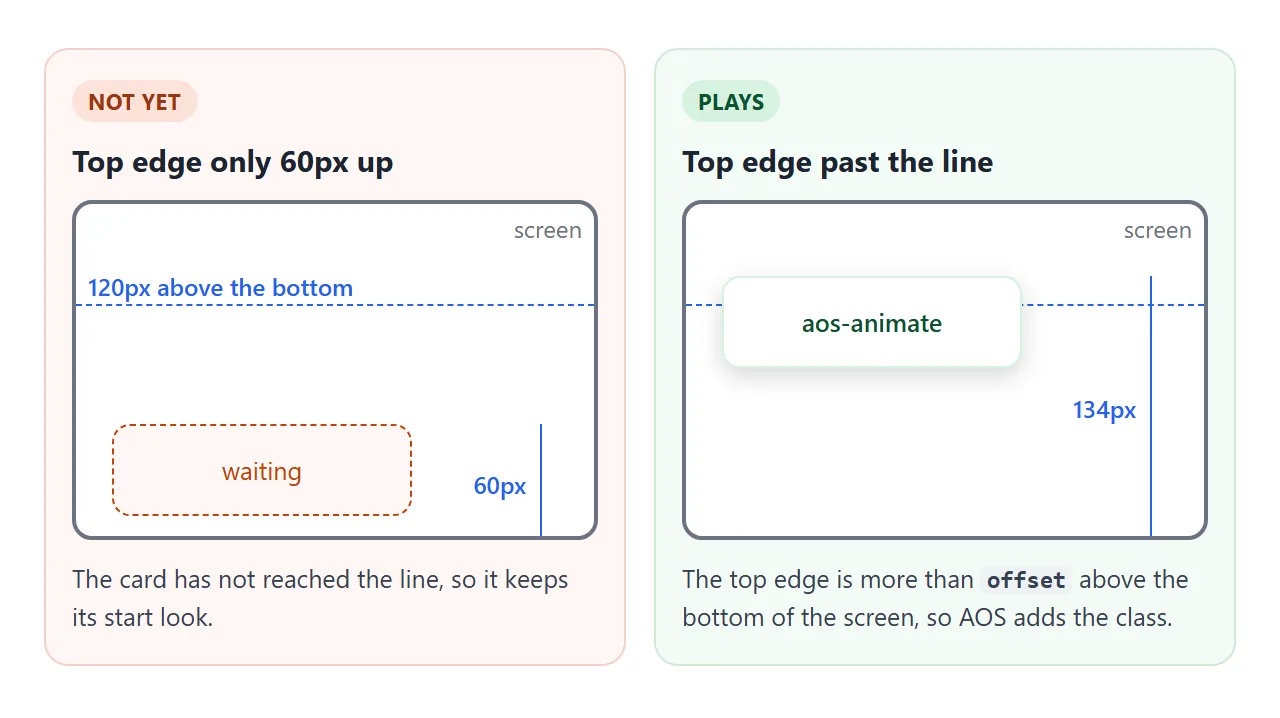
A bigger offset starts later, a smaller one starts sooner. To move the line for one element, use data-aos-anchor-placement. The value top-center waits until the element reaches the middle of the screen.
Use data-aos-anchor with a selector to trigger from another element, so a group plays together.
By default the class is removed again when the element is back below the line, so the animation repeats on the way down. Set once: true for a single play.
Stagger and pace
Cards that appear together all play at the same moment. Give each one a longer data-aos-delay and they arrive one after another:
<div data-aos="fade-up" data-aos-delay="0">One</div>
<div data-aos="fade-up" data-aos-delay="150">Two</div>
<div data-aos="fade-up" data-aos-delay="300">Three</div>
Keep the total short. A reader who scrolls fast should not wait for a long chain of effects before the content is there.
Phones and reduced motion
Two things need care on a phone. First, fade-left starts 100 pixels to the right of its place. In our test on a 390 px screen that widened the page to 490 px until the element animated, so the page scrolled sideways.
Wrap the page in a container with overflow-x: hidden, as the landing page below does.
Second, some readers turn on a reduced motion setting. The AOS 2.3.4 files contain no rule for it, but disable accepts a function. Pass one that reads the media query, and AOS removes its attributes and leaves the content in place.
AOS.init({
  disable: () => matchMedia('(prefers-reduced-motion: reduce)').matches
});
Add a <noscript> rule too, so the content shows when JavaScript is off.
A finished page
This page combines the pieces: a hero, staggered features, a zoom banner, a flip group triggered from its container, once: true, the reduced motion check, a <noscript> fallback and a clipped page width.
<!doctype html>
<html lang="en">
<head>
<meta charset="utf-8">
<meta name="viewport" content="width=device-width, initial-scale=1">
<title>AOS landing page</title>
<link rel="stylesheet" href="https://cdnjs.cloudflare.com/ajax/libs/aos/2.3.4/aos.css">
<!-- if the script never runs, show everything instead of leaving it at opacity 0 -->
<noscript><style>[data-aos] { opacity: 1 !important; transform: none !important; }</style></noscript>
<style>
  * { box-sizing: border-box; }
  body { margin: 0; font-family: system-ui, sans-serif; color: #1d2330; background: #fff; overflow-x: hidden; }
  .hero { padding: 40px 20px 50px; text-align: center; background: linear-gradient(135deg, #e0ecff, #f3e8ff); }
  .hero h1 { margin: 0 0 8px; font-size: 26px; }
  .hero p { margin: 0; color: #4b5563; }
  .mode { margin-top: 14px; display: inline-block; font-size: 12px; padding: 4px 10px; border-radius: 99px; background: #fff; color: #374151; }
  section { padding: 50px 20px 10px; max-width: 760px; margin: 0 auto; }
  h2 { margin: 0 0 16px; font-size: 20px; }
  .row { display: grid; grid-template-columns: repeat(auto-fit, minmax(150px, 1fr)); gap: 12px; }
  .feat { padding: 16px; border-radius: 12px; background: #f4f5f7; }
  .feat b { display: block; margin-bottom: 4px; }
  .banner { height: 110px; border-radius: 14px; background: linear-gradient(120deg, #2563eb, #7c3aed); color: #fff;
            display: grid; place-items: center; font-weight: 700; }
  .stats { display: flex; gap: 12px; }
  .end { padding: 260px 20px 80px; text-align: center; color: #6b7280; font-size: 14px; }
  .stat { flex: 1; padding: 16px; text-align: center; border: 1px solid #e1e4ea; border-radius: 12px; }
  .stat b { display: block; font-size: 22px; }
</style>
</head>
<body>
<header class="hero">
  <h1 data-aos="fade-down">Small tools, shared by link</h1>
  <p data-aos="fade-up" data-aos-delay="150">Scroll to see the sections arrive.</p>
  <span class="mode" id="mode"></span>
</header>

<section>
  <h2 data-aos="fade-right">Three features</h2>
  <div class="row">
    <div class="feat" data-aos="fade-up" data-aos-delay="0"><b>Fast</b>Delay 0 ms.</div>
    <div class="feat" data-aos="fade-up" data-aos-delay="150"><b>Simple</b>Delay 150 ms.</div>
    <div class="feat" data-aos="fade-up" data-aos-delay="300"><b>Shareable</b>Delay 300 ms.</div>
  </div>
</section>

<section>
  <div class="banner" data-aos="zoom-in" data-aos-duration="800">zoom-in, 800 ms</div>
</section>

<section>
  <h2 data-aos="fade-right">Numbers</h2>
  <div class="stats" id="stats">
    <div class="stat" data-aos="flip-up" data-aos-anchor="#stats" data-aos-anchor-placement="top-center"><b>12</b>pages</div>
    <div class="stat" data-aos="flip-up" data-aos-anchor="#stats" data-aos-anchor-placement="top-center" data-aos-delay="150"><b>3</b>demos</div>
  </div>
</section>

<footer class="end">That is the whole page.</footer>

<script src="https://cdnjs.cloudflare.com/ajax/libs/aos/2.3.4/aos.js"></script>
<script>
  const reduced = window.matchMedia('(prefers-reduced-motion: reduce)').matches;
  document.getElementById('mode').textContent = reduced ? 'Reduced motion: on, no animation' : 'Reduced motion: off';

  AOS.init({
    duration: 600,
    once: true,                 // play one time per element
    offset: 80,                 // start 80px inside the screen
    disable: () => reduced      // reduced motion: AOS leaves the content as it is
  });
</script>
</body>
</html>
If you would rather not load a library, scroll reveal with IntersectionObserver covers the same effect by hand. For motion on first load instead, see animation on page load.
When it does not work
| What you see | Cause | Fix |
|---|---|---|
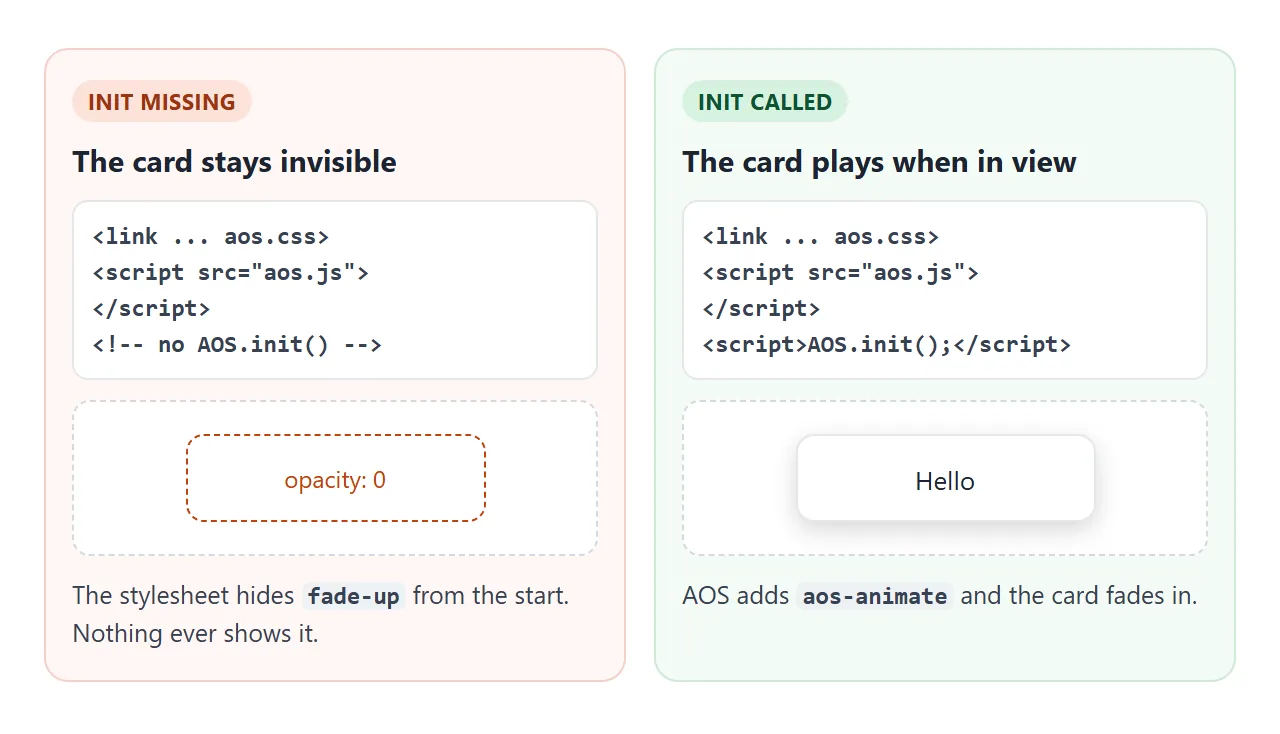
| Fade and zoom elements stay invisible | AOS.init() never ran, so nothing adds aos-animate | Call AOS.init() after the script tag |
| Console error about setAttribute on null | AOS.init() ran in the head, before the body exists | Move the call to the end of the body |
| Elements show, nothing animates | The stylesheet link is missing or blocked | Check the aos.css link and address |
| One element shows with no motion | The data-aos name is misspelled | Compare with the list of names |
| Duration or delay has no effect | The value is not a step of 50 from 50 to 3000 | Use 400, 450, 500 and so on |
| Sideways scrollbar on a phone | fade-left starts 100 px to the right of its place | overflow-x: hidden on a wrapper |
| The last element never plays | The page ends before it reaches the trigger line | Add space below it, or lower the offset |
| An attribute set by a script is ignored | AOS does not watch attribute changes | Call AOS.refreshHard() afterwards |
| It replays on every scroll | once is false by default | Set once: true |
Share it as a link
A scroll effect only shows while someone scrolls, so a screenshot cannot carry it. An .html attachment may not open on the other person's phone, and a page that does not run shows no animation.
To send the working version, paste the page into a NOS document and choose Create share link. HTML to link walks through it. The page renders as written, and scripts and styles from cdnjs, jsDelivr and unpkg load.
So the people you send it to can scroll and watch each card arrive. If you change the code later, the same link shows the new version.