The <noscript> tag shows its content only when scripting is turned off for the page. With JavaScript on, the browser does not draw it at all.
It is not triggered when a script fails to load or throws an error. It is a fallback for "no JavaScript", not for "broken JavaScript".
Here is the tag in a working page. Scripting is on here, so the orange warning inside <noscript> never appears. Press the button to see what the browser keeps inside the element.
<!doctype html>
<html lang="en">
<head>
<meta charset="utf-8">
<meta name="viewport" content="width=device-width, initial-scale=1">
<title>noscript basics</title>
<style>
  body { margin: 0; padding: 16px; font-family: system-ui, sans-serif; background: #f4f5f7; color: #1d2330; }
  .box { background: #fff; border-radius: 10px; padding: 12px 14px; margin-bottom: 10px; box-shadow: 0 2px 8px rgba(0, 0, 0, .08); }
  .warn { background: #fff4e5; border: 1px solid #f5c67a; }
  button { font: inherit; padding: 8px 12px; border-radius: 8px; border: 1px solid #c9cdd4; background: #fff; cursor: pointer; }
  pre { margin: 8px 0 0; padding: 10px; background: #1d2330; color: #e5e7eb; border-radius: 8px; font-size: 12px; white-space: pre-wrap; word-break: break-all; }
</style>
</head>
<body>
<!-- Shown only when scripting is off for this page -->
<noscript>
  <div class="box warn">JavaScript is off. The price calculator below needs it.</div>
</noscript>

<div class="box" id="status">Waiting for the script...</div>

<button id="peek" type="button">What is inside the noscript now?</button>
<pre id="out" hidden></pre>

<script>
  document.getElementById('status').textContent = 'JavaScript is on, so the noscript block is not shown.';

  document.getElementById('peek').addEventListener('click', () => {
    const ns = document.querySelector('noscript');
    const out = document.getElementById('out');
    // With scripting on, the contents are one text node, not elements
    out.textContent =
      'child nodes: ' + ns.childNodes.length +
      '\nfirst node is text: ' + (ns.firstChild.nodeType === Node.TEXT_NODE) +
      '\ndivs inside: ' + ns.querySelectorAll('div').length +
      '\ntext: ' + ns.textContent.trim();
    out.hidden = false;
  });
</script>
</body>
</html>
<noscript>
  <p>JavaScript is off. The price calculator needs it.</p>
</noscript>
When noscript shows, and when it does not
The HTML standard ties <noscript> to one question: is scripting enabled for this document? If yes, the element shows nothing. If no, it shows its children like any other element.
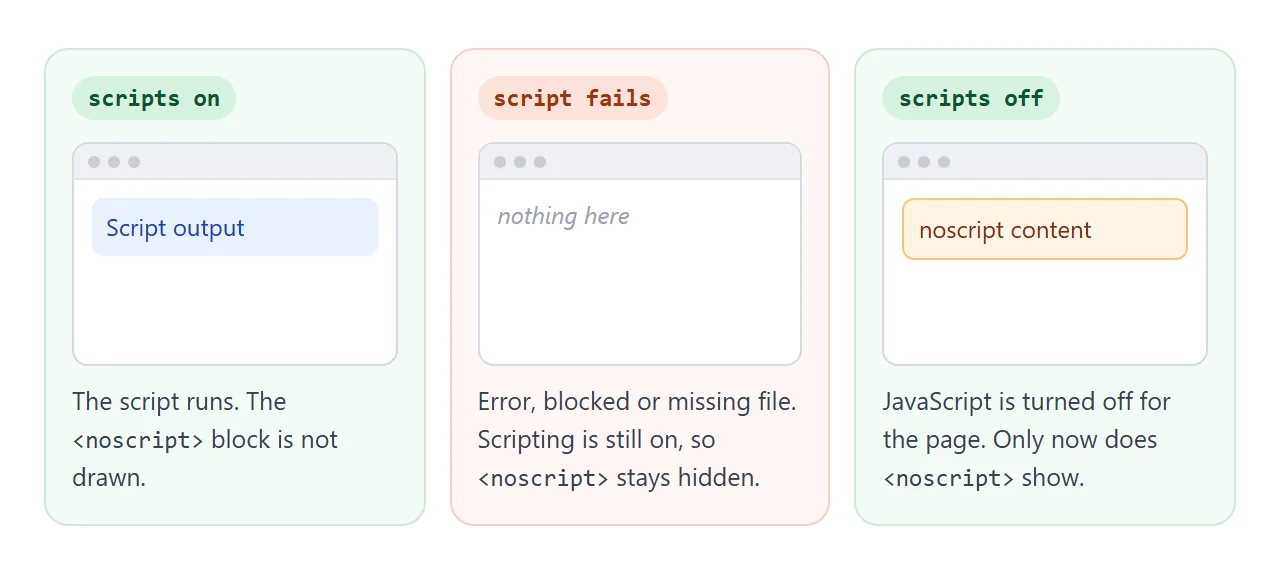
Scripting is off when:
- the visitor turned JavaScript off in the browser settings, or an extension turned it off for the site
- the browser does not run scripts at all, such as a text-mode browser
- the page is inside an iframe whose sandbox attribute leaves out
allow-scripts
Scripting is still on when your file returns a 404, when a script is blocked by a Content Security Policy or a blocker, or when your code throws an error. In all of these, the page gets neither the script's work nor the <noscript> content.
Compare the three cases side by side. Each frame loads the same small page. The last frame has sandbox="", which turns scripting off inside it.
<!doctype html>
<html lang="en">
<head>
<meta charset="utf-8">
<meta name="viewport" content="width=device-width, initial-scale=1">
<title>Scripts on, script fails, scripts off</title>
<style>
  body { margin: 0; padding: 12px; font-family: system-ui, sans-serif; background: #f4f5f7; color: #1d2330; }
  .grid { display: grid; grid-template-columns: repeat(3, 1fr); gap: 10px; }
  @media (max-width: 520px) { .grid { grid-template-columns: 1fr; } }
  h3 { margin: 0 0 6px; font-size: 13px; }
  iframe { width: 100%; height: 72px; border: 1px solid #d5d9e0; border-radius: 8px; background: #fff; }
</style>
</head>
<body>
<div class="grid">
  <div><h3>1. Scripts on</h3><iframe id="on" sandbox="allow-scripts" title="Scripts on"></iframe></div>
  <div><h3>2. Script throws an error</h3><iframe id="fail" sandbox="allow-scripts" title="Script fails"></iframe></div>
  <div><h3>3. Scripts off</h3><iframe id="off" sandbox="" title="Scripts off"></iframe></div>
</div>

<script>
  // The same small page goes into all three frames. Only the script differs.
  const page = (script) => `
    <body style="font:14px system-ui;margin:10px">
      <p id="msg"></p>
      <noscript><p style="color:#9a3412">noscript: please turn on JavaScript.</p></noscript>
      <script>${script}<\/script>
    </body>`;

  const works = "document.getElementById('msg').textContent = 'Script ran.';";
  const breaks = "undefinedFunction(); document.getElementById('msg').textContent = 'Script ran.';";

  document.getElementById('on').srcdoc = page(works);
  document.getElementById('fail').srcdoc = page(breaks);
  // sandbox="" (no allow-scripts) turns scripting off inside this frame
  document.getElementById('off').srcdoc = page(works);
</script>
</body>
</html>
| Situation | Script output | noscript content |
|---|---|---|
| JavaScript on, script works | Shown | Hidden |
| JavaScript on, script errors or 404s | Missing | Hidden |
| JavaScript on, script blocked | Missing | Hidden |
| JavaScript off | Missing | Shown |
iframe sandbox without allow-scripts |
Missing | Shown |
noscript in the head vs the body
<noscript> is allowed in both places, with different rules.
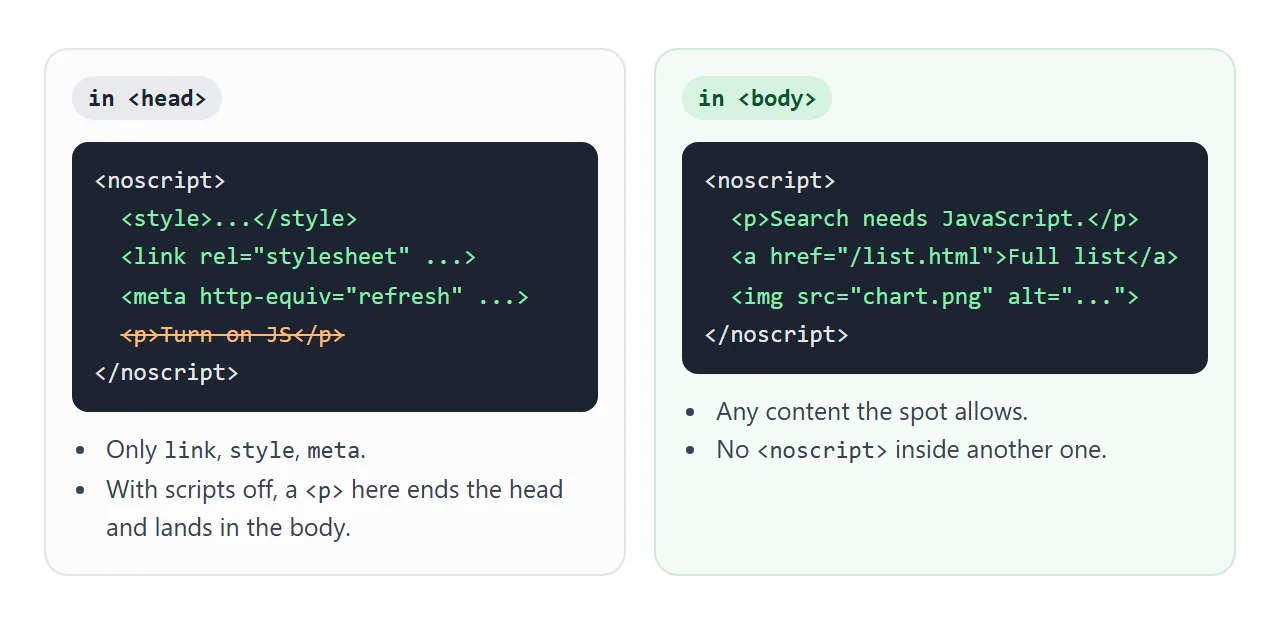
In <head>, it may contain only <link>, <style> and <meta>. The common uses are a stylesheet that hides script-only controls, and a redirect to a plain version of the page:
<head>
  <noscript>
    <style>.js-only { display: none; }</style>
    <meta http-equiv="refresh" content="0; url=/basic.html">
  </noscript>
</head>
If you put a paragraph there, the browser does not keep it in the head. With scripting off, the parser treats the <p> as the end of the head and places it at the top of the body.
In <body>, it takes the same content the surrounding spot allows: paragraphs, links, images, even an iframe. That is where a visible message goes. More about the head itself is in the HTML head tag.
What the browser keeps inside noscript
With scripting on, the parser does not build elements from the contents of <noscript>. It keeps the whole inside as one text node, which is why the first example reports one child node and zero divs.
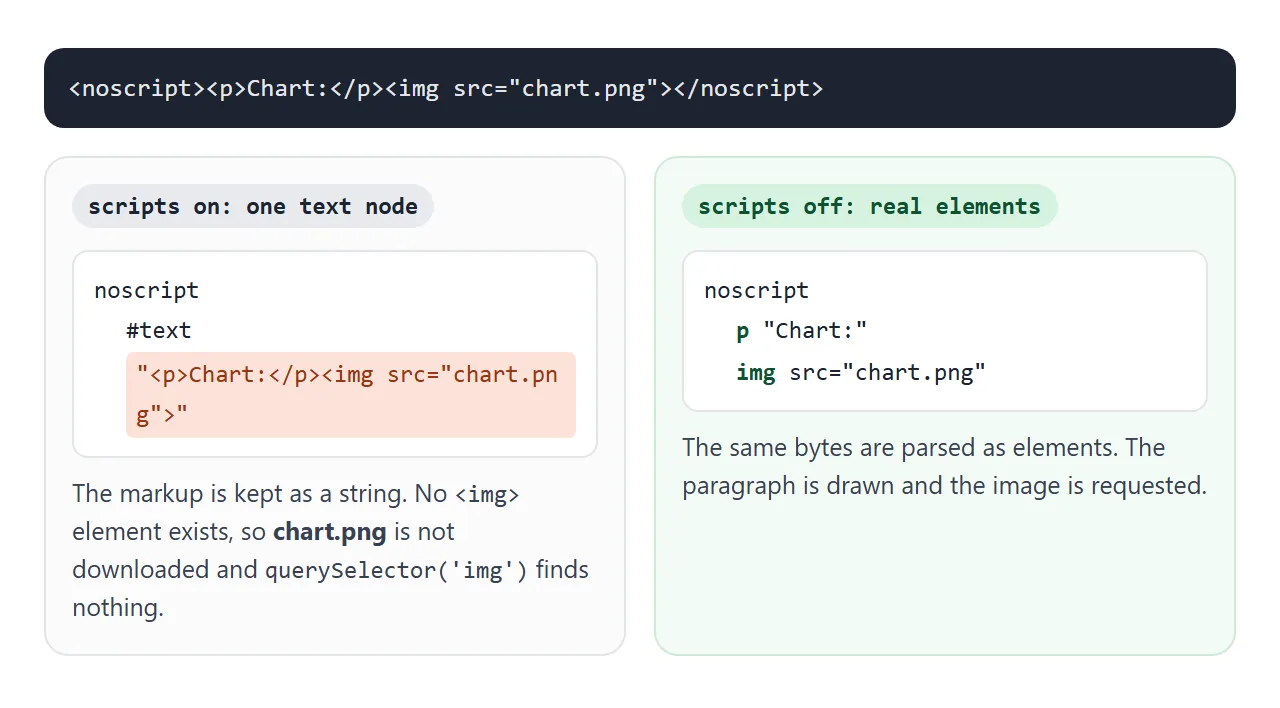
Two practical results follow:
- Images, iframes and stylesheets inside
<noscript>are not downloaded while JavaScript is on. querySelectorcannot reach elements inside it, because there are none. Do not store data or templates in it for your script to read.
Use cases that work
- A clear message next to a feature that needs JavaScript, with a way forward: a link to a plain page, a phone number, or an email address.
- Hiding dead controls with a
<style>in the head, so visitors do not see a search box or a button that does nothing. - Plain copies of script-built content, such as a static table under a chart that a script draws.
- Tracking fallbacks. Some analytics install snippets include an
<img>or<iframe>inside<noscript>right after<body>, so a visit is still counted without JavaScript.
The finished example below does the first two. Switch scripts off and the search box disappears, a note appears, and the full list stays readable.
<!doctype html>
<html lang="en">
<head>
<meta charset="utf-8">
<meta name="viewport" content="width=device-width, initial-scale=1">
<title>A page with a no-JavaScript fallback</title>
<style>
  body { margin: 0; padding: 12px; font-family: system-ui, sans-serif; background: #f4f5f7; color: #1d2330; }
  .bar { display: flex; align-items: center; gap: 10px; margin-bottom: 10px; flex-wrap: wrap; }
  button { font: inherit; padding: 8px 12px; border-radius: 8px; border: 1px solid #c9cdd4; background: #fff; cursor: pointer; }
  #state { font-size: 13px; color: #5b6270; }
  iframe { width: 100%; height: 360px; border: 1px solid #d5d9e0; border-radius: 10px; background: #fff; }
</style>
</head>
<body>
<div class="bar">
  <button id="toggle" type="button">Turn scripts off</button>
  <span id="state">Scripts: on</span>
</div>
<iframe id="view" title="Preview"></iframe>

<script>
  // The page being previewed: a searchable list with a fallback for no JavaScript
  const PAGE = `<!doctype html>
<html lang="en"><head><meta charset="utf-8">
<style>
  body { font: 14px system-ui, sans-serif; margin: 12px; color: #1d2330; }
  input { font: inherit; width: 100%; box-sizing: border-box; padding: 8px; border: 1px solid #c9cdd4; border-radius: 8px; }
  ul { padding-left: 18px; } li { margin: 4px 0; }
  .note { background: #fff4e5; border: 1px solid #f5c67a; border-radius: 8px; padding: 8px 10px; }
</style>
<noscript>
  <!-- In head, noscript may hold only link, style and meta -->
  <style>.js-only { display: none; }</style>
</noscript>
</head><body>
<h3 style="margin:0 0 8px">Office phone list</h3>
<noscript>
  <p class="note">Search needs JavaScript. The full list is below.</p>
</noscript>
<input class="js-only" id="q" type="search" placeholder="Type a name to filter">
<ul id="list">
  <li>Ana Silva, 201</li><li>Ben Okafor, 202</li><li>Chen Wei, 203</li>
  <li>Dana Kim, 204</li><li>Eli Moreau, 205</li><li>Farah Haddad, 206</li>
</ul>
<script>
  document.getElementById('q').addEventListener('input', (e) => {
    const q = e.target.value.toLowerCase();
    document.querySelectorAll('#list li').forEach((li) => {
      li.hidden = !li.textContent.toLowerCase().includes(q);
    });
  });
<\/script>
</body></html>`;

  const view = document.getElementById('view');
  const toggle = document.getElementById('toggle');
  let scriptsOn = true;

  function load() {
    // A new sandbox value applies on the next load, so set it, then load the page
    view.setAttribute('sandbox', scriptsOn ? 'allow-scripts' : '');
    view.srcdoc = PAGE;
    toggle.textContent = scriptsOn ? 'Turn scripts off' : 'Turn scripts on';
    document.getElementById('state').textContent = 'Scripts: ' + (scriptsOn ? 'on' : 'off');
  }

  toggle.addEventListener('click', () => { scriptsOn = !scriptsOn; load(); });
  load();
</script>
</body>
</html>
What not to do
- Do not use it to catch script errors. For that, show the fallback by default and let the script remove it once it has done its job:
<p id="fallback">Loading the calculator. If it does not appear, call 555-0100.</p>
<script>
  buildCalculator();                         // if this throws, the message stays
  document.getElementById('fallback').remove();
</script>
- Do not fill it with text for search engines only. Write it for the person who has JavaScript off. SEO for static websites covers what helps instead.
- Do not put body content in the head noscript. It ends up in the body anyway, in a spot you did not choose.
- Do not nest one
<noscript>inside another. The standard does not allow it. - Do not rely on it in XHTML. The element only has an effect in the HTML syntax, not when a page is served as XML.
A related pattern is a no-js class on <html> that the first script swaps for js. CSS can then style both states. It has the same limit: if that script never runs, the page stays in its no-JavaScript look.
When it does not work
| What you see | Cause | Fix |
|---|---|---|
| noscript text never appears when the script breaks | Scripting is still enabled, so noscript stays hidden | Show a fallback by default and remove it from the script |
| noscript text appears inside a preview or embed | The iframe sandbox has no allow-scripts |
Add allow-scripts if the frame should run scripts |
| A paragraph from the head noscript shows at the top of the page | Only link, style and meta are allowed in the head | Move visible content to a noscript in the body |
| querySelector returns null for an element inside noscript | With scripting on, the contents are text | Keep data your script needs outside noscript |
| The fallback image never loads in testing | JavaScript is on, so the img is not created | Turn JavaScript off in DevTools and reload |
| Scripts still do not run after fixing noscript | A different problem in the script itself | See HTML JavaScript not working |
Share it as a link
Fallbacks are hard to show with a screenshot, because the interesting part is what happens when you switch scripts on and off. An .html attachment may open as plain code on a phone, and then nobody sees either version.
Paste the page into a NOS document and choose Create share link. HTML to link walks through it. The page renders as written and its scripts run, so the people you send it to can try the search box and the scripts-off toggle themselves.
If you change the code later, the same link shows the new version.