In the browser, EventSource is the JavaScript interface for server-sent events. new EventSource(url) opens a persistent connection to an HTTP server, and the server sends events down it as plain text. Each one arrives in your page as an event.
Data moves one way, from the server to the page. A single HTML file has no server, so the examples below build the stream as text inside the page and hand EventSource a blob: address.
The browser's own parser reads that text, so what you see is real EventSource behaviour. A real page passes the address of a server instead.
Try it first. Edit the stream text, press the button, and read what the browser did with it.
<!doctype html>
<html lang="en">
<head>
<meta charset="utf-8">
<meta name="viewport" content="width=device-width, initial-scale=1">
<title>EventSource basics</title>
<style>
  * { box-sizing: border-box; }
  body { margin: 0; padding: 14px; font-family: system-ui, sans-serif; background: #f4f5f7; color: #1d2330; }
  label { display: block; font-size: 13px; font-weight: 600; margin-bottom: 4px; }
  textarea {
    width: 100%; height: 92px; padding: 8px 10px; border: 1px solid #cfd4dc; border-radius: 8px;
    font: 13px/1.4 ui-monospace, Consolas, monospace; resize: vertical; background: #fff;
  }
  button {
    margin: 10px 0; padding: 9px 16px; border: 0; border-radius: 8px;
    background: #2563eb; color: #fff; font: 600 14px system-ui, sans-serif; cursor: pointer;
  }
  ul { list-style: none; margin: 0; padding: 8px 10px; min-height: 84px; background: #fff; border: 1px solid #e1e4ea; border-radius: 8px; font: 13px/1.6 ui-monospace, Consolas, monospace; }
  li.msg { color: #0f5132; }
  li.err { color: #9a3412; }
  li.empty { color: #6b7280; font-family: system-ui, sans-serif; }
</style>
</head>
<body>
<label for="stream">The stream (the "server" sends this text)</label>
<textarea id="stream" spellcheck="false">data: hello

data: second message

</textarea>
<button id="go" type="button">Connect with EventSource</button>
<ul id="out"><li class="empty">Press the button. Each line below is something EventSource did.</li></ul>

<script>
  const box = document.getElementById('stream');
  const out = document.getElementById('out');
  let es;

  function add(text, cls) {
    const li = document.createElement('li');
    li.textContent = text;
    if (cls) li.className = cls;
    out.appendChild(li);
  }

  document.getElementById('go').addEventListener('click', () => {
    if (es) es.close();
    out.textContent = '';

    // A real page passes the address of a server here, such as '/events'.
    // This page builds the stream itself so one file can run it.
    const url = URL.createObjectURL(new Blob([box.value], { type: 'text/event-stream' }));

    es = new EventSource(url);
    es.onopen = () => add('open');
    es.onmessage = (e) => add('message: ' + JSON.stringify(e.data), 'msg');
    es.onerror = () => {
      add('error, readyState ' + es.readyState + ' (the stream ended)', 'err');
      es.close();  // stop the browser from reconnecting
    };
  });
</script>
</body>
</html>
How the code works
Three steps cover most pages:
- Create it.
new EventSource(url)starts the connection at once. - Listen.
onopenfires when the connection is made,onmessagefor each message,onerrorfor trouble. - Close it.
es.close()ends the connection when you are done.
const es = new EventSource('/events');   // the address of a server
es.onmessage = (e) => console.log(e.data);
es.onerror = () => console.log('connection problem');
// later, when the page is done with it
es.close();
e.data is always a string. For JSON, run it through JSON.parse(e.data); the JSON.parse guide covers the errors. es.addEventListener('message', fn) does the same job as onmessage, and addEventListener is also how you hear named events.
The stream in the first example ends after two messages. When a connection ends, the browser reconnects, so that example calls close() inside onerror. The readyState 0 in its last line means CONNECTING: the browser was about to try again.
The stream format
The server sends lines of text. A message is one or more lines shaped like name: value, followed by a blank line. The blank line is what fires the message, so the last message needs one too.
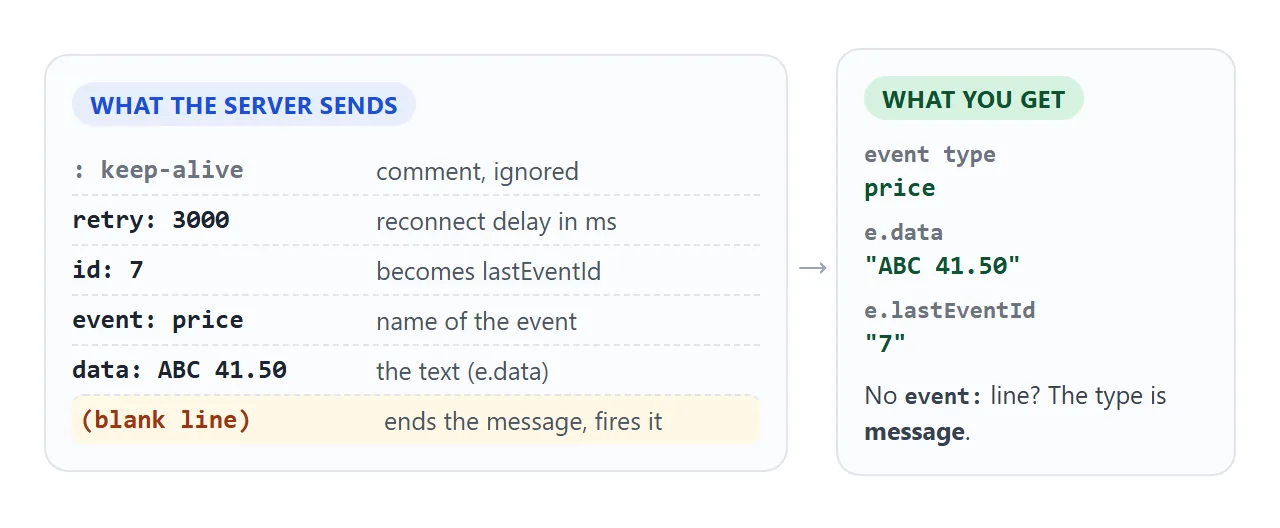
| Line | What it does |
|---|---|
data: |
The message text. Several data: lines are joined with a newline |
event: |
The name of the event. Without it, the event is message |
id: |
Sets the last event ID, readable as e.lastEventId |
retry: |
Reconnect delay in milliseconds, digits only |
: text |
A comment, ignored. Handy as a keep-alive |
One space after the colon is dropped, so data:hi and data: hi give the same text. A field name the browser does not know is ignored.
Named events need addEventListener
A message that has an event: line does not go to onmessage. The browser fires an event with that name instead, and only a listener for that exact name hears it.
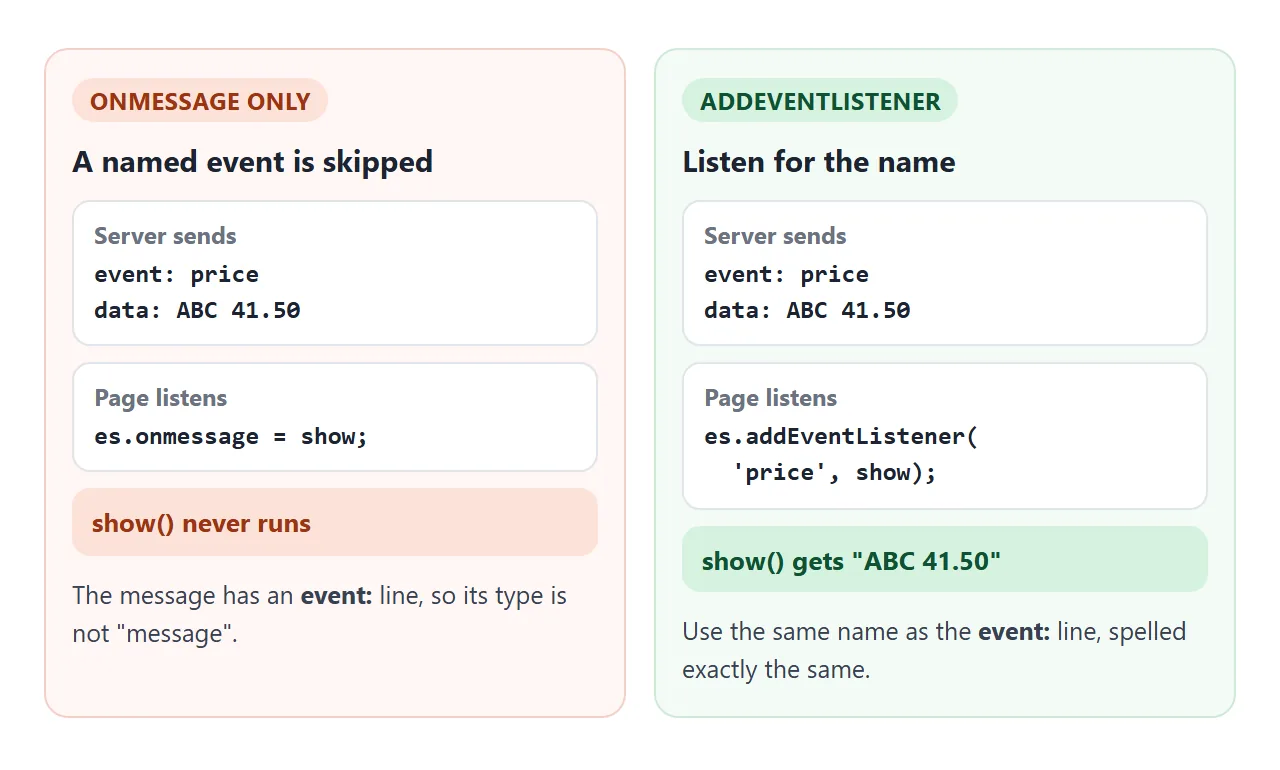
This is the most common reason that "the server sends data but nothing shows up".
<!doctype html>
<html lang="en">
<head>
<meta charset="utf-8">
<meta name="viewport" content="width=device-width, initial-scale=1">
<title>onmessage vs named events</title>
<style>
  * { box-sizing: border-box; }
  body { margin: 0; padding: 14px; font-family: system-ui, sans-serif; background: #f4f5f7; color: #1d2330; }
  label { display: block; font-size: 13px; font-weight: 600; margin-bottom: 4px; }
  textarea {
    width: 100%; height: 190px; padding: 8px 10px; border: 1px solid #cfd4dc; border-radius: 8px;
    font: 13px/1.4 ui-monospace, Consolas, monospace; resize: vertical; background: #fff;
  }
  button {
    margin: 10px 0; padding: 9px 16px; border: 0; border-radius: 8px;
    background: #2563eb; color: #fff; font: 600 14px system-ui, sans-serif; cursor: pointer;
  }
  .panels { display: grid; grid-template-columns: 1fr 1fr; gap: 10px; }
  @media (max-width: 440px) { .panels { grid-template-columns: 1fr; } }
  .panel { background: #fff; border: 1px solid #e1e4ea; border-radius: 8px; padding: 8px 10px; min-height: 112px; }
  .panel h3 { margin: 0 0 6px; font: 700 12.5px ui-monospace, Consolas, monospace; }
  .panel.a h3 { color: #1d4ed8; }
  .panel.b h3 { color: #0f5132; }
  .panel ul { list-style: none; margin: 0; padding: 0; font: 12.5px/1.5 ui-monospace, Consolas, monospace; overflow-wrap: anywhere; }
  .panel li { margin-bottom: 3px; }
  p.hint { margin: 10px 0 0; font-size: 13px; color: #4b5563; line-height: 1.45; }
</style>
</head>
<body>
<label for="stream">The stream</label>
<textarea id="stream" spellcheck="false">: a line starting with a colon is a comment
data: plain message, no event field

event: price
data: ABC 41.50

event: alert
data: line one
data: line two
id: 42

</textarea>
<button id="go" type="button">Connect</button>

<div class="panels">
  <div class="panel a"><h3>onmessage</h3><ul id="outA"></ul></div>
  <div class="panel b"><h3>addEventListener('price' / 'alert')</h3><ul id="outB"></ul></div>
</div>
<p class="hint">Rename <b>price</b> to <b>news</b> in the stream and connect again. It appears in neither panel, because nothing listens for "news".</p>

<script>
  const box = document.getElementById('stream');
  const outA = document.getElementById('outA');
  const outB = document.getElementById('outB');
  let es;

  function add(list, label, e) {
    const li = document.createElement('li');
    li.textContent = label + ' ' + JSON.stringify(e.data) + (e.lastEventId ? '  id=' + e.lastEventId : '');
    list.appendChild(li);
  }

  document.getElementById('go').addEventListener('click', () => {
    if (es) es.close();
    outA.textContent = '';
    outB.textContent = '';

    const url = URL.createObjectURL(new Blob([box.value], { type: 'text/event-stream' }));
    es = new EventSource(url);

    // Messages with no "event:" line, or with "event: message", come here.
    es.onmessage = (e) => add(outA, 'message', e);

    // Messages with an "event:" line go to a listener of that exact name.
    es.addEventListener('price', (e) => add(outB, 'price', e));
    es.addEventListener('alert', (e) => add(outB, 'alert', e));

    es.onerror = () => es.close();  // this stream ends; do not reconnect
  });
</script>
</body>
</html>
Pick the name on the server and register the same name on the page:
es.addEventListener('price', (e) => {
  const quote = JSON.parse(e.data);   // data is a string
  console.log(quote.symbol, quote.value);
});
Connection states and reconnecting
es.readyState is a number: 0 is CONNECTING, 1 is OPEN and 2 is CLOSED. After a lost connection the browser sets it back to 0, fires error, and opens the connection again.
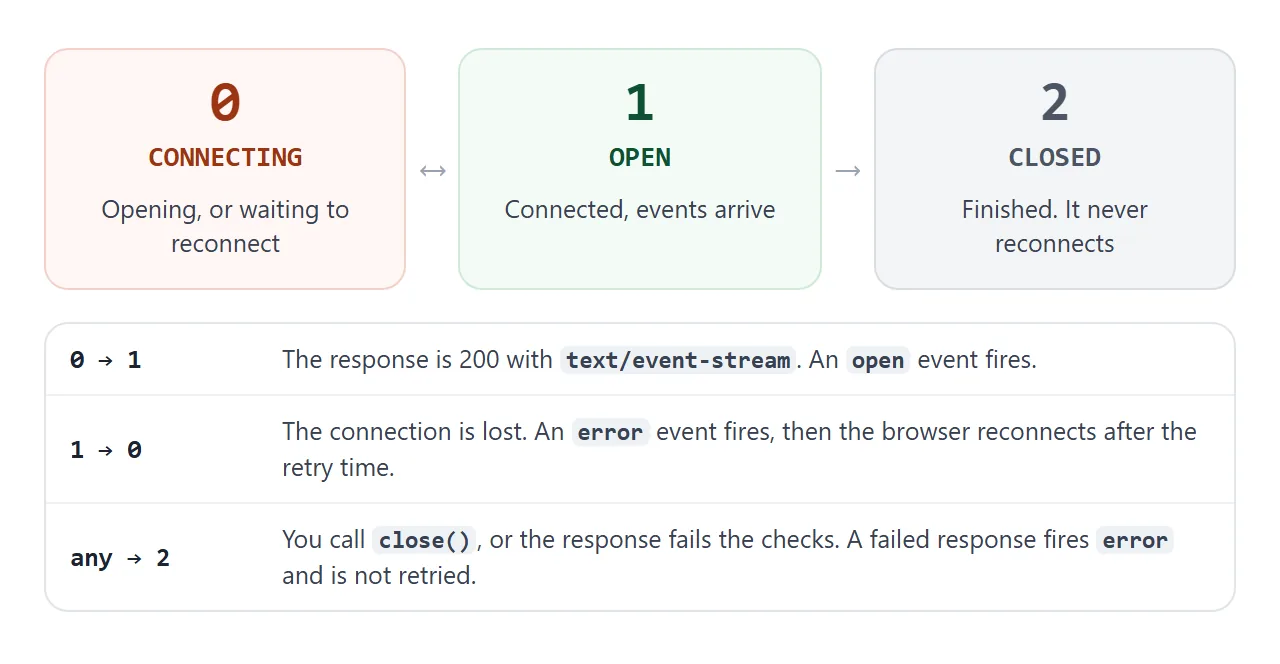
It waits before it retries. Until the server sends a retry: line, how long is up to the browser. Try different values below, then switch the answer to text/plain to see a failed connection that is never retried.
<!doctype html>
<html lang="en">
<head>
<meta charset="utf-8">
<meta name="viewport" content="width=device-width, initial-scale=1">
<title>EventSource reconnect and states</title>
<style>
  * { box-sizing: border-box; }
  body { margin: 0; padding: 14px; font-family: system-ui, sans-serif; background: #f4f5f7; color: #1d2330; }
  .row { display: flex; flex-wrap: wrap; gap: 10px; align-items: end; margin-bottom: 10px; }
  .row label { display: block; font-size: 12.5px; font-weight: 600; margin-bottom: 3px; }
  input, select { padding: 7px 8px; border: 1px solid #cfd4dc; border-radius: 8px; font: 14px system-ui, sans-serif; background: #fff; }
  input { width: 90px; }
  button { padding: 9px 14px; border: 0; border-radius: 8px; background: #2563eb; color: #fff; font: 600 14px system-ui, sans-serif; cursor: pointer; }
  button.stop { background: #6b7280; }
  .status { display: flex; flex-wrap: wrap; gap: 8px 14px; align-items: center; margin: 4px 0 10px; font-size: 14px; }
  .pill { padding: 3px 10px; border-radius: 999px; font: 700 13px ui-monospace, Consolas, monospace; background: #e5e7eb; }
  .pill.s0 { background: #ffedd5; color: #9a3412; }
  .pill.s1 { background: #dcfce7; color: #0f5132; }
  .pill.s2 { background: #fee2e2; color: #991b1b; }
  ul { list-style: none; margin: 0; padding: 8px 10px; min-height: 190px; background: #fff; border: 1px solid #e1e4ea; border-radius: 8px; font: 12.5px/1.6 ui-monospace, Consolas, monospace; }
  li { overflow-wrap: anywhere; }
  li.open { color: #0f5132; }
  li.err { color: #9a3412; }
  li.empty { color: #6b7280; font-family: system-ui, sans-serif; }
</style>
</head>
<body>
<div class="row">
  <div><label for="retry">retry (ms)</label><input id="retry" type="number" min="200" max="5000" step="100" value="1000"></div>
  <div>
    <label for="kind">The "server" answers with</label>
    <select id="kind">
      <option value="text/event-stream">text/event-stream</option>
      <option value="text/plain">text/plain</option>
    </select>
  </div>
  <button id="start" type="button">Start</button>
  <button id="stop" class="stop" type="button">Close</button>
</div>

<div class="status">
  <span>readyState <span id="state" class="pill">none</span></span>
  <span>connections opened: <b id="opens">0</b></span>
  <span>messages: <b id="msgs">0</b></span>
</div>

<ul id="log"><li class="empty">Start with text/event-stream and watch it reconnect on its own. Then try text/plain.</li></ul>

<script>
  const NAMES = ['CONNECTING', 'OPEN', 'CLOSED'];
  const $ = (id) => document.getElementById(id);
  let es, url, t0, opens, msgs;

  function show() {
    const s = es ? es.readyState : null;
    $('state').textContent = s === null ? 'none' : s + ' ' + NAMES[s];
    $('state').className = 'pill' + (s === null ? '' : ' s' + s);
  }

  function log(text, cls) {
    const li = document.createElement('li');
    li.textContent = '+' + ((performance.now() - t0) / 1000).toFixed(1) + 's  ' + text;
    if (cls) li.className = cls;
    $('log').prepend(li);
    while ($('log').children.length > 12) $('log').lastChild.remove();
  }

  function stop() {
    if (es) es.close();
    if (url) URL.revokeObjectURL(url);
    show();
  }

  $('start').addEventListener('click', () => {
    stop();
    $('log').textContent = '';
    opens = 0; msgs = 0; t0 = performance.now();
    $('opens').textContent = 0; $('msgs').textContent = 0;

    // This blob ends right after one message, like a server that drops the connection.
    const text = 'retry: ' + $('retry').value + '\nid: 1\ndata: tick\n\n';
    url = URL.createObjectURL(new Blob([text], { type: $('kind').value }));

    es = new EventSource(url);
    es.onopen = () => { $('opens').textContent = ++opens; log('open', 'open'); show(); };
    es.onmessage = (e) => { $('msgs').textContent = ++msgs; log('message ' + JSON.stringify(e.data)); };
    es.onerror = () => {
      log('error, readyState ' + es.readyState + (es.readyState === 0 ? ': will reconnect' : ': closed for good'), 'err');
      show();
    };
    show();
  });

  $('stop').addEventListener('click', () => { if (es) { stop(); log('close() called'); } });
</script>
</body>
</html>
The page can stop a stream with close(). The server can stop it too: an HTTP 204 No Content response tells the browser not to reconnect.
When an id: line has been received, the browser sends it back in a Last-Event-ID request header on reconnect. A server can read that header and continue from the next message. The examples cannot show the header, because no server is involved.
What the server sends
The server must answer with status 200 and the type text/event-stream, then keep the response open and write messages when it has them. This small Node.js server does that:
// server.mjs - run with: node server.mjs
import http from 'node:http';

http.createServer((req, res) => {
  if (req.url !== '/events') { res.writeHead(404).end(); return; }

  res.writeHead(200, {
    'Content-Type': 'text/event-stream',
    'Cache-Control': 'no-cache',
  });

  // After a reconnect the browser sends the last id it saw
  let id = Number(req.headers['last-event-id'] || 0);
  res.write('retry: 3000\n\n');

  const timer = setInterval(() => {
    id += 1;
    res.write('id: ' + id + '\ndata: tick ' + id + '\n\n');
  }, 1000);
  req.on('close', () => clearInterval(timer));
}).listen(3000);
Open a page from the same server that calls new EventSource('/events'), and a new message event arrives each second. A proxy between the two can drop a quiet connection, so the HTML specification suggests a comment line about every 15 seconds.
Three limits are worth knowing:
- Open connections. Over HTTP/1.1 the limit is six per browser per domain, shared by every tab. With HTTP/2 the number of streams is negotiated and defaults to 100.
- Other origins. A stream from another origin is a cross-origin request, so the server needs the right CORS headers. The
withCredentialsoption of the constructor sets the CORS credentials mode. - Page policy. A Content Security Policy can block it, because
connect-srcalso coversEventSource.
When it does not work
| What you see | Cause | Fix |
|---|---|---|
error at once, readyState is 2 |
The response is not 200, or its type is not text/event-stream |
Fix the status and the Content-Type on the server |
Data is sent but onmessage stays silent |
The message has an event: line |
Use addEventListener with that name |
| The last message never arrives | No blank line after it | End every message with a blank line |
| It reconnects every few seconds | The server ends the response each time | Keep the response open, answer 204, or call close() |
| One tab works, many tabs stall | HTTP/1.1 allows six per browser per domain | Serve over HTTP/2, or open fewer streams |
e.data is text, not an object |
data is always a string |
Call JSON.parse(e.data) |
| Blocked, with a policy message in the console | connect-src does not list the address |
Allow the address in connect-src |
| Blocked, with a CORS message | The stream is on another origin | Add CORS headers on the server |
When a stream fails, open the browser's developer tools (a short guide) and check the status code and Content-Type the server really returned.
Share it as a link
A stream test bench is easier to try than to describe. A screenshot cannot reconnect, and an .html attachment may not open on a phone at all.
To send the working version, paste the page into a NOS document and choose Create share link. HTML to link walks through it.
The page renders as written and its scripts run, so the people you send it to can edit the stream and press the buttons themselves. If you change the code later, the same link shows the new version.
In NOS, fetch to other sites is blocked, so share a page that builds its stream inside the page, like these examples. If yours points at a server, open the share link and test it before you send it.