To show an HTML link without an underline, set text-decoration: none on the anchor.
a.nav-link { text-decoration: none; }
Or inline, which is what you want when the page has to travel as a single file:
<a href="/pricing" style="text-decoration:none">Pricing</a>
That is the whole technique. Everything else on this page is about where to apply it, because applying it everywhere is the common mistake.
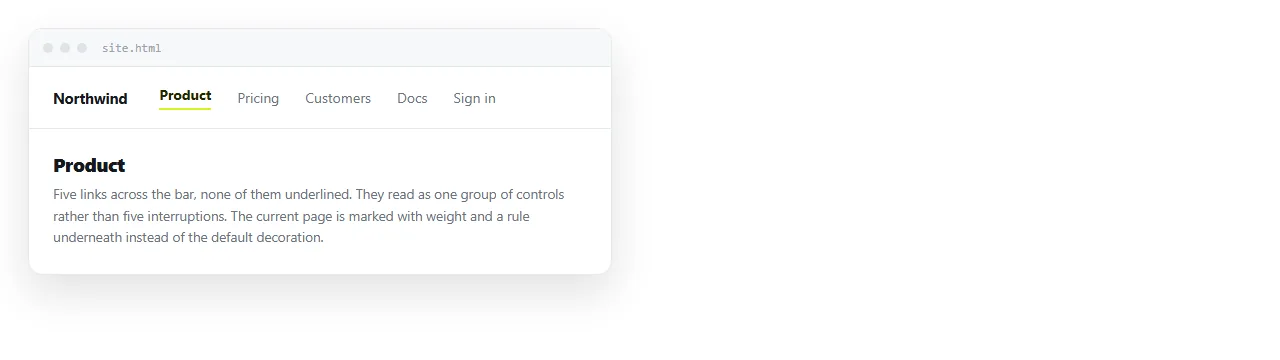
Do not style every anchor
a { text-decoration: none; }
That one rule strips the underline from links inside paragraphs as well, which is where readers most need it.
Target what you mean instead:
nav a, .button, .card a { text-decoration: none; }
A class costs nothing and keeps body links intact. It also survives someone adding a new section to the page six months later.
Where the underline is doing work
| Context | Keep the underline | Why |
|---|---|---|
| Links inside a paragraph | Yes | Nothing else marks them apart from text |
| Navigation bar | No | Grouping and position identify them |
| Buttons and calls to action | No | The shape already says clickable |
| Card or list titles | No | The whole card is the target |
| Footer link columns | No | A list of links in a column reads as links |
| Links in a table cell | Usually yes | A cell of mixed text and links is ambiguous |
The pattern is consistent. Where the link is surrounded by ordinary text, the underline is the only signal. Where the link is in a structure made of links, it is redundant.
Colour alone is not a substitute
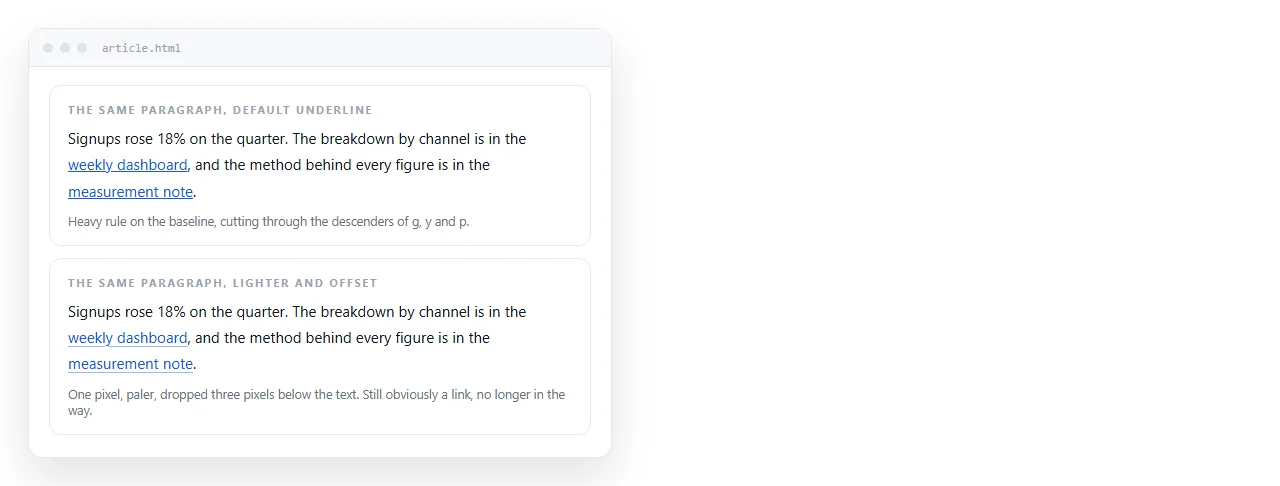
A blue word in a paragraph is a link to readers who can see the blue. Around one in twelve men has some form of colour vision deficiency, and print copies have none at all.
That is why the rule is context dependent rather than a matter of taste. In running text, remove the underline and some readers cannot find the link.
If you want body links to look lighter, change the underline rather than deleting it:
p a {
  text-decoration: underline;
  text-decoration-color: #9ca3af;
  text-underline-offset: 3px;
}
That keeps the signal and removes most of the visual noise people object to.
The underline that comes back
A link loses its underline in normal state and regains it on hover. The cause is almost always an existing rule:
a:hover { text-decoration: underline; }
Hover is more specific than a plain a selector, so it wins. Find and change that rule rather than reaching for an important flag.
Browser defaults do not add a hover underline by themselves. If you see one appear, something in your stylesheet is asking for it.
Focus is not optional
There is a second decoration that people remove by accident:
a { outline: none; }
That removes the focus ring, and a keyboard user now tabs through the page with no way to see where they are. It is the most damaging one line change in front end CSS.
If the default ring is ugly, replace it rather than deleting it:
a:focus-visible {
  outline: 2px solid #2563eb;
  outline-offset: 2px;
}
:focus-visible shows the ring for keyboard navigation and not on mouse clicks, which is what most people wanted when they removed it.
Replace the signal you removed
If the underline goes, something else has to say clickable. Any of these is enough on its own.
- Weight. Navigation links at 500 or 600 against 400 body text.
- A background or border. The button shape, covered in HTML button with a link.
- A hover change. Colour or background shifting on hover, described in link hover colour.
- Position. A bar across the top of the page is understood without any styling at all.
- A small arrow or chevron after the text on card titles.

Doing it inline for a file that travels
A page that is pasted, emailed or opened from disk may lose an external stylesheet on the way. Inline CSS keeps the styling attached to the element.
<a href="#summary"
   style="text-decoration:none;font-weight:600;color:#111">
  Summary
</a>
This is the normal approach in HTML email, where support for stylesheets is inconsistent and a style attribute is the dependable form.
It is also the right approach for a contents list built from same page anchors, because that list usually ships inside the document itself.
A default worth keeping
Underlines in body text, none in navigation, buttons and card titles, and a visible focus ring everywhere.
That combination reads as designed rather than as a stripped default, and it does not cost you the readers who cannot distinguish a blue word from a black one.
In a NOS document, pasted HTML renders with the link styles as written, so whichever of these rules the file carries is what the reader sees. If the styling lives in an external stylesheet the file cannot reach, fold it inline before sharing.
A block to start from
a { color: #2563eb; }

nav a,
.btn,
.card a,
footer a {
  text-decoration: none;
}

a:focus-visible {
  outline: 2px solid #2563eb;
  outline-offset: 2px;
}
Body links are untouched, because they are not in any of those selectors. Everything structural loses the underline, and focus survives everywhere.
Adding a new area later means adding one selector to that list. That is a deliberate choice: opting a section in is a decision someone makes on purpose, whereas a blanket a rule strips underlines nobody looked at.
If you want hover to restore the underline on the stripped links, put that rule below the block. Order decides which state wins, as link hover colour sets out.