Put <meta charset="utf-8"> as the first line inside <head>, and save the file as UTF-8.
The tag tells the browser how to turn the file's bytes into characters. Without it, the browser has to guess, and a wrong guess shows é as é and a dash as —.
<!doctype html>
<html lang="en">
<head>
  <meta charset="utf-8">
  <title>My page</title>
</head>
Here is why it matters. The example below turns your text into UTF-8 bytes with TextEncoder, then decodes the same bytes with five different encodings. Only one of them gives your text back.
<!doctype html>
<html lang="en">
<head>
<meta charset="utf-8">
<meta name="viewport" content="width=device-width, initial-scale=1">
<title>Same bytes, different charsets</title>
<style>
  body { margin: 0; padding: 16px; font-family: system-ui, sans-serif; background: #f4f5f7; color: #1d2330; }
  label { font-weight: 600; font-size: 14px; }
  input { display: block; width: 100%; box-sizing: border-box; margin: 6px 0 10px; padding: 9px 10px;
          font-size: 17px; border: 1px solid #c9ced8; border-radius: 8px; }
  .bytes { font: 13px/1.5 ui-monospace, Consolas, monospace; background: #fff; border-radius: 8px;
           padding: 8px 10px; word-break: break-all; margin-bottom: 12px; }
  table { width: 100%; border-collapse: collapse; background: #fff; border-radius: 8px; overflow: hidden; }
  td { padding: 8px 10px; border-top: 1px solid #eceef2; font-size: 15px; vertical-align: top; }
  td:first-child { font: 600 13px ui-monospace, Consolas, monospace; white-space: nowrap; color: #4b5563; }
  tr.ok td:last-child { color: #0f5132; font-weight: 600; }
  .note { font-size: 13px; color: #4b5563; margin-top: 10px; }
</style>
</head>
<body>
<label for="text">Type some text</label>
<input id="text" value="Café — naïve “quotes” €5">
<div class="bytes" id="bytes"></div>
<table id="out"></table>
<p class="note">This page itself was decoded as <b id="me"></b>.</p>

<script>
  const input = document.getElementById('text');
  const labels = ['utf-8', 'windows-1252', 'iso-8859-2', 'shift_jis', 'utf-16le'];

  function show() {
    const bytes = new TextEncoder().encode(input.value);  // always UTF-8
    document.getElementById('bytes').textContent = bytes.length + ' bytes: ' +
      [...bytes].map(b => b.toString(16).padStart(2, '0').toUpperCase()).join(' ');

    // Decode the SAME bytes with each charset
    document.getElementById('out').innerHTML = '';
    for (const label of labels) {
      const row = document.createElement('tr');
      if (label === 'utf-8') row.className = 'ok';
      const name = document.createElement('td');
      const text = document.createElement('td');
      name.textContent = label;
      text.textContent = new TextDecoder(label).decode(bytes);
      row.append(name, text);
      document.getElementById('out').append(row);
    }
  }

  input.addEventListener('input', show);
  document.getElementById('me').textContent = document.characterSet;
  show();
</script>
</body>
</html>
A file on disk has no letters in it, only bytes. The charset is the key that maps bytes to letters, and every row above used a different key.
What meta charset actually does
meta charset is a label, not a converter. It says "these bytes are UTF-8". It does not change a single byte of the file.
That gives two ways to break a page:
- No label. The file is UTF-8, but nothing says so. The browser falls back to a default, often
windows-1252, and every non-ASCII character comes out as two or three wrong ones. - A wrong label. The tag says UTF-8, but the editor saved the file in
windows-1252. Nowéis the single byteE9, which is not valid UTF-8, so it shows as the replacement character�.
The fix for the first is the tag. The fix for the second is saving the file again as UTF-8. The current HTML standard requires UTF-8 for HTML documents, so there is no reason to declare anything else.
Why é turns into é
UTF-8 stores é as two bytes, C3 A9. windows-1252 reads one byte as one character. It sees C3 and prints Ã, then sees A9 and prints ©.
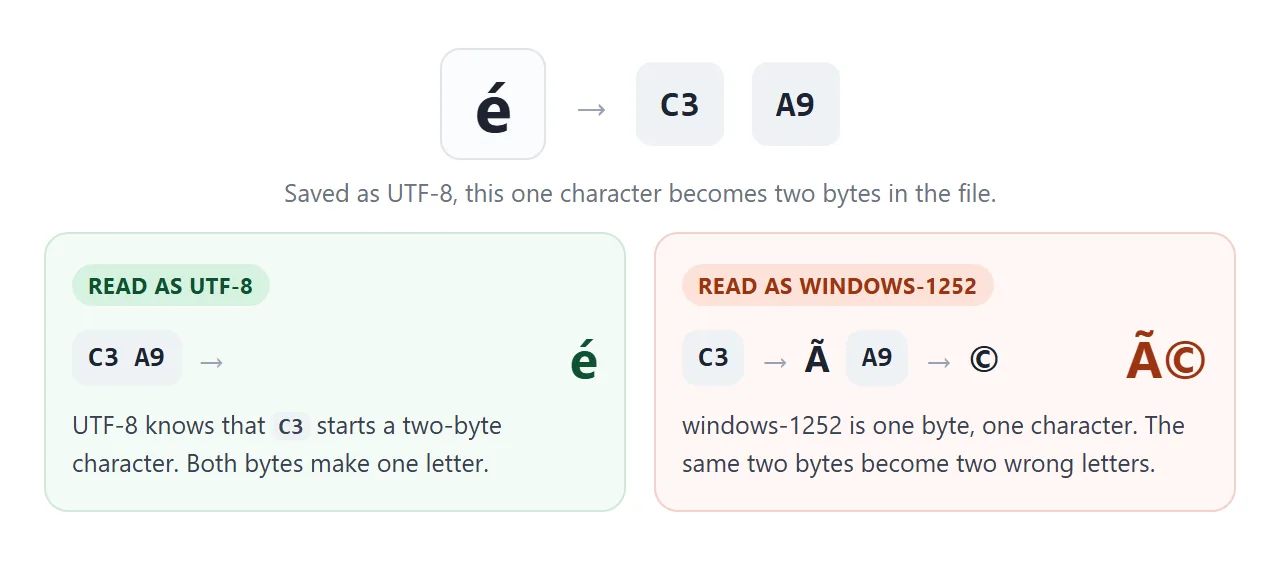
Garbled text like this has a name: mojibake. The pattern gives the cause away. Pairs such as é, è and ’ mean UTF-8 read as windows-1252. A lone � means the opposite: bytes that are not valid UTF-8 read as UTF-8.
Because the first kind loses nothing, it can be reversed. Map each character back to its windows-1252 byte and decode those bytes as UTF-8:
<!doctype html>
<html lang="en">
<head>
<meta charset="utf-8">
<meta name="viewport" content="width=device-width, initial-scale=1">
<title>Break and repair mojibake</title>
<style>
  body { margin: 0; padding: 16px; font-family: system-ui, sans-serif; background: #f4f5f7; color: #1d2330; }
  textarea { display: block; width: 100%; box-sizing: border-box; height: 84px; padding: 9px 10px;
             font-size: 16px; border: 1px solid #c9ced8; border-radius: 8px; resize: vertical; }
  .buttons { display: flex; gap: 8px; flex-wrap: wrap; margin: 10px 0; }
  button { font: 600 14px system-ui, sans-serif; padding: 9px 14px; border-radius: 8px; border: 0; cursor: pointer; }
  #break { background: #fde2da; color: #9a3412; }
  #repair { background: #d6f2df; color: #0f5132; }
  #reset { background: #e5e7eb; color: #374151; }
  #status { font-size: 14px; min-height: 40px; background: #fff; border-radius: 8px; padding: 9px 10px; }
</style>
</head>
<body>
<textarea id="text">Café — naïve “quotes” €5</textarea>
<div class="buttons">
  <button id="break">Break it (read as windows-1252)</button>
  <button id="repair">Repair it</button>
  <button id="reset">Reset</button>
</div>
<div id="status">Press "Break it" to see what a missing charset does.</div>

<script>
  const box = document.getElementById('text');
  const status = document.getElementById('status');

  // Reverse table: character -> the windows-1252 byte that produces it
  const toByte = new Map();
  const all = new TextDecoder('windows-1252').decode(Uint8Array.from({ length: 256 }, (_, i) => i));
  [...all].forEach((ch, i) => toByte.set(ch, i));

  document.getElementById('break').addEventListener('click', () => {
    const bytes = new TextEncoder().encode(box.value);           // UTF-8 bytes
    box.value = new TextDecoder('windows-1252').decode(bytes);   // read with the wrong charset
    status.textContent = bytes.length + ' UTF-8 bytes read one byte per character. Press again to break it twice.';
  });

  document.getElementById('repair').addEventListener('click', () => {
    const chars = [...box.value];
    if (chars.some(ch => !toByte.has(ch))) {
      status.textContent = 'Not windows-1252 mojibake: some characters have no windows-1252 byte.';
      return;
    }
    const bytes = Uint8Array.from(chars, ch => toByte.get(ch));  // get the original bytes back
    try {
      box.value = new TextDecoder('utf-8', { fatal: true }).decode(bytes);
      status.textContent = 'Repaired one layer: the bytes were valid UTF-8.';
    } catch {
      status.textContent = 'Those bytes are not valid UTF-8, so this text is not broken this way.';
    }
  });

  document.getElementById('reset').addEventListener('click', () => {
    box.value = 'Café — naïve “quotes” €5';
    status.textContent = 'Press "Break it" to see what a missing charset does.';
  });
</script>
</body>
</html>
The � kind cannot be reversed from the page. The original byte was replaced, so the file itself has to be fixed.
Why it must be in the first 1024 bytes
The HTML standard says the whole meta charset element must fit in the first 1024 bytes of the file. Before the browser builds the page, it scans that opening stretch of bytes for the declaration, a step the standard calls the prescan.
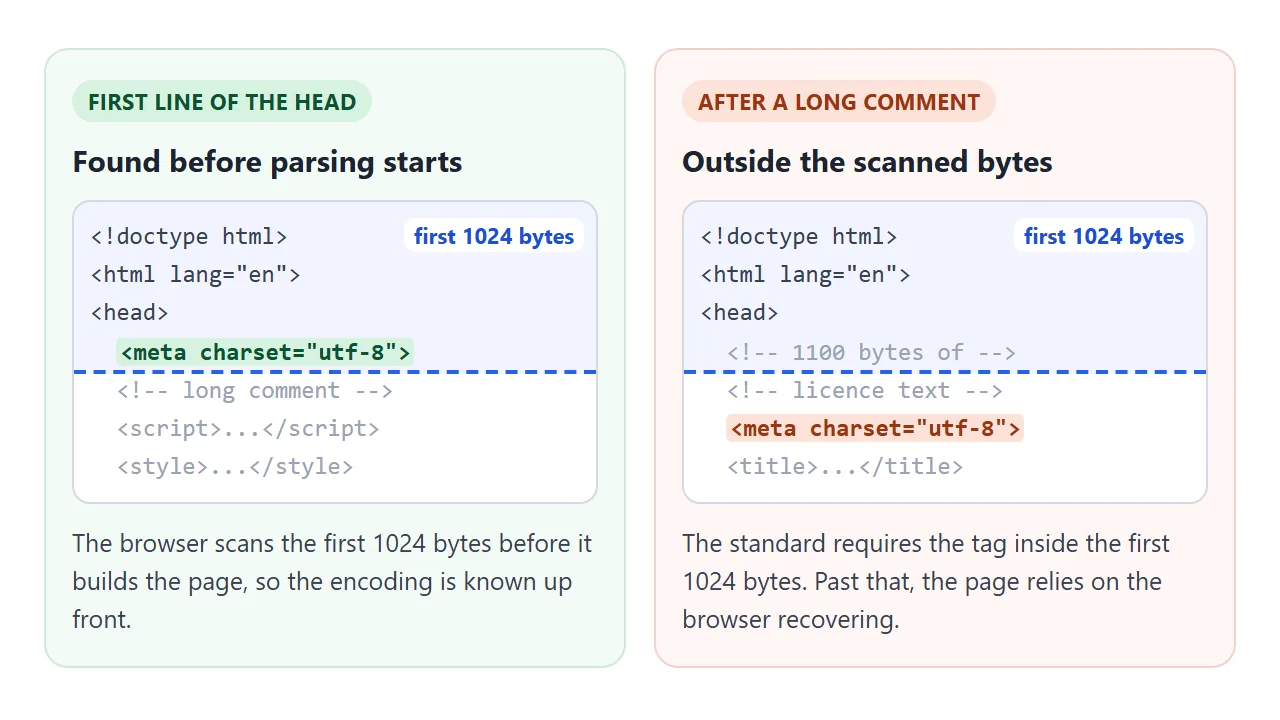
What pushes it out is anything placed above it in the head: a licence comment, an inline script, a large style block. Nothing about these is wrong on its own. They only need to come after the charset.
In our test, Chromium and Firefox still used a utf-8 tag that ended past byte 1024, when the whole small file arrived at once.
Firefox also logged a console warning asking to move the tag to the start of the head. That is recovery work, not a promise. First line of the head, and the question never comes up.
The server header beats the meta tag
The browser does not start with the meta tag. It checks sources in a fixed order and uses the first one that answers:
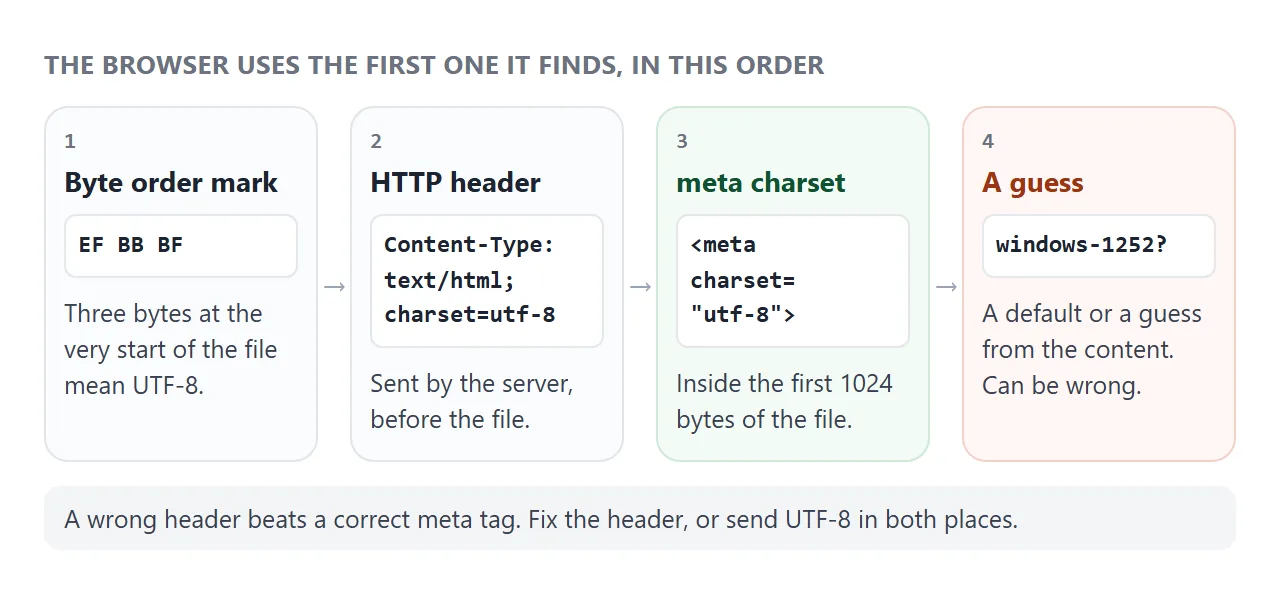
| Source | Where it lives | Wins over |
|---|---|---|
| Byte order mark | First bytes of the file | Everything |
Content-Type header |
Server response | meta charset |
meta charset |
First 1024 bytes of the file | The guess |
| Guess | The browser | Nothing |
So a server that sends charset=iso-8859-1 will garble a UTF-8 page even though its meta tag is correct. In our test of that case, both Chromium and Firefox reported windows-1252 in document.characterSet and showed é.
The header should read:
Content-Type: text/html; charset=utf-8
To see what your server sends, open the browser developer tools, reload on the Network tab, click the page request and read the response headers. On the command line:
curl -sI https://example.com/ | grep -i content-type
Two common server settings that add charset=utf-8:
# nginx, inside http, server or location
charset utf-8;
# Apache, in the config or .htaccess
AddDefaultCharset UTF-8
The BOM: three invisible bytes at the start
Some editors begin a UTF-8 file with the bytes EF BB BF, called a byte order mark or BOM. The browser checks for it before anything else. A UTF-8 BOM makes the page UTF-8 even when the header or the meta tag says otherwise.
That makes a BOM harmless for a normal HTML file, and it is not a problem to leave one in. Two things to know:
TextDecoderremoves a leading BOM by default. Pass{ ignoreBOM: true }to keep it as the characterU+FEFF. TextEncoder in JavaScript covers the rest of that API.- A BOM only counts at the very start of the file. When one file is pasted or included into another, its BOM becomes an ordinary invisible character in the middle of the page.
Check a file before you publish it
This checker reads the raw bytes of a file and walks through the same order the browser uses: BOM, then the meta tag within 1024 bytes, then the fallback. A local file has no server header, so that step is skipped.
Try the samples or pick one of your own .html files.
<!doctype html>
<html lang="en">
<head>
<meta charset="utf-8">
<meta name="viewport" content="width=device-width, initial-scale=1">
<title>HTML charset checker</title>
<style>
  body { margin: 0; padding: 16px; font-family: system-ui, sans-serif; background: #f4f5f7; color: #1d2330; }
  h1 { font-size: 18px; margin: 0 0 10px; }
  .pick { display: flex; flex-wrap: wrap; gap: 6px; margin-bottom: 10px; }
  button { font: 600 13px system-ui, sans-serif; padding: 7px 10px; border-radius: 8px;
           border: 1px solid #c9ced8; background: #fff; cursor: pointer; }
  input[type=file] { font-size: 13px; margin-bottom: 12px; max-width: 100%; }
  ul { list-style: none; padding: 0; margin: 0 0 12px; background: #fff; border-radius: 8px; }
  li { padding: 8px 10px 8px 34px; border-top: 1px solid #eceef2; font-size: 14px; position: relative; }
  li:first-child { border-top: 0; }
  li::before { position: absolute; left: 11px; font-weight: 700; }
  li.ok::before { content: "\2713"; color: #0f5132; }
  li.bad::before { content: "!"; color: #c2410c; left: 14px; }
  li.info::before { content: "i"; color: #2563eb; left: 14px; }
  #verdict { font-weight: 700; font-size: 15px; margin-bottom: 8px; }
  #preview { background: #fff; border-radius: 8px; padding: 9px 10px; font-size: 15px; word-break: break-word; }
</style>
</head>
<body>
<h1>Which charset will the browser use?</h1>
<div class="pick">
  <button data-sample="good">Good file</button>
  <button data-sample="late">Meta after 1024 bytes</button>
  <button data-sample="none">No meta</button>
  <button data-sample="latin">Saved as windows-1252</button>
  <button data-sample="bom">BOM + other meta</button>
</div>
<input type="file" id="file" accept=".html,.htm,text/html">
<div id="verdict"></div>
<ul id="list"></ul>
<div id="preview"></div>

<script>
  const enc = s => new TextEncoder().encode(s);
  const join = (...parts) => {  // glue byte arrays together
    const out = new Uint8Array(parts.reduce((n, p) => n + p.length, 0));
    let i = 0; for (const p of parts) { out.set(p, i); i += p.length; }
    return out;
  };
  const text = 'Café — naïve';
  const samples = {
    good:  () => enc('<!doctype html><head><meta charset="utf-8"><title>t</title></head><body>' + text),
    late:  () => enc('<!doctype html><head><!-- ' + 'x'.repeat(1100) + ' --><meta charset="utf-8"></head><body>' + text),
    none:  () => enc('<!doctype html><head><title>t</title></head><body>' + text),
    latin: () => join(enc('<!doctype html><head><meta charset="utf-8"></head><body>Caf'), [0xE9], enc(' ok')),
    bom:   () => join([0xEF, 0xBB, 0xBF], enc('<!doctype html><head><meta charset="windows-1252"></head><body>' + text)),
  };

  function canonical(label) {  // "UTF8", "latin1" ... -> the name TextDecoder uses
    try { return new TextDecoder(label).encoding; } catch { return null; }
  }

  function check(bytes) {
    const notes = [];
    const add = (cls, msg) => notes.push([cls, msg]);
    let chosen = null;

    // 1. A byte order mark beats everything else
    if (bytes[0] === 0xEF && bytes[1] === 0xBB && bytes[2] === 0xBF) chosen = 'utf-8';
    else if (bytes[0] === 0xFE && bytes[1] === 0xFF) chosen = 'utf-16be';
    else if (bytes[0] === 0xFF && bytes[1] === 0xFE) chosen = 'utf-16le';
    add(chosen ? 'info' : 'ok', chosen ? 'Starts with a ' + chosen + ' BOM. It wins over the header and the meta tag.' : 'No BOM.');

    // 2. A local file has no Content-Type header, so skip to the meta tag.
    // windows-1252 maps one byte to one character, so string index = byte offset.
    const raw = new TextDecoder('windows-1252').decode(bytes);
    const m = /<meta\b[^>]*?charset\s*=\s*["']?\s*([\w:.-]+)/i.exec(raw);
    if (!m) {
      add('bad', 'No meta charset found.');
    } else {
      const end = raw.indexOf('>', m.index) + 1;
      const declared = canonical(m[1]);
      add(end <= 1024 ? 'ok' : 'bad', 'meta charset="' + m[1] + '" ends at byte ' + end +
        (end <= 1024 ? ', inside the first 1024.' : '. The standard wants it inside the first 1024.'));
      if (!declared) add('bad', '"' + m[1] + '" is not an encoding name the browser knows.');
      if (!chosen && declared) chosen = declared.startsWith('utf-16') ? 'utf-8' : declared;
    }

    // 3. Nothing declared: the browser guesses
    if (!chosen) { chosen = 'windows-1252'; add('bad', 'Nothing declared, so the browser falls back to a guess, often windows-1252.'); }

    // Are the bytes really UTF-8?
    let validUtf8 = true;
    try { new TextDecoder('utf-8', { fatal: true }).decode(bytes); } catch { validUtf8 = false; }
    if (chosen === 'utf-8' && !validUtf8) add('bad', 'Declared UTF-8, but the file was not saved as UTF-8. Bad bytes will show as �.');
    if (chosen !== 'utf-8' && validUtf8 && /[^\x00-\x7F]/.test(raw)) add('bad', 'The bytes look like UTF-8 but will be read as ' + chosen + '.');

    const shown = new TextDecoder(chosen).decode(bytes).replace(/<[^>]*>/g, ' ').replace(/\s+/g, ' ').trim();
    document.getElementById('verdict').textContent = 'Browser reads this file as: ' + chosen;
    document.getElementById('list').innerHTML = '';
    for (const [cls, msg] of notes) {
      const li = document.createElement('li'); li.className = cls; li.textContent = msg;
      document.getElementById('list').append(li);
    }
    document.getElementById('preview').textContent = 'Text shown: ' + shown.slice(-60);
  }

  document.querySelectorAll('[data-sample]').forEach(b =>
    b.addEventListener('click', () => check(samples[b.dataset.sample]())));

  document.getElementById('file').addEventListener('change', async (e) => {
    const f = e.target.files[0];
    if (f) check(new Uint8Array(await f.arrayBuffer()));  // read the raw bytes, not text
  });

  check(samples.good());
</script>
</body>
</html>
The meta search here is a simple pattern match, a smaller cousin of the real prescan. It is enough to find the common mistakes. To see what the browser actually chose for a live page, type this in the console:
document.characterSet // "UTF-8"
For where meta charset sits among the other head elements, see the HTML head tag. Characters you cannot type can also be written as HTML entities, which are plain ASCII and survive any encoding.
When it does not work
| What you see | Cause | Fix |
|---|---|---|
é shows as é, ’ as ’ |
UTF-8 bytes read as windows-1252 |
Add meta charset first in the head |
Tag is there, still é |
Server header names another charset | Set the header to charset=utf-8 |
� in place of accented letters |
File saved as windows-1252 but read as UTF-8 |
Save the file again as UTF-8 |
| Fine on the server, garbled when opened from disk | Only the header declared the charset | Add meta charset to the file |
| Firefox console asks to move the tag | Tag is past the start of the head | Move it to the first line of the head |
TextDecoder output starts with an invisible character |
BOM kept by ignoreBOM: true |
Leave ignoreBOM off |
Share it as a link
Encoding bugs are hard to describe and easy to show. A screenshot of mojibake does not let anyone type into the decoder, and an emailed .html file may be opened with yet another encoding on the other end.
To send the working version, paste the page into a NOS document and choose Create share link. HTML to link walks through it.
The page renders as written and its scripts run, so the people you send it to can type their own text into the decoder. If you change the code later, the same link shows the new version.