TextEncoder converts a JavaScript string into UTF-8 bytes, returned as a Uint8Array. TextDecoder does the reverse. You need them whenever a limit, a file or an API counts bytes rather than characters, because "한글".length is 2 while the text is 6 bytes.
const bytes = new TextEncoder().encode('한글');  // Uint8Array(6)
bytes.length;                                    // 6
new TextDecoder().decode(bytes);                 // '한글'
Type into the box, or tap a sample. The three numbers rarely agree once you leave plain English.
<!doctype html>
<html lang="en">
<head>
<meta charset="utf-8">
<meta name="viewport" content="width=device-width, initial-scale=1">
<title>String length vs UTF-8 bytes</title>
<style>
body { margin: 0; padding: 14px; font-family: system-ui, sans-serif; background: #f4f5f7; color: #1d2330; }
textarea {
width: 100%; box-sizing: border-box; height: 70px; padding: 10px;
font: 18px system-ui, sans-serif; border: 1px solid #c9cdd4; border-radius: 10px;
}
.presets { display: flex; flex-wrap: wrap; gap: 6px; margin: 8px 0 12px; }
.presets button {
font: 15px system-ui, sans-serif; padding: 6px 10px; border-radius: 99px;
border: 1px solid #c9cdd4; background: #fff; cursor: pointer;
}
.stats { display: grid; grid-template-columns: repeat(3, 1fr); gap: 8px; }
.stat { background: #fff; border-radius: 10px; padding: 10px; text-align: center; }
.stat b { display: block; font-size: 28px; }
.stat span { font-size: 12px; color: #5b6270; }
.stat.bytes b { color: #0f7a3a; }
</style>
</head>
<body>
<textarea id="text">hello</textarea>
<div class="presets">
<button>hello</button><button>café</button><button>한글</button>
<button>😀</button><button>👍🏽</button><button>👨👩👧</button>
</div>
<div class="stats">
<div class="stat"><b id="len">0</b><span>.length<br>(UTF-16 units)</span></div>
<div class="stat"><b id="cps">0</b><span>[...text].length<br>(code points)</span></div>
<div class="stat bytes"><b id="bytes">0</b><span>UTF-8 bytes<br>(TextEncoder)</span></div>
</div>
<script>
const text = document.getElementById('text');
const encoder = new TextEncoder(); // always UTF-8
function update() {
const s = text.value;
document.getElementById('len').textContent = s.length;
document.getElementById('cps').textContent = [...s].length;
document.getElementById('bytes').textContent = encoder.encode(s).length;
}
text.addEventListener('input', update);
document.querySelectorAll('.presets button').forEach((b) => {
b.addEventListener('click', () => { text.value = b.textContent; update(); });
});
update();
</script>
</body>
</html>
String length is not byte length
JavaScript stores strings as UTF-16 code units, and .length counts those units. UTF-8, the usual encoding for files and network requests, spends 1 to 4 bytes per character. The two counts only match for plain ASCII.
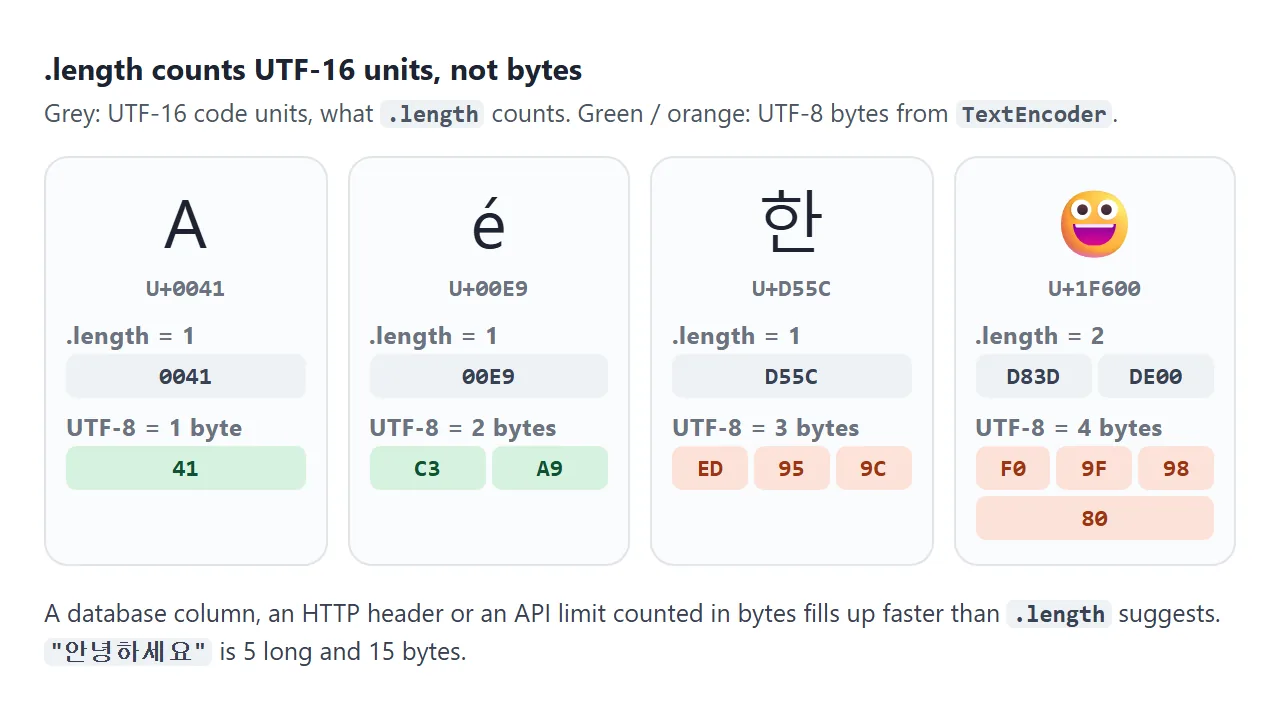
| Text | .length |
Code points | UTF-8 bytes |
|---|---|---|---|
| hello | 5 | 5 | 5 |
| café | 4 | 4 | 5 |
| 한글 | 2 | 2 | 6 |
| 안녕하세요 | 5 | 5 | 15 |
| 😀 | 2 | 1 | 4 |
| 👍🏽 (skin tone) | 4 | 2 | 8 |
| 👨👩👧 (family) | 8 | 5 | 18 |
Every Korean syllable is 3 bytes in UTF-8. 😀 is U+1F600, above U+FFFF, so it takes two UTF-16 units and 4 bytes. Combined emoji such as the family are several code points glued with invisible joiners, which is why one picture counts as 8.
[...text].length counts code points, because string iteration walks code points instead of units. It still counts the family emoji as 5, so neither number equals what a reader sees as one character.
TextEncoder: string to bytes
TextEncoder has no options. It always writes UTF-8, and its encoding property always reads "utf-8". Anything passed to the constructor is ignored.
encode(text)returns a newUint8Array. Use itslengthfor byte limits and send the array itself withfetchor put it in aBlob.encodeInto(text, target)writes into an array you already have and returns{ read, written }.
encodeInto never writes half a character. That makes it a clean way to cut text to a byte budget:
// Keep at most 4 UTF-8 bytes of 'a한글'
const buf = new Uint8Array(4);
const { read, written } = new TextEncoder().encodeInto('a한글', buf);
// read: 2 ('a' and '한'), written: 4
const cut = new TextDecoder().decode(buf.subarray(0, written));  // 'a한'
Slicing with text.slice(0, n) has no such guard. '😀'.slice(0, 1) returns half an emoji, a lone surrogate, which TextEncoder then writes as the replacement character.
TextDecoder: bytes to string, and fatal
new TextDecoder() reads UTF-8 unless you name another encoding, such as 'euc-kr', 'shift_jis' or 'windows-1252'. Its decode() accepts a Uint8Array, an ArrayBuffer or a DataView.
What happens to bytes that are not valid UTF-8 depends on one option. Try the presets below:
<!doctype html>
<html lang="en">
<head>
<meta charset="utf-8">
<meta name="viewport" content="width=device-width, initial-scale=1">
<title>TextDecoder: default vs fatal</title>
<style>
  body { margin: 0; padding: 14px; font-family: system-ui, sans-serif; background: #f4f5f7; color: #1d2330; }
  label { font-size: 13px; color: #5b6270; }
  input {
    width: 100%; box-sizing: border-box; margin: 4px 0 8px; padding: 9px 10px;
    font: 15px ui-monospace, Consolas, monospace; border: 1px solid #c9cdd4; border-radius: 10px;
  }
  .presets { display: flex; flex-wrap: wrap; gap: 6px; margin-bottom: 12px; }
  .presets button {
    font: 13px system-ui, sans-serif; padding: 6px 10px; border-radius: 99px;
    border: 1px solid #c9cdd4; background: #fff; cursor: pointer;
  }
  .out { display: grid; grid-template-columns: 1fr 1fr; gap: 8px; }
  .box { background: #fff; border-radius: 10px; padding: 10px; min-width: 0; }
  .box h3 { margin: 0 0 6px; font: 600 12px ui-monospace, Consolas, monospace; color: #5b6270; }
  .box p { margin: 0; font-size: 20px; overflow-wrap: anywhere; }
  .box small { display: block; margin-top: 6px; font-size: 12px; color: #5b6270; overflow-wrap: anywhere; }
  .err { color: #b42318; font-size: 14px !important; }
</style>
</head>
<body>
<label for="hex">Bytes in hex, separated by spaces</label>
<input id="hex" value="ed 95 9c ea b8 80">
<div class="presets">
  <button data-hex="ed 95 9c ea b8 80">한글 (valid)</button>
  <button data-hex="ed 95 9c ea b8">last byte missing</button>
  <button data-hex="68 69 ff 21">stray ff byte</button>
  <button data-hex="c7 d1 b1 db">EUC-KR bytes</button>
</div>
<div class="out">
  <div class="box">
    <h3>new TextDecoder()</h3>
    <p id="loose"></p><small id="looseNote"></small>
  </div>
  <div class="box">
    <h3>{ fatal: true }</h3>
    <p id="strict"></p><small id="strictNote"></small>
  </div>
</div>

<script>
  const hex = document.getElementById('hex');
  const loose = new TextDecoder();                         // bad bytes become U+FFFD
  const strict = new TextDecoder('utf-8', { fatal: true }); // bad bytes throw

  function update() {
    const parts = hex.value.trim().split(/\s+/).filter(Boolean);
    const bytes = new Uint8Array(parts.map((h) => parseInt(h, 16) & 255));

    const s = loose.decode(bytes);
    const bad = [...s].filter((c) => c === '�').length;
    document.getElementById('loose').textContent = s;
    document.getElementById('looseNote').textContent = bad + ' replacement character(s)';

    const out = document.getElementById('strict');
    const note = document.getElementById('strictNote');
    try {
      out.textContent = strict.decode(bytes);
      out.className = '';
      note.textContent = 'valid UTF-8';
    } catch (err) {
      out.textContent = err.name;      // TypeError
      out.className = 'err';
      note.textContent = err.message;
    }
  }

  hex.addEventListener('input', update);
  document.querySelectorAll('.presets button').forEach((b) => {
    b.addEventListener('click', () => { hex.value = b.dataset.hex; update(); });
  });
  update();
</script>
</body>
</html>
- Default: each invalid sequence becomes U+FFFD (�) and decoding continues. No error, and the damage is silent.
{ fatal: true }:decode()throws aTypeErrorat the first invalid sequence.
const strict = new TextDecoder('utf-8', { fatal: true });
let text;
try {
  text = strict.decode(bytes);
} catch {
  // not UTF-8: try another encoding or ask the user
  text = new TextDecoder('euc-kr').decode(bytes);
}
Use fatal when you read user files. An older CSV saved as EUC-KR decodes into � marks with the default decoder. The strict decoder tells you, so you can retry with the right encoding.
The decoder also drops a leading UTF-8 byte order mark (EF BB BF). Pass { ignoreBOM: true } to keep it in the string.
Bytes that arrive in pieces: stream: true
A network response or a large file often arrives in chunks, and a chunk can end in the middle of a character. Decoding each chunk on its own turns both halves into U+FFFD.
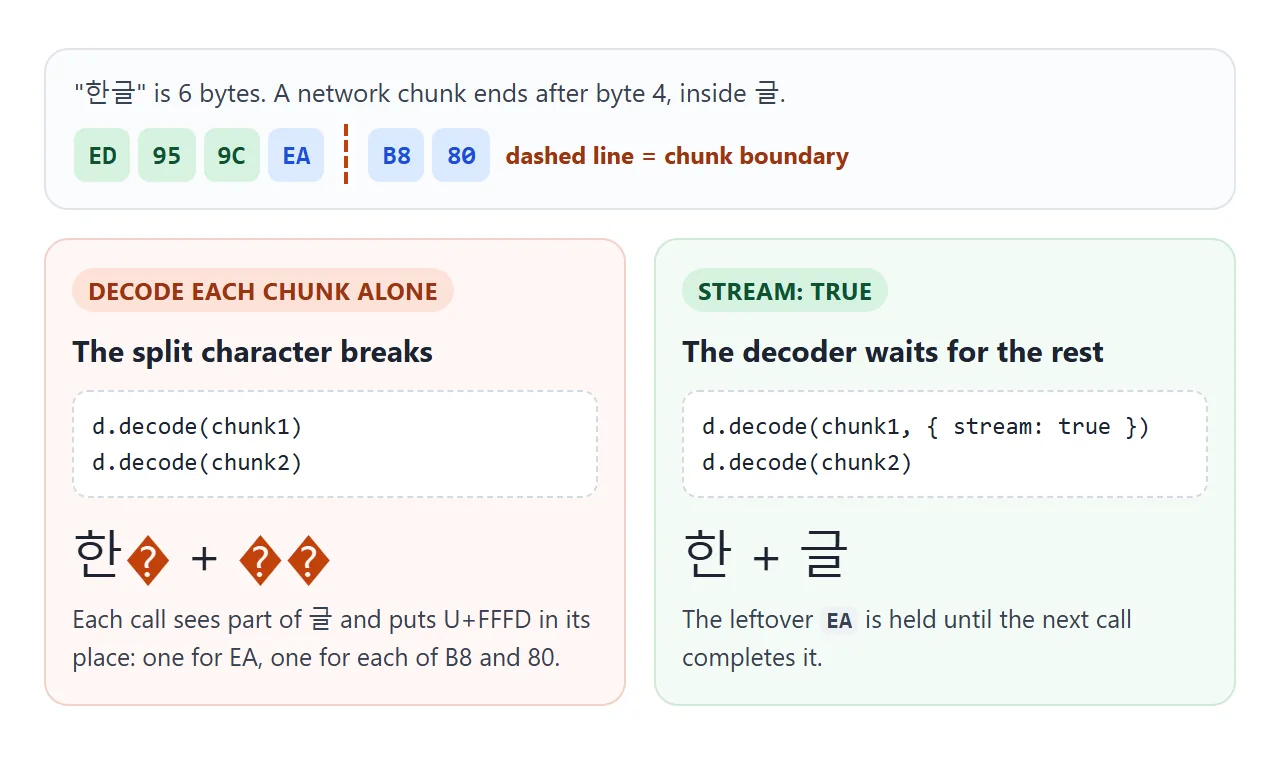
Pass { stream: true } on every call except the last. The decoder keeps the unfinished bytes and joins them with the next chunk:
const reader = response.body.getReader();
const decoder = new TextDecoder();
let text = '';
while (true) {
  const { done, value } = await reader.read();
  if (done) break;
  text += decoder.decode(value, { stream: true });
}
text += decoder.decode();  // flush whatever is left
TextDecoderStream does the same inside a pipe, if you prefer pipeThrough.
Base64 of Unicode text
btoa only accepts characters from U+0000 to U+00FF. Give it Korean or emoji and it throws InvalidCharacterError. The fix is to Base64 the UTF-8 bytes, not the string.
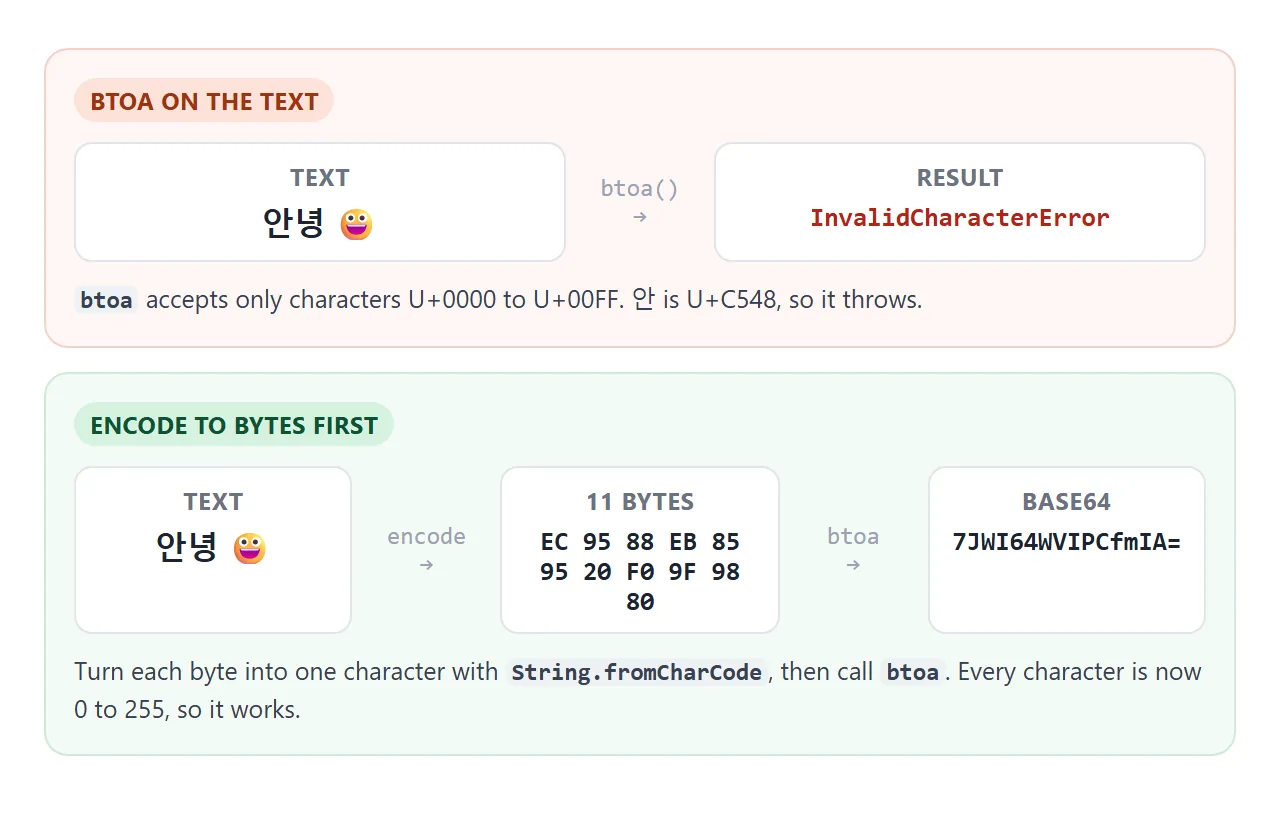
function toBase64(text) {
  const bytes = new TextEncoder().encode(text);
  let bin = '';
  for (const b of bytes) bin += String.fromCharCode(b);
  return btoa(bin);
}

function fromBase64(b64) {
  const bin = atob(b64);
  const bytes = Uint8Array.from(bin, (c) => c.charCodeAt(0));
  return new TextDecoder().decode(bytes);
}

toBase64('안녕 😀');  // '7JWI64WVIPCfmIA='
Newer engines also have bytes.toBase64() and Uint8Array.fromBase64(), which skip the character loop. Check they exist before relying on them. For Base64 inside image and data URLs, see Base64 images.
A finished example: a byte inspector
This puts the pieces together. Each tile is one code point with its U+ number and its UTF-8 bytes in hex, coloured by byte count. Below it, the text is Base64-encoded and decoded back to prove the round trip.
<!doctype html>
<html lang="en">
<head>
<meta charset="utf-8">
<meta name="viewport" content="width=device-width, initial-scale=1">
<title>UTF-8 byte inspector</title>
<style>
  body { margin: 0; padding: 14px; font-family: system-ui, sans-serif; background: #f4f5f7; color: #1d2330; }
  input {
    width: 100%; box-sizing: border-box; padding: 10px; font: 18px system-ui, sans-serif;
    border: 1px solid #c9cdd4; border-radius: 10px;
  }
  .sum { margin: 8px 0; font-size: 13px; color: #5b6270; }
  .sum b { color: #1d2330; }
  .chars { display: flex; flex-wrap: wrap; gap: 6px; max-height: 210px; overflow: auto; }
  .ch { background: #fff; border-radius: 8px; padding: 6px 8px; text-align: center; }
  .ch .g { font-size: 22px; line-height: 1.2; }
  .ch .cp { font: 11px ui-monospace, Consolas, monospace; color: #5b6270; }
  .ch .by { display: flex; gap: 2px; justify-content: center; margin-top: 4px; }
  .ch .by span { font: 600 12px ui-monospace, Consolas, monospace; padding: 2px 4px; border-radius: 4px; }
  .n1 span { background: #dbeafe; } .n2 span { background: #e0e7ff; }
  .n3 span { background: #d6f2df; } .n4 span { background: #fde2da; }
  .b64 { margin-top: 10px; background: #fff; border-radius: 10px; padding: 10px; }
  .b64 h3 { margin: 0 0 4px; font-size: 12px; color: #5b6270; font-weight: 600; }
  .b64 code { display: block; font: 13px ui-monospace, Consolas, monospace; overflow-wrap: anywhere; }
  .ok { color: #0f7a3a; } .no { color: #b42318; }
</style>
</head>
<body>
<input id="text" value="Hi 한글 😀">
<p class="sum">
  <b id="nChars">0</b> characters · <b id="nUnits">0</b> UTF-16 units · <b id="nBytes">0</b> UTF-8 bytes
</p>
<div class="chars" id="chars"></div>
<div class="b64">
  <h3>Base64 of the UTF-8 bytes</h3>
  <code id="b64"></code>
  <h3 style="margin-top:8px">Decoded back</h3>
  <code id="back"></code>
</div>

<script>
  const input = document.getElementById('text');
  const encoder = new TextEncoder();
  const decoder = new TextDecoder();
  const hex = (b) => b.toString(16).toUpperCase().padStart(2, '0');

  // text -> UTF-8 bytes -> one char per byte -> btoa
  function toBase64(str) {
    const bytes = encoder.encode(str);
    let bin = '';
    for (const b of bytes) bin += String.fromCharCode(b);
    return btoa(bin);
  }

  // atob -> one char per byte -> bytes -> TextDecoder
  function fromBase64(b64) {
    const bin = atob(b64);
    return decoder.decode(Uint8Array.from(bin, (c) => c.charCodeAt(0)));
  }

  function update() {
    const s = input.value;
    const box = document.getElementById('chars');
    box.innerHTML = '';
    for (const ch of s) {  // for...of walks code points, not UTF-16 units
      const bytes = encoder.encode(ch);
      const tile = document.createElement('div');
      tile.className = 'ch n' + bytes.length;  // colour by byte count
      const cp = 'U+' + ch.codePointAt(0).toString(16).toUpperCase().padStart(4, '0');
      tile.innerHTML = '<div class="g"></div><div class="cp">' + cp + '</div><div class="by">' +
        [...bytes].map((b) => '<span>' + hex(b) + '</span>').join('') + '</div>';
      tile.querySelector('.g').textContent = ch === ' ' ? '␠' : ch;  // show spaces as a symbol
      box.appendChild(tile);
    }
    document.getElementById('nChars').textContent = [...s].length;
    document.getElementById('nUnits').textContent = s.length;
    document.getElementById('nBytes').textContent = encoder.encode(s).length;

    const b64 = toBase64(s);
    const back = fromBase64(b64);
    const same = back === s;
    document.getElementById('b64').textContent = b64 || '(empty)';
    const el = document.getElementById('back');
    el.textContent = back + (same ? '  ✓ same text' : '  ✗ changed');
    el.className = same ? 'ok' : 'no';
  }

  input.addEventListener('input', update);
  update();
</script>
</body>
</html>
- Walk code points:
for (const ch of text)makes an emoji one tile, not two. - Bytes per tile:
encoder.encode(ch)gives 1 to 4 bytes for one code point. - Hex:
b.toString(16).padStart(2, '0')prints each byte as two digits.
To save the bytes as a file, wrap them in a Blob and link to it. Blob URLs shows that step.
When it does not work
| What you see | Cause | Fix |
|---|---|---|
A byte limit is exceeded though .length is under it |
.length counts UTF-16 units |
Check encode(text).length |
| � marks in decoded text | Invalid bytes, or the wrong encoding | Use fatal: true and retry with the right label |
| � only at chunk edges | Characters split across chunks | Pass { stream: true } |
btoa throws InvalidCharacterError |
Text has characters above U+00FF | Encode to UTF-8 bytes first |
| Base64 decodes to é or similar | atob result used as text |
Decode the bytes with TextDecoder |
| Half an emoji after trimming | slice cut a surrogate pair |
Trim with encodeInto or by code points |
new TextEncoder('utf-16') still gives UTF-8 |
TextEncoder is UTF-8 only | Encode other formats by hand |
Share it as a link
A byte inspector is easiest to understand when someone can type their own text into it. A screenshot shows one string, and an .html attachment may open as plain code on a phone.
To send the working version, paste the page into a NOS document and choose Create share link. HTML to link walks through it.
The page renders as written and its scripts run, so the people you send it to can type Korean, emoji or anything else and watch the bytes change. If you change the code later, the same link shows the new version.