To get a random whole number between min and max in JavaScript, both included, use this line:
const n = Math.floor(Math.random() * (max - min + 1)) + min;
Try it below. Change min and max, roll once, or roll 10,000 times and look at the bars. Then switch the formula to one of the two common mistakes and watch which bars shrink.
<!doctype html>
<html lang="en">
<head>
<meta charset="utf-8">
<meta name="viewport" content="width=device-width, initial-scale=1">
<title>Random integer between min and max</title>
<style>
  body { margin: 0; padding: 14px; font-family: system-ui, sans-serif; background: #f4f5f7; color: #1d2330; }
  .row { display: flex; flex-wrap: wrap; gap: 8px 12px; align-items: center; margin-bottom: 10px; }
  label { font-size: 14px; }
  input[type=number] { width: 64px; padding: 6px; font-size: 15px; }
  select { padding: 6px; font-size: 14px; max-width: 100%; }
  button { padding: 8px 14px; font-size: 14px; border: 0; border-radius: 8px; background: #1d4ed8; color: #fff; cursor: pointer; }
  button.alt { background: #fff; color: #1d4ed8; border: 1px solid #1d4ed8; }
  code { display: block; font: 13px ui-monospace, Consolas, monospace; background: #fff; border: 1px solid #e1e4ea;
         border-radius: 8px; padding: 8px 10px; overflow-x: auto; white-space: pre; }
  #one { font-size: 28px; font-weight: 700; min-width: 40px; }
  #chart { display: flex; align-items: flex-end; gap: 3px; height: 190px; padding: 8px 6px 0;
           background: #fff; border: 1px solid #e1e4ea; border-radius: 8px; margin-top: 10px; }
  .bar { flex: 1; display: flex; flex-direction: column; justify-content: flex-end; align-items: center; height: 100%; min-width: 0; }
  .fill { width: 100%; background: #16a34a; border-radius: 4px 4px 0 0; }
  .fill.low { background: #ea580c; }
  .cnt { font-size: 11px; color: #5b6270; }
  .lab { font-size: 12px; font-weight: 600; padding: 3px 0 5px; }
  #note { font-size: 13px; color: #374151; margin: 8px 0 0; min-height: 36px; }
</style>
</head>
<body>
<div class="row">
  <label>min <input type="number" id="min" value="1"></label>
  <label>max <input type="number" id="max" value="6"></label>
  <select id="formula">
    <option value="floor">floor + 1 (correct)</option>
    <option value="round">Math.round (edges too rare)</option>
    <option value="noplus">floor, no + 1 (max never comes)</option>
  </select>
</div>
<code id="code"></code>
<div class="row" style="margin-top:10px">
  <button id="roll">Roll once</button> <span id="one">-</span>
  <button id="many" class="alt">Roll 10,000 times</button>
</div>
<div id="chart"></div>
<p id="note">Each bar counts how often that number came up.</p>

<script>
  const $ = (id) => document.getElementById(id);

  // the three versions people write; only the first is right
  const formulas = {
    floor:  (min, max) => Math.floor(Math.random() * (max - min + 1)) + min,
    round:  (min, max) => Math.round(Math.random() * (max - min)) + min,
    noplus: (min, max) => Math.floor(Math.random() * (max - min)) + min,
  };
  const text = {
    floor:  (a, b) => `Math.floor(Math.random() * (${b} - ${a} + 1)) + ${a}`,
    round:  (a, b) => `Math.round(Math.random() * (${b} - ${a})) + ${a}`,
    noplus: (a, b) => `Math.floor(Math.random() * (${b} - ${a})) + ${a}`,
  };

  function range() {
    let min = Math.ceil(Number($('min').value)), max = Math.floor(Number($('max').value));
    if (max < min) [min, max] = [max, min];
    if (max - min > 19) max = min + 19;  // keep the chart readable: at most 20 bars
    $('min').value = min; $('max').value = max;
    return [min, max];
  }

  function showCode() {
    const [min, max] = range();
    $('code').textContent = text[$('formula').value](min, max);
  }

  $('roll').addEventListener('click', () => {
    const [min, max] = range();
    $('one').textContent = formulas[$('formula').value](min, max);
  });

  $('many').addEventListener('click', () => {
    const [min, max] = range();
    const f = formulas[$('formula').value];
    const counts = {};
    for (let v = min; v <= max; v++) counts[v] = 0;
    for (let i = 0; i < 10000; i++) counts[f(min, max)]++;

    const n = max - min + 1, fair = 10000 / n, top = Math.max(...Object.values(counts), fair);
    $('chart').innerHTML = '';
    for (let v = min; v <= max; v++) {
      const bar = document.createElement('div');
      bar.className = 'bar';
      const low = counts[v] < fair * 0.8;  // well under the fair share
      bar.innerHTML = `<span class="cnt">${counts[v]}</span>
        <div class="fill${low ? ' low' : ''}" style="height:${counts[v] / top * 80}%"></div>
        <span class="lab">${v}</span>`;
      $('chart').append(bar);
    }
    $('note').textContent = `Fair share: about ${Math.round(fair)} per number. ` +
      (Object.values(counts).some((c) => c < fair * 0.8) ? 'Orange bars came up far less often.' : 'All bars are close to it.');
  });

  ['min', 'max', 'formula'].forEach((id) => $(id).addEventListener('change', () => { showCode(); $('many').click(); }));
  showCode();
  $('many').click();
</script>
</body>
</html>
What Math.random() actually returns
Math.random() returns a decimal number from 0 up to, but not including, 1. It can return exactly 0, but never 1. Every other random value in this guide is built from that one number by stretching, cutting and shifting it.
| You want | Code | Range |
|---|---|---|
| A fraction | Math.random() |
0 to just under 1 |
| A decimal between a and b | Math.random() * (b - a) + a |
a to just under b |
| A whole number below n | Math.floor(Math.random() * n) |
0 to n - 1 |
| A whole number from min to max | Math.floor(Math.random() * (max - min + 1)) + min |
min to max |
| true or false | Math.random() < 0.5 |
each half the time |
The numbers are "pseudo-random": the browser computes them from a hidden starting state. They are fine for games, demos and shuffling a quiz. They are not designed to be unguessable, which matters later.
A random integer between min and max
The formula reads from the inside out. Each step changes the range, and the last one lands exactly on min to max.
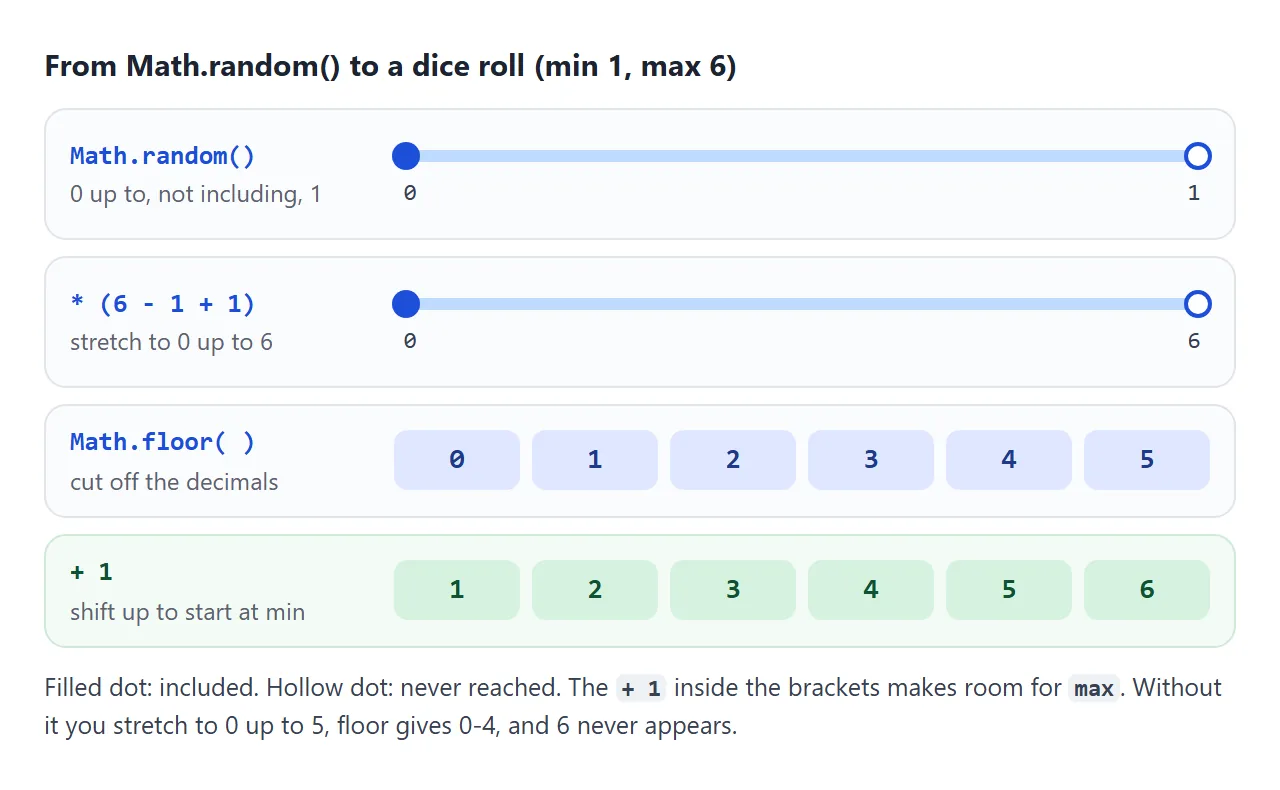
Math.random()gives a fraction from 0 up to 1.* (max - min + 1)stretches it. The+ 1is there because 1 to 6 contains six numbers, not five.Math.floorcuts off the decimals, giving 0 to max - min.+ minshifts the result so it starts at min.
It works for negative values as well. -3 to 3 gives seven results, and the demo above shows all seven equally often.
If min and max come from a text box, they arrive as strings. Wrap them in Number() first, otherwise + min joins text instead of adding.
Two mistakes that change the odds
Forgetting the + 1. Math.floor(Math.random() * (max - min)) + min looks right but can never return max. Math.random() never reaches 1, so the product never reaches the top of the range.
Using Math.round. Math.round(Math.random() * (max - min)) + min does return both ends, but only half as often as the middle. Rounding gives each end half a slice of the number line.
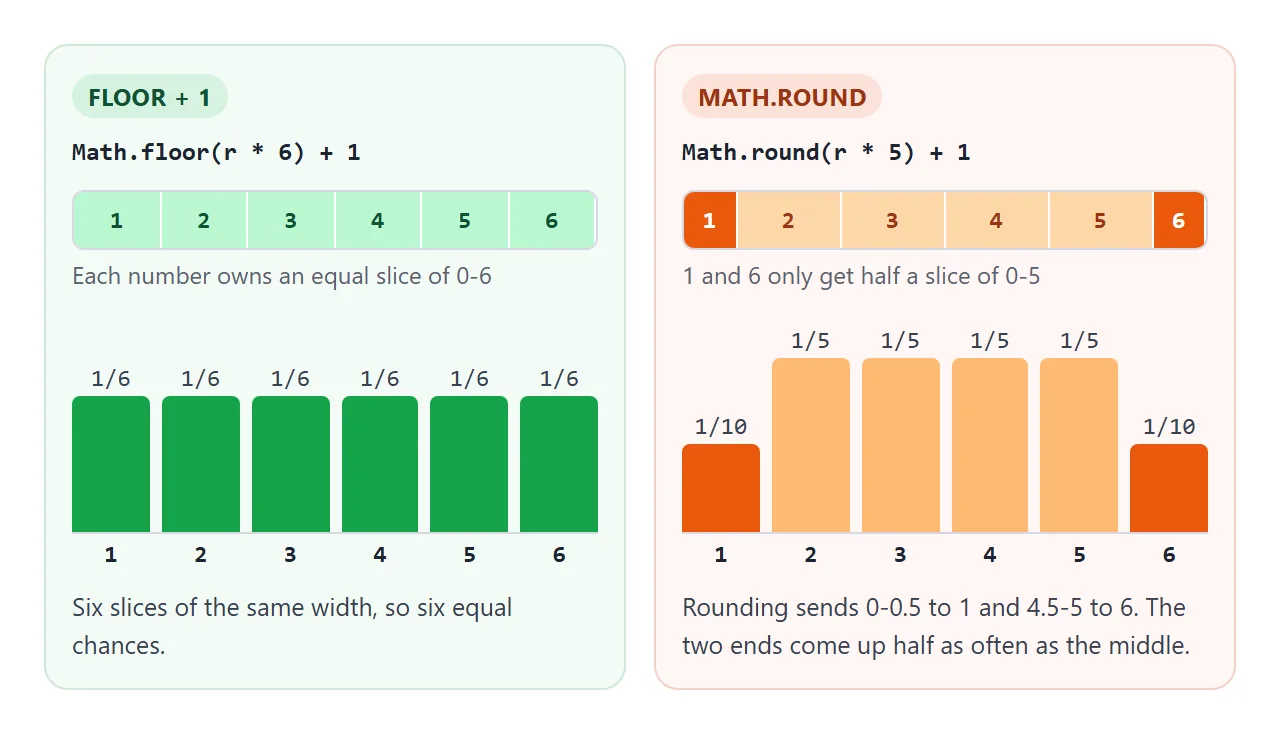
Pick the second option in the first demo and the orange bars show it: with 1 to 6, the ends land near 1,000 out of 10,000 rolls, the middle numbers near 2,000.
Pick a random item and shuffle an array
A random item from an array is the "whole number below n" row of the table, used as an index:
const colours = ['red', 'green', 'blue'];
const pick = colours[Math.floor(Math.random() * colours.length)];
To pick several items without repeats, remove each one as you pick it with splice, or shuffle a copy of the array and take the first few.
For shuffling, the one-liner that turns up everywhere is arr.sort(() => Math.random() - 0.5). It is short, and it is not fair. The demo shuffles four letters 20,000 times with both methods and counts where each letter ends up.
<!doctype html>
<html lang="en">
<head>
<meta charset="utf-8">
<meta name="viewport" content="width=device-width, initial-scale=1">
<title>Fisher-Yates vs sort shuffle</title>
<style>
body { margin: 0; padding: 14px; font-family: system-ui, sans-serif; background: #f4f5f7; color: #1d2330; }
.top { display: flex; flex-wrap: wrap; gap: 8px; align-items: center; margin-bottom: 10px; font-size: 14px; }
button { padding: 8px 14px; font-size: 14px; border: 0; border-radius: 8px; background: #1d4ed8; color: #fff; cursor: pointer; }
.wrap { display: grid; grid-template-columns: 1fr 1fr; gap: 12px; }
@media (max-width: 520px) { .wrap { grid-template-columns: 1fr; } }
.panel { background: #fff; border: 1px solid #e1e4ea; border-radius: 10px; padding: 10px; }
h3 { margin: 0 0 2px; font-size: 14px; }
.sub { margin: 0 0 8px; font: 12px ui-monospace, Consolas, monospace; color: #5b6270; }
table { border-collapse: collapse; width: 100%; font-size: 12px; }
th { font-weight: 600; color: #5b6270; padding: 3px; }
td { text-align: center; padding: 7px 2px; border: 2px solid #fff; border-radius: 4px; font-variant-numeric: tabular-nums; }
.verdict { font-size: 12px; margin: 8px 0 0; }
</style>
</head>
<body>
<div class="top">
<button id="run">Shuffle [A, B, C, D] 20,000 times</button>
<span>Fair = 25% in every cell</span>
</div>
<div class="wrap">
<div class="panel"><h3>Fisher-Yates</h3><p class="sub">swap from the end</p><table id="fy"></table><p class="verdict" id="fyv"></p></div>
<div class="panel"><h3>sort(() => Math.random() - 0.5)</h3><p class="sub">random comparator</p><table id="st"></table><p class="verdict" id="stv"></p></div>
</div>
<script>
// Fisher-Yates: walk from the end, swap each item with a random earlier (or same) one
function shuffle(arr) {
for (let i = arr.length - 1; i > 0; i--) {
const j = Math.floor(Math.random() * (i + 1));
[arr[i], arr[j]] = [arr[j], arr[i]];
}
return arr;
}
// the popular one-liner: short, but not every order is equally likely
const sortShuffle = (arr) => arr.sort(() => Math.random() - 0.5);
const ITEMS = ['A', 'B', 'C', 'D'], RUNS = 20000;
function tally(fn) {
// grid[item][position] = how many times that item landed there
const grid = ITEMS.map(() => ITEMS.map(() => 0));
for (let r = 0; r < RUNS; r++) {
fn([...ITEMS]).forEach((item, pos) => grid[ITEMS.indexOf(item)][pos]++);
}
return grid;
}
function draw(tableId, verdictId, grid) {
let worst = 0, html = '<tr><th></th>' + ITEMS.map((_, p) => `<th>pos ${p + 1}</th>`).join('') + '</tr>';
grid.forEach((row, i) => {
html += `<tr><th>${ITEMS[i]}</th>`;
row.forEach((count) => {
const pct = count / RUNS * 100, off = Math.abs(pct - 25);
worst = Math.max(worst, off);
// green near 25%, orange the further it drifts
const bg = off < 2 ? '#dcfce7' : off < 6 ? '#fed7aa' : '#fb923c';
html += `<td style="background:${bg}">${pct.toFixed(1)}%</td>`;
});
html += '</tr>';
});
document.getElementById(tableId).innerHTML = html;
document.getElementById(verdictId).textContent = worst < 2
? `Every cell within 2 points of 25%.`
: `Some cells are ${worst.toFixed(1)} points away from 25%.`;
}
document.getElementById('run').addEventListener('click', () => {
draw('fy', 'fyv', tally(shuffle));
draw('st', 'stv', tally(sortShuffle));
});
document.getElementById('run').click();
</script>
</body>
</html>
A comparator that gives random answers breaks the rules sort expects, so the specification leaves the result up to each browser. The exact pattern of bias depends on the browser's sort algorithm, but it does not go away.
The fair method is the Fisher-Yates shuffle. Walk from the last position to the second, and swap each one with a random position at or before it:
function shuffle(arr) {
  for (let i = arr.length - 1; i > 0; i--) {
    const j = Math.floor(Math.random() * (i + 1)); // 0 to i, i included
    [arr[i], arr[j]] = [arr[j], arr[i]];
  }
  return arr;
}
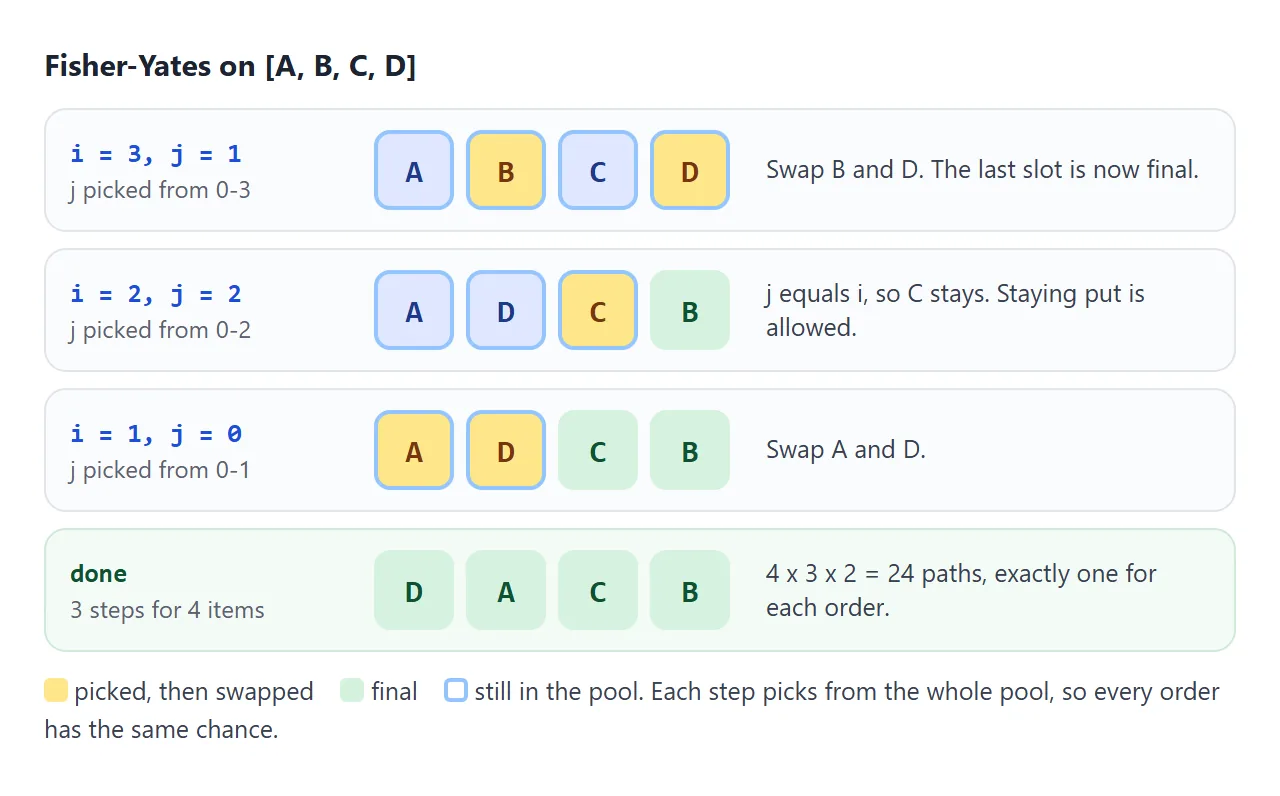
It shuffles in place. Use shuffle([...arr]) to keep the original. Note the i + 1: letting an item swap with itself is part of what makes it fair.
Random colours
A colour in hex is a number from 0 to 0xFFFFFF. Pick one and write it as six hex digits:
const hex = '#' + Math.floor(Math.random() * 0x1000000).toString(16).padStart(6, '0');
padStart matters: small numbers would otherwise give five or fewer digits, which is not a valid colour. For colours that look good together, keep saturation and lightness fixed and randomise only the hue, as in hsl(${Math.floor(Math.random() * 360)} 70% 55%).
To apply a random colour across a page, set it on a custom property and let the CSS use it. CSS variables shows how setProperty updates every element that reads the variable.
When it has to be secure: the crypto API
Math.random() is not cryptographically secure. Its output was never meant to be unpredictable to someone trying to guess it. Do not use it for passwords, tokens, invite codes or anything that protects access.
Browsers provide a secure generator on the global crypto object:
crypto.getRandomValues(array)fills a typed array, such asUint32Array, with secure random integers. One call can fill up to 65,536 bytes.crypto.randomUUID()returns a random version 4 UUID, a 36-character ID such as3b241101-e2bb-4255-8caf-4136c566a962. It needs a secure context: anhttps://page orlocalhost.
Turning a random 32-bit integer into a range needs care. x % 6 favours the low numbers slightly, because 2^32 is not a multiple of 6. The fix is to throw away values from the last, incomplete block and draw again:
function secureInt(n) {                        // 0 to n - 1
  const limit = Math.floor(2 ** 32 / n) * n;   // largest multiple of n that fits
  const buf = new Uint32Array(1);
  do crypto.getRandomValues(buf); while (buf[0] >= limit);
  return buf[0] % n;
}
Repeatable random numbers with a seed
Sometimes you want the same "random" sequence every time: a daily puzzle, a test you can rerun, a generated level that looks the same for every player. Math.random() cannot do this, because it has no seed.
A seeded generator is a small function that turns a starting number into a sequence. Mulberry32 is a widely copied example, a few lines long:
function mulberry32(seed) {
  return function () {
    seed = (seed + 0x6D2B79F5) | 0;
    let t = Math.imul(seed ^ (seed >>> 15), 1 | seed);
    t = (t + Math.imul(t ^ (t >>> 7), 61 | t)) ^ t;
    return ((t ^ (t >>> 14)) >>> 0) / 4294967296;  // 0 up to 1, like Math.random()
  };
}

const rand = mulberry32(20260926);
rand(); rand(); // the same two numbers on every run, in every browser
Use rand() anywhere this guide uses Math.random(). A seeded generator like this is for games and tests only, never for security.
For a puzzle that changes daily, build the seed from today's date; formatting dates in JavaScript covers getting the year, month and day as numbers.
A finished example: a random picker
This page combines the pieces. It draws winners without repeats, rolls dice, makes a colour palette and creates IDs. The checkbox switches every draw from Math.random() to crypto.getRandomValues() with the unbiased secureInt approach.
<!doctype html>
<html lang="en">
<head>
<meta charset="utf-8">
<meta name="viewport" content="width=device-width, initial-scale=1">
<title>Random picker</title>
<style>
  body { margin: 0; padding: 12px; font-family: system-ui, sans-serif; background: #f4f5f7; color: #1d2330; }
  .mode { font-size: 14px; margin-bottom: 10px; }
  .grid { display: grid; grid-template-columns: 1fr 1fr; gap: 10px; }
  @media (max-width: 560px) { .grid { grid-template-columns: 1fr; } }
  .card { background: #fff; border: 1px solid #e1e4ea; border-radius: 10px; padding: 10px 12px; }
  h3 { margin: 0 0 8px; font-size: 14px; }
  textarea { width: 100%; box-sizing: border-box; height: 64px; font: 14px system-ui, sans-serif; padding: 6px; }
  button { padding: 7px 12px; font-size: 14px; border: 0; border-radius: 8px; background: #1d4ed8; color: #fff; cursor: pointer; }
  button.alt { background: #fff; color: #1d4ed8; border: 1px solid #1d4ed8; }
  button:disabled { background: #9aa3b2; }
  .out { font-size: 22px; font-weight: 700; margin: 6px 0 2px; min-height: 30px; }
  .small { font-size: 12px; color: #5b6270; margin: 4px 0 0; }
  .dice { font-size: 40px; line-height: 1.1; letter-spacing: 4px; min-height: 46px; }
  .row { display: flex; gap: 8px; align-items: center; flex-wrap: wrap; }
  select { padding: 5px; font-size: 14px; }
  .pal { display: flex; height: 64px; border-radius: 8px; overflow: hidden; margin-top: 8px; }
  .pal div { flex: 1; display: flex; align-items: flex-end; justify-content: center; padding-bottom: 4px;
             font: 11px ui-monospace, Consolas, monospace; color: #fff; text-shadow: 0 1px 2px rgba(0,0,0,.6); }
  #uuid { font: 12px ui-monospace, Consolas, monospace; word-break: break-all; margin: 8px 0 0; }
</style>
</head>
<body>
<label class="mode"><input type="checkbox" id="secure"> Use <b>crypto.getRandomValues</b> instead of Math.random</label>

<div class="grid">
  <div class="card">
    <h3>Pick a winner (no repeats)</h3>
    <textarea id="names">Ana
Ben
Chloe
Dev
Emi</textarea>
    <div class="row"><button id="pick">Pick</button><button id="reset" class="alt">Start over</button></div>
    <div class="out" id="winner"></div>
    <p class="small" id="picked">Picked so far: none</p>
  </div>

  <div class="card">
    <h3>Dice roller</h3>
    <div class="row">
      <select id="count"><option>1</option><option selected>2</option><option>3</option><option>4</option><option>5</option></select>
      <button id="roll">Roll</button> <span id="total" class="small"></span>
    </div>
    <div class="dice" id="dice"></div>
  </div>

  <div class="card">
    <h3>Random colour palette</h3>
    <button id="colors">New palette</button>
    <div class="pal" id="pal"></div>
  </div>

  <div class="card">
    <h3>Random ID</h3>
    <button id="id">crypto.randomUUID()</button>
    <p id="uuid"></p>
  </div>
</div>

<script>
  const $ = (id) => document.getElementById(id);

  // whole number from 0 to n - 1
  function randomInt(n) {
    if (!$('secure').checked) return Math.floor(Math.random() * n);
    // crypto version: throw away values above the last full block of n, so no number is favoured
    const limit = Math.floor(2 ** 32 / n) * n, buf = new Uint32Array(1);
    do crypto.getRandomValues(buf); while (buf[0] >= limit);
    return buf[0] % n;
  }

  // Winner: take the name out of the pool so it cannot come up again
  let pool = null, picked = [];
  function startOver() {
    pool = $('names').value.split('\n').map((s) => s.trim()).filter(Boolean);
    picked = [];
    $('winner').textContent = '';
    $('picked').textContent = 'Picked so far: none';
    $('pick').disabled = pool.length === 0;
  }
  $('pick').addEventListener('click', () => {
    if (pool === null) startOver();
    const [name] = pool.splice(randomInt(pool.length), 1);
    picked.push(name);
    $('winner').textContent = name;
    $('picked').textContent = 'Picked so far: ' + picked.join(', ') + (pool.length ? '' : ' (everyone)');
    $('pick').disabled = pool.length === 0;
  });
  $('reset').addEventListener('click', startOver);
  $('names').addEventListener('input', startOver);

  // Dice: each die is a random integer from 1 to 6
  const FACES = ['⚀', '⚁', '⚂', '⚃', '⚄', '⚅'];
  $('roll').addEventListener('click', () => {
    const rolls = Array.from({ length: Number($('count').value) }, () => randomInt(6) + 1);
    $('dice').textContent = rolls.map((r) => FACES[r - 1]).join('');
    $('total').textContent = rolls.join(' + ') + ' = ' + rolls.reduce((a, b) => a + b, 0);
  });

  // Palette: a random number from 0 to 0xFFFFFF, written as 6 hex digits
  $('colors').addEventListener('click', () => {
    $('pal').innerHTML = '';
    for (let i = 0; i < 5; i++) {
      const hex = '#' + randomInt(0x1000000).toString(16).padStart(6, '0');
      const sw = document.createElement('div');
      sw.style.background = hex;
      sw.textContent = hex;
      $('pal').append(sw);
    }
  });

  // IDs always come from crypto, whatever the checkbox says
  $('id').addEventListener('click', () => { $('uuid').textContent = crypto.randomUUID(); });

  startOver();
  $('roll').click();
  $('colors').click();
  $('id').click();
</script>
</body>
</html>
- No repeats: each pick removes the name with
splice, so the pool shrinks until the button turns off. - One helper: every feature calls
randomInt(n), so switching the generator is oneif. - IDs:
crypto.randomUUID()is used whatever the checkbox says, because IDs should not be guessable.
To roll automatically every few seconds, or add a short "rolling" animation before the result, see setTimeout and setInterval.
When it does not work
| What you see | Cause | Fix |
|---|---|---|
| max never comes up | Math.floor without + 1 |
Multiply by (max - min + 1) |
| min and max come up half as often as the others | Math.round instead of Math.floor |
Use Math.floor and + 1 |
| Results such as "41" instead of 5 | min and max are strings from an input | Convert with Number() first |
| Some shuffled orders keep showing up | sort(() => Math.random() - 0.5) |
Use Fisher-Yates |
| Colour codes with five digits | Missing padStart(6, '0') |
Pad the hex string |
| You expected the same sequence twice | Math.random() cannot be seeded |
Use a seeded generator such as mulberry32 |
| Tokens or passwords made with Math.random | It is not cryptographically secure | Use crypto.getRandomValues or crypto.randomUUID |
crypto.randomUUID is not a function |
The page is not a secure context | Serve it over https:// or localhost |
Share it as a link
A random picker is more convincing when the other person can press the button. A screenshot only shows one result, and an .html attachment may open as plain code on a phone.
To send the working version, paste the page into a NOS document and choose Create share link. HTML to link walks through it.
The page renders as written and its scripts run, so the people you send it to can roll the dice and draw names themselves. If you change the code later, the same link shows the new version.