To format a date in JavaScript, pass it to toLocaleDateString or Intl.DateTimeFormat with a locale and an options object. date.toLocaleDateString('en-US', { dateStyle: 'long' }) returns "September 26, 2026". For a string a program reads, use toISOString().
Try the options here. Change the locale, the style and the time zone, and the code under the result changes with them.
<!doctype html>
<html lang="en">
<head>
<meta charset="utf-8">
<meta name="viewport" content="width=device-width, initial-scale=1">
<title>Date format playground</title>
<style>
  body { margin: 0; padding: 16px; font-family: system-ui, sans-serif; background: #f4f5f7; color: #1d2330; }
  .grid { display: grid; grid-template-columns: repeat(auto-fit, minmax(150px, 1fr)); gap: 10px; }
  label { display: block; font-size: 12px; font-weight: 600; color: #4b5563; }
  input, select { width: 100%; box-sizing: border-box; margin-top: 4px; padding: 7px; font: inherit; font-size: 14px;
                  border: 1px solid #cfd4dc; border-radius: 8px; background: #fff; }
  .out { margin-top: 14px; background: #fff; border-radius: 12px; padding: 12px 14px; box-shadow: 0 2px 10px rgba(0,0,0,.06); }
  .big { font-size: 20px; font-weight: 600; margin: 4px 0 10px; overflow-wrap: anywhere; }
  .row { font-size: 13px; margin: 6px 0; overflow-wrap: anywhere; }
  .row b { display: inline-block; min-width: 118px; color: #6b7280; font-weight: 600; }
  pre { margin: 10px 0 0; background: #1d2330; color: #e5e7eb; padding: 10px 12px; border-radius: 8px;
        font-size: 12.5px; white-space: pre-wrap; overflow-wrap: anywhere; }
</style>
</head>
<body>
<div class="grid">
  <label>Date and time <input type="datetime-local" id="when" value="2026-09-26T14:30"></label>
  <label>Locale
    <select id="locale">
      <option value="">Your browser's default</option>
      <option>en-US</option><option>en-GB</option><option>de-DE</option>
      <option>fr-FR</option><option>ja-JP</option><option>ko-KR</option>
    </select>
  </label>
  <label>Style
    <select id="style">
      <option value="full">dateStyle: full</option>
      <option value="long" selected>dateStyle: long</option>
      <option value="medium">dateStyle: medium</option>
      <option value="short">dateStyle: short</option>
      <option value="both">dateStyle + timeStyle</option>
      <option value="parts">weekday, day, month name</option>
    </select>
  </label>
  <label>Time zone
    <select id="zone">
      <option value="">Your time zone</option>
      <option>UTC</option><option>America/New_York</option>
      <option>Europe/London</option><option>Asia/Tokyo</option>
    </select>
  </label>
</div>

<div class="out">
  <div class="big" id="result"></div>
  <div class="row"><b>toISOString()</b> <span id="iso"></span></div>
  <div class="row"><b>Your time zone</b> <span id="tz"></span></div>
  <pre id="code"></pre>
</div>

<script>
  const $ = (id) => document.getElementById(id);

  // each preset is an options object for Intl.DateTimeFormat
  const presets = {
    full: { dateStyle: 'full' },
    long: { dateStyle: 'long' },
    medium: { dateStyle: 'medium' },
    short: { dateStyle: 'short' },
    both: { dateStyle: 'medium', timeStyle: 'short' },
    parts: { weekday: 'long', day: 'numeric', month: 'long', year: 'numeric' },
  };

  function render() {
    const d = new Date($('when').value);  // "YYYY-MM-DDTHH:mm" is read as local time
    if (isNaN(d)) { $('result').textContent = 'Pick a date and time'; return; }

    const locale = $('locale').value || undefined;  // undefined = browser default
    const options = { ...presets[$('style').value] };
    if ($('zone').value) options.timeZone = $('zone').value;

    $('result').textContent = new Intl.DateTimeFormat(locale, options).format(d);
    $('iso').textContent = d.toISOString();
    $('tz').textContent = Intl.DateTimeFormat().resolvedOptions().timeZone;
    $('code').textContent =
      'const d = new Date("' + $('when').value + '");\n' +
      'new Intl.DateTimeFormat(' + (locale ? '"' + locale + '"' : 'undefined') + ', ' +
      JSON.stringify(options).replace(/"(\w+)":/g, '$1: ') + ').format(d);';
  }

  ['when', 'locale', 'style', 'zone'].forEach((id) => $(id).addEventListener('input', render));
  render();
</script>
</body>
</html>
The rest of this guide covers what a Date actually holds, why dates come out a day off, and when to use each formatting method.
What a Date object holds
A Date is one number: milliseconds since midnight UTC on 1 January 1970. It has no time zone and no format of its own. Every method that shows it picks a time zone and a layout at that moment.
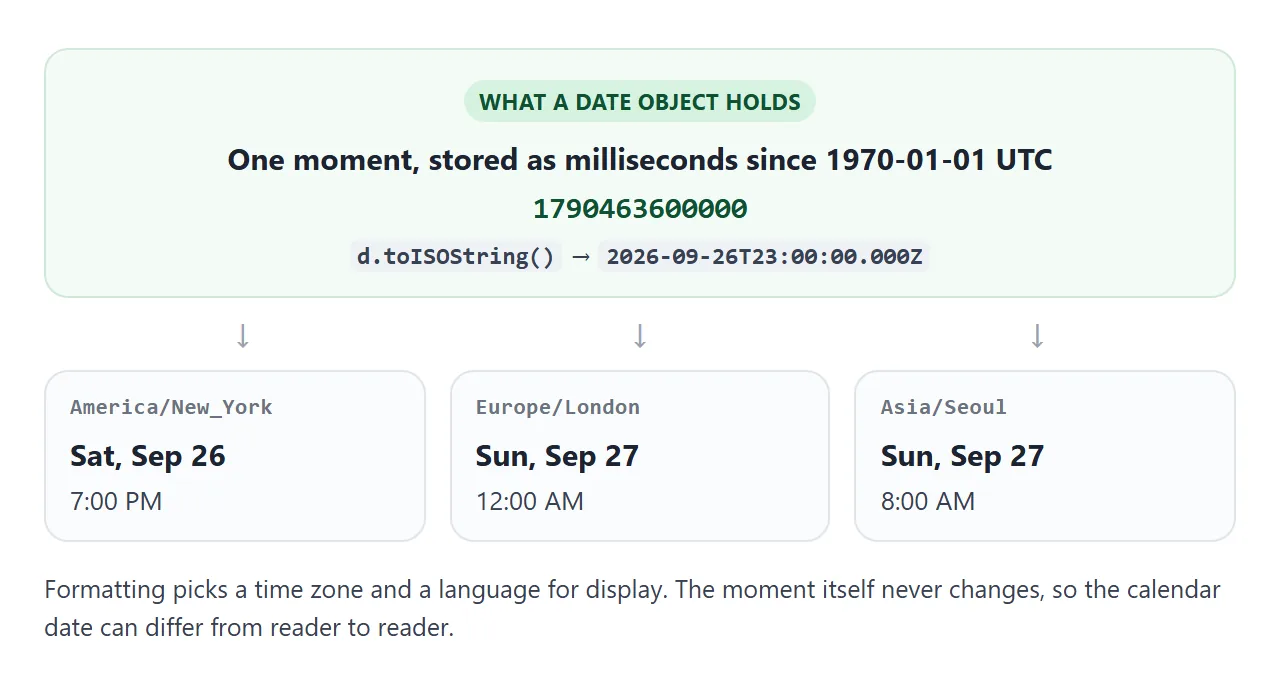
So new Date() is "now", everywhere at once. Methods such as getDate() and toString() show it in the device's time zone. getUTCDate() and toISOString() show it in UTC. Neither is wrong; they answer different questions.
Formatting for people: toLocaleDateString and Intl.DateTimeFormat
Both take the same two arguments: a locale such as 'en-GB', and an options object. Leave the locale out, or pass undefined, and the reader's browser language is used.
const d = new Date('2026-09-26T14:30');

d.toLocaleDateString('en-GB', { weekday: 'long', day: 'numeric', month: 'long', year: 'numeric' });
// "Saturday, 26 September 2026"

const fmt = new Intl.DateTimeFormat(undefined, { dateStyle: 'medium', timeStyle: 'short' });
fmt.format(d);  // reuse fmt for every date in a list
There are two ways to fill the options object, and they do not mix:
| Options | Example | Gives you |
|---|---|---|
dateStyle, timeStyle |
{ dateStyle: 'full' } |
A complete, locale-appropriate layout: full, long, medium or short |
| Individual fields | { weekday: 'short', month: 'long', day: 'numeric' } |
Only the parts you name, arranged the locale's way |
timeZone |
{ timeZone: 'Asia/Tokyo' } |
The date as seen in that zone; works with either kind above |
hour12 |
{ hour: 'numeric', hour12: false } |
24-hour or 12-hour clock regardless of locale |
Combining dateStyle with a field such as weekday throws a TypeError. So does passing timeStyle to toLocaleDateString; use toLocaleString or Intl.DateTimeFormat for date and time together.
The locale decides order and words, not you. en-US puts the month first, en-GB the day, ja-JP the year. If you need exact pieces, fmt.formatToParts(d) returns them as an array you can rearrange.
Why the date is one day off
This bug comes from parsing, not formatting. The specification reads a date-only ISO string such as "2026-09-26" as midnight UTC. The same string with a time, "2026-09-26T00:00", is read as midnight local time.
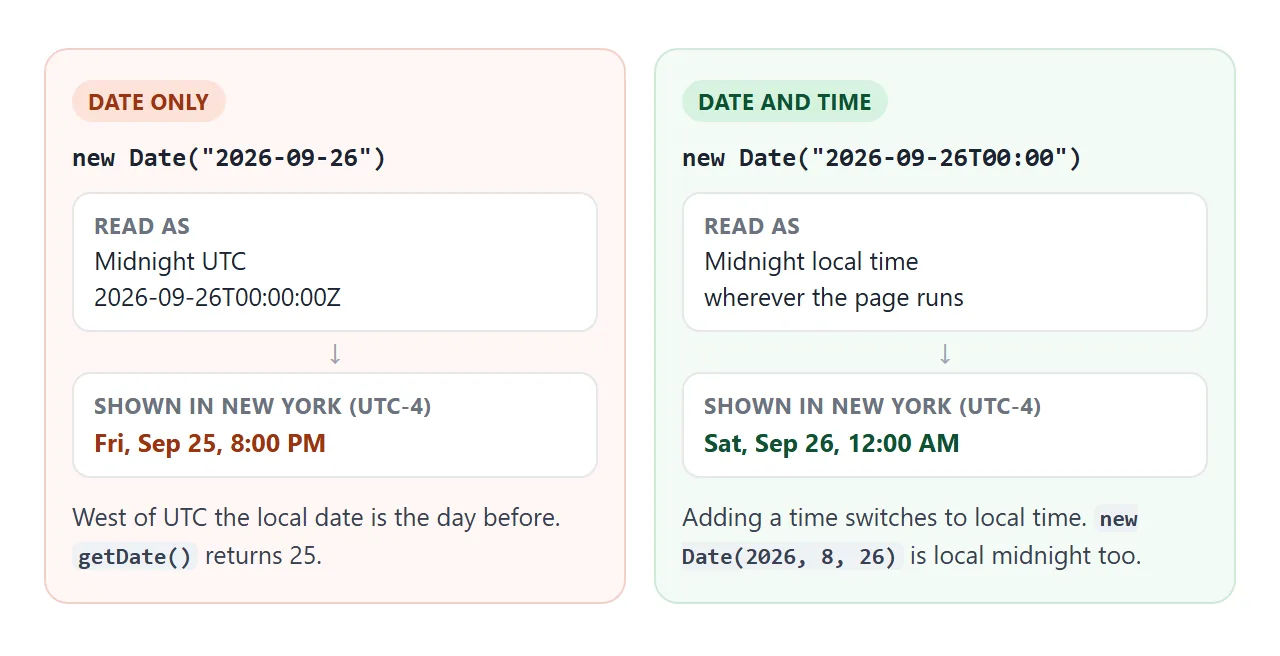
In New York, midnight UTC is 8 PM the evening before, so toLocaleDateString() prints September 25. East of UTC it looks fine, which is why the bug often passes testing in one place and appears for users somewhere else.
The lab below runs the cases in your own time zone, then shows the same date-only value formatted for other zones.
<!doctype html>
<html lang="en">
<head>
<meta charset="utf-8">
<meta name="viewport" content="width=device-width, initial-scale=1">
<title>Date pitfalls lab</title>
<style>
  body { margin: 0; padding: 16px; font-family: system-ui, sans-serif; background: #f4f5f7; color: #1d2330; font-size: 14px; }
  .tz { margin-bottom: 10px; color: #4b5563; }
  .box { background: #fff; border-radius: 12px; padding: 12px 14px; margin-bottom: 12px; box-shadow: 0 2px 10px rgba(0,0,0,.06); }
  h3 { margin: 0 0 8px; font-size: 14px; }
  table { border-collapse: collapse; width: 100%; font-size: 13px; }
  td { padding: 5px 4px; border-top: 1px solid #eef0f3; vertical-align: top; overflow-wrap: anywhere; }
  td:first-child { font-family: ui-monospace, Consolas, monospace; font-size: 12px; width: 48%; }
  .bad { color: #b45309; font-weight: 600; }
  .good { color: #047857; font-weight: 600; }
  .try { display: flex; gap: 8px; flex-wrap: wrap; }
  input { flex: 1 1 160px; padding: 7px; font: inherit; border: 1px solid #cfd4dc; border-radius: 8px; }
  button { padding: 7px 10px; font: inherit; font-size: 13px; border: 1px solid #cfd4dc; border-radius: 8px; background: #fff; cursor: pointer; }
  #parsed { margin-top: 8px; font-family: ui-monospace, Consolas, monospace; font-size: 12.5px; overflow-wrap: anywhere; }
</style>
</head>
<body>
<div class="tz">Your time zone: <b id="zone"></b></div>

<div class="box">
  <h3>1. The same text, read two ways</h3>
  <table id="parse"></table>
</div>

<div class="box">
  <h3>2. The date-only string, shown in other time zones</h3>
  <table id="zones"></table>
</div>

<div class="box">
  <h3>3. getMonth() starts at 0</h3>
  <table id="month"></table>
</div>

<div class="box">
  <h3>4. Try your own string</h3>
  <div class="try">
    <input id="text" value="26/09/2026">
    <button data-v="2026-09-26">2026-09-26</button>
    <button data-v="2026-09-26T09:00">…T09:00</button>
    <button data-v="2026-09-26T09:00Z">…T09:00Z</button>
  </div>
  <div id="parsed"></div>
</div>

<script>
  const $ = (id) => document.getElementById(id);
  const row = (code, value, cls) =>
    '<tr><td>' + code + '</td><td class="' + (cls || '') + '">' + value + '</td></tr>';
  const day = (d, tz) => d.toLocaleDateString('en-US',
    { weekday: 'short', month: 'short', day: 'numeric', hour: 'numeric', minute: '2-digit', timeZone: tz });

  $('zone').textContent = Intl.DateTimeFormat().resolvedOptions().timeZone;

  // 1. date-only = UTC midnight, date + time = local time
  const utc = new Date('2026-09-26');
  const local = new Date('2026-09-26T00:00');
  const off = utc.getDate() !== 26;
  $('parse').innerHTML =
    row('new Date("2026-09-26")', day(utc) + (off ? ' (a day off here)' : ' (fine in your zone, see 2)'), off ? 'bad' : '') +
    row('new Date("2026-09-26T00:00")', day(local), 'good') +
    row('new Date(2026, 8, 26)', day(new Date(2026, 8, 26)), 'good') +
    row('utc.toLocaleDateString("en-US", { timeZone: "UTC" })', utc.toLocaleDateString('en-US', { timeZone: 'UTC' }), 'good');

  // 2. the same moment formatted for people in other zones
  $('zones').innerHTML = ['America/Los_Angeles', 'America/New_York', 'UTC', 'Europe/Berlin', 'Asia/Tokyo']
    .map((tz) => {
      const dom = new Intl.DateTimeFormat('en-US', { day: 'numeric', timeZone: tz }).format(utc);
      return row(tz, day(utc, tz), dom === '26' ? 'good' : 'bad');
    }).join('');

  // 3. months are 0-11, days are 1-31
  const d = new Date(2026, 8, 26);
  const pad = (n) => String(n).padStart(2, '0');
  $('month').innerHTML =
    row('d.getMonth()', d.getMonth() + ' (September)', 'bad') +
    row('d.getFullYear() + "-" + d.getMonth() + "-" + d.getDate()',
        d.getFullYear() + '-' + d.getMonth() + '-' + d.getDate(), 'bad') +
    row('`${y}-${pad(m + 1)}-${pad(day)}`',
        d.getFullYear() + '-' + pad(d.getMonth() + 1) + '-' + pad(d.getDate()), 'good');

  // 4. anything that is not an ISO string is up to the browser
  function parse() {
    const p = new Date($('text').value);
    $('parsed').innerHTML = isNaN(p)
      ? '<span class="bad">Invalid Date</span>'
      : '<span class="good">' + p.toString() + '</span><br>toISOString(): ' + p.toISOString();
  }
  $('text').addEventListener('input', parse);
  document.querySelectorAll('button[data-v]').forEach((b) =>
    b.addEventListener('click', () => { $('text').value = b.dataset.v; parse(); }));
  parse();
</script>
</body>
</html>
Three fixes, depending on what the string means:
- It is a calendar date with no time. Build it as local:
new Date(2026, 8, 26), or append"T00:00"before parsing. - You must keep it as UTC. Format with
{ timeZone: 'UTC' }so display matches how it was read. - It came from a date input. HTML date input default value covers
valueversusvalueAsDate, which has the same trap.
Strings in other shapes, such as "26/09/2026", are outside the specification. Each browser decides, and the result can be Invalid Date. Parse only ISO strings, or split the parts yourself.
Formatting for machines: toISOString
toISOString() always returns UTC in one fixed shape: 2026-09-26T14:30:00.000Z. The Z means UTC. Use it for storage, for sending to a server, and for comparing or sorting dates as text.
It does not depend on the reader's locale, which is the point. It also throws a RangeError on an invalid date, so check isNaN(d) first when the input came from a user.
Format a date as yyyy-mm-dd
For a fixed pattern in local time, build it from the parts. getMonth() counts from 0, so September is 8.
const pad = (n) => String(n).padStart(2, '0');
const ymd = (d) => `${d.getFullYear()}-${pad(d.getMonth() + 1)}-${pad(d.getDate())}`;

ymd(new Date(2026, 8, 26));  // "2026-09-26"
toISOString().slice(0, 10) gives the same shape but the UTC date, which is the off-by-one bug again near midnight. Use the getUTC... methods in the helper instead if you do want UTC.
"3 days ago": Intl.RelativeTimeFormat
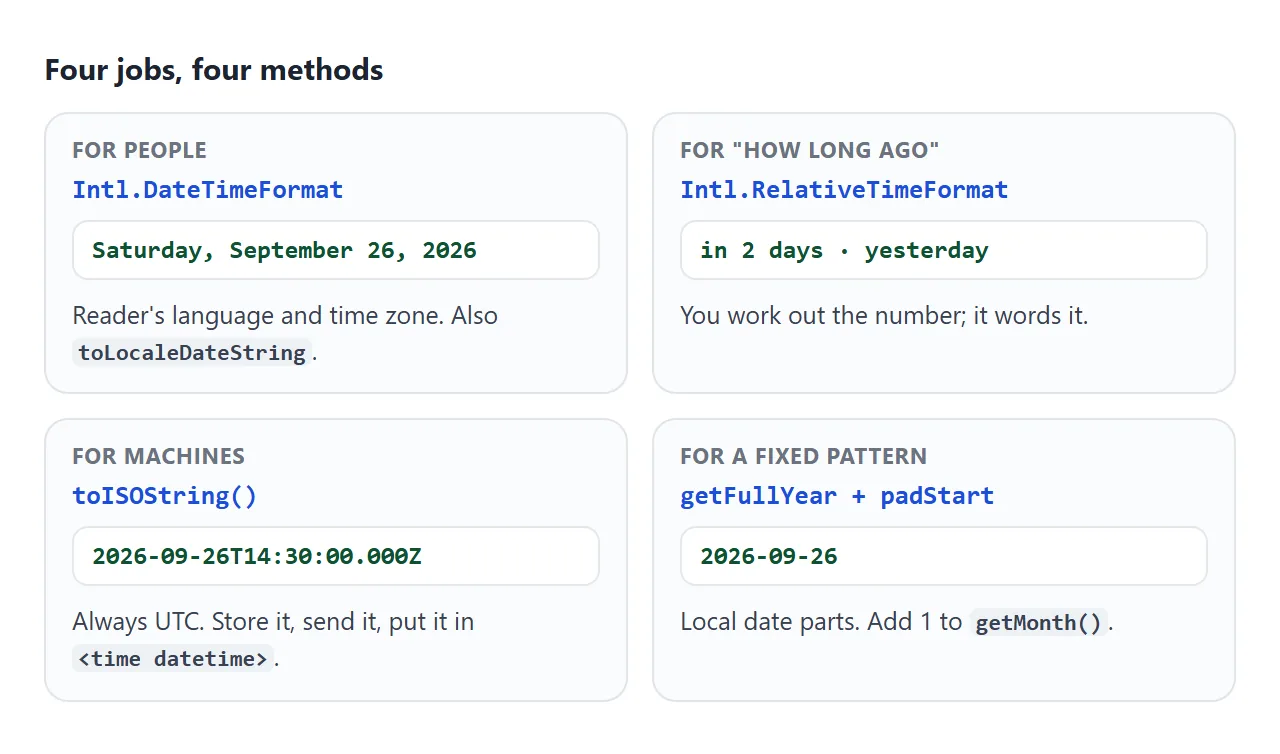
Intl.RelativeTimeFormat words a number and a unit. It does not measure the gap; you pass it in.
const rtf = new Intl.RelativeTimeFormat('en', { numeric: 'auto' });
rtf.format(-3, 'day');  // "3 days ago"
rtf.format(1, 'day');   // "tomorrow"
rtf.format(2, 'week');  // "in 2 weeks"
For whole days, set both dates to local midnight with setHours(0, 0, 0, 0), subtract, divide by 86,400,000 and round. Rounding absorbs the 23-hour and 25-hour days around daylight saving changes.
A finished example: an events list
This list takes ISO timestamps, shows each in the reader's language and time zone, adds a relative label, and marks up every date with <time datetime>.
<!doctype html>
<html lang="en">
<head>
<meta charset="utf-8">
<meta name="viewport" content="width=device-width, initial-scale=1">
<title>Upcoming events</title>
<style>
  body { margin: 0; padding: 16px; font-family: system-ui, sans-serif; background: #f4f5f7; color: #1d2330; }
  header { display: flex; justify-content: space-between; align-items: center; gap: 10px; flex-wrap: wrap; margin-bottom: 12px; }
  h2 { margin: 0; font-size: 18px; }
  select { padding: 6px; font: inherit; font-size: 13px; border: 1px solid #cfd4dc; border-radius: 8px; background: #fff; }
  ul { list-style: none; margin: 0; padding: 0; }
  li { background: #fff; border-radius: 12px; padding: 12px 14px; margin-bottom: 10px;
       box-shadow: 0 2px 10px rgba(0,0,0,.06); display: flex; justify-content: space-between; gap: 12px; align-items: baseline; }
  .name { font-weight: 600; }
  time { display: block; font-size: 13px; color: #4b5563; margin-top: 3px; }
  .rel { font-size: 12px; font-weight: 600; white-space: nowrap; padding: 3px 8px; border-radius: 99px; background: #e0f2fe; color: #075985; }
  .rel.past { background: #eef0f3; color: #6b7280; }
  pre { margin: 6px 0 0; background: #1d2330; color: #e5e7eb; padding: 10px 12px; border-radius: 8px;
        font-size: 12px; white-space: pre-wrap; overflow-wrap: anywhere; }
</style>
</head>
<body>
<header>
  <h2>Upcoming events</h2>
  <select id="locale" aria-label="Locale">
    <option value="">Your browser's language</option>
    <option>en-US</option><option>en-GB</option><option>de-DE</option><option>ja-JP</option>
  </select>
</header>
<ul id="list"></ul>
<div style="font-size:12px;color:#6b7280">Markup of the first item:</div>
<pre id="markup"></pre>

<script>
  // Example data: offsets from today so the labels stay meaningful.
  // Real data would be ISO strings from a server, e.g. "2026-09-28T16:00:00Z".
  function at(daysFromToday, hour, minute) {
    const d = new Date();
    d.setDate(d.getDate() + daysFromToday);
    d.setHours(hour, minute, 0, 0);
    return d.toISOString();
  }
  const events = [
    { name: 'Team retro', start: at(-3, 15, 0) },
    { name: 'Product demo', start: at(0, 17, 30) },
    { name: 'Design review', start: at(1, 10, 0) },
    { name: 'Launch party', start: at(2, 18, 0) },
    { name: 'Quarterly planning', start: at(12, 9, 0) },
  ];

  // Whole calendar days between today and the event, in the reader's time zone
  function daysFromToday(date) {
    const a = new Date(); a.setHours(0, 0, 0, 0);
    const b = new Date(date); b.setHours(0, 0, 0, 0);
    return Math.round((b - a) / 86400000);
  }

  function render() {
    const locale = document.getElementById('locale').value || undefined;
    const when = new Intl.DateTimeFormat(locale, { dateStyle: 'medium', timeStyle: 'short' });
    const rel = new Intl.RelativeTimeFormat(locale, { numeric: 'auto' });  // "tomorrow", "in 2 days"

    const list = document.getElementById('list');
    list.innerHTML = '';
    for (const ev of events) {
      const d = new Date(ev.start);
      const days = daysFromToday(d);

      const li = document.createElement('li');
      const left = document.createElement('div');
      left.innerHTML = '<div class="name"></div><time></time>';
      left.querySelector('.name').textContent = ev.name;
      const t = left.querySelector('time');
      t.dateTime = d.toISOString();       // for machines: one exact moment
      t.textContent = when.format(d);     // for people: their locale and time zone

      const badge = document.createElement('span');
      badge.className = 'rel' + (days < 0 ? ' past' : '');
      badge.textContent = rel.format(days, 'day');

      li.append(left, badge);
      list.append(li);
    }
    document.getElementById('markup').textContent = list.querySelector('time').outerHTML;
  }

  document.getElementById('locale').addEventListener('input', render);
  render();
</script>
</body>
</html>
The <time> element carries two versions of the date. The text between the tags is for people. The datetime attribute holds a machine-readable value, such as a toISOString() result, for search engines, scripts and assistive tools.
<time datetime="2026-09-28T16:00:00.000Z">Sep 28, 2026, 6:00 PM</time>
To count down to one of these events instead, see the HTML countdown timer. To refresh a relative label on a schedule, setTimeout and setInterval covers the timers.
When it does not work
| What you see | Cause | Fix |
|---|---|---|
| The date is one day early | A date-only string was parsed as UTC | Add T00:00, use new Date(y, m, d), or format with timeZone: 'UTC' |
| The month is one too low, or 0 in January | getMonth() counts from 0 |
Add 1 when displaying; subtract 1 when building |
Invalid Date |
A non-ISO string such as 26/09/2026 |
Parse ISO strings only, or split the parts |
RangeError from toISOString |
The Date is invalid | Check isNaN(d) before formatting |
TypeError about options |
dateStyle mixed with weekday or month, or timeStyle in toLocaleDateString |
Use one kind of option; use Intl.DateTimeFormat for date and time |
| Text differs on another device | No locale or timeZone given, so the device settings apply |
Pass both when output must be fixed; do not hard-code expected strings in tests |
| The time is hours off after saving | Local time was stored without its offset | Store toISOString() and format on display |
Share it as a link
Date formatting depends on where it runs, so a screenshot from your machine shows only your locale and time zone. A live page shows each person their own.
To send the working version, paste the page into a NOS document and choose Create share link. HTML to link walks through it.
The page renders as written and its scripts run, so each person who opens it sees dates in their own language and time zone. If you change the code later, the same link shows the new version.