A digital clock in JavaScript is four moves: read the time with new Date(), pad each number to two digits, write the text into an element, and repeat with setInterval. It fits in one HTML file and about ten lines of script.
Try it first. This is the smallest version that works.
<!doctype html>
<html lang="en">
<head>
<meta charset="utf-8">
<meta name="viewport" content="width=device-width, initial-scale=1">
<title>Digital clock</title>
<style>
  body {
    margin: 0; min-height: 100vh; display: grid; place-items: center;
    background: #101820; font-family: system-ui, sans-serif;
  }
  #clock {
    font: 700 clamp(40px, 15vw, 88px) ui-monospace, Consolas, monospace;
    font-variant-numeric: tabular-nums;  /* equal-width digits, no jitter */
    color: #4ff0a8; letter-spacing: .04em;
    text-shadow: 0 0 18px rgba(79, 240, 168, .45);
  }
  p { margin: 6px 0 0; color: #8fa3b3; font-size: 14px; text-align: center; }
</style>
</head>
<body>
<main>
  <div id="clock">--:--:--</div>
  <p>Your device's local time</p>
</main>

<script>
  const clock = document.getElementById('clock');

  // 7 -> "07"
  function pad(n) { return String(n).padStart(2, '0'); }

  function tick() {
    const now = new Date();  // read the real time on every tick
    clock.textContent =
      pad(now.getHours()) + ':' + pad(now.getMinutes()) + ':' + pad(now.getSeconds());
  }

  tick();                    // draw once right away, so the dashes never show
  setInterval(tick, 1000);   // then redraw every second
</script>
</body>
</html>
There is no library, no build step and no second file. If you only want something to paste in, the HTML clock widget guide has a timezone board and a countdown. This guide builds the clock from the ground up and ends with an alarm.
How the code works, step by step
Every tick runs the same four steps, and the next tick starts again at step 1.
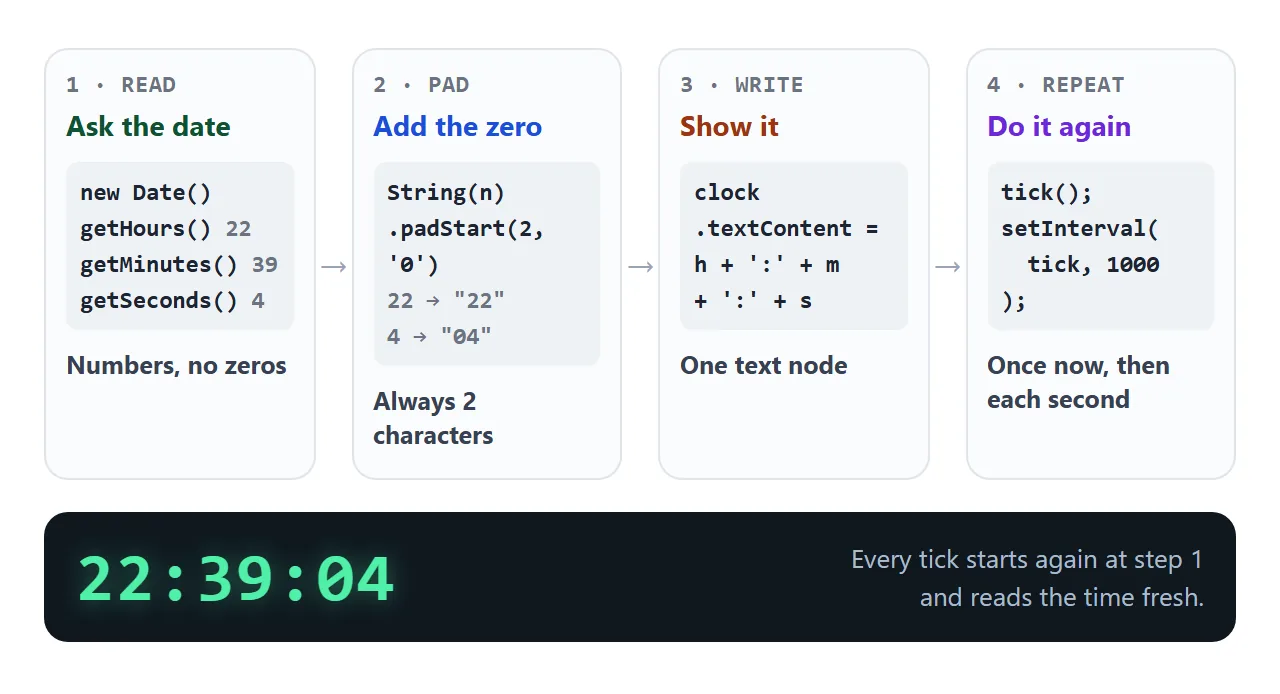
- Read the time.
new Date()with no arguments is the current date and time.getHours(),getMinutes()andgetSeconds()return whole numbers for the device's local time. - Pad each number.
String(n).padStart(2, '0')makes sure every part has two characters. - Write the text. Setting
textContentreplaces what is inside the element with one text node. The browser does not parse it as HTML. - Repeat.
setInterval(tick, 1000)calls the function again and again, with a fixed delay in milliseconds, until you stop it withclearInterval.
Read the time again on every tick. Do not keep your own counter of seconds, because a counter can only be as right as the ticks that fed it.
Why the zeros go missing
getMinutes() returns an integer from 0 to 59. At five past the hour it returns 5, so joining the three numbers with colons gives 9:5:7 instead of 09:05:07.
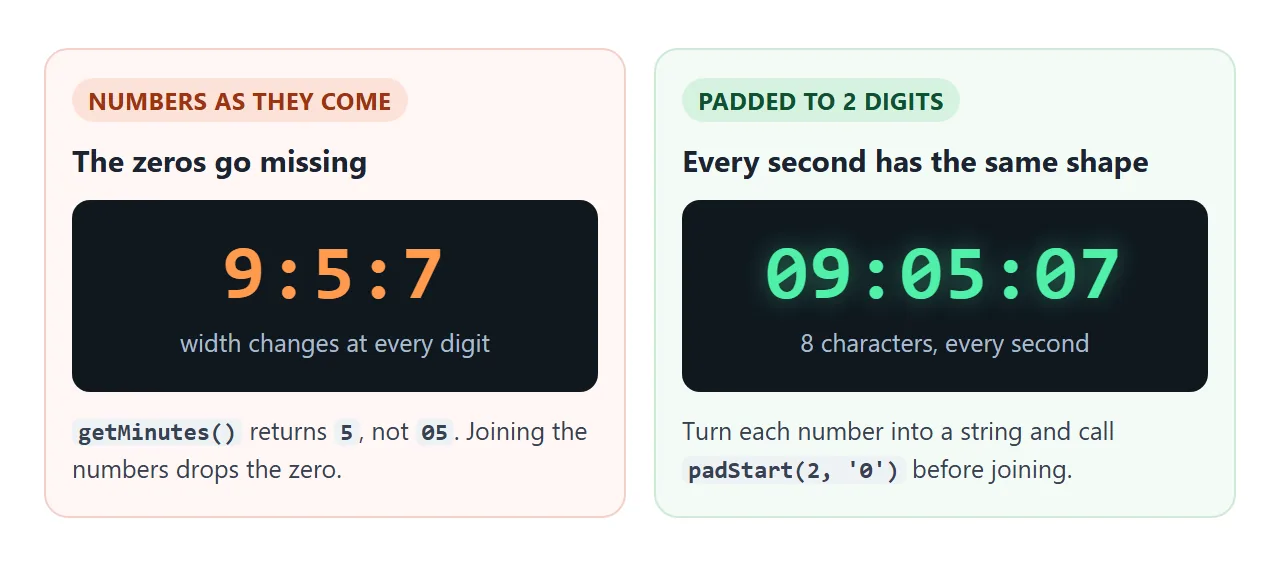
padStart pads a string from the start until it reaches the length you ask for. A string that is already long enough comes back unchanged, so "12" stays "12".
const pad = (n) => String(n).padStart(2, '0');
It is a string method, so convert the number with String(n) first.
Padding fixes the number of characters, not their width. In a proportional font a 1 can be narrower than an 8, so the clock can still wobble sideways.
A monospace font fixes that, and so does font-variant-numeric: tabular-nums, which switches to figures that are all the same size. Font feature settings covers the property.
12-hour, no seconds, and a date line
The first demo is a 24-hour clock with seconds. The variations are small changes to the string you build.
<!doctype html>
<html lang="en">
<head>
<meta charset="utf-8">
<meta name="viewport" content="width=device-width, initial-scale=1">
<title>Digital clock formats</title>
<style>
  body {
    margin: 0; padding: 18px 14px; min-height: 100vh; box-sizing: border-box;
    background: #101820; color: #cfe3f0; font-family: system-ui, sans-serif; text-align: center;
  }
  #clock {
    font: 700 clamp(34px, 12vw, 72px) ui-monospace, Consolas, monospace;
    font-variant-numeric: tabular-nums; color: #4ff0a8;
    text-shadow: 0 0 16px rgba(79, 240, 168, .4);
  }
  #clock small { font-size: .38em; margin-left: .25em; color: #8fa3b3; text-shadow: none; }
  .sep { animation: blink 1s steps(1) infinite; }   /* blinking colons, pure CSS */
  @keyframes blink { 50% { opacity: .25; } }
  #date { margin: 4px 0 16px; color: #8fa3b3; min-height: 1.4em; }
  .row { display: flex; gap: 8px; justify-content: center; flex-wrap: wrap; }
  button {
    font: 600 14px system-ui, sans-serif; padding: 9px 14px; border-radius: 8px; cursor: pointer;
    border: 1px solid #2d4153; background: #18242f; color: #cfe3f0;
  }
  button[aria-pressed="true"] { background: #4ff0a8; border-color: #4ff0a8; color: #06251a; }
</style>
</head>
<body>
<div id="clock">--:--:--</div>
<div id="date"></div>
<div class="row">
  <button id="fmt" aria-pressed="false">12-hour</button>
  <button id="sec" aria-pressed="true">Seconds</button>
</div>

<script>
  const clock = document.getElementById('clock');
  const dateEl = document.getElementById('date');
  const fmtBtn = document.getElementById('fmt');
  const secBtn = document.getElementById('sec');
  let twelve = false, showSeconds = true;

  const pad = (n) => String(n).padStart(2, '0');

  function tick() {
    const now = new Date();
    let h = now.getHours();                 // 0-23
    let suffix = '';
    if (twelve) {
      suffix = h < 12 ? 'AM' : 'PM';
      h = h % 12 || 12;                     // 0 -> 12, 13 -> 1
    }
    const colon = '<span class="sep">:</span>';
    let html = (twelve ? String(h) : pad(h)) + colon + pad(now.getMinutes());
    if (showSeconds) html += colon + pad(now.getSeconds());
    if (suffix) html += '<small>' + suffix + '</small>';
    clock.innerHTML = html;                 // safe here: we build the string ourselves
    dateEl.textContent = now.toLocaleDateString(undefined,
      { weekday: 'long', month: 'long', day: 'numeric' });
  }

  fmtBtn.addEventListener('click', () => {
    twelve = !twelve;
    fmtBtn.setAttribute('aria-pressed', String(twelve));
    tick();
  });
  secBtn.addEventListener('click', () => {
    showSeconds = !showSeconds;
    secBtn.setAttribute('aria-pressed', String(showSeconds));
    tick();
  });

  tick();
  setInterval(tick, 1000);
</script>
</body>
</html>
| You want | What to change |
|---|---|
| 24-hour clock | Use getHours() as it is: it returns 0 to 23 |
| 12-hour clock | Take the hour remainder after dividing by 12, and show 12 when it is 0 |
| AM or PM | AM when the hour is below 12, PM otherwise |
| No seconds | Leave the seconds part out of the string |
| Date line | Add toLocaleDateString in a second element |
The 12-hour rule is one line:
h = h % 12 || 12; // 0 -> 12, 13 -> 1
Midnight is hour 0, and the remainder of 0 is 0, which is falsy, so the line falls through to 12. Date format in JavaScript lists the options for the date line.
Why the first second is blank, and why a tick can be late
Look at the last two lines of the first example. tick() runs once on its own before setInterval starts. Without that call, the placeholder dashes stay on screen for a full second after the page loads.
The delay you give setInterval is a minimum, not a promise. MDN says the time between calls may be longer than the delay. A timeout can also fire late if the page or the browser is busy with other work.
Hidden tabs are slowed too. MDN notes a minimum timeout of one second for inactive tabs in Firefox Desktop, and says Chrome applies different levels of throttling depending on tab activity.
None of this breaks a display clock. Each tick reads the real time, so a late tick shows the right time. It may jump past a number, which nobody notices on a clock. setTimeout and setInterval goes deeper into timer behavior.
Add an alarm: compare, do not match
An alarm clock is the same clock plus one stored moment. The common mistake is to check whether the current seconds equal the alarm's seconds. If a tick runs late and steps over that second, the alarm never fires.
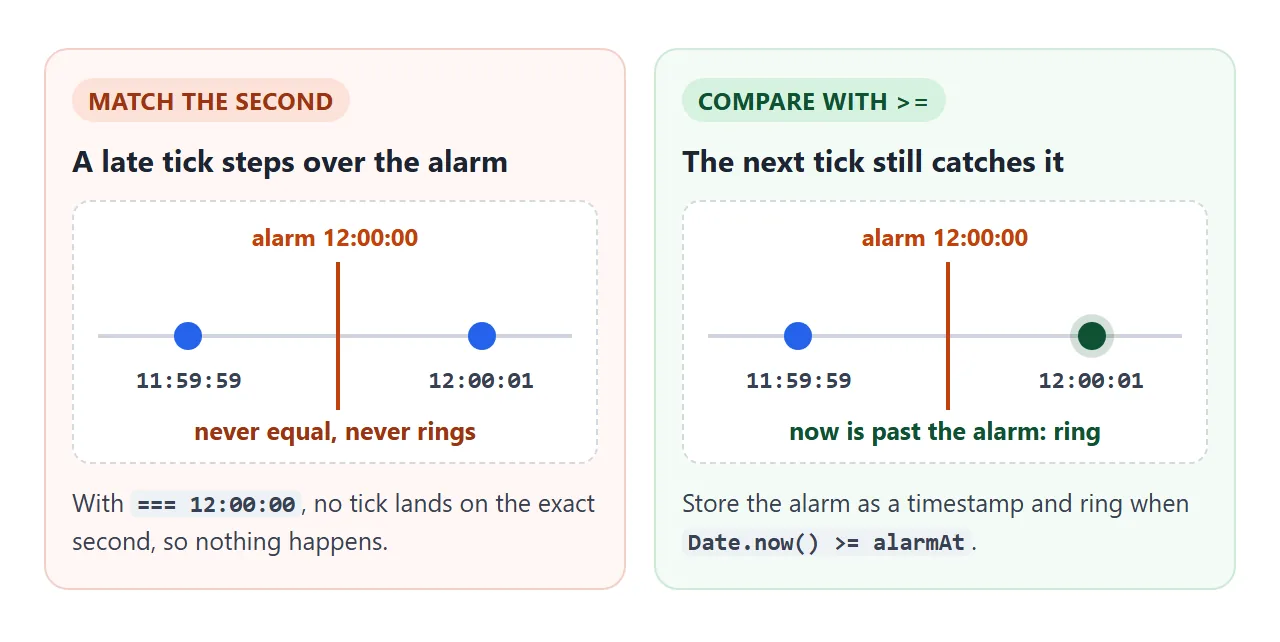
Store the alarm as a timestamp and compare it on every tick:
if (alarmAt !== null && Date.now() >= alarmAt) ring();
A <input type="time"> gives the time as a string. MDN says its value is always 24-hour HH:mm, with leading zeros, whatever the input looks like on screen. Turn it into a timestamp with setHours, and move to tomorrow if that moment has already passed:
function nextOccurrence(value) {
  const [h, m] = value.split(':').map(Number);
  const d = new Date();
  d.setHours(h, m, 0, 0);
  if (d.getTime() <= Date.now()) d.setDate(d.getDate() + 1);
  return d.getTime();
}
setDate accepts values outside the month, so adding 1 to the last day of a month rolls over to the next month.
Sound has one rule. MDN advises creating or resuming an AudioContext from inside a user gesture, normally a click. A context created outside one starts in the suspended state.
resume() returns a promise that settles when the context is running. The demo creates the context in the Set alarm click handler.
<!doctype html>
<html lang="en">
<head>
<meta charset="utf-8">
<meta name="viewport" content="width=device-width, initial-scale=1">
<title>Digital alarm clock</title>
<style>
  body {
    margin: 0; padding: 18px 14px; min-height: 100vh; box-sizing: border-box;
    background: #101820; color: #cfe3f0; font-family: system-ui, sans-serif; text-align: center;
  }
  #clock {
    font: 700 clamp(38px, 14vw, 76px) ui-monospace, Consolas, monospace;
    font-variant-numeric: tabular-nums; color: #4ff0a8;
    text-shadow: 0 0 16px rgba(79, 240, 168, .4);
  }
  .row { display: flex; gap: 8px; justify-content: center; flex-wrap: wrap; margin-top: 14px; }
  input[type="time"], button {
    font: 600 16px system-ui, sans-serif; padding: 9px 12px; border-radius: 8px;
    border: 1px solid #2d4153; background: #18242f; color: #cfe3f0;
  }
  button { cursor: pointer; }
  button.main { background: #4ff0a8; border-color: #4ff0a8; color: #06251a; }
  #status { margin: 14px 0 0; min-height: 3em; color: #8fa3b3; font-size: 14px; }
  #ring {
    margin-top: 12px; padding: 14px; border-radius: 12px; background: #ff7a1a; color: #231100;
    animation: flash .8s steps(1) infinite;
  }
  #ring[hidden] { display: none; }
  #ring b { display: block; font-size: 22px; margin-bottom: 6px; }
  @keyframes flash { 50% { background: #ffd23f; } }
  @media (prefers-reduced-motion: reduce) { #ring { animation: none; } }
</style>
</head>
<body>
<div id="clock">--:--:--</div>

<div class="row">
  <input id="at" type="time" aria-label="Alarm time">
  <button id="set" class="main">Set alarm</button>
  <button id="test">Ring in 5 s</button>
</div>
<p id="status" aria-live="polite">No alarm set.</p>

<div id="ring" hidden>
  <b>Alarm!</b>
  <div class="row" style="margin-top:0">
    <button id="stop">Stop</button>
    <button id="snooze">Snooze 1 min</button>
  </div>
</div>

<script>
  const $ = (id) => document.getElementById(id);
  const pad = (n) => String(n).padStart(2, '0');
  const hms = (t) => { const d = new Date(t); return pad(d.getHours()) + ':' + pad(d.getMinutes()) + ':' + pad(d.getSeconds()); };

  let alarmAt = null;   // timestamp (ms) of the next ring, or null
  let ctx = null;       // AudioContext, created from a click
  let beepTimer = null;

  // Next time the clock shows hh:mm - today if still ahead, otherwise tomorrow
  function nextOccurrence(value) {
    const [h, m] = value.split(':').map(Number);
    const d = new Date();
    d.setHours(h, m, 0, 0);
    if (d.getTime() <= Date.now()) d.setDate(d.getDate() + 1);
    return d.getTime();
  }

  // Browsers only let audio start after a user gesture, so call this from a click
  function prepareSound() {
    try {
      ctx = ctx || new (window.AudioContext || window.webkitAudioContext)();
      if (ctx.state === 'suspended') ctx.resume();
    } catch (e) { ctx = null; }
  }

  function beep() {
    if (!ctx || ctx.state !== 'running') return;
    const osc = ctx.createOscillator(), gain = ctx.createGain();
    osc.frequency.value = 880;
    gain.gain.value = 0.15;
    osc.connect(gain); gain.connect(ctx.destination);
    osc.start();
    osc.stop(ctx.currentTime + 0.2);
  }

  function arm(timestamp) {
    prepareSound();
    alarmAt = timestamp;
    $('status').textContent = 'Alarm set for ' + hms(alarmAt) + '.';
  }

  function ring() {
    alarmAt = null;
    $('ring').hidden = false;
    const sound = ctx && ctx.state === 'running';
    $('status').textContent = sound ? 'Ringing.' : 'Ringing. Sound is blocked here, so the screen flashes instead.';
    beep();
    beepTimer = setInterval(beep, 600);
  }

  function stopRinging() {
    clearInterval(beepTimer);
    $('ring').hidden = true;
  }

  function tick() {
    $('clock').textContent = hms(Date.now());
    // ">=" not "===": a late tick must not skip past the alarm
    if (alarmAt !== null && Date.now() >= alarmAt) ring();
  }

  $('set').addEventListener('click', () => {
    if (!$('at').value) { $('status').textContent = 'Pick a time first.'; return; }
    stopRinging();
    arm(nextOccurrence($('at').value));
  });
  $('test').addEventListener('click', () => { stopRinging(); arm(Date.now() + 5000); });
  $('stop').addEventListener('click', () => { stopRinging(); $('status').textContent = 'Stopped. No alarm set.'; });
  $('snooze').addEventListener('click', () => { stopRinging(); arm(Date.now() + 60000); });

  tick();
  setInterval(tick, 250);   // check often; the shown time is read fresh every time
</script>
</body>
</html>
The ring panel flashes so the alarm still does something visible if the sound does not start. Play sound in JavaScript covers beeps in more detail.
The alarm check is a timer, so the throttling described above applies to it as well, and a hidden tab can ring late.
When it does not work
| Symptom | Cause | Fix |
|---|---|---|
The clock shows 9:5:7 |
The numbers were joined without padding | Pad each part with padStart(2, '0') |
| Dashes stay for the first second | tick() is only called by the interval |
Call tick() once before setInterval |
| The digits wobble sideways | Proportional figures differ in width | Monospace font or tabular-nums |
| 12-hour mode shows 0 at midnight | The remainder was not mapped to 12 | Add the fall-through to 12 |
| The alarm never rings | The seconds are compared with equality | Compare a timestamp with greater-or-equal |
| The alarm flashes but is silent | The audio context was not started by a click | Create or resume it in a click handler |
| The time is hours off | The clock shows the device's local time | Check the device's clock and zone |
Share it as a link
A clock is a poor fit for a screenshot, which shows one moment and is wrong a second later. A link to the running page shows the live clock instead.
To send the working version, paste the page into a NOS document and choose Create share link. HTML to link walks through it.
The page renders as written and its scripts run, so anyone with the link can open it without an account, watch the clock tick and set the alarm themselves. If you change the code later, the same link shows the new version.
The alarm lives in a variable, so reloading the page clears it. Single HTML file apps covers building bigger things in one file the same way.