A stopwatch in HTML is one element for the time, two buttons and a short script.
The script saves the time when you press Start with performance.now(), and on every repaint it shows now minus start. A timer is only used to trigger the repaint, never to count.
Try it first. Start, stop, start again, and reset.
<!doctype html>
<html lang="en">
<head>
<meta charset="utf-8">
<meta name="viewport" content="width=device-width, initial-scale=1">
<title>Stopwatch</title>
<style>
  body { margin: 0; padding: 28px 16px; font-family: system-ui, sans-serif; text-align: center; background: #f4f5f7; }
  #time {
    font-size: 56px; font-weight: 700; margin: 0 0 20px;
    font-variant-numeric: tabular-nums;  /* every digit the same width: no jitter */
  }
  button { font: 600 16px system-ui, sans-serif; padding: 10px 22px; margin: 0 4px; border: 0; border-radius: 10px; cursor: pointer; }
  #start { background: #16a34a; color: #fff; }
  #start.running { background: #dc2626; }
  #reset { background: #e5e7eb; }
</style>
</head>
<body>
<p id="time">00:00.00</p>
<button id="start">Start</button>
<button id="reset">Reset</button>

<script>
  const time = document.getElementById('time');
  const startBtn = document.getElementById('start');
  const resetBtn = document.getElementById('reset');

  let startedAt = 0;  // performance.now() when the current run began
  let saved = 0;      // milliseconds from earlier runs (before a stop)
  let timer = null;   // interval id while running, null while stopped

  function elapsed() {
    return timer ? saved + performance.now() - startedAt : saved;
  }

  function format(ms) {
    const cs = Math.floor(ms / 10);  // hundredths of a second
    const m = Math.floor(cs / 6000);
    const s = Math.floor(cs / 100) % 60;
    return String(m).padStart(2, '0') + ':' + String(s).padStart(2, '0') + '.' + String(cs % 100).padStart(2, '0');
  }

  function render() { time.textContent = format(elapsed()); }

  startBtn.addEventListener('click', () => {
    if (timer) {             // stop: keep what has elapsed so far
      saved = elapsed();
      clearInterval(timer);
      timer = null;
    } else {                 // start or resume
      startedAt = performance.now();
      timer = setInterval(render, 30);  // the interval only repaints
    }
    render();
    startBtn.textContent = timer ? 'Stop' : 'Start';
    startBtn.classList.toggle('running', !!timer);
  });

  resetBtn.addEventListener('click', () => {
    saved = 0;
    startedAt = performance.now();
    render();
  });
</script>
</body>
</html>
The interval runs every 30 ms, but it could run every 100 ms and the time would still be right. It only decides how often the digits change.
How the code works
The whole stopwatch is three variables and one small function.
startedAtholdsperformance.now()from the moment the current run began.savedholds the milliseconds from earlier runs, before the last Stop.timeris the interval id while running, andnullwhile stopped.
The elapsed time is saved + performance.now() - startedAt while running, and just saved while stopped. Every button reads or updates those values, then calls render().
function elapsed() {
  return timer ? saved + performance.now() - startedAt : saved;
}
Stop adds the current run to saved and clears the interval. Start takes a fresh startedAt. That is all pause and resume needs, and the time spent paused is never counted.
Why counting setInterval ticks drifts
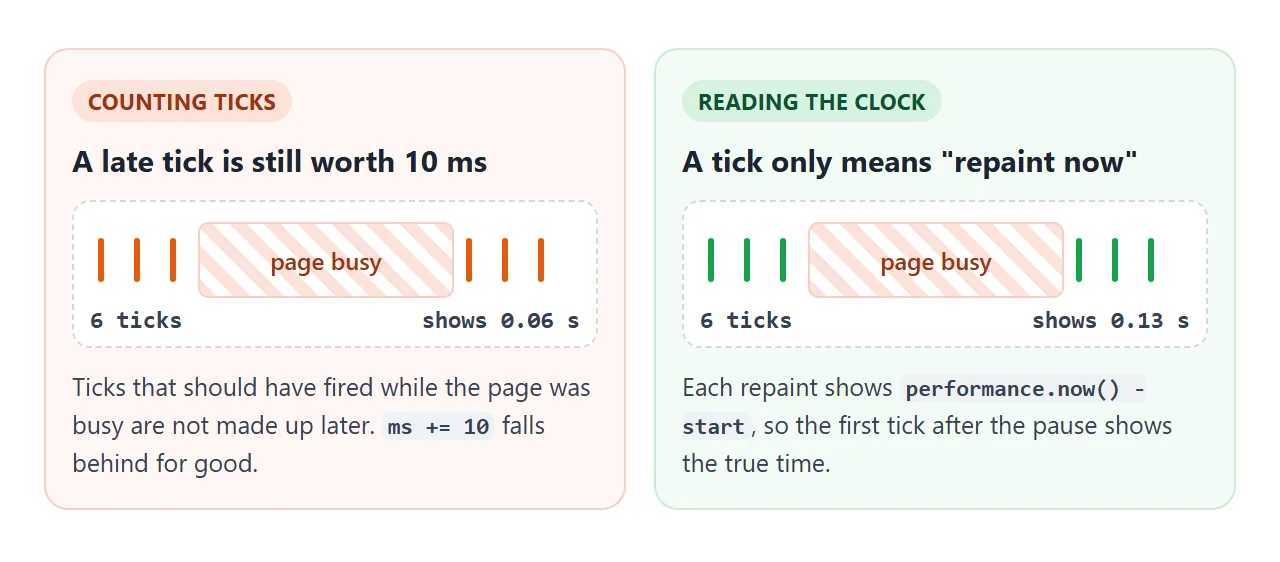
The tempting version is setInterval(() => ms += 10, 10). It assumes every tick arrives exactly 10 ms after the last one.
A timer delay is only a minimum. When the page is busy, the tick comes late, and ticks that should have fired meanwhile are not made up.
<!doctype html>
<html lang="en">
<head>
<meta charset="utf-8">
<meta name="viewport" content="width=device-width, initial-scale=1">
<title>Counting ticks vs reading the clock</title>
<style>
  body { margin: 0; padding: 18px 14px; font-family: system-ui, sans-serif; background: #f4f5f7; color: #1d2330; }
  .row { display: grid; grid-template-columns: 1fr 1fr; gap: 10px; }
  .box { background: #fff; border-radius: 12px; padding: 12px; text-align: center; border: 2px solid #e5e7eb; }
  .bad { border-color: #fdba74; } .good { border-color: #86efac; }
  .label { font-size: 13px; color: #4b5563; }
  code { font-size: 12px; background: #eef1f5; padding: 1px 4px; border-radius: 4px; }
  .num { font-size: 30px; font-weight: 700; margin: 6px 0 2px; font-variant-numeric: tabular-nums; }
  #gap { text-align: center; margin: 14px 0; font-size: 15px; font-variant-numeric: tabular-nums; }
  .btns { text-align: center; }
  button { font: 600 15px system-ui, sans-serif; padding: 9px 14px; margin: 3px; border: 0; border-radius: 10px; cursor: pointer; background: #e5e7eb; }
  #go { background: #16a34a; color: #fff; }
</style>
</head>
<body>
<div class="row">
  <div class="box bad"><div class="label">Counting ticks<br><code>ms += 10</code></div><div class="num" id="counted">0.00</div></div>
  <div class="box good"><div class="label">Reading the clock<br><code>performance.now()</code></div><div class="num" id="measured">0.00</div></div>
</div>
<p id="gap">Behind by 0.00 s</p>
<div class="btns">
  <button id="go">Start</button>
  <button id="busy">Freeze the page 0.5 s</button>
</div>

<script>
  const counted = document.getElementById('counted');
  const measured = document.getElementById('measured');
  const gap = document.getElementById('gap');
  let ms = 0, start = 0, timer = null;

  document.getElementById('go').addEventListener('click', (e) => {
    clearInterval(timer);
    ms = 0;
    start = performance.now();
    // asks for a tick every 10 ms, and assumes every tick arrives on time
    timer = setInterval(() => {
      ms += 10;
      const real = performance.now() - start;
      counted.textContent = (ms / 1000).toFixed(2);
      measured.textContent = (real / 1000).toFixed(2);
      gap.textContent = 'Behind by ' + ((real - ms) / 1000).toFixed(2) + ' s';
    }, 10);
    e.target.textContent = 'Restart';
  });

  // a long loop blocks the page, like a slow script would
  document.getElementById('busy').addEventListener('click', () => {
    const until = performance.now() + 500;
    while (performance.now() < until) {}
  });
</script>
</body>
</html>
When the page is idle, the two numbers may agree. Press Freeze the page, which blocks the page for 0.5 seconds, and the left one falls behind by the ticks it missed. It never catches up. Hidden tabs have the same effect, because browsers run timers much less often there.
The general rules for timers, including clearInterval and the nested-timer minimum, are in setTimeout and setInterval. A stopwatch only needs one of them: the timer tells you when to look at the clock.
performance.now() or Date.now()
Both return milliseconds, but they measure different things.
performance.now() |
Date.now() |
|
|---|---|---|
| Counts from | When the page started loading | 1 January 1970, UTC |
| Moves backwards or jumps | No, it only moves forward | Yes, if the computer's clock is changed or corrected |
| Fractions of a millisecond | Yes | No, whole milliseconds |
| Best for | Measuring how long something took | Dates, deadlines, timestamps you save |
A stopwatch measures a duration, so performance.now() fits. If the system clock is corrected while the stopwatch runs, a Date.now() stopwatch can jump by that amount, while performance.now() keeps going.
A countdown to a fixed date is the opposite case. It needs the real date, so the HTML countdown timer uses Date.now().
Formatting the time: mm:ss.cc
Work in whole hundredths of a second, then split them into minutes, seconds and hundredths:
function format(ms) {
  const cs = Math.floor(ms / 10);          // hundredths
  const m = Math.floor(cs / 6000);
  const s = Math.floor(cs / 100) % 60;
  const two = (n) => String(n).padStart(2, '0');
  return two(m) + ':' + two(s) + '.' + two(cs % 100);
}
Use Math.floor, not Math.round. A stopwatch should show 00:00.99 until a full second has passed, not round up to 00:01.00 early. padStart keeps each part two digits wide, so 7 seconds shows as 07.
Stop the digits from jittering with tabular-nums
In some fonts a 1 is much narrower than an 8. The time then changes width many times a second, and centred text visibly shakes.
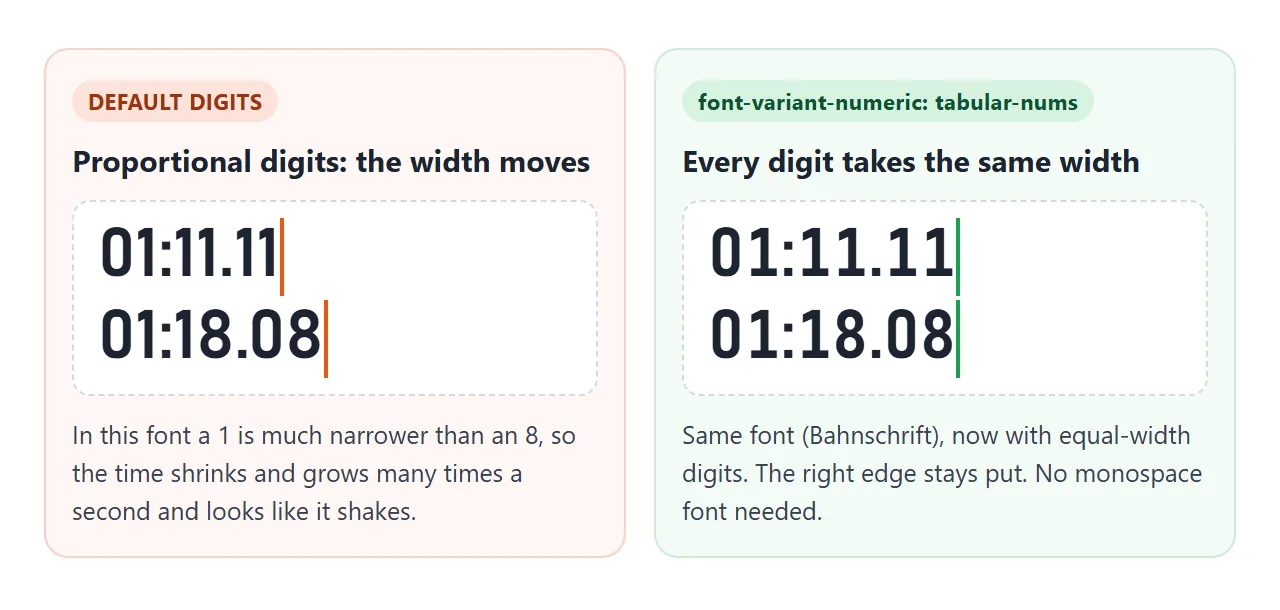
One CSS line fixes it without switching to a monospace font:
#time { font-variant-numeric: tabular-nums; }
It switches on the font's own equal-width digits. Some fonts, such as Segoe UI on Windows, use them by default, and then the line changes nothing. A font that has no such digits also stays as it is.
Other ways to pick and tune fonts are in changing the font in HTML.
Adding laps
A lap button should not reset anything. It saves the current total into an array, and each lap time is the difference between two saved totals.
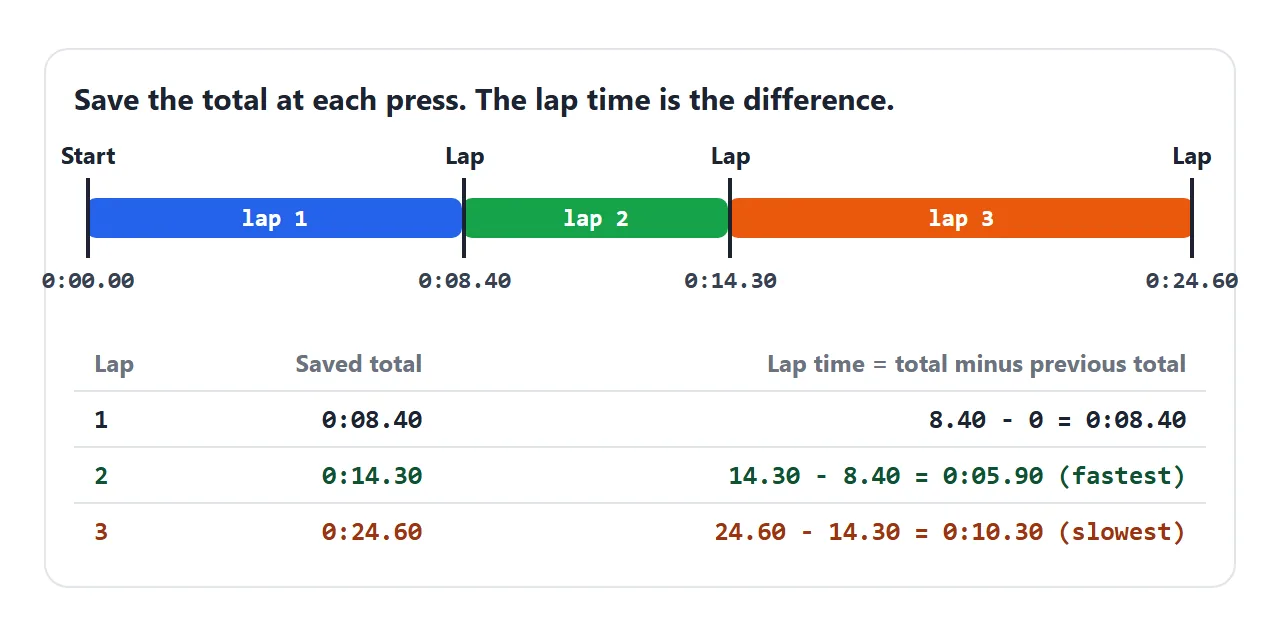
laps.push(elapsed());
const splits = laps.map((t, i) => t - (laps[i - 1] || 0));
Storing totals means both columns come from the same numbers, and the lap times always add up to the total. The fastest and slowest laps are just Math.min and Math.max over splits.
A finished stopwatch with laps and keys
This version puts it together: Start/Stop, a Lap button that turns into Reset when stopped, a lap table with the fastest lap in green and the slowest in red, and keyboard shortcuts.
<!doctype html>
<html lang="en">
<head>
<meta charset="utf-8">
<meta name="viewport" content="width=device-width, initial-scale=1">
<title>Stopwatch with laps</title>
<style>
  body { margin: 0; padding: 20px 14px; font-family: system-ui, sans-serif; background: #111827; color: #f9fafb; }
  .watch { max-width: 380px; margin: 0 auto; }
  #time { font-size: 60px; font-weight: 300; text-align: center; margin: 4px 0 18px; font-variant-numeric: tabular-nums; }
  .btns { display: flex; justify-content: space-between; }
  button { width: 84px; height: 84px; border-radius: 50%; border: 0; font: 600 16px system-ui, sans-serif; cursor: pointer; }
  #lap { background: #374151; color: #f9fafb; }
  #lap:disabled { opacity: .45; cursor: default; }
  #toggle { background: #14532d; color: #4ade80; }
  #toggle.running { background: #7f1d1d; color: #f87171; }
  .hint { text-align: center; font-size: 12px; color: #9ca3af; margin: 10px 0 6px; }
  table { width: 100%; border-collapse: collapse; font-variant-numeric: tabular-nums; font-size: 15px; }
  td { padding: 8px 4px; border-top: 1px solid #374151; }
  td:not(:first-child) { text-align: right; }
  th { font-size: 12px; font-weight: 600; color: #9ca3af; padding: 4px; text-align: right; }
  th:first-child { text-align: left; }
  .fast { color: #4ade80; } .slow { color: #f87171; }
  .laps { max-height: 210px; overflow-y: auto; }
</style>
</head>
<body>
<div class="watch">
  <p id="time">00:00.00</p>
  <div class="btns">
    <button id="lap" disabled>Lap</button>
    <button id="toggle">Start</button>
  </div>
  <p class="hint">Keys: Space start/stop, L lap, R reset</p>
  <div class="laps">
    <table>
      <thead><tr><th>Lap</th><th>Lap time</th><th>Total</th></tr></thead>
      <tbody id="list"></tbody>
    </table>
  </div>
</div>

<script>
  const time = document.getElementById('time');
  const toggleBtn = document.getElementById('toggle');
  const lapBtn = document.getElementById('lap');
  const list = document.getElementById('list');

  let running = false;
  let startedAt = 0;   // performance.now() when the current run began
  let saved = 0;       // milliseconds from earlier runs
  let laps = [];       // total time at each lap press
  let frame = 0;

  const elapsed = () => running ? saved + performance.now() - startedAt : saved;

  function format(ms) {
    const cs = Math.floor(ms / 10);
    const h = Math.floor(cs / 360000);
    const m = Math.floor(cs / 6000) % 60;
    const s = Math.floor(cs / 100) % 60;
    const two = (n) => String(n).padStart(2, '0');
    return (h ? h + ':' : '') + two(m) + ':' + two(s) + '.' + two(cs % 100);
  }

  // repaint once per screen frame while running
  function tick() {
    time.textContent = format(elapsed());
    if (running) frame = requestAnimationFrame(tick);
  }

  function toggle() {
    if (running) { saved = elapsed(); running = false; cancelAnimationFrame(frame); }
    else { startedAt = performance.now(); running = true; frame = requestAnimationFrame(tick); }
    tick();
    toggleBtn.textContent = running ? 'Stop' : 'Start';
    toggleBtn.classList.toggle('running', running);
    lapBtn.textContent = running ? 'Lap' : 'Reset';
    lapBtn.disabled = !running && saved === 0;
  }

  function lap() {
    if (!running) return;
    laps.push(elapsed());
    drawLaps();
  }

  function reset() {
    if (running) return;
    saved = 0; laps = [];
    tick(); drawLaps();
    lapBtn.textContent = 'Lap';
    lapBtn.disabled = true;
  }

  function drawLaps() {
    // lap time = this total minus the previous total
    const splits = laps.map((t, i) => t - (laps[i - 1] || 0));
    const min = Math.min(...splits), max = Math.max(...splits);
    list.innerHTML = '';
    for (let i = laps.length - 1; i >= 0; i--) {  // newest on top
      const tr = document.createElement('tr');
      if (laps.length > 2 && splits[i] === min) tr.className = 'fast';
      if (laps.length > 2 && splits[i] === max) tr.className = 'slow';
      tr.innerHTML = '<td>' + (i + 1) + '</td><td>' + format(splits[i]) + '</td><td>' + format(laps[i]) + '</td>';
      list.appendChild(tr);
    }
  }

  toggleBtn.addEventListener('click', toggle);
  lapBtn.addEventListener('click', () => running ? lap() : reset());

  document.addEventListener('keydown', (e) => {
    if (e.repeat) return;
    if (e.code === 'Space') { e.preventDefault(); toggle(); }
    if (e.code === 'KeyL') lap();
    if (e.code === 'KeyR') reset();
  });
</script>
</body>
</html>
- Repaint with requestAnimationFrame: the display updates once per screen frame and pauses while the tab is hidden. The time stays correct because it is computed from
startedAt. requestAnimationFrame explains the loop. - Hours:
formatadds an hour part only once the time passes 60 minutes. - Keys:
e.repeatis checked so holding Space does not toggle over and over, andpreventDefault()stops Space from scrolling the page.
When it does not work
| What you see | Cause | Fix |
|---|---|---|
| The stopwatch runs slow | It adds a fixed amount per tick | Show saved + performance.now() - startedAt |
| It loses time after switching tabs | Ticks were skipped in the hidden tab and it counts ticks | Compute from the clock, not the tick count |
| Resume starts again from zero | saved is reset or never updated on Stop |
On Stop, set saved = elapsed() |
| Resume adds the paused time | startedAt was not renewed on Start |
Take a new performance.now() on every Start |
| Stop no longer stops it | Start ran twice, and the variable holds only the second interval id | Ignore Start while running, or clear the old interval first |
| The digits shake | Digits of different widths | font-variant-numeric: tabular-nums |
| Shows 00:01.00 a moment too early | Math.round in the formatting |
Use Math.floor |
| Pressing Space scrolls the page | Space's default action still runs | e.preventDefault() in the keydown handler |
Share it as a link
A stopwatch is something people want to press, not look at. A screenshot shows a frozen time, and an .html attachment often opens as plain code on a phone.
To send the working version, paste the page into a NOS document and choose Create share link. HTML to link walks through it.
The page renders as written and its script runs, so whoever opens the link can start the stopwatch and record laps themselves. If you change the code later, the same link shows the new version.