URLPattern is a built-in JavaScript class that matches a URL against a pattern and returns the named parts. Create one with a pathname such as /books/:id, then test(url) answers yes or no and exec(url) returns { id: '42' } for /books/42.
Try it. Change the pattern or the URL, or press one of the sample paths.
<!doctype html>
<html lang="en">
<head>
<meta charset="utf-8">
<meta name="viewport" content="width=device-width, initial-scale=1">
<title>URLPattern basics</title>
<style>
  body { margin: 0; padding: 16px; font-family: system-ui, sans-serif; background: #f4f5f7; color: #1d2330; }
  label { display: block; font-size: 13px; font-weight: 600; margin: 10px 0 4px; }
  input { box-sizing: border-box; width: 100%; padding: 9px 10px; font: 15px ui-monospace, Consolas, monospace;
          border: 1px solid #cfd4dc; border-radius: 8px; background: #fff; }
  .try { display: flex; flex-wrap: wrap; gap: 6px; margin-top: 8px; }
  .try button { font: 12px ui-monospace, Consolas, monospace; padding: 6px 8px; border: 1px solid #cfd4dc;
                border-radius: 6px; background: #fff; cursor: pointer; }
  #out { margin-top: 14px; padding: 12px; border-radius: 10px; background: #fff; border: 1px solid #e1e4ea;
         font: 14px/1.5 ui-monospace, Consolas, monospace; white-space: pre-wrap; word-break: break-all; }
  #out.yes { border-color: #9fd8b3; background: #f4fbf6; }
  #out.no  { border-color: #f3c5b8; background: #fff7f5; }
</style>
</head>
<body>
<label for="pat">Pattern (pathname)</label>
<input id="pat" value="/books/:id" spellcheck="false" autocomplete="off">
<label for="url">URL to test</label>
<input id="url" value="https://example.com/books/42?tab=reviews" spellcheck="false" autocomplete="off">
<div class="try">
  <button data-url="https://example.com/books/42?tab=reviews">/books/42</button>
  <button data-url="https://example.com/books/">/books/</button>
  <button data-url="https://example.com/books/42/">/books/42/</button>
  <button data-url="https://example.com/authors/7">/authors/7</button>
</div>
<div id="out"></div>

<script>
  const pat = document.getElementById('pat');
  const url = document.getElementById('url');
  const out = document.getElementById('out');

  function run() {
    if (!('URLPattern' in globalThis)) {
      out.className = 'no';
      out.textContent = 'This browser has no URLPattern. See the fallback example.';
      return;
    }
    try {
      // Only pathname is given, so protocol, host, search and hash match anything
      const pattern = new URLPattern({ pathname: pat.value });
      const m = pattern.exec(url.value);
      out.className = m ? 'yes' : 'no';
      out.textContent = m
        ? 'test(): true\ngroups: ' + JSON.stringify(m.pathname.groups)
        : 'test(): false\nexec() returned null';
    } catch (err) {
      out.className = 'no';
      out.textContent = err.name + ': ' + err.message;  // bad pattern or bad URL
    }
  }

  pat.addEventListener('input', run);
  url.addEventListener('input', run);
  document.querySelectorAll('[data-url]').forEach((b) =>
    b.addEventListener('click', () => { url.value = b.dataset.url; run(); }));
  run();
</script>
</body>
</html>
You write no regular expression and load no library. The browser parses both the pattern and the URL, so a query string or a #hash on the end does not break the match.
What a pattern is made of
A URL has several parts: protocol, username, password, hostname, port, pathname, search and hash. A URLPattern holds one pattern per part. Any part you leave out becomes * and accepts every value.
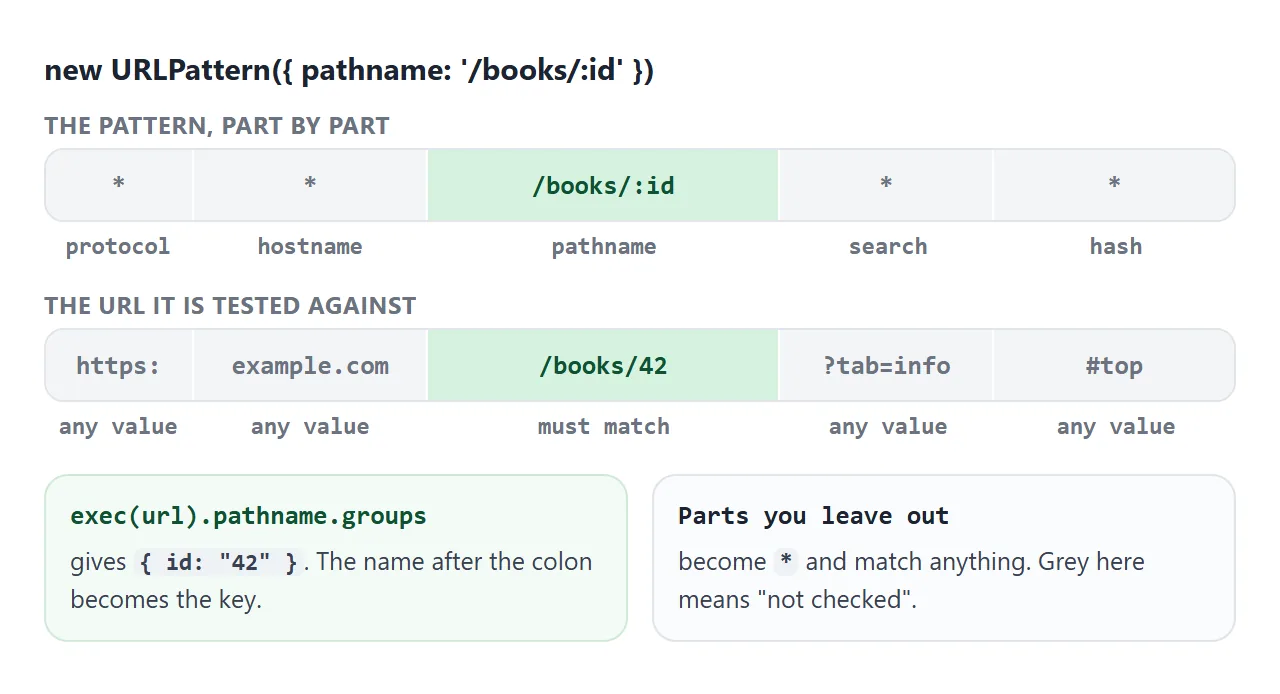
There are two ways to build one. The object form names the parts. The string form reads a whole URL pattern, and a relative one needs a base URL as the second argument:
// Object form: only the pathname is checked
const byPath = new URLPattern({ pathname: '/books/:id' });

// String form: the base fills in protocol and host
const onSite = new URLPattern('/books/:id', 'https://example.com');
onSite.test('https://example.com/books/7'); // true
onSite.test('https://other.org/books/7');   // false: different host
A relative string with no base, such as new URLPattern('/books/:id'), throws a TypeError. So does a broken pattern like /a/: with nothing after the colon.
test() and exec()
Both take the URL to check. exec() returns null on no match. On a match it returns one entry per part, and the values you want are under groups:
const p = new URLPattern({ pathname: '/books/:id' });
const m = p.exec('https://example.com/books/42?tab=info');
m.pathname.groups.id;   // "42"
m.pathname.input;       // "/books/42"
Three details matter in practice:
- Relative paths need a base.
p.test('/books/42')returnsfalse. Pass a base,p.test('/books/42', location.href), or pass an object such as{ pathname: '/books/42' }. - Values stay encoded. A path of
/books/caf%C3%A9gives an id ofcaf%C3%A9. RundecodeURIComponenton it when you display it. - Matching is case-sensitive. Pass
{ ignoreCase: true }as the last constructor argument to change that.
Named groups, wildcards and optional parts
The pathname syntax is short. Each piece below was run against the paths shown:
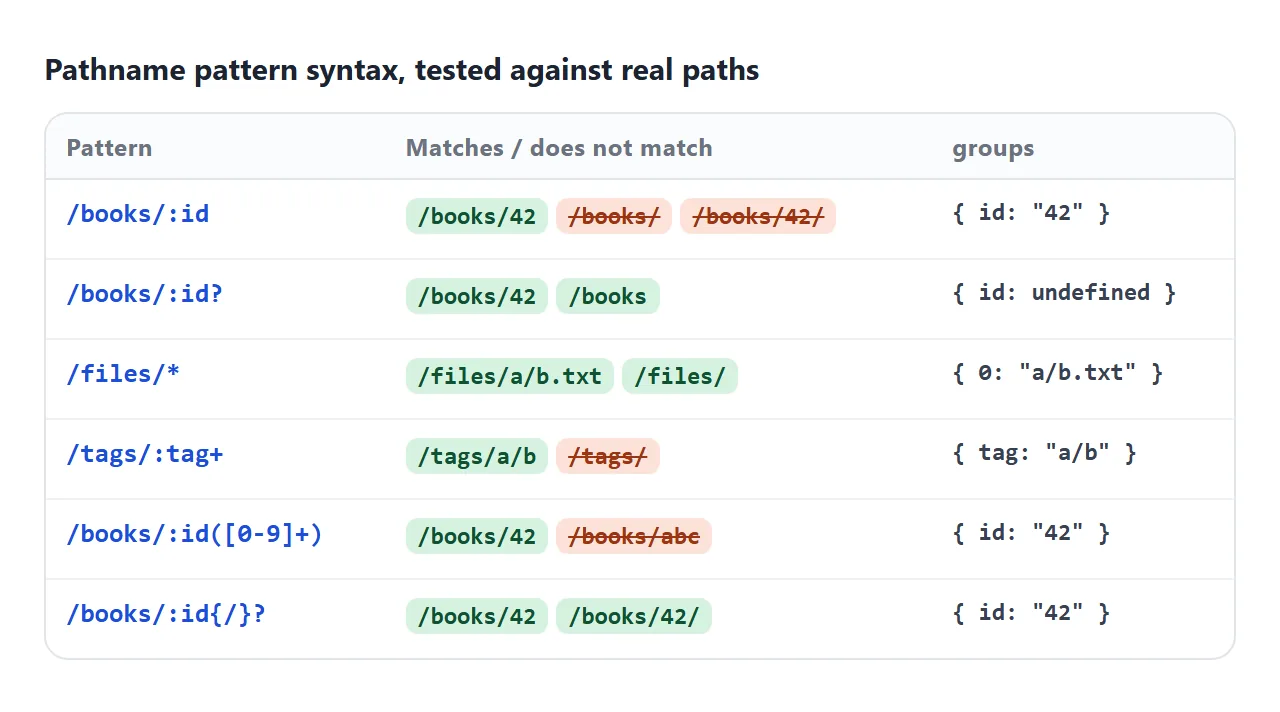
| Syntax | Means | Example match |
|---|---|---|
:id |
One segment, up to the next / |
/books/42 |
:id? |
The segment is optional | /books and /books/42 |
:tag+ |
One or more segments | /tags/a/b |
* |
Anything, slashes included, stored as group 0 |
/files/a/b.txt |
{/}? |
Optional literal text in braces | /books/42/ |
:id([0-9]+) |
A segment that must match a RegExp | /books/42, not /books/abc |
A custom group is plain RegExp text in brackets. Inside a JavaScript string a backslash has to be doubled, or the pattern quietly loses it:
new URLPattern({ pathname: '/books/:id(\\d+)' }); // right: \d reaches URLPattern
new URLPattern({ pathname: '/books/:id([0-9]+)' }); // same, no backslash needed
There is also a search part, but it matches the query text in order, so q=* does not match ?page=2&q=cat. Match the path with URLPattern and read the query with URLSearchParams.
A tiny router in one file
A router is a list of patterns tried in order. The first one that matches decides what the page shows. This one runs entirely in the page, so the links never load anything:
<!doctype html>
<html lang="en">
<head>
<meta charset="utf-8">
<meta name="viewport" content="width=device-width, initial-scale=1">
<title>A tiny router with URLPattern</title>
<style>
  body { margin: 0; padding: 14px; font-family: system-ui, sans-serif; background: #f4f5f7; color: #1d2330; }
  form { display: flex; gap: 6px; }
  #addr { flex: 1; min-width: 0; padding: 8px 12px; font: 14px ui-monospace, Consolas, monospace;
          border: 1px solid #cfd4dc; border-radius: 99px; background: #fff; }
  form button { padding: 8px 14px; border: 0; border-radius: 99px; background: #1d2330; color: #fff; cursor: pointer; }
  nav { display: flex; flex-wrap: wrap; gap: 6px; margin: 10px 0; }
  nav a { font-size: 13px; padding: 6px 10px; border-radius: 99px; background: #fff; border: 1px solid #dfe3ea;
          color: #1d4ed8; text-decoration: none; }
  #view { background: #fff; border: 1px solid #e1e4ea; border-radius: 12px; padding: 14px 16px; min-height: 110px; }
  #view h2 { margin: 0 0 6px; font-size: 20px; }
  #view p { margin: 4px 0; font-size: 14px; color: #4b5563; word-break: break-all; }
  #engine { margin-top: 8px; font-size: 12px; color: #6b7280; }
</style>
</head>
<body>
<form id="go"><input id="addr" aria-label="Path" value="/" spellcheck="false" autocomplete="off"><button>Go</button></form>
<nav>
  <a href="/" data-link>Home</a>
  <a href="/books" data-link>Books</a>
  <a href="/books/42" data-link>Book 42</a>
  <a href="/books/7/reviews" data-link>Reviews of 7</a>
  <a href="/files/docs/2026/plan.pdf" data-link>A file</a>
  <a href="/nowhere" data-link>Broken link</a>
</nav>
<div id="view"><h2></h2><p class="text"></p><p class="route"></p></div>
<div id="engine"></div>

<script>
  // The first route that matches wins, so put specific routes first
  const routes = [
    { path: '/',                  view: () => ['Home', 'Pick a link above.'] },
    { path: '/books',             view: () => ['All books', 'A list would go here.'] },
    { path: '/books/:id',         view: (g) => ['Book ' + g.id, 'id = ' + g.id] },
    { path: '/books/:id/reviews', view: (g) => ['Reviews', 'Reviews for book ' + g.id] },
    { path: '/files/*',           view: (g) => ['File', 'Rest of the path: ' + g[0]] },
  ];

  // URLPattern when the browser has it, a RegExp otherwise
  const native = 'URLPattern' in globalThis;
  function compile(path) {
    if (native) {
      const p = new URLPattern({ pathname: path });
      return (url) => p.exec({ pathname: url })?.pathname.groups ?? null;
    }
    const re = new RegExp('^' + path.replace(/:(\w+)/g, '(?<$1>[^/]+)').replace('*', '(?<rest>.*)') + '$');
    return (url) => { const m = re.exec(url); return m && { ...m.groups, 0: m.groups?.rest }; };
  }
  routes.forEach((r) => { r.match = compile(r.path); });

  function show(path) {
    document.getElementById('addr').value = path;
    let title = 'Not found', text = 'No route matches ' + path, used = '';
    for (const r of routes) {
      const groups = r.match(path);
      if (groups) { [title, text] = r.view(groups); used = 'Route: ' + r.path; break; }
    }
    // textContent, so text from the URL is never read as HTML
    document.querySelector('#view h2').textContent = title;
    document.querySelector('#view .text').textContent = text;
    document.querySelector('#view .route').textContent = used;
  }

  // Handle link clicks here instead of loading a new page
  document.querySelectorAll('[data-link]').forEach((a) =>
    a.addEventListener('click', (e) => { e.preventDefault(); show(a.getAttribute('href')); }));
  document.getElementById('go').addEventListener('submit', (e) => {
    e.preventDefault();
    show(document.getElementById('addr').value.trim() || '/');
  });

  document.getElementById('engine').textContent = 'Matcher: ' + (native ? 'URLPattern' : 'RegExp fallback');
  show('/');
</script>
</body>
</html>
- List the routes, each with a pathname pattern and a function that returns the view.
- Compile each pattern once when the page loads.
- Find the first match by calling
exec()on each route in turn. - Draw the view from the groups, using
textContentso text from the URL is never read as HTML. - Handle link clicks with
preventDefault()and run the router with the link's path.
const routes = [
  { path: '/books/:id', view: (g) => 'Book ' + g.id },
  { path: '/files/*',   view: (g) => 'File ' + g[0] },
];
routes.forEach((r) => { r.pattern = new URLPattern({ pathname: r.path }); });

function route(path) {
  for (const r of routes) {
    const m = r.pattern.exec({ pathname: path });
    if (m) return r.view(m.pathname.groups);
  }
  return 'Not found';
}
Order matters. Put specific routes before general ones, or a catch-all such as /* placed first will take every path.
For a single-file page that keeps its state in the part after #, give the pattern a hash part such as /post/:id instead of a pathname, and run the router on hashchange. location.hash in JavaScript covers that event.
A RegExp fallback when URLPattern is missing
URLPattern is a newer API than URL and URLSearchParams. Check for it once, and build a regular expression when it is not there:
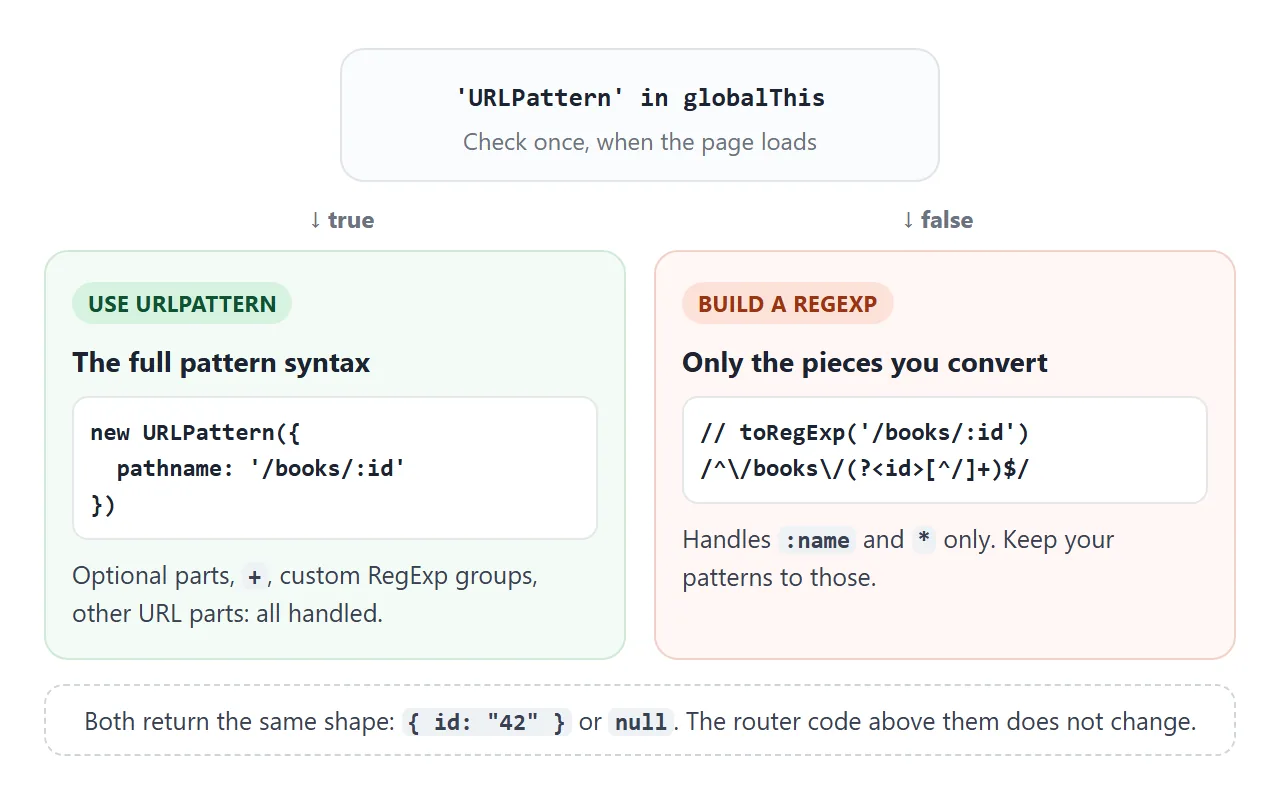
function toRegExp(pattern) {
  let n = 0;
  const src = pattern
    .replace(/[.+?^${}()|[\]\\]/g, '\\$&')        // escape RegExp characters
    .replace(/:(\w+)/g, '(?<$1>[^/]+)')            // :id -> one segment
    .replace(/\*/g, () => '(?<_' + n++ + '>.*)');  // *   -> anything
  return new RegExp('^' + src + '$');
}

const matcher = 'URLPattern' in globalThis
  ? new URLPattern({ pathname: '/books/:id' })
  : toRegExp('/books/:id');
The fallback understands :name and * only. Keep the patterns in your routes to those two if the page has to run on both paths. The next example runs both engines on the same paths. Tick the box to force the fallback and compare:
<!doctype html>
<html lang="en">
<head>
<meta charset="utf-8">
<meta name="viewport" content="width=device-width, initial-scale=1">
<title>URLPattern with a RegExp fallback</title>
<style>
  body { margin: 0; padding: 16px; font-family: system-ui, sans-serif; background: #f4f5f7; color: #1d2330; }
  .bar { display: flex; flex-wrap: wrap; gap: 8px 14px; align-items: center; font-size: 14px; }
  select { font: 14px ui-monospace, Consolas, monospace; padding: 6px; border-radius: 6px; border: 1px solid #cfd4dc; }
  #engine { margin: 10px 0 6px; font-size: 13px; color: #4b5563; }
  #regex { font: 12px ui-monospace, Consolas, monospace; background: #fff; border: 1px solid #e1e4ea;
           border-radius: 8px; padding: 8px; word-break: break-all; }
  table { width: 100%; border-collapse: collapse; margin-top: 10px; background: #fff; font-size: 13px; }
  th, td { text-align: left; padding: 7px 8px; border-bottom: 1px solid #eceef2; vertical-align: top; }
  td { font-family: ui-monospace, Consolas, monospace; word-break: break-all; }
  .y { color: #0f5132; } .n { color: #9a3412; }
</style>
</head>
<body>
<div class="bar">
  <label>Pattern
    <select id="pat">
      <option>/books/:id</option>
      <option>/books/:id/reviews</option>
      <option>/files/*</option>
      <option>/:lang/docs/:page</option>
    </select>
  </label>
  <label><input type="checkbox" id="force"> Pretend URLPattern is missing</label>
</div>
<div id="engine"></div>
<div id="regex"></div>
<table>
  <thead><tr><th>Path</th><th>Result</th></tr></thead>
  <tbody id="rows"></tbody>
</table>

<script>
  const paths = ['/books/42', '/books/42/reviews', '/books/', '/files/docs/a.txt', '/en/docs/intro', '/about'];

  // Fallback: ':name' becomes a named group, '*' becomes "anything".
  // It covers only :name and *. URLPattern understands much more.
  function toRegExp(pattern) {
    let n = 0;
    const src = pattern
      .replace(/[.+?^${}()|[\]\\]/g, '\\$&')        // escape RegExp characters
      .replace(/:(\w+)/g, '(?<$1>[^/]+)')            // :id -> one path segment
      .replace(/\*/g, () => '(?<_' + n++ + '>.*)');  // *   -> anything, named _0, _1...
    return new RegExp('^' + src + '$');
  }

  // One interface for both engines: a path goes in, groups (or null) come out
  function makeMatcher(pattern, useFallback) {
    if (!useFallback && 'URLPattern' in globalThis) {
      const p = new URLPattern({ pathname: pattern });
      return { engine: 'URLPattern', match: (path) => p.exec({ pathname: path })?.pathname.groups ?? null };
    }
    const re = toRegExp(pattern);
    return {
      engine: 'RegExp fallback', re,
      match(path) {
        const m = re.exec(path);
        if (!m) return null;
        const groups = {};  // rename _0 to 0 so both engines return the same shape
        for (const [k, v] of Object.entries(m.groups || {})) groups[k.replace(/^_(\d+)$/, '$1')] = v;
        return groups;
      },
    };
  }

  function render() {
    const force = document.getElementById('force').checked;
    const m = makeMatcher(document.getElementById('pat').value, force);
    document.getElementById('engine').textContent = 'Matching with: ' + m.engine;
    document.getElementById('regex').textContent = m.re ? 'RegExp: ' + m.re : 'new URLPattern({ pathname: pattern })';
    const rows = document.getElementById('rows');
    rows.textContent = '';
    for (const path of paths) {
      const g = m.match(path);
      const tr = rows.insertRow();
      tr.insertCell().textContent = path;
      const td = tr.insertCell();
      td.className = g ? 'y' : 'n';
      td.textContent = g ? JSON.stringify(g) : 'no match';
    }
  }

  document.getElementById('pat').addEventListener('change', render);
  document.getElementById('force').addEventListener('change', render);
  render();
</script>
</body>
</html>
The wildcard group is named _0 in the RegExp, because a group name cannot be a number. The example renames it to 0 so both engines return the same shape.
If you need the full syntax without native support, a polyfill package for URLPattern is published on npm.
Which browsers were tested
The examples and every pattern in the syntax picture were run in the Chromium, Firefox and WebKit builds installed with Playwright, the browser testing tool. All three have URLPattern and gave the same result on every check.
That includes the trailing slash, the optional group and the [0-9]+ group. Older browser versions and real phones were not tested, so keep the feature check.
When it does not work
| What you see | Cause | Fix |
|---|---|---|
URLPattern is not defined error |
The browser has no URLPattern | Check 'URLPattern' in globalThis and fall back to a RegExp |
TypeError when creating the pattern |
A relative string with no base, or a broken pattern | Use the object form, or pass a base URL |
test('/books/42') is false |
A relative URL with no base | Pass location.href as the second argument |
/books/42/ does not match |
The trailing slash is left over | Add {/}? to the pattern |
(\d+) does not match numbers |
The string ate the backslash | Write \\d, or use [0-9] |
| The wrong route wins | A general pattern comes first | Put specific routes first |
Values show %20 |
Groups are not decoded | decodeURIComponent(value) |
Share it as a link
A router is hard to show in a screenshot, since the point is clicking through it. An .html attachment may open as plain code, or not at all, on a phone.
To send the working version, paste the page into a NOS document and choose Create share link. HTML to link walks through it.
The page renders as written and its scripts run, so the people you send it to can click the links and type paths themselves. If you change the routes later, the same link shows the new version.