To read a query string in JavaScript, pass it to URLSearchParams: new URLSearchParams(location.search).get('q') returns the value of ?q=, already decoded, or null if it is not there. To write one, build a URLSearchParams, call set or append, and turn it into text with toString().
Edit the URL in the box below. The pairs and the method results update as you type.
<!doctype html>
<html lang="en">
<head>
<meta charset="utf-8">
<meta name="viewport" content="width=device-width, initial-scale=1">
<title>Read a query string</title>
<style>
  body { margin: 0; padding: 16px; font-family: system-ui, sans-serif; background: #f4f5f7; color: #1d2330; }
  label { font-size: 13px; font-weight: 600; }
  input {
    display: block; width: 100%; box-sizing: border-box; margin: 6px 0 14px;
    padding: 9px 10px; border: 1px solid #c9cdd4; border-radius: 8px;
    font: 13px ui-monospace, Consolas, monospace;
  }
  .grid { display: grid; grid-template-columns: 1fr 1fr; gap: 12px; }
  .box { background: #fff; border-radius: 10px; padding: 10px 12px; box-shadow: 0 2px 8px rgba(0, 0, 0, .06); min-width: 0; }
  .box h3 { margin: 0 0 6px; font-size: 13px; }
  table { border-collapse: collapse; width: 100%; font-size: 13px; }
  td { padding: 3px 4px; border-top: 1px solid #eceef1; font-family: ui-monospace, Consolas, monospace; word-break: break-all; }
  pre { margin: 0; font-size: 12.5px; white-space: pre-wrap; word-break: break-all; }
  @media (max-width: 480px) { .grid { grid-template-columns: 1fr; } }
</style>
</head>
<body>
<label for="u">Paste or edit a URL</label>
<input id="u" value="https://shop.example/list?q=red+shoes&size=40&size=41&sort=price%20asc">

<div class="grid">
  <div class="box">
    <h3>Every pair, in order</h3>
    <table id="pairs"></table>
  </div>
  <div class="box">
    <h3>Asking for one name</h3>
    <pre id="calls"></pre>
  </div>
</div>

<script>
  const input = document.getElementById('u');
  const table = document.getElementById('pairs');
  const calls = document.getElementById('calls');

  function show() {
    table.innerHTML = '';
    let params;
    try {
      params = new URL(input.value).searchParams;  // the part after ?, decoded
    } catch {
      calls.textContent = 'Not a full URL yet (it needs https://...)';
      return;
    }

    // for...of gives [name, value] pairs, repeats included
    for (const [name, value] of params) {
      const row = table.insertRow();
      row.insertCell().textContent = name;
      row.insertCell().textContent = JSON.stringify(value);
    }

    const say = (call, result) => call.padEnd(15) + '→ ' + JSON.stringify(result);
    calls.textContent = [
      say("get('q')", params.get('q')),
      say("get('size')", params.get('size')),
      say("getAll('size')", params.getAll('size')),
      say("get('page')", params.get('page')),
      say("has('sort')", params.has('sort')),
    ].join('\n');
  }

  input.addEventListener('input', show);
  show();
</script>
</body>
</html>
Notice that size appears twice. get('size') returns only the first one, "40". getAll('size') returns both.
What URLSearchParams reads
A URL has several parts. The query string is the part that starts with ? and ends before #. Only that part is made of name and value pairs.
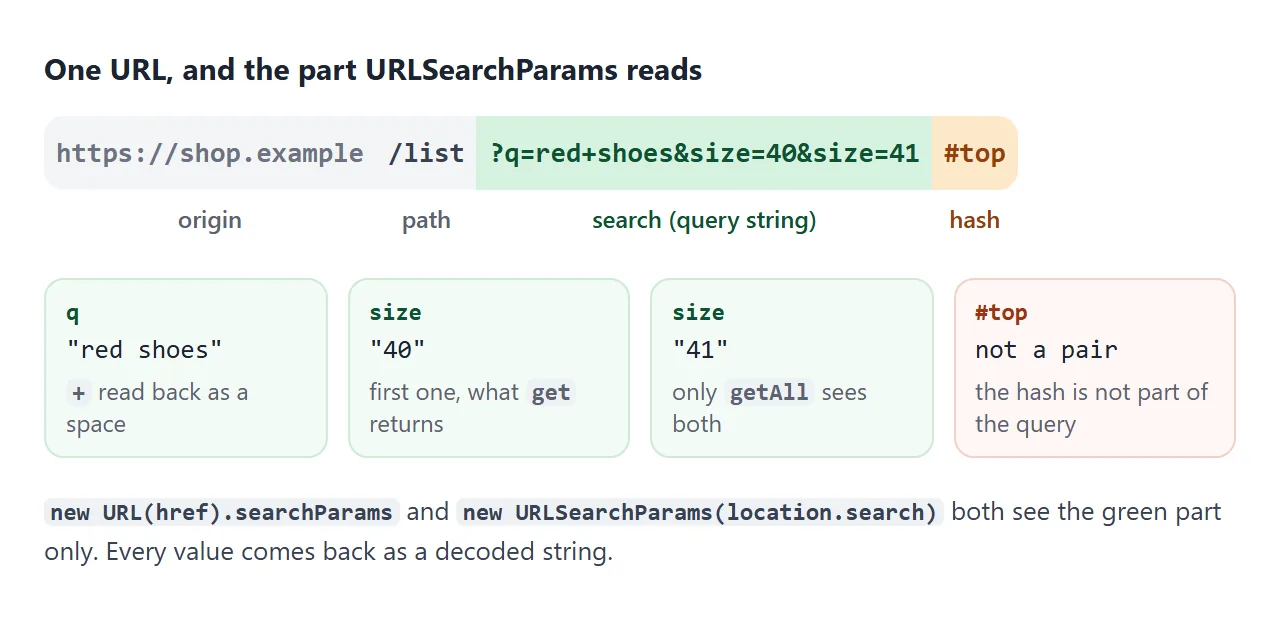
There are two common ways to get at it:
// The page's own address
const params = new URLSearchParams(location.search);

// Any other URL string
const other = new URL('https://shop.example/list?q=red+shoes').searchParams;
The leading ? in location.search is fine, because the constructor drops it. A full URL string is not fine. new URLSearchParams('https://...?q=x') treats everything up to the first = as one long name.
get, getAll, has and looping
Four calls cover most reading:
| Call | Returns | When the name is missing |
|---|---|---|
get('q') |
The first value, as a string | null |
getAll('size') |
Every value, as an array | [] |
has('sort') |
true or false |
false |
for (const [name, value] of params) |
Each pair, in order | The loop skips it |
Every value is a string. A missing value and an empty one differ: ?q= gives "", while no q at all gives null. Check for null when the difference matters.
Object.fromEntries(params) is handy for logging, but it keeps only the last value of a repeated name. Use getAll for those.
set, append and delete
Writing uses three methods on the same object:
set(name, value)replaces every pair with that name by one pair.append(name, value)adds one more pair, even if the name exists.delete(name)removes every pair with that name.
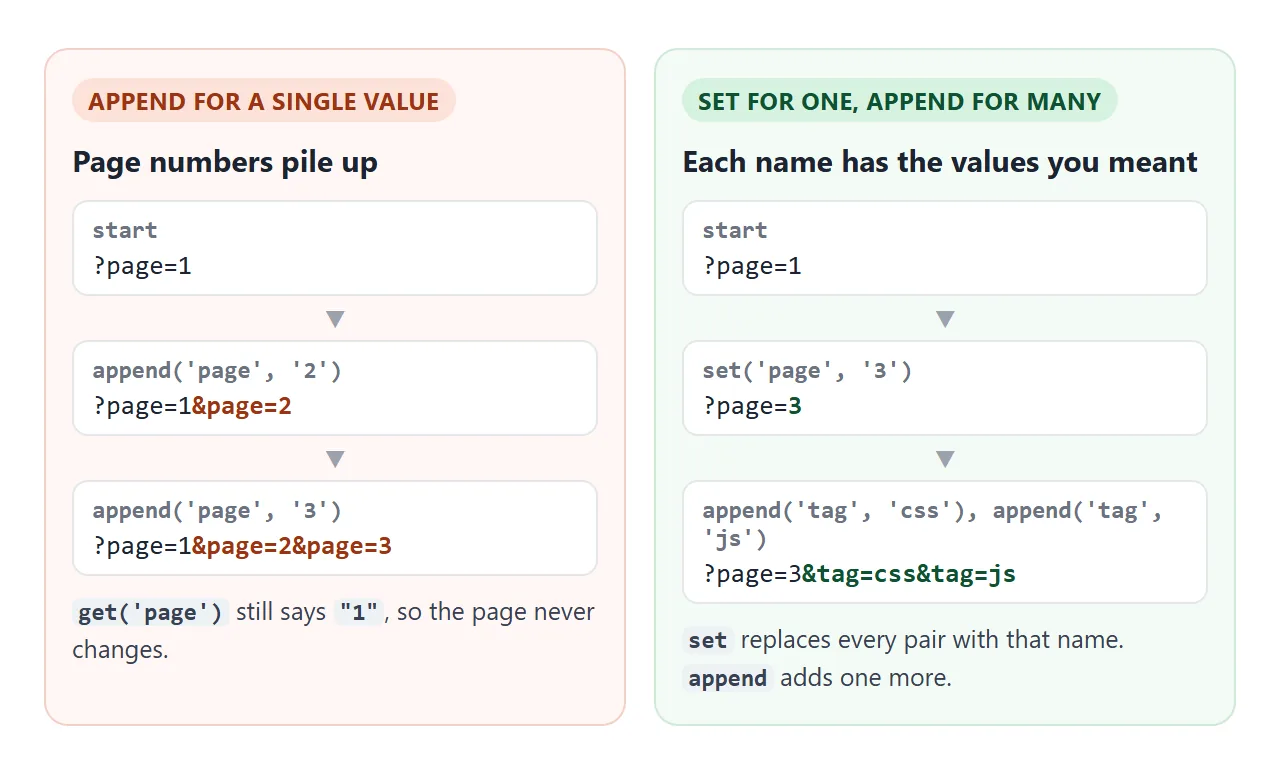
toString() gives the text without the ?. Add it yourself when you build a link: '?' + params. The + joins a string, which calls toString() for you.
Turning a form into a query string
new URLSearchParams(new FormData(form)) collects every named field of a form in one line. Checked boxes that share a name become repeated pairs, which is what getAll expects on the other side. FormData in JavaScript covers which fields get collected.
Type an & or a # into the search box and compare the two lines:
<!doctype html>
<html lang="en">
<head>
<meta charset="utf-8">
<meta name="viewport" content="width=device-width, initial-scale=1">
<title>Form to query string</title>
<style>
  body { margin: 0; padding: 16px; font-family: system-ui, sans-serif; background: #f4f5f7; color: #1d2330; font-size: 14px; }
  form { background: #fff; border-radius: 10px; padding: 12px 14px; box-shadow: 0 2px 8px rgba(0, 0, 0, .06); }
  .row { margin-bottom: 10px; }
  .row > b { display: block; font-size: 13px; margin-bottom: 4px; }
  input[type=text], select { width: 100%; box-sizing: border-box; padding: 8px; border: 1px solid #c9cdd4; border-radius: 7px; font: inherit; }
  .checks label { margin-right: 12px; white-space: nowrap; }
  .out { margin-top: 12px; display: grid; gap: 8px; }
  .out div { border-radius: 8px; padding: 8px 10px; font: 13px ui-monospace, Consolas, monospace; word-break: break-all; }
  .good { background: #f4fbf6; border: 1px solid #cfe9d7; }
  .bad { background: #fff7f5; border: 1px solid #f3d1c8; }
  .out small { display: block; font: 600 11px system-ui, sans-serif; color: #5b6270; margin-bottom: 2px; }
</style>
</head>
<body>
<form id="f">
  <div class="row">
    <b>Search</b>
    <input type="text" name="q" value="Tom & Jerry #2">
  </div>
  <div class="row checks">
    <b>Size</b>
    <label><input type="checkbox" name="size" value="40" checked> 40</label>
    <label><input type="checkbox" name="size" value="41" checked> 41</label>
    <label><input type="checkbox" name="size" value="42"> 42</label>
  </div>
  <div class="row">
    <b>Sort</b>
    <select name="sort">
      <option value="new">Newest</option>
      <option value="price asc">Price, low to high</option>
    </select>
  </div>
</form>

<div class="out">
  <div class="good"><small>new URLSearchParams(new FormData(form))</small><span id="good"></span></div>
  <div class="bad"><small>'?q=' + value (glued by hand, not encoded)</small><span id="bad"></span></div>
</div>

<script>
  const form = document.getElementById('f');

  function build() {
    // every named field; checked boxes become repeated pairs; all encoded
    const params = new URLSearchParams(new FormData(form));
    document.getElementById('good').textContent = '?' + params;

    // the hand-made version breaks on & and #
    document.getElementById('bad').textContent =
      '?q=' + form.q.value + '&sort=' + form.sort.value;
  }

  form.addEventListener('input', build);
  // Enter in the text box would submit the form; stay on the page instead
  form.addEventListener('submit', (e) => e.preventDefault());
  build();
</script>
</body>
</html>
A browser does the same thing when a form with method="get" submits: the fields end up in the address as a query string.
An HTML form without an action shows that route, which reloads the page. The script above builds the text without leaving the page.
Encoding: why gluing strings breaks
Some characters mean something in a URL. & starts the next pair, # starts the hash, and = separates a name from its value. A value that contains them has to be encoded.
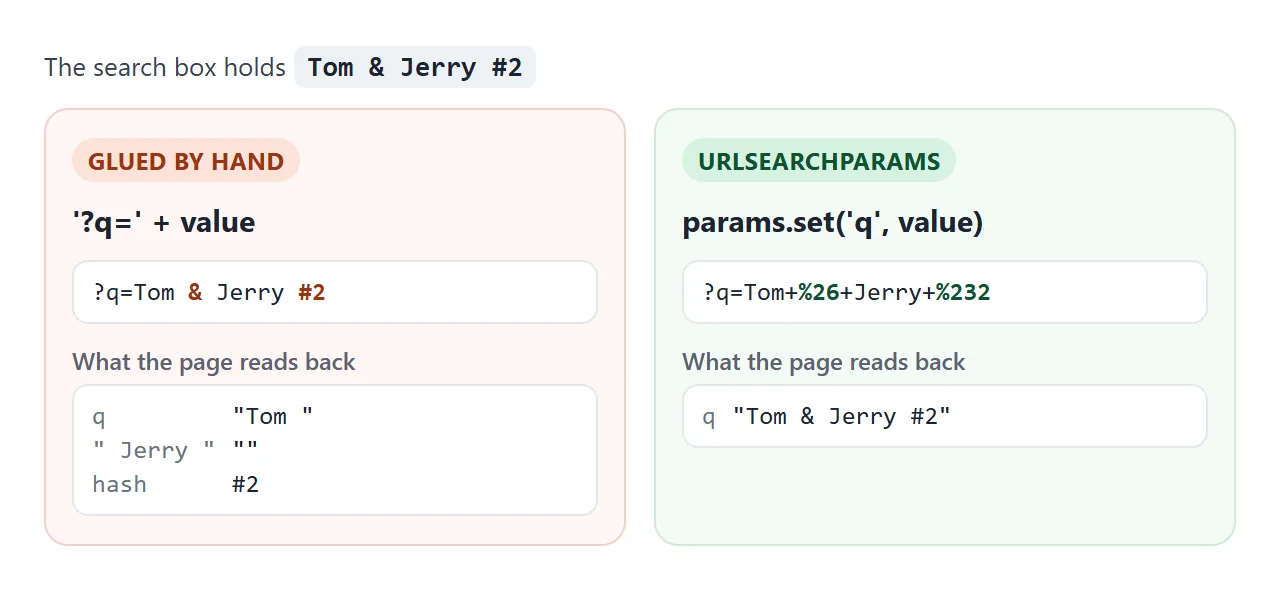
URLSearchParams encodes when it writes and decodes when it reads, so you never call encodeURIComponent or decodeURIComponent yourself. The two styles differ slightly:
| Value | URLSearchParams writes |
encodeURIComponent writes |
|---|---|---|
| a space | + |
%20 |
& |
%26 |
%26 |
+ |
%2B |
%2B |
é |
%C3%A9 |
%C3%A9 |
Both forms are read back correctly by URLSearchParams. The catch is the other direction: a + typed straight into a URL, such as ?phone=+44, reads back as a space.
Updating the address bar with history.replaceState
Setting location.search loads the page again. To change the address without a reload, put the params into a URL object and pass it to history.replaceState:
const url = new URL(location.href);
url.search = params;                 // params becomes ?q=...&tag=...
history.replaceState(null, '', url);
replaceState swaps the current history entry, so Back still leaves the page. pushState adds a new entry for each change instead. Use it when each state should be a step the visitor can go back to.
The finished pattern reads the filters from the address on load, and writes them back on every change:
<!doctype html>
<html lang="en">
<head>
<meta charset="utf-8">
<meta name="viewport" content="width=device-width, initial-scale=1">
<title>Filters kept in the URL</title>
<style>
  body { margin: 0; padding: 14px; font-family: system-ui, sans-serif; background: #eceef1; color: #1d2330; font-size: 14px; }
  .bar {
    background: #fff; border: 1px solid #d5d9e0; border-radius: 99px; padding: 7px 14px;
    font: 12.5px ui-monospace, Consolas, monospace; color: #374151; word-break: break-all;
  }
  .bar b { color: #0f5132; }
  .tools { display: flex; flex-wrap: wrap; gap: 8px 12px; align-items: center; margin: 12px 0; }
  .tools input[type=search] { flex: 1 1 160px; padding: 8px; border: 1px solid #c9cdd4; border-radius: 7px; font: inherit; }
  ul { list-style: none; margin: 0; padding: 0; display: grid; gap: 6px; }
  li { background: #fff; border-radius: 8px; padding: 8px 12px; display: flex; justify-content: space-between; }
  li span { color: #5b6270; font-size: 13px; }
</style>
</head>
<body>
<div class="bar">page.html<b id="query"></b></div>

<div class="tools">
  <input type="search" id="q" placeholder="Search" aria-label="Search">
  <label><input type="checkbox" name="tag" value="css"> css</label>
  <label><input type="checkbox" name="tag" value="js"> js</label>
  <label><input type="checkbox" name="tag" value="html"> html</label>
</div>

<ul id="list"></ul>

<script>
  const items = [
    ['Sticky header', 'css'], ['Draggable card', 'js'], ['Dark mode toggle', 'css'],
    ['Copy button', 'js'], ['Accessible table', 'html'], ['Share link form', 'html'],
  ];
  const q = document.getElementById('q');
  const boxes = [...document.querySelectorAll('[name=tag]')];
  const list = document.getElementById('list');

  // 1. On load, read the filters back from the address
  const start = new URLSearchParams(location.search);
  q.value = start.get('q') || '';
  const saved = start.getAll('tag');
  boxes.forEach((b) => { b.checked = saved.includes(b.value); });

  function render() {
    const text = q.value.trim();
    const tags = boxes.filter((b) => b.checked).map((b) => b.value);

    list.innerHTML = '';
    items
      .filter(([name, tag]) => name.toLowerCase().includes(text.toLowerCase())
        && (tags.length === 0 || tags.includes(tag)))
      .forEach(([name, tag]) => {
        const li = document.createElement('li');
        li.textContent = name;
        li.append(Object.assign(document.createElement('span'), { textContent: tag }));
        list.append(li);
      });
    if (!list.children.length) list.innerHTML = '<li>Nothing matches.</li>';

    // 2. Turn the filters into a query string
    const params = new URLSearchParams();
    if (text) params.set('q', text);
    tags.forEach((t) => params.append('tag', t));
    const query = params.toString() ? '?' + params : '';
    document.getElementById('query').textContent = query;

    // 3. Put it in the address bar: no reload, no extra Back step
    const url = new URL(location.href);
    url.search = query;
    history.replaceState(null, '', url);
  }

  q.addEventListener('input', render);
  boxes.forEach((b) => b.addEventListener('change', render));
  render();
</script>
</body>
</html>
On a page served from your own address, this makes every filtered view a link. Copy the address, send it, and the other person sees the same list.
Inside a sandboxed frame, such as the example box above, there is no real address to change. Some browsers refuse the call there with a SecurityError. The sandbox attribute guide explains that isolation.
When it does not work
| What you see | Cause | Fix |
|---|---|---|
get returns null but the value is in the URL |
The value is after #, not ? |
Read new URLSearchParams(location.hash.slice(1)) |
The first name looks like https://site/page?q |
A full URL was passed to URLSearchParams |
Use new URL(href).searchParams |
| Only one checkbox value comes back | get returns the first value only |
Use getAll |
A value is cut off at & or # |
The query was glued by hand without encoding | Build it with set or append |
+44 comes back as 44 |
A raw + in a query means a space |
Write the value with URLSearchParams, which gives %2B |
| The same name repeats more each time | append was used for a single value |
Use set |
| The page reloads on every change | location.search was assigned |
Use history.replaceState |
SecurityError from replaceState |
The page runs in a sandboxed or srcdoc frame, or the URL has another origin |
Run it at its own address, and keep the URL on the same origin |
Share it as a link
A filter page is easier to judge by using it than by reading the code. Send it as a share link and the scripts run, so the people you send it to can search, tick tags and see the query string being built.
To do that, paste the page into a NOS document and choose Create share link. HTML to link walks through it.
The page renders as written, and if you change the code later, the same link shows the new version. The shared page runs inside a frame, so the address bar part stays still there; reading, building and encoding work as shown.