location.hash returns the part of the address after #, including the #. Set it, and the address changes without a reload. Listen for hashchange on window to react to every change: a link, your code, or the Back button.
location.hash;              // "#pricing" on page.html#pricing, "" with no hash
location.hash = 'faq';      // address becomes page.html#faq, no reload

window.addEventListener('hashchange', () => {
  console.log('now at', location.hash);
});
Try it. Click the links and buttons, then press history.back().
<!doctype html>
<html lang="en">
<head>
<meta charset="utf-8">
<meta name="viewport" content="width=device-width, initial-scale=1">
<title>location.hash and hashchange</title>
<style>
  body { margin: 0; padding: 14px; font-family: system-ui, sans-serif; background: #f4f5f7; color: #1d2330; }
  .now { background: #fff; border-radius: 10px; padding: 10px 12px; box-shadow: 0 2px 8px rgba(0,0,0,.08); }
  .now code { font: 700 17px ui-monospace, Consolas, monospace; color: #0f5132; }
  .now small { color: #5b6270; }
  .btns { display: flex; flex-wrap: wrap; gap: 8px; margin: 12px 0; }
  .btns a, .btns button {
    font: 13px ui-monospace, Consolas, monospace; padding: 7px 10px; border-radius: 8px;
    border: 1px solid #cdd3dc; background: #fff; color: #1d4ed8; text-decoration: none; cursor: pointer;
  }
  .btns button { color: #1d2330; }
  h3 { margin: 0 0 4px; font-size: 13px; color: #5b6270; }
  #log { margin: 0; padding-left: 22px; font: 12.5px/1.6 ui-monospace, Consolas, monospace; }
</style>
</head>
<body>
<div class="now">
  <small>location.hash is</small> <code id="now"></code><br>
  <small>history.length is <b id="len"></b></small>
</div>

<div class="btns">
  <a href="#intro">href="#intro"</a>
  <a href="#pricing">href="#pricing"</a>
  <button id="set">location.hash = 'faq'</button>
  <button id="back">history.back()</button>
</div>

<h3>hashchange events (newest first)</h3>
<ol id="log" reversed></ol>

<script>
  const now = document.getElementById('now');
  const len = document.getElementById('len');
  const log = document.getElementById('log');

  function show() {
    now.textContent = location.hash === '' ? '"" (empty)' : '"' + location.hash + '"';
    len.textContent = history.length;
  }

  // Fires after the hash changes: links, code, Back and Forward
  window.addEventListener('hashchange', (e) => {
    const from = new URL(e.oldURL).hash || '(none)';
    const to = new URL(e.newURL).hash || '(none)';
    const li = document.createElement('li');
    li.textContent = from + ' -> ' + to;
    log.prepend(li);
    show();
  });

  document.getElementById('set').addEventListener('click', () => {
    location.hash = 'faq';  // the # is added for you
  });
  document.getElementById('back').addEventListener('click', () => history.back());

  show();  // hashchange does not fire on page load
</script>
</body>
</html>
Inside the example boxes on this page, the hash belongs to the box. The address bar above stays the same. The browser's own Back button still steps back through the box's hashes first.
Reading location.hash
The hash is one of the pieces the location object splits the address into. The query string before it is location.search; the path is location.pathname.
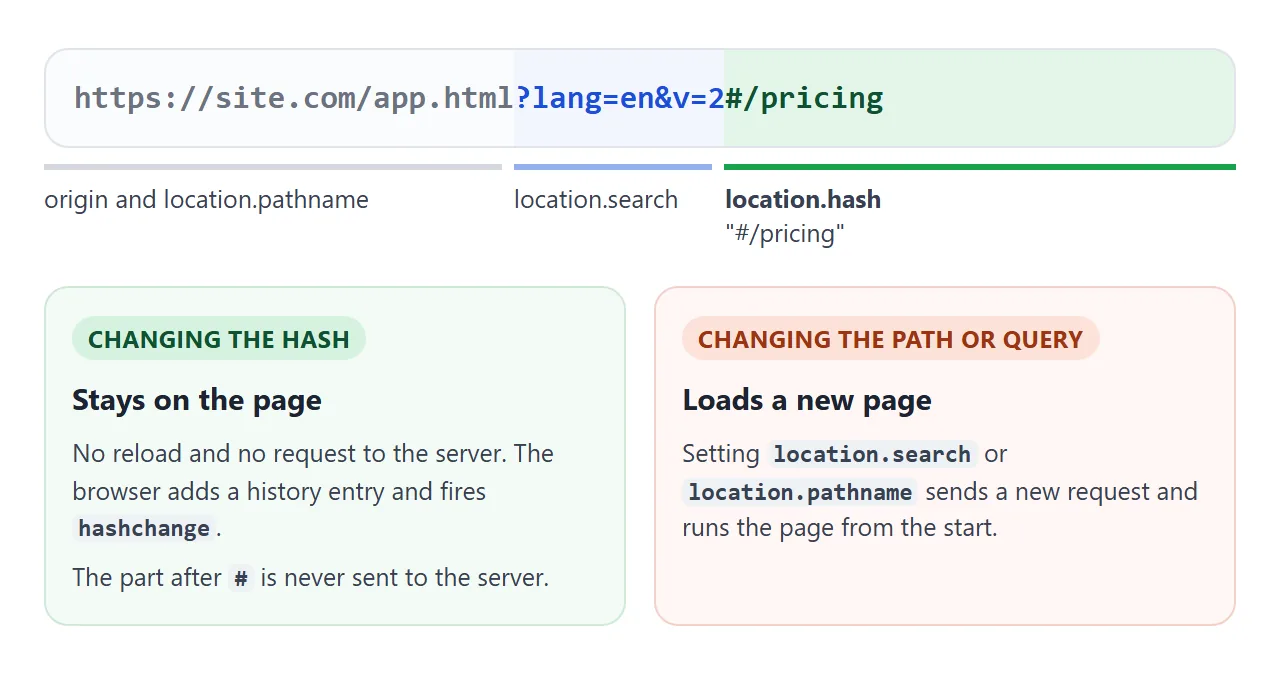
Three details catch people out:
- The
#is included. Uselocation.hash.slice(1)to get the bare name. - No hash reads as
"". An address ending in a bare#also reads as"". - It is never sent to the server. The browser requests only the part before
#, so server code cannot see the hash.
Anchor links read the same value. A plain <a href="#pricing"> sets the hash exactly as code does. The link to an anchor on the same page guide covers that no-script side.
Setting the hash and the hashchange event
Assigning location.hash does four things. The address updates, a history entry is added, the page scrolls to an element whose id matches, and hashchange fires on window.
The event object carries both addresses, so you can see where the visitor came from:
window.addEventListener('hashchange', (e) => {
  const from = new URL(e.oldURL).hash;  // "#intro"
  const to = new URL(e.newURL).hash;    // "#pricing"
});
Setting the hash to the value it already has does nothing. No event fires and no history entry is added. The first example shows it: press the location.hash = 'faq' button twice and the log gains one line.
hashchange does not fire when the page first opens, even if the address already has a hash. Any code that draws the page from the hash has to run once on load as well.
History: one Back step per change
Each new hash is a separate entry in the browser history. Back walks through them, firing hashchange each time, and only leaves the page after the first one.
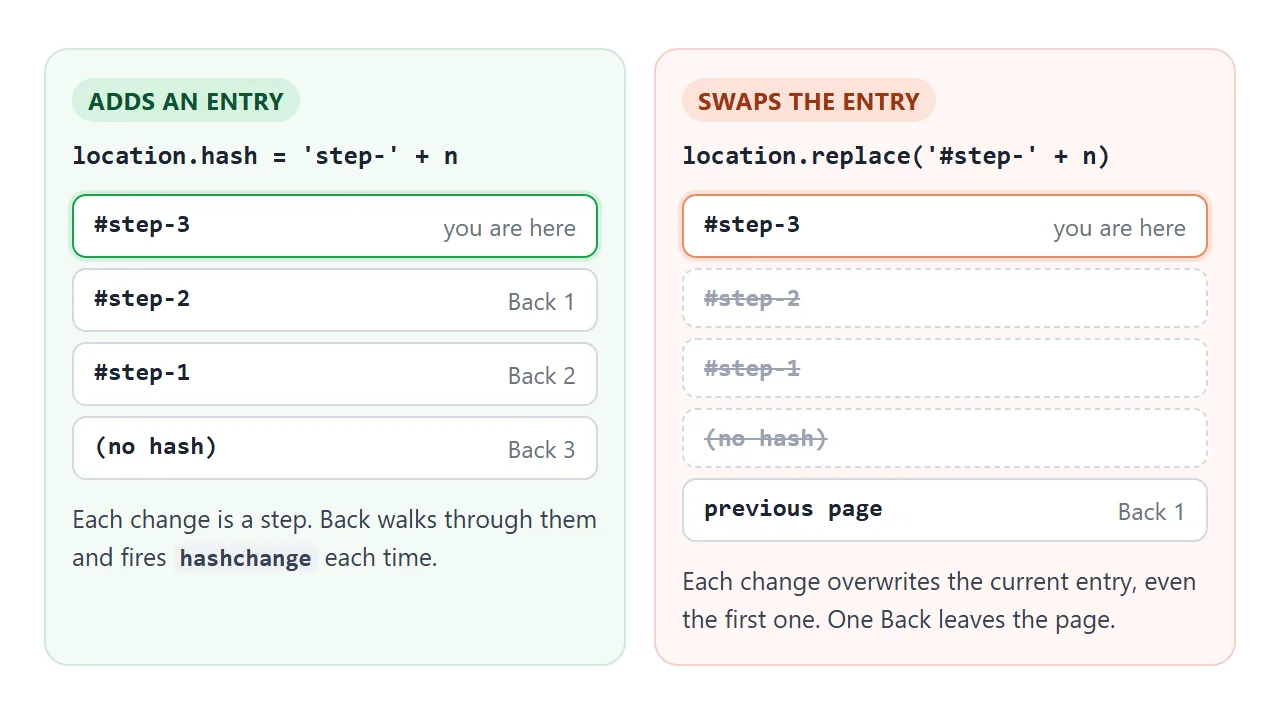
That is right for tabs a visitor chooses. It is wrong for changes the visitor did not ask for, such as fixing a bad hash on load.
For those, use location.replace with a hash. It changes the address and fires hashchange, but swaps the current entry instead of adding one.
<!doctype html>
<html lang="en">
<head>
<meta charset="utf-8">
<meta name="viewport" content="width=device-width, initial-scale=1">
<title>location.hash vs location.replace</title>
<style>
  body { margin: 0; padding: 14px; font-family: system-ui, sans-serif; background: #f4f5f7; color: #1d2330; }
  .lanes { display: grid; grid-template-columns: 1fr 1fr; gap: 10px; }
  .lane { background: #fff; border-radius: 10px; padding: 10px 12px; box-shadow: 0 2px 8px rgba(0,0,0,.08); }
  .lane h3 { margin: 0 0 4px; font-size: 14px; }
  .lane p { margin: 0 0 10px; font-size: 12px; color: #5b6270; overflow-wrap: anywhere; }
  code { font-family: ui-monospace, Consolas, monospace; }
  button {
    font: 13px system-ui, sans-serif; padding: 8px 10px; border-radius: 8px;
    border: 1px solid #cdd3dc; background: #fff; cursor: pointer; width: 100%;
  }
  .add button { border-color: #9fd3b0; background: #eefaf2; }
  .swap button { border-color: #f1c7a8; background: #fff6ef; }
  .status { margin-top: 12px; font-size: 14px; display: flex; flex-wrap: wrap; gap: 6px 16px; align-items: center; }
  .status b { font-family: ui-monospace, Consolas, monospace; }
  #back { width: auto; }
</style>
</head>
<body>
<div class="lanes">
  <div class="lane add">
    <h3>Add a step</h3>
    <p><code>location.hash = 'step-' + n</code></p>
    <button id="add">Next step</button>
  </div>
  <div class="lane swap">
    <h3>Swap the step</h3>
    <p><code>location.replace('#step-' + n)</code></p>
    <button id="swap">Next step</button>
  </div>
</div>

<div class="status">
  <span>hash <b id="hash"></b></span>
  <span>history.length <b id="len"></b></span>
  <button id="back">Back</button>
</div>

<script>
  let n = 0;
  const show = () => {
    document.getElementById('hash').textContent = location.hash || '""';
    document.getElementById('len').textContent = history.length;
  };

  // New history entry: Back returns to the previous step
  document.getElementById('add').addEventListener('click', () => {
    location.hash = 'step-' + (++n);
  });

  // Same entry, new hash: Back skips over these steps
  document.getElementById('swap').addEventListener('click', () => {
    location.replace('#step-' + (++n));
  });

  document.getElementById('back').addEventListener('click', () => history.back());
  window.addEventListener('hashchange', show);
  show();
</script>
</body>
</html>
| Way to change it | New history entry | Fires hashchange |
|---|---|---|
Click <a href="#x"> |
Yes | Yes |
location.hash = 'x' |
Yes | Yes |
location.replace('#x') |
No | Yes |
history.pushState with '#x' |
Yes | No |
history.replaceState with '#x' |
No | No |
| Setting the value it already has | No | No |
The two history methods change the address silently, so a hashchange router does not notice them. Inside a sandboxed srcdoc frame, such as the example boxes here, Firefox refused them with a SecurityError when we tested. location.replace worked there in Chromium, Firefox and WebKit.
Encoding: what comes back is not what you set
The browser percent-encodes some characters when you set the hash, and location.hash hands them back encoded.
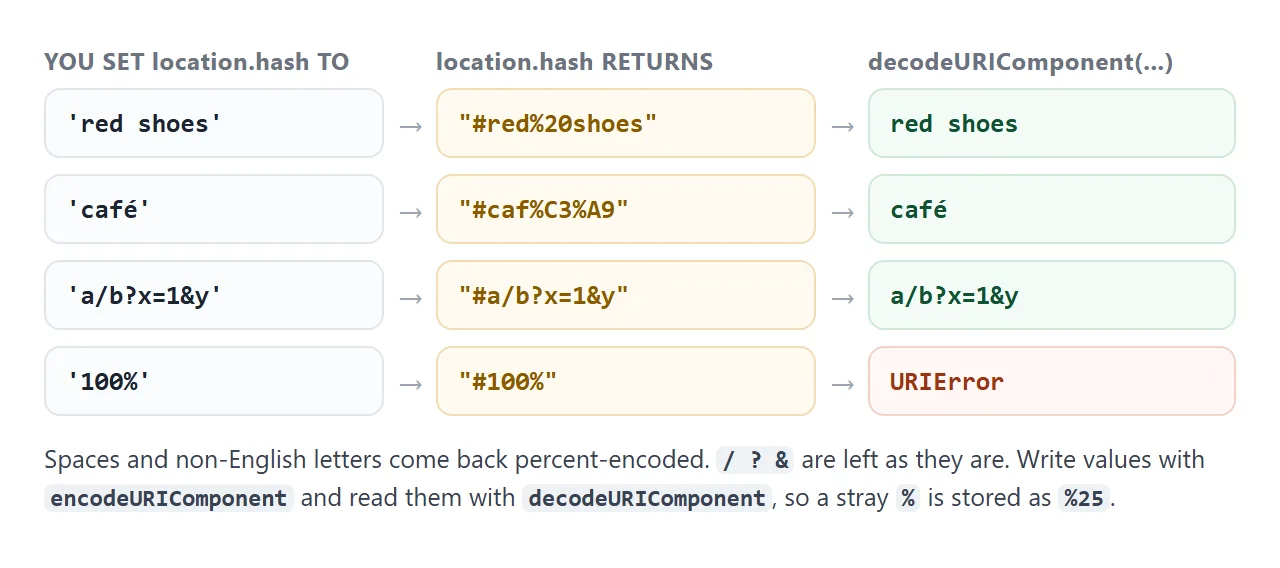
Encode on the way in and decode on the way out, and every value survives the round trip:
location.hash = encodeURIComponent('100% cotton');
const value = decodeURIComponent(location.hash.slice(1));  // "100% cotton"
Unlike the query string, the hash has no built-in name and value parser. To keep more than one value there, write them in query form and read them like this:
// page.html#tab=pricing&plan=team
const params = new URLSearchParams(location.hash.slice(1));
params.get('plan');  // "team"
The URLSearchParams guide covers that format.
A hash router: tabs for a one-file page
A single HTML file has one address, but the hash can give each part of it its own. The pattern is a list of routes, one function that shows the route named in the hash, and two calls to that function.
<!doctype html>
<html lang="en">
<head>
<meta charset="utf-8">
<meta name="viewport" content="width=device-width, initial-scale=1">
<title>Hash tabs</title>
<style>
  body { margin: 0; padding: 14px; font-family: system-ui, sans-serif; background: #f4f5f7; color: #1d2330; }
  nav { display: flex; gap: 4px; border-bottom: 2px solid #dfe3ea; }
  nav a {
    padding: 9px 14px; border-radius: 8px 8px 0 0; text-decoration: none;
    color: #5b6270; font-weight: 600; font-size: 14px; margin-bottom: -2px;
    border-bottom: 2px solid transparent;
  }
  nav a[aria-current="page"] { color: #0f5132; border-bottom-color: #16a34a; background: #fff; }
  section { background: #fff; padding: 14px 16px; border-radius: 0 0 10px 10px; min-height: 150px; }
  section h2 { margin: 0 0 6px; font-size: 18px; }
  section p { margin: 0 0 8px; font-size: 14px; line-height: 1.5; }
  .addr { margin-top: 10px; font-size: 12.5px; color: #5b6270; }
  .addr code { color: #1d2330; font-weight: 700; }
</style>
</head>
<body>
<nav>
  <a href="#/overview">Overview</a>
  <a href="#/pricing">Pricing</a>
  <a href="#/faq">FAQ</a>
</nav>

<section data-route="overview">
  <h2>Overview</h2>
  <p>A one-file page with three tabs. Each tab has its own address, so a link can open any of them.</p>
  <p>Switch tabs, then press Back: the previous tab returns.</p>
</section>
<section data-route="pricing" hidden>
  <h2>Pricing</h2>
  <p>Starter: free. Team: 12 per seat, per month.</p>
  <p>A link ending in <code>#/pricing</code> opens this tab directly.</p>
</section>
<section data-route="faq" hidden>
  <h2>FAQ</h2>
  <p><b>Does the page reload?</b> No. Only the part after # changes.</p>
  <p><b>Is the hash sent to the server?</b> No. It stays in the browser.</p>
</section>

<p class="addr">The address ends with <code id="addr"></code></p>

<script>
  const routes = ['overview', 'pricing', 'faq'];

  function render() {
    // '#/pricing' -> 'pricing'
    const name = decodeURIComponent(location.hash.replace(/^#\/?/, ''));

    // Empty or unknown hash: go to the first tab without adding a history step
    if (!routes.includes(name)) {
      location.replace('#/' + routes[0]);
      return;  // replace fires hashchange, which calls render again
    }

    document.querySelectorAll('section').forEach((s) => {
      s.hidden = s.dataset.route !== name;
    });
    document.querySelectorAll('nav a').forEach((a) => {
      if (a.getAttribute('href') === '#/' + name) a.setAttribute('aria-current', 'page');
      else a.removeAttribute('aria-current');
    });
    document.getElementById('addr').textContent = location.hash;
  }

  window.addEventListener('hashchange', render);
  render();  // hashchange does not fire on load, so draw the first tab now
</script>
</body>
</html>
- Links, not buttons. Each tab is
<a href="#/pricing">. It can be opened in a new tab, copied, and reached with the keyboard. - One render function. It reads the name from
location.hash, shows the matching section, and marks the current link witharia-current="page". - Two calls. Run it from the
hashchangelistener, and once at the end of the script for the hash the page opened with. - A fallback. An empty or unknown hash is sent to the first route with
location.replace, so it does not leave a dead Back step.
The / after # is deliberate. When the hash matches an element's id, the browser scrolls to that element. #/pricing matches no id, so switching tabs never jumps the page. Keep plain #pricing for real anchors.
If you only need tabs and no addresses, the CSS-only tab methods need no script at all.
When it does not work
| What you see | Cause | Fix |
|---|---|---|
| Opening a link with a hash shows the wrong tab | hashchange does not fire on load |
Call the render function once at the end of the script |
| The listener never runs | It was added to document |
Listen on window |
| The page jumps down when a tab opens | The hash matches an element id |
Use #/name for routes |
| Back needs extra presses to leave | Each automatic fix added an entry | Use location.replace('#...') for fixes |
A replaceState change is ignored by the router |
The history methods do not fire hashchange |
Change the hash through location |
Spaces show as %20 |
The browser encoded the value | Read it with decodeURIComponent |
URIError when reading the hash |
A raw % was set without encoding |
Write it with encodeURIComponent |
| The server never sees the value | The hash is not sent in the request | Use the query string instead |
Share it as a link
A hash router is easiest to judge by clicking through it: the tabs, the Back button, a link that opens straight on the second tab. A screenshot shows none of that.
To send the working version, paste the page into a NOS document and choose Create share link. HTML to link walks through it.
The page renders as written and its scripts run, so the people you send it to can switch tabs themselves. If you change the code later, the same link shows the new version.