An HTML table with sort and filter needs no library. Click-to-sort headers and a search box are about forty lines of plain JavaScript in the same file as the table.

Below is the whole thing, split into the two behaviours. Both operate on the rows already in the document, so there is no data layer to keep in sync.
Sorting on a header click
Read the rows into an array, sort them, put them back.
<table id="grid">
  <thead>
    <tr>
      <th data-sort="text">Client</th>
      <th data-sort="num">Invoices</th>
      <th data-sort="date">Last order</th>
    </tr>
  </thead>
  <tbody>
    <tr><td>Aldridge</td><td data-value="14">14</td><td data-value="2026-03-04">4 Mar 2026</td></tr>
  </tbody>
</table>
<script>
const grid = document.getElementById('grid');
const body = grid.tBodies[0];
let dir = 1, last = -1;

grid.tHead.addEventListener('click', (e) => {
  const th = e.target.closest('th[data-sort]');
  if (!th) return;
  const i = [...th.parentNode.children].indexOf(th);
  dir = (i === last) ? -dir : 1;
  last = i;
  const type = th.dataset.sort;
  const rows = [...body.rows];
  rows.sort((a, b) => {
    const x = a.cells[i].dataset.value ?? a.cells[i].textContent.trim();
    const y = b.cells[i].dataset.value ?? b.cells[i].textContent.trim();
    if (type === 'num') return (Number(x) - Number(y)) * dir;
    return x.localeCompare(y) * dir;
  });
  rows.forEach((r) => body.appendChild(r));
});
</script>
appendChild on a row already in the document moves it rather than copying it, which is why no removal step is needed.
Why sorting goes wrong
| Symptom | Cause | Fix |
|---|---|---|
| 10 sorts before 9 | Compared as text | Number() the value first |
| Currency sorts randomly | "$1,204" is not a number |
Put the raw number in data-value |
| Dates sort by day name | Comparing the display string | Put an ISO date in data-value |
| Blank rows go first | Empty string sorts low | Handle empties explicitly |
| Accented names out of order | Byte comparison | Use localeCompare |
The pattern behind four of those five rows is the same. Sort the value, display the format, and keep them in separate places.
Filtering as you type
One input and one loop over the rows.
<input id="q" type="search" placeholder="Filter rows">
<script>
document.getElementById('q').addEventListener('input', (e) => {
  const q = e.target.value.toLowerCase();
  for (const row of body.rows) {
    row.hidden = q !== '' && !row.textContent.toLowerCase().includes(q);
  }
});
</script>
Using the hidden property rather than a style keeps the row in the document, so sorting still sees it and clearing the box restores everything.
For tables over a few thousand rows, cache each row's lowercased text once instead of reading textContent on every keystroke.
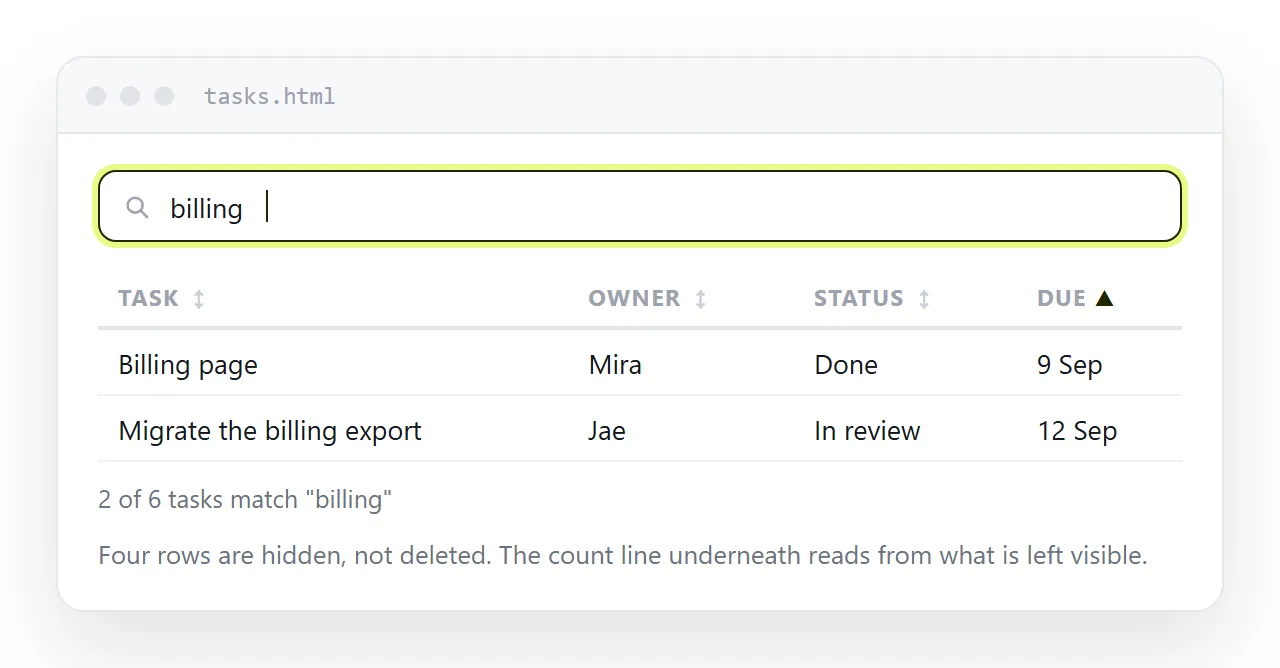
Details that make it usable
- Show the sort direction. An arrow in the header, set with a class, so the reader knows which column is ordering the table.
- Show the count. "18 of 240 rows" under the filter box. Without it, a filter that matched nothing looks like a broken table.
- Keep the keyboard working. Use
<button>inside the<th>rather than a click handler on the cell, so the header is reachable by tab. - Announce the change.
aria-sort="ascending"on the active header tells a screen reader what happened. - Keep striping correct. Zebra rules based on
nth-childrestripe automatically after a sort, since the rows really moved. See zebra striping.
Filtering by column rather than by text
A single search box matches anything in the row, which is usually what people want. Column filters are the next step up and cost one more attribute.
<select id="status-filter">
  <option value="">All statuses</option>
  <option>Paid</option>
  <option>Overdue</option>
</select>
Match the selected value against one cell rather than the whole row, and combine it with the text filter so both conditions apply at once.
Keep the two filters in one function that decides each row's visibility. Two independent handlers, each setting hidden, will fight and the second one applied wins.

When a library is the right call
Plain JavaScript stops being the cheaper option at a fairly clear line.
- Tens of thousands of rows. You need virtual scrolling, and writing that yourself is a project.
- Server side data. Sorting has to become a request, not a comparator.
- Pagination, column resizing, grouping, export. A grid component already has these and they interact.
- Editable cells with validation. See the editable HTML table tool for the lighter version of this.
Below that line, forty lines you can read beats a dependency you cannot.
Keeping the behaviour when you share the page
Sorting and filtering live in the script, and a script in a separate file next to the page does not travel with it. Attach the page to an email and the table arrives inert.
Inline the JavaScript in a <script> block inside the same file. Self-contained HTML covers folding in styles, scripts and images.

Check it in the HTML file opener, which has never seen your project. If sorting works there, the script is genuinely inside the file.
Sending a table people can actually sort
Sorting and filtering exist to be used, so a screenshot or a PDF removes the reason the table was built. The reader needs the live page.
Paste the HTML into a NOS document. It renders as written, scripts included, at an address of its own. Share, then Share link, then Create link gives an unlisted link that opens in one click.
Correct a figure later by clicking the text in the document, and the address stays the same, so the link you sent already points at the fix. HTML to link is the same route for any page.