In an HTML table, rowspan and colspan merge cells: colspan stretches a cell across columns, rowspan stretches it down through rows.
<tr>
  <th colspan="2">Q1 total</th>
  <td>1,204</td>
</tr>
The number is the total count of cells covered, including the cell itself. colspan="2" means this cell plus one more, so one <td> has to be removed from that row.
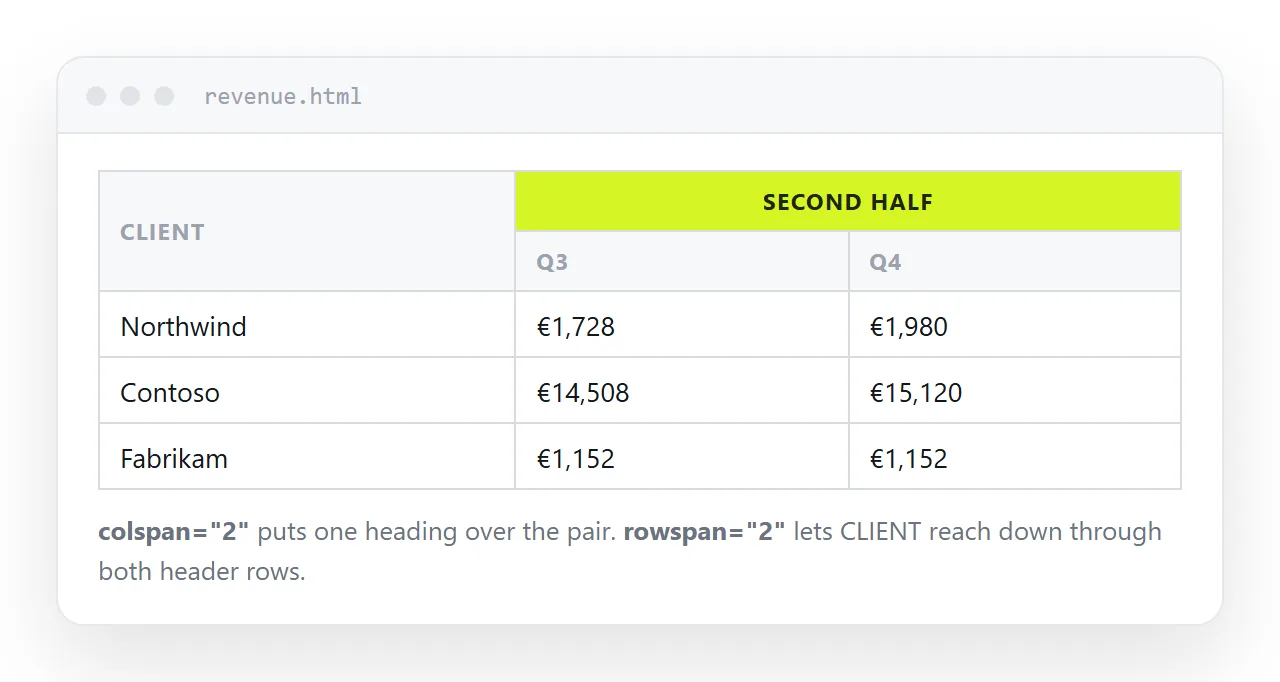
The arithmetic that keeps the table square
Every table row has to account for the same number of columns. A span does not add space, it consumes cells, and those cells must be deleted from the markup.
colspan="n"removes n minus 1 cells from the same row.rowspan="n"removes one cell from each of the n minus 1 rows below it, in the same column position.- Both together removes the cells in the whole rectangle, minus the one you kept.
Getting this wrong is the single cause of the ragged table. The browser does not report an error. It draws the extra cells anyway, and one row ends up a column wider than the rest.
<!-- wrong: four columns declared, five cells worth of content -->
<tr><td colspan="2">Subtotal</td><td>A</td><td>B</td><td>C</td></tr>

<!-- right -->
<tr><td colspan="2">Subtotal</td><td>A</td><td>B</td></tr>
Counting rowspan, which is harder
colspan is easy because the deletions are next to the span. rowspan puts them in later rows, which is where people lose track.
<tr>
  <th rowspan="3">North</th>
  <td>January</td><td>412</td>
</tr>
<tr>
  <td>February</td><td>388</td>
</tr>
<tr>
  <td>March</td><td>501</td>
</tr>
Rows two and three have two cells each, not three. The first column is already occupied by the spanning cell above them.
When you add a fourth month later, the rowspan has to become 4. Nothing reminds you, and a stale span leaves a hole at the bottom of the group.
What spans cost
| Feature | Effect of spans |
|---|---|
table-layout: fixed widths |
Spanned cells do not follow the colgroup cleanly |
| Sorting by a column | Breaks, because rows are no longer independent |
| Responsive stacking | Breaks, since a spanning cell has no single row |
| Screen reader header pairing | Positional matching fails without extra attributes |
| Copy into a spreadsheet | Merged cells arrive merged, or shift the columns |
That list is the argument for using spans in headers and avoiding them in the body. A header block is read once. A data body is sorted, filtered, stacked and pasted elsewhere.
If you need sorting, see sort and filter, and keep the body free of spans.
Making merged headers readable to a screen reader
A plain table lets assistive technology match a cell to its header by position. Spans break that assumption.
For a two level header, scope is usually enough:
<tr>
  <th rowspan="2" scope="col">Client</th>
  <th colspan="2" scope="colgroup">2026</th>
</tr>
<tr>
  <th scope="col">Q1</th>
  <th scope="col">Q2</th>
</tr>
For anything more tangled, use explicit ids:
<th id="h-client" scope="col">Client</th>
<td headers="h-client">Aldridge</td>
The headers attribute is verbose and it is the only thing that works on a genuinely complex table. Semantic HTML covers the wider habit of letting the markup carry the meaning.
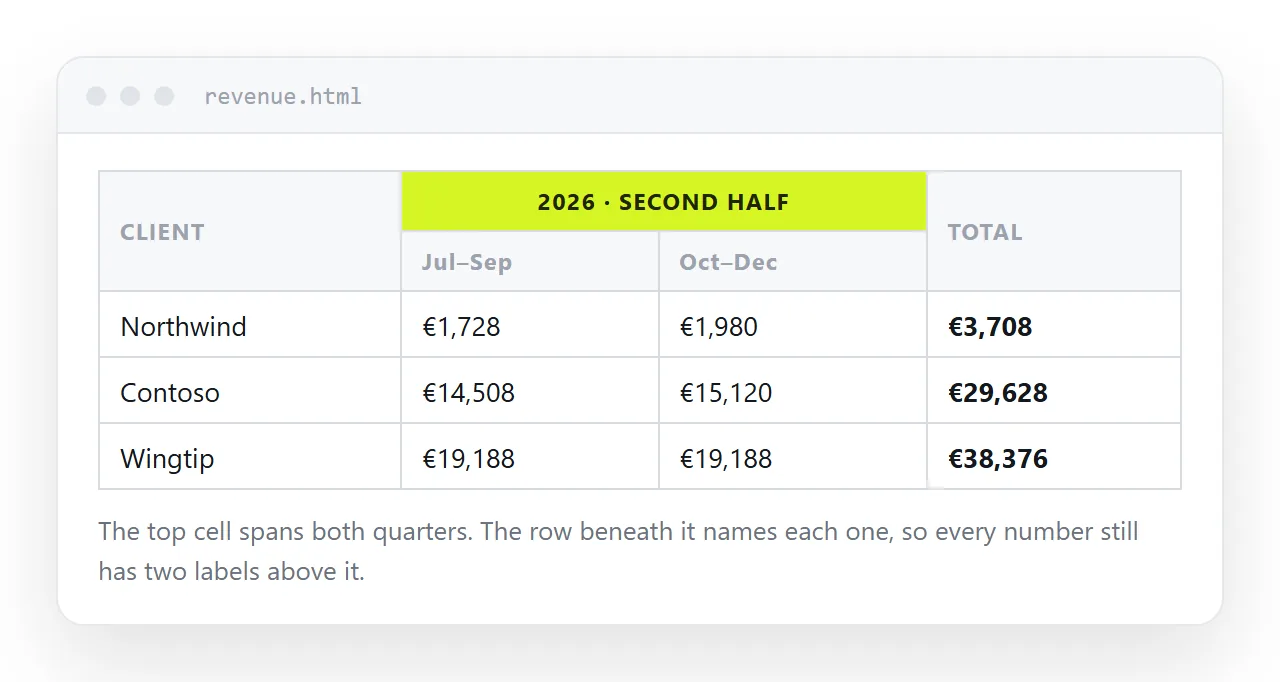
Borders and merged cells
Spans and border-collapse interact. Under collapse, a spanning cell shares edges with several neighbours, and the conflict resolution can drop a rule you expected on one side.
Under separate with zero spacing, each cell carries its own border, and the spanning cell keeps a clean outline. That is usually the better choice for a table with merged headers. Border collapse explains the resolution order.
When not to merge
Three cases where the merge is hiding a different problem.
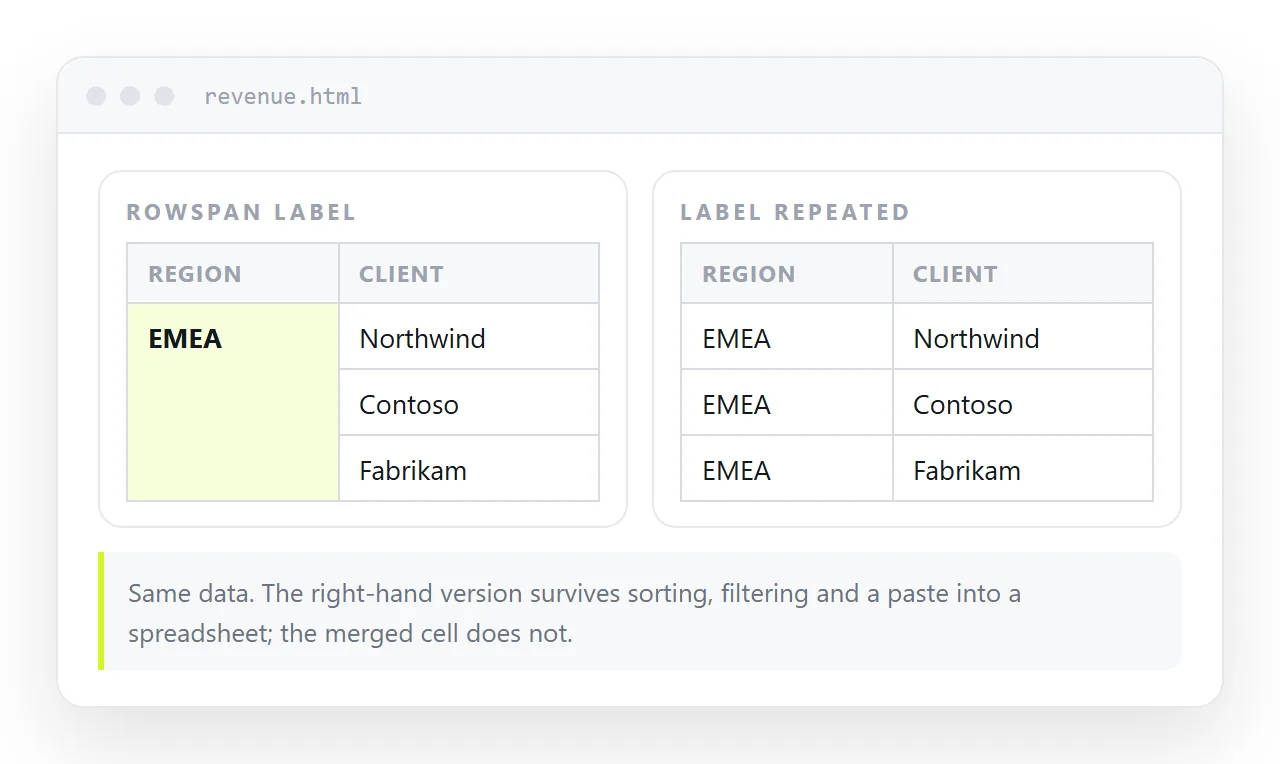
- Repeating a label down a group. A
rowspanhere is tidy on screen and awful for reuse. If the table will be sorted or exported, repeat the label in every row instead. - A title above the table. Use
<caption>, not a full width spanning row. It is shorter and it is announced as the table title. - Layout. Spans used to position things on a page belong to an era before grid. CSS grid does that job.
Checking the result
Look at the table in a browser and count the columns in the widest row against the narrowest. If they differ, a span is wrong. The rendered table is a faster check than reading the markup.
Open it in the HTML file opener to see it without your project's stylesheet, where a padding rule cannot disguise a missing cell. To edit values without touching the structure, the editable HTML table tool types straight into the cells.
Handing the table over
A merged header table is often the final form of a report, which means the next step is getting it in front of someone.
Paste the HTML into a NOS document. It renders as written, spans and all, at an address of its own. Share, then Share link, then Create link produces an unlisted link that opens in one click.
Correct a figure later by clicking the text in the document. The address does not change, so the link you sent already points at the corrected version, and there is no second copy circulating.