border-collapse on an HTML table decides whether two neighbouring cells share one border or keep one each.
table { border-collapse: collapse; }
With collapse, the line between two cells is a single line and the gap disappears. With separate, the browser default, each cell draws its own border and a gap sits between them.
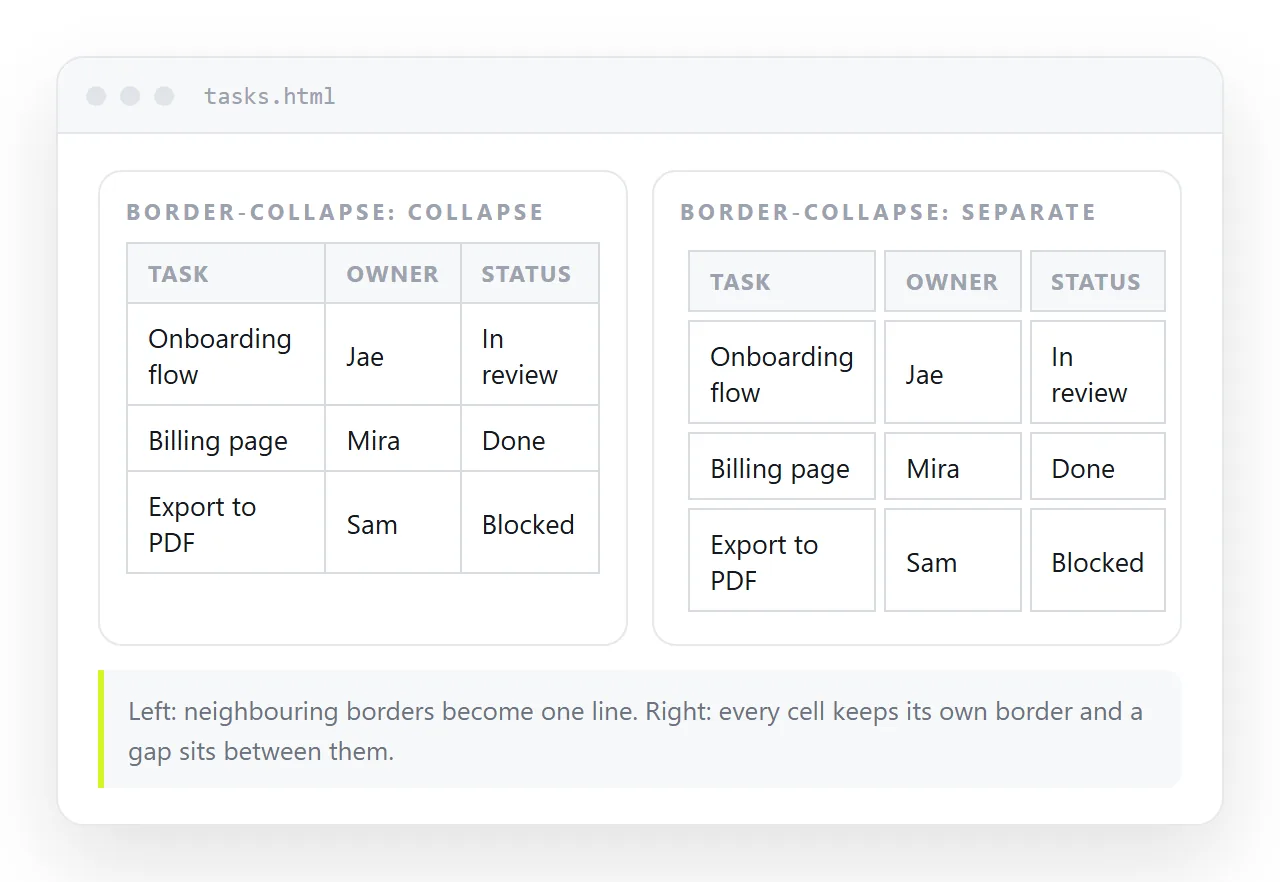
What each value actually changes
collapse |
separate |
|
|---|---|---|
| Border between cells | One shared line | Two lines |
border-spacing |
Ignored | Works |
border-radius on cells |
Ignored | Works |
| Border owner | The shared edge | The individual cell |
| Sticky cells keep their border | No | Yes |
| Empty cells | Always bordered | Hidden if empty-cells: hide |
Read that table as a pair of trades rather than a winner. Collapse gives clean single rules with no arithmetic. Separate gives you rounded corners, spacing control, and borders that survive on a pinned row.
The doubled border problem
The most common complaint is borders that look twice as thick as they were meant to be, or thicker at the edges of the table than inside it.
That is separate doing its job. Every cell has a one pixel border, and two of them meeting produce two pixels.
Setting collapse fixes it at once. If you need to stay on separate, put the border on only one side of each cell and let the table supply the other two edges.
table { border-collapse: separate; border-spacing: 0; }
th, td { border-bottom: 1px solid #e3e3e3; border-right: 1px solid #e3e3e3; }
table { border-top: 1px solid #e3e3e3; border-left: 1px solid #e3e3e3; }
That gives a clean single-line grid while keeping everything separate allows.
Which border wins when they conflict
Under collapse, two cells claim the same edge, so the browser has to pick one. The resolution order is fixed and worth knowing, because it explains borders you did not ask for.
- A style of
hiddenon either side wins and no border is drawn. - Otherwise the widest border wins.
- At equal width, the style wins in this order: double, solid, dashed, dotted, then inset styles.
- At equal width and style, the border belonging to the cell that comes first wins, where a cell beats a row, a row beats a row group, and a row group beats the table.
This is why setting a border on a <tr> sometimes appears to do nothing. A cell border of the same width beat it.
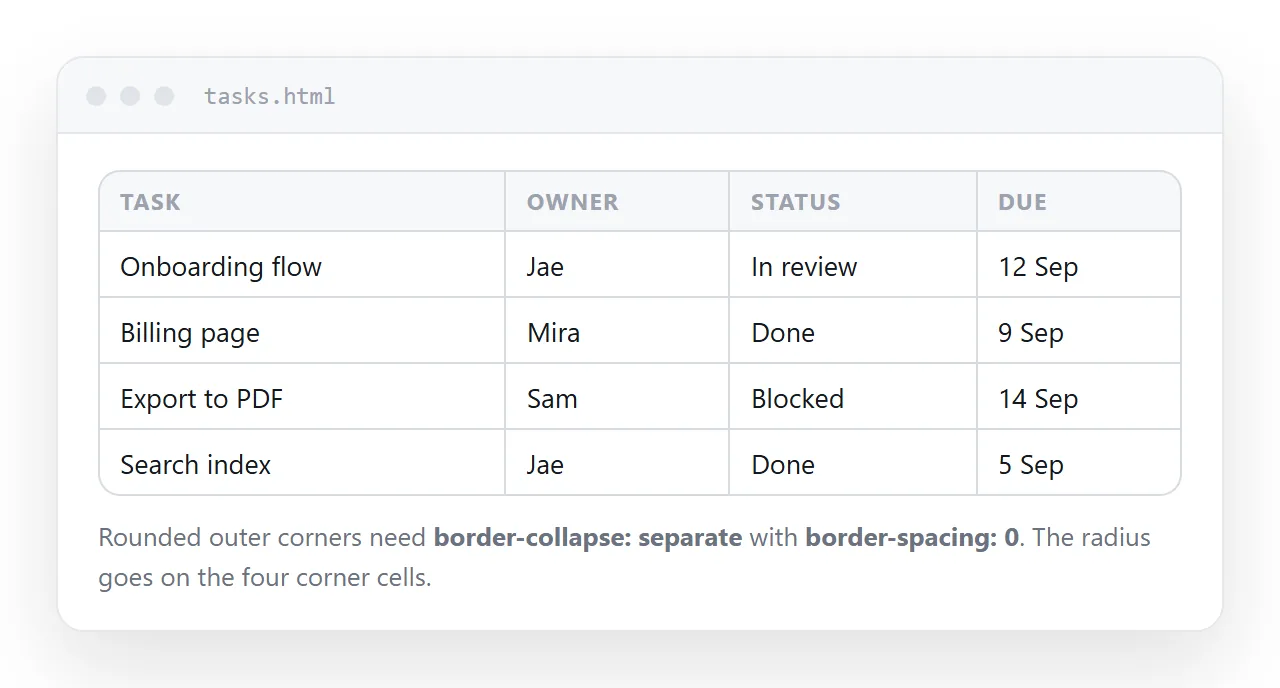
Rounded corners need separate
Rounded table corners come up often and do not work under collapse, because the corner is part of a shared edge that no single cell owns.
table { border-collapse: separate; border-spacing: 0; overflow: hidden; border-radius: 8px; }
With overflow: hidden on the table, the cells are clipped to the rounded shape and you do not have to round individual corner cells. Note that clipping conflicts with sticky positioning, so pick one or round the four corner cells individually.
Sticky rows and columns want separate
A pinned header or pinned first column moves away from its neighbours while scrolling. Under collapse, the border between them belongs to the shared edge, not to the moving cell, so the frozen part can slide out with no rule on one side.
Use separate with border-spacing: 0 and a one-sided border per cell. The pinned cell then carries its own line wherever it goes. Keeping the header visible uses that combination throughout.
How much border a table needs
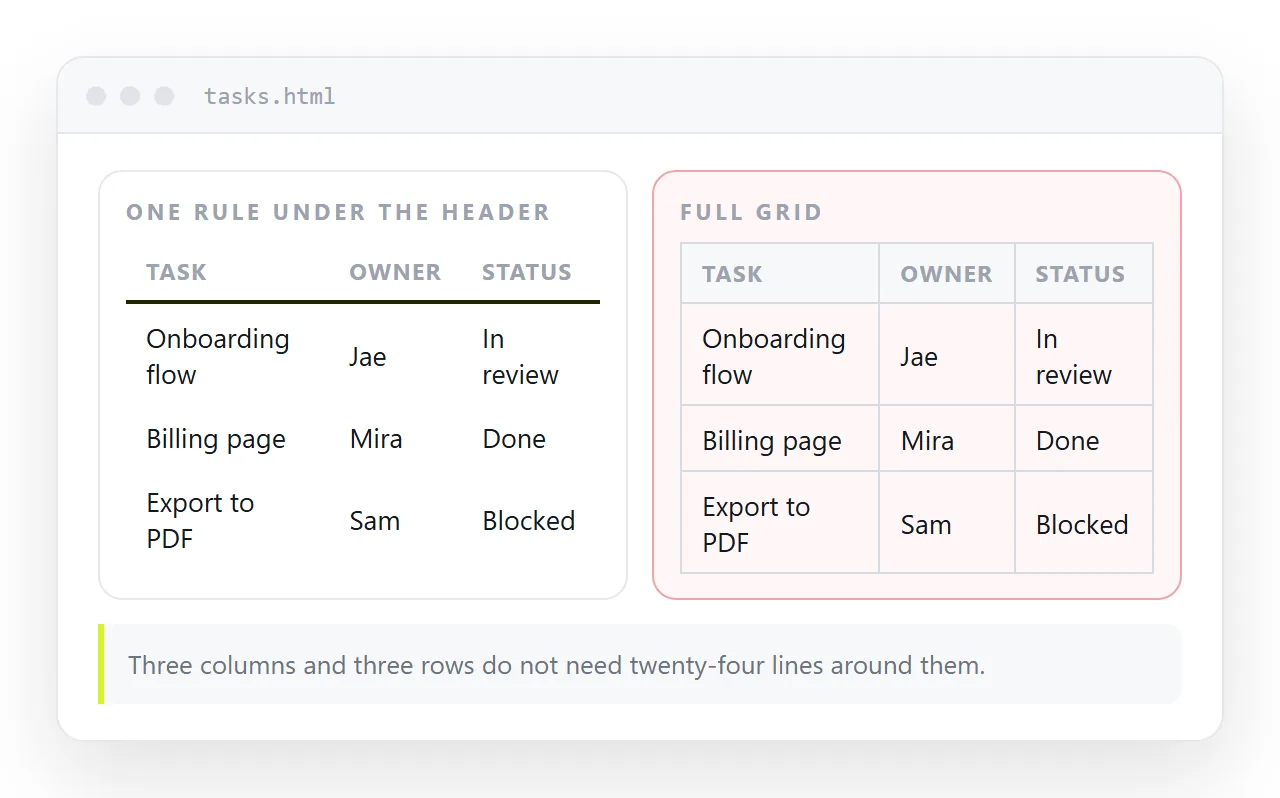
Less than most tables have. A full grid of lines puts a box around every value and slows reading down.
- A rule under the header. Almost always worth it. It separates labels from data.
- Horizontal rules only. Enough for most data tables. Vertical lines rarely earn their place.
- No rules at all. Works when zebra striping already gives each row a boundary.
- The full grid. Reserve it for tables where a cell has to be located by coordinates, such as a schedule or a matrix.
Printing and older mail clients
Collapsed borders print reliably, which is one reason report tables use them. Backgrounds are dropped by default in print, so a table that relies on striping instead of borders can come out flat on paper. Print stylesheets covers the switch.
Mail clients are the other case. Several of them strip <style> blocks, so a border set in a stylesheet disappears while one set inline survives.
That is a mail rendering constraint rather than a border-collapse question, and it is another reason a link to a page beats an attached table.
Sending the table on
Once the borders are right, the table has to reach someone without being re-rendered by a different stylesheet.
Paste the HTML into a NOS document. It renders exactly as written, borders and theme included, at an address of its own. Share, then Share link, then Create link gives a link that opens in one click.
Edit a value later by clicking it in the document. The address does not change, so the link already points at the corrected table.
HTML to link covers the same route for any page, and the editable HTML table tool lets you type into the cells directly.