FormData is a built-in JavaScript object that holds a list of name and value pairs. new FormData(form) fills that list from a form: every control that has a name and is not disabled adds one entry.
You read it with get() and getAll(), and change it with set(), append() and delete().
Try it. Type, tick boxes, pick a file. The panel rebuilds the FormData on every change and lists what is inside.
<!doctype html>
<html lang="en">
<head>
<meta charset="utf-8">
<meta name="viewport" content="width=device-width, initial-scale=1">
<title>FormData inspector</title>
<style>
  body { margin: 0; padding: 14px; font-family: system-ui, sans-serif; background: #f4f5f7; color: #1d2330; }
  .wrap { display: grid; grid-template-columns: 1fr 1fr; gap: 14px; }
  @media (max-width: 560px) { .wrap { grid-template-columns: 1fr; } }
  form, .panel { background: #fff; border-radius: 12px; padding: 14px; box-shadow: 0 2px 10px rgba(0, 0, 0, .08); }
  label { display: block; margin: 0 0 10px; font-size: 14px; }
  input[type=text], select { width: 100%; box-sizing: border-box; padding: 6px 8px; font: inherit; }
  .checks label { display: inline-block; margin-right: 12px; }
  small { color: #6b7280; }
  h3 { margin: 0 0 8px; font-size: 15px; }
  ul { margin: 0; padding: 0; list-style: none; font: 13px/1.5 ui-monospace, Consolas, monospace; }
  li { padding: 3px 6px; border-bottom: 1px solid #eef0f3; word-break: break-all; }
  li b { color: #2563eb; }
  .note { white-space: pre-line; margin-top: 10px; font-size: 13px; background: #eef6ff; border-radius: 8px; padding: 8px; }
</style>
</head>
<body>
<div class="wrap">
  <form id="form">
    <label>Name <input type="text" name="name" value="Ada"></label>
    <div class="checks">Topics<br>
      <label><input type="checkbox" name="topic" value="html" checked> html</label>
      <label><input type="checkbox" name="topic" value="css" checked> css</label>
      <label><input type="checkbox" name="topic" value="js"> js</label>
    </div>
    <label>Tools (Ctrl/Cmd for several)
      <select name="tool" multiple size="3">
        <option selected>editor</option><option>browser</option><option selected>terminal</option>
      </select>
    </label>
    <label>File <input type="file" name="upload"></label>
    <label>Plan <input type="text" name="plan" value="free" disabled> <small>disabled</small></label>
    <label>Nickname <input type="text" value="no name attribute"> <small>no name</small></label>
  </form>

  <div class="panel">
    <h3>new FormData(form)</h3>
    <ul id="out"></ul>
    <div class="note" id="note"></div>
  </div>
</div>

<script>
  const form = document.getElementById('form');
  const out = document.getElementById('out');
  const note = document.getElementById('note');

  // Show a File as its name and size, everything else as text
  const show = (v) => v === null ? 'null'
    : v instanceof File ? `File("${v.name}", ${v.size} bytes)` : `"${v}"`;

  function render() {
    const data = new FormData(form);
    out.innerHTML = '';
    for (const [key, value] of data) {        // same as data.entries()
      const li = document.createElement('li');
      li.innerHTML = `<b>${key}</b> = `;
      li.append(show(value));                  // append as text, not HTML
      out.append(li);
    }
    note.textContent = `get('topic') → ${show(data.get('topic'))}
` +
      `getAll('topic') → [${data.getAll('topic').map(show).join(', ')}]`;
  }

  form.addEventListener('input', render);
  form.addEventListener('change', render);
  render();
</script>
</body>
</html>
This guide is about the object in your script. For what the browser sends when a form submits on its own, see HTML form submit.
What new FormData(form) collects
The constructor walks the form's controls in page order and keeps some of them. The key is the name attribute, never the id.
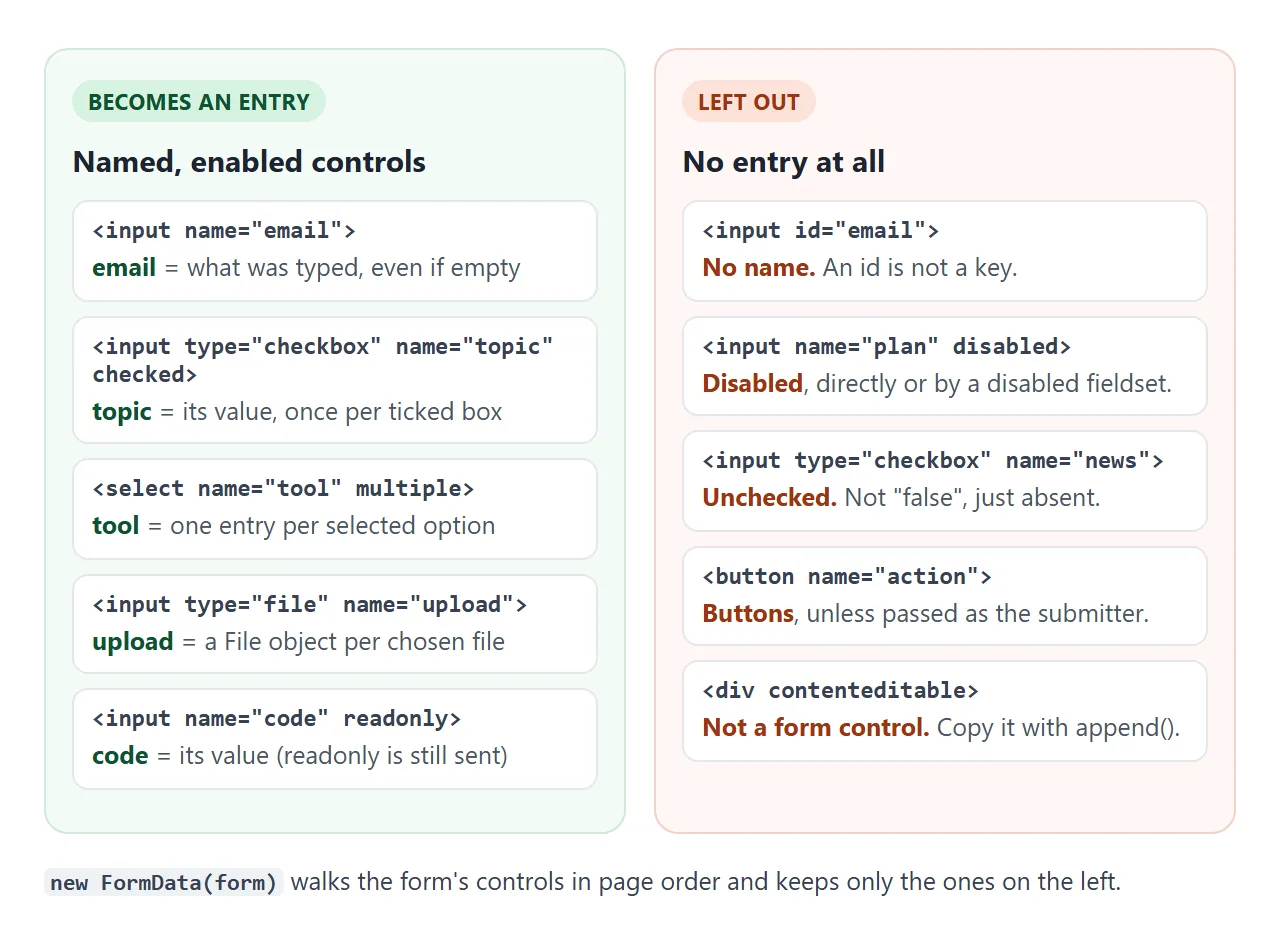
| Control | What ends up in FormData |
|---|---|
| Text, email, textarea | One entry, even when empty ("") |
| Checkbox or radio | One entry only when checked. Without a value attribute, the value is "on" |
<select multiple> |
One entry per selected option |
| File input | One File per chosen file. With no file chosen, one empty File with no name |
readonly field |
Included |
disabled field, or any field inside a disabled fieldset |
Left out |
| Buttons | Left out, unless passed as the second argument: new FormData(form, submitter) |
Fields placed outside the <form> tag but linked to it with form="id" are included too.
get, getAll, has, set, append, delete
A FormData is a list, not an object with properties, so one name can hold several values. The methods reflect that.
| Method | What it does |
|---|---|
get(name) |
First value for the name, or null |
getAll(name) |
Every value as an array, or [] |
has(name) |
true if at least one entry exists |
set(name, value) |
Replaces all values for the name with one |
append(name, value) |
Adds another value and keeps the old ones |
delete(name) |
Removes every entry with the name |
Values you add become strings. data.set('count', 3) stores "3". The one exception is a Blob or File, which stays a file:
const data = new FormData(form);
data.get('topic');          // "html" – only the first
data.getAll('topic');       // ["html", "css"]
data.set('count', 3);       // stored as "3"
data.append('photo', blob, 'photo.png');  // a file with a filename
Checkboxes, multiple selects and files
Unchecked boxes send nothing. There is no false entry. So data.has('newsletter') is how you read a single checkbox as yes or no.
Boxes that share a name give one entry each. get() returns only the first ticked one, which looks like lost data. Use getAll() and you get the full array. A <select multiple> behaves the same way.
Files arrive as File objects with name, size and type.
A file input with nothing chosen still adds an entry: a File with an empty name and size 0. Check file.size > 0 before treating it as an upload. For a drop zone, see drag and drop file upload.
FormData to JSON, object or query string
Most APIs want JSON, and JSON.stringify(data) gives "{}". You have to turn the entries into a plain object first. The obvious one-liner has a catch.
<!doctype html>
<html lang="en">
<head>
<meta charset="utf-8">
<meta name="viewport" content="width=device-width, initial-scale=1">
<title>FormData conversions</title>
<style>
  body { margin: 0; padding: 14px; font-family: system-ui, sans-serif; background: #f4f5f7; color: #1d2330; }
  form, .panel { background: #fff; border-radius: 12px; padding: 14px; box-shadow: 0 2px 10px rgba(0, 0, 0, .08); margin-bottom: 12px; }
  label { margin-right: 12px; font-size: 14px; white-space: nowrap; }
  input[type=text] { padding: 5px 7px; font: inherit; width: 140px; }
  .btns { display: flex; flex-wrap: wrap; gap: 8px; margin-bottom: 10px; }
  button { font: inherit; font-size: 14px; padding: 7px 11px; border: 1px solid #cbd2dc; border-radius: 8px; background: #fff; cursor: pointer; }
  button.on { background: #1d2330; color: #fff; border-color: #1d2330; }
  pre { margin: 0; padding: 10px; background: #f7f8fa; border-radius: 8px; font: 13px/1.5 ui-monospace, Consolas, monospace; white-space: pre-wrap; word-break: break-all; }
  .lost { margin-top: 8px; font-size: 13px; padding: 8px; border-radius: 8px; }
  .lost.bad { background: #fff1ec; color: #9a3412; }
  .lost.good { background: #edf9f1; color: #0f5132; }
</style>
</head>
<body>
<form id="form">
  <label>Name <input type="text" name="name" value="Ada"></label><br><br>
  <label><input type="checkbox" name="topic" value="html" checked> html</label>
  <label><input type="checkbox" name="topic" value="css" checked> css</label>
  <label><input type="checkbox" name="topic" value="js" checked> js</label>
</form>

<div class="panel">
  <div class="btns">
    <button data-mode="plain">Object.fromEntries</button>
    <button data-mode="arrays">getAll-aware object</button>
    <button data-mode="query">URLSearchParams</button>
  </div>
  <pre id="out"></pre>
  <div class="lost" id="lost"></div>
</div>

<script>
  const form = document.getElementById('form');
  const out = document.getElementById('out');
  const lost = document.getElementById('lost');
  let mode = 'plain';

  // Keys that appear more than once become arrays; single keys stay strings
  function toObject(data) {
    const obj = {};
    for (const key of new Set(data.keys())) {
      const all = data.getAll(key);
      obj[key] = all.length > 1 ? all : all[0];
    }
    return obj;
  }

  function render() {
    const data = new FormData(form);
    const total = [...data].length;
    lost.className = 'lost good';

    if (mode === 'plain') {
      const obj = Object.fromEntries(data);   // a repeated key keeps only its last value
      out.textContent = JSON.stringify(obj, null, 2);
      const kept = Object.keys(obj).length;
      const dropped = [...data].filter(([k, v]) => obj[k] !== v).map(([k, v]) => `${k}=${v}`);
      lost.className = dropped.length ? 'lost bad' : 'lost good';
      lost.textContent = dropped.length
        ? `${total} entries in, ${kept} keys out. Lost: ${dropped.join(', ')}`
        : `${total} entries in, nothing lost.`;
    } else if (mode === 'arrays') {
      out.textContent = JSON.stringify(toObject(data), null, 2);
      lost.textContent = `${total} entries in, all kept. Repeated keys became arrays.`;
    } else {
      const query = new URLSearchParams(data).toString();
      out.textContent = query;
      lost.textContent = `${total} entries in, ${total} pairs out. Repeated keys stay repeated.`;
    }
    document.querySelectorAll('button').forEach((b) => b.classList.toggle('on', b.dataset.mode === mode));
  }

  document.querySelectorAll('button').forEach((b) =>
    b.addEventListener('click', () => { mode = b.dataset.mode; render(); }));
  form.addEventListener('input', render);
  render();
</script>
</body>
</html>
Object.fromEntries(data) writes each pair into an object in order. When a name repeats, the later value overwrites the earlier one, so only the last tick survives.
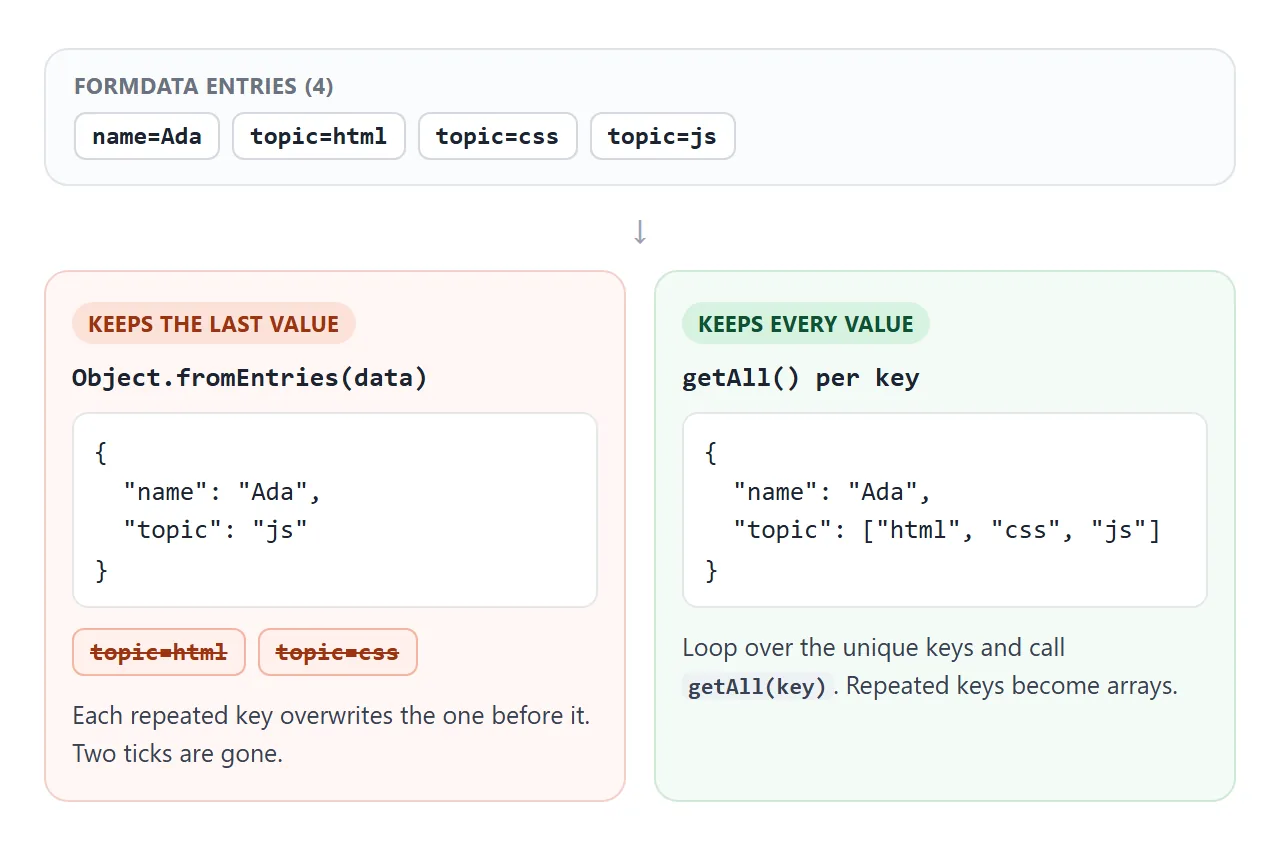
To keep everything, loop over the unique keys and use getAll:
function toObject(data) {
  const obj = {};
  for (const key of new Set(data.keys())) {
    const all = data.getAll(key);
    obj[key] = all.length > 1 ? all : all[0];
  }
  return obj;
}
If a field can hold one or several values, always read it with getAll so it is an array every time. The survey below does that.
For a query string, new URLSearchParams(data) keeps repeated keys as repeated pairs, such as topic=html&topic=css. It cannot carry files: a File becomes the text [object File].
Why console.log shows an empty FormData
The entries are not properties on the object. Logging data itself may print FormData {}, which looks empty even when the form is full. Log the entries instead:
console.log([...data]);            // [["name","Ada"], ["topic","html"], ...]
for (const [key, value] of data) console.log(key, value);
If that list is really empty, the fields have no name, or they are disabled.
Adding fields and sending it with fetch
set and append add values the user never typed, such as a timestamp or a computed total.
There is also a formdata event: it fires on the form each time a FormData is built from it, and event.formData can be changed there, so every copy gets the extra field.
form.addEventListener('formdata', (event) => {
  event.formData.append('source', 'pricing-page');
});
To send it, pass the object as the body of fetch and do not set a Content-Type header:
fetch('/api/signup', { method: 'POST', body: data });
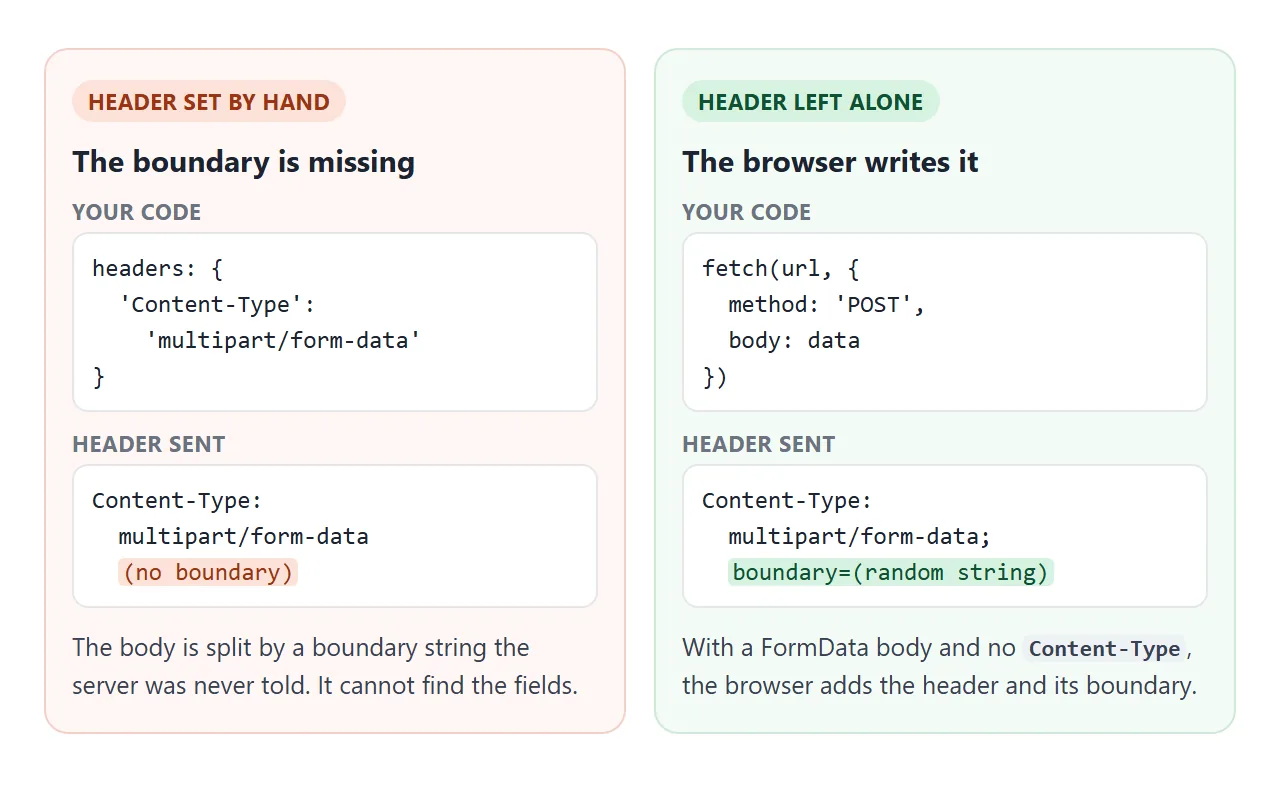
A multipart body separates fields with a boundary string. The browser picks that string and writes it into the header. A hand-written multipart/form-data header has no boundary, so the server cannot split the fields.
If the server wants JSON instead, send JSON.stringify(toObject(data)) with Content-Type: application/json. That header is fine to set, because JSON has no boundary.
A finished example: a survey form
The survey stops the real submit, builds a FormData, adds two computed fields and shows the JSON it would send. Nothing leaves the page.
<!doctype html>
<html lang="en">
<head>
<meta charset="utf-8">
<meta name="viewport" content="width=device-width, initial-scale=1">
<title>Survey form with FormData</title>
<style>
  body { margin: 0; padding: 14px; font-family: system-ui, sans-serif; background: #f4f5f7; color: #1d2330; }
  form, .panel { background: #fff; border-radius: 12px; padding: 16px; box-shadow: 0 2px 10px rgba(0, 0, 0, .08); max-width: 520px; margin: 0 auto 12px; }
  h2 { margin: 0 0 12px; font-size: 18px; }
  fieldset { border: 1px solid #e1e4ea; border-radius: 8px; margin: 0 0 12px; padding: 8px 12px 10px; }
  legend { font-size: 14px; font-weight: 600; padding: 0 4px; }
  fieldset label { display: inline-block; margin: 4px 12px 0 0; font-size: 14px; }
  .field { display: block; font-size: 14px; margin-bottom: 12px; }
  .field input, textarea { display: block; width: 100%; box-sizing: border-box; margin-top: 4px; padding: 7px 8px; font: inherit; }
  textarea { height: 60px; resize: vertical; }
  button { font: inherit; padding: 9px 16px; border: 0; border-radius: 8px; background: #2563eb; color: #fff; cursor: pointer; }
  pre { margin: 0; padding: 10px; background: #f7f8fa; border-radius: 8px; font: 13px/1.5 ui-monospace, Consolas, monospace; white-space: pre-wrap; word-break: break-all; }
  .muted { color: #6b7280; font-size: 13px; margin: 0 0 8px; }
</style>
</head>
<body>
<form id="survey">
  <h2>Quick survey</h2>
  <fieldset>
    <legend>How useful was the guide?</legend>
    <label><input type="radio" name="rating" value="1" required> 1</label>
    <label><input type="radio" name="rating" value="2"> 2</label>
    <label><input type="radio" name="rating" value="3"> 3</label>
    <label><input type="radio" name="rating" value="4"> 4</label>
    <label><input type="radio" name="rating" value="5"> 5</label>
  </fieldset>
  <fieldset>
    <legend>What did you use?</legend>
    <label><input type="checkbox" name="used" value="demos"> Live demos</label>
    <label><input type="checkbox" name="used" value="code"> Code</label>
    <label><input type="checkbox" name="used" value="table"> Fix table</label>
  </fieldset>
  <label class="field">Email (optional) <input type="email" name="email"></label>
  <label class="field">Comment <textarea name="comment"></textarea></label>
  <button type="submit">Send</button>
</form>

<div class="panel">
  <p class="muted">JSON that would be sent (nothing leaves this page):</p>
  <pre id="out">Fill in the form and press Send.</pre>
</div>

<script>
  const form = document.getElementById('survey');
  const out = document.getElementById('out');

  // Repeated keys (the checkboxes) become arrays
  function toObject(data) {
    const obj = {};
    for (const key of new Set(data.keys())) {
      const all = data.getAll(key);
      obj[key] = all.length > 1 ? all : all[0];
    }
    return obj;
  }

  form.addEventListener('submit', (event) => {
    event.preventDefault();                       // stay on the page
    const data = new FormData(form);

    // Computed fields that are not inputs in the form
    data.set('usedCount', data.getAll('used').length);
    data.append('sentAt', new Date().toISOString());

    const obj = toObject(data);
    obj.used = data.getAll('used');               // always an array, even with 0 or 1 ticks
    out.textContent = JSON.stringify(obj, null, 2);
  });
</script>
</body>
</html>
- Stop the page load:
event.preventDefault()in thesubmitlistener. - Computed fields:
set('usedCount', ...)andappend('sentAt', ...). Note thatusedCountcomes out as the string"2". - Always an array:
usedis read withgetAll, so zero, one and three ticks all give an array.
When it does not work
| What you see | Cause | Fix |
|---|---|---|
| A field is missing | No name, or the field (or its fieldset) is disabled |
Add a name. Use readonly to lock a value that must still be included |
| An unchecked box is missing | Unchecked boxes add no entry | Read it with has(name) |
console.log shows FormData {} |
Entries are not properties | Log [...data] or loop with for...of |
JSON.stringify gives {} |
Same reason | Convert to an object first |
| Only one checkbox value arrives | get() or Object.fromEntries kept one value |
Use getAll() for that key |
| The server sees no fields | Content-Type set by hand, no boundary |
Remove the header and pass FormData as the body |
TypeError from new FormData(el) |
el is not a <form>, such as a div or null |
Pass the form element, or start empty and append |
| An empty file entry | The file input had nothing chosen | Check file.size > 0 |
Share it as a link
A form is easier to check when someone can fill it in. A screenshot shows the fields but not what the script builds from them, and an .html attachment may open as plain code on a phone.
To send the working version, paste the page into a NOS document and choose Create share link. HTML to link walks through it.
The page renders as written and its scripts run, so the people you send it to can submit the form and see the JSON themselves. If you change the code later, the same link shows the new version.