On the web, the submit event is the event a <form> fires when someone submits it. It is a SubmitEvent, and it carries one extra property, submitter, which names the button that was used. This guide is about that browser event.
Try it. Type a name, then click the button or press Enter.
<!doctype html>
<html lang="en">
<head>
<meta charset="utf-8">
<meta name="viewport" content="width=device-width, initial-scale=1">
<title>Submit event</title>
<style>
  body { margin: 0; padding: 16px; font-family: system-ui, sans-serif; background: #f4f5f7; color: #1d2330; }
  form { display: flex; gap: 8px; flex-wrap: wrap; }
  input { flex: 1 1 160px; min-width: 0; padding: 10px 12px; font-size: 16px; border: 1px solid #c9ced8; border-radius: 8px; }
  button { padding: 10px 16px; font-size: 16px; border: 0; border-radius: 8px; background: #2563eb; color: #fff; cursor: pointer; }
  #out {
    margin-top: 14px; padding: 12px 14px; background: #fff; border-radius: 10px;
    box-shadow: 0 4px 14px rgba(0, 0, 0, .08);
    font: 14px/1.6 ui-monospace, Consolas, monospace; white-space: pre-wrap; overflow-wrap: anywhere;
  }
  .hello { font: 600 16px system-ui, sans-serif; color: #0f5132; }
</style>
</head>
<body>
<form id="hello">
  <input name="who" placeholder="Your name" required>
  <button>Say hello</button>
</form>

<div id="out">Click the button, or press Enter in the field.</div>

<script>
  const form = document.getElementById('hello');
  const out = document.getElementById('out');
  let count = 0;

  // Listen on the form, not on the button, so Enter is covered too
  form.addEventListener('submit', (event) => {
    event.preventDefault();  // stop the browser from loading a new page
    count++;
    const who = form.elements.who.value;
    out.innerHTML = '';
    out.append(
      'submit event #' + count + '\n' +
      'type: ' + event.type + '\n' +
      'target: ' + event.target.tagName + '  (the form, not the button)\n' +
      'submitter: ' + event.submitter.tagName + ' "' + event.submitter.textContent + '"\n' +
      'defaultPrevented: ' + event.defaultPrevented + '\n'
    );
    const hi = document.createElement('span');
    hi.className = 'hello';
    hi.textContent = 'Hello, ' + who + '!';
    out.append(hi);
  });
</script>
</body>
</html>
The listener is attached to the form. event.target is the form, even though you clicked a button. The call to preventDefault() is what keeps the page from reloading.
When the submit event fires
The event fires when a submit button is clicked, when someone presses Enter in a text field, and when code calls form.requestSubmit(). It does not fire when code calls form.submit(). It also does not fire when a field fails validation.
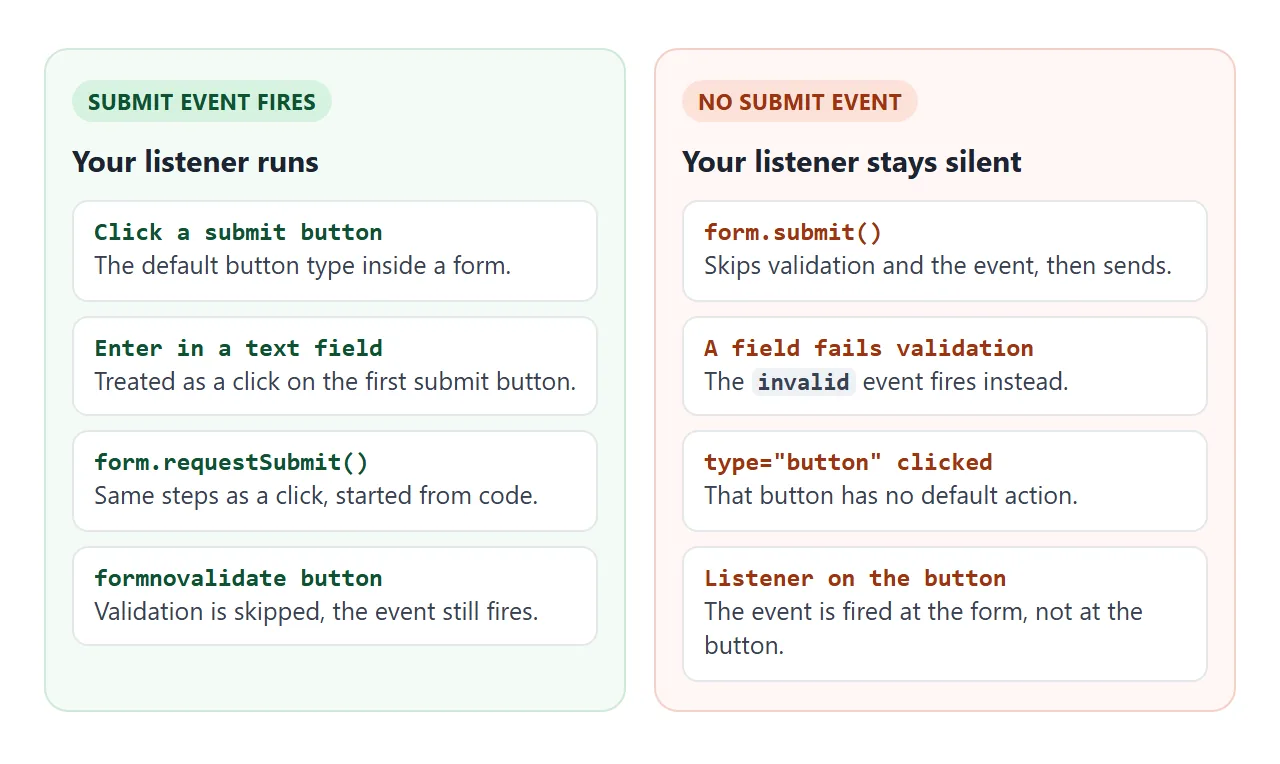
Try each case yourself. Leave the title empty and press Save, then Save draft, which has the formnovalidate attribute.
<!doctype html>
<html lang="en">
<head>
<meta charset="utf-8">
<meta name="viewport" content="width=device-width, initial-scale=1">
<title>When does submit fire?</title>
<style>
  body { margin: 0; padding: 14px; font-family: system-ui, sans-serif; background: #f4f5f7; color: #1d2330; }
  .box { background: #fff; border-radius: 10px; padding: 12px; box-shadow: 0 4px 14px rgba(0, 0, 0, .08); margin-bottom: 12px; }
  .row { display: flex; gap: 8px; flex-wrap: wrap; margin-top: 8px; }
  input[type=text] { width: 100%; box-sizing: border-box; padding: 10px 12px; font-size: 16px; border: 1px solid #c9ced8; border-radius: 8px; }
  button { padding: 9px 12px; font-size: 15px; border: 0; border-radius: 8px; background: #2563eb; color: #fff; cursor: pointer; }
  button.alt { background: #e8ecf3; color: #1d2330; }
  button.draft { background: #6b7280; }
  h4 { margin: 0 0 2px; font-size: 13px; color: #6b7280; font-weight: 600; }
  #log { margin: 0; padding: 0; list-style: none; font: 13.5px/1.55 ui-monospace, Consolas, monospace; min-height: 120px; }
  #log li { padding: 2px 0; border-bottom: 1px solid #eef0f4; overflow-wrap: anywhere; }
  .s { color: #0f5132; } .i { color: #b45309; }
</style>
</head>
<body>
<div class="box">
  <form id="f">
    <input type="text" id="title" name="title" placeholder="Title (required)" required>
    <div class="row">
      <button>Save</button>
      <button name="action" value="publish">Publish</button>
      <button class="draft" formnovalidate>Save draft</button>
    </div>
  </form>
  <h4 style="margin-top:12px">Same form, called from code</h4>
  <div class="row">
    <button type="button" class="alt" id="rs0">requestSubmit()</button>
    <button type="button" class="alt" id="rs1">requestSubmit(Publish)</button>
  </div>
</div>

<div class="box">
  <h4>Event log (newest first) <button type="button" class="alt" id="clear" style="padding:3px 8px;font-size:12px;margin-left:6px">Clear</button></h4>
  <ul id="log"></ul>
</div>

<script>
  const form = document.getElementById('f');
  const title = document.getElementById('title');
  const log = document.getElementById('log');

  function add(cls, text) {
    const li = document.createElement('li');
    li.className = cls;
    li.textContent = text;
    log.prepend(li);
  }

  form.addEventListener('submit', (event) => {
    event.preventDefault();
    const who = event.submitter ? event.submitter.textContent : 'null';
    add('s', 'submit  - submitter: ' + who);
  });

  // an invalid field gets this event instead, and no submit event follows
  title.addEventListener('invalid', () => add('i', 'invalid - title is empty, no submit event'));

  document.getElementById('rs0').addEventListener('click', () => form.requestSubmit());
  document.getElementById('rs1').addEventListener('click', () => form.requestSubmit(form.querySelector('[value=publish]')));
  document.getElementById('clear').addEventListener('click', () => { log.textContent = ''; });
</script>
</body>
</html>
The log shows the order of events. An empty required field produces an invalid event and nothing else. A button with formnovalidate skips the check, so the submit event still arrives.
Code can start a submission too, with submit() or requestSubmit(). They differ in what they skip.
requestSubmit() acts like a click on a submit button: it validates, then fires the event. submit() does neither and sends the form straight away.
If you want your own listener and the browser's checks to run, call requestSubmit(). Check that it exists first if you support old browsers, and fall back to submit() only when you must.
A form control named submit hides the method. A button with id="submit" or name="submit" makes form.submit point at the button, and the call fails with "submit is not a function". Rename the button.
What happens before and after the event
The browser follows the same four steps every time. Validation runs first, the event second, and sending last.
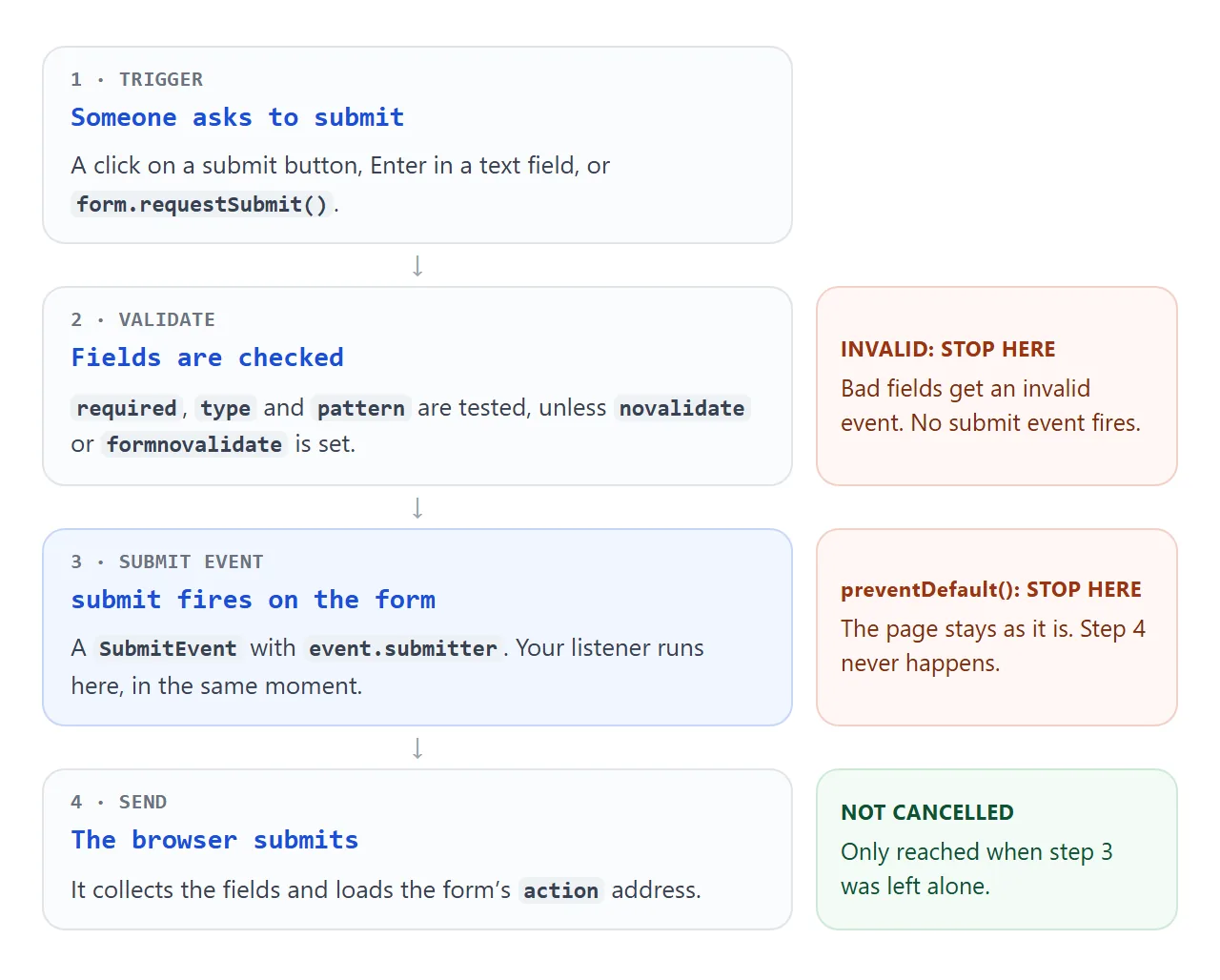
Cancelling is how you take over. Call event.preventDefault() and the browser skips step 4. The page keeps its state, and you decide what to show.
Call it on the first line. The browser decides whether to go on once your listeners have run. It does not wait for a timer or a network call, so a preventDefault() placed after await fetch(...) comes too late.
form.addEventListener('submit', async (event) => {
  event.preventDefault();          // first line, before any waiting
  const reply = await doWork();    // now it is safe to wait
  show(reply);
});
event.submitter: which button was pressed
A form with two buttons, such as Save and Publish, needs to know which one was used. event.submitter is that button element. Read its value, id or text.
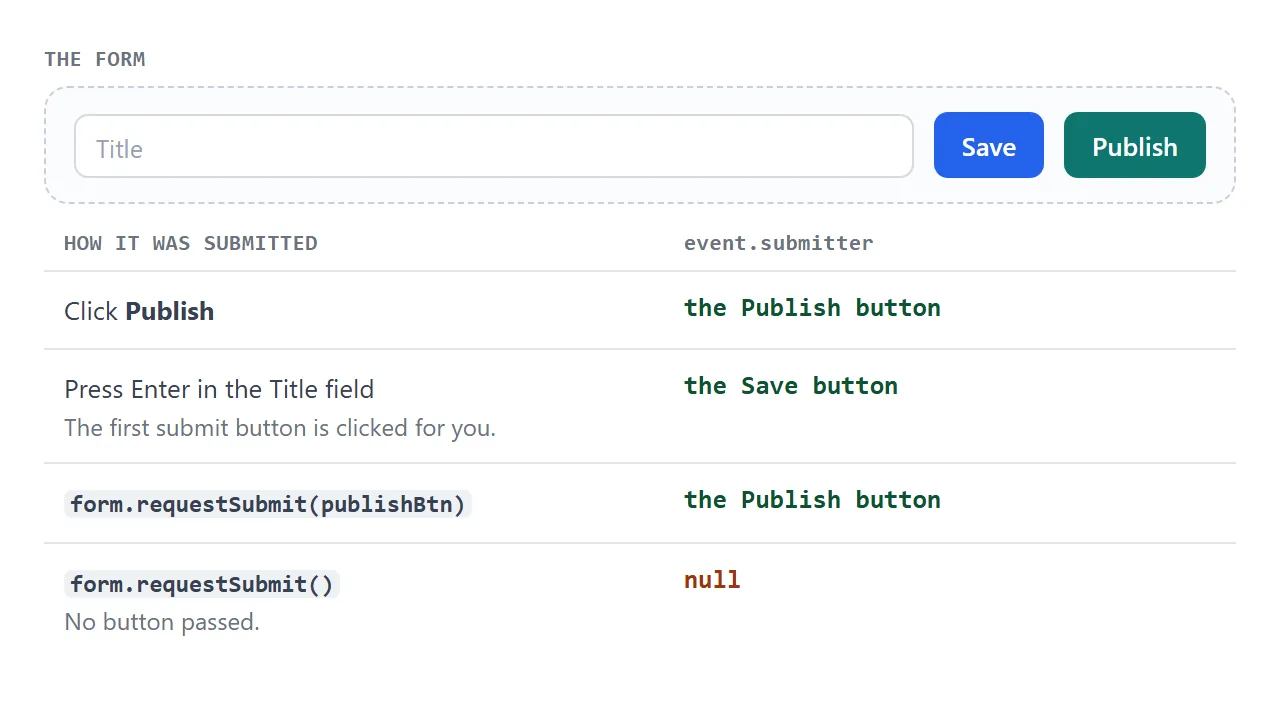
Pressing Enter in a text field counts as a click on the form's first submit button. That button becomes the submitter, even though the user never touched it.
requestSubmit() is the odd one. Pass it a button and that button is the submitter. Pass nothing and the submitter is null, so code that reads event.submitter.value throws a TypeError. Guard it:
const action = event.submitter ? event.submitter.value : 'default';
Listen on the form, not on the button
A click listener on the button feels natural, but it is the wrong hook. It runs before validation, so it fires even when the form is invalid. Your code then reacts to a submission that never happens.
A submit listener on a button does nothing at all. The browser fires the event at the form, so it never passes through the button.
| Listener | Button clicked | A field is invalid | Enter in a one-field form with no button |
|---|---|---|---|
click on the button |
Runs | Runs | No button, so nothing runs |
submit on the form |
Runs | Silent | Runs |
One listener for many forms
Because the event bubbles, you can listen once on document and check event.target. This is useful for pages with several forms, or forms that scripts add later.
<!doctype html>
<html lang="en">
<head>
<meta charset="utf-8">
<meta name="viewport" content="width=device-width, initial-scale=1">
<title>One submit listener, many forms</title>
<style>
  body { margin: 0; padding: 14px; font-family: system-ui, sans-serif; background: #f4f5f7; color: #1d2330; }
  .card { background: #fff; border-radius: 10px; padding: 12px 14px; box-shadow: 0 4px 14px rgba(0, 0, 0, .08); margin-bottom: 12px; }
  h3 { margin: 0 0 8px; font-size: 15px; }
  form { display: flex; gap: 8px; flex-wrap: wrap; align-items: center; }
  input[type=email], input[type=search] { flex: 1 1 150px; min-width: 0; padding: 9px 11px; font-size: 16px; border: 1px solid #c9ced8; border-radius: 8px; }
  label { font-size: 15px; }
  button { padding: 9px 14px; font-size: 15px; border: 0; border-radius: 8px; background: #2563eb; color: #fff; cursor: pointer; }
  button:disabled { background: #9aa3b2; cursor: default; }
  button.alt { background: #e8ecf3; color: #1d2330; }
  .msg { flex-basis: 100%; min-height: 1.3em; font-size: 14px; color: #0f5132; }
</style>
</head>
<body>
<div id="forms">
  <div class="card">
    <h3>Newsletter</h3>
    <form data-kind="newsletter">
      <input type="email" name="email" placeholder="you@example.com" required>
      <button>Subscribe</button>
      <div class="msg"></div>
    </form>
  </div>
  <div class="card">
    <h3>Quick poll: favourite tag?</h3>
    <form data-kind="poll">
      <label><input type="radio" name="choice" value="form" required> form</label>
      <label><input type="radio" name="choice" value="button"> button</label>
      <button>Vote</button>
      <div class="msg"></div>
    </form>
  </div>
  <div class="card">
    <h3>Search</h3>
    <form data-kind="search">
      <input type="search" name="q" placeholder="Search the docs" required>
      <button>Search</button>
      <div class="msg"></div>
    </form>
  </div>
</div>
<button type="button" class="alt" id="add">Add another newsletter form</button>

<script>
  const replies = {
    newsletter: (d) => 'Subscribed ' + d.get('email'),
    poll: (d) => 'You voted for <' + d.get('choice') + '>',
    search: (d) => 'Searching for "' + d.get('q') + '"'
  };

  // One listener on document: submit bubbles up from every form, so forms added later work too
  document.addEventListener('submit', (event) => {
    const form = event.target;
    if (!form.dataset.kind) return;   // not one of our forms
    event.preventDefault();
    if (form.dataset.busy) return;    // ignore a second submit while "sending"
    form.dataset.busy = '1';

    const data = new FormData(form);
    const button = event.submitter;   // the button that was pressed
    button.disabled = true;
    const label = button.textContent;
    button.textContent = 'Sending...';

    setTimeout(() => {                // a timer stands in for the network
      form.querySelector('.msg').textContent = replies[form.dataset.kind](data);
      button.textContent = label;
      button.disabled = false;
      delete form.dataset.busy;
      if (form.dataset.kind !== 'poll') form.reset();
    }, 600);
  });

  document.getElementById('add').addEventListener('click', () => {
    const card = document.querySelector('#forms .card').cloneNode(true);
    card.querySelector('form').reset();
    card.querySelector('.msg').textContent = '';
    document.getElementById('forms').append(card);   // no new listener needed
  });
</script>
</body>
</html>
- Filter first: return early if
event.targetis not one of your forms. - Use the submitter: disable the pressed button while the work runs.
- Guard repeats: a flag on the form stops a second submit during the wait.
For reading the field values themselves, see FormData in JavaScript. For what the browser sends when you do not cancel, see HTML form submit.
When it does not work
| What you see | Cause | Fix |
|---|---|---|
| The listener never runs | A required or typed field is invalid | Fix the field, or listen for invalid on it |
| The listener never runs after code submits | Code called form.submit() |
Call form.requestSubmit() |
Nothing happens on a submit listener on a button |
The event is fired at the form | Move the listener to the form |
| The page still reloads | preventDefault() came after a wait, or was never called |
Call it on the first line |
event.submitter is null |
requestSubmit() was called without a button |
Pass the button, or check for null |
submit is not a function |
A control has id or name set to submit |
Rename the control |
| Enter does nothing | No submit button, and more than one text-like input | Add a submit button |
| Submitting a form in a sandboxed frame does nothing | The frame lacks allow-forms |
Add it to the sandbox attribute |
The last row matters if you embed your page in an iframe. Without allow-forms, the form displays normally, but submitting it triggers no validation and sends nothing. See the sandbox attribute.
Share it as a link
A submit handler is easier to judge when you can press the button. A screenshot cannot be submitted, and an .html attachment may open as plain code on a phone.
To send the working version, paste the page into a NOS document and choose Create share link. HTML to link walks through it.
The page renders as written and its scripts run, so the people you send it to can submit the forms themselves and watch the events. Forms handled inside the page work.
Sending a form to a server does not, which is why the examples here call preventDefault() and show the result on screen. If you change the code later, the same link shows the new version.