You post something and the comments start. "Where can I buy this?" "Is the workshop still open?" "Link?"
Your bio has room for a link, and that is where everyone goes next.
Most people who tap it are on a phone, came from one post, and give the page about a second. If the thing they came for is not near the top, they leave.
These days a lot of people do not build that page in a page builder. They ask ChatGPT, Claude or Gemini for it and get a finished page in one reply.
This guide shows what to put on the page, gives you a prompt to copy, and covers the part that usually goes wrong: changing it next week.
<!doctype html>
<html lang="en">
<head>
<meta charset="utf-8">
<meta name="viewport" content="width=device-width, initial-scale=1">
<title>Hana Ito Ceramics - Links</title>
<style>
  * { box-sizing: border-box; }
  body {
    margin: 0; min-height: 100vh; color: #2b2522;
    font-family: system-ui, -apple-system, "Segoe UI", sans-serif;
    background:
      radial-gradient(circle at 15% 10%, #f7d9c4 0, transparent 40%),
      radial-gradient(circle at 90% 85%, #e4ead9 0, transparent 45%),
      #f6f0e8;
  }
  .page { max-width: 430px; margin: 0 auto; padding: 34px 20px 30px; text-align: center; }
  .avatar { width: 92px; height: 92px; margin: 0 auto 12px; display: block; filter: drop-shadow(0 8px 18px rgba(180, 83, 42, .25)); }
  h1 { margin: 0; font-size: 25px; letter-spacing: -0.4px; }
  .line { margin: 6px 0 4px; color: #6b5f57; font-size: 15px; }
  .place { display: inline-block; margin-bottom: 20px; font-size: 12px; color: #8a7a6e; }
  .shelf { display: grid; grid-template-columns: repeat(3, 1fr); gap: 8px; margin-bottom: 18px; }
  .shelf svg { width: 100%; height: auto; border-radius: 14px; background: #fffaf3; border: 1px solid #eadfd2; }
  .main {
    position: relative; display: block; padding: 18px 18px 16px; border-radius: 18px; overflow: hidden;
    background: linear-gradient(135deg, #b4532a, #d8794a); color: #fff; text-decoration: none;
    box-shadow: 0 12px 26px rgba(180, 83, 42, .35); transition: transform .15s;
  }
  .main:active { transform: scale(.98); }
  .main b { display: block; font-size: 18px; }
  .main .left { display: inline-block; margin-top: 8px; padding: 4px 10px; border-radius: 999px; background: rgba(255,255,255,.2); font-size: 13px; font-variant-numeric: tabular-nums; }
  .main::after {
    content: ""; position: absolute; top: 0; left: -60%; width: 40%; height: 100%;
    background: linear-gradient(90deg, transparent, rgba(255,255,255,.35), transparent);
    animation: shine 3.2s infinite;
  }
  @keyframes shine { 0%, 60% { left: -60%; } 100% { left: 130%; } }
  .links { list-style: none; margin: 12px 0 0; padding: 0; display: grid; gap: 10px; }
  .links a {
    display: flex; align-items: center; gap: 12px; padding: 14px 16px; border-radius: 16px;
    background: rgba(255,255,255,.85); border: 1px solid #eadfd2; color: #2b2522; text-decoration: none;
    font-weight: 600; font-size: 15.5px; text-align: left; transition: transform .15s, box-shadow .15s;
  }
  .links a:hover { transform: translateY(-2px); box-shadow: 0 8px 18px rgba(43, 37, 34, .08); }
  .links .ic { width: 34px; height: 34px; flex: none; border-radius: 10px; display: grid; place-items: center; background: #f3e4d6; font-size: 17px; }
  .links small { display: block; font-weight: 400; font-size: 12.5px; color: #8a7a6e; margin-top: 1px; }
  .note { margin-top: 22px; font-size: 12.5px; color: #8a7a6e; }
</style>
</head>
<body>
<main class="page">
  <svg class="avatar" viewBox="0 0 92 92" aria-hidden="true">
    <defs><linearGradient id="g" x1="0" y1="0" x2="1" y2="1"><stop offset="0" stop-color="#b4532a"/><stop offset="1" stop-color="#e09060"/></linearGradient></defs>
    <circle cx="46" cy="46" r="46" fill="url(#g)"/>
    <text x="46" y="56" text-anchor="middle" font-family="Georgia, serif" font-size="30" fill="#fff">HI</text>
  </svg>
  <h1>Hana Ito Ceramics</h1>
  <p class="line">Small-batch mugs and bowls</p>
  <span class="place">Portland, Oregon</span>

  <div class="shelf" aria-hidden="true">
    <svg viewBox="0 0 100 90"><rect x="28" y="28" width="40" height="44" rx="8" fill="#c96f45"/><path d="M68 38 q16 0 16 14 t-16 14" fill="none" stroke="#c96f45" stroke-width="6"/><rect x="28" y="28" width="40" height="10" rx="5" fill="#8f3f1f"/></svg>
    <svg viewBox="0 0 100 90"><path d="M18 40 h64 q-4 32 -32 32 t-32 -32 z" fill="#7d9a86"/><ellipse cx="50" cy="40" rx="32" ry="7" fill="#5f7a67"/></svg>
    <svg viewBox="0 0 100 90"><path d="M36 22 h28 l6 50 h-40 z" fill="#e2c58f"/><rect x="34" y="18" width="32" height="8" rx="4" fill="#b99555"/></svg>
  </div>

  <a class="main" href="#sale">
    <b>Autumn seconds sale</b>
    <span class="left" id="left">Ends Sunday</span>
  </a>

  <ul class="links">
    <li><a href="#shop"><span class="ic">🛍️</span><span>Shop all pieces<small>Mugs, bowls, vases</small></span></a></li>
    <li><a href="#class"><span class="ic">🏺</span><span>Book a wheel class<small>Saturdays, 6 seats</small></span></a></li>
    <li><a href="#news"><span class="ic">✉️</span><span>Get first pick of new drops<small>One email a month</small></span></a></li>
    <li><a href="#wholesale"><span class="ic">☕</span><span>Wholesale and cafe orders</span></a></li>
  </ul>
  <p class="note">Every piece is made by hand, so glazes vary a little.</p>
</main>
<script>
  // Counts down to the end of the coming Sunday, in the visitor's own time zone.
  const out = document.getElementById('left');
  function tick() {
    const now = new Date();
    const end = new Date(now);
    end.setDate(now.getDate() + ((7 - now.getDay()) % 7));
    end.setHours(23, 59, 59, 0);
    const ms = Math.max(0, end - now);
    const d = Math.floor(ms / 86400000), h = Math.floor(ms / 3600000) % 24, m = Math.floor(ms / 60000) % 60;
    out.textContent = ms ? 'Ends in ' + d + 'd ' + h + 'h ' + m + 'm' : 'Ended';
  }
  tick();
  setInterval(tick, 30000);
</script>
</body>
</html>
Three things that decide whether people tap
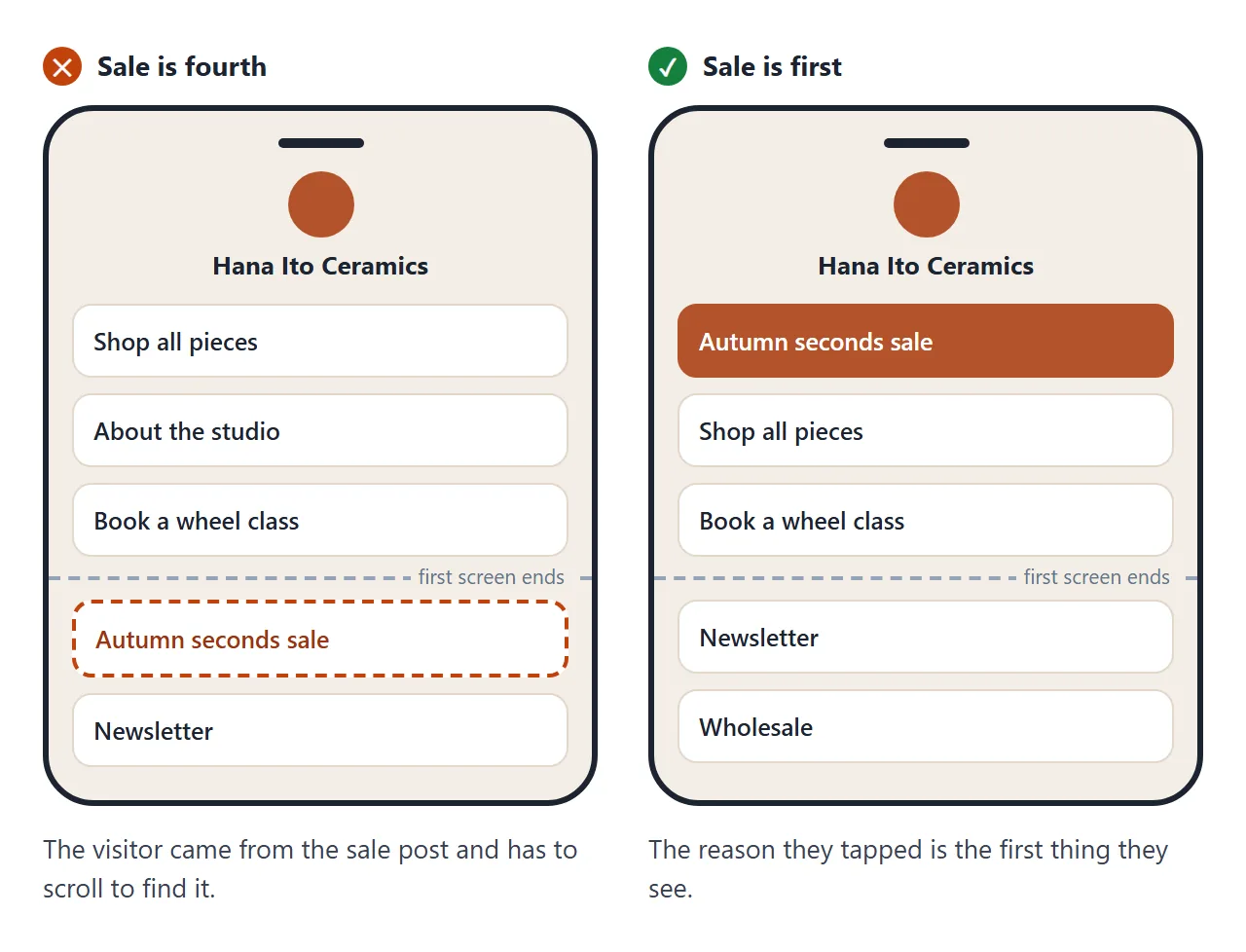
1. The first button is this week's reason. Visitors arrive from one post. If that post was about a sale, the sale goes first, styled so it stands out. The shop, the newsletter and the rest sit underneath.
2. Five to seven buttons is plenty. Instagram lets you add up to five websites to your profile (Instagram Help). A page behind one of those links can hold more, but a long list makes people scroll past the one you care about. Short and ordered beats complete.
3. Labels say what happens, not where it goes. "Book a class" tells someone what they get. "Calendly" does not. Write each button as the thing the visitor wants to do.
Make it with AI
Open ChatGPT, Claude or Gemini and paste this. Change the words in capitals. Put your real links at the end.
Make one complete HTML file: a link in bio page.
Name: YOUR NAME
One line under the name: WHAT YOU DO
First button, highlighted: THIS WEEK'S MAIN LINK
Other buttons, in this order: LINK 2, LINK 3, LINK 4
Small note at the bottom: ONE SHORT LINE
Rules: one column, readable on a phone, large
buttons, two colours, all CSS inside the file.
No images from other sites. Draw my initials in a
circle with SVG. Use only the links I give you.
Do not invent links. If one is missing, write TODO.
Links: PASTE TITLE AND URL FOR EACH BUTTON
The last two lines matter most. Without them an AI may fill a button with an address that looks right and goes nowhere.
Before you use it, tap every button once. Search the page for TODO.
You can ask for more than buttons. Here is the same prompt for a small bakery, with one extra line asking for a reserved-loaves bar and tappable menu items. The pickup day sits right under the main button.
<!doctype html>
<html lang="en">
<head>
<meta charset="utf-8">
<meta name="viewport" content="width=device-width, initial-scale=1">
<title>Crumb and Co. - Links</title>
<style>
  * { box-sizing: border-box; }
  body { margin: 0; min-height: 100vh; background: #fff6e4; color: #33261a; font-family: system-ui, -apple-system, "Segoe UI", sans-serif; }
  .hero { padding: 30px 20px 54px; background: linear-gradient(160deg, #3b2a1c, #5a3f27); color: #fff6e4; text-align: center; border-radius: 0 0 28px 28px; }
  .hero svg { width: 64px; height: 64px; }
  h1 { margin: 6px 0 2px; font-size: 24px; font-family: Georgia, serif; }
  .hero p { margin: 0; font-size: 14px; color: #f2d9a6; }
  .page { max-width: 430px; margin: -36px auto 0; padding: 0 18px 28px; }
  .card { background: #fff; border-radius: 20px; padding: 16px; box-shadow: 0 14px 30px rgba(59, 42, 28, .14); }
  .card b { font-size: 18px; }
  .stock { display: flex; justify-content: space-between; margin: 12px 0 6px; font-size: 13px; color: #7b6650; }
  .bar { height: 10px; border-radius: 5px; background: #f4e6c8; overflow: hidden; }
  .bar i { display: block; height: 100%; width: 0; border-radius: 5px; background: linear-gradient(90deg, #e2a33b, #c0761a); transition: width 1.2s ease; }
  .go { display: block; margin-top: 14px; padding: 14px; border-radius: 14px; background: #33261a; color: #fff6e4; text-align: center; font-weight: 700; text-decoration: none; }
  .pickup { margin: 12px 0 0; padding: 10px 12px; border-radius: 12px; background: #fde9b8; font-size: 14px; }
  h2 { margin: 22px 4px 10px; font-size: 13px; letter-spacing: .08em; color: #9a7f5f; text-transform: uppercase; }
  .menu { display: grid; grid-template-columns: repeat(3, 1fr); gap: 8px; }
  .menu button { border: 1.5px solid #ecdcbc; background: #fff; border-radius: 14px; padding: 10px 6px 8px; font: inherit; color: inherit; cursor: pointer; }
  .menu button[aria-pressed="true"] { border-color: #c0761a; background: #fff1d6; }
  .menu svg { width: 46px; height: 34px; display: block; margin: 0 auto 4px; }
  .menu span { font-size: 12.5px; font-weight: 600; }
  .detail { margin: 10px 2px 0; min-height: 40px; font-size: 14px; color: #5b4632; }
  .links { list-style: none; margin: 8px 0 0; padding: 0; display: grid; gap: 9px; }
  .links a { display: block; padding: 14px 16px; border-radius: 14px; background: #fff; border: 1.5px solid #ecdcbc; color: #33261a; text-decoration: none; font-weight: 600; }
  .hours { margin-top: 18px; font-size: 13px; color: #7b6650; line-height: 1.6; text-align: center; }
</style>
</head>
<body>
<header class="hero">
  <svg viewBox="0 0 64 64" aria-hidden="true"><circle cx="32" cy="32" r="32" fill="#e2a33b"/><path d="M14 38 q18 -22 36 0 q-18 10 -36 0z" fill="#fff6e4"/><path d="M24 30 l4 6 M32 27 l2 7 M40 30 l-3 6" stroke="#c0761a" stroke-width="2.5" stroke-linecap="round"/></svg>
  <h1>Crumb and Co.</h1>
  <p>Sourdough and pastries, two days a week</p>
</header>
<main class="page">
  <div class="card">
    <b>Pre-order this week's bread</b>
    <div class="stock"><span>Loaves reserved</span><span id="count">0 of 40</span></div>
    <div class="bar"><i id="fill"></i></div>
    <a class="go" href="#preorder">Reserve a loaf</a>
    <p class="pickup"><strong>Pickup:</strong> Saturday, 9 am - 1 pm, at the shop door</p>
  </div>

  <h2>This week</h2>
  <div class="menu" role="group" aria-label="This week's bakes">
    <button aria-pressed="true" data-d="Country sourdough. 36-hour ferment, crackly crust. $9.">
      <svg viewBox="0 0 46 34"><ellipse cx="23" cy="20" rx="20" ry="12" fill="#c98b45"/><path d="M12 16 l5 6 M21 13 l3 8 M30 15 l-3 7" stroke="#8a5523" stroke-width="2" stroke-linecap="round"/></svg><span>Sourdough</span></button>
    <button aria-pressed="false" data-d="Butter croissant. Laminated over three days. $4.50.">
      <svg viewBox="0 0 46 34"><path d="M4 24 q19 -22 38 0 q-19 8 -38 0z" fill="#e0a85a"/><path d="M15 15 l3 9 M23 12 v12 M31 15 l-3 9" stroke="#a8692a" stroke-width="2" stroke-linecap="round"/></svg><span>Croissant</span></button>
    <button aria-pressed="false" data-d="Cinnamon bun. Brown sugar, orange zest. $5.">
      <svg viewBox="0 0 46 34"><circle cx="23" cy="18" r="14" fill="#d79a55"/><path d="M23 18 m-3 0 a3 3 0 1 1 6 0 a6 6 0 1 1 -12 0 a9 9 0 1 1 18 0" fill="none" stroke="#8a5523" stroke-width="2"/></svg><span>Cinnamon bun</span></button>
  </div>
  <p class="detail" id="detail">Country sourdough. 36-hour ferment, crackly crust. $9.</p>

  <ul class="links">
    <li><a href="#cakes">Order a cake for an event</a></li>
    <li><a href="#map">Find the shop</a></li>
    <li><a href="#contact">Ask a question</a></li>
  </ul>
  <p class="hours">Open Friday and Saturday, 8 am - 2 pm.<br>Allergen notes are on the menu page.</p>
</main>
<script>
  // The reserved count is a sample number. Change RESERVED and TOTAL to your own.
  const RESERVED = 31, TOTAL = 40;
  document.getElementById('count').textContent = RESERVED + ' of ' + TOTAL;
  requestAnimationFrame(() => { document.getElementById('fill').style.width = Math.round(RESERVED / TOTAL * 100) + '%'; });

  const detail = document.getElementById('detail');
  document.querySelectorAll('.menu button').forEach((b) => {
    b.addEventListener('click', () => {
      document.querySelectorAll('.menu button').forEach((x) => x.setAttribute('aria-pressed', 'false'));
      b.setAttribute('aria-pressed', 'true');
      detail.textContent = b.dataset.d;
    });
  });
</script>
</body>
</html>
Getting it into your bio
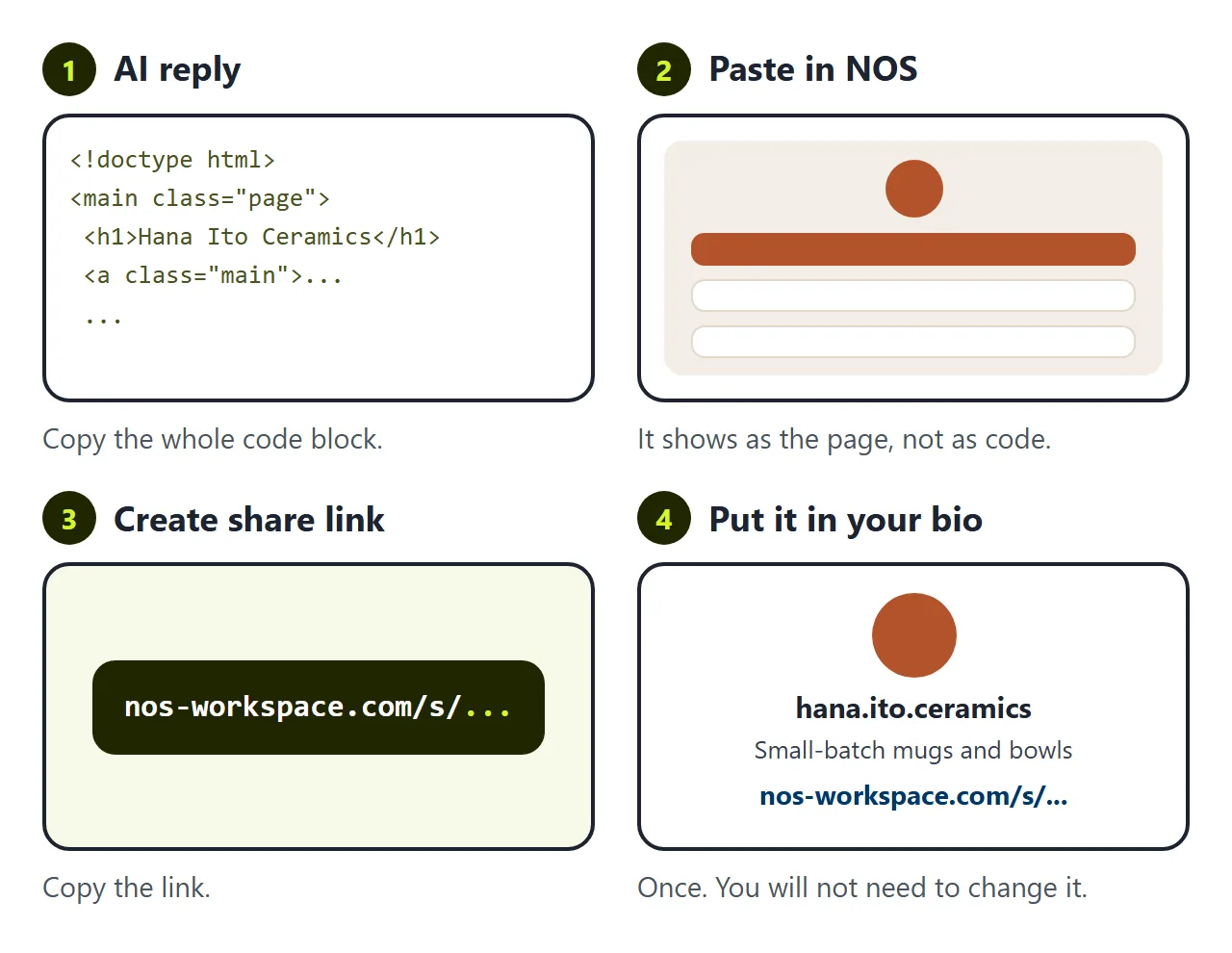
You have a page. The AI gave it to you as HTML code, though, and your bio field takes an address, not code.
The first wall is the address. Paste the code into a message and the other person sees code. Save it as a file and it opens on your computer, but nobody can reach it from your profile. To get a link, the page has to live somewhere.
In NOS you paste the code into a document and it turns into the page right away. Choose Create share link, copy it, and put that link in your bio. HTML to link walks through it.
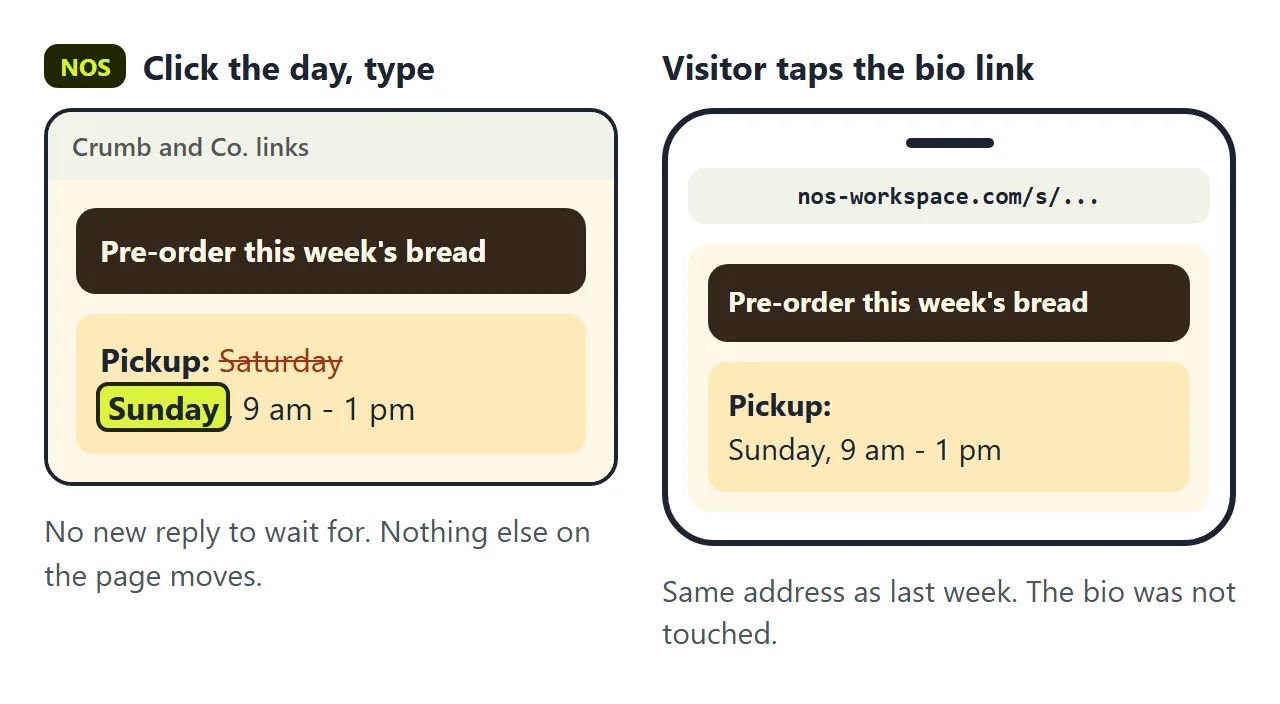
The second wall comes a week later. The sale ends. The workshop moves from the 15th to the 22nd. The pickup day changes from Saturday to Sunday.
If you ask the AI again, you wait for a new reply. It often changes things you did not ask about, so you read the whole page again. Then you have a new file, and if you had uploaded the old one somewhere, the address may change too, which means editing your bio again.
In NOS you click the date on the page, type the new one, and it is saved. The link in your bio does not change. Anyone who taps it sees the new date.
Before you share it
- Tap every button on your own phone.
- Read the first screen only. Is the main reason visible without scrolling?
- Check the labels. Each one should say what the visitor does.
- Remove anything private you would not put on a shop window.
If you want to know which buttons get tapped, Link tracking covers giving each destination its own address. If you are weighing a hosted service against your own page, Linktree alternative compares the two.