Turn a card. A watermelon. Turn another. A rocket.
They flip back, and now you are trying to remember which corner the watermelon was in.
That small game works for a five-year-old with pictures, a language class with words, and a team quiz with names and faces. Making one used to mean writing it yourself or finding a template that never quite fit.
These days people ask ChatGPT, Claude or Gemini for it and get a finished page in one reply. Memory games in JavaScript are a good fit, because the whole game is one short file.
Here is one. Flip two cards at a time and find all eight pairs.
<!doctype html>
<html lang="en">
<head>
<meta charset="utf-8">
<meta name="viewport" content="width=device-width, initial-scale=1">
<title>Memory match</title>
<style>
  * { box-sizing: border-box; }
  body { margin: 0; min-height: 100vh; background: radial-gradient(circle at 15% 0%, #3b2a7a, transparent 50%), radial-gradient(circle at 100% 100%, #0f5a6b, transparent 50%), #15122b; color: #fff; font-family: system-ui, -apple-system, "Segoe UI", sans-serif; }
  .page { max-width: 480px; margin: 0 auto; padding: 18px 14px 24px; }
  .top { display: flex; align-items: center; justify-content: space-between; margin-bottom: 12px; }
  h1 { margin: 0; font-size: 22px; letter-spacing: -.01em; }
  h1 span { background: linear-gradient(90deg, #ffcf5a, #ff6fa8); -webkit-background-clip: text; background-clip: text; color: transparent; }
  .restart { border: 0; border-radius: 12px; padding: 9px 12px; background: rgba(255, 255, 255, .12); color: #fff; font: 700 13px system-ui; cursor: pointer; }
  .stats { display: grid; grid-template-columns: repeat(3, 1fr); gap: 8px; margin-bottom: 14px; }
  .stat { background: rgba(255, 255, 255, .08); border: 1px solid rgba(255, 255, 255, .1); border-radius: 14px; padding: 8px 10px; text-align: center; }
  .stat small { display: block; font-size: 11px; letter-spacing: .1em; text-transform: uppercase; color: #b8b0e0; }
  .stat b { font-size: 22px; font-variant-numeric: tabular-nums; }
  .stat b.bump { animation: bump .3s; }
  @keyframes bump { 50% { transform: scale(1.25); color: #ffcf5a; } }
  .board { display: grid; grid-template-columns: repeat(4, 1fr); gap: 10px; perspective: 900px; }
  .card { position: relative; aspect-ratio: 1; border: 0; padding: 0; background: none; cursor: pointer; transform-style: preserve-3d; transition: transform .45s cubic-bezier(.3, 1.3, .5, 1); }
  .card.flipped, .card.matched { transform: rotateY(180deg); }
  .face { position: absolute; inset: 0; border-radius: 14px; display: grid; place-items: center; backface-visibility: hidden; -webkit-backface-visibility: hidden; }
  .back { background: linear-gradient(135deg, #6c4bf4, #b44ce0); box-shadow: inset 0 0 0 2px rgba(255, 255, 255, .18), 0 6px 14px -6px rgba(0, 0, 0, .6); }
  .back::after { content: "?"; font: 900 26px system-ui; color: rgba(255, 255, 255, .55); }
  .front { background: #fffaf0; transform: rotateY(180deg); font-size: clamp(30px, 10vw, 44px); box-shadow: 0 6px 14px -6px rgba(0, 0, 0, .6); }
  .card.matched .front { background: #d9ffe9; box-shadow: 0 0 0 3px #39d98a, 0 0 22px rgba(57, 217, 138, .55); animation: glow .6s; }
  .card.miss .front { animation: shake .4s; background: #ffe3e8; }
  @keyframes glow { 50% { transform: rotateY(180deg) scale(1.08); } }
  @keyframes shake { 25% { translate: -4px 0; } 75% { translate: 4px 0; } }
  .faces { margin-top: 18px; padding: 10px 12px; border-radius: 14px; background: rgba(255, 255, 255, .06); font-size: 13px; color: #b8b0e0; }
  .faces h2 { margin: 0 0 6px; font-size: 11px; letter-spacing: .1em; text-transform: uppercase; }
  .faces ul { margin: 0; padding: 0; list-style: none; display: flex; flex-wrap: wrap; gap: 6px; font-size: 20px; }
  .win { position: fixed; inset: 0; display: none; place-items: center; background: rgba(12, 10, 30, .72); backdrop-filter: blur(4px); }
  .win.show { display: grid; animation: fade .3s; }
  @keyframes fade { from { opacity: 0; } }
  .win .box { width: min(320px, 86vw); background: #fffaf0; color: #1d1838; border-radius: 22px; padding: 22px 20px; text-align: center; animation: rise .45s cubic-bezier(.3, 1.4, .5, 1); }
  @keyframes rise { from { transform: translateY(30px) scale(.9); opacity: 0; } }
  .win .stars { font-size: 34px; letter-spacing: 4px; color: #ffb703; }
  .win .stars .off { color: #e3dccb; }
  .win h3 { margin: 6px 0 4px; font-size: 24px; }
  .win p { margin: 0 0 14px; color: #5b5478; }
  .win button { border: 0; border-radius: 12px; padding: 12px 18px; background: #6c4bf4; color: #fff; font: 700 15px system-ui; cursor: pointer; }
  canvas { position: fixed; inset: 0; pointer-events: none; }
  @media (prefers-reduced-motion: reduce) { .card { transition: none; } }
</style>
</head>
<body>
<main class="page">
  <div class="top"><h1>Memory <span>match</span></h1><button class="restart" id="restart">New game</button></div>
  <div class="stats">
    <div class="stat"><small>Moves</small><b id="moves">0</b></div>
    <div class="stat"><small>Time</small><b id="time">0:00</b></div>
    <div class="stat"><small>Pairs</small><b id="pairsLeft">0/8</b></div>
  </div>
  <div class="board" id="board"></div>

  <section class="faces">
    <h2>Card faces (each one makes a pair)</h2>
    <ul id="faces"><li>🦊</li><li>🐙</li><li>🌵</li><li>🍉</li><li>🚀</li><li>🎈</li><li>🐢</li><li>🌙</li></ul>
  </section>
</main>
<div class="win" id="win"><div class="box"><div class="stars" id="stars"></div><h3>You matched them all</h3><p id="summary"></p><button id="again">Play again</button></div></div>
<canvas id="fx"></canvas>
<script>
  const board = document.getElementById('board');
  let first = null, lock = false, moves = 0, found = 0, total = 0, start = 0, timer = null;

  function shuffle(a) { for (let i = a.length - 1; i > 0; i--) { const j = Math.floor(Math.random() * (i + 1)); [a[i], a[j]] = [a[j], a[i]]; } return a; }
  const fmt = (s) => Math.floor(s / 60) + ':' + String(s % 60).padStart(2, '0');
  function bump(id, v) { const el = document.getElementById(id); el.textContent = v; el.classList.remove('bump'); void el.offsetWidth; el.classList.add('bump'); }

  function newGame() {
    // The faces come from the visible list, so editing that list changes the cards.
    const faces = [...document.querySelectorAll('#faces li')].map((li) => li.textContent.trim()).filter(Boolean);
    total = faces.length; first = null; lock = false; moves = 0; found = 0; start = 0;
    clearInterval(timer);
    document.getElementById('moves').textContent = 0;
    document.getElementById('time').textContent = '0:00';
    document.getElementById('pairsLeft').textContent = '0/' + total;
    document.getElementById('win').classList.remove('show');
    board.innerHTML = '';
    shuffle([...faces, ...faces]).forEach((f) => {
      const c = document.createElement('button');
      c.className = 'card'; c.dataset.k = f; c.setAttribute('aria-label', 'Hidden card');
      c.innerHTML = '<span class="face back"></span><span class="face front"></span>';
      c.querySelector('.front').textContent = f;
      c.onclick = () => flip(c);
      board.append(c);
    });
  }

  function flip(card) {
    if (lock || card === first || card.classList.contains('matched')) return;
    if (!start) { start = Date.now(); timer = setInterval(() => { document.getElementById('time').textContent = fmt(Math.floor((Date.now() - start) / 1000)); }, 250); }
    card.classList.add('flipped'); card.setAttribute('aria-label', card.dataset.k);
    if (!first) { first = card; return; }
    bump('moves', ++moves);
    if (first.dataset.k === card.dataset.k) {
      first.classList.add('matched'); card.classList.add('matched');
      first = null; found++;
      bump('pairsLeft', found + '/' + total);
      if (found === total) setTimeout(win, 500);
    } else {
      lock = true;
      const a = first, b = card;
      setTimeout(() => { a.classList.add('miss'); b.classList.add('miss'); }, 350);
      setTimeout(() => {
        a.classList.remove('flipped', 'miss'); b.classList.remove('flipped', 'miss');
        a.setAttribute('aria-label', 'Hidden card'); b.setAttribute('aria-label', 'Hidden card');
        first = null; lock = false;
      }, 900);
    }
  }

  function win() {
    clearInterval(timer);
    const secs = Math.floor((Date.now() - start) / 1000);
    const extra = moves - total;
    const stars = extra <= total / 2 ? 3 : extra <= total ? 2 : 1;
    document.getElementById('stars').innerHTML = '★'.repeat(stars) + '<span class="off">' + '★'.repeat(3 - stars) + '</span>';
    document.getElementById('summary').textContent = total + ' pairs in ' + moves + ' moves and ' + fmt(secs) + '.';
    document.getElementById('win').classList.add('show');
    confetti();
  }

  function confetti() {
    const cv = document.getElementById('fx'), x = cv.getContext('2d');
    cv.width = innerWidth; cv.height = innerHeight;
    const cols = ['#ffcf5a', '#ff6fa8', '#39d98a', '#6c4bf4', '#4cc9f0'];
    const bits = Array.from({ length: 120 }, () => ({ x: Math.random() * cv.width, y: -20 - Math.random() * cv.height * .4, vx: (Math.random() - .5) * 3, vy: 2 + Math.random() * 3, a: Math.random() * 6, c: cols[Math.floor(Math.random() * cols.length)] }));
    let f = 0;
    (function draw() {
      x.clearRect(0, 0, cv.width, cv.height);
      bits.forEach((b) => { b.x += b.vx; b.y += b.vy; b.a += .12; x.save(); x.translate(b.x, b.y); x.rotate(b.a); x.fillStyle = b.c; x.fillRect(-4, -2, 8, 5); x.restore(); });
      if (++f < 140) requestAnimationFrame(draw); else x.clearRect(0, 0, cv.width, cv.height);
    })();
  }

  document.getElementById('restart').onclick = newGame;
  document.getElementById('again').onclick = newGame;
  newGame();
</script>
</body>
</html>
Three things that make it feel right
1. The board locks while two cards are showing. This is the part most first attempts get wrong. If a player taps a third card before the first two turn back, the game loses track. A short lock fixes it.
2. A miss stays visible long enough to remember. Under half a second, it is hard to remember anything. Much over a second and the game drags. Somewhere near one second feels fair.
3. The cards come from a list you can see. Put the pairs in a plain list on the page and have the script read them. Then changing the game means editing a list, not a line of code.
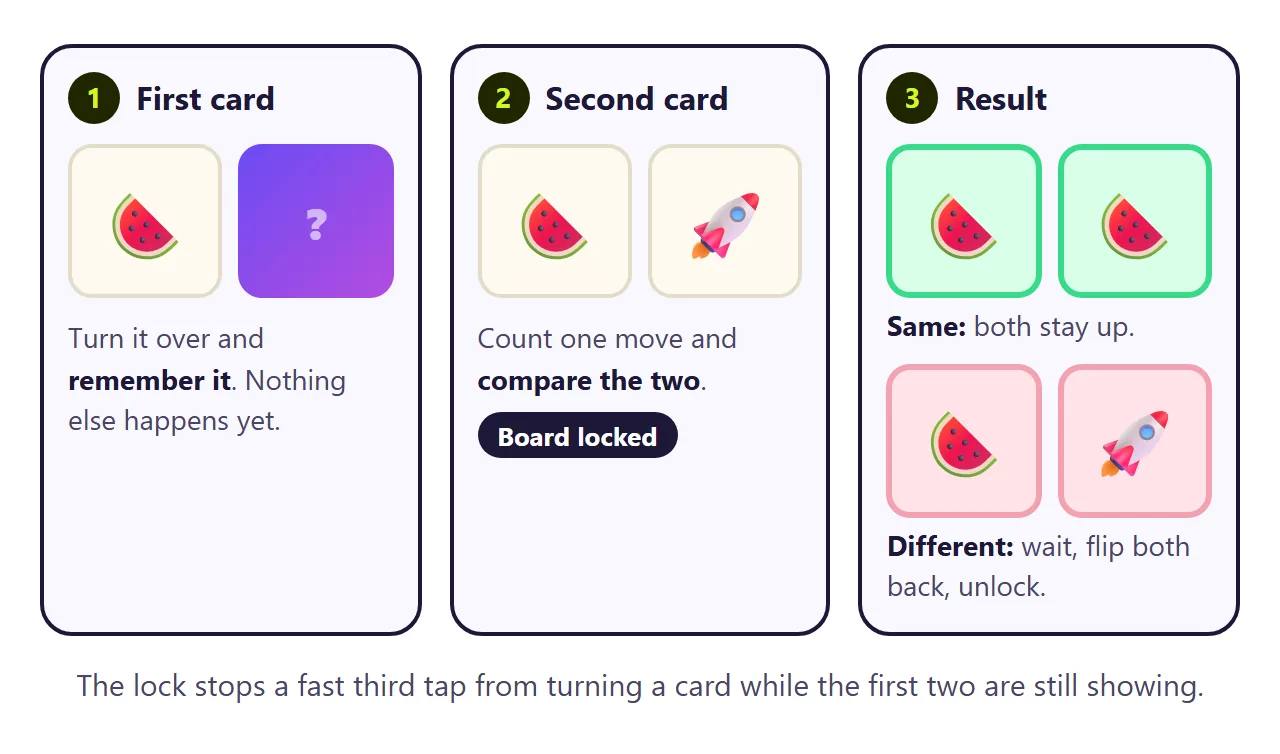
Every memory game in JavaScript comes down to one small function. This is the compare-and-lock part from the game above, with the timer and animations taken out:
let first = null, lock = false, moves = 0;

function flip(card) {
  if (lock || card === first || card.classList.contains('matched')) return;
  card.classList.add('flipped');
  if (!first) { first = card; return; }   // first card: just remember it
  moves++;
  if (first.dataset.k === card.dataset.k) {  // same pair: keep both up
    first.classList.add('matched');
    card.classList.add('matched');
    first = null;
  } else {                                  // miss: lock, wait, flip back
    lock = true;
    const a = first, b = card;
    setTimeout(() => {
      a.classList.remove('flipped');
      b.classList.remove('flipped');
      first = null;
      lock = false;
    }, 900);
  }
}
The flip itself is CSS. Each card has a front and a back stacked on top of each other, the card turns 180 degrees, and backface-visibility: hidden keeps the side facing away from you invisible (MDN).
Make it with AI
Open ChatGPT, Claude or Gemini and paste this. Change the words in capitals and put your pairs at the end.
Make one complete HTML file: a card-matching memory game.
Title: TITLE, for AGE OR CLASS.
Show my pairs as a plain list under the board and
read the cards from that list when a game starts.
Each line is one pair: "LEFT = RIGHT". Make one
card for each side and shuffle them.
Tap to flip a card with a 3D turn. After two cards,
count a move and compare. Match: both stay up and
glow. Miss: lock the board, wait about one second,
flip both back, unlock.
Show moves, a timer that starts on the first tap,
and a win screen with the result. Add "New game".
Rules: all CSS and JavaScript inside the file, no
images or fonts from other sites, nothing sent
anywhere, works on a phone. Use only my pairs. Do
not invent extra pairs.
My pairs: PASTE ONE PAIR PER LINE
"Read the cards from that list" matters most. If the pairs only live inside the script, changing them means opening the code. Read from the page, they are just text.
The same prompt with words instead of pictures turns it into vocabulary practice. Here each card is one side of a pair, Spanish on one, English on the other.
<!doctype html>
<html lang="en">
<head>
<meta charset="utf-8">
<meta name="viewport" content="width=device-width, initial-scale=1">
<title>Spanish word match</title>
<style>
  * { box-sizing: border-box; }
  body { margin: 0; min-height: 100vh; background: linear-gradient(180deg, #fff4e0 0%, #ffe4d6 100%); color: #2c1f14; font-family: system-ui, -apple-system, "Segoe UI", sans-serif; }
  .page { max-width: 520px; margin: 0 auto; padding: 18px 14px 24px; }
  .top { display: flex; align-items: center; justify-content: space-between; gap: 10px; }
  h1 { margin: 0; font-size: 22px; }
  .lead { margin: 2px 0 12px; font-size: 14px; color: #7a5a44; }
  .new { border: 0; border-radius: 12px; padding: 9px 12px; background: #2c1f14; color: #fff; font: 700 13px system-ui; cursor: pointer; flex: none; }
  .hud { display: flex; align-items: center; gap: 10px; margin-bottom: 12px; font-size: 14px; color: #7a5a44; }
  .hud b { color: #2c1f14; font-variant-numeric: tabular-nums; }
  .track { flex: 1; height: 10px; border-radius: 999px; background: #ffd9c2; overflow: hidden; }
  .track i { display: block; height: 100%; width: 0; background: linear-gradient(90deg, #ff8a4c, #e8467c); border-radius: inherit; transition: width .4s cubic-bezier(.3, 1.2, .5, 1); }
  .board { display: grid; grid-template-columns: repeat(3, 1fr); gap: 10px; perspective: 1000px; }
  @media (min-width: 560px) { .board { grid-template-columns: repeat(4, 1fr); } }
  .card { position: relative; height: 92px; border: 0; padding: 0; background: none; cursor: pointer; transform-style: preserve-3d; transition: transform .5s cubic-bezier(.3, 1.3, .5, 1); }
  .card.flipped, .card.matched { transform: rotateX(180deg); }
  .face { position: absolute; inset: 0; border-radius: 16px; display: grid; place-items: center; padding: 6px; backface-visibility: hidden; -webkit-backface-visibility: hidden; text-align: center; }
  .back { background: repeating-linear-gradient(45deg, #ff8a4c 0 10px, #ff9a62 10px 20px); box-shadow: 0 4px 0 #d9652b, 0 10px 18px -10px rgba(120, 50, 10, .6); }
  .back::after { content: "Hola"; font: 900 16px system-ui; color: rgba(255, 255, 255, .8); letter-spacing: .04em; }
  .front { transform: rotateX(180deg); background: #fff; box-shadow: 0 4px 0 #ecd3c2; font: 750 clamp(15px, 4.4vw, 19px)/1.2 system-ui; }
  .front small { display: block; font: 700 10px system-ui; letter-spacing: .12em; text-transform: uppercase; color: #b48a6e; margin-bottom: 4px; }
  .card.matched .front { background: #e2f7ea; box-shadow: 0 4px 0 #8fd4a9; color: #1b6b3d; }
  .card.matched { animation: pop .5s; }
  @keyframes pop { 50% { scale: 1.06; } }
  .card.miss .front { background: #ffe1e6; box-shadow: 0 4px 0 #f2a2b2; }
  .pairs { margin-top: 18px; padding: 12px 14px; border-radius: 16px; background: rgba(255, 255, 255, .65); }
  .pairs h2 { margin: 0 0 6px; font-size: 12px; letter-spacing: .1em; text-transform: uppercase; color: #7a5a44; }
  .pairs ul { margin: 0; padding: 0; list-style: none; columns: 2; font-size: 15px; line-height: 1.7; }
  .pairs li.got { color: #1b6b3d; font-weight: 700; }
  .pairs li.got::before { content: "\2713  "; }
  .done { position: fixed; inset: 0; display: none; place-items: center; background: rgba(44, 31, 20, .55); }
  .done.show { display: grid; }
  .done .box { width: min(330px, 88vw); background: #fff; border-radius: 22px; padding: 22px; text-align: center; animation: rise .45s cubic-bezier(.3, 1.4, .5, 1); }
  @keyframes rise { from { transform: translateY(26px) scale(.92); opacity: 0; } }
  .done .big { font: 900 40px system-ui; color: #e8467c; }
  .done h3 { margin: 4px 0; font-size: 24px; }
  .done p { margin: 0 0 14px; color: #7a5a44; }
  .done button { border: 0; border-radius: 12px; padding: 12px 18px; background: #e8467c; color: #fff; font: 700 15px system-ui; cursor: pointer; }
  @media (prefers-reduced-motion: reduce) { .card { transition: none; } }
</style>
</head>
<body>
<main class="page">
  <div class="top"><h1>Spanish word match</h1><button class="new" id="new">Shuffle</button></div>
  <p class="lead">Find each Spanish word and its English meaning.</p>
  <div class="hud"><span>Moves <b id="moves">0</b></span><div class="track"><i id="bar"></i></div><span><b id="time">0:00</b></span></div>
  <div class="board" id="board"></div>

  <section class="pairs">
    <h2>This week's pairs</h2>
    <ul id="pairs">
      <li>perro = dog</li>
      <li>gato = cat</li>
      <li>manzana = apple</li>
      <li>libro = book</li>
      <li>casa = house</li>
      <li>agua = water</li>
    </ul>
  </section>
</main>
<div class="done" id="win"><div class="box"><div class="big">¡Muy bien!</div><h3>All pairs found</h3><p id="sum"></p><button id="again">Play again</button></div></div>
<script>
  const board = document.getElementById('board');
  let pairs = [], first = null, lock = false, moves = 0, found = 0, start = 0, timer = null;
  const fmt = (s) => Math.floor(s / 60) + ':' + String(s % 60).padStart(2, '0');
  function shuffle(a) { for (let i = a.length - 1; i > 0; i--) { const j = Math.floor(Math.random() * (i + 1)); [a[i], a[j]] = [a[j], a[i]]; } return a; }

  function newGame() {
    // Each line of the visible list is one pair: "word = meaning". Edit the list and the cards follow.
    const lis = [...document.querySelectorAll('#pairs li')];
    pairs = lis.map((li) => Object.assign(li.textContent.split('=').map((s) => s.trim()), { li })).filter((p) => p.length === 2 && p[0] && p[1]);
    lis.forEach((li) => li.classList.remove('got'));
    first = null; lock = false; moves = 0; found = 0; start = 0; clearInterval(timer);
    document.getElementById('moves').textContent = 0;
    document.getElementById('time').textContent = '0:00';
    document.getElementById('bar').style.width = '0';
    document.getElementById('win').classList.remove('show');
    const cards = [];
    pairs.forEach((p, i) => { cards.push({ k: i, text: p[0], tag: 'Español' }, { k: i, text: p[1], tag: 'English' }); });
    board.innerHTML = '';
    shuffle(cards).forEach((c) => {
      const el = document.createElement('button');
      el.className = 'card'; el.dataset.k = c.k; el.setAttribute('aria-label', 'Hidden card');
      el.innerHTML = '<span class="face back"></span><span class="face front"><span><small></small><span class="w"></span></span></span>';
      el.querySelector('small').textContent = c.tag;
      el.querySelector('.w').textContent = c.text;
      el.dataset.text = c.text;
      el.onclick = () => flip(el);
      board.append(el);
    });
  }

  function flip(card) {
    if (lock || card === first || card.classList.contains('matched')) return;
    if (!start) { start = Date.now(); timer = setInterval(() => { document.getElementById('time').textContent = fmt(Math.floor((Date.now() - start) / 1000)); }, 250); }
    card.classList.add('flipped'); card.setAttribute('aria-label', card.dataset.text);
    if (!first) { first = card; return; }
    document.getElementById('moves').textContent = ++moves;
    if (first.dataset.k === card.dataset.k) {
      first.classList.add('matched'); card.classList.add('matched');
      pairs[card.dataset.k].li.classList.add('got');
      first = null; found++;
      document.getElementById('bar').style.width = (found / pairs.length) * 100 + '%';
      if (found === pairs.length) setTimeout(finish, 600);
    } else {
      lock = true;
      const a = first, b = card;
      setTimeout(() => { a.classList.add('miss'); b.classList.add('miss'); }, 380);
      setTimeout(() => {
        a.classList.remove('flipped', 'miss'); b.classList.remove('flipped', 'miss');
        a.setAttribute('aria-label', 'Hidden card'); b.setAttribute('aria-label', 'Hidden card');
        first = null; lock = false;
      }, 1000);
    }
  }

  function finish() {
    clearInterval(timer);
    document.getElementById('sum').textContent = pairs.length + ' pairs in ' + moves + ' moves and ' + fmt(Math.floor((Date.now() - start) / 1000)) + '.';
    document.getElementById('win').classList.add('show');
  }

  document.getElementById('new').onclick = newGame;
  document.getElementById('again').onclick = newGame;
  newGame();
</script>
</body>
</html>
Getting the game to the players
You have a working game. The AI gave it to you as HTML code, though, and a page of code is not something a student taps on a tablet.
The first wall is getting it onto other screens. Attach the file and on a phone it opens as code or lands in downloads. On a school tablet it may not open at all. To be a game people tap, it has to live somewhere.
In NOS you paste the code into a document and it becomes the game straight away. Choose Create share link and post the link in your class page, a chat, or a QR code on the board. Players need no account and cannot edit it. Host a game online covers other options.
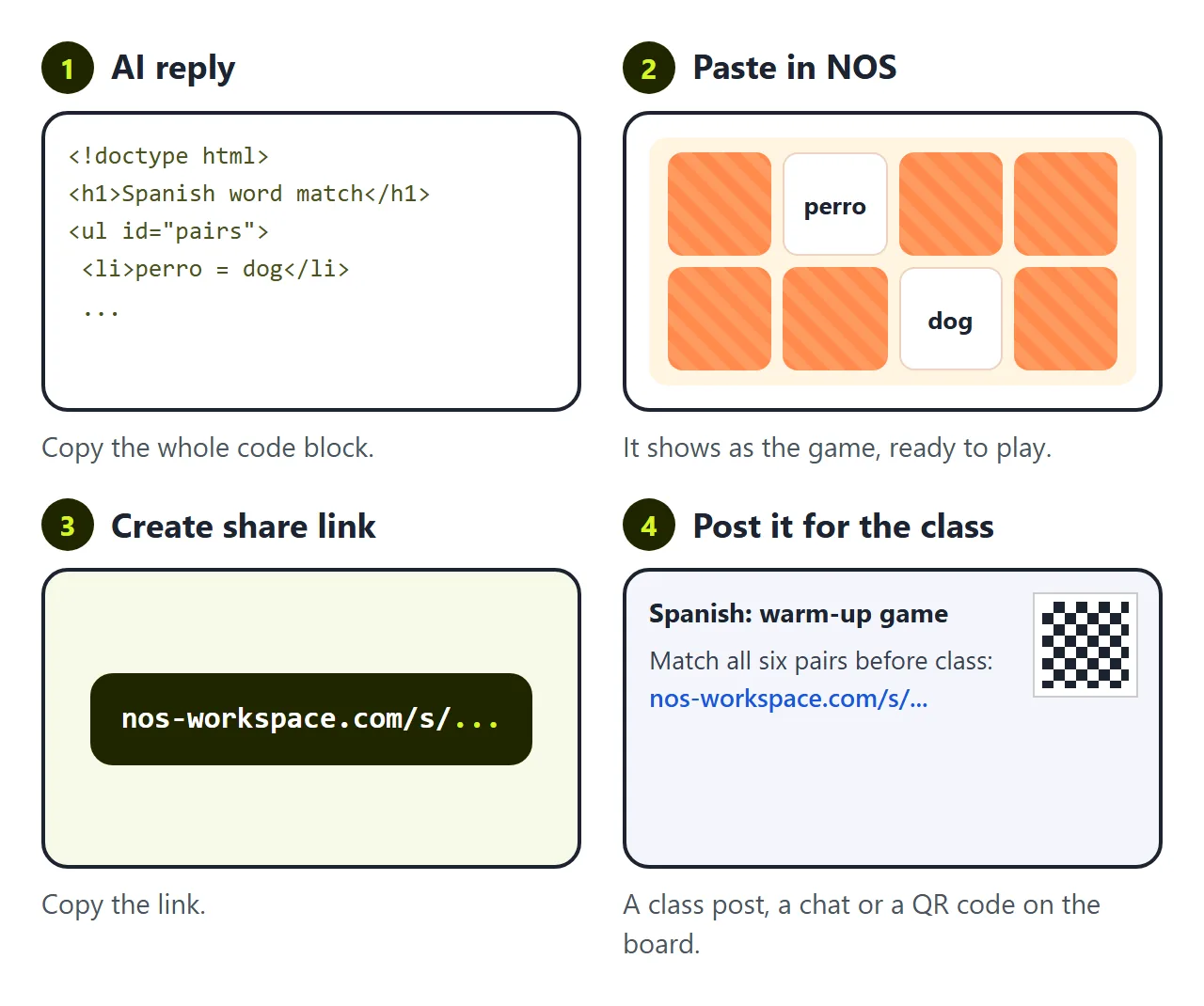
The second wall comes with next week's words. "Gato" was too easy. You want "pájaro = bird" instead.
If you ask the AI again, you wait for a new reply. It often changes the timing, the colours or the number of cards while it is at it, so you play a full round to check. Then you have a new file and a new link, and some students open last week's.
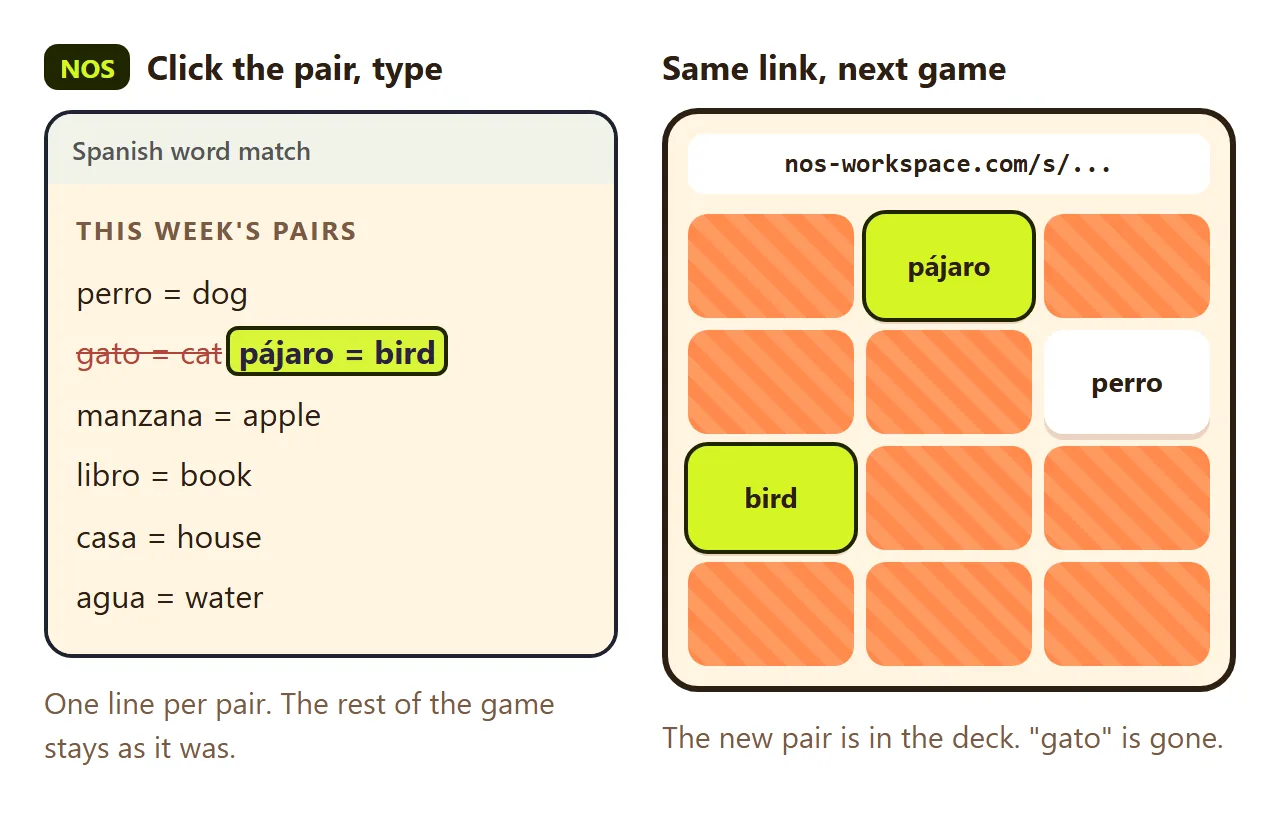
In NOS you click "gato = cat" in the pairs list on the page and type "pájaro = bird". The link stays the same, and the next game anyone starts deals the new pair. In the emoji version, the faces list works the same way.
Before you share it
- Play one full round on a phone, including a fast third tap after a miss.
- Check the win screen shows the right number of pairs.
- Keep it to six to eight pairs for a phone. More cards get small.
- Keep the "=" in each line of a word list. A line without it is skipped.
The timer, the move count and the shake on a miss live in the code. Change those in the code view.
Memory games in JavaScript are small enough to keep in one file, which is what makes them easy to share. For more games like that, see Single HTML file games. For another short game built the same way, see Tic tac toe in JavaScript.