A tic tac toe game needs three things: an array of nine cells, a list of the eight winning lines, and a click handler that fills a cell and checks for a result.
Put them in one HTML file with a little CSS and the game runs when you open the file or share a link. Play this version first: two players, X goes first, and the status line announces a win or a draw.
<!doctype html>
<html lang="en">
<head>
<meta charset="utf-8">
<meta name="viewport" content="width=device-width, initial-scale=1">
<title>Tic tac toe</title>
<style>
  body { margin: 0; padding: 16px; font-family: system-ui, sans-serif; text-align: center; background: #f4f5f7; }
  #msg { font-size: 20px; font-weight: 700; margin-bottom: 12px; }
  #board {
    display: grid; grid-template-columns: repeat(3, 1fr); gap: 6px;
    width: min(100%, 300px); margin: 0 auto 14px;
  }
  #board button {
    aspect-ratio: 1; font-size: 44px; font-weight: 700; line-height: 1;
    border: 0; border-radius: 10px; background: #fff; cursor: pointer;
    box-shadow: 0 2px 6px rgba(0, 0, 0, .12);
  }
  #reset { font-size: 16px; padding: 8px 16px; border-radius: 8px; border: 1px solid #c8ccd4; background: #fff; cursor: pointer; }
</style>
</head>
<body>
<div id="msg">X's turn</div>
<div id="board"></div>
<button id="reset">New game</button>

<script>
  // The 8 winning lines, as indexes into the 9 cells (0-8, row by row)
  const WINS = [[0,1,2],[3,4,5],[6,7,8],[0,3,6],[1,4,7],[2,5,8],[0,4,8],[2,4,6]];

  const msg = document.getElementById('msg');
  const board = document.getElementById('board');
  let cells, turn, over;

  // Build the 9 buttons once
  const buttons = [];
  for (let i = 0; i < 9; i++) {
    const b = document.createElement('button');
    b.addEventListener('click', () => play(i));
    board.appendChild(b);
    buttons.push(b);
  }

  function winner() {
    for (const [a, b, c] of WINS) {
      if (cells[a] && cells[a] === cells[b] && cells[a] === cells[c]) return cells[a];
    }
    return null;
  }

  function play(i) {
    if (over || cells[i]) return;     // ignore taken squares and finished games
    cells[i] = turn;
    buttons[i].textContent = turn;

    const w = winner();
    if (w) { over = true; msg.textContent = w + ' wins!'; }
    else if (cells.every(Boolean)) { over = true; msg.textContent = "It's a draw"; }
    else { turn = turn === 'X' ? 'O' : 'X'; msg.textContent = turn + "'s turn"; }
  }

  function reset() {
    cells = Array(9).fill('');        // '' means empty
    turn = 'X';
    over = false;
    msg.textContent = "X's turn";
    buttons.forEach(b => b.textContent = '');
  }

  document.getElementById('reset').addEventListener('click', reset);
  reset();
</script>
</body>
</html>
The whole game in four steps
Every click does the same four things, in the same order.
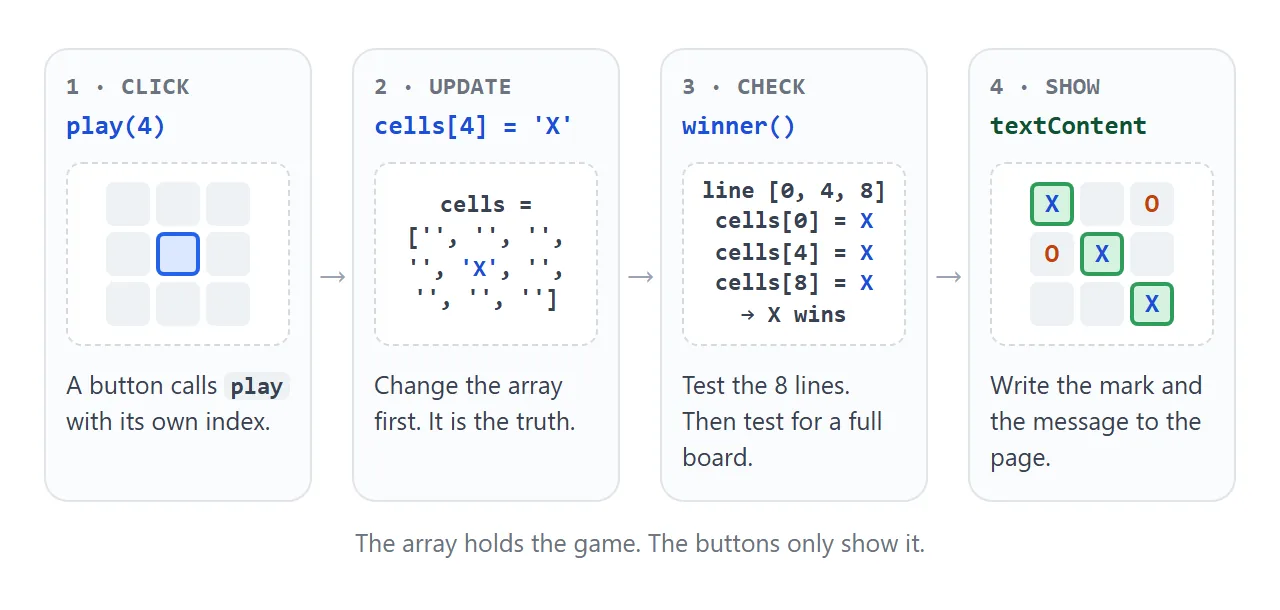
- Click – each button calls
playwith its own number, 0 to 8. - Update – set
cells[i]to the current mark. The array is the game state. - Check – test the eight winning lines, then test whether the board is full.
- Show – write the mark into the button and the message into the status line.
Because the rules work on the array and not on the page, the win check is plain JavaScript that never reads the DOM. To see how a script reaches the page at all, read the DOM in HTML and JavaScript.
The board is one array of nine
Keep the board as a flat array, row by row. Cell 0 is the top left, cell 4 is the centre and cell 8 is the bottom right.
let cells = Array(9).fill('');   // '' means empty
const WINS = [[0,1,2],[3,4,5],[6,7,8],[0,3,6],[1,4,7],[2,5,8],[0,4,8],[2,4,6]];
A player wins by marking all three spaces of a row, a column or a diagonal. On a 3 by 3 grid that gives eight lines, and each one is three cell numbers.
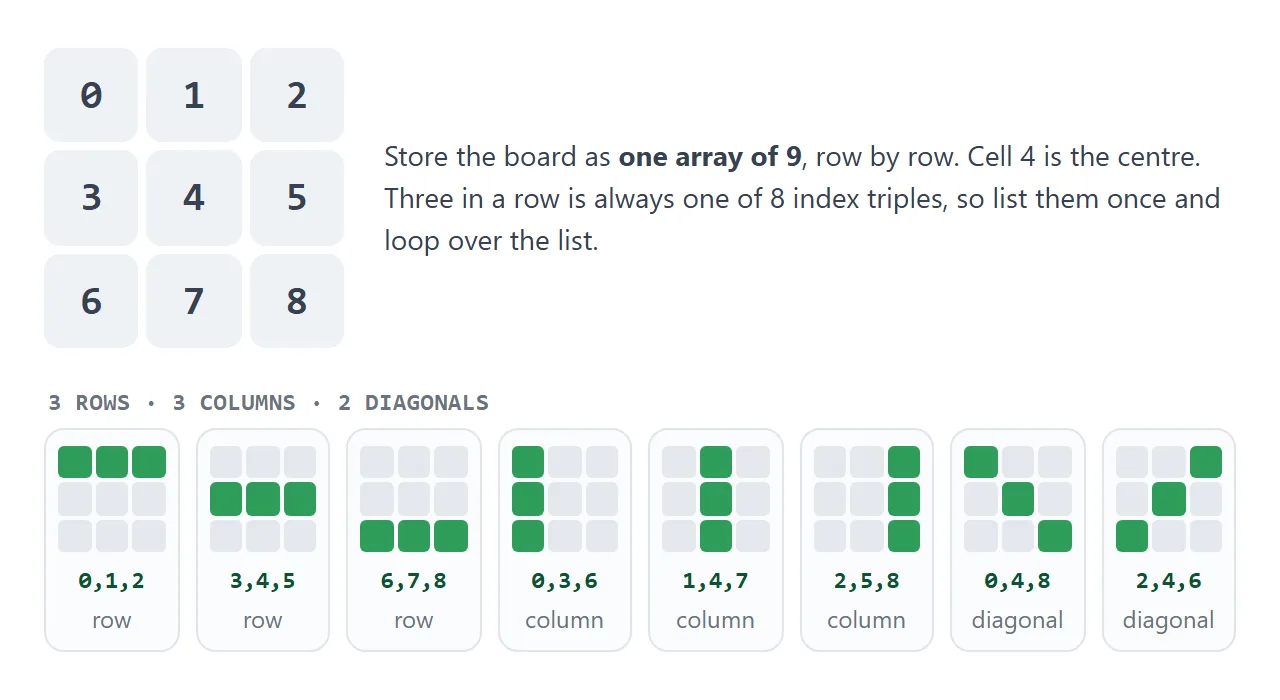
Pick a line below to see which cells it covers and the matching entry of the WINS list.
<!doctype html>
<html lang="en">
<head>
<meta charset="utf-8">
<meta name="viewport" content="width=device-width, initial-scale=1">
<title>The 8 winning lines</title>
<style>
  body { margin: 0; padding: 14px; font-family: system-ui, sans-serif; background: #f4f5f7; color: #1d2330; }
  .wrap { max-width: 340px; margin: 0 auto; }
  #grid { display: grid; grid-template-columns: repeat(3, 1fr); gap: 6px; margin-bottom: 12px; }
  #grid div {
    aspect-ratio: 1; display: grid; place-items: center;
    border-radius: 10px; background: #fff; color: #9aa3b2;
    font: 700 26px ui-monospace, Consolas, monospace;
    box-shadow: 0 2px 6px rgba(0, 0, 0, .1);
  }
  #grid div.hit { background: #d6f2df; color: #0f5132; box-shadow: 0 0 0 3px #2e9d5b inset; }
  #chips { display: flex; flex-wrap: wrap; gap: 6px; margin-bottom: 10px; }
  #chips button {
    font: 600 14px system-ui, sans-serif; padding: 7px 11px; border-radius: 99px;
    border: 1px solid #c8ccd4; background: #fff; cursor: pointer;
  }
  #chips button[aria-pressed="true"] { background: #1d4ed8; border-color: #1d4ed8; color: #fff; }
  #out { font: 600 15px ui-monospace, Consolas, monospace; background: #fff; border-radius: 8px; padding: 10px 12px; }
</style>
</head>
<body>
<div class="wrap">
  <div id="grid"></div>
  <div id="chips"></div>
  <div id="out">Pick a line</div>
</div>

<script>
  const LINES = [
    ['Row 1', [0,1,2]], ['Row 2', [3,4,5]], ['Row 3', [6,7,8]],
    ['Col 1', [0,3,6]], ['Col 2', [1,4,7]], ['Col 3', [2,5,8]],
    ['Diagonal \\', [0,4,8]], ['Diagonal /', [2,4,6]]
  ];

  const grid = document.getElementById('grid');
  const chips = document.getElementById('chips');
  const out = document.getElementById('out');

  // Show each cell's index, so the array positions are visible
  const squares = [];
  for (let i = 0; i < 9; i++) {
    const d = document.createElement('div');
    d.textContent = i;
    grid.appendChild(d);
    squares.push(d);
  }

  const chipEls = LINES.map(([name, idx]) => {
    const b = document.createElement('button');
    b.textContent = name;
    b.setAttribute('aria-pressed', 'false');
    b.addEventListener('click', () => select(b, idx));
    chips.appendChild(b);
    return b;
  });

  function select(btn, idx) {
    chipEls.forEach(c => c.setAttribute('aria-pressed', String(c === btn)));
    squares.forEach((s, i) => s.classList.toggle('hit', idx.includes(i)));
    out.textContent = '[' + idx.join(', ') + ']';
  }

  select(chipEls[0], LINES[0][1]);
</script>
</body>
</html>
Check for a winner, then for a draw
The win check loops over the eight lines and asks whether all three cells hold the same mark.
function winner() {
  for (const [a, b, c] of WINS) {
    if (cells[a] && cells[a] === cells[b] && cells[a] === cells[c]) return cells[a];
  }
  return null;
}
The first test, cells[a], matters. Three empty strings are equal to each other, so without it an empty line would count as a win before anyone has moved.
A draw is a full board with no winner. cells.every(Boolean) is true only when every cell holds a mark.
Order matters here too. The ninth move can complete a line, so test for a winner first. If the full-board test runs first, a game won on the last move is announced as a draw.
Ignore clicks that should not count
The first line of play throws away clicks that must not change the game.
if (over || cells[i]) return; // taken square, or game already finished
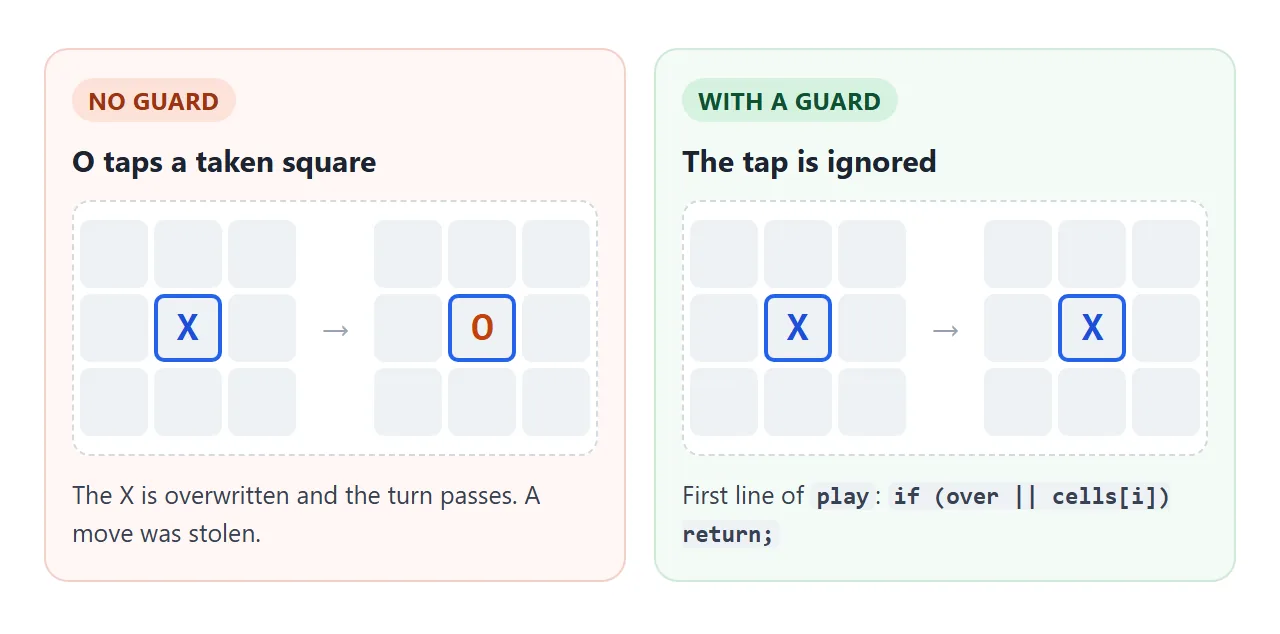
Without the first half, a player can overwrite the other player's mark. Without the second half, moves keep landing after somebody has won. Set over = true when the game ends and reset sets it back.
Add a computer player
The finished version below adds a vs-computer mode, a score tally, a highlight on the winning line and labels for screen readers.
<!doctype html>
<html lang="en">
<head>
<meta charset="utf-8">
<meta name="viewport" content="width=device-width, initial-scale=1">
<title>Tic tac toe with a computer player</title>
<style>
  body { margin: 0; padding: 14px; font-family: system-ui, sans-serif; text-align: center; background: #f4f5f7; color: #1d2330; }
  .wrap { max-width: 320px; margin: 0 auto; }
  #modes { display: flex; gap: 6px; justify-content: center; margin-bottom: 12px; }
  #modes button, #reset {
    font: 600 14px system-ui, sans-serif; padding: 7px 13px; border-radius: 99px;
    border: 1px solid #c8ccd4; background: #fff; cursor: pointer;
  }
  #modes button[aria-pressed="true"] { background: #1d4ed8; border-color: #1d4ed8; color: #fff; }
  #msg { font-size: 20px; font-weight: 700; min-height: 28px; margin-bottom: 10px; }
  #board { display: grid; grid-template-columns: repeat(3, 1fr); gap: 6px; margin-bottom: 12px; }
  #board button {
    aspect-ratio: 1; font-size: 44px; font-weight: 700; line-height: 1;
    border: 0; border-radius: 10px; background: #fff; cursor: pointer;
    box-shadow: 0 2px 6px rgba(0, 0, 0, .12);
  }
  #board button.x { color: #1d4ed8; }
  #board button.o { color: #c2410c; }
  #board button.win { background: #d6f2df; box-shadow: 0 0 0 3px #2e9d5b inset; }
  #score { display: flex; justify-content: center; gap: 18px; font-size: 15px; margin-bottom: 12px; }
  #score b { font-size: 20px; display: block; }
</style>
</head>
<body>
<div class="wrap">
  <div id="modes">
    <button id="m2" aria-pressed="false">2 players</button>
    <button id="m1" aria-pressed="true">vs computer</button>
  </div>
  <div id="msg" role="status" aria-live="polite"></div>
  <div id="board"></div>
  <div id="score">
    <div><b id="sx">0</b>X wins</div>
    <div><b id="sd">0</b>Draws</div>
    <div><b id="so">0</b>O wins</div>
  </div>
  <button id="reset">New game</button>
</div>

<script>
  const WINS = [[0,1,2],[3,4,5],[6,7,8],[0,3,6],[1,4,7],[2,5,8],[0,4,8],[2,4,6]];

  const msg = document.getElementById('msg');
  const boardEl = document.getElementById('board');
  const score = { X: 0, O: 0, D: 0 };
  let cells, turn, over, vsComputer = true, timer = null;

  const buttons = [];
  for (let i = 0; i < 9; i++) {
    const b = document.createElement('button');
    b.addEventListener('click', () => humanClick(i));
    boardEl.appendChild(b);
    buttons.push(b);
  }

  function drawCell(i) {
    const v = cells[i];
    const b = buttons[i];
    b.textContent = v;
    b.className = v.toLowerCase();
    b.setAttribute('aria-label', 'Row ' + (Math.floor(i / 3) + 1) + ', column ' + (i % 3 + 1) + ': ' + (v || 'empty'));
  }

  // Returns the winning line (an array of 3 indexes) or null
  function findWin() {
    return WINS.find(([a, b, c]) => cells[a] && cells[a] === cells[b] && cells[a] === cells[c]) || null;
  }

  function play(i) {
    cells[i] = turn;
    drawCell(i);
    const line = findWin();
    if (line) {
      over = true;
      score[turn]++;
      line.forEach(k => buttons[k].classList.add('win'));
      msg.textContent = turn + ' wins!';
    } else if (cells.every(Boolean)) {
      over = true;
      score.D++;
      msg.textContent = "It's a draw";
    } else {
      turn = turn === 'X' ? 'O' : 'X';
      msg.textContent = turn + "'s turn";
    }
    showScore();
  }

  function humanClick(i) {
    if (over || cells[i] || timer) return;          // taken, finished, or computer is thinking
    play(i);
    if (!over && vsComputer && turn === 'O') {
      timer = setTimeout(() => { timer = null; play(computerPick()); }, 400);
    }
  }

  // Computer: win if possible, else block, else centre, else a corner, else anything
  function computerPick() {
    const empty = cells.map((v, i) => v ? -1 : i).filter(i => i >= 0);
    const finish = (p) => {
      for (const line of WINS) {
        const mine = line.filter(i => cells[i] === p).length;
        const gap = line.find(i => !cells[i]);
        if (mine === 2 && gap !== undefined) return gap;
      }
      return -1;
    };
    let move = finish('O');
    if (move < 0) move = finish('X');
    if (move < 0 && !cells[4]) move = 4;
    if (move < 0) {
      const corners = [0, 2, 6, 8].filter(i => !cells[i]);
      if (corners.length) move = corners[Math.floor(Math.random() * corners.length)];
    }
    if (move < 0) move = empty[Math.floor(Math.random() * empty.length)];
    return move;
  }

  function showScore() {
    document.getElementById('sx').textContent = score.X;
    document.getElementById('so').textContent = score.O;
    document.getElementById('sd').textContent = score.D;
  }

  function newGame() {
    clearTimeout(timer);
    timer = null;
    cells = Array(9).fill('');
    turn = 'X';
    over = false;
    msg.textContent = "X's turn";
    for (let i = 0; i < 9; i++) drawCell(i);
  }

  function setMode(computer) {
    vsComputer = computer;
    document.getElementById('m1').setAttribute('aria-pressed', String(computer));
    document.getElementById('m2').setAttribute('aria-pressed', String(!computer));
    score.X = score.O = score.D = 0;
    showScore();
    newGame();
  }

  document.getElementById('m1').addEventListener('click', () => setMode(true));
  document.getElementById('m2').addEventListener('click', () => setMode(false));
  document.getElementById('reset').addEventListener('click', newGame);
  setMode(true);
</script>
</body>
</html>
The computer is a list of rules, tried in this order:
- Win now, if two of its marks sit on a line with a free cell.
- Block X in the same way.
- Take the centre.
- Take a random free corner.
- Take any free cell.
A random pick uses Math.floor(Math.random() * n). Random numbers in JavaScript covers it in detail.
Three small details keep it tidy:
- Delay:
setTimeoutmakes the reply appear after 400 milliseconds. The click handler ignores taps while that timer is pending. - Cancel: the timer id is saved, so New game can call
clearTimeoutand stop a reply that has not happened yet. - Announce: the status line has
role="status"andaria-live="polite", and each button has anaria-labelsuch as "Row 2, column 2: empty".
Keep it in one file
Everything on this page lives in a single HTML file. The CSS sits in a style element, the JavaScript sits in a script element at the end of the body, and nothing else has to be uploaded or built.
The script goes last because a script without async or defer runs as soon as the browser reaches it. At that moment, only the elements above it exist.
If you are adapting code that came as separate files, paste the CSS into a style element and the JavaScript into a script element. More on that format: single HTML file games and HTML game code.
For phones, two lines do the work. The viewport meta tag sets the page width, and width: min(100%, 300px) on the board lets it shrink on a narrow screen.
A CSS grid with repeat(3, 1fr) makes three equal columns, and aspect-ratio: 1 keeps every square square.
When it does not work
| What you see | Cause | Fix |
|---|---|---|
| Clicking does nothing | The script runs before the buttons exist, so getElementById returns null |
Move the script block to the end of the body |
| A mark gets overwritten | No check for a taken square | `if (over |
| Moves still count after someone wins | No over flag |
Set over = true on a win or a draw, and test it first |
| A win on the ninth move shows as a draw | The full-board test runs before the win test | Call winner() first |
| The game ends before the first move | Three empty cells are equal, so the line test passes | Require cells[a] to be non-empty first |
| Filling one row fills all three | Array(3).fill([]) puts the same inner array in every row |
Use one flat array, or Array.from |
| The computer moves after New game | A pending setTimeout still fires |
Save the id and call clearTimeout |
| The board runs off a phone screen | Fixed pixel widths and no viewport meta tag | width: min(100%, 300px) plus the viewport tag |
Share it as a link
A game is easier to show than to describe, and a screenshot cannot be played. Game link covers sending a game as a link.
To send the working version, paste the page into a NOS document and choose Create share link. HTML to link walks through it.
The page renders as written and its scripts run, so the people you send it to can play a round themselves, without an account. If you change the code later, the same link shows the new version.