A rock paper scissors game needs three buttons, a random pick for the computer and a way to decide who won. In JavaScript that fits in about ten lines of script inside one .html file, with no server, library or repository.
Try it first. Click a button and the computer answers.
<!doctype html>
<html lang="en">
<head>
<meta charset="utf-8">
<meta name="viewport" content="width=device-width, initial-scale=1">
<title>Rock Paper Scissors</title>
<style>
  body {
    margin: 0; padding: 22px 16px; text-align: center;
    font-family: system-ui, sans-serif; background: #f4f5f7; color: #1d2330;
  }
  h1 { font-size: 20px; margin: 0 0 14px; }
  button {
    font: inherit; font-size: 16px; padding: 10px 16px; margin: 4px;
    border: 1px solid #c9ced8; border-radius: 10px; background: #fff; cursor: pointer;
  }
  button:hover { background: #eef2ff; }
  #out { min-height: 3em; margin-top: 18px; font-size: 17px; line-height: 1.5; }
</style>
</head>
<body>
<h1>Rock Paper Scissors</h1>
<div>
  <button type="button">Rock</button>
  <button type="button">Paper</button>
  <button type="button">Scissors</button>
</div>
<p id="out" aria-live="polite">Pick one.</p>

<script>
  const moves = ['rock', 'paper', 'scissors'];   // index 0, 1, 2 - same order as the buttons
  const out = document.getElementById('out');

  document.querySelectorAll('button').forEach((btn, player) => {
    btn.addEventListener('click', () => {
      const computer = Math.floor(Math.random() * 3);  // 0, 1 or 2
      const diff = (player - computer + 3) % 3;        // 0 = draw, 1 = you win, 2 = you lose
      const verdict = ['Draw.', 'You win!', 'You lose.'][diff];
      out.textContent = 'You: ' + moves[player] + '. Computer: ' + moves[computer] + '. ' + verdict;
    });
  });
</script>
</body>
</html>
Save that code as rps.html and open it in a browser, and it works the same way. The rest of this page explains each step, then fixes the mistakes people usually hit.
How the code works, step by step
Every round is the same four moments. The click starts it, and each step hands one number to the next.
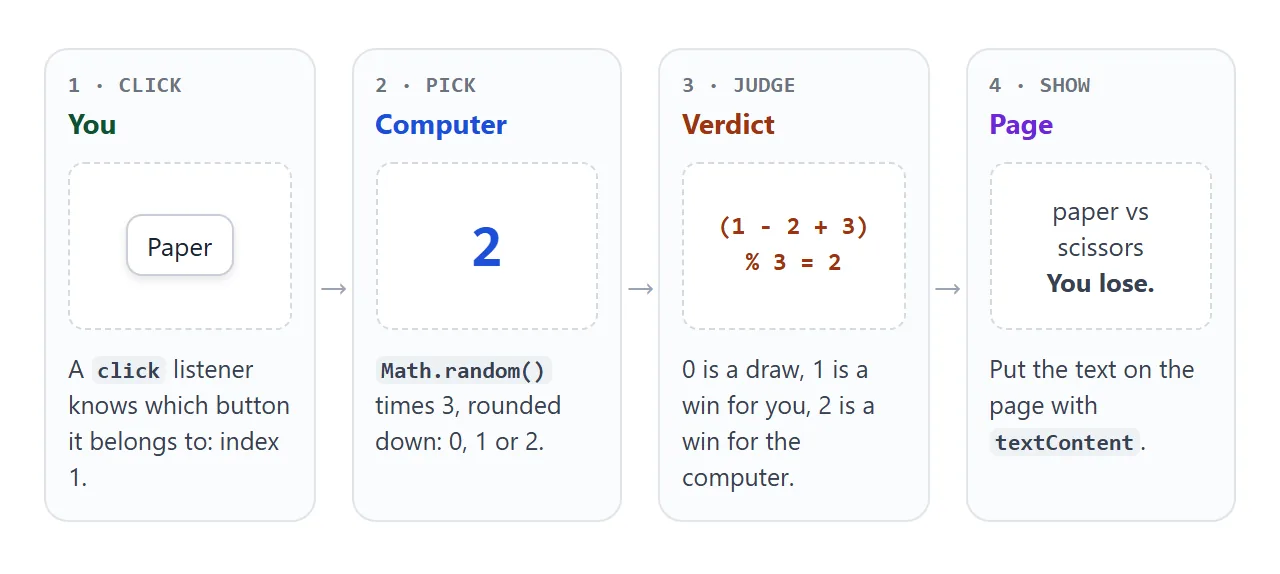
- Number the moves. The array
['rock', 'paper', 'scissors']gives each move an index: 0, 1 and 2. Keep the buttons in the same order as the array. - Listen for clicks. Looping over
querySelectorAll('button')withforEachpasses each button and its position to the callback. That position is the player's move. - Pick for the computer.
Math.floor(Math.random() * 3)gives 0, 1 or 2. - Judge. One expression compares the two numbers, explained next.
- Show the result. Setting
textContentwrites plain text into the paragraph. The paragraph hasaria-live="polite", so a screen reader announces the new result without interrupting.
Why the judge is one line of arithmetic
Put the moves in this order: rock, paper, scissors. Each move then beats the one before it, and rock beats scissors by wrapping around the end of the list.
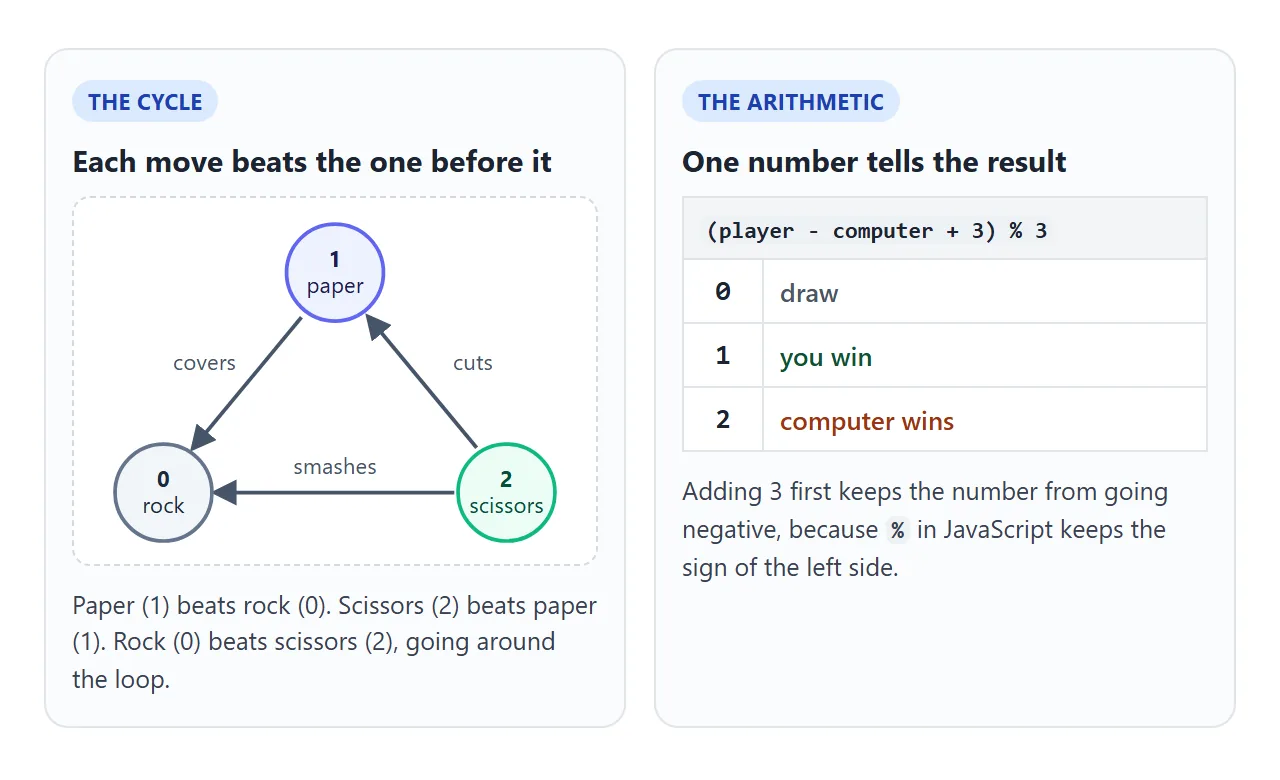
So the difference between your number and the computer's tells the whole story:
const diff = (player - computer + 3) % 3;
// 0 = draw, 1 = you win, 2 = the computer wins
The + 3 matters. In JavaScript the % operator keeps the sign of the number on its left, so without it a difference of -1 would stay -1 and match none of your cases.
Make the computer's pick fair
Math.random() returns a number from 0 up to, but not including, 1. Multiplying by 3 and rounding down splits that range into three equal slices. Rounding to the nearest whole number does not.
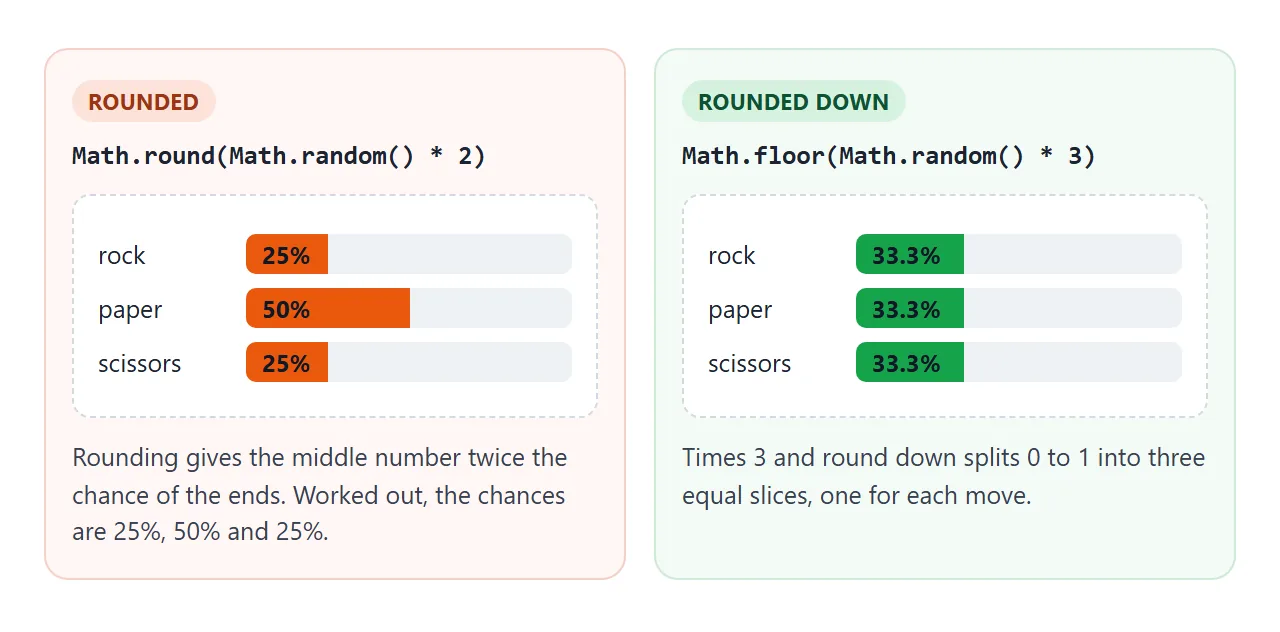
The next example checks both claims by running the code. It builds the nine-pair result table from the judging expression, then picks 30,000 times with each formula and counts the results.
<!doctype html>
<html lang="en">
<head>
<meta charset="utf-8">
<meta name="viewport" content="width=device-width, initial-scale=1">
<title>Check the rules and the random pick</title>
<style>
  body { margin: 0; padding: 16px; font-family: system-ui, sans-serif; background: #fff; color: #1d2330; }
  h2 { font-size: 16px; margin: 0 0 6px; }
  p { margin: 0 0 10px; font-size: 14px; line-height: 1.45; color: #374151; }
  section { border: 1px solid #e1e4ea; border-radius: 12px; padding: 14px; margin-bottom: 14px; }
  table { border-collapse: collapse; width: 100%; max-width: 420px; font-size: 14px; }
  th, td { border: 1px solid #e1e4ea; padding: 6px 8px; text-align: center; }
  th { background: #f4f5f7; font-weight: 600; }
  td.win { background: #e8f6ec; color: #0f5132; }
  td.lose { background: #fdeee9; color: #9a3412; }
  td.draw { background: #f4f5f7; color: #4b5563; }
  #agree { margin-top: 10px; font-weight: 600; }
  button { font: inherit; font-size: 14px; padding: 8px 14px; border: 1px solid #c9ced8; border-radius: 9px; background: #fff; cursor: pointer; }
  .bars { margin-top: 12px; }
  .row { display: grid; grid-template-columns: 112px 1fr; gap: 8px; align-items: center; margin: 4px 0; font-size: 13px; }
  .bar { height: 20px; border-radius: 5px; background: #eef1f5; position: relative; overflow: hidden; }
  .fill { height: 100%; width: 0; background: #16a34a; }
  .bad .fill { background: #ea580c; }
  .bar span { position: absolute; left: 8px; top: 2px; font-size: 12px; color: #111827; }
  h3 { font-size: 14px; margin: 14px 0 4px; }
</style>
</head>
<body>

<section>
  <h2>1. All nine pairs</h2>
  <p>Rows are your move, columns are the computer's. Each cell comes from the same one-line formula.</p>
  <table id="grid"></table>
  <div id="agree"></div>
</section>

<section>
  <h2>2. Is the random pick fair?</h2>
  <p>Pick 30,000 times with each formula and count the three results.</p>
  <button type="button" id="run">Pick 30,000 times</button>
  <div class="bars" id="bars"></div>
</section>

<script>
  const moves = ['rock', 'paper', 'scissors'];

  // Way 1: one line of arithmetic. 0 = draw, 1 = first move wins, 2 = second move wins.
  function judge(a, b) { return (a - b + 3) % 3; }

  // Way 2: spell out every winning pair.
  function judgeLong(a, b) {
    if (a === b) return 0;
    if ((a === 1 && b === 0) || (a === 2 && b === 1) || (a === 0 && b === 2)) return 1;
    return 2;
  }

  // 1. Build the 3 x 3 table and compare both ways.
  const grid = document.getElementById('grid');
  const labels = ['draw', 'win', 'lose'];
  let same = 0;
  let html = '<tr><th></th>' + moves.map(m => '<th>' + m + '</th>').join('') + '</tr>';
  for (let p = 0; p < 3; p++) {
    html += '<tr><th>' + moves[p] + '</th>';
    for (let c = 0; c < 3; c++) {
      const r = judge(p, c);
      if (r === judgeLong(p, c)) same++;
      html += '<td class="' + labels[r] + '">' + labels[r] + '</td>';
    }
    html += '</tr>';
  }
  grid.innerHTML = html;
  document.getElementById('agree').textContent =
    'Both ways agree on ' + same + ' of 9 pairs.';

  // 2. Count results of a fair pick and a skewed one.
  const pickFloor = () => Math.floor(Math.random() * 3);
  const pickRound = () => Math.round(Math.random() * 2);

  function count(pick, n) {
    const t = [0, 0, 0];
    for (let i = 0; i < n; i++) t[pick()]++;
    return t;
  }

  function draw(title, cls, t, n) {
    let s = '<h3>' + title + '</h3><div class="' + cls + '">';
    for (let i = 0; i < 3; i++) {
      const pct = (t[i] / n * 100).toFixed(1);
      s += '<div class="row"><div>' + moves[i] + '</div><div class="bar"><div class="fill" style="width:' + pct + '%"></div><span>' + pct + '%</span></div></div>';
    }
    return s + '</div>';
  }

  document.getElementById('run').addEventListener('click', () => {
    const n = 30000;
    document.getElementById('bars').innerHTML =
      draw('Math.floor(Math.random() * 3)', 'good', count(pickFloor, n), n) +
      draw('Math.round(Math.random() * 2)', 'bad', count(pickRound, n), n);
  });
</script>
</body>
</html>
Run it a few times. The floor counts stay close to a third each. The round counts settle near a quarter, a half and a quarter. For other random-number recipes, see random numbers in JavaScript.
A finished version: first to three
The same play() logic can sit inside a small match. This version adds a score, a first-to-three rule, a round history, a new-match button and keyboard keys.
<!doctype html>
<html lang="en">
<head>
<meta charset="utf-8">
<meta name="viewport" content="width=device-width, initial-scale=1">
<title>Rock Paper Scissors - best of five</title>
<style>
body { margin: 0; padding: 18px 14px; font-family: system-ui, sans-serif; background: #f4f5f7; color: #1d2330; text-align: center; }
h1 { font-size: 20px; margin: 0 0 4px; }
.sub { font-size: 13px; color: #6b7280; margin: 0 0 14px; }
.score { display: flex; justify-content: center; align-items: center; gap: 18px; font-size: 15px; }
.score b { font-size: 30px; display: block; line-height: 1.1; }
.hands { display: flex; justify-content: center; gap: 14px; margin: 14px 0; }
.hand { width: 92px; height: 92px; border-radius: 14px; background: #fff; box-shadow: 0 4px 14px rgba(0,0,0,.1);
display: grid; place-items: center; font-size: 44px; }
.hand.win { outline: 3px solid #16a34a; }
.hand.lose { outline: 3px solid #ea580c; }
.pick button, #again {
font: inherit; font-size: 15px; padding: 10px 14px; margin: 3px; border: 1px solid #c9ced8;
border-radius: 10px; background: #fff; cursor: pointer;
}
.pick button:hover:not(:disabled) { background: #eef2ff; }
.pick button:disabled { opacity: .45; cursor: default; }
#status { min-height: 1.6em; font-size: 17px; font-weight: 600; margin: 8px 0; }
#again[hidden] { display: none; }
ol { list-style: none; margin: 10px auto 0; padding: 0; max-width: 320px; max-height: 120px; overflow-y: auto; font-size: 13px; color: #374151; text-align: left; }
li { padding: 3px 0; border-top: 1px solid #e5e7eb; }
</style>
</head>
<body>
<h1>Rock Paper Scissors</h1>
<p class="sub">First to 3 wins. Keys: R, P, S.</p>
<div class="score">
<div>You<b id="you">0</b></div>
<div>:</div>
<div>Computer<b id="cpu">0</b></div>
</div>
<div class="hands">
<div class="hand" id="handYou">?</div>
<div class="hand" id="handCpu">?</div>
</div>
<div class="pick" id="pick">
<button type="button" data-key="r">✊ Rock</button>
<button type="button" data-key="p">✋ Paper</button>
<button type="button" data-key="s">✌️ Scissors</button>
</div>
<div id="status" aria-live="polite">Pick a move.</div>
<button type="button" id="again" hidden>New match</button>
<ol id="log"></ol>
<script>
const MOVES = ['rock', 'paper', 'scissors'];
const ICONS = ['✊', '✋', '✌️'];
const WINS_NEEDED = 3;
const buttons = document.querySelectorAll('#pick button');
const el = (id) => document.getElementById(id);
let you = 0, cpu = 0, round = 0;
function play(player) {
const computer = Math.floor(Math.random() * 3);
const diff = (player - computer + 3) % 3; // 0 draw, 1 win, 2 lose
round++;
if (diff === 1) you++;
if (diff === 2) cpu++;
el('handYou').textContent = ICONS[player];
el('handCpu').textContent = ICONS[computer];
el('handYou').className = 'hand' + (diff === 1 ? ' win' : diff === 2 ? ' lose' : '');
el('handCpu').className = 'hand' + (diff === 2 ? ' win' : diff === 1 ? ' lose' : '');
el('you').textContent = you;
el('cpu').textContent = cpu;
const li = document.createElement('li');
li.textContent = 'Round ' + round + ': ' + MOVES[player] + ' vs ' + MOVES[computer] +
' - ' + ['draw', 'you win', 'you lose'][diff];
el('log').prepend(li);
if (you === WINS_NEEDED || cpu === WINS_NEEDED) {
el('status').textContent = you > cpu ? 'You win the match!' : 'Computer wins the match.';
buttons.forEach(b => b.disabled = true);
el('again').hidden = false;
el('again').focus();
} else {
el('status').textContent = ['Draw.', 'You win the round.', 'You lose the round.'][diff];
}
}
buttons.forEach((btn, i) => btn.addEventListener('click', () => play(i)));
document.addEventListener('keydown', (e) => {
if (e.ctrlKey || e.metaKey || e.altKey) return;
const i = Array.from(buttons).findIndex(b => b.dataset.key === e.key.toLowerCase());
if (i !== -1 && !buttons[i].disabled) play(i);
});
el('again').addEventListener('click', () => {
you = cpu = round = 0;
el('you').textContent = 0;
el('cpu').textContent = 0;
el('handYou').textContent = '?';
el('handCpu').textContent = '?';
el('handYou').className = el('handCpu').className = 'hand';
el('log').innerHTML = '';
el('status').textContent = 'Pick a move.';
buttons.forEach(b => b.disabled = false);
el('again').hidden = true;
});
</script>
</body>
</html>
- Score: two counters, raised only when
diffis 1 or 2. - End of match: when a counter reaches 3, disable the buttons and show New match.
- Keys: a
keydownlistener readse.keyand finds the button whosedata-keymatches. For more on key handling, see keyboard shortcuts in JavaScript. - History: each round adds a line to a list with
createElementandprepend.
No state is saved between visits. Reload the page and the score starts again at zero.
Rock paper scissors in the console
You can play without any buttons. Open your browser's developer tools, as in HTML DevTools, paste this into the Console tab and call play('rock'):
function play(player) {
  const moves = ['rock', 'paper', 'scissors'];
  if (!moves.includes(player)) return console.log('Use rock, paper or scissors');
  const computer = Math.floor(Math.random() * 3);
  const diff = (moves.indexOf(player) - computer + 3) % 3;
  console.log('Computer: ' + moves[computer] + ' - ' + ['draw', 'you win', 'you lose'][diff]);
}
The includes check stops a typo from being treated as rock. If you read the move with prompt() instead, remember it returns null when the player cancels, and calling a string method on null throws a TypeError.
When it does not work
| What you see | Cause | Fix |
|---|---|---|
| The computer's move shows undefined | The pick is a fraction such as 1.7, which is not an array position | Wrap the pick in Math.floor |
| Paper comes up twice as often as rock | The pick uses Math.round |
Use Math.floor(Math.random() * 3) |
| Some rounds give no verdict | The difference is -1 or -2, which matches no case | Add 3 before the % |
| The page reloads when you click | The button is inside a form and defaults to submit | Add type="button" |
TypeError on addEventListener |
The script runs before the buttons are parsed | Move the script to the end of body |
| Wrong move credited to a button | Button order differs from the array order | Match the orders, or read data-move |
| TypeError after pressing Cancel | prompt() returned null |
Check for null before using the value |
Share it as a link
A game is easier to show than to describe. For more on sharing games, see single-file HTML games.
To send the working version, paste the page into a NOS document and choose Create share link. HTML to link walks through it.
The page renders as written and its script runs, so the people you send it to can play it themselves. If you change the code later, the same link shows the new version.