"Notifications" here means the browser's Notifications API: a web page shows a system notification outside the tab, after the user agrees. It is not an email or a banner inside the page.
In JavaScript it takes two calls: Notification.requestPermission(), then new Notification().
Try the button below. It asks only when you press it, then shows a notification, or a card in the page when that is not possible.
<!doctype html>
<html lang="en">
<head>
<meta charset="utf-8">
<meta name="viewport" content="width=device-width, initial-scale=1">
<title>Show a notification</title>
<style>
  body { margin: 0; padding: 16px; font-family: system-ui, sans-serif; background: #f4f5f7; color: #1d2330; }
  button {
    font: inherit; font-weight: 600; padding: 10px 16px; border: 0; border-radius: 8px;
    background: #2563eb; color: #fff; cursor: pointer;
  }
  #state { margin: 12px 0 0; font-size: 14px; }
  #state code { background: #e8ebf0; border-radius: 4px; padding: 1px 5px; }
  #toasts { margin-top: 14px; display: grid; gap: 8px; }
  .toast {
    padding: 10px 12px; border-radius: 10px; background: #fff; font-size: 14px;
    border-left: 4px solid #f97316; box-shadow: 0 4px 14px rgba(0, 0, 0, .1);
  }
  .toast.ok { border-left-color: #16a34a; }
</style>
</head>
<body>
<button id="go">Show a notification</button>
<p id="state"></p>
<div id="toasts" aria-live="polite"></div>

<script>
  const state = document.getElementById('state');
  const toasts = document.getElementById('toasts');

  function showState() {
    const p = 'Notification' in window ? Notification.permission : 'not supported';
    state.innerHTML = 'Permission: <code>' + p + '</code>';
  }

  // A plain on-page card, used whenever a system notification cannot be shown
  function toast(text, ok) {
    const t = document.createElement('div');
    t.className = 'toast' + (ok ? ' ok' : '');
    t.textContent = text;
    toasts.prepend(t);
    setTimeout(() => t.remove(), 8000);
  }

  document.getElementById('go').addEventListener('click', async () => {
    if (!('Notification' in window)) {
      toast('This browser has no Notification API.');
      return;
    }
    let permission = Notification.permission;
    if (permission === 'default') {
      permission = await Notification.requestPermission();  // asks only after a click
      showState();
    }
    if (permission !== 'granted') {
      toast('Permission is "' + permission + '", so no system notification.');
      return;
    }
    try {
      new Notification('Hello from the page', { body: 'This is a system notification.' });
      toast('Sent to the system.', true);
    } catch (err) {
      toast('The constructor threw ' + err.name + '. Phones need a service worker.');
    }
  });

  showState();
</script>
</body>
</html>
Inside this article, the example runs in an embedded frame. MDN says Chrome and Firefox no longer allow notification permission requests from cross-origin iframes, so the prompt may never appear here. That is why the example always has the on-page card.
How the code works: ask, then show
The whole flow is a permission check, an optional request and a constructor call.
button.addEventListener('click', async () => {
  let permission = Notification.permission;
  if (permission === 'default') {
    permission = await Notification.requestPermission();
  }
  if (permission === 'granted') {
    new Notification('Hello', { body: 'Shown by the browser.' });
  }
});
Notification.permission is a string with exactly three possible values. requestPermission() returns a promise that resolves to one of the same three.
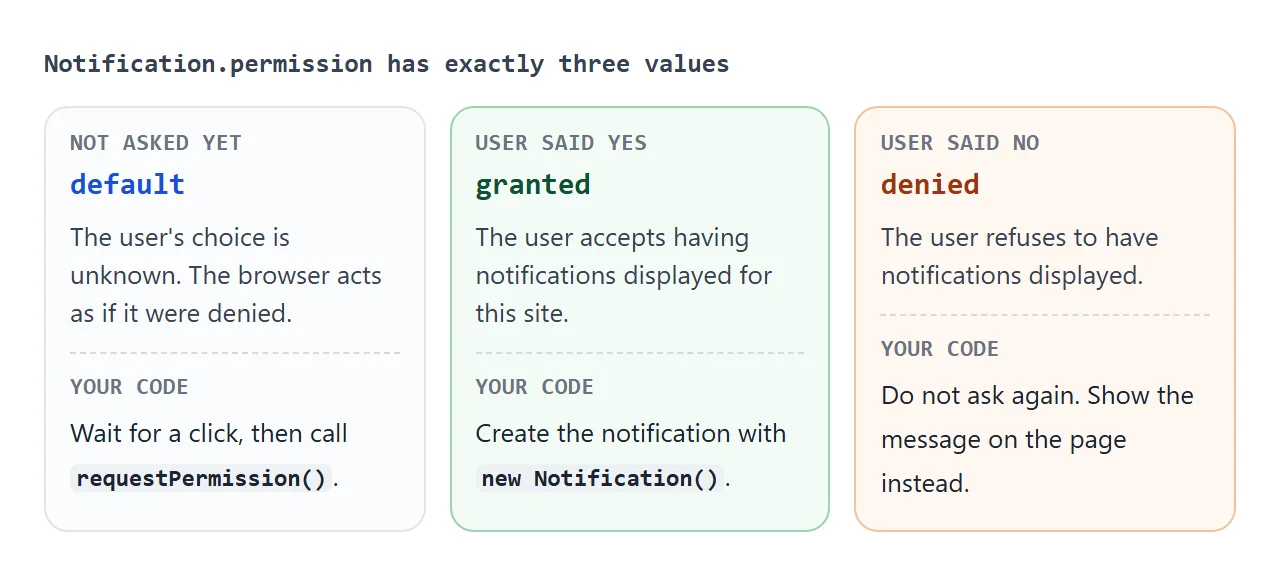
Note that default means the user has not decided. MDN says the browser acts as if it were denied, so a page in that state cannot show anything until it asks.
The older form, requestPermission(callback), is deprecated. Use the promise.
Ask after a click, not on load
A permission prompt that appears the moment a page opens has no context. The reader has not asked for anything yet and cannot tell what the notifications would be for.
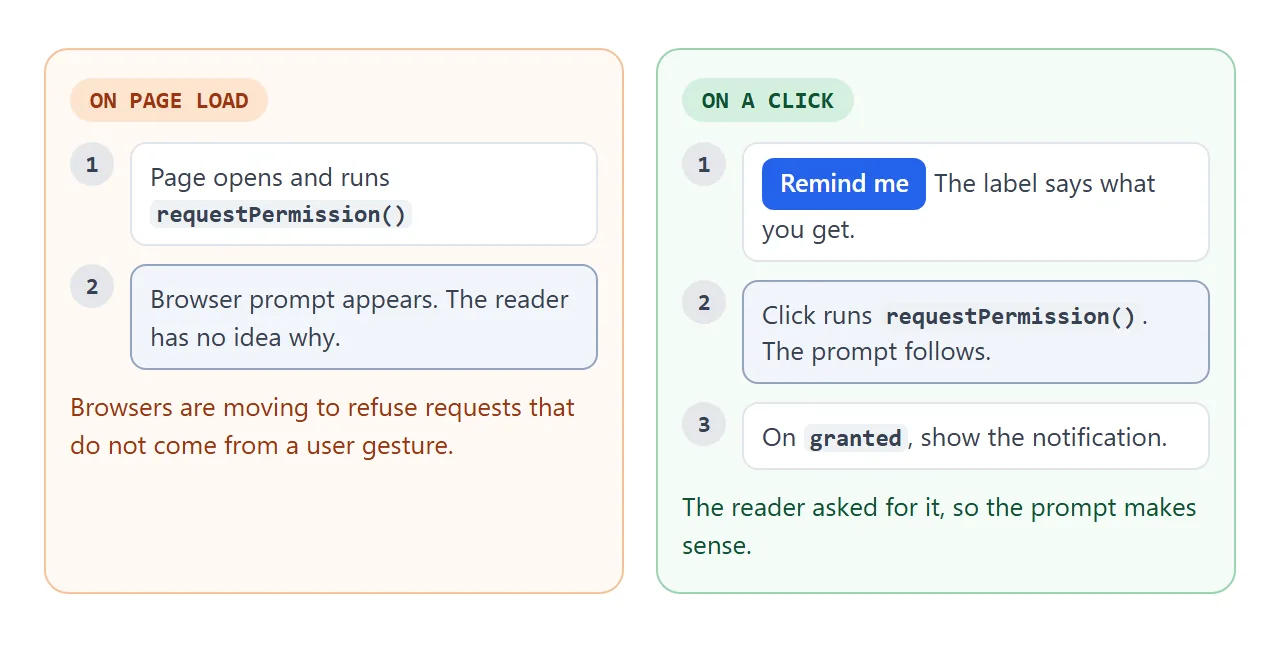
MDN says to request consent only in response to a user gesture such as a button click. It adds that browsers are moving toward refusing requests that are not triggered that way.
- Put the request in a click handler. The button label says what the reader gets: "Remind me", "Tell me when it is done".
- Ask once. Check
Notification.permissionfirst and skip the request when it isdenied. - Keep the page usable without it. A refusal should leave a card, a banner or a status line, not a dead end.
Options: body, tag and more
new Notification(title, options) takes a required title and an optional object. These are the options you will use first.
| Option | What it does |
|---|---|
body |
The text under the title |
tag |
An ID. A new notification with the same tag replaces the older one |
icon |
URL of an image to show beside the text |
silent |
true asks for no sound or vibration |
requireInteraction |
true keeps the notification until the user dismisses it |
data |
Any value you want to carry along with the notification |
The tag is the one that saves users from a pile of alerts. MDN describes it as a way to link notifications so one can be replaced by another instead of filling the screen with similar ones.
<!doctype html>
<html lang="en">
<head>
<meta charset="utf-8">
<meta name="viewport" content="width=device-width, initial-scale=1">
<title>Notification options and tag</title>
<style>
  body { margin: 0; padding: 14px; font-family: system-ui, sans-serif; background: #f4f5f7; color: #1d2330; }
  form { display: grid; gap: 8px; }
  label { font-size: 13px; display: grid; gap: 3px; }
  input[type=text] { font: inherit; padding: 8px 10px; border: 1px solid #c9cdd4; border-radius: 8px; }
  .row { display: flex; gap: 10px; align-items: center; flex-wrap: wrap; }
  .row label { display: flex; gap: 6px; align-items: center; }
  button {
    font: inherit; font-weight: 600; padding: 9px 16px; border: 0; border-radius: 8px;
    background: #2563eb; color: #fff; cursor: pointer;
  }
  #note { margin: 10px 0 0; font-size: 13px; color: #5b6270; min-height: 18px; }
  #cards { margin-top: 8px; display: grid; gap: 8px; }
  .card {
    padding: 10px 12px; border-radius: 10px; background: #fff; border-left: 4px solid #2563eb;
    box-shadow: 0 4px 14px rgba(0, 0, 0, .1); font-size: 14px;
  }
  .card b { display: block; }
  .card small { color: #6b7280; }
</style>
</head>
<body>
<form id="f">
  <label>Title <input type="text" id="title" value="New message"></label>
  <label>Body <input type="text" id="body" value="Ana: are we still on for 3?"></label>
  <div class="row">
    <label><input type="checkbox" id="usetag" checked> Use tag "chat"</label>
    <button>Send</button>
  </div>
</form>
<p id="note"></p>
<div id="cards"></div>

<script>
  const cards = document.getElementById('cards');
  const note = document.getElementById('note');
  let count = 0;

  // The preview card shows what you passed. Cards with the same tag replace each other.
  function preview(title, body, tag) {
    count++;
    const old = tag ? cards.querySelector('[data-tag="' + tag + '"]') : null;
    const el = document.createElement('div');
    el.className = 'card';
    if (tag) el.dataset.tag = tag;
    el.innerHTML = '<b></b><span></span><br><small></small>';
    el.querySelector('b').textContent = title;
    el.querySelector('span').textContent = body;
    el.querySelector('small').textContent = '#' + count + (tag ? ' · tag: ' + tag : ' · no tag');
    if (old) old.replaceWith(el); else cards.prepend(el);
  }

  document.getElementById('f').addEventListener('submit', async (e) => {
    e.preventDefault();  // handled in the page, nothing is sent to a server
    const title = document.getElementById('title').value || 'Untitled';
    const body = document.getElementById('body').value;
    const tag = document.getElementById('usetag').checked ? 'chat' : undefined;
    preview(title, body, tag);

    if (!('Notification' in window)) { note.textContent = 'No Notification API here. Preview only.'; return; }
    let permission = Notification.permission;
    if (permission === 'default') permission = await Notification.requestPermission();
    if (permission !== 'granted') { note.textContent = 'Permission is "' + permission + '". Preview only.'; return; }
    try {
      new Notification(title, { body: body, tag: tag });
      note.textContent = 'Also sent to the system.';
    } catch (err) {
      note.textContent = err.name + ' from the constructor. Preview only.';
    }
  });
</script>
</body>
</html>
Some combinations throw a TypeError: silent: true together with vibrate, or renotify: true with no tag.
The notification object also fires events. click fires when the user clicks it, and by default focuses the page. Call preventDefault() on the event to stop that. close, show and error fire as well. notification.close() closes it from code.
Phones need a service worker
The examples above use the Notification() constructor. MDN says that is fine on desktop, but that on mobile browsers it can throw a TypeError. For phones it recommends registering a service worker and calling showNotification() on the registration.
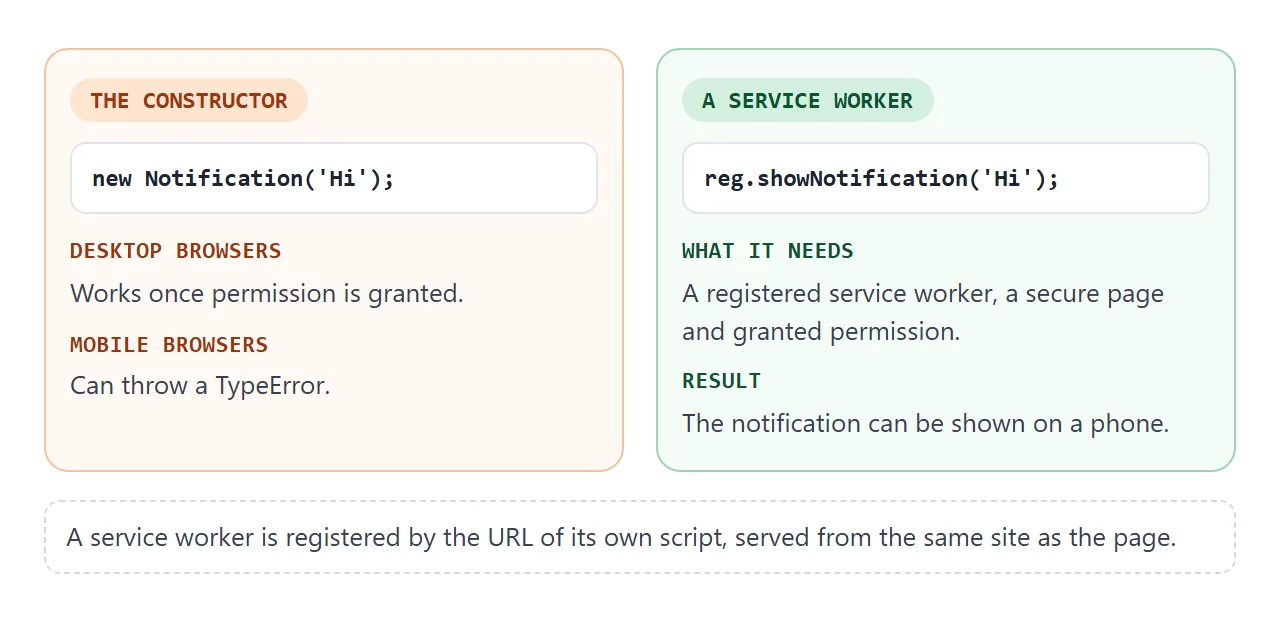
A service worker is registered from the URL of its own script, served from the same site as the page. A single pasted HTML page cannot supply that script, so this part does not run in the examples here. The code looks like this:
// in the page: needs HTTPS and a sw.js file next to it
const reg = await navigator.serviceWorker.register('/sw.js');
if (Notification.permission === 'granted') {
  reg.showNotification('Hello', { body: 'Shown through the worker.' });
}
Until you have that, wrap the constructor in try and catch, as the examples do, and fall back to a card in the page.
A notification while the site is closed is a different job. MDN's Push API page describes it: a server sends the message, and a service worker must be active to receive it.
A finished example: a reminder
Put the pieces together and you have a reminder. Type a message and a delay, press Start, and keep the tab open. When the time is up, the page shows a card and, if permission is granted, a system notification too.
<!doctype html>
<html lang="en">
<head>
<meta charset="utf-8">
<meta name="viewport" content="width=device-width, initial-scale=1">
<title>Reminder with a notification</title>
<style>
  body { margin: 0; padding: 14px; font-family: system-ui, sans-serif; background: #f4f5f7; color: #1d2330; }
  form { display: grid; grid-template-columns: 1fr 90px; gap: 8px; align-items: end; }
  label { font-size: 13px; display: grid; gap: 3px; }
  input { font: inherit; padding: 8px 10px; border: 1px solid #c9cdd4; border-radius: 8px; min-width: 0; }
  button {
    font: inherit; font-weight: 600; padding: 9px 14px; border: 0; border-radius: 8px;
    background: #2563eb; color: #fff; cursor: pointer;
  }
  button.start { grid-column: 1 / -1; }
  button.cancel { background: #e5e7eb; color: #1d2330; padding: 5px 10px; font-size: 13px; }
  #state { margin: 10px 0 4px; font-size: 13px; color: #5b6270; }
  ul { list-style: none; margin: 0; padding: 0; display: grid; gap: 6px; }
  li {
    display: flex; justify-content: space-between; align-items: center; gap: 8px;
    padding: 8px 10px; border-radius: 10px; background: #fff; font-size: 14px;
  }
  li span { overflow-wrap: anywhere; }
  #toasts { margin-top: 10px; display: grid; gap: 8px; }
  .toast {
    padding: 10px 12px; border-radius: 10px; background: #fff; font-size: 14px;
    border-left: 4px solid #16a34a; box-shadow: 0 4px 14px rgba(0, 0, 0, .1);
  }
</style>
</head>
<body>
<form id="f">
  <label>Remind me to <input id="text" value="Stand up and stretch"></label>
  <label>In (sec) <input id="secs" type="number" min="1" max="3600" value="5"></label>
  <button class="start">Start reminder</button>
</form>
<p id="state"></p>
<ul id="list"></ul>
<div id="toasts" aria-live="polite"></div>

<script>
  const list = document.getElementById('list');
  const toasts = document.getElementById('toasts');
  const state = document.getElementById('state');
  const reminders = [];

  function showState() {
    state.textContent = 'System notifications: ' +
      ('Notification' in window ? Notification.permission : 'not supported');
  }

  function fire(text) {
    // Always show a card in the page, then try the system notification too
    const t = document.createElement('div');
    t.className = 'toast';
    t.textContent = 'Reminder: ' + text;
    toasts.prepend(t);
    if (!('Notification' in window) || Notification.permission !== 'granted') return;
    try {
      const n = new Notification('Reminder', { body: text });
      n.onclick = () => { window.focus(); n.close(); };  // bring the tab back on click
    } catch (err) { /* phones: the constructor throws, the card above is enough */ }
  }

  function label(r) {
    return r.text + ' - ' + Math.max(0, Math.ceil((r.due - Date.now()) / 1000)) + 's';
  }

  // Rebuild the list only when a reminder is added or removed, so Cancel clicks are never lost
  function render() {
    list.innerHTML = '';
    for (const r of reminders) {
      const li = document.createElement('li');
      r.span = document.createElement('span');
      r.span.textContent = label(r);
      const b = document.createElement('button');
      b.className = 'cancel'; b.type = 'button'; b.textContent = 'Cancel';
      b.addEventListener('click', () => { reminders.splice(reminders.indexOf(r), 1); render(); });
      li.append(r.span, b);
      list.append(li);
    }
  }

  document.getElementById('f').addEventListener('submit', async (e) => {
    e.preventDefault();
    const text = document.getElementById('text').value || 'Time is up';
    const secs = Math.min(3600, Math.max(1, Number(document.getElementById('secs').value) || 5));
    // Ask for permission here, inside the click that started the reminder
    if ('Notification' in window && Notification.permission === 'default') {
      await Notification.requestPermission();
      showState();
    }
    reminders.push({ text: text, due: Date.now() + secs * 1000 });
    render();
  });

  // One timer checks every reminder twice a second
  setInterval(() => {
    let changed = false;
    for (const r of reminders.slice()) {
      if (Date.now() >= r.due) { reminders.splice(reminders.indexOf(r), 1); fire(r.text); changed = true; }
      else r.span.textContent = label(r);
    }
    if (changed) render();
  }, 500);

  showState();
</script>
</body>
</html>
It uses one setInterval that checks every reminder twice a second. The same timer idea is covered in setTimeout and setInterval. Clicking the system notification calls window.focus() to bring the tab back.
The timer lives in the page. If the tab is closed, the reminder is gone. Pages that need to survive that need a server and a service worker.
When it does not work
| What you see | Cause | Fix |
|---|---|---|
| No prompt, nothing appears | The page is not in a secure context | Serve it over HTTPS |
| No prompt inside an embedded frame | Permission requests from cross-origin iframes are no longer allowed in Chrome and Firefox | Open the page on its own, and keep an on-page fallback |
| Prompt never shows when the page loads | The request did not come from a user gesture | Call requestPermission() in a click handler |
permission is denied |
The user refused earlier | Do not ask again. Show a message in the page |
TypeError from new Notification() |
A mobile browser, or silent with vibrate |
Use showNotification() through a service worker, or remove one option |
| Alerts pile up | Every notification has a new identity | Give related ones the same tag |
| Reminder never fires | The tab was closed, so the timer stopped | Keep the tab open, or use the Push API with a server |
If a page does nothing at all, JavaScript not working in HTML lists the usual script mistakes first.
Share it as a link
A notification page is hard to describe. A screenshot cannot ask for permission, and an .html attachment may not open properly on a phone.
To send the working version, paste the page into a NOS document and choose Create share link. HTML to link walks through it.
The page renders as written and its scripts run, so the people you send it to can press the buttons themselves. If you change the code later, the same link shows the new version.
Keep the on-page fallback in anything you share. A reader may open the link where the permission prompt is not allowed, and the card is how they still see the result.
The sandbox attribute explains how frames limit a page.