An online memorial page is one web page with the person's name, a few photographs, the service details and the memories people want to keep. You need no site builder. Ask an AI chat to write the page, then send it as a link.
Here is a page of that kind. It is a fictional example with placeholder pictures. Open the photographs and the memories.
<!doctype html>
<html lang="en">
<head>
<meta charset="utf-8">
<meta name="viewport" content="width=device-width, initial-scale=1">
<title>In memory of Eleanor Marsh</title>
<style>
* { box-sizing: border-box; }
body {
margin: 0; font-family: Georgia, "Times New Roman", serif;
background: #f6f2ec; color: #2b2a28; line-height: 1.6;
}
.wrap { max-width: 640px; margin: 0 auto; padding: 28px 18px 40px; }
header { text-align: center; padding-bottom: 18px; border-bottom: 1px solid #d9d1c5; }
.portrait { width: 120px; height: 120px; border-radius: 50%; margin: 0 auto 12px; display: block; }
h1 { font-size: 30px; margin: 0; font-weight: 600; }
.dates { color: #6d6558; margin: 4px 0 8px; font-size: 16px; }
.line { font-style: italic; color: #4a463f; margin: 0; }
h2 { font-size: 20px; margin: 30px 0 10px; color: #4b3f2f; }
.stage { border-radius: 12px; overflow: hidden; background: #fff; box-shadow: 0 4px 14px rgba(0,0,0,.08); }
.stage svg { display: block; width: 100%; height: auto; }
.cap { padding: 10px 14px; font-size: 15px; color: #4a463f; min-height: 46px; }
.thumbs { display: flex; gap: 8px; margin-top: 10px; }
.thumbs button {
flex: 1; padding: 0; border: 2px solid transparent; border-radius: 8px;
background: none; cursor: pointer; overflow: hidden;
}
.thumbs button[aria-pressed="true"] { border-color: #8a6d3b; }
.thumbs svg { display: block; width: 100%; height: auto; }
ol.time { list-style: none; margin: 0; padding: 0 0 0 16px; border-left: 2px solid #cdbfa8; }
ol.time li { margin: 0 0 14px; padding-left: 14px; position: relative; }
ol.time li::before {
content: ""; position: absolute; left: -23px; top: 8px;
width: 10px; height: 10px; border-radius: 50%; background: #8a6d3b;
}
ol.time b { color: #4b3f2f; }
.card { background: #fff; border-radius: 12px; padding: 14px 16px; box-shadow: 0 2px 8px rgba(0,0,0,.06); }
.card p { margin: 0 0 6px; }
details { background: #fff; border-radius: 10px; padding: 10px 14px; margin-bottom: 8px; box-shadow: 0 2px 8px rgba(0,0,0,.05); }
summary { cursor: pointer; font-weight: 600; }
details p { margin: 8px 0 2px; }
footer { margin-top: 30px; text-align: center; color: #6d6558; font-size: 14px; }
</style>
</head>
<body>
<div class="wrap">
<header>
<svg class="portrait" viewBox="0 0 120 120" role="img" aria-label="Portrait placeholder: replace with a photo of Eleanor">
<rect width="120" height="120" fill="#e5dccd"/>
<circle cx="60" cy="46" r="20" fill="#b9a98f"/>
<path d="M20 120c4-28 20-40 40-40s36 12 40 40z" fill="#b9a98f"/>
</svg>
<h1>Eleanor Marsh</h1>
<p class="dates"><time datetime="1941-03-14">14 March 1941</time> – <time datetime="2026-09-02">2 September 2026</time></p>
<p class="line">Gardener, teacher, keeper of the good biscuit tin.</p>
</header>
<h2>Photographs</h2>
<div class="stage">
<div id="big"></div>
<div class="cap" id="cap"></div>
</div>
<div class="thumbs" id="thumbs"></div>
<h2>Her life, in short</h2>
<ol class="time">
<li><b>1941</b> Born in Larkfield, the youngest of four.</li>
<li><b>1963</b> Began teaching at the village primary school, where she stayed for 31 years.</li>
<li><b>1972</b> Planted the first row of sweet peas at the back of the house on Mill Lane.</li>
<li><b>2009</b> Started the Thursday gardening club that still meets today.</li>
</ol>
<h2>Celebration of life</h2>
<div class="card">
<p><b>When:</b> <time datetime="2026-09-19T14:00">Saturday 19 September 2026, 2:00 pm</time></p>
<p><b>Where:</b> Larkfield Community Hall, Mill Lane (a fictional place for this example)</p>
<p><b>Please wear:</b> something bright. She disliked black.</p>
<p><b>Afterwards:</b> tea and cake in the hall. Everyone is welcome.</p>
</div>
<h2>Memories</h2>
<details>
<summary>The sweet peas</summary>
<p>Every summer she left a jar of sweet peas on the school office desk. Nobody ever saw her put it there.</p>
</details>
<details>
<summary>The biscuit tin</summary>
<p>The tin on the second shelf was never as empty as it looked. She topped it up whenever someone had a bad week.</p>
</details>
<details>
<summary>Thursday club</summary>
<p>She taught half the village to prune a rose, and was firm that you cut above an outward-facing bud.</p>
</details>
<footer>To add a memory, reply to the message that brought you this page.</footer>
</div>
<script>
// Three placeholder pictures drawn as inline SVG. Swap in your own later.
const photos = [
{ name: 'Garden', cap: 'The back garden on Mill Lane, early summer.', sky: '#cfe6f5', ground: '#8fb878', mark: '#e58aa8' },
{ name: 'Classroom', cap: 'Her classroom, the year of the nativity play.', sky: '#f3e3c3', ground: '#c9a46a', mark: '#7a5c34' },
{ name: 'Seaside', cap: 'The Whitby trip, a Thursday club outing.', sky: '#d6ecf2', ground: '#6fa3b8', mark: '#f2c14e' }
];
function scene(p) {
return '<svg viewBox="0 0 320 180" role="img" aria-label="' + p.cap + '">' +
'<rect width="320" height="180" fill="' + p.sky + '"/>' +
'<rect y="110" width="320" height="70" fill="' + p.ground + '"/>' +
'<circle cx="250" cy="48" r="20" fill="' + p.mark + '"/>' +
'<rect x="60" y="70" width="14" height="50" fill="#6b5a45"/>' +
'<circle cx="67" cy="64" r="26" fill="' + p.mark + '" opacity=".85"/>' +
'</svg>';
}
const big = document.getElementById('big');
const cap = document.getElementById('cap');
const thumbs = document.getElementById('thumbs');
function show(i) {
big.innerHTML = scene(photos[i]);
cap.textContent = photos[i].cap;
thumbs.querySelectorAll('button').forEach((b, k) => b.setAttribute('aria-pressed', k === i));
}
photos.forEach((p, i) => {
const b = document.createElement('button');
b.type = 'button';
b.setAttribute('aria-label', 'Show photo: ' + p.name);
b.innerHTML = scene(p);
b.addEventListener('click', () => show(i));
thumbs.appendChild(b);
});
show(0);
</script>
</body>
</html>
What to put on an online memorial page
Keep it short. People arrive on a phone, often from a message, and want to find the same few things quickly.
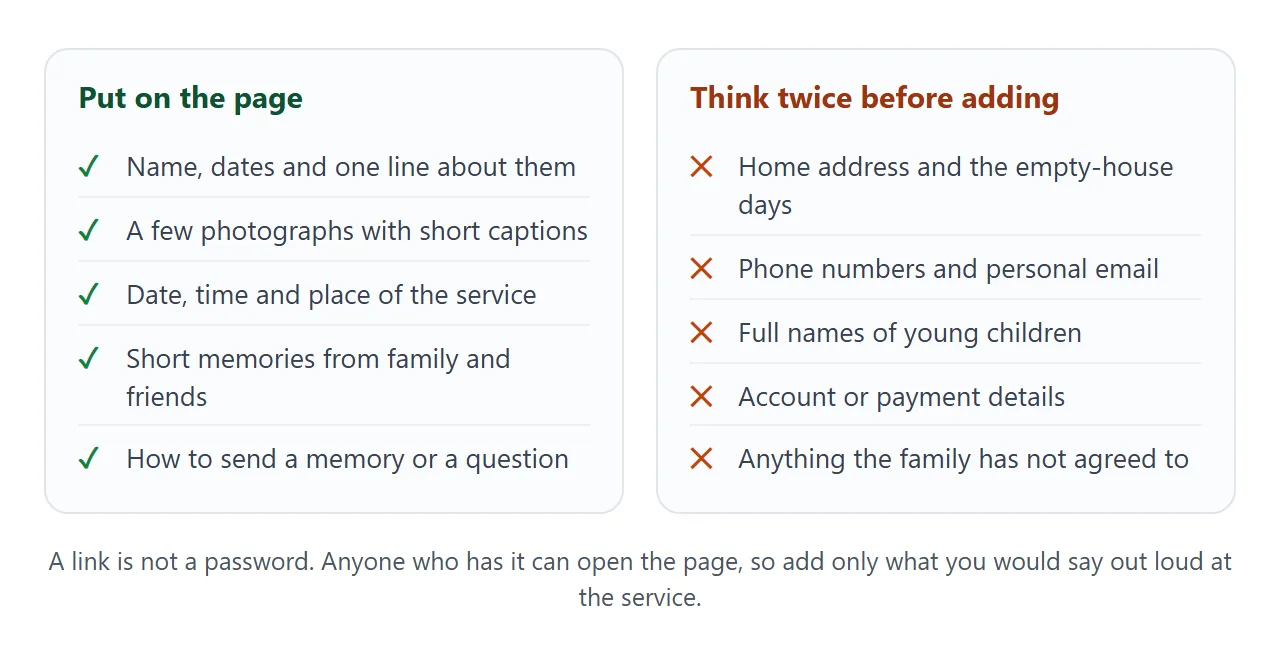
A good page usually has five parts:
- Name, dates and one line. Something the family would say themselves.
- Photographs with short captions. Three to six is plenty.
- Service details. Date, time, place, and anything practical such as what to wear.
- Memories. A few sentences each, with who wrote them.
- How to reply. One sentence on where to send a memory or a question.
Ask the family before you publish anything with other people's names or photographs in it.
Make it with AI
An AI chat such as ChatGPT, Claude or Gemini can write the whole page from a description. Paste this prompt, then replace the bracketed parts with your own facts.
Write one complete HTML page, in a single file, as an online memorial page.
Use a calm layout with a warm, light background and large, easy-to-read text.
It must work on a phone. Do not load anything from other websites: no external images, scripts or fonts.
Use only the facts I give you. Do not invent dates, places, quotes or stories.
Where I give no photo, draw a simple placeholder with inline SVG and a caption I can edit.

Sections: name and dates, a short life summary, photographs with captions,
service details, memories (each in a small expandable box), and a last line
saying where to send a memory.

Name: [name]
Dates: [born] to [died]
One line about them: [line]
Service: [date, time, place, what to wear]
Memories: [two or three, with who wrote each one]
Reply to: [for example "reply to the message you received"]
When the page comes back, check these before anything else:
- Every name, date and time matches what you wrote.
- No sentence or quote appears that you did not provide.
- Nothing is on the page that the family has not agreed to.
- The page reads well when you shrink the browser window to phone width.
If something is wrong, tell the chat what to change in plain words, then copy the new version. Host ChatGPT HTML output covers the copy step.
Send it as a link
Copy the HTML from the chat, paste it into a NOS document, and choose Create share link. HTML to link walks through it. The page renders as written, and the people you send it to open it in a browser, phone included, without an account.
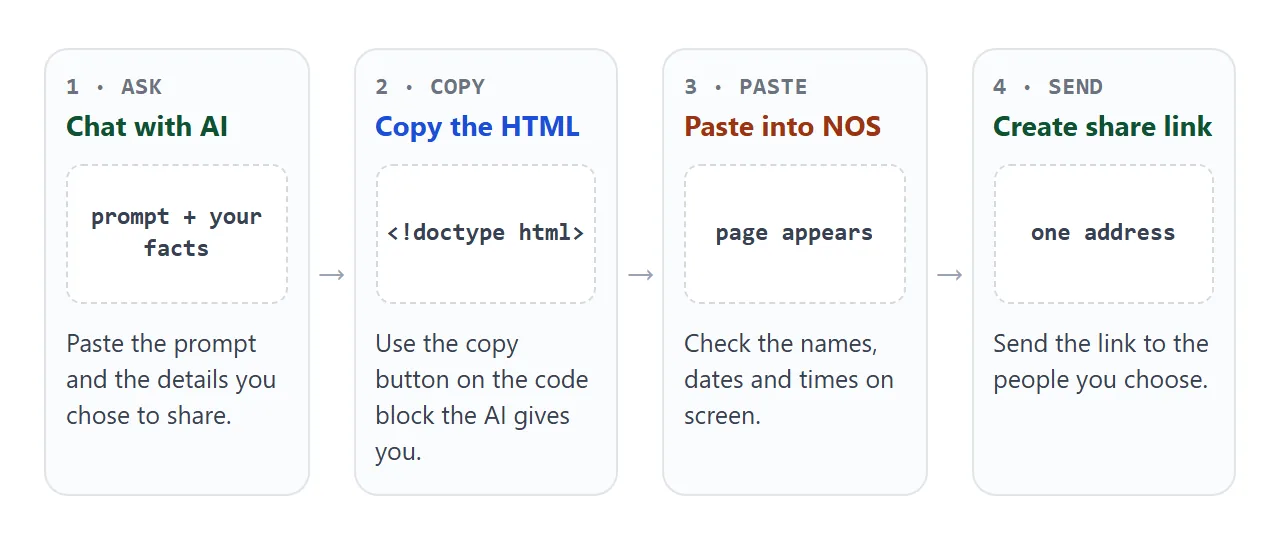
The link opens the page for reading only. Visitors cannot edit it. When you change the code later, for example a new time or one more memory, the same link shows the new version, so nobody needs a second message.
Photos are the hard part. Images loaded from other websites are blocked on shared pages, which is why the example draws its pictures. Open your link on a phone before you send it, and look at every photograph.
Who can open the link
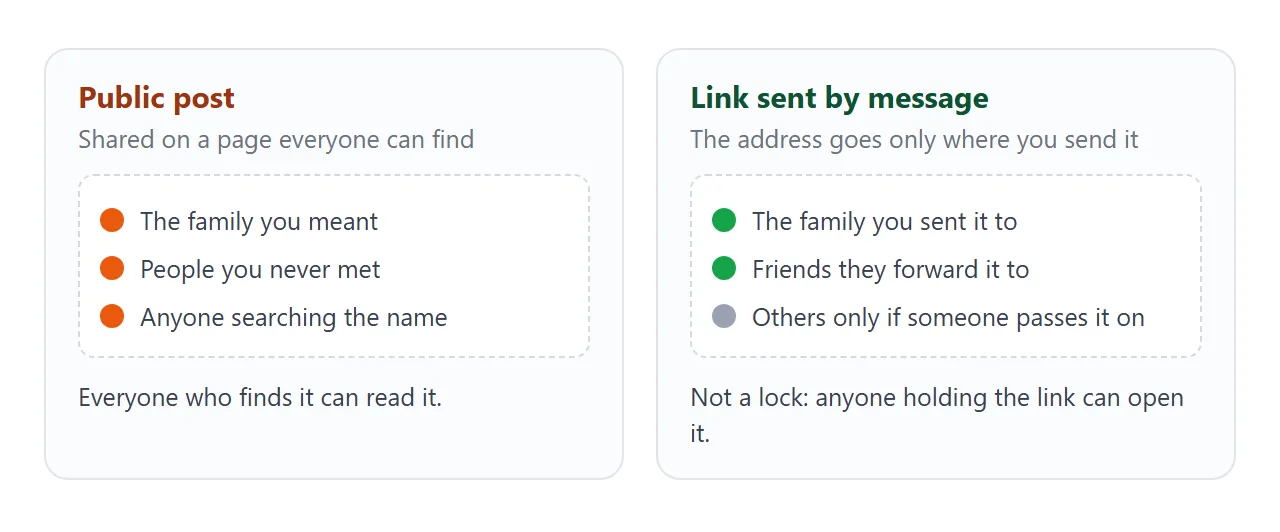
The link is private in the sense that you decide where the address goes. It is not a lock. NOS has no password and no list of allowed visitors, so anyone who holds the link can open the page.
| Attachment | Link | Public post | |
|---|---|---|---|
| Needs an account to open | No, but opening depends on the phone and the mail app | No | Depends on the site |
| Who sees it | Whoever receives the file | Whoever holds the link | Anyone who finds it |
| Update after sending | Send the file again | Same link shows the new version | Depends on the site |
For a small group, send the link in a private message and say who it is meant for. To put it on a printed order of service, see QR code link. Share a file without login compares the other options.
Gather memories from other people
A memorial page grows when others contribute. The page cannot take submissions itself, because a form inside it cannot send answers to a server. Ask people to reply to you, then paste each memory into the page.
<!doctype html>
<html lang="en">
<head>
<meta charset="utf-8">
<meta name="viewport" content="width=device-width, initial-scale=1">
<title>Memories of Daniel Okafor</title>
<style>
  * { box-sizing: border-box; }
  body { margin: 0; font-family: system-ui, sans-serif; background: #1f2a33; color: #eef2f5; line-height: 1.55; }
  .wrap { max-width: 640px; margin: 0 auto; padding: 26px 18px 36px; }
  h1 { margin: 0; font-size: 26px; font-weight: 600; }
  .sub { margin: 4px 0 18px; color: #b7c4cf; }
  .chips { display: flex; flex-wrap: wrap; gap: 8px; margin-bottom: 16px; }
  .chips button {
    border: 1px solid #4d6172; background: transparent; color: #dfe7ed;
    padding: 8px 14px; border-radius: 999px; font-size: 15px; cursor: pointer;
  }
  .chips button[aria-pressed="true"] { background: #f2c14e; border-color: #f2c14e; color: #1f2a33; font-weight: 600; }
  .count { font-size: 14px; color: #b7c4cf; margin: 0 0 12px; }
  .list { display: grid; gap: 12px; }
  .memo { background: #2a3844; border-radius: 12px; padding: 14px 16px; border-left: 4px solid #f2c14e; }
  .memo p { margin: 0 0 8px; }
  .who { font-size: 14px; color: #b7c4cf; }
  .tag { display: inline-block; font-size: 12px; background: #384a59; border-radius: 6px; padding: 1px 8px; margin-left: 6px; }
</style>
</head>
<body>
<div class="wrap">
  <h1>Remembering Daniel Okafor</h1>
  <p class="sub">Memories from the people who knew him. A fictional example page.</p>

  <div class="chips" id="chips"></div>
  <p class="count" id="count"></p>
  <div class="list" id="list"></div>
</div>

<script>
  // Paste each memory as one line here. group is Family, Friends or Work.
  const memories = [
    { group: 'Family', who: 'His sister', text: 'He taught me to ride a bike by running behind me and pretending he was still holding on.' },
    { group: 'Friends', who: 'A friend from the five-a-side team', text: 'Terrible at football, first to organise it every single week.' },
    { group: 'Work', who: 'A colleague on the maintenance crew', text: 'He labelled every cable in the store room, and he was the only one who knew the system.' },
    { group: 'Family', who: 'His cousin', text: 'At every wedding he was the one who found the dance floor first.' },
    { group: 'Friends', who: 'A neighbour', text: 'He kept a spare key for half the street and never once mentioned it.' }
  ];
  const groups = ['All', 'Family', 'Friends', 'Work'];
  let current = 'All';

  const chips = document.getElementById('chips');
  const list = document.getElementById('list');
  const count = document.getElementById('count');

  function render() {
    const shown = memories.filter(m => current === 'All' || m.group === current);
    count.textContent = shown.length + (shown.length === 1 ? ' memory' : ' memories');
    list.innerHTML = '';
    shown.forEach(m => {
      const d = document.createElement('div');
      d.className = 'memo';
      const p = document.createElement('p');
      p.textContent = m.text;
      const w = document.createElement('div');
      w.className = 'who';
      w.textContent = m.who;
      const t = document.createElement('span');
      t.className = 'tag';
      t.textContent = m.group;
      w.appendChild(t);
      d.append(p, w);
      list.appendChild(d);
    });
    chips.querySelectorAll('button').forEach(b => b.setAttribute('aria-pressed', b.dataset.g === current));
  }

  groups.forEach(g => {
    const b = document.createElement('button');
    b.type = 'button';
    b.dataset.g = g;
    b.textContent = g;
    b.addEventListener('click', () => { current = g; render(); });
    chips.appendChild(b);
  });
  render();
</script>
</body>
</html>
Add one line for each memory to the list at the top of the script, and the page sorts it under its heading. Everyone with the link sees it the next time they open the page.
For the service details on a page of their own, see event landing page.
When it does not work
| What you see | Cause | Fix |
|---|---|---|
| The photographs are empty boxes | The page asks another website for the images | Ask the AI to draw placeholders, and check every picture on a phone |
| The page is tiny on a phone | The viewport tag is missing | Ask the chat to make it work on a phone |
| A date or place is wrong | The AI guessed a detail you did not give | Correct it in the chat, copy the new version, paste again |
| The memories do not expand | The code was cut off when copying | Copy the whole code block, from the first line to the last |
| A relative cannot open the file | An attachment depends on the phone and the app | Send the link instead, see open HTML on a phone |
| People ask for a password | NOS has no password feature | Share the link only in private messages, and keep sensitive details off the page |