Open Graph tags are the meta lines in a page's head that chat apps, social feeds and messaging tools read when someone pastes a link, so they can draw a preview card instead of showing the raw address. og:title, og:description and og:image are the three that matter; the card they produce is the difference between a link people click and one they scroll past.
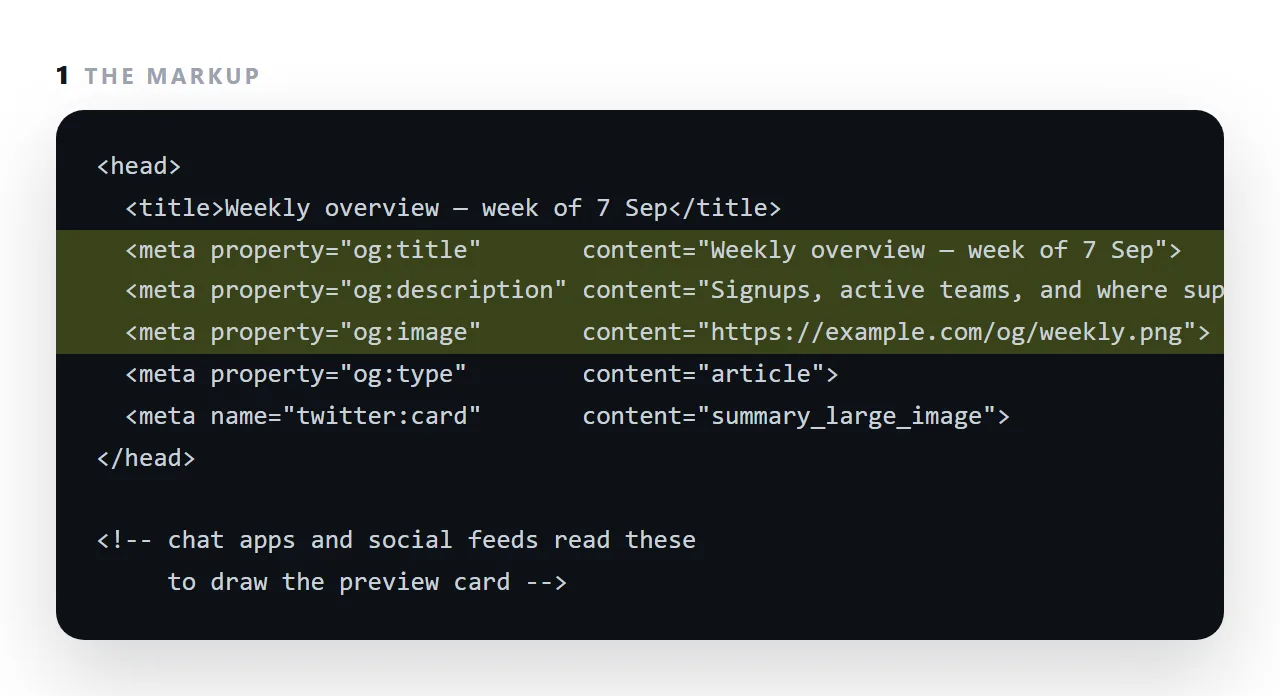
This guide covers why the card changes behaviour, the complete useful set of tags, sizing the image, how the tags relate to the title and meta description, and how to test what a link will look like before sending it.
<meta property="og:title" content="Weekly overview — week of 7 Sep">
<meta property="og:description" content="Signups, active teams, and where support time went.">
<meta property="og:image" content="https://example.com/og/weekly.png">
<meta property="og:url" content="https://example.com/weekly">
Four lines. With them, your link pasted into a channel becomes a card with a title, a sentence and a picture. Without them, it is a bare address.
Why an Open Graph preview card changes behaviour
In a busy channel the card is the message for most readers. It carries the title and the headline point in front of everyone scrolling past, and the ones who care click through.
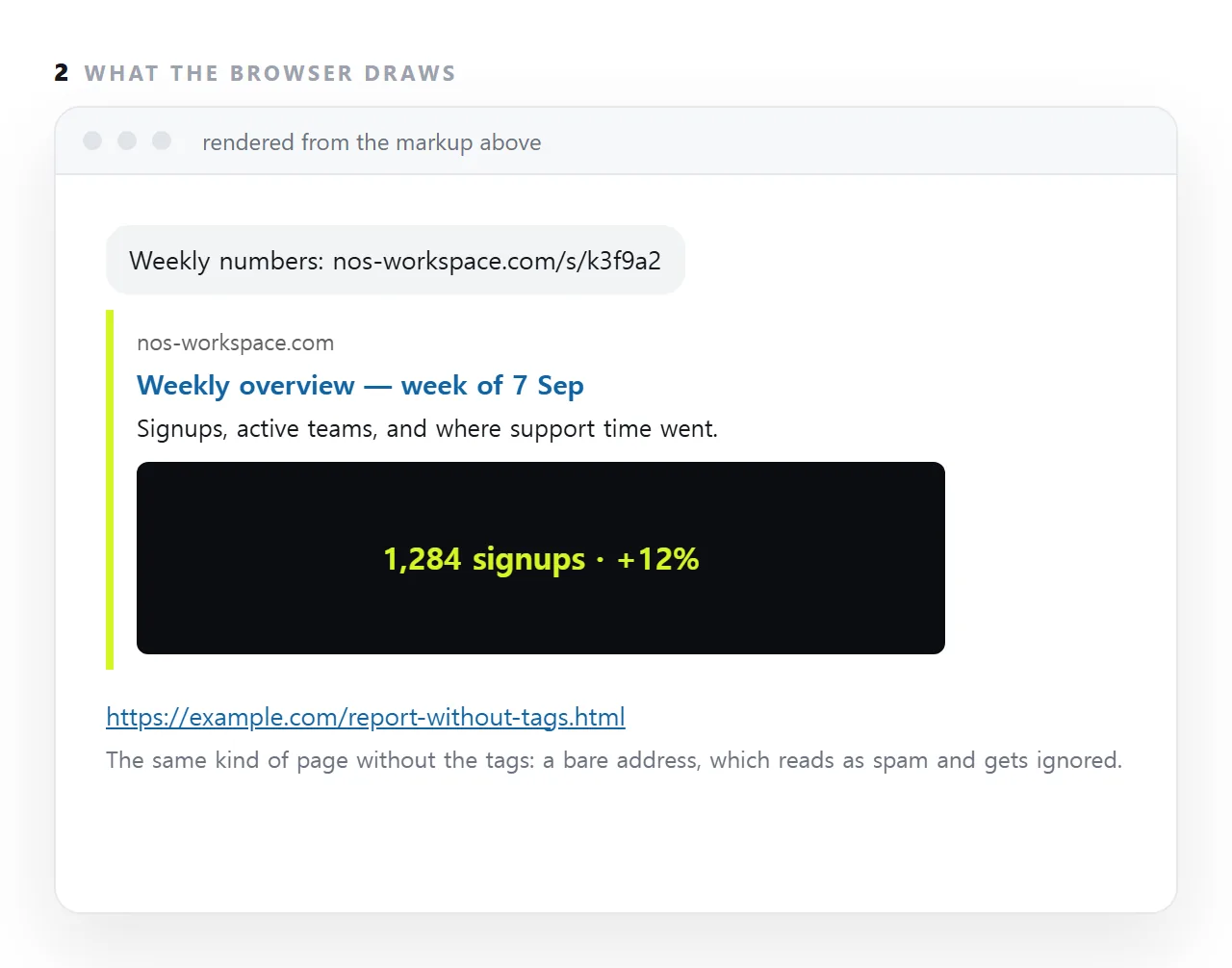
A bare address carries nothing. It also looks like the kind of link people have been trained not to click. This is the practical difference between a message that gets engagement and one that gets scrolled past — and it is four lines.
It is also a large part of why a link beats a file: an uploaded file has no address to look up, so it can never have a card.
The complete useful set
<!-- Open Graph -->
<meta property="og:type" content="article">
<meta property="og:title" content="Weekly overview — week of 7 Sep">
<meta property="og:description" content="Signups, active teams, and where support time went.">
<meta property="og:image" content="https://example.com/og/weekly.png">
<meta property="og:image:width" content="1200">
<meta property="og:image:height" content="630">
<meta property="og:image:alt" content="Four KPI cards and a bar chart of signup sources">
<meta property="og:url" content="https://example.com/weekly">
<meta property="og:site_name" content="Example">

<!-- one extra line for the card shape -->
<meta name="twitter:card" content="summary_large_image">
Points worth knowing:
og:image must be an absolute address. A relative path resolves to nothing for the app fetching it, and no image appears.
Declaring width and height lets the app reserve the space before the image arrives, which avoids a moment where the card is drawn without it.
og:image:alt is read by screen readers when the card is announced. Rarely set, and it costs nothing.
og:url should match your canonical address, so shares of the same page with different tracking parameters are treated as one.
The image
| Property | Value |
|---|---|
| Size | 1200 × 630 |
| Format | PNG or JPEG |
| File size | Under about 300KB |
| Minimum that shows at all | Roughly 200 × 200 |
Design for the fact it will be displayed small, and often cropped. The title of the page repeated as large text in the image is more effective than a screenshot of the page, because a screenshot at card size is illegible.
Keep the important content away from the edges — different apps crop differently.
Caching, and how to refresh
Once an app has fetched your card it caches it, sometimes for a long time. Editing the page does not update the card already shown in old messages.
Most platforms provide a debug tool that refetches on demand — that is the only reliable way to force an update. Plan on getting the card right before the link is widely shared, rather than after.
A quick self-check
Paste the link into a private message to yourself in whichever app matters most. That is the real test, and it takes ten seconds.
Check three things: the title is not truncated in a way that loses its meaning, the image is not illegibly cropped, and the description is a sentence rather than the first words of the page.
Difference from the description meta tag
og:description is for the sharing card. <meta name="description"> is for search results. They can be the same sentence and often should be, but one does not substitute for the other — see meta descriptions.
Three Open Graph mistakes that cost the most
An image behind a login. The chat app fetches the image as an anonymous visitor. If the address needs a session, the card has no image, and often no card at all.
A relative image address. og:image has to be a full https:// address; /img/preview.png is not fetched.
A stale card. Most apps cache the first card they drew for an address. Changing the title later does not change the card in old messages, and some apps keep the old card for new pastes for a day or more. Get the title right before the first share.
The tags and the search snippet
Open Graph tags and the meta description do different jobs. Search engines read the title tag and the meta description for the result snippet; chat apps read og:title and og:description for the card. They can carry the same words, and usually should, but a page needs both sets, because neither reader looks at the other's tags.
Getting the preview card right: 4 steps
- Write the
<title>first, thenog:titleto match. The title is what the tab shows;og:titleis what the card shows. Usually the same words, with the date in them for anything periodic. - Add
og:descriptionandog:image. One sentence, and an image at a fullhttps://address, at least 1200 by 630 pixels, that reads at thumbnail size. - Add
og:typeand the twitter card line.articleorwebsite, andtwitter:cardset tosummary_large_imageso the image shows large. - Paste the link into a chat with yourself and look at the card. If it is a bare address, one of the three is missing or the image is not reachable without a login. A NOS page carries its title and description into the card automatically: Share, then Share link, then Create link.