p5.js is a free, open-source JavaScript library for creative coding: drawing, animation and interaction on an HTML <canvas>. To run p5 js samples in a single HTML file, you need one <script> tag that loads p5.js and two functions you write yourself, setup() and draw().
There is nothing to install and no build step. Here is a complete sketch. Move the mouse over it, or drag a finger on a phone.
<!doctype html>
<html lang="en">
<head>
<meta charset="utf-8">
<meta name="viewport" content="width=device-width, initial-scale=1">
<title>p5.js sketch</title>
<style>
  body { margin: 0; overflow: hidden; }
  canvas { display: block; touch-action: none; } /* a finger draws instead of scrolling */
</style>
</head>
<body>
<!-- 1. load p5.js (pinned version) -->
<script src="https://cdn.jsdelivr.net/npm/p5@2.3.4/lib/p5.min.js"></script>

<!-- 2. your sketch: two global functions -->
<script>
  // runs once
  function setup() {
    createCanvas(windowWidth, 300);
    noStroke();
  }

  // runs again and again (60 frames a second on most computers)
  function draw() {
    background(250, 245, 235);          // wipe the last frame

    // a dot that circles the centre on its own
    const a = frameCount * 0.03;
    fill(60, 130, 240);
    circle(width / 2 + cos(a) * 90, height / 2 + sin(a) * 90, 24);

    // a circle that follows the mouse or finger
    fill(255, 110, 80);
    circle(mouseX, mouseY, 56);

    fill(40);
    text('Move the mouse, or drag a finger', 12, 22);
  }

  // keep the canvas as wide as the window
  function windowResized() {
    resizeCanvas(windowWidth, 300);
  }
</script>
</body>
</html>
The p5.js website says it is free and open source, and the project repository lists the LGPL-2.1 licence. If you would rather draw on a canvas with no library, drawing on an HTML canvas shows the plain JavaScript way.
The smallest working file
Copy this into an empty .html file and open it in a browser:
<!doctype html>
<html lang="en">
<head>
<meta charset="utf-8">
<meta name="viewport" content="width=device-width, initial-scale=1">
<title>My p5.js sketch</title>
</head>
<body>
<script src="https://cdn.jsdelivr.net/npm/p5@2.3.4/lib/p5.min.js"></script>
<script>
  function setup() {
    createCanvas(400, 300);
  }

  function draw() {
    background(240);
    circle(mouseX, mouseY, 40);
  }
</script>
</body>
</html>
You do not add a <canvas> tag. createCanvas() makes one and adds it to the page.
The p5.js download page lists jsDelivr addresses for the library. On 1 October 2026 the latest version on npm is 2.3.4. The download page also offers p5@2, which always loads the newest 2.x release.
Pin the exact version, as above. A sketch that loads p5@2 can change when a new release comes out, and you will not know why.
What setup() and draw() do
The p5.js docs describe setup() as a function called once when the sketch begins, and draw() as a function called repeatedly while it runs. The frame rate reference says most computers default to 60 frames a second.
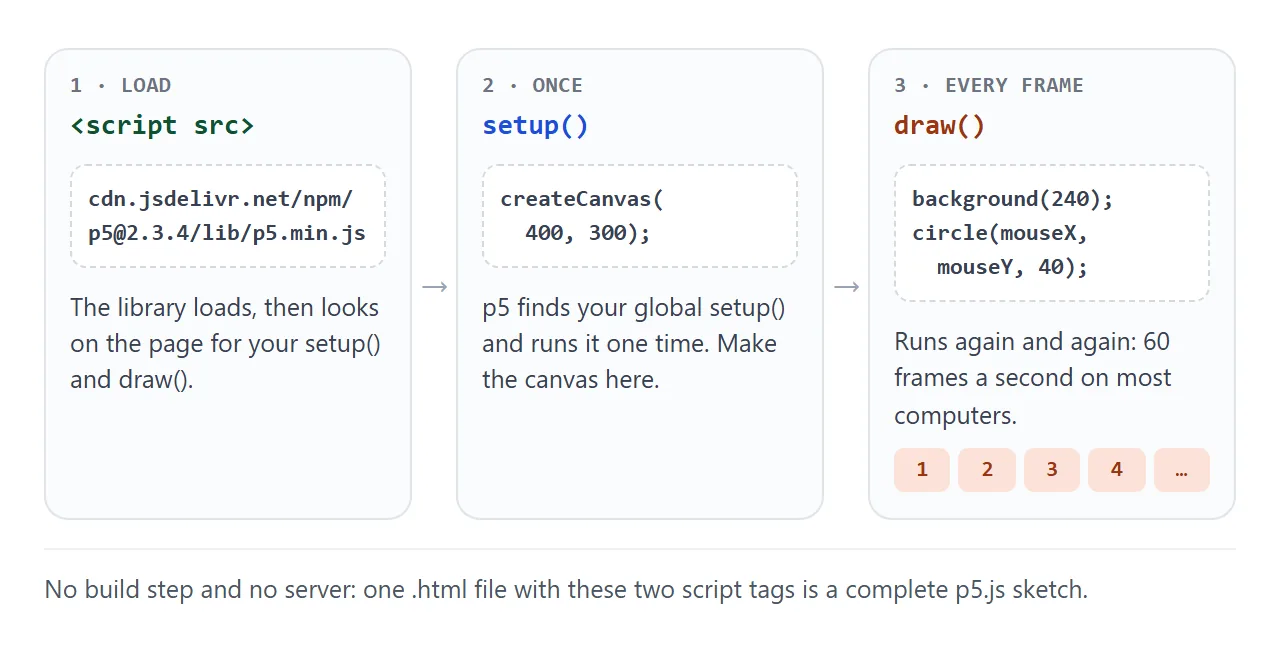
- The script tag loads p5.js. It then looks on the page for your
setup()anddraw(). setup()runs one time. CallcreateCanvas()here, at the start, and only once.draw()runs again and again. Each call draws one frame of the animation.
Inside draw(), mouseX and mouseY hold the pointer position, width and height hold the canvas size, and frameCount counts frames since the start. The first example uses all of them.
background() in draw() or in setup()
The p5.js reference says background() is typically used in draw() to clear the canvas at the start of each frame. Called only in setup(), it paints the first frame and nothing wipes later frames.
Both are useful. Compare them side by side:
<!doctype html>
<html lang="en">
<head>
<meta charset="utf-8">
<meta name="viewport" content="width=device-width, initial-scale=1">
<title>background() in draw vs in setup</title>
<style>
  body {
    margin: 0; padding: 10px; font-family: system-ui, sans-serif;
    display: grid; grid-template-columns: 1fr 1fr; gap: 10px;
  }
  h3 { margin: 0 0 2px; font-size: 14px; font-family: ui-monospace, Consolas, monospace; }
  p { margin: 0 0 6px; font-size: 12px; color: #5b6270; }
  canvas { display: block; border-radius: 8px; }
</style>
</head>
<body>
<div><h3>background() in draw</h3><p>Wiped every frame: one ball.</p><div id="left"></div></div>
<div><h3>background() in setup</h3><p>Never wiped: a trail.</p><div id="right"></div></div>

<script src="https://cdn.jsdelivr.net/npm/p5@2.3.4/lib/p5.min.js"></script>
<script>
  // Instance mode: each sketch is a function that receives its own p5 object (p).
  function bouncer(clearEachFrame, id) {
    return (p) => {
      let x = 30, y = 40, vx = 2.2, vy = 1.7;

      p.setup = () => {
        p.createCanvas(document.getElementById(id).clientWidth, 200);
        p.background(235, 240, 250);
      };

      p.draw = () => {
        if (clearEachFrame) p.background(235, 240, 250);
        x += vx; y += vy;
        if (x < 12 || x > p.width - 12) vx *= -1;   // bounce off the sides
        if (y < 12 || y > p.height - 12) vy *= -1;
        p.noStroke();
        p.fill(60, 130, 240);
        p.circle(x, y, 24);
      };
    };
  }

  // two sketches on one page, each inside its own div
  new p5(bouncer(true, 'left'), 'left');
  new p5(bouncer(false, 'right'), 'right');
</script>
</body>
</html>
The left canvas shows one ball. The right one keeps every ball it ever drew, which is how paint programs and trail effects work.
This page also shows instance mode.
Each sketch is a function that receives its own p5 object, called p here, and new p5(sketch, 'left') places it inside the element with that id. The p5.js reference says it is useful for pages with several sketches or other libraries.
Four p5 js samples to paste
Each sample below is a complete <script> body. Put it after the p5.js script tag in the smallest working file, in place of the sketch there.
A ball that bounces between the sides:
let x = 50, dx = 3;
function setup() { createCanvas(400, 200); }
function draw() {
  background(240);
  x += dx;
  if (x < 20 || x > width - 20) dx = -dx;
  circle(x, height / 2, 40);
}
A grid of random colours that draws once, and again on each click. noLoop() stops draw() from repeating, and redraw() runs it one more time:
function setup() {
  createCanvas(400, 400);
  noLoop();
}
function draw() {
  background(255);
  for (let x = 0; x < width; x += 40) {
    for (let y = 0; y < height; y += 40) {
      fill(random(255), random(255), random(255));
      rect(x, y, 40, 40);
    }
  }
}
function mousePressed() { redraw(); }
A smooth moving wave made with noise():
function setup() { createCanvas(400, 200); }
function draw() {
  background(20);
  stroke(120, 200, 255);
  noFill();
  beginShape();
  for (let x = 0; x <= width; x += 5) {
    vertex(x, height * noise(x * 0.01, frameCount * 0.01));
  }
  endShape();
}
A paint program in ten lines. It never calls background() in draw(), so every line stays:
function setup() {
  createCanvas(400, 300);
  background(255);
}
function draw() {
  if (mouseIsPressed) {
    strokeWeight(6);
    line(pmouseX, pmouseY, mouseX, mouseY);
  }
}
For an animation with no library, requestAnimationFrame is the browser function behind this kind of loop.
Why the page stays blank
p5.js runs in global mode by default. The reference says it searches the page for functions such as setup() and draw(). If it cannot find them, it does nothing and shows no error.
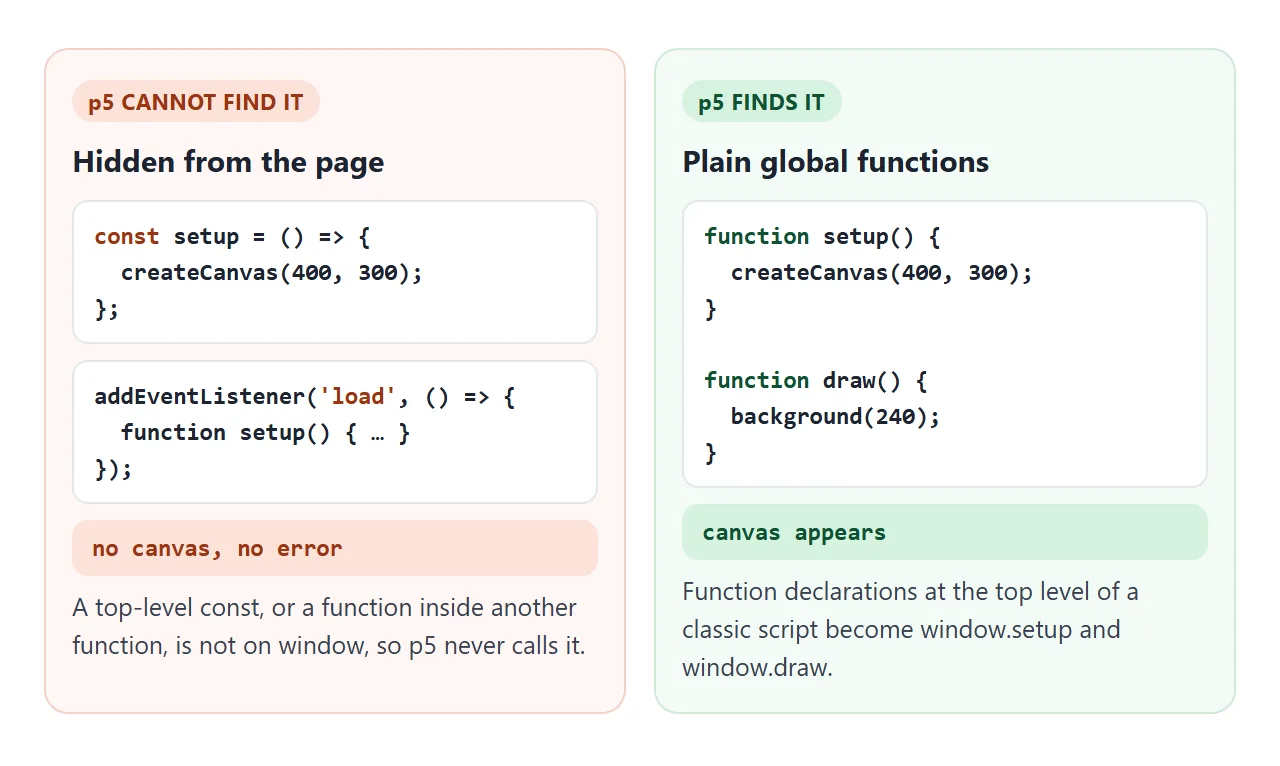
Two common ways to hide them, both tested to give no canvas and no message:
- Arrow functions in a const. A top-level
const setup = () => ...is not a property ofwindow. - Wrapping the sketch in a
loadorDOMContentLoadedlistener, sosetupexists only inside that function.
Write function setup() and function draw() at the top level of a normal script. If the canvas appears but is a small square, createCanvas() is missing. Without it the canvas is 100 by 100 pixels.
Images and preload() in p5.js 2.x
Many p5 js samples online were written for version 1 and load images in preload(). The p5.js-compatibility repository says preload() no longer works in 2.0. In a test with 2.3.4 it was skipped without any message.
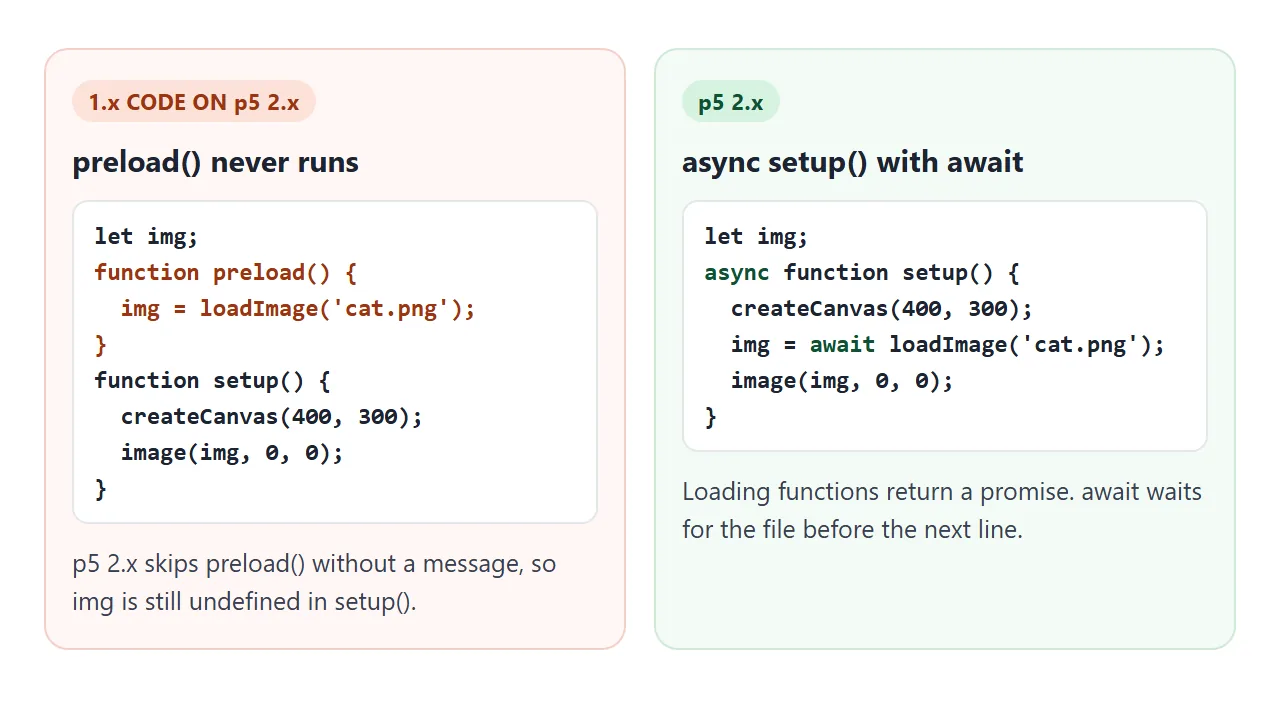
In 2.x, loading functions return a promise. Make setup() async and wait for the file:
let img;
async function setup() {
  createCanvas(400, 300);
  img = await loadImage('cat.png');
  image(img, 0, 0);
}
The file itself is the next trap. Opened as a file:// page in Chromium, loadImage('cat.png') fails with "Failed to fetch". For a single file, draw the picture with shapes, or put a small image in a data: URI. Both load without a server.
A finished sample: a kaleidoscope
This one puts the pieces together. Drag on the dark square to draw, and each stroke repeats around the centre. The slider sets how many mirrors there are.
<!doctype html>
<html lang="en">
<head>
<meta charset="utf-8">
<meta name="viewport" content="width=device-width, initial-scale=1">
<title>p5.js kaleidoscope</title>
<style>
  body { margin: 0; padding: 12px; font-family: system-ui, sans-serif; background: #f4f5f7; }
  .bar { display: flex; flex-wrap: wrap; align-items: center; gap: 10px; margin-bottom: 10px; font-size: 14px; }
  .bar label { display: flex; align-items: center; gap: 6px; }
  .bar output { min-width: 1.5em; font-weight: 700; }
  button { font: inherit; padding: 6px 12px; border: 1px solid #c9cdd4; border-radius: 8px; background: #fff; cursor: pointer; }
  #pad canvas { display: block; margin: 0 auto; border-radius: 12px; touch-action: none; }
</style>
</head>
<body>
<div class="bar">
  <label>Mirrors <input id="slices" type="range" min="2" max="12" value="6"> <output id="n">6</output></label>
  <button id="clear">Clear</button>
  <button id="save">Save PNG</button>
</div>
<div id="pad"></div>

<script src="https://cdn.jsdelivr.net/npm/p5@2.3.4/lib/p5.min.js"></script>
<script>
  const slices = document.getElementById('slices');
  let last = null;  // previous point of the current stroke

  function setup() {
    const size = min(windowWidth - 24, 380);
    createCanvas(size, size).parent('pad');
    colorMode(HSB);
    background(230, 40, 12);
    // a starter pattern, so the pad is not empty
    for (let t = 0; t < 1; t += 0.02) {
      mirror(t * 140, sin(t * 12) * 30, (t + 0.02) * 140, sin((t + 0.02) * 12) * 30, 190 + t * 120);
    }
  }

  function draw() {
    const inside = mouseX >= 0 && mouseY >= 0 && mouseX <= width && mouseY <= height;
    if (!mouseIsPressed || !inside) { last = null; return; }
    // measure from the centre of the canvas
    const x = mouseX - width / 2, y = mouseY - height / 2;
    if (last) mirror(last[0], last[1], x, y, frameCount % 360);
    last = [x, y];
  }

  // draw one segment n times around the centre, plus its reflection
  function mirror(x1, y1, x2, y2, hue) {
    const n = Number(slices.value);
    push();
    translate(width / 2, height / 2);
    stroke(hue, 70, 95);
    strokeWeight(3);
    for (let i = 0; i < n; i++) {
      rotate(TWO_PI / n);
      line(x1, y1, x2, y2);
      line(x1, -y1, x2, -y2);
    }
    pop();
  }

  slices.addEventListener('input', () => { document.getElementById('n').value = slices.value; });
  document.getElementById('clear').addEventListener('click', () => background(230, 40, 12));
  document.getElementById('save').addEventListener('click', () => saveCanvas('kaleidoscope', 'png'));
</script>
</body>
</html>
- No background() in draw(): strokes stay, as in the trails example.
- translate() and rotate():
mirror()moves the origin to the centre and draws the same segment once per mirror, plus its reflection. - HTML controls: the slider and buttons are ordinary HTML elements with
addEventListener. p5.js only draws. - saveCanvas(): the reference says it saves the canvas as an image. The Save button calls it with the name
kaleidoscopeand the typepng.
The canvas has touch-action: none. MDN says the value none turns off the browser's own panning and zooming on that element, so a finger draws instead of scrolling.
For a sketch that becomes a small game, single HTML file games covers the next steps. Canvas particles shows a particle effect in plain JavaScript.
When it does not work
| What you see | Cause | Fix |
|---|---|---|
| Blank page, no error | setup is a const arrow function or sits inside another function |
Use a top-level function setup() |
| A small square canvas | createCanvas() was never called |
Call it at the start of setup() |
| Shapes leave smears | background() runs only in setup() |
Call background() first in draw() |
An image from preload() is undefined |
Version 1 code on p5.js 2.x | async function setup() with await |
| "Failed to fetch" for an image | The page was opened from file:// |
Use a data: URI or draw it with shapes |
| A finger scrolls instead of drawing | The browser treats the touch as a scroll | touch-action: none on the canvas |
| The canvas is wider than a phone | A fixed width in createCanvas() |
Use windowWidth and windowResized() |
| The sketch changed by itself | The script tag loads p5@2 |
Pin the full version, such as p5@2.3.4 |
If the page is blank for some other reason, HTML JavaScript not working walks through the general checks.
Share it as a link
A sketch only makes sense when it moves. A screenshot is frozen, and an .html attachment may open as plain code on someone else's phone.
To send the working version, paste the page into a NOS document and choose Create share link. HTML to link walks through it.
The page renders as written, its scripts run and p5.js loads from jsDelivr, so the people you send it to can play with the sketch themselves.
Anyone with the link can open it without an account.
If you change the code later, the same link shows the new version. Images from other sites are blocked on a shared page, so keep pictures in data: URIs or draw them with p5.js.
The p5.js Web Editor at editor.p5js.org is another place to write and share sketches. Its setup tutorial says you need to be logged in to save one.