A random quote generator is an array of quotes, one random index, and a button that writes the chosen quote into the page. It fits in a single HTML file, with no API, no library and no server. Press the button, then read the code.
<!doctype html>
<html lang="en">
<head>
<meta charset="utf-8">
<meta name="viewport" content="width=device-width, initial-scale=1">
<title>Random quote generator</title>
<style>
  body {
    margin: 0; min-height: 100vh; box-sizing: border-box; padding: 16px;
    display: grid; place-items: center;
    font-family: system-ui, sans-serif; background: #f4f5f7;
  }
  .card {
    width: 100%; max-width: 420px; box-sizing: border-box;
    background: #fff; border-radius: 14px; padding: 22px;
    box-shadow: 0 6px 20px rgba(0, 0, 0, .12);
  }
  blockquote { margin: 0; font: 20px/1.4 Georgia, serif; min-height: 84px; }
  figcaption { margin-top: 8px; color: #6b7280; font-size: 14px; }
  button {
    margin-top: 16px; padding: 10px 18px; border: 0; border-radius: 8px;
    background: #1d4ed8; color: #fff; font: 600 15px system-ui, sans-serif; cursor: pointer;
  }
</style>
</head>
<body>
<figure class="card" style="margin:0">
  <blockquote id="text"></blockquote>
  <figcaption id="who"></figcaption>
  <button id="next" type="button">New quote</button>
</figure>

<script>
  // The whole "database": add a quote by adding one line.
  const quotes = [
    { text: 'The first draft is allowed to be ugly. That is its whole job.', who: 'A patient editor' },
    { text: 'I do not fix bugs. I introduce them gently, so they have time to adjust.', who: 'A tired developer' },
    { text: 'Plans are just guesses wearing a tie.', who: 'A project manager' },
    { text: 'Water the plant, answer the email, in that order.', who: 'The office plant' },
    { text: 'A cat does not apologise for the 3 a.m. concert.', who: 'A very calm cat' },
  ];

  const text = document.getElementById('text');
  const who = document.getElementById('who');

  function show() {
    // random() is 0 up to (not including) 1, so floor() gives 0 .. length - 1
    const q = quotes[Math.floor(Math.random() * quotes.length)];
    text.textContent = q.text;           // textContent keeps "<" and "&" as plain text
    who.textContent = '— ' + q.who;
  }

  document.getElementById('next').addEventListener('click', show);
  show();  // fill the card once on load
</script>
</body>
</html>
The list lives inside the page, so pressing the button downloads nothing. To add a quote, add one line to the array.
How the code works: four steps
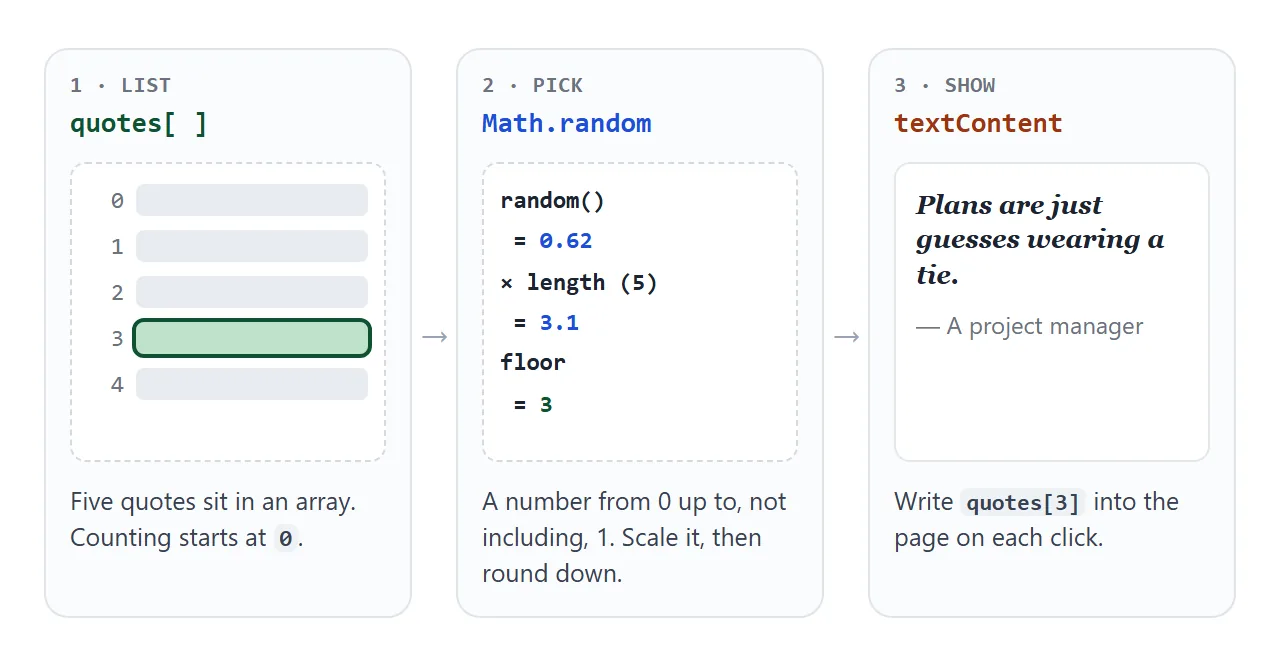
- Keep the quotes in an array. Each item is an object with
textandwho, so a quote and its author stay together. - Pick a random index.
Math.random()returns a number from 0 up to, but not including, 1. Multiply it byquotes.lengthand round down withMath.floor(). - Write the quote into the page. Set
textContenton the quote and author elements. UnlikeinnerHTML, it never reads the text as HTML, so a quote containing<or&shows exactly as typed. - Run it on click, and once on load. Call the function from the button's
clicklistener, and again at the end of the script so the card is never empty.
A <button> can be focused and works from the keyboard, so Enter or Space also draws a new quote. For the markup, put the quote in a <blockquote> and the author in the <figcaption> of a wrapping <figure>. The blockquote guide explains the tags.
Why Math.floor, not Math.round
Rounding looks harmless and breaks once in a while. Math.round(Math.random() * 5) can return 5, and with five quotes the last valid index is 4. A random value of 0.95 times 5 is 4.75, which rounds to 5.
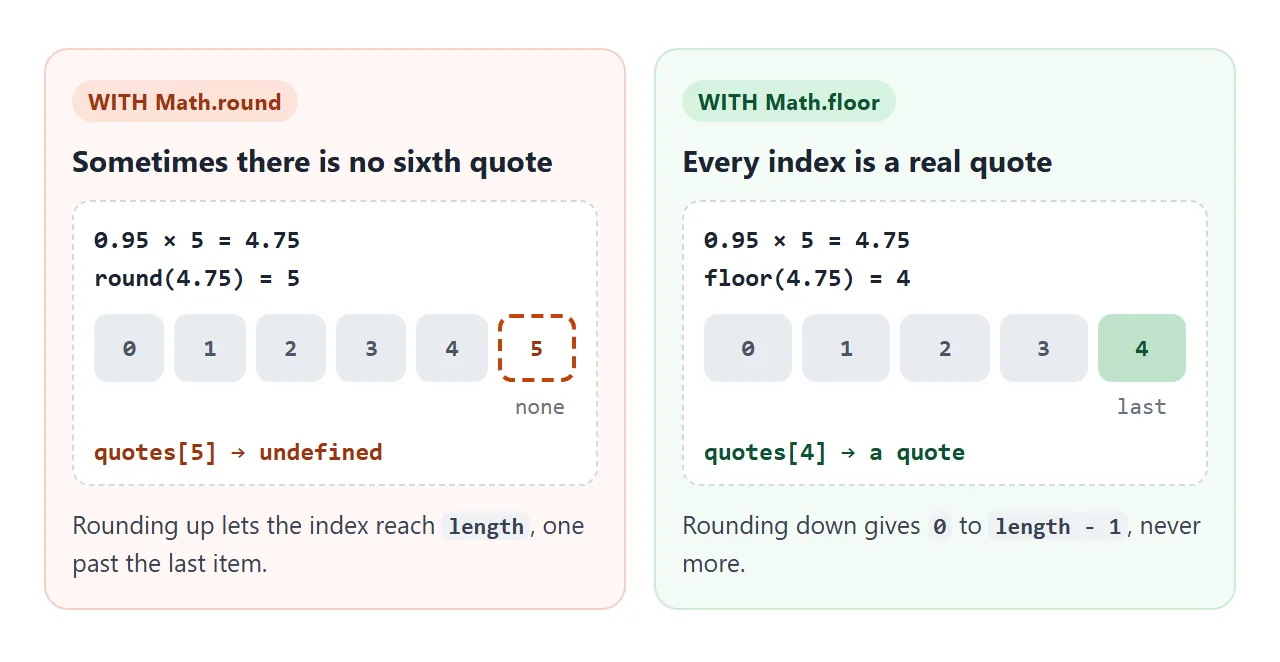
Reading an index past the end of an array gives undefined, and the next line, q.text, then throws an error. The card keeps the old quote and the button seems to ignore you now and then. Math.floor can never reach quotes.length.
For other random picks, such as shuffles and colours, see random numbers in JavaScript.
Why the same quote shows twice in a row
Each pick is independent, so the generator has no memory of what it just showed. With five quotes, any press has a one in five chance of repeating the quote on screen. That looks like a bug to the reader.
Compare the two methods. Press the button and count the orange squares.
<!doctype html>
<html lang="en">
<head>
<meta charset="utf-8">
<meta name="viewport" content="width=device-width, initial-scale=1">
<title>Plain random vs shuffled deck</title>
<style>
  body { margin: 0; padding: 14px; font-family: system-ui, sans-serif; background: #f4f5f7; color: #1d2330; }
  .top { display: flex; align-items: center; gap: 12px; flex-wrap: wrap; margin-bottom: 12px; }
  button {
    padding: 10px 16px; border: 0; border-radius: 8px; background: #1d4ed8; color: #fff;
    font: 600 15px system-ui, sans-serif; cursor: pointer;
  }
  .hint { font-size: 13px; color: #4b5563; }
  .row { display: grid; grid-template-columns: 1fr 1fr; gap: 12px; }
  @media (max-width: 480px) { .row { grid-template-columns: 1fr; } }
  .panel { background: #fff; border-radius: 12px; padding: 12px; box-shadow: 0 4px 14px rgba(0, 0, 0, .08); }
  h2 { margin: 0 0 8px; font-size: 15px; }
  .seq { display: flex; flex-wrap: wrap; gap: 4px; min-height: 60px; align-content: flex-start; }
  .chip {
    width: 22px; height: 22px; display: grid; place-items: center; border-radius: 5px;
    background: #e8ecf2; font: 700 12px ui-monospace, Consolas, monospace;
  }
  .chip.rep { background: #f97316; color: #fff; }
  .count { margin-top: 10px; font-size: 14px; }
  .count b { font-size: 20px; }
</style>
</head>
<body>
<div class="top">
  <button id="draw" type="button">Draw 30 quotes</button>
  <span class="hint">Five quotes, A to E. Orange = same quote as the one before.</span>
</div>
<div class="row">
  <div class="panel">
    <h2>Plain random</h2>
    <div class="seq" id="seq-plain"></div>
    <div class="count">Repeats in a row: <b id="n-plain">0</b></div>
  </div>
  <div class="panel">
    <h2>Shuffled deck</h2>
    <div class="seq" id="seq-deck"></div>
    <div class="count">Repeats in a row: <b id="n-deck">0</b></div>
  </div>
</div>

<script>
  const N = 5;                 // number of quotes
  const names = 'ABCDE';

  // 1) Plain random: every pick ignores the last one.
  function plain() {
    return Math.floor(Math.random() * N);
  }

  // 2) Deck: deal each quote once, then refill and start over.
  let deck = [];
  function dealt(last) {
    if (deck.length === 0) deck = [0, 1, 2, 3, 4];             // refill
    let k = Math.floor(Math.random() * deck.length);
    if (deck[k] === last && deck.length > 1) k = (k + 1) % deck.length;  // no repeat across a refill
    return deck.splice(k, 1)[0];                                // take it out of the deck
  }

  function run(pick, seqId, countId) {
    const seq = document.getElementById(seqId);
    seq.textContent = '';
    let last = -1, repeats = 0;
    for (let i = 0; i < 30; i++) {
      const n = pick(last);
      const chip = document.createElement('span');
      chip.className = 'chip';
      chip.textContent = names[n];
      if (n === last) { chip.classList.add('rep'); repeats++; }
      seq.appendChild(chip);
      last = n;
    }
    document.getElementById(countId).textContent = repeats;
  }

  document.getElementById('draw').addEventListener('click', () => {
    deck = [];
    run(plain, 'seq-plain', 'n-plain');
    run(dealt, 'seq-deck', 'n-deck');
  });
</script>
</body>
</html>
The fix is a deck, like a deck of cards. Deal every quote once in random order, then refill and deal again:
let deck = [];
function nextIndex(last) {
  if (deck.length === 0) deck = quotes.map((q, i) => i);  // refill
  let k = Math.floor(Math.random() * deck.length);
  if (deck[k] === last && deck.length > 1) k = (k + 1) % deck.length;
  return deck.splice(k, 1)[0];  // remove it from the deck and return it
}
splice removes the dealt index from the deck and returns it, so no quote comes back until the others have been shown. The check on last covers the one place a repeat could still slip in: the moment the deck is refilled.
Do you need a quote API?
Searches for this often include the word API. A quote API is another website that sends back a quote when your page asks for one with fetch. It saves you from writing the list, but it adds conditions your page has to meet.
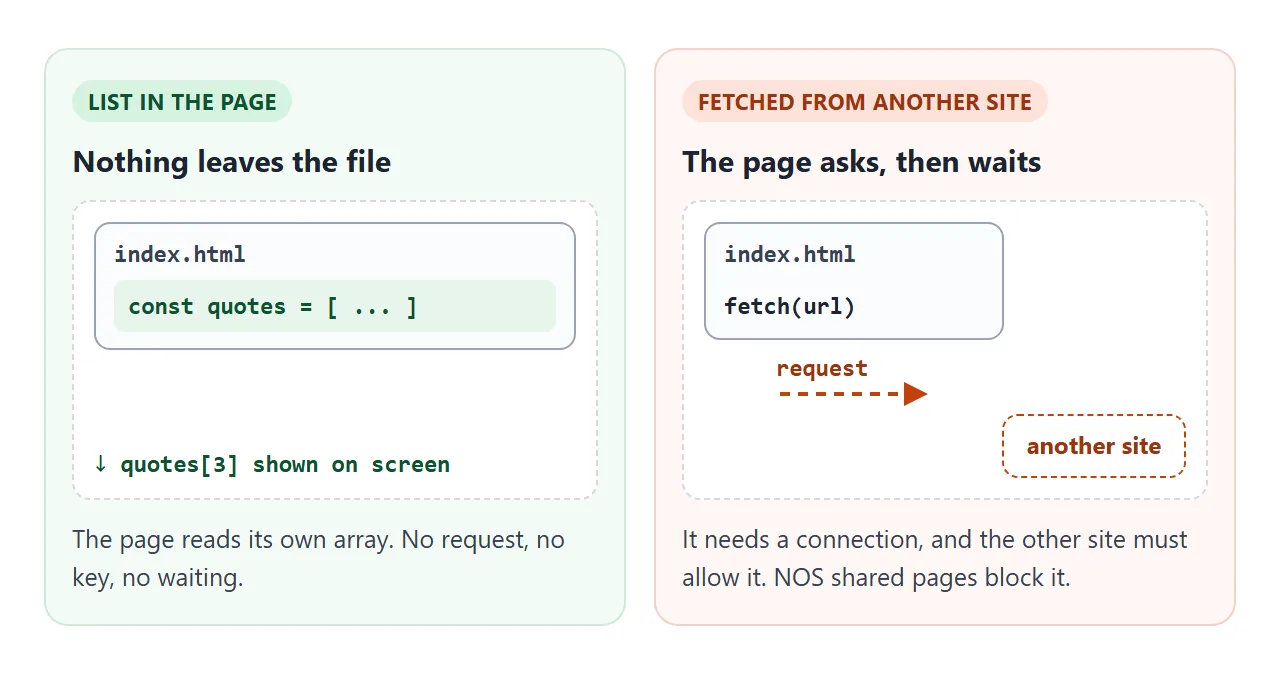
- The reader must be online.
- The other site must allow requests from your page. The browser enforces this rule, called CORS.
- On a page shared from NOS,
fetchto other sites is blocked.
A list inside the page has none of these conditions, and the quotes are yours. You choose the tone, the length and whether they are funny. For a longer list, paste more lines into the array.
If you ask an AI chat to draft the quotes, ask for a JavaScript array. Check any quote credited to a real person before you publish it.
A finished example: mood filter, copy and history
To make the generator funny, calm or businesslike, change the list, not the code. This version tags each quote and lets the reader pick a mood.
<!doctype html>
<html lang="en">
<head>
<meta charset="utf-8">
<meta name="viewport" content="width=device-width, initial-scale=1">
<title>Quote card</title>
<style>
  body {
    margin: 0; padding: 14px; box-sizing: border-box; min-height: 100vh;
    font-family: system-ui, sans-serif; background: #f4f5f7; color: #1d2330;
  }
  .card { max-width: 440px; margin: 0 auto; background: #fff; border-radius: 14px; padding: 18px; box-shadow: 0 6px 20px rgba(0, 0, 0, .12); }
  .bar { display: flex; align-items: center; gap: 8px; margin-bottom: 14px; }
  label { font-size: 14px; color: #4b5563; }
  select { padding: 7px 8px; border: 1px solid #cbd2dc; border-radius: 8px; font: 15px system-ui, sans-serif; background: #fff; }
  figure { margin: 0; }
  blockquote { margin: 0; font: 21px/1.4 Georgia, serif; min-height: 90px; }
  figcaption { margin-top: 8px; color: #6b7280; font-size: 14px; }
  .btns { display: flex; gap: 8px; margin-top: 14px; flex-wrap: wrap; }
  button {
    padding: 10px 16px; border: 0; border-radius: 8px; background: #1d4ed8; color: #fff;
    font: 600 15px system-ui, sans-serif; cursor: pointer;
  }
  button.alt { background: #e8ecf2; color: #1d2330; }
  #status { min-height: 20px; margin-top: 8px; font-size: 13px; color: #0f5132; }
  #box { width: 100%; box-sizing: border-box; margin-top: 6px; padding: 8px; font: 14px system-ui, sans-serif; border: 1px solid #cbd2dc; border-radius: 8px; resize: none; }
  h2 { margin: 18px 0 6px; font-size: 14px; color: #4b5563; }
  ol { margin: 0; padding-left: 20px; font-size: 14px; color: #374151; line-height: 1.5; }
</style>
</head>
<body>
<div class="card">
  <div class="bar">
    <label for="cat">Mood</label>
    <select id="cat">
      <option value="all">Anything</option>
      <option value="funny">Funny</option>
      <option value="calm">Calm</option>
      <option value="work">Work</option>
    </select>
  </div>

  <figure aria-live="polite">
    <blockquote id="text"></blockquote>
    <figcaption id="who"></figcaption>
  </figure>

  <div class="btns">
    <button id="next" type="button">New quote</button>
    <button id="copy" type="button" class="alt">Copy</button>
  </div>
  <div id="status" aria-live="polite"></div>
  <textarea id="box" rows="2" readonly hidden></textarea>

  <h2>Seen so far</h2>
  <ol id="hist"></ol>
</div>

<script>
  const quotes = [
    { tag: 'funny', text: 'I do not fix bugs. I introduce them gently, so they have time to adjust.', who: 'A tired developer' },
    { tag: 'funny', text: 'A cat does not apologise for the 3 a.m. concert.', who: 'A very calm cat' },
    { tag: 'funny', text: 'Coffee is not a personality, but it is a very good first draft of one.', who: 'A morning person' },
    { tag: 'calm',  text: 'Small steps still leave footprints.', who: 'A trail guide' },
    { tag: 'calm',  text: 'Water the plant, answer the email, in that order.', who: 'The office plant' },
    { tag: 'calm',  text: 'The tea will wait. The tea is very good at waiting.', who: 'A kettle' },
    { tag: 'work',  text: 'The first draft is allowed to be ugly. That is its whole job.', who: 'A patient editor' },
    { tag: 'work',  text: 'Plans are just guesses wearing a tie.', who: 'A project manager' },
    { tag: 'work',  text: 'Ship the small version. The big version is still a rumour.', who: 'A product owner' },
  ];

  const $ = (id) => document.getElementById(id);
  let pool = [];       // quotes not yet dealt in this round
  let last = null;     // the quote on screen
  const seen = [];

  function next() {
    if (pool.length === 0) {                       // new round: refill from the chosen mood
      const mood = $('cat').value;
      pool = quotes.filter((q) => mood === 'all' || q.tag === mood);
    }
    let k = Math.floor(Math.random() * pool.length);
    if (pool[k] === last && pool.length > 1) k = (k + 1) % pool.length;
    last = pool.splice(k, 1)[0];

    $('text').textContent = last.text;
    $('who').textContent = '— ' + last.who;
    $('status').textContent = '';
    $('box').hidden = true;

    seen.unshift(last.text);                       // keep the latest three
    if (seen.length > 3) seen.pop();
    $('hist').textContent = '';
    seen.forEach((t) => {
      const li = document.createElement('li');
      li.textContent = t;
      $('hist').appendChild(li);
    });
  }

  $('next').addEventListener('click', next);
  $('cat').addEventListener('change', () => { pool = []; next(); });  // new mood: start a new round

  $('copy').addEventListener('click', async () => {
    const s = '“' + last.text + '” — ' + last.who;
    try {
      await navigator.clipboard.writeText(s);
      $('status').textContent = 'Copied.';
    } catch (err) {
      // Clipboard blocked here: show the text selected so Ctrl+C / long-press still works
      $('box').hidden = false;
      $('box').value = s;
      $('box').select();
      $('status').textContent = 'Copy is blocked here. The text is selected: press Ctrl+C.';
    }
  });

  next();
</script>
</body>
</html>
- Mood filter: each quote has a
tag. When the select changes, the deck is rebuilt fromquotes.filter(...). - Copy button:
navigator.clipboard.writeText()copies the quote. If the browser blocks it, the code shows the text selected in a box so the reader can copy by hand. The copy button guide covers the details. - History: a short array keeps the last three quotes, and the list is rebuilt with
textContenteach time. - Screen readers:
aria-live="polite"on the quote asks assistive technology to announce the new quote after each press.
On a phone, the page needs the viewport meta tag to be sized correctly. All three examples include it.
When it does not work
| What you see | Cause | Fix |
|---|---|---|
| The button sometimes does nothing, and the console shows an error | Math.round or + 1 lets the index reach the array length |
Use Math.floor and multiply by quotes.length |
| The same quote appears twice in a row | Every pick is independent | Deal from a deck |
| The card is empty until the first click | The function only runs on click | Call it once at the end of the script |
An error about null as the page loads |
The script runs before the elements exist | Put the <script> at the end of <body> |
A quote with <b> in it shows bold or breaks the layout |
innerHTML reads the text as HTML |
Use textContent |
| Nothing loads on the shared page | fetch to another site is blocked |
Keep the list in the page |
| The Copy button does nothing | The browser blocked clipboard access | Show the text selected in a box |
Share it as a link
A quote generator is easier to try than to describe, because one screenshot shows only one quote. To send the working version, paste the page into a NOS document and choose Create share link. HTML to link walks through it.
The page renders as written and its script runs, so the people you send it to can press the button themselves. If you change the quotes later, the same link shows the new version.