Use <blockquote> for a passage quoted from another source, <q> for a short quote inside a sentence, and <cite> for the title of the work.
Browsers indent a blockquote by 40px on both sides, and that indent is only a default. Replace it with your own CSS.
Try it first. The left panel is the browser's default, the right panel is the same HTML with a class. Switch between three styles and copy the CSS underneath.
<!doctype html>
<html lang="en">
<head>
<meta charset="utf-8">
<meta name="viewport" content="width=device-width, initial-scale=1">
<title>Blockquote styles</title>
<style>
  body { margin: 0; padding: 14px; font: 15px/1.55 system-ui, sans-serif; color: #1d2330; background: #f4f5f7; }
  .row { display: grid; grid-template-columns: repeat(auto-fit, minmax(240px, 1fr)); gap: 12px; }
  .panel { background: #fff; border: 1px solid #e1e4ea; border-radius: 10px; padding: 4px 14px; }
  .panel h3 { font-size: 12px; text-transform: uppercase; letter-spacing: .5px; color: #6b7280; margin: 10px 0 0; }
  .panel p { margin: 10px 0; }
  .buttons { display: flex; flex-wrap: wrap; gap: 6px; margin: 12px 0 8px; }
  button { font: inherit; font-size: 14px; padding: 6px 12px; border: 1px solid #c9ced6; border-radius: 99px; background: #fff; cursor: pointer; }
  button[aria-pressed="true"] { background: #1d2330; color: #fff; border-color: #1d2330; }
  pre { margin: 0; padding: 10px 12px; background: #1d2330; color: #e6e9ef; border-radius: 8px; font: 12.5px/1.5 ui-monospace, Consolas, monospace; white-space: pre-wrap; }

  /* 1. A bar on the left */
  blockquote.bar {
    margin: 1em 0;                 /* drop the default 40px side margins */
    padding: .1em 0 .1em 1em;
    border-left: 4px solid #2563eb;
    color: #374151; font-style: italic;
  }
  /* 2. A big quote mark drawn with ::before */
  blockquote.mark { margin: 1em 0; padding-left: 2.2em; position: relative; }
  blockquote.mark::before {
    content: "\201C";              /* the curly opening quote character */
    position: absolute; left: 0; top: -.2em;
    font: 700 3.6em/1 Georgia, serif; color: #2563eb;
  }
  /* 3. A card */
  blockquote.card {
    margin: 1em 0; padding: .8em 1em;
    background: #f1f5ff; border-radius: 10px;
    box-shadow: 0 4px 14px rgba(37, 99, 235, .15);
  }
  blockquote.card p, blockquote.bar p, blockquote.mark p { margin: 0; }
</style>
</head>
<body>
<div class="row">
  <section class="panel">
    <h3>Browser default</h3>
    <p>The novel opens with one sentence:</p>
    <blockquote>
      <p>It is a truth universally acknowledged, that a single man in possession of a good fortune, must be in want of a wife.</p>
    </blockquote>
    <p>Note the indent on both sides.</p>
  </section>
  <section class="panel">
    <h3>With your CSS</h3>
    <p>The novel opens with one sentence:</p>
    <blockquote id="styled" class="bar">
      <p>It is a truth universally acknowledged, that a single man in possession of a good fortune, must be in want of a wife.</p>
    </blockquote>
    <p>Same HTML, different class.</p>
  </section>
</div>

<div class="buttons">
  <button data-style="bar" aria-pressed="true">Left bar</button>
  <button data-style="mark" aria-pressed="false">Big quote mark</button>
  <button data-style="card" aria-pressed="false">Card</button>
</div>
<pre id="css"></pre>

<script>
  // The CSS each button applies, shown so it can be copied
  const css = {
    bar: 'blockquote {\n  margin: 1em 0;\n  padding-left: 1em;\n  border-left: 4px solid #2563eb;\n  font-style: italic;\n}',
    mark: 'blockquote { margin: 1em 0; padding-left: 2.2em; position: relative; }\nblockquote::before {\n  content: "\\201C";\n  position: absolute; left: 0; top: -.2em;\n  font: 700 3.6em/1 Georgia, serif;\n}',
    card: 'blockquote {\n  margin: 1em 0; padding: .8em 1em;\n  background: #f1f5ff; border-radius: 10px;\n  box-shadow: 0 4px 14px rgba(37, 99, 235, .15);\n}'
  };
  const styled = document.getElementById('styled');
  const out = document.getElementById('css');
  const buttons = document.querySelectorAll('button');

  buttons.forEach((btn) => {
    btn.addEventListener('click', () => {
      styled.className = btn.dataset.style;
      out.textContent = css[btn.dataset.style];
      buttons.forEach((b) => b.setAttribute('aria-pressed', b === btn));
    });
  });
  out.textContent = css.bar;
</script>
</body>
</html>
The basic markup
A blockquote is a block element. Inside it, put the quoted paragraphs as <p> elements, just as they appear in the source.
<blockquote cite="https://www.gutenberg.org/ebooks/1342">
  <p>It is a truth universally acknowledged, that a single man
  in possession of a good fortune, must be in want of a wife.</p>
</blockquote>
The cite attribute holds the address of the source. It is optional, and browsers do not display it. Screen readers can tell users that a quote begins, which is one reason to use the real element instead of an indented <div>.
blockquote vs q vs cite
These three are often mixed up. Each one means something different, and only one of them is a quote element for long passages.
<!doctype html>
<html lang="en">
<head>
<meta charset="utf-8">
<meta name="viewport" content="width=device-width, initial-scale=1">
<title>blockquote vs q vs cite</title>
<style>
body { margin: 0; padding: 14px; font: 15px/1.55 system-ui, sans-serif; color: #1d2330; background: #f4f5f7; }
.box { background: #fff; border: 1px solid #e1e4ea; border-radius: 10px; padding: 2px 14px 12px; margin-bottom: 10px; }
.box h3 { font: 700 13px ui-monospace, Consolas, monospace; color: #2563eb; margin: 12px 0 0; }
.note { font-size: 13px; color: #4b5563; margin: 6px 0 0; }
.controls { display: flex; flex-wrap: wrap; gap: 8px 14px; align-items: center; font-size: 13px; margin-top: 8px; }
button, select { font: inherit; font-size: 13px; padding: 4px 10px; border: 1px solid #c9ced6; border-radius: 6px; background: #fff; }
output { font: 12.5px ui-monospace, Consolas, monospace; color: #0f5132; }
</style>
</head>
<body>
<div class="box">
<h3><blockquote cite="…"></h3>
<blockquote id="bq" cite="https://www.gutenberg.org/ebooks/1342">
It is a truth universally acknowledged, that a single man in possession of a good fortune, must be in want of a wife.
</blockquote>
<p class="note">A block of text quoted from somewhere else. The <b>cite attribute</b> holds the source address, but nothing on screen shows it.</p>
<div class="controls">
<button id="read">Read the cite attribute</button>
<output id="citeOut"></output>
</div>
</div>
<div class="box">
<h3><q></h3>
<p id="line">Mrs Bennet greets her husband with <q id="q">have you heard that Netherfield Park is let at last?</q></p>
<p class="note">A short quote inside a sentence. You do not type the quote marks: the browser adds them, and picks them from the <b>lang</b> of the surrounding text.</p>
<div class="controls">
<label>Paragraph lang
<select id="lang">
<option value="en">en</option>
<option value="fr">fr</option>
<option value="de">de</option>
<option value="ja">ja</option>
</select>
</label>
<label><input type="checkbox" id="typed"> Also type " marks in the text</label>
</div>
</div>
<div class="box">
<h3><cite></h3>
<p>The line above opens <cite>Pride and Prejudice</cite> by Jane Austen.</p>
<p class="note">The <b>title of a work</b>: a book, film, article or song. Browsers show it in italics. It is not for the quote itself, and not for a person's name.</p>
</div>
<script>
const bq = document.getElementById('bq');
const q = document.getElementById('q');
const text = q.textContent;
// The attribute is in the page, just not displayed
document.getElementById('read').addEventListener('click', () => {
document.getElementById('citeOut').textContent = bq.getAttribute('cite');
});
// The marks follow the language of the text around the <q>,
// so the lang attribute goes on the paragraph, not on the <q>
document.getElementById('lang').addEventListener('change', (e) => {
document.getElementById('line').lang = e.target.value;
});
// Typing marks by hand on top of <q> doubles them
document.getElementById('typed').addEventListener('change', (e) => {
q.textContent = e.target.checked ? '"' + text + '"' : text;
});
</script>
</body>
</html>
| Element | Use it for | Default rendering |
|---|---|---|
<blockquote> |
A passage that stands on its own lines | Block, 1em above and below, 40px left and right |
<q> |
A short quote inside a sentence | Inline, with quote marks added by the browser |
<cite> |
The title of a book, film, article or song | Italic |
cite="…" attribute |
The source address, on blockquote or q | Not shown |
With <q>, do not type the quote marks yourself. The browser inserts them, and picks them from the language of the surrounding text. English gets curly double quotes, French gets guillemets, and a quote nested inside another gets single marks.
<cite> is not for people. The HTML standard says a person's name is not the title of a work, so write the author as plain text and wrap only the title.
The HTML standard says attribution goes outside the blockquote. The usual pattern is a <figure> that holds the quote and a <figcaption> with the name and title.
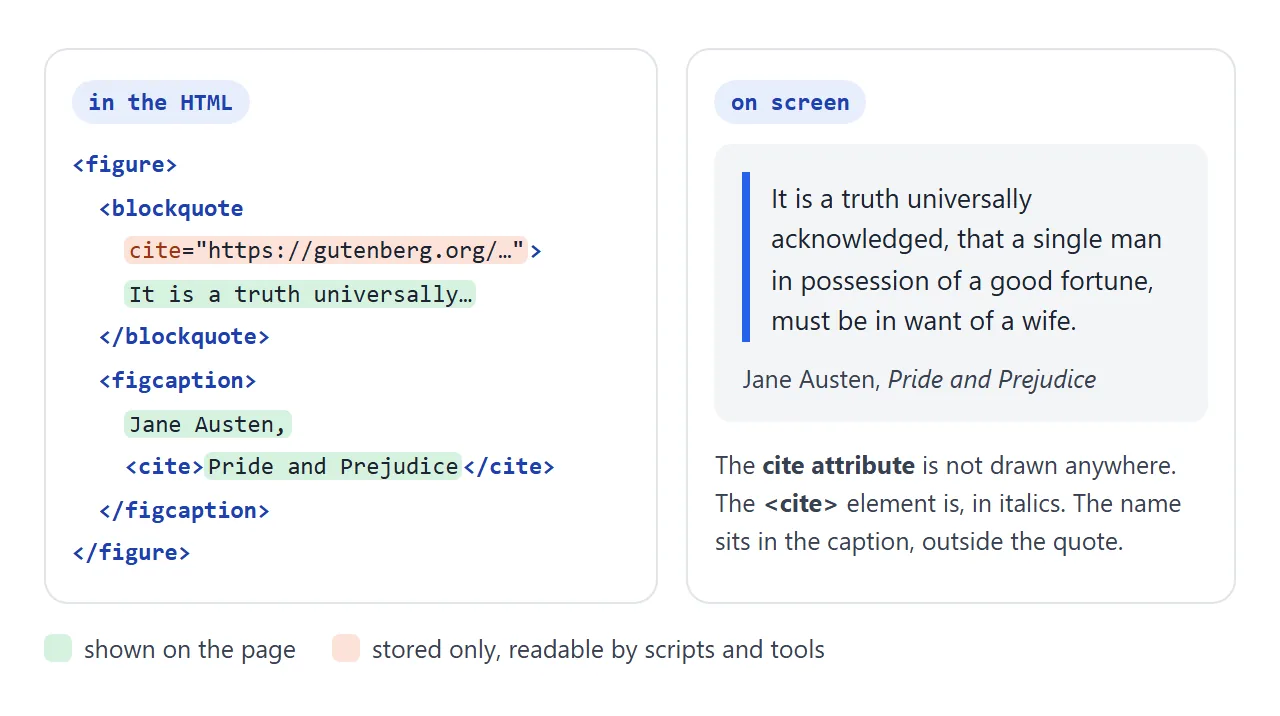
<figure>
  <blockquote cite="https://www.gutenberg.org/ebooks/1342">
    <p>It is a truth universally acknowledged…</p>
  </blockquote>
  <figcaption>Jane Austen, <cite>Pride and Prejudice</cite></figcaption>
</figure>
If readers should be able to follow the source, put a link in the figcaption. The cite attribute alone gives them nothing to click.
Restyle it: indent, bar or quote mark
The browser's own stylesheet gives <blockquote> a margin of 1em on the top and bottom and 40px on the left and right. <figure> gets the same margins, so a blockquote inside a figure starts 80px in.
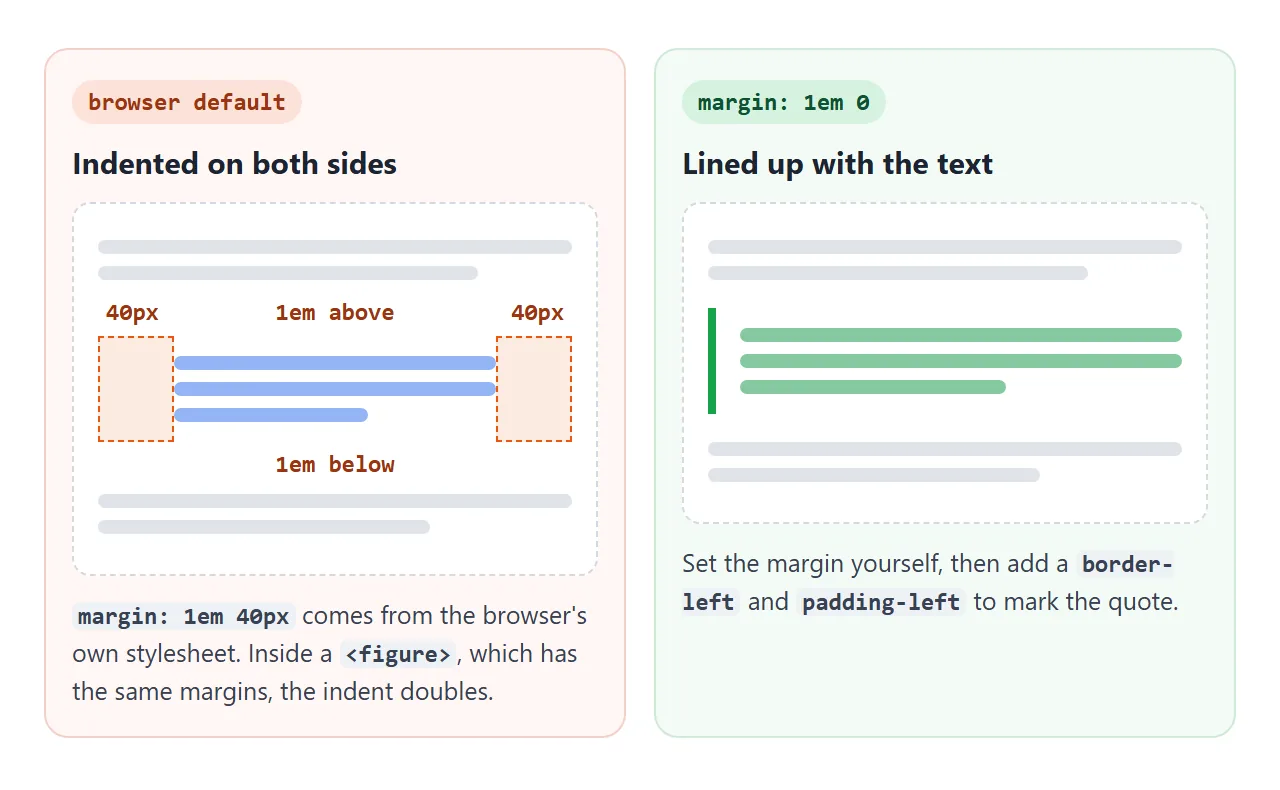
Reset both, then decide how the quote should stand out:
figure, blockquote { margin: 1em 0; }

blockquote {
  padding-left: 1em;
  border-left: 4px solid #2563eb;
}
A left bar keeps the quote in line with the text around it. CSS border covers widths, colours and rounded ends.
A large opening quote mark is decoration, so it belongs in CSS rather than in the text. Draw it with ::before and position it in the padding.
blockquote { position: relative; padding-left: 2.2em; }
blockquote::before {
  content: "\201C";          /* curly opening quote */
  position: absolute; left: 0; top: -.2em;
  font: 700 3.6em/1 Georgia, serif;
  color: #2563eb;
}
\201C is the Unicode code point for the curly opening mark. CSS ::before and ::after explains content and positioning in more detail.
On <q>, the automatic marks are themselves ::before and ::after with open-quote and close-quote. Setting your own content on q::before replaces the opening mark, so change ::after as well or the pair will not match.
Testimonials and pull quotes
Testimonial cards use the same figure pattern: the words in a blockquote, the person in the figcaption. A pull quote is different. It repeats a line from the same article, so it is not a quotation from another source.
<!doctype html>
<html lang="en">
<head>
<meta charset="utf-8">
<meta name="viewport" content="width=device-width, initial-scale=1">
<title>Testimonials and a pull quote</title>
<style>
  body { margin: 0; padding: 18px 16px; font: 15px/1.6 system-ui, sans-serif; color: #1d2330; background: #f4f5f7; }
  h2 { font-size: 20px; margin: 0 0 12px; }

  /* Testimonial cards: figure > blockquote + figcaption */
  .quotes { display: grid; grid-template-columns: repeat(auto-fit, minmax(190px, 1fr)); gap: 12px; }
  .quote {
    margin: 0;                       /* figure has 40px side margins by default */
    display: flex; flex-direction: column; justify-content: space-between;
    background: #fff; border-radius: 12px; padding: 16px;
    box-shadow: 0 4px 16px rgba(0, 0, 0, .08);
  }
  .quote blockquote { margin: 0; position: relative; padding-top: 22px; }
  .quote blockquote::before {
    content: "\201C"; position: absolute; left: -2px; top: -10px;
    font: 700 52px/1 Georgia, serif; color: #2563eb;
  }
  .quote blockquote p { margin: 0; }
  .quote figcaption { display: flex; align-items: center; gap: 10px; margin-top: 14px; font-size: 13px; color: #4b5563; }
  .quote figcaption b { display: block; color: #1d2330; font-size: 14px; }
  .avatar { flex: none; width: 36px; height: 36px; border-radius: 50%; display: grid; place-items: center; font-weight: 700; color: #fff; background: linear-gradient(135deg, #2563eb, #7c3aed); }

  /* Article with a pull quote */
  article { background: #fff; border-radius: 12px; padding: 4px 18px 8px; margin-top: 20px; }
  article p { margin: 12px 0; }
  .pull {
    float: right; width: 42%; margin: 4px 0 8px 18px;
    padding: 10px 0; border-block: 3px solid #1d2330;
    font: 700 19px/1.35 Georgia, serif; color: #1d2330;
  }
  @media (max-width: 480px) {
    .pull { float: none; width: auto; margin: 14px 0; }
  }
</style>
</head>
<body>

<section>
  <h2>What teams say</h2>
  <div class="quotes">
    <figure class="quote">
      <blockquote><p>We send the weekly report as a link now. People actually open it.</p></blockquote>
      <figcaption><span class="avatar">AR</span><span><b>Ana Ruiz</b>Operations lead</span></figcaption>
    </figure>
    <figure class="quote">
      <blockquote><p>The prototype ran on the client's phone in the meeting. No install, no attachment.</p></blockquote>
      <figcaption><span class="avatar">DK</span><span><b>David Kim</b>Product designer</span></figcaption>
    </figure>
    <figure class="quote">
      <blockquote><p>I fix the page, and the link everyone already has shows the new version.</p></blockquote>
      <figcaption><span class="avatar">MO</span><span><b>Mia Okafor</b>Freelance developer</span></figcaption>
    </figure>
  </div>
</section>

<article>
  <h2 style="margin-top:14px">Why we moved reports out of attachments</h2>
  <p>Every Friday the team exported a report and attached it to an email. By Monday there were four versions in circulation, and nobody was sure which one had the corrected numbers.</p>
  <!-- A pull quote repeats text from the article, so it is an aside, not a blockquote -->
  <aside class="pull">By Monday there were four versions in circulation.</aside>
  <p>We switched to a single page with one address. The page is updated in place, so the link in last week's thread shows this week's numbers.</p>
  <p>The change took an afternoon. Most of that time went into deciding which charts to keep.</p>
</article>

</body>
</html>
- Cards:
figure { margin: 0; }removes the default indent, and a grid withauto-fitstacks the cards on a phone. - Quote mark: each card's blockquote gets the
::beforemark from the previous section. - Pull quote: an
<aside>, the element the HTML standard gives as an example for pull quotes. It floats right on wide screens and becomes full width on narrow ones.
Do not use <blockquote> just to indent text that is not a quote. Use a <div> with padding, or margin on the element you already have. Semantic HTML explains why the element's meaning matters.
blockquote inside a paragraph
A <p> can only contain inline content. When the parser meets <blockquote> inside an open paragraph, it closes the paragraph first.
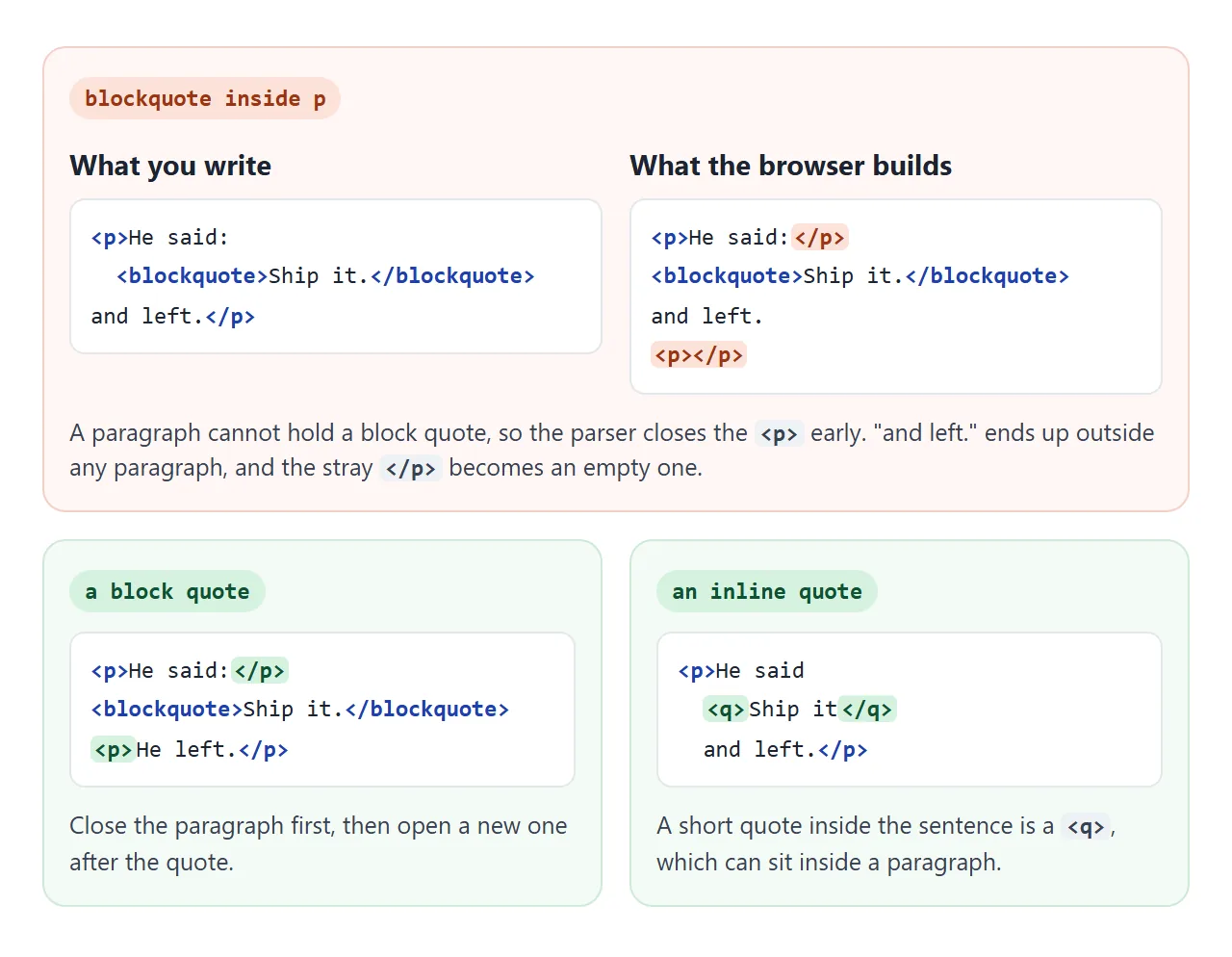
The text after the quote ends up outside any paragraph, and the stray </p> becomes an empty <p></p>, which has its own margins. End the paragraph before the blockquote, or use <q> if the quote belongs in the sentence.
When it does not work
| What you see | Cause | Fix |
|---|---|---|
| The quote is indented and you did not ask for it | The browser's default 40px margins | margin: 1em 0 on the blockquote |
| The indent is twice as deep | A figure around it adds another 40px | Reset figure margins too |
| Quote marks appear twice | Marks typed inside <q>, which adds its own |
Delete the typed marks |
| Opening and closing marks do not match | q::before changed, q::after left alone |
Set both, or neither |
| The source address never appears | cite="…" is not displayed |
Put the source in a figcaption |
| Extra space appears after the quote | Blockquote inside <p>; an empty <p> was created |
Close the paragraph before the blockquote |
| A screen reader may announce a quote for plain text | Blockquote used only to indent | Use a div with padding |
Share it as a link
A styled quote section is easier to judge in a browser than in a screenshot, especially on a phone where the cards stack. An .html attachment may open as plain code instead.
To send the working version, paste the page into a NOS document and choose Create share link. HTML to link walks through it.
The page renders as written and its scripts run, so the people you send it to can switch the styles themselves. If you change the code later, the same link shows the new version.