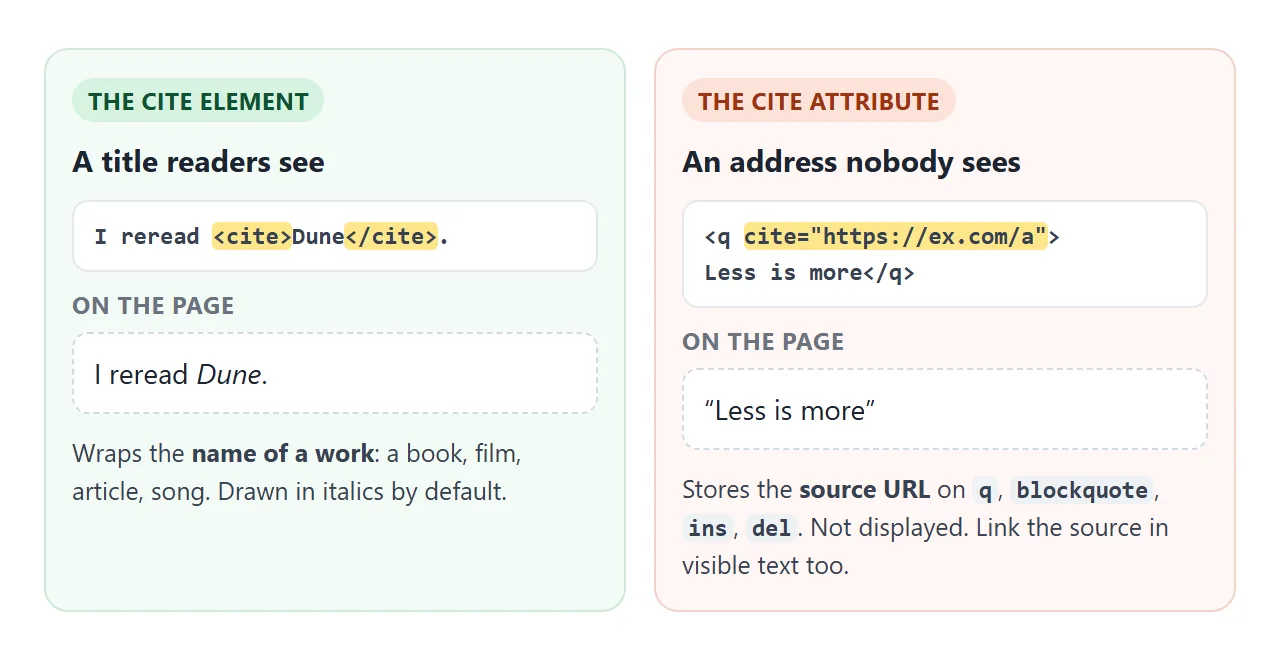
The <cite> tag marks the title of a work: a book, a film, an article, a song. Browsers show it in italics.
It is not for people's names. It is also not the same as the cite attribute, which holds a source URL and is never displayed.
Try both below. The first line uses the element. The quotes carry the attribute, and the button reveals what the browser was storing.
<!doctype html>
<html lang="en">
<head>
<meta charset="utf-8">
<meta name="viewport" content="width=device-width, initial-scale=1">
<title>cite element and cite attribute</title>
<style>
  body { margin: 0; padding: 16px 18px; font: 16px/1.55 system-ui, sans-serif; color: #1d2330; }
  h3 { font-size: 13px; letter-spacing: .4px; text-transform: uppercase; color: #6b7280; margin: 0 0 6px; }
  section { margin-bottom: 14px; }
  blockquote { margin: 6px 0; padding-left: 12px; border-left: 3px solid #cbd5e1; }
  button { font: inherit; font-size: 14px; padding: 6px 12px; border-radius: 8px; border: 1px solid #cbd5e1; background: #fff; cursor: pointer; }
  .src { font-size: 13px; color: #0f5132; }
  blockquote + .src { display: block; }  /* under a long quote, its own line */
  .src a { color: inherit; overflow-wrap: anywhere; }
</style>
</head>
<body>
<section>
  <h3>cite element: the title of a work</h3>
  <p>Chapter one of <cite>Pride and Prejudice</cite> opens with a famous line.</p>
</section>

<section>
  <h3>cite attribute: the source address, not drawn</h3>
  <p>Austen writes that
    <q cite="https://www.gutenberg.org/ebooks/1342">a single man in possession of a good fortune must be in want of a wife</q>.</p>
  <blockquote cite="https://www.gutenberg.org/ebooks/1342">
    <p>It is a truth universally acknowledged…</p>
  </blockquote>
</section>

<button id="show">Show the cite attributes</button>

<script>
  // The browser stores cite="…" but never displays it.
  // This copies each one into a visible link after its quote.
  document.getElementById('show').addEventListener('click', (e) => {
    document.querySelectorAll('q[cite], blockquote[cite]').forEach((quote) => {
      if (quote.nextElementSibling?.classList.contains('src')) return;  // already shown
      const small = document.createElement('small');
      small.className = 'src';
      const link = document.createElement('a');
      link.href = quote.cite;        // .cite gives the full, resolved address
      if (quote.tagName === 'Q') {   // inside a sentence: keep it short
        link.textContent = 'source';
        small.append(' (', link, ')');
      } else {
        link.textContent = quote.cite;
        small.append('Source: ', link);
      }
      quote.after(small);
    });
    e.target.disabled = true;
  });
</script>
</body>
</html>
This page covers the inline side of quoting and defining: <cite>, the cite attribute, <dfn>, and a glossary built from them. Styling block quotes is covered in the blockquote guide.
cite names a work, not a person
Use <cite> around the name of something someone made. Books, papers, films, TV shows, songs, games, paintings and websites all count.
<p>We based the onboarding on <cite>The Mom Test</cite>.</p>
<figcaption>Jane Austen, <cite>Pride and Prejudice</cite></figcaption>
The WHATWG HTML standard is direct about names: a person's name is not the title of a work, so it does not go in <cite>. Write the author as plain text next to the title.
The default italic comes from the browser's own stylesheet. If your design shows titles differently, change it with CSS. The meaning stays the same:
cite { font-style: normal; font-weight: 600; }
The cite attribute is a different thing
The attribute and the element share a name and nothing else. The attribute goes on <q>, <blockquote>, <ins> and <del>, and its value is the URL of the source. No browser draws it on the page.
<cite> element |
cite attribute |
|
|---|---|---|
| Holds | The title of a work | A URL |
| Goes on | Its own tag, inside text | q, blockquote, ins, del |
| Shown on the page | Yes, italic by default | No |
| Read by a script as | el.textContent |
el.cite (a full URL) |
Because the attribute is invisible, it cannot be the only place the source lives. If readers should be able to check the source, put a real link in the text.
The demo above does that with a script: it reads quote.cite and inserts a link after each quote.
q adds its own quote marks
<q> is for a short quote inside a sentence. The browser adds the quote marks, so do not type them yourself or they appear twice. The marks follow the page language set with lang.
<p>The docs say <q cite="https://example.com/guide">measure before you optimize</q>.</p>
For a passage on its own lines, use <blockquote> instead. Both take the cite attribute the same way.
dfn marks where a term is defined
<dfn> wraps a term at the one place the page defines it. The standard ties it to its surroundings: the nearest paragraph, description list group or section around the <dfn> must contain the definition.
<p>A <dfn id="callback">callback</dfn> is a function you pass to another function to run later.</p>
Use it once per term, not on every mention. Browsers show it in italics. Its built-in accessibility role is term.
Which term does a dfn define?
Usually the text inside it. The standard has three rules, and the first one that fits decides the term.
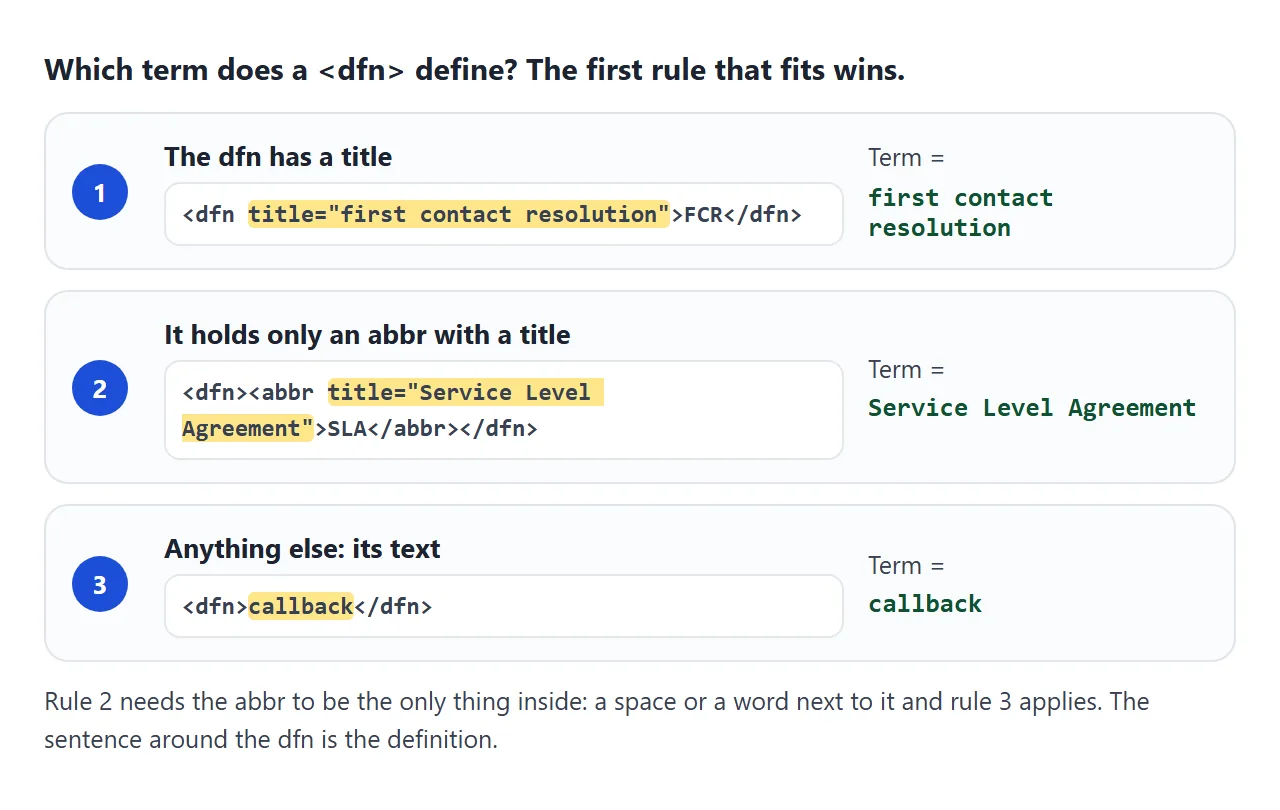
Rule two is why <abbr> inside <dfn> is the common pattern for short forms. The page shows SLA, and the defined term is Service Level Agreement. The rule only applies when the <abbr> is the only thing inside, with no text or spaces around it.
The demo runs the same three rules in a few lines of JavaScript, so you can change the markup and watch the result change.
<!doctype html>
<html lang="en">
<head>
<meta charset="utf-8">
<meta name="viewport" content="width=device-width, initial-scale=1">
<title>Which term does dfn define?</title>
<style>
  body { margin: 0; padding: 16px 18px; font: 16px/1.55 system-ui, sans-serif; color: #1d2330; }
  p { margin: 0 0 10px; padding: 8px 10px; background: #f6f7f9; border-radius: 8px; }
  dfn { font-style: normal; font-weight: 700; color: #1d4ed8; }
  table { border-collapse: collapse; width: 100%; font-size: 14px; margin-top: 4px; }
  th, td { text-align: left; padding: 6px 8px; border-bottom: 1px solid #e5e7eb; vertical-align: top; }
  th { color: #6b7280; font-weight: 600; }
  td b { color: #0f5132; }
</style>
</head>
<body>
<p id="p1">A <dfn>callback</dfn> is a function you pass to another function to run later.</p>
<p id="p2"><dfn title="first contact resolution">FCR</dfn> counts issues solved on the first call.</p>
<p id="p3">An <dfn><abbr title="Service Level Agreement">SLA</abbr></dfn> is a written promise about response times.</p>

<table>
  <thead><tr><th>Paragraph</th><th>Defined term</th><th>Taken from</th></tr></thead>
  <tbody id="out"></tbody>
</table>

<script>
  // The rule from the HTML standard, in order:
  // 1. dfn has a title  -> the title is the term
  // 2. dfn holds only one abbr that has a title -> that title is the term
  // 3. otherwise -> the text inside dfn is the term
  function definedTerm(dfn) {
    if (dfn.hasAttribute('title')) return [dfn.title, 'title on dfn'];
    const child = dfn.childNodes.length === 1 ? dfn.firstChild : null;  // nothing else, not even spaces
    if (child?.matches?.('abbr[title]')) return [child.title, 'title on the abbr inside'];
    return [dfn.textContent, 'text inside dfn'];
  }

  document.querySelectorAll('dfn').forEach((dfn, i) => {
    const [term, source] = definedTerm(dfn);
    const row = document.createElement('tr');
    row.innerHTML = '<td>' + (i + 1) + '</td><td><b></b></td><td></td>';
    row.children[1].firstChild.textContent = term;
    row.children[2].textContent = source;
    document.getElementById('out').append(row);
  });
</script>
</body>
</html>
For more on the tooltip that title gives an abbreviation, and who can see it, read the abbr tag guide.
Build a glossary with dfn and links
A glossary is where <dfn> pays off. Each term is defined once, gets an id, and every mention in the text links to it.
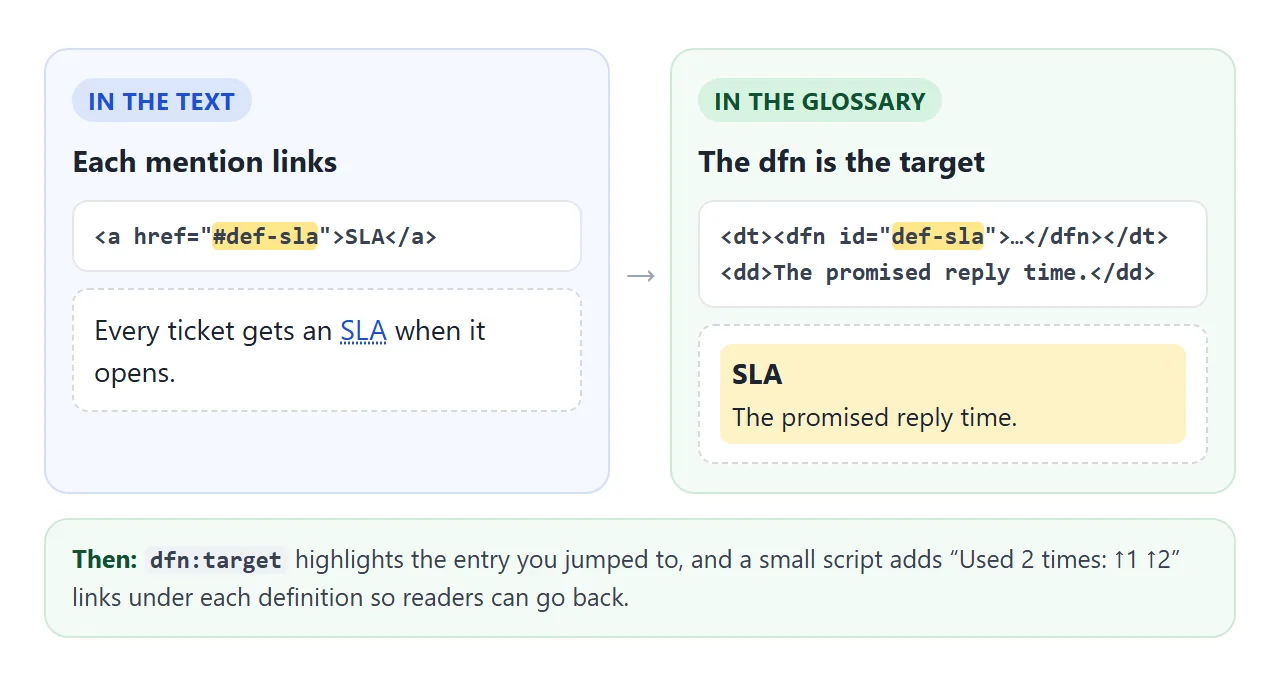
- Write each term once as a dfn. In a
<dl>, put the term in a<dt>, wrap it in<dfn>, and give the<dfn>a uniqueid. - Put the definition next to it in the
<dd>that follows. - Link mentions to the definition with an
hrefof#plus theid. - Highlight the target.
dfn:targetmatches the definition the reader just jumped to. - Add back links. A short script lists the mentions under each definition.
<p>Every ticket gets an <a href="#def-sla">SLA</a>.</p>

<dl>
  <dt><dfn id="def-sla"><abbr title="Service Level Agreement">SLA</abbr></dfn></dt>
  <dd>Service Level Agreement: the promised reply time.</dd>
</dl>
The standard says a link that points at a <dfn> is an instance of that term. So the link is meaningful markup as well as a shortcut.
<!doctype html>
<html lang="en">
<head>
<meta charset="utf-8">
<meta name="viewport" content="width=device-width, initial-scale=1">
<title>Glossary with dfn and links</title>
<style>
  body { margin: 0; padding: 16px 18px; font: 16px/1.55 system-ui, sans-serif; color: #1d2330; }
  h2 { font-size: 15px; margin: 14px 0 6px; }
  article p { margin: 0 0 10px; }
  a.term { color: #1d4ed8; text-decoration: underline dotted; text-underline-offset: 3px; }
  dl { margin: 0; }
  dt { margin-top: 8px; }
  dd { margin: 2px 0 0; font-size: 14.5px; color: #374151; }
  dfn { font-style: normal; font-weight: 700; }
  /* the definition you jumped to lights up */
  dt:has(dfn:target), dt:has(dfn:target) + dd { background: #fef3c7; }
  dt:has(dfn:target) { border-radius: 6px 6px 0 0; } dt:has(dfn:target) + dd { border-radius: 0 0 6px 6px; }
  dt, dd { padding: 2px 8px; }
  .uses { font-size: 13px; color: #6b7280; }
  .uses a { color: #0f5132; margin-left: 4px; }
  .flash { background: #dcfce7; border-radius: 4px; }
</style>
</head>
<body>
<article>
  <p id="u1">Every ticket gets an <a class="term" href="#def-sla">SLA</a> the moment it is opened.</p>
  <p id="u2">If the first agent solves it, it counts toward <a class="term" href="#def-fcr">FCR</a>.</p>
  <p id="u3">An <a class="term" href="#def-escalation">escalation</a> pauses the <a class="term" href="#def-sla">SLA</a> clock until a lead replies.</p>
</article>

<h2>Glossary</h2>
<dl>
  <dt><dfn id="def-escalation">Escalation</dfn></dt>
  <dd>Handing a ticket to a more senior person.</dd>
  <dt><dfn id="def-fcr"><abbr title="First Contact Resolution">FCR</abbr></dfn></dt>
  <dd>First Contact Resolution: solved without a second contact.</dd>
  <dt><dfn id="def-sla"><abbr title="Service Level Agreement">SLA</abbr></dfn></dt>
  <dd>Service Level Agreement: the promised reply time.</dd>
</dl>

<script>
  // Under each definition, list the paragraphs that use the term,
  // so a reader can jump back to where they were.
  document.querySelectorAll('dfn[id]').forEach((dfn) => {
    const links = document.querySelectorAll('a[href="#' + dfn.id + '"]');
    const dd = dfn.closest('dt').nextElementSibling;
    const uses = document.createElement('div');
    uses.className = 'uses';
    uses.textContent = 'Used ' + links.length + (links.length === 1 ? ' time:' : ' times:');
    links.forEach((link, i) => {
      const back = document.createElement('a');
      back.href = '#' + link.closest('p').id;
      back.textContent = '↑' + (i + 1);
      back.addEventListener('click', () => {
        link.classList.add('flash');  // show which mention it was
        setTimeout(() => link.classList.remove('flash'), 1200);
      });
      uses.append(back);
    });
    dd.append(uses);
  });
</script>
</body>
</html>
More on the list markup itself is in dl, dt and dd. How #id links scroll the page is in linking to a spot on the same page.
When it does not work
| What you see | Cause | Fix |
|---|---|---|
| The source URL never appears | cite="…" is not displayed |
Add a visible link, or copy el.cite into one with a script |
| Quote marks appear twice | Typed marks inside <q> |
Remove them. <q> adds its own |
| A title is not italic | CSS set font-style on cite or a parent |
Check the rule in dev tools, or style titles on purpose |
| An author name is in italics | The name is inside <cite> |
Keep only the work's title in <cite> |
| A glossary link goes nowhere | The href and the id differ, or the id repeats |
Match them exactly, one id per term |
| The abbr title is not the defined term | Text or spaces sit next to the <abbr> inside <dfn> |
Leave the <abbr> alone inside, or put title on the <dfn> |
Share it as a link
A glossary with jump links and back links only makes sense when people can click it. A screenshot shows the words but none of the links, and an .html attachment may open as plain code on a phone.
To send the working version, paste the page into a NOS document and choose Create share link. HTML to link walks through it.
The page renders as written and its scripts run, so readers can click a term and jump back. If you change the code later, the same link shows the new version.