The HTML title attribute tooltip is the small box a browser shows after roughly one second of hovering over an element carrying a title attribute.
<abbr title="Annual Recurring Revenue">ARR</abbr>
<a href="/report" title="Opens the Q3 summary">Q3 summary</a>
It works on almost any element, needs no CSS and no script, and it is the wrong tool more often than people expect.
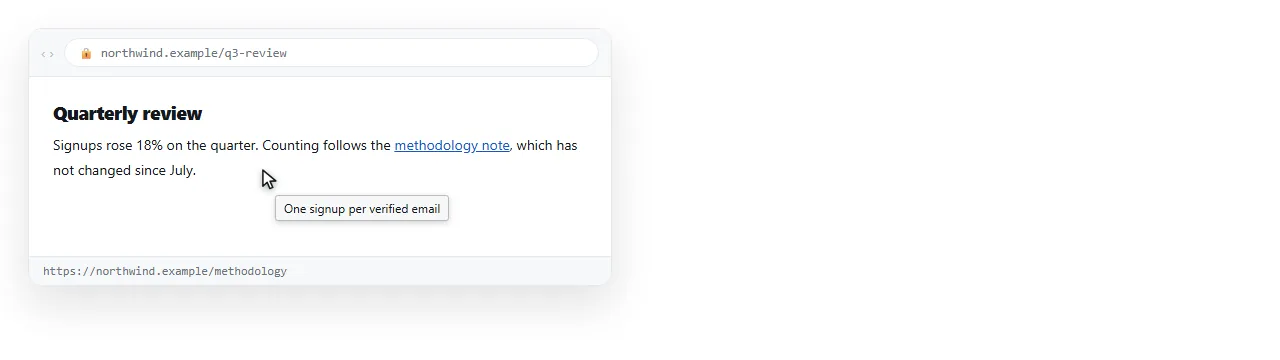
What the browser controls
Everything about the appearance. You supply a string and nothing else.
| Property | Who decides |
|---|---|
| Delay before it appears | Browser and operating system |
| Position relative to the cursor | Browser |
| Font, size, colour, border | Operating system |
| Line breaks | Newlines in the attribute, partially honoured |
| Duration on screen | Browser, often about five seconds |
| Whether it appears at all | Input method, see below |
No CSS property reaches any of these. If the design calls for a particular look, the native tooltip is out.
The three ways it fails
Touch. Phones and tablets have no hover state. The tooltip never appears, and a tap activates the element instead. On a page where most readers are on a phone, a title attribute is content nobody sees.
Keyboard. Tabbing to a link does not reliably trigger the tooltip. A keyboard user reaches the element and gets nothing.
Screen readers. Support varies by reader and by setting. Some announce the title, some announce it only when no other accessible name exists, some ignore it. Treat it as unavailable.
The rule that follows: never put information in title that the reader needs. It is an extra, not a channel.
Where it is still correct
<iframe title="...">. Here it is the accessible name of the frame, and it is required practice. See iframe.<abbr title="...">. The defined expansion of an abbreviation, which is the element's specified purpose.- Truncated table cells. A long value clipped with
text-overflow: ellipsiscan carry the full string intitleas a convenience for mouse users. - Distinguishing repeated links. Several "View" links in a table, each with a
titlenaming its row. Better still, use an accessible label or visually hidden text.
A CSS tooltip that works on touch
If the text matters, build it. This version uses a data attribute and shows on hover and on focus.
.tip { position: relative; }
.tip::after {
  content: attr(data-tip);
  position: absolute;
  left: 50%;
  bottom: calc(100% + 8px);
  transform: translateX(-50%);
  white-space: nowrap;
  background: #111827;
  color: #e5e7eb;
  padding: 6px 10px;
  border-radius: 6px;
  font-size: .85rem;
  opacity: 0;
  pointer-events: none;
  transition: opacity .12s;
}
.tip:hover::after,
.tip:focus-visible::after { opacity: 1; }
<button class="tip" data-tip="Recalculates from the source sheet">Refresh</button>
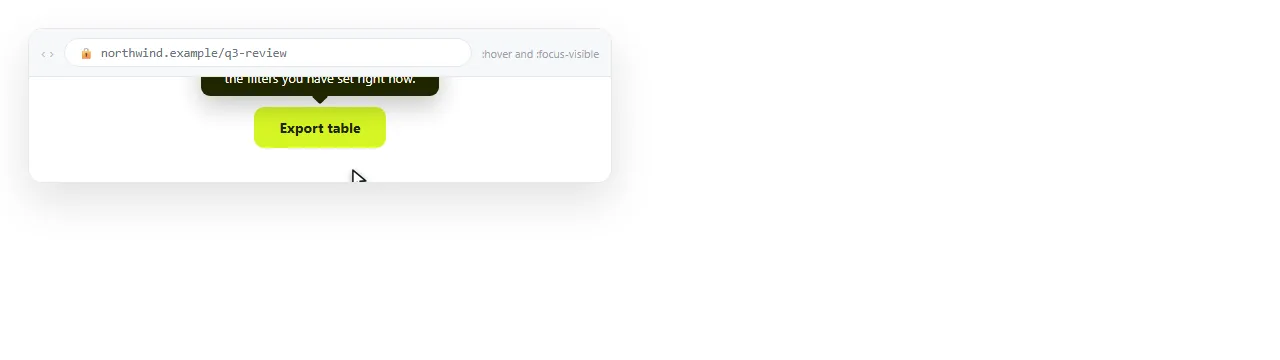
The :focus-visible line is what makes it reachable by keyboard. Without it you have rebuilt the same problem with more code.
For touch, the reliable answer is not a tooltip at all. Show the text, or put it behind a tap that toggles a visible panel.
Line breaks and length
A newline in the attribute value is honoured by most browsers, so a two-line tooltip is possible.
<span title="Gross margin Excludes shipping">GM</span>
is the character reference for a newline, which is easier to keep intact than a literal line break inside an attribute.
Length is the bigger constraint. Browsers truncate long values differently, and there is no defined limit. Keep it under about one line of text, roughly 80 characters. Anything longer belongs in the page.
Accessible alternatives
| Need | Use instead of title |
|---|---|
| Name an icon-only button | aria-label on the button |
| Describe an image | alt on the image |
| Extra detail about a field | Visible hint text plus aria-describedby |
| Expand an abbreviation | abbr title, plus the full form on first use |
| Explain a table column | A visible note under the table |
The pattern behind all five: put the words where everyone can read them, and use an attribute only to connect elements that are already visible.
<label for="rate">Rate</label>
<input id="rate" aria-describedby="rate-hint">
<p id="rate-hint" class="hint">Excluding tax, per hour.</p>
That hint is visible on a phone, reachable by keyboard, and announced by screen readers. A title attribute is none of the three.
title on the page against title in the head
Two different things with the same word, and they are often confused.
<title> element |
title attribute |
|
|---|---|---|
| Location | Inside <head> |
On any element in the body |
| Shows where | Browser tab, search result, bookmark | Tooltip on hover |
| How many | One per document | Any number |
| Search engines | Heavily used | Not used for ranking |
Only the head element affects how the page appears in results. HTML meta tags list covers that block.
Checking what a reader actually sees
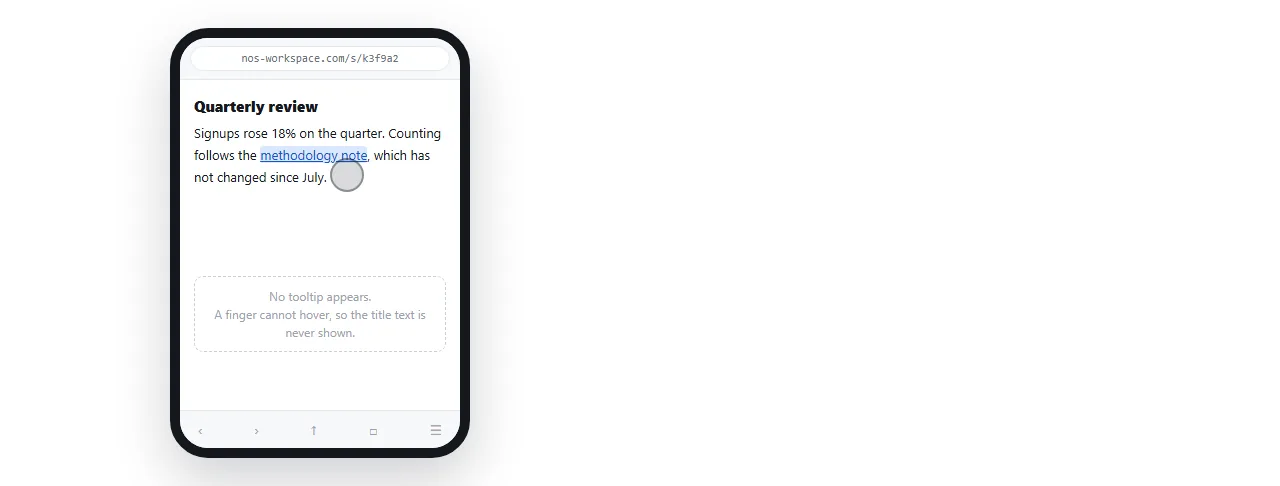
The fastest way to see the touch problem is to open the page on a phone. Anything you can only reach by hovering is gone.
Open the file in the HTML file opener to confirm it renders outside your project. Then paste the HTML into a document and share it as a link.
Opening that link on a phone shows the page exactly as a reader on a phone gets it, tooltips included or missing.
If the check reveals that important text lived in tooltips, move it into the page. Related: alt text for images, aria-label for controls without visible names, and semantic HTML for the structure that removes the need for most labels.