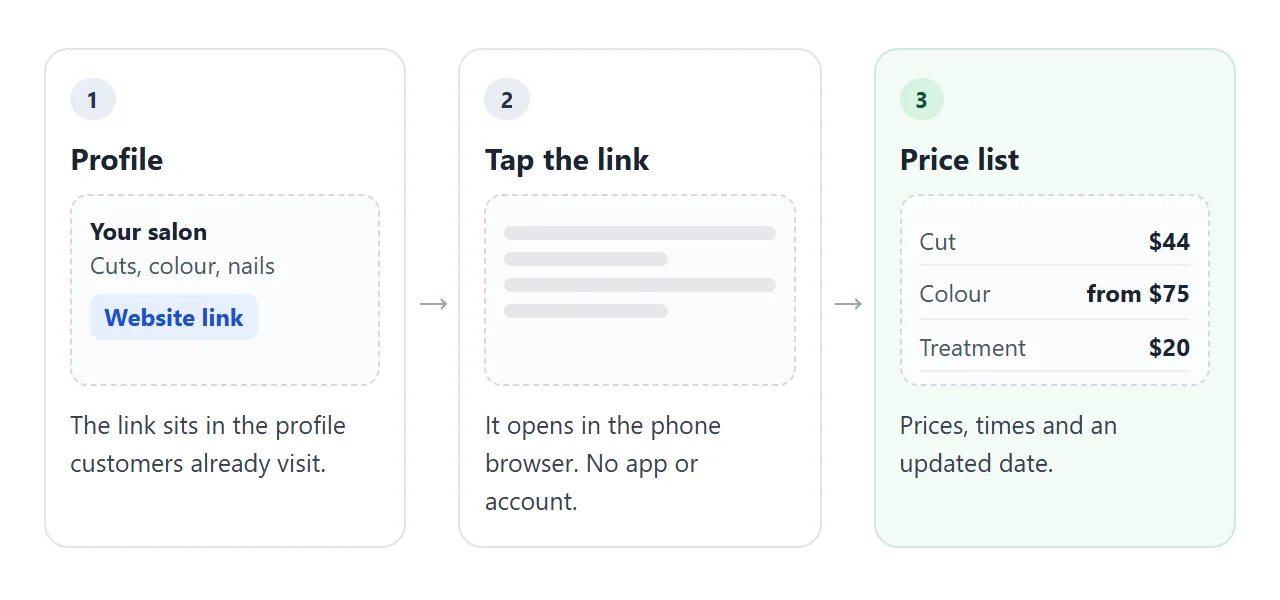
A salon price list works best as one web page with its own link, put in the profile your customers already open. Keep the page small: services in groups, a time and a price on each line, and a date.
When a price changes, you edit one number and the link stays the same.
This is the page the rest of this guide builds. Try the length buttons: the prices change with the hair length.
<!doctype html>
<html lang="en">
<head>
<meta charset="utf-8">
<meta name="viewport" content="width=device-width, initial-scale=1">
<title>Salon price list</title>
<style>
* { box-sizing: border-box; }
body { margin: 0; font-family: system-ui, sans-serif; background: #faf6f2; color: #2b2320; }
.wrap { max-width: 640px; margin: 0 auto; padding: 22px 18px 28px; }
h1 { font-size: 24px; margin: 0 0 2px; letter-spacing: .2px; }
.sub { margin: 0; color: #7a6a60; font-size: 14px; }
.updated { display: inline-block; margin: 12px 0 0; padding: 4px 10px; border-radius: 99px; background: #efe3d8; color: #5b4636; font-size: 12.5px; font-weight: 600; }
.len { margin: 18px 0 4px; font-size: 13px; color: #7a6a60; }
.chips { display: flex; gap: 8px; flex-wrap: wrap; margin-bottom: 6px; }
.chips button { font: inherit; font-size: 14px; padding: 8px 14px; border: 1px solid #d9c9bb; border-radius: 99px; background: #fff; color: #2b2320; cursor: pointer; }
.chips button[aria-pressed="true"] { background: #2b2320; color: #fff; border-color: #2b2320; }
h2 { font-size: 13px; text-transform: uppercase; letter-spacing: 1.2px; color: #a0522d; margin: 22px 0 6px; }
.row { display: flex; align-items: baseline; gap: 10px; padding: 11px 0; border-bottom: 1px solid #eadfd5; }
.row .name { flex: 1; font-size: 16px; }
.row .time { display: block; font-size: 12.5px; color: #8a7a70; margin-top: 2px; }
.row .price { font-size: 17px; font-weight: 700; font-variant-numeric: tabular-nums; white-space: nowrap; }
.row .from { font-size: 12px; font-weight: 500; color: #8a7a70; margin-right: 3px; }
.note { margin-top: 20px; font-size: 13.5px; line-height: 1.5; color: #5b4f47; background: #fff; border: 1px solid #eadfd5; border-radius: 10px; padding: 12px 14px; }
</style>
</head>
<body>
<div class="wrap">
<h1>Marlow & Finch Hair Studio</h1>
<p class="sub">Price list for hair services</p>
<p class="updated">Prices updated 1 October 2026</p>
<p class="len">Hair length</p>
<div class="chips" id="chips"></div>
<div id="list"></div>
<p class="note">Colour prices start from the amount shown. We confirm the final price at your consultation, before we begin.</p>
</div>
<script>
// To correct a price, change one number below. Nothing else on the page needs to change.
var LENGTHS = ['Short', 'Medium', 'Long'];
var SERVICES = [
{ group: 'Cut and style', items: [
{ name: 'Cut and blow-dry', time: '45 min', from: false, price: [38, 44, 52] },
{ name: 'Blow-dry only', time: '30 min', from: false, price: [24, 28, 34] },
{ name: 'Fringe trim', time: '10 min', from: false, price: [8, 8, 8] }
]},
{ group: 'Colour', items: [
{ name: 'Root colour', time: '1 h 30', from: true, price: [55, 58, 62] },
{ name: 'Full colour', time: '2 h', from: true, price: [75, 90, 110] },
{ name: 'Half head highlights', time: '2 h 15', from: true, price: [95, 110, 130] }
]},
{ group: 'Treatments', items: [
{ name: 'Deep conditioning', time: '30 min', from: false, price: [18, 20, 24] },
{ name: 'Scalp massage', time: '20 min', from: false, price: [15, 15, 15] }
]}
];
var current = 1;
var chips = document.getElementById('chips');
var list = document.getElementById('list');
function render() {
chips.innerHTML = '';
LENGTHS.forEach(function (label, i) {
var b = document.createElement('button');
b.type = 'button';
b.textContent = label;
b.setAttribute('aria-pressed', i === current ? 'true' : 'false');
b.addEventListener('click', function () { current = i; render(); });
chips.appendChild(b);
});
var html = '';
SERVICES.forEach(function (g) {
html += '<h2>' + g.group + '</h2>';
g.items.forEach(function (s) {
html += '<div class="row"><div class="name">' + s.name +
'<span class="time">' + s.time + '</span></div><div class="price">' +
(s.from ? '<span class="from">from</span>' : '') + '$' + s.price[current] + '</div></div>';
});
});
list.innerHTML = html;
}
render();
</script>
</body>
</html>
The prices in that list are made up. Replace the name, the services and the numbers with yours, and the page works the same way.
Make it with AI
You do not need to write the page yourself. An AI assistant can build it from a pasted list of your services. Paste this into ChatGPT, Claude or Gemini, and put your own services at the end.
Write one self-contained HTML page: a price list for my hair salon, [salon name].
Make it readable on a phone, 390 px wide. Use only HTML, CSS and a little
JavaScript. No outside files, images or fonts.
Group services under headings. Each row shows the service name, the time it
takes and the price.
Put every price in one list at the top of the script, with a comment that says
"change prices here", so I can correct a price by editing one number.
Under the title, add the line "Prices updated [date]".
Show colour prices as "from". Do not invent services or prices.
My services and prices:
[paste your list]
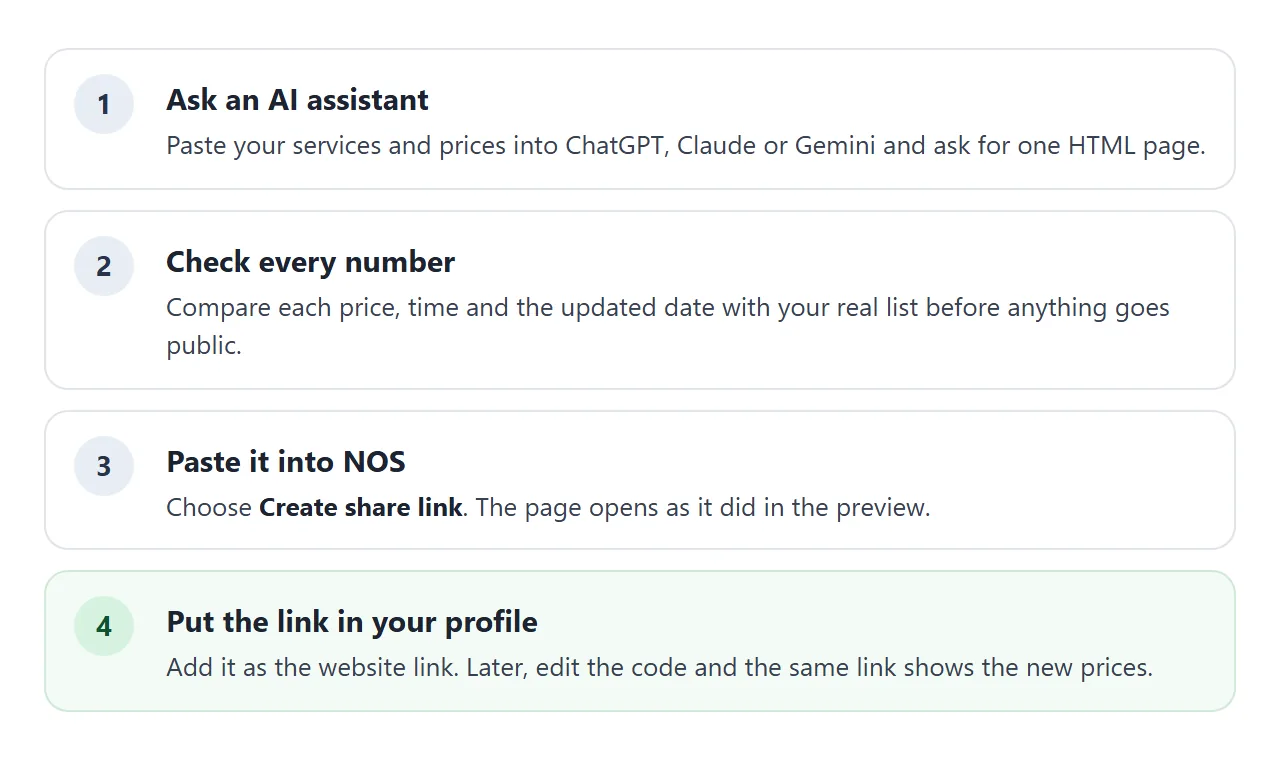
Before you use the result, check four things:
- Every number. Compare each price and time with your real list. AI assistants can slip a digit or add a service you do not offer.
- The date. It should be today's date, not a placeholder.
- No leftover words. Look for text such as "Your Salon Name" or "Lorem ipsum".
- No outside pictures. A photo linked from another website will not load on the shared page. A page with no photos is fine.
Send it as a link
Copy the full page the assistant gave you and paste it into a NOS document. Choose Create share link. The page shows as you saw it, and its script runs, so the length buttons work. HTML to link walks through the steps.
Anyone with the link can open the page in a browser, on a phone too. They do not need an account, and they cannot edit it. If you change the code later, the same link shows the new version.
Put the link where customers look
Put the link in the profile people check before they book. Instagram's help pages describe adding a website to your profile from Edit profile.
As of October 2026, the exact screens can change, so look for the website field there and paste the address in.
Google Business Profile has its own way to show prices. Open Edit services, choose a service, and add a price and a description.
Google says custom service names should not include prices, so use the price field. That list and your page are separate, so change both when a price moves.
| Way to show prices | What the customer sees | When a price changes |
|---|---|---|
| Photo of the list in a post | An image | Post a new photo. The old one stays wherever it was saved |
| PDF or file attachment | A file to download and open | Send the new file to everyone again |
| Link to a page | A web page in the browser | Edit one number. The link stays the same |
| Services in Google Business Profile | Services in your Google listing | Edit each service price there. It is separate from your page |
If you also want a printed card or a sign, see QR codes that open a link. For the general case beyond salons, price list link covers dates, tiers and print.
Correct a price without redesigning anything
A price list goes wrong in small ways: one price rises, one service ends, one new service starts. Because the page keeps its numbers in one list, the layout never has to change.
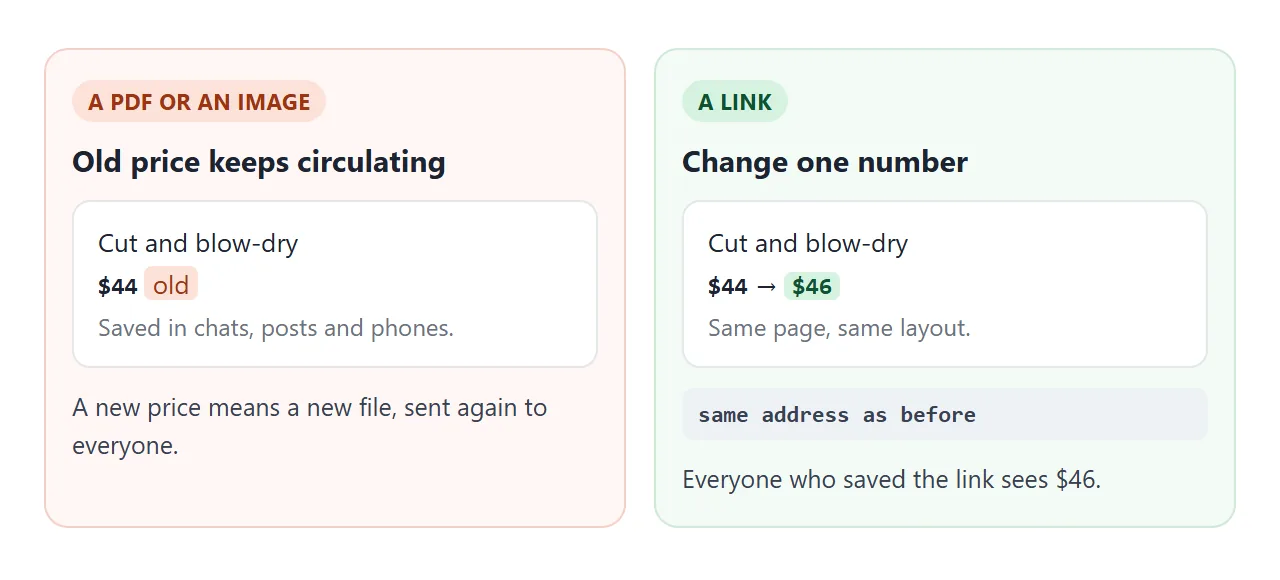
You have two ways to fix a price:
- Edit the number yourself. Find the line for that service in the list at the top of the code, change the number, and update the date line.
- Ask the assistant. Paste the page back and say: "Change only the medium price of Cut and blow-dry from 44 to 46. Return the whole page." Then compare the result with the old one.
For a planned rise, tell customers before it happens. The second example shows a notice with the date, the two prices that change, and a line saying everything else stays the same.
<!doctype html>
<html lang="en">
<head>
<meta charset="utf-8">
<meta name="viewport" content="width=device-width, initial-scale=1">
<title>Barber price list with a change notice</title>
<style>
  * { box-sizing: border-box; }
  body { margin: 0; font-family: system-ui, sans-serif; background: #f3f4f6; color: #1f2937; }
  .wrap { max-width: 520px; margin: 0 auto; padding: 22px 16px 28px; }
  h1 { font-size: 23px; margin: 0 0 4px; }
  .sub { margin: 0 0 14px; font-size: 14px; color: #6b7280; }
  .notice { background: #fff7e6; border: 1px solid #f2d599; border-radius: 10px; padding: 11px 14px; font-size: 14px; line-height: 1.5; color: #6b4a0b; margin-bottom: 14px; }
  .notice b { color: #4a3305; }
  table { width: 100%; border-collapse: collapse; background: #fff; border-radius: 12px; overflow: hidden; box-shadow: 0 1px 3px rgba(0, 0, 0, .08); }
  th { text-align: left; font-size: 12px; text-transform: uppercase; letter-spacing: 1px; color: #6b7280; padding: 10px 14px; background: #f9fafb; }
  th.r, td.r { text-align: right; }
  td { padding: 12px 14px; border-top: 1px solid #eef0f3; font-size: 15.5px; }
  td.r { font-weight: 700; font-variant-numeric: tabular-nums; white-space: nowrap; }
  .was { display: block; font-size: 12.5px; font-weight: 400; color: #6b7280; }
  .new { display: inline-block; font-size: 11px; font-weight: 700; color: #0f5132; background: #d6f2df; border-radius: 99px; padding: 2px 7px; margin-left: 6px; vertical-align: 1px; }
  .foot { margin: 14px 2px 0; font-size: 13px; color: #6b7280; line-height: 1.5; }
</style>
</head>
<body>
<div class="wrap">
  <h1>Corner Chair Barbers</h1>
  <p class="sub">Price list. Walk-ins and bookings, same prices.</p>

  <p class="notice"><b>New prices from 1 November 2026.</b> The cut and the beard trim each go up by $2. The combined price and everything else stay the same. Today's prices apply until then.</p>

  <table>
    <thead><tr><th>Service</th><th class="r">Price</th></tr></thead>
    <tbody>
      <tr><td>Cut</td><td class="r">$22<span class="was">$24 from 1 Nov</span></td></tr>
      <tr><td>Beard trim</td><td class="r">$12<span class="was">$14 from 1 Nov</span></td></tr>
      <tr><td>Cut and beard trim</td><td class="r">$32</td></tr>
      <tr><td>Kids cut (under 12)</td><td class="r">$16</td></tr>
      <tr><td>Hot towel shave <span class="new">NEW</span></td><td class="r">$20</td></tr>
    </tbody>
  </table>

  <p class="foot">Prices updated 2 October 2026. We take cash and card.</p>
</div>
</body>
</html>
Remember to remove the notice after the date, and then change the numbers in the list.
What the page needs, and what it can skip
A short page is easier to keep correct. These are the parts worth having:
- The date. "Prices updated" with a real date tells readers whether to trust the page.
- Time per service. It helps people choose and book the right slot.
- "From" where it applies. Use it for colour and any work priced after a consultation.
- A contact line. Show your phone number as plain text. A form that sends data to a server will not work on the shared page.
For booking links and menus, see a booking link on a page and menu link.
When it does not work
| What you see | Cause | Fix |
|---|---|---|
| The length buttons do nothing | Only part of the page was pasted, so the script is missing | Copy the whole page from the assistant and paste it again |
| A photo or logo shows as a blank box | The image comes from another website, which the shared page blocks | Remove it, or ask for an inline drawing instead |
| A customer quotes an old price | They saved a screenshot, a PDF or a copy of a message | Ask them to open the link in your profile |
| A price is wrong after an AI edit | The assistant changed more than you asked | Compare every row, or edit the number yourself |
| The booking form does not send | Sending a form to a server is blocked on the shared page | Show a phone number as text, or link to your booking page |
| The profile link opens the wrong page | The address was typed by hand with a mistake | Copy the link and paste it again |