The shop opens at ten. You have a box of tote bags, a stack of coupons and a jar of stickers.
You could hand them out. Or people could spin for them, and the whole queue would stop to watch.
These days people ask ChatGPT, Claude or Gemini for it and get a finished page in one reply. A spin the wheel page with your prizes on the slices, a pointer that clicks past each one, and confetti when it lands.
Here is one. Tap Spin.
<!doctype html>
<html lang="en">
<head>
<meta charset="utf-8">
<meta name="viewport" content="width=device-width, initial-scale=1">
<title>Spin to win</title>
<style>
  * { box-sizing: border-box; }
  body { margin: 0; min-height: 100vh; background: radial-gradient(circle at 50% 18%, #6b2bd9 0%, #3a1580 38%, #1c0a45 75%); color: #fff; font-family: system-ui, -apple-system, "Segoe UI", sans-serif; overflow-x: hidden; }
  .page { max-width: 560px; margin: 0 auto; padding: 18px 14px 28px; text-align: center; }
  .shop { font-size: 13px; letter-spacing: .14em; text-transform: uppercase; color: #ffcf5c; }
  h1 { margin: 4px 0 34px; font-size: 28px; letter-spacing: -.01em; }
  .wrap { position: relative; width: min(340px, 86vw); margin: 0 auto; aspect-ratio: 1; }
  .wrap::before { content: ""; position: absolute; inset: -12px; border-radius: 50%; background: conic-gradient(from 0deg, #ffcf5c, #ff8a3d, #ffcf5c, #ff8a3d, #ffcf5c); box-shadow: 0 18px 40px rgba(0,0,0,.45); }
  .wrap::after { content: ""; position: absolute; inset: -12px; border-radius: 50%; background: repeating-conic-gradient(from 0deg, transparent 0 13deg, rgba(255,255,255,.95) 13deg 15deg); -webkit-mask: radial-gradient(circle, transparent calc(50% - 7px), #000 calc(50% - 6px), #000 calc(50% - 2px), transparent calc(50% - 1px)); mask: radial-gradient(circle, transparent calc(50% - 7px), #000 calc(50% - 6px), #000 calc(50% - 2px), transparent calc(50% - 1px)); opacity: .8; }
  #wheel { position: relative; z-index: 1; width: 100%; height: 100%; display: block; border-radius: 50%; }
  .hub { position: absolute; z-index: 2; left: 50%; top: 50%; width: 22%; aspect-ratio: 1; transform: translate(-50%, -50%); border-radius: 50%; border: 0; background: radial-gradient(circle at 35% 30%, #fff, #ffe3a1 45%, #f0a020); box-shadow: 0 4px 12px rgba(0,0,0,.4); font: 900 clamp(13px, 3.6vw, 16px) system-ui; color: #4a1d00; cursor: pointer; }
  .hub:disabled { cursor: default; }
  .pointer { position: absolute; z-index: 3; left: 50%; top: -22px; width: 34px; height: 46px; margin-left: -17px; transform-origin: 50% 12px; filter: drop-shadow(0 3px 3px rgba(0,0,0,.4)); }
  .spin { margin-top: 24px; border: 0; border-radius: 18px; padding: 15px 44px; background: linear-gradient(180deg, #ffd56b, #ff9b2f); color: #4a1d00; font: 900 20px system-ui; letter-spacing: .04em; cursor: pointer; box-shadow: 0 5px 0 #b8600f; transition: transform .1s, box-shadow .1s; }
  .spin:active { transform: translateY(4px); box-shadow: 0 1px 0 #b8600f; }
  .spin:disabled { opacity: .6; cursor: default; }
  .banner { margin: 16px auto 0; max-width: 380px; padding: 14px 16px; border-radius: 18px; background: #fff; color: #2a0f5c; box-shadow: 0 12px 30px rgba(0,0,0,.35); transform: scale(.4); opacity: 0; transition: transform .45s cubic-bezier(.2,1.6,.4,1), opacity .2s; }
  .banner.show { transform: none; opacity: 1; }
  .banner .k { font-size: 12px; letter-spacing: .14em; text-transform: uppercase; color: #8a5cd6; }
  .banner .p { font: 900 26px/1.2 system-ui; margin: 2px 0 4px; }
  .banner .s { font-size: 14px; color: #5c4a80; }
  .list { margin: 22px auto 0; max-width: 420px; text-align: left; padding: 12px 16px; border-radius: 16px; background: rgba(255,255,255,.08); border: 1px solid rgba(255,255,255,.12); }
  .list h2 { margin: 0 0 6px; font-size: 12px; letter-spacing: .12em; text-transform: uppercase; color: #ffcf5c; }
  .list ol { margin: 0; padding-left: 22px; columns: 2; column-gap: 22px; font-size: 15px; line-height: 1.75; }
  .list p { margin: 6px 0 0; font-size: 13px; color: #c9b8ef; }
  #fx { position: fixed; inset: 0; pointer-events: none; z-index: 9; }
</style>
</head>
<body>
<main class="page">
  <div class="shop">Maple and Thread · Opening day</div>
  <h1>Spin to win</h1>
  <div class="wrap">
    <svg class="pointer" id="pointer" viewBox="0 0 34 46" aria-hidden="true"><path d="M17 46 L3 14 A14 14 0 1 1 31 14 Z" fill="#fff"/><circle cx="17" cy="13" r="6" fill="#e0457b"/></svg>
    <canvas id="wheel" width="680" height="680" aria-label="Prize wheel"></canvas>
    <button class="hub" id="hub" aria-label="Spin">SPIN</button>
  </div>
  <button class="spin" id="spin">Spin the wheel</button>
  <div class="banner" id="banner"><div class="k">You won</div><div class="p" id="prize">...</div><div class="s">Show this screen at the counter.</div></div>

  <section class="list">
    <h2>Prizes on the wheel</h2>
    <ol id="prizes">
      <li>10% off</li>
      <li>Free tote bag</li>
      <li>Sticker pack</li>
      <li>Free coffee</li>
      <li>15% off</li>
      <li>Pin badge</li>
      <li>Free gift wrap</li>
      <li>Spin again</li>
    </ol>
    <p>Shop and prizes are made up. Every slice is the same size and has the same chance.</p>
  </section>
</main>
<canvas id="fx"></canvas>
<script>
  const cv = document.getElementById('wheel'), x = cv.getContext('2d');
  const pointer = document.getElementById('pointer');
  const COLORS = ['#ff5c8a', '#ffb02e', '#2ec4b6', '#5b7cfa', '#ff7a45', '#a35cff', '#22b573', '#f2558f', '#3fa7ff', '#ffd23f'];
  let angle = 0, spinning = false;

  // Slices come from the list on the page, so the wheel always matches it.
  function slices() { return [...document.querySelectorAll('#prizes li')].map((li) => li.textContent.trim()).filter(Boolean); }

  function draw() {
    const items = slices(), n = items.length || 1, W = cv.width, r = W / 2;
    x.clearRect(0, 0, W, W);
    x.save(); x.translate(r, r); x.rotate(angle);
    const seg = Math.PI * 2 / n;
    for (let i = 0; i < n; i++) {
      // Slice i is centred at the top (-90deg) when angle = -i * seg.
      const a0 = -Math.PI / 2 - seg / 2 + i * seg;
      x.beginPath(); x.moveTo(0, 0); x.arc(0, 0, r, a0, a0 + seg); x.closePath();
      x.fillStyle = COLORS[i % COLORS.length]; x.fill();
      const g = x.createRadialGradient(0, 0, r * .2, 0, 0, r);
      g.addColorStop(0, 'rgba(255,255,255,.18)'); g.addColorStop(1, 'rgba(0,0,0,.12)');
      x.fillStyle = g; x.fill();
      x.strokeStyle = 'rgba(255,255,255,.85)'; x.lineWidth = 4; x.stroke();
      x.save(); x.rotate(a0 + seg / 2);
      x.fillStyle = '#fff'; x.textAlign = 'right'; x.textBaseline = 'middle';
      const label = items[i] || '';
      let size = n > 10 ? 26 : 34;
      x.font = '800 ' + size + 'px system-ui, sans-serif';
      while (x.measureText(label).width > r * .6 && size > 16) { size -= 2; x.font = '800 ' + size + 'px system-ui, sans-serif'; }
      x.shadowColor = 'rgba(0,0,0,.35)'; x.shadowBlur = 6;
      x.fillText(label, r - 26, 0);
      x.restore();
    }
    x.restore();
  }

  function easeOutQuart(t) { return 1 - Math.pow(1 - t, 4); }

  function spin() {
    if (spinning) return;
    const items = slices(); if (!items.length) return;
    spinning = true;
    document.getElementById('spin').disabled = true; document.getElementById('hub').disabled = true;
    document.getElementById('banner').classList.remove('show');
    const n = items.length, seg = Math.PI * 2 / n;
    // Choose the slice first with Math.random (each slice the same chance), then work out where to stop.
    const win = Math.floor(Math.random() * n);
    const wobble = (Math.random() - .5) * seg * .7;
    const base = -win * seg + wobble;
    const turns = 5 + Math.floor(Math.random() * 3);
    let target = base;
    while (target < angle + Math.PI * 2 * turns) target += Math.PI * 2;
    const start = angle, dist = target - start, dur = 4800 + Math.random() * 800, t0 = performance.now();
    let lastSlice = null, kick = 0;
    (function frame(now) {
      const t = Math.min(1, (now - t0) / dur);
      angle = start + dist * easeOutQuart(t);
      draw();
      // Pointer flicks each time a slice edge passes it.
      const s = Math.floor((-angle + seg / 2) / seg);
      if (lastSlice !== null && s !== lastSlice) kick = 1;
      lastSlice = s;
      kick *= .82;
      pointer.style.transform = 'rotate(' + (kick * 24) + 'deg)';
      if (t < 1) return requestAnimationFrame(frame);
      angle = ((angle % (Math.PI * 2)) + Math.PI * 2) % (Math.PI * 2);
      pointer.style.transform = '';
      done(items[win]);
    })(t0);
  }

  function done(prize) {
    document.getElementById('prize').textContent = prize;
    document.getElementById('banner').classList.add('show');
    confetti();
    spinning = false;
    document.getElementById('spin').disabled = false; document.getElementById('hub').disabled = false;
  }

  function confetti() {
    const c = document.getElementById('fx'), g = c.getContext('2d');
    c.width = innerWidth; c.height = innerHeight;
    const bits = Array.from({ length: 160 }, () => ({ x: Math.random() * c.width, y: -20 - Math.random() * c.height * .5, vx: (Math.random() - .5) * 3, vy: 2 + Math.random() * 3.5, a: Math.random() * 6, w: 5 + Math.random() * 6, col: COLORS[Math.floor(Math.random() * COLORS.length)] }));
    let f = 0;
    (function anim() {
      g.clearRect(0, 0, c.width, c.height);
      bits.forEach((b) => { b.x += b.vx + Math.sin(f / 10 + b.a); b.y += b.vy; b.a += .12; g.save(); g.translate(b.x, b.y); g.rotate(b.a); g.fillStyle = b.col; g.fillRect(-b.w / 2, -2, b.w, 5); g.restore(); });
      if (++f < 170) requestAnimationFrame(anim); else g.clearRect(0, 0, c.width, c.height);
    })();
  }

  document.getElementById('spin').onclick = spin;
  document.getElementById('hub').onclick = spin;
  // Redraw if someone edits the prize list on the page.
  new MutationObserver(() => { if (!spinning) draw(); }).observe(document.getElementById('prizes'), { childList: true, characterData: true, subtree: true });
  draw();
</script>
</body>
</html>
Three things that make a wheel people trust
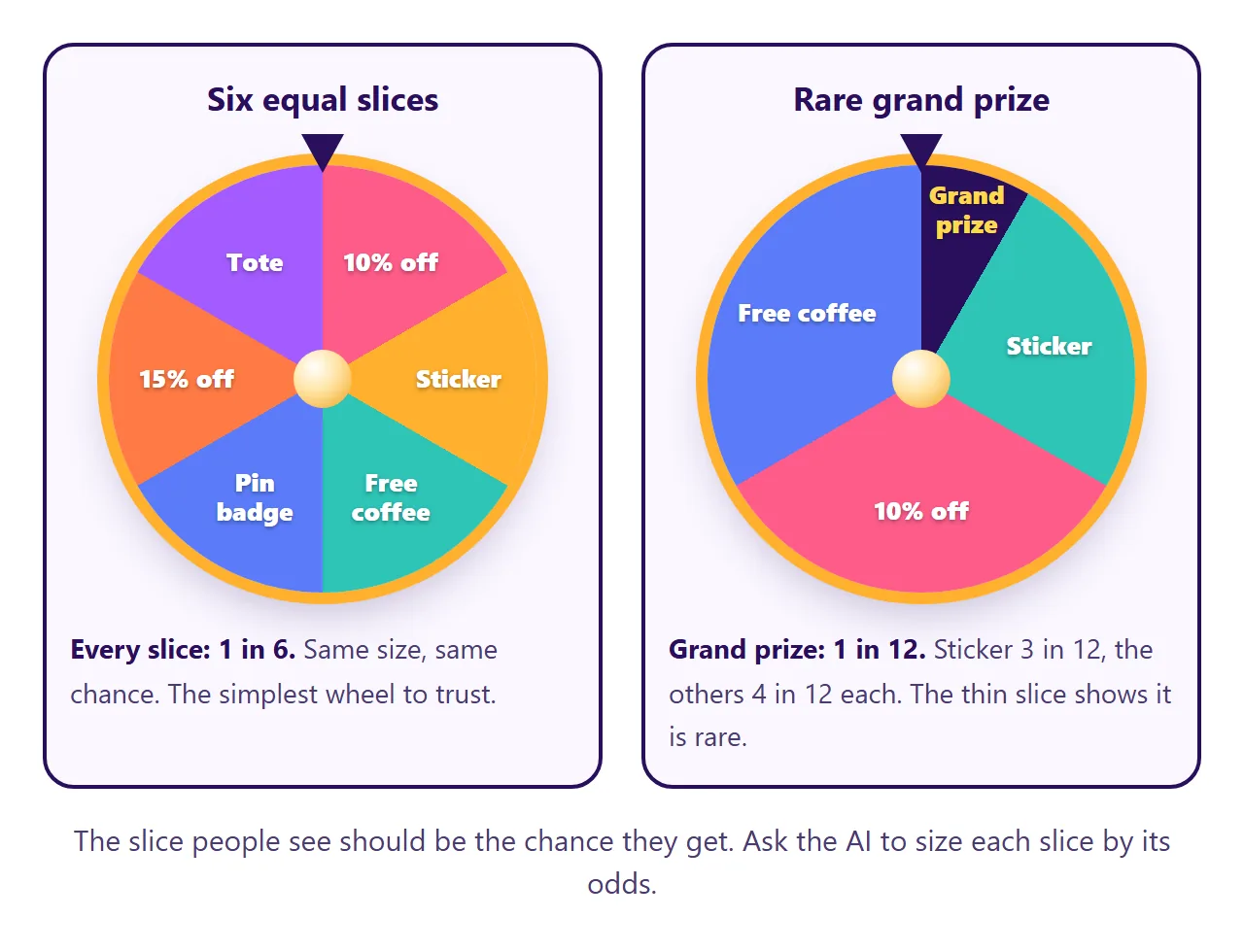
1. The slice people see is the chance they get. If every prize has the same chance, make every slice the same size. If the grand prize should be rare, ask for a thinner slice. A big slice that hardly ever wins feels like a trick once someone notices.
2. The pointer and the banner must agree. Ask the AI to choose the result first, then spin the wheel so it stops on that slice. If the page spins first and works out the winner afterwards, the banner and the pointer can disagree on a slice edge.
3. Short labels. A slice is narrow near the middle. "Free tote bag" fits. "One free canvas tote bag while stocks last" shrinks to a size nobody can read from a step away.
Make it with AI
Open ChatGPT, Claude or Gemini and paste this. Change the words in capitals and add your list at the end.
Make one complete HTML file: a spin the wheel page.
Title: TITLE. Colours: COLOURS.
Show my prizes as a plain numbered list under the
wheel, and draw the wheel slices from that list.
Every slice the same size and the same chance.
Choose the winning slice first with Math.random,
then spin about five turns and ease out so the
pointer stops on that slice.
A pointer at the top that flicks as slices pass.
When it stops, show a banner with the prize and a
short confetti burst.
Rules: all CSS and JavaScript inside the file, no
images or fonts from other sites, nothing sent
anywhere, works on a phone and a tablet.
Use only my prizes, do not invent any.
Prizes: PASTE YOUR LIST HERE
"Draw the wheel slices from that list" matters most. It keeps each prize as plain text on the page, so swapping one later does not mean touching the code that draws the wheel.
A wheel also settles everyday arguments. This one picks team lunch and keeps a running count, so you can watch how the results spread out over many spins.
<!doctype html>
<html lang="en">
<head>
<meta charset="utf-8">
<meta name="viewport" content="width=device-width, initial-scale=1">
<title>Where's team lunch?</title>
<style>
* { box-sizing: border-box; }
body { margin: 0; min-height: 100vh; background: linear-gradient(180deg, #fff6ea, #fdebd8); color: #2d1f14; font-family: system-ui, -apple-system, "Segoe UI", sans-serif; }
.page { max-width: 560px; margin: 0 auto; padding: 18px 14px 28px; }
h1 { margin: 0; font-size: 24px; text-align: center; }
.sub { text-align: center; font-size: 14px; color: #8a6a52; margin: 4px 0 14px; }
.stage { position: relative; width: min(300px, 78vw); margin: 0 auto; aspect-ratio: 1; }
.stage svg.w { width: 100%; height: 100%; display: block; filter: drop-shadow(0 12px 18px rgba(120,60,10,.25)); }
#rot { transform-origin: 150px 150px; transition: transform 4.2s cubic-bezier(.12,.72,.12,1); }
.tick { position: absolute; top: 50%; right: -16px; width: 30px; height: 26px; margin-top: -13px; filter: drop-shadow(0 2px 2px rgba(0,0,0,.25)); }
.go { display: block; margin: 18px auto 0; border: 0; border-radius: 999px; padding: 13px 34px; background: #2d1f14; color: #fff6ea; font: 800 17px system-ui; cursor: pointer; box-shadow: 0 4px 0 #000; transition: transform .1s; }
.go:active { transform: translateY(3px); }
.go:disabled { opacity: .5; cursor: default; }
.result { text-align: center; min-height: 54px; margin-top: 12px; }
.result .r { display: inline-block; padding: 9px 18px; border-radius: 14px; background: #fff; box-shadow: 0 6px 16px rgba(120,60,10,.15); font: 800 22px system-ui; animation: pop .5s cubic-bezier(.2,1.6,.4,1); }
@keyframes pop { from { transform: scale(.5); opacity: 0; } }
.panel { margin-top: 14px; padding: 14px; border-radius: 18px; background: #fff; box-shadow: 0 4px 14px rgba(120,60,10,.08); }
.panel h2 { margin: 0 0 10px; font-size: 12px; letter-spacing: .12em; text-transform: uppercase; color: #8a6a52; display: flex; justify-content: space-between; align-items: center; gap: 8px; }
.panel h2 button { border: 0; border-radius: 9px; padding: 6px 10px; background: #f5e6d6; color: #2d1f14; font: 700 12px system-ui; cursor: pointer; letter-spacing: 0; text-transform: none; }
.row { display: grid; grid-template-columns: 96px 1fr 34px; gap: 8px; align-items: center; font-size: 14px; margin-bottom: 6px; }
.row .nm { white-space: nowrap; overflow: hidden; text-overflow: ellipsis; font-weight: 600; }
.bar { height: 14px; border-radius: 7px; background: #f5ece2; overflow: hidden; }
.bar i { display: block; height: 100%; width: 0; border-radius: 7px; transition: width .4s; }
.row .c { text-align: right; font: 700 13px ui-monospace, Consolas, monospace; color: #8a6a52; }
.note { margin: 8px 0 0; font-size: 13px; color: #8a6a52; }
.opts { margin: 0; padding-left: 20px; font-size: 15px; line-height: 1.7; }
</style>
</head>
<body>
<main class="page">
<h1>Where's team lunch?</h1>
<p class="sub">Friday decider. The wheel spins, nobody argues.</p>
<div class="stage">
<svg class="w" viewBox="0 0 300 300"><g id="rot"></g><circle cx="150" cy="150" r="26" fill="#2d1f14"/><circle cx="150" cy="150" r="10" fill="#fff6ea"/></svg>
<svg class="tick" viewBox="0 0 30 26"><path d="M0 13 L30 0 L30 26 Z" fill="#2d1f14"/></svg>
</div>
<button class="go" id="go">Spin</button>
<div class="result" id="result"></div>
<section class="panel">
<h2>Results so far <span><button id="sim">Spin 60 times fast</button> <button id="clear">Clear</button></span></h2>
<div id="tally"></div>
<p class="note" id="total">No spins yet. Each option has the same chance, so over many spins the bars come out roughly even, rarely exactly.</p>
</section>
<section class="panel">
<h2>Options</h2>
<ol class="opts" id="opts">
<li>Tacos</li>
<li>Ramen</li>
<li>Salad bar</li>
<li>Pizza</li>
<li>Thai</li>
<li>Burgers</li>
</ol>
</section>
</main>
<script>
const COLORS = ['#ff7a45', '#ffc93c', '#5cc8a8', '#ff5c7a', '#7a8cff', '#b08968', '#e86fd1', '#47b8ff'];
const rot = document.getElementById('rot');
let turn = 0, spinning = false, counts = {};
// The options are read from the list on the page.
function options() { return [...document.querySelectorAll('#opts li')].map((li) => li.textContent.trim()).filter(Boolean); }
function esc(s) { return s.replace(/[&<>"]/g, (c) => ({ '&': '&', '<': '<', '>': '>', '"': '"' }[c])); }
function build() {
const o = options(), n = o.length || 1, seg = 360 / n;
let h = '';
o.forEach((name, i) => {
// Slice i is centred at 0deg (pointing right, at the pointer) when the wheel is turned by -i * seg.
const a0 = (i * seg - seg / 2) * Math.PI / 180, a1 = (i * seg + seg / 2) * Math.PI / 180;
const x0 = 150 + 140 * Math.cos(a0), y0 = 150 + 140 * Math.sin(a0), x1 = 150 + 140 * Math.cos(a1), y1 = 150 + 140 * Math.sin(a1);
h += '<path d="M150 150 L' + x0.toFixed(2) + ' ' + y0.toFixed(2) + ' A140 140 0 ' + (seg > 180 ? 1 : 0) + ' 1 ' + x1.toFixed(2) + ' ' + y1.toFixed(2) + ' Z" fill="' + COLORS[i % COLORS.length] + '" stroke="#fff6ea" stroke-width="3"/>';
const fs = name.length > 9 ? 13 : 16;
h += '<text x="268" y="150" transform="rotate(' + (i * seg) + ' 150 150)" text-anchor="end" dominant-baseline="middle" font-family="system-ui, sans-serif" font-weight="800" font-size="' + fs + '" fill="#fff" style="paint-order:stroke" stroke="rgba(0,0,0,.18)" stroke-width="2">' + esc(name) + '</text>';
});
h += '<circle cx="150" cy="150" r="140" fill="none" stroke="#2d1f14" stroke-width="6"/>';
rot.innerHTML = h;
}
function tally() {
const o = options(), max = Math.max(1, ...o.map((k) => counts[k] || 0));
const total = o.reduce((a, k) => a + (counts[k] || 0), 0);
document.getElementById('tally').innerHTML = o.map((k, i) => '<div class="row"><span class="nm">' + esc(k) + '</span><span class="bar"><i style="width:' + ((counts[k] || 0) / max * 100) + '%;background:' + COLORS[i % COLORS.length] + '"></i></span><span class="c">' + (counts[k] || 0) + '</span></div>').join('');
if (total) document.getElementById('total').textContent = total + ' spins. Each option has a 1 in ' + o.length + ' chance per spin, so the bars wobble around an even split.';
}
function spin() {
if (spinning) return;
const o = options(); if (!o.length) return;
spinning = true; document.getElementById('go').disabled = true; document.getElementById('sim').disabled = true;
document.getElementById('result').innerHTML = '';
build();
const n = o.length, seg = 360 / n;
const win = Math.floor(Math.random() * n);
const wobble = (Math.random() - .5) * seg * .6;
// Next resting angle: at least 5 full turns past the current one, stopping with slice "win" at the pointer.
let target = -win * seg + wobble;
while (target < turn + 360 * 5) target += 360;
turn = target;
rot.style.transform = 'rotate(' + turn + 'deg)';
setTimeout(() => {
counts[o[win]] = (counts[o[win]] || 0) + 1;
document.getElementById('result').innerHTML = '<span class="r">' + esc(o[win]) + '</span>';
tally();
spinning = false; document.getElementById('go').disabled = false; document.getElementById('sim').disabled = false;
}, 4300);
}
document.getElementById('go').onclick = spin;
document.getElementById('sim').onclick = () => {
if (spinning) return;
const o = options();
for (let k = 0; k < 60; k++) { const w = o[Math.floor(Math.random() * o.length)]; counts[w] = (counts[w] || 0) + 1; }
tally();
};
document.getElementById('clear').onclick = () => {
counts = {}; tally();
document.getElementById('total').textContent = 'No spins yet. Each option has the same chance, so over many spins the bars come out roughly even, rarely exactly.';
};
new MutationObserver(() => { if (!spinning) { build(); tally(); } }).observe(document.getElementById('opts'), { childList: true, characterData: true, subtree: true });
build(); tally();
</script>
</body>
</html>
Getting the wheel to the booth
You have a spin the wheel page. The AI gave it to you as HTML code, though, and code does not spin for anyone.
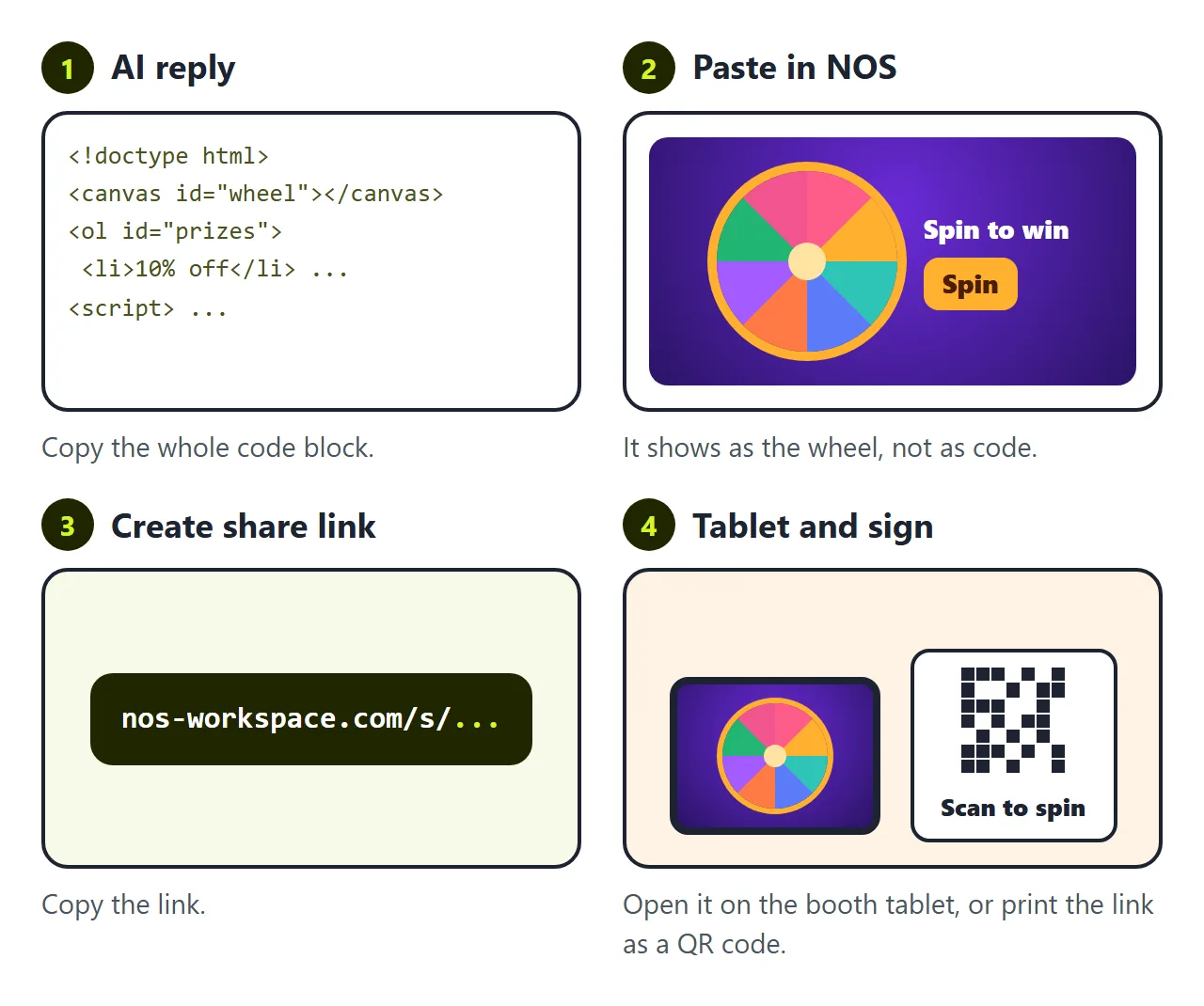
The first wall is putting it where people can tap it. Send the file to the shop tablet or to customers, and on a phone it often opens as code or lands in downloads. To be a page people tap, it has to live somewhere.
In NOS you paste the code into a document and it becomes the wheel straight away. Choose Create share link. Open the link on the booth tablet, or print it as a QR code so people spin on their own phones. Nobody needs an account.
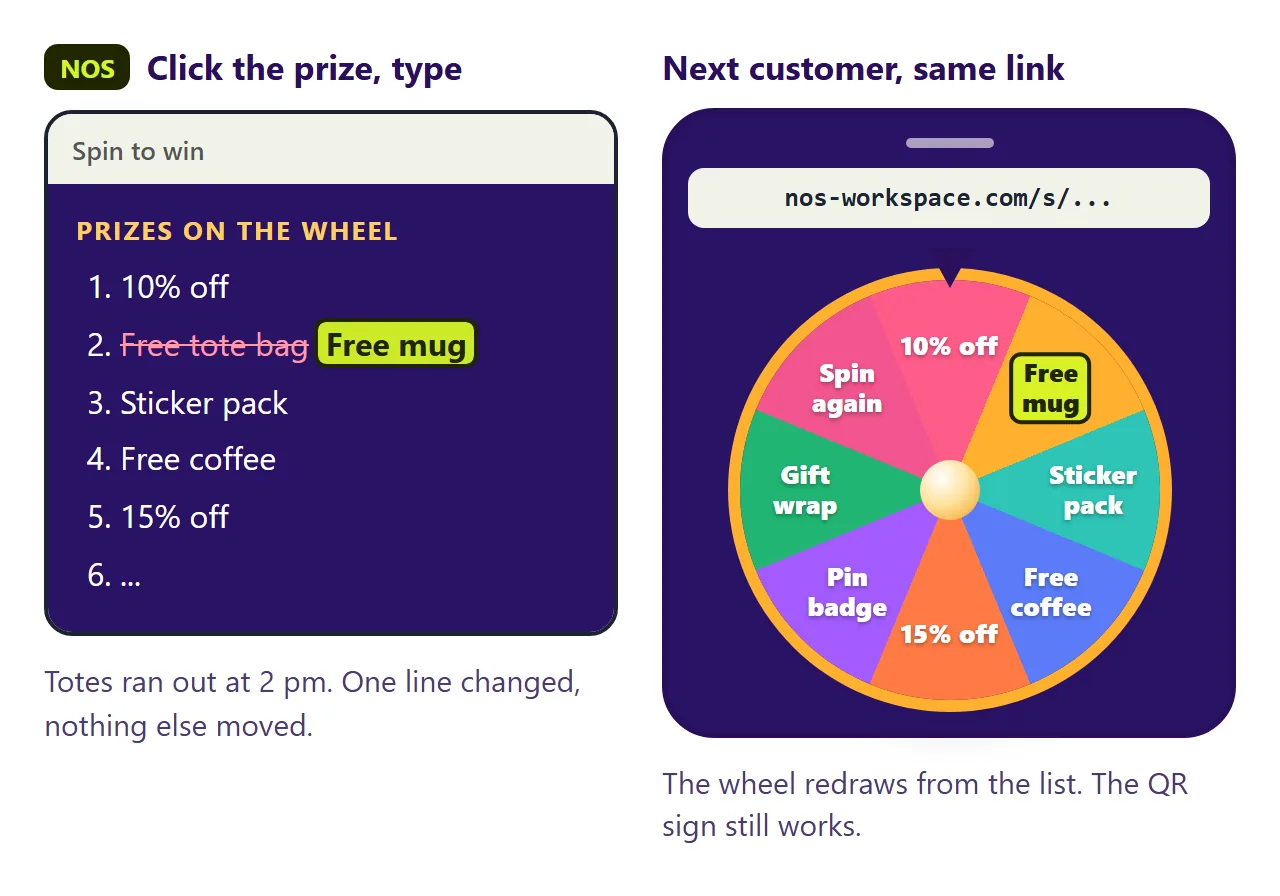
The second wall arrives at two in the afternoon. The tote bags run out. You have mugs instead, and the wheel still promises a tote bag.
If you ask the AI again, you wait for a new reply. It often changes the colours or the spin while it is at it, so you test the wheel again. Then you have a new file and a new link, and the QR sign on the table points to the old one.
In NOS you click "Free tote bag" in the prize list on the page and type "Free mug". The wheel redraws from the list. The link stays the same, so the next customer who scans the sign spins for a mug.
Before you share it
The page picks with Math.random, the browser's built-in random number function. MDN notes that it is not cryptographically secure. That is fine for coupons and lunch, not for a lottery with money at stake.
The wheel cannot tell who already spun. Each visitor's browser runs its own copy, so a reload means another spin. If one spin per person matters, have someone at the booth watch.
To pick a person rather than a prize, see Random name picker. For the page around your event, see Event landing page.