You ask a question and the same three hands go up.
So you pick someone. Then a student says you always pick them. Or a colleague notices it is their turn to present again.
Pulling names from a cup works, until you lose the cup.
These days people ask ChatGPT, Claude or Gemini for it and get a finished page in one reply. A random name picker with your class or team on it, a big button, and a name that lands with a little celebration.
Here is one. Press the button a few times, then flip the switch and see what changes.
<!doctype html>
<html lang="en">
<head>
<meta charset="utf-8">
<meta name="viewport" content="width=device-width, initial-scale=1">
<title>Who's answering?</title>
<style>
  * { box-sizing: border-box; }
  body { margin: 0; min-height: 100vh; background: radial-gradient(circle at 15% 0%, #d9f2ff, transparent 45%), radial-gradient(circle at 100% 40%, #ffe9cf, transparent 42%), #f7f8fc; color: #1f2544; font-family: system-ui, -apple-system, "Segoe UI", sans-serif; }
  .page { max-width: 560px; margin: 0 auto; padding: 20px 14px 28px; }
  .top { display: flex; align-items: baseline; justify-content: space-between; gap: 10px; margin-bottom: 12px; }
  h1 { margin: 0; font-size: 22px; letter-spacing: -.01em; }
  h1 span { color: #2f6fed; }
  .left { font-size: 13px; color: #5d6485; white-space: nowrap; }
  .left b { color: #1f2544; }
  .stage { position: relative; height: 170px; border-radius: 22px; background: linear-gradient(160deg, #23306b, #151b3d); box-shadow: 0 14px 30px -12px rgba(21,27,61,.55), inset 0 1px 0 rgba(255,255,255,.12); display: grid; place-items: center; overflow: hidden; }
  .stage::before, .stage::after { content: ""; position: absolute; left: 0; right: 0; height: 46px; z-index: 2; pointer-events: none; }
  .stage::before { top: 0; background: linear-gradient(#151b3d, transparent); }
  .stage::after { bottom: 0; background: linear-gradient(transparent, #151b3d); }
  .name { position: relative; z-index: 1; font: 800 clamp(34px, 10vw, 52px)/1.1 system-ui; color: #fff; text-align: center; padding: 0 12px; transition: transform .15s; }
  .name.tick { animation: tick .09s; }
  @keyframes tick { from { transform: translateY(-14px); opacity: .4; } to { transform: none; opacity: 1; } }
  .name.landed { color: #ffd84d; animation: land .6s cubic-bezier(.2,1.6,.4,1); text-shadow: 0 0 24px rgba(255,216,77,.55); }
  @keyframes land { from { transform: scale(.6); } to { transform: scale(1); } }
  .hint { position: absolute; bottom: 12px; z-index: 3; font-size: 13px; color: #aab3e6; }
  .ring { position: absolute; inset: 0; border-radius: 22px; box-shadow: inset 0 0 0 3px #ffd84d; opacity: 0; transition: opacity .3s; pointer-events: none; z-index: 3; }
  .stage.done .ring { opacity: 1; }
  .controls { display: flex; gap: 10px; align-items: center; margin: 14px 0 6px; flex-wrap: wrap; }
  .pick { flex: 1 1 180px; border: 0; border-radius: 16px; padding: 15px 18px; background: linear-gradient(180deg, #3d7bff, #2459d6); color: #fff; font: 800 18px system-ui; cursor: pointer; box-shadow: 0 5px 0 #173f9e; transition: transform .1s, box-shadow .1s; }
  .pick:active { transform: translateY(4px); box-shadow: 0 1px 0 #173f9e; }
  .pick:disabled { opacity: .6; cursor: default; }
  .switch { display: flex; align-items: center; gap: 8px; border: 0; background: none; padding: 6px 2px; font: 600 14px system-ui; color: #1f2544; cursor: pointer; }
  .track { width: 42px; height: 24px; border-radius: 12px; background: #c7cbe0; position: relative; transition: background .2s; flex: none; }
  .track::after { content: ""; position: absolute; top: 3px; left: 3px; width: 18px; height: 18px; border-radius: 50%; background: #fff; box-shadow: 0 1px 3px rgba(0,0,0,.3); transition: left .2s; }
  .switch[aria-pressed="true"] .track { background: #22a06b; }
  .switch[aria-pressed="true"] .track::after { left: 21px; }
  .card { margin-top: 14px; padding: 14px; border-radius: 16px; background: rgba(255,255,255,.85); box-shadow: 0 2px 10px rgba(31,37,68,.07); }
  .card h2 { margin: 0 0 8px; font-size: 12px; letter-spacing: .1em; text-transform: uppercase; color: #5d6485; display: flex; justify-content: space-between; align-items: center; }
  .card h2 button { border: 0; background: #eef0f8; border-radius: 9px; padding: 5px 10px; font: 600 12px system-ui; color: #1f2544; cursor: pointer; letter-spacing: 0; text-transform: none; }
  .hist { display: flex; flex-wrap: wrap; gap: 6px; min-height: 30px; margin: 0; padding: 0; list-style: none; }
  .hist li { padding: 6px 10px; border-radius: 999px; background: #eef3ff; color: #2459d6; font: 700 14px system-ui; animation: in .35s; }
  .hist li:first-child { background: #ffd84d; color: #3a2d00; }
  .hist li small { opacity: .6; margin-right: 4px; font-weight: 600; }
  .hist li.empty { background: none; color: #8a90ad; font-weight: 500; padding-left: 0; }
  @keyframes in { from { transform: scale(.5); opacity: 0; } }
  .roster { margin: 0; font-size: 16px; line-height: 1.7; color: #2b3154; }
  .note { margin: 8px 0 0; font-size: 13px; color: #8a90ad; }
  canvas { position: fixed; inset: 0; pointer-events: none; z-index: 9; }
</style>
</head>
<body>
<main class="page">
  <div class="top"><h1>Who's <span>answering?</span></h1><div class="left"><b id="left">0</b> left to pick</div></div>

  <div class="stage" id="stage">
    <div class="name" id="name">Ready?</div>
    <div class="hint" id="hint">Press Pick a name</div>
    <div class="ring"></div>
  </div>

  <div class="controls">
    <button class="pick" id="pick">Pick a name</button>
    <button class="switch" id="remove" aria-pressed="true"><span class="track"></span>Remove picked name</button>
  </div>

  <section class="card">
    <h2>Picked so far <button id="reset">Reset</button></h2>
    <ol class="hist" id="hist"><li class="empty">Nobody yet.</li></ol>
  </section>

  <section class="card">
    <h2>Class list</h2>
    <p class="roster" id="names">Ava, Ben, Chloe, Daniel, Ella, Felix, Grace, Hugo, Isla, Jacob, Kaito, Lena, Mateo, Nora, Oliver, Priya, Ruby, Samir, Sofia, Theo, Uma, Victor, Willow, Yusuf</p>
    <p class="note">Names are made up. Separate names with commas.</p>
  </section>
</main>
<canvas id="fx"></canvas>
<script>
  const $ = (id) => document.getElementById(id);
  const nameEl = $('name'), stage = $('stage'), pickBtn = $('pick'), removeBtn = $('remove');
  let history = [];
  let busy = false;

  // The names are read from the class list on the page every time, so editing that text changes the draw.
  function readNames() {
    return $('names').textContent.split(/[,\n]/).map((s) => s.trim()).filter(Boolean);
  }
  function removeOn() { return removeBtn.getAttribute('aria-pressed') === 'true'; }
  function pool() {
    const names = readNames();
    if (!removeOn()) return names;
    return names.filter((n) => !history.includes(n));
  }
  function updateLeft() { $('left').textContent = pool().length; }

  function renderHistory() {
    const ol = $('hist');
    ol.innerHTML = '';
    if (!history.length) { ol.innerHTML = '<li class="empty">Nobody yet.</li>'; return; }
    history.slice().reverse().forEach((n, i) => {
      const li = document.createElement('li');
      li.innerHTML = '<small>' + (history.length - i) + '.</small>';
      li.append(n);
      ol.append(li);
    });
  }

  function pick() {
    if (busy) return;
    const choices = pool();
    if (!choices.length) {
      nameEl.className = 'name'; nameEl.textContent = 'Everyone had a turn';
      nameEl.style.fontSize = 'clamp(22px, 6vw, 30px)';
      $('hint').textContent = 'Press Reset to start again';
      return;
    }
    nameEl.style.fontSize = '';
    busy = true; pickBtn.disabled = true; stage.classList.remove('done');
    $('hint').textContent = '';
    // Choose first with Math.random, then animate towards it.
    const winner = choices[Math.floor(Math.random() * choices.length)];
    const all = readNames();
    const steps = 24;
    let i = 0;
    (function step() {
      if (i < steps) {
        nameEl.className = 'name';
        void nameEl.offsetWidth;
        nameEl.className = 'name tick';
        nameEl.textContent = all[Math.floor(Math.random() * all.length)];
        const delay = 45 + Math.pow(i / steps, 2.4) * 330;
        i++;
        setTimeout(step, delay);
        return;
      }
      nameEl.textContent = winner;
      nameEl.className = 'name landed';
      stage.classList.add('done');
      history.push(winner);
      renderHistory(); updateLeft();
      $('hint').textContent = removeOn() ? 'Taken out of the hat' : 'Still in the hat';
      burst();
      busy = false; pickBtn.disabled = false;
    })();
  }

  function burst() {
    const cv = $('fx'), x = cv.getContext('2d');
    cv.width = innerWidth; cv.height = innerHeight;
    const r = stage.getBoundingClientRect();
    const cx = r.left + r.width / 2, cy = r.top + r.height / 2;
    const cols = ['#ffd84d', '#3d7bff', '#22a06b', '#ff6b8b', '#9b6bff'];
    const bits = Array.from({ length: 70 }, () => {
      const a = Math.random() * Math.PI * 2, s = 3 + Math.random() * 6;
      return { x: cx, y: cy, vx: Math.cos(a) * s, vy: Math.sin(a) * s - 2, c: cols[Math.floor(Math.random() * cols.length)], r: Math.random() * 6 };
    });
    let f = 0;
    (function draw() {
      x.clearRect(0, 0, cv.width, cv.height);
      bits.forEach((b) => { b.x += b.vx; b.y += b.vy; b.vy += .18; b.vx *= .98; b.r += .2; x.fillStyle = b.c; x.save(); x.translate(b.x, b.y); x.rotate(b.r); x.fillRect(-4, -2, 8, 5); x.restore(); });
      if (++f < 80) requestAnimationFrame(draw); else x.clearRect(0, 0, cv.width, cv.height);
    })();
  }

  pickBtn.onclick = pick;
  removeBtn.onclick = () => { removeBtn.setAttribute('aria-pressed', String(!removeOn())); updateLeft(); };
  $('reset').onclick = () => {
    if (busy) return;
    history = []; renderHistory(); updateLeft();
    nameEl.className = 'name'; nameEl.style.fontSize = ''; nameEl.textContent = 'Ready?';
    stage.classList.remove('done'); $('hint').textContent = 'Press Pick a name';
  };
  // Keep the count right if someone edits the list.
  new MutationObserver(updateLeft).observe($('names'), { childList: true, characterData: true, subtree: true });
  updateLeft();
</script>
</body>
</html>
Three things that make it work in a room
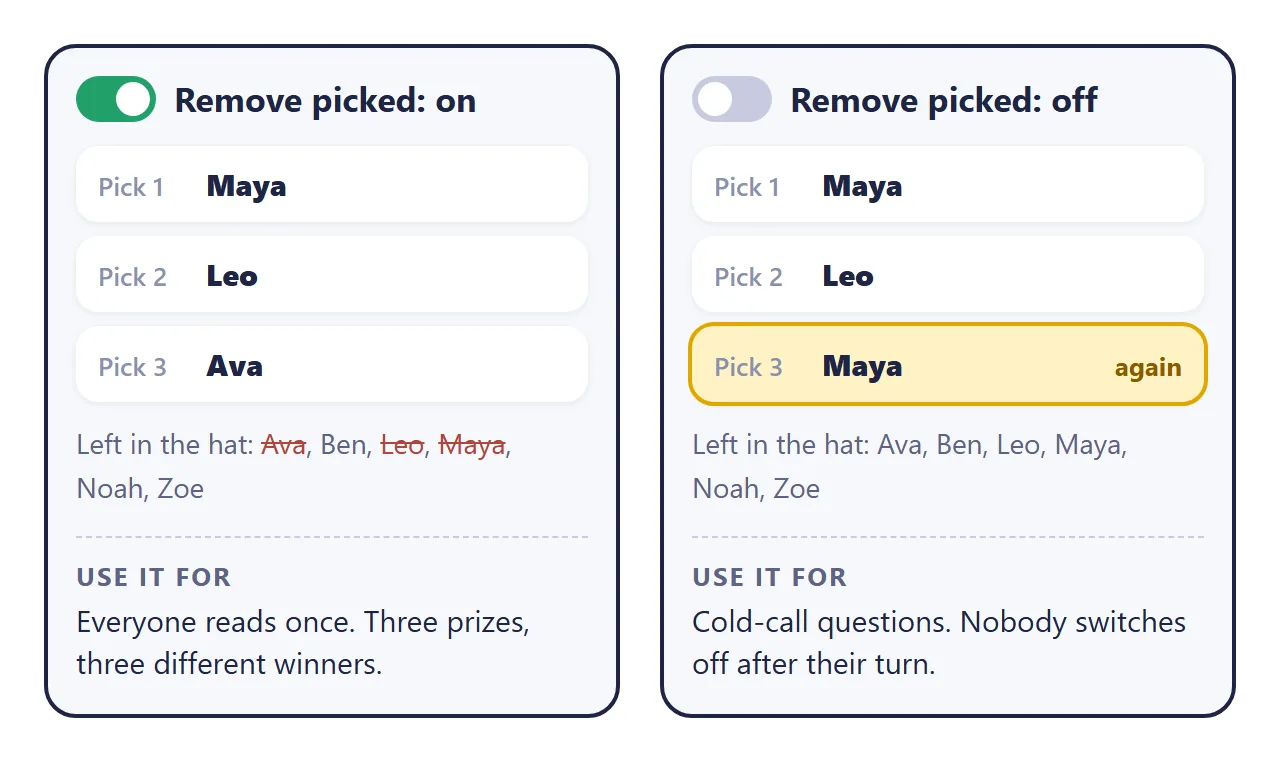
1. Decide: one turn each, or anyone any time. With "remove picked name" on, each person comes up once until you reset. That suits reading turns or handing out three prizes. With it off, anyone can come up again, which keeps everyone listening during questions.
2. Keep the list on the page. If the names are visible, people can see they are in the draw. It also means a missing or misspelled name is easy to spot before you start.
3. Keep a history. "Who did we already pick?" comes up every time. A short row of past picks answers it without anyone keeping notes.
Make it with AI
Open ChatGPT, Claude or Gemini and paste this. Change the words in capitals and add your names at the end.
Make one complete HTML file: a random name picker.
Title: TITLE, for WHO IT IS FOR.
Show my names as a plain list on the page and read
the names from that list each time.
A big "Pick a name" button. Shuffle through names
for about two seconds, then land on the picked one
with a small confetti burst.
Use Math.random to choose. Choose the name first,
then animate towards it.
Add a "Remove picked name" switch, on by default.
Show a history of picks, newest first, and a Reset
button.
Rules: all CSS and JavaScript inside the file, no
images or fonts from other sites, nothing sent
anywhere, works on a phone and on a projector.
Use only my names, do not invent any.
Names: PASTE YOUR NAMES HERE
"Read the names from that list each time" matters most. It keeps the names as plain text on the page, so adding or fixing one later is a matter of typing, not rewriting code.
The same idea works for a meeting. This one shuffles the whole team into a speaking order and times each person.
<!doctype html>
<html lang="en">
<head>
<meta charset="utf-8">
<meta name="viewport" content="width=device-width, initial-scale=1">
<title>Stand-up order</title>
<style>
  * { box-sizing: border-box; }
  body { margin: 0; min-height: 100vh; background: #0f1a17; background-image: radial-gradient(circle at 0% 0%, rgba(46,204,143,.18), transparent 45%), radial-gradient(circle at 100% 100%, rgba(255,184,77,.12), transparent 45%); color: #e9f5ef; font-family: system-ui, -apple-system, "Segoe UI", sans-serif; }
  .page { max-width: 560px; margin: 0 auto; padding: 20px 14px 28px; }
  .top { display: flex; justify-content: space-between; align-items: center; gap: 10px; margin-bottom: 14px; }
  h1 { margin: 0; font-size: 21px; }
  .date { font-size: 13px; color: #8fb3a4; }
  .bar { display: flex; gap: 8px; margin-bottom: 14px; }
  .bar button { flex: 1; border: 0; border-radius: 14px; padding: 13px 10px; font: 800 16px system-ui; cursor: pointer; transition: transform .1s; }
  .bar button:active { transform: scale(.97); }
  .bar button:disabled { opacity: .45; cursor: default; }
  #shuffle { background: #2ecc8f; color: #062418; box-shadow: 0 4px 0 #1b8f61; }
  #next { background: #ffb84d; color: #3a2400; box-shadow: 0 4px 0 #c7862a; }
  .now { display: flex; align-items: center; justify-content: space-between; gap: 10px; padding: 14px 16px; margin-bottom: 12px; border-radius: 18px; background: linear-gradient(135deg, #1d3a30, #142a23); border: 1px solid rgba(46,204,143,.35); min-height: 74px; }
  .now .lab { font-size: 12px; letter-spacing: .1em; text-transform: uppercase; color: #8fb3a4; }
  .now .who { font: 800 26px system-ui; margin-top: 2px; }
  .clock { font: 700 24px ui-monospace, Consolas, monospace; color: #ffb84d; font-variant-numeric: tabular-nums; }
  .queue { list-style: none; margin: 0; padding: 0; display: grid; gap: 7px; }
  .queue li { display: flex; align-items: center; gap: 12px; padding: 10px 12px; border-radius: 14px; background: rgba(255,255,255,.06); border: 1px solid rgba(255,255,255,.08); font: 600 17px system-ui; opacity: 0; transform: translateX(-30px) rotate(-2deg); animation: deal .45s cubic-bezier(.2,1.4,.4,1) forwards; }
  @keyframes deal { to { opacity: 1; transform: none; } }
  .queue .n { width: 30px; height: 30px; border-radius: 50%; display: grid; place-items: center; background: rgba(46,204,143,.18); color: #2ecc8f; font: 800 14px system-ui; flex: none; }
  .queue .t { margin-left: auto; font: 600 13px ui-monospace, Consolas, monospace; color: #8fb3a4; }
  .queue li.cur { background: rgba(255,184,77,.16); border-color: #ffb84d; box-shadow: 0 0 0 3px rgba(255,184,77,.18); }
  .queue li.cur .n { background: #ffb84d; color: #3a2400; }
  .queue li.done { opacity: .5; }
  .queue li.done .n { background: #2ecc8f; color: #062418; }
  .empty { color: #8fb3a4; font-size: 14px; padding: 6px 2px; }
  .team { margin-top: 18px; padding: 12px 14px; border-radius: 14px; background: rgba(255,255,255,.05); }
  .team h2 { margin: 0 0 6px; font-size: 12px; letter-spacing: .1em; text-transform: uppercase; color: #8fb3a4; }
  .team ul { margin: 0; padding: 0; list-style: none; display: flex; flex-wrap: wrap; gap: 4px 14px; font-size: 15px; }
  .team p { margin: 8px 0 0; font-size: 13px; color: #8fb3a4; }
</style>
</head>
<body>
<main class="page">
  <div class="top"><h1>Daily stand-up</h1><span class="date">Speaking order</span></div>
  <div class="bar"><button id="shuffle">Shuffle order</button><button id="next" disabled>Next speaker</button></div>
  <div class="now"><div><div class="lab" id="lab">Up now</div><div class="who" id="who">Shuffle to start</div></div><div class="clock" id="clock">0:00</div></div>
  <ol class="queue" id="queue"><li class="empty" style="opacity:1;transform:none;animation:none;background:none;border:0">The order appears here.</li></ol>

  <section class="team">
    <h2>Team</h2>
    <ul id="team"><li>Amara</li><li>Ben</li><li>Carlos</li><li>Dana</li><li>Eitan</li><li>Fatima</li><li>Gus</li><li>Hana</li></ul>
    <p>Names are made up. Each speaker's time is shown next to their name.</p>
  </section>
</main>
<script>
  const $ = (id) => document.getElementById(id);
  let order = [], cur = -1, started = 0, timer = null, times = [];

  function fmt(ms) { const s = Math.floor(ms / 1000); return Math.floor(s / 60) + ':' + String(s % 60).padStart(2, '0'); }

  // Fisher-Yates shuffle using Math.random.
  function shuffle(a) {
    for (let i = a.length - 1; i > 0; i--) { const j = Math.floor(Math.random() * (i + 1)); [a[i], a[j]] = [a[j], a[i]]; }
    return a;
  }

  function draw() {
    const q = $('queue');
    q.innerHTML = '';
    order.forEach((n, i) => {
      const li = document.createElement('li');
      li.style.animationDelay = (i * 0.09) + 's';
      li.innerHTML = '<span class="n">' + (i + 1) + '</span><span class="nm"></span><span class="t"></span>';
      li.querySelector('.nm').textContent = n;
      q.append(li);
    });
  }

  function mark() {
    [...$('queue').children].forEach((li, i) => {
      li.classList.toggle('cur', i === cur);
      li.classList.toggle('done', i < cur);
      if (times[i] != null) li.querySelector('.t').textContent = fmt(times[i]);
    });
  }

  function tick() { $('clock').textContent = fmt(Date.now() - started); }

  $('shuffle').onclick = () => {
    // Read the team from the list on the page each time.
    order = shuffle([...document.querySelectorAll('#team li')].map((li) => li.textContent.trim()).filter(Boolean));
    cur = -1; times = []; clearInterval(timer);
    draw();
    $('lab').textContent = 'Up first';
    $('who').textContent = order[0] || 'No names';
    $('clock').textContent = '0:00';
    $('next').disabled = !order.length;
    $('next').textContent = 'Start';
  };

  $('next').onclick = () => {
    if (cur >= 0) times[cur] = Date.now() - started;
    cur++;
    clearInterval(timer);
    if (cur >= order.length) {
      mark();
      const total = times.reduce((a, b) => a + b, 0);
      $('lab').textContent = 'All done';
      $('who').textContent = 'Everyone spoke';
      $('clock').textContent = fmt(total);
      $('next').disabled = true;
      return;
    }
    started = Date.now(); timer = setInterval(tick, 250); tick();
    $('lab').textContent = 'Up now · ' + (cur + 1) + ' of ' + order.length;
    $('who').textContent = order[cur];
    $('next').textContent = cur === order.length - 1 ? 'Finish' : 'Next speaker';
    mark();
  };
</script>
</body>
</html>
Getting it in front of the room
You have a working random name picker. The AI gave it to you as HTML code, though, and code does not pick anyone.
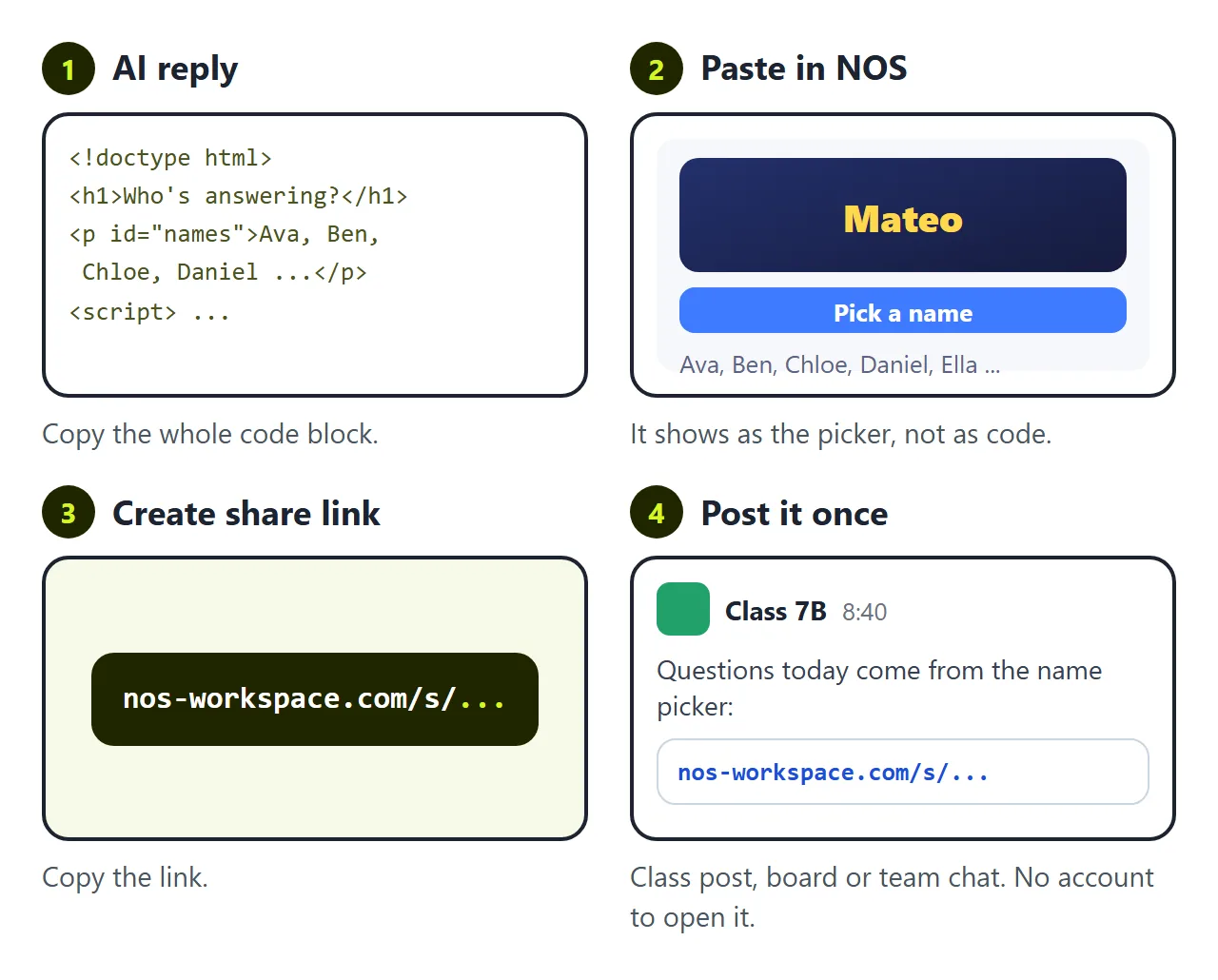
The first wall is turning the code into something people can open. Send the file and on a phone it often opens as code or lands in downloads. On a school laptop it may not open at all. To be a page people tap, it has to live somewhere.
In NOS you paste the code into a document and it becomes the picker straight away. Choose Create share link and put that link on the board, in the class post, or in the team chat. Nobody needs an account to open it.
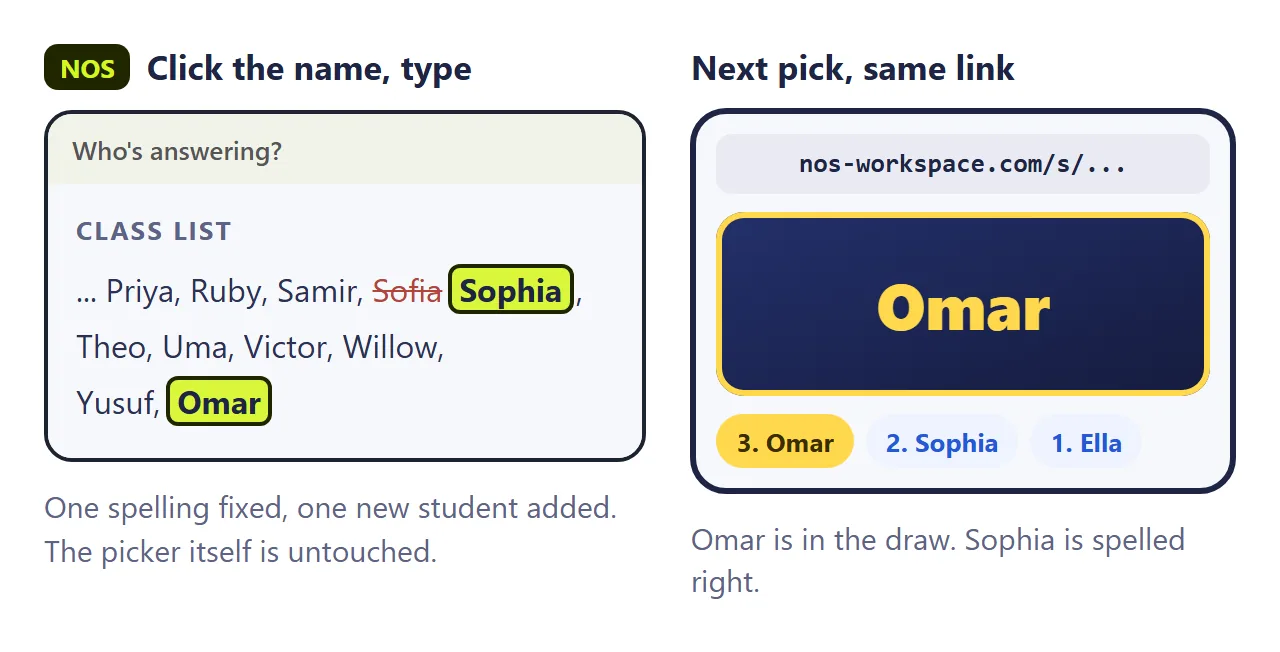
The second wall is the name you got wrong. Sofia spells it Sophia. Omar joined the class last week. Small things, but nobody wants to be missing from the draw.
If you ask the AI again, you wait for a new reply. It often changes other parts while it is at it, so you test everything again. Then you have a new file and a new link to send.
In NOS you click the name in the list on the page and type. The link stays the same, and the next person who opens it gets the fixed list.
Before you share it
The page chooses with Math.random, the browser's built-in random number function. That is fine for turns and questions. MDN notes that it is not cryptographically secure, so do not use it for a lottery or anything with money at stake.
Each person's picks live in their own browser. If you and a student both open the link, you each have your own history.
For a prize or decision you want people to watch, see Spin the wheel. For a class game, see Classroom bingo.