The storage event is how one browser tab learns that another tab changed localStorage. Here "storage" means the Web Storage API, not cloud or file storage. The event is a StorageEvent sent to window, and it carries the key and the old and new values.
A real one needs two tabs, and the examples on this page run in a frame that is not allowed to use storage. So the first example builds the same event by hand and sends it to its own window.
Press the buttons and watch what the listener receives.
<!doctype html>
<html lang="en">
<head>
<meta charset="utf-8">
<meta name="viewport" content="width=device-width, initial-scale=1">
<title>storage event inspector</title>
<style>
  body { margin: 0; padding: 14px; font-family: system-ui, sans-serif; background: #f4f5f7; color: #1d2330; }
  p { margin: 0 0 10px; font-size: 14px; line-height: 1.45; }
  .btns { display: flex; flex-wrap: wrap; gap: 8px; margin-bottom: 12px; }
  button { font: inherit; font-size: 14px; padding: 8px 12px; border: 1px solid #c9ced8; border-radius: 8px; background: #fff; cursor: pointer; }
  button:hover { background: #eef2ff; }
  table { width: 100%; border-collapse: collapse; background: #fff; border-radius: 8px; overflow: hidden; font-size: 14px; }
  th, td { text-align: left; padding: 6px 10px; border-bottom: 1px solid #e6e8ee; }
  th { width: 38%; font: 600 13px ui-monospace, Consolas, monospace; color: #475066; }
  td { font-family: ui-monospace, Consolas, monospace; font-size: 13px; word-break: break-all; }
  #count { margin-top: 10px; font-size: 13px; color: #475066; }
</style>
</head>
<body>
<p>A real <code>storage</code> event needs a second tab. These buttons build the same event by hand and send it to <code>window</code>, so you can see what the listener receives.</p>

<div class="btns">
  <button id="change">Change theme</button>
  <button id="add">Add draft</button>
  <button id="remove">Remove draft</button>
  <button id="clear">Clear all</button>
</div>

<table>
  <tr><th>e.key</th><td id="key">(nothing yet)</td></tr>
  <tr><th>e.oldValue</th><td id="oldValue">-</td></tr>
  <tr><th>e.newValue</th><td id="newValue">-</td></tr>
  <tr><th>e.url</th><td id="url">-</td></tr>
  <tr><th>e.bubbles</th><td id="bubbles">-</td></tr>
</table>
<div id="count">Events received: 0</div>

<script>
  const data = new Map([['theme', 'light']]);   // stands in for the other tab's localStorage
  let received = 0;

  // This listener is the same code a real page uses.
  window.addEventListener('storage', (e) => {
    received++;
    const show = (v) => (v === null ? 'null' : '"' + v + '"');
    document.getElementById('key').textContent = show(e.key);
    document.getElementById('oldValue').textContent = show(e.oldValue);
    document.getElementById('newValue').textContent = show(e.newValue);
    document.getElementById('url').textContent = e.url;
    document.getElementById('bubbles').textContent = String(e.bubbles);
    document.getElementById('count').textContent = 'Events received: ' + received;
  });

  // Build the event the browser would send to this tab.
  function fire(key, oldValue, newValue) {
    window.dispatchEvent(new StorageEvent('storage', {
      key, oldValue, newValue, url: location.href
    }));
  }

  document.getElementById('change').addEventListener('click', () => {
    const old = data.has('theme') ? data.get('theme') : null;
    const next = old === 'light' ? 'dark' : 'light';
    data.set('theme', next);
    fire('theme', old, next);
  });
  document.getElementById('add').addEventListener('click', () => {
    const old = data.has('draft') ? data.get('draft') : null;
    data.set('draft', 'hello');
    if (old !== 'hello') fire('draft', old, 'hello');
  });
  document.getElementById('remove').addEventListener('click', () => {
    if (!data.has('draft')) return;
    const old = data.get('draft');
    data.delete('draft');
    fire('draft', old, null);
  });
  document.getElementById('clear').addEventListener('click', () => {
    data.clear();
    fire(null, null, null);   // clear() sends null for all three
  });
</script>
</body>
</html>
Everything the listener prints, key, oldValue, newValue and url, is a plain property of the event.
The smallest real example: one file, two tabs
Save this as one HTML file and open it from a local web server in two tabs. MDN lists pages opened from file: or data: addresses as a case where localStorage can throw a SecurityError, so do not double-click the file.
<!doctype html>
<meta charset="utf-8">
<button id="toggle">Toggle theme</button>
<script>
  let theme = localStorage.getItem('theme') || 'light';
  const apply = () => {
    document.body.style.background = theme === 'dark' ? '#333' : '#fff';
  };
  apply();

  // Runs in OTHER tabs of the same origin
  window.addEventListener('storage', (e) => {
    if (e.key !== 'theme') return;
    theme = e.newValue || 'light';
    apply();
  });

  document.getElementById('toggle').addEventListener('click', () => {
    theme = theme === 'dark' ? 'light' : 'dark';
    localStorage.setItem('theme', theme);
    apply();   // no event comes back to this tab
  });
</script>
Click the button in one tab and the background of the other tab changes. The steps are the same every time:
- Save with
setItem, then update this tab yourself. - Listen on
windowin every page that should follow. - Check
e.keyfirst, becausenullmeansclear(). - Read
e.newValueand update the screen.
What the event carries
Each property is read-only and describes one change.
| Property | What it holds |
|---|---|
key |
The key that changed, or null after clear() |
oldValue |
The previous value, or null for a new key |
newValue |
The new value, or null after a removal or clear() |
url |
The URL of the document whose storage changed |
storageArea |
The Storage object that was affected |
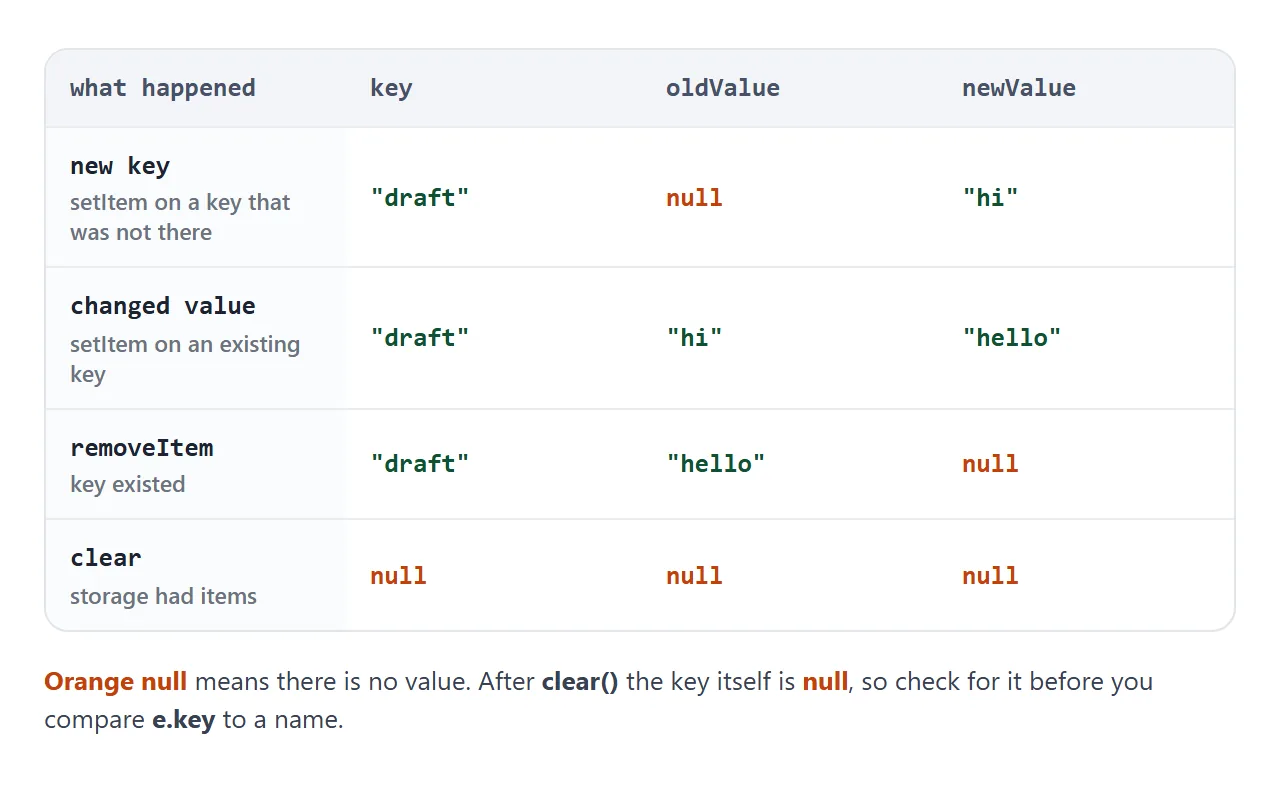
Values are strings, because storage keeps strings. If you saved JSON, run JSON.parse on e.newValue, and check for null first.
Who hears it, and who does not
The event goes to other documents that share the storage. The document that made the change gets nothing, so it must update itself.
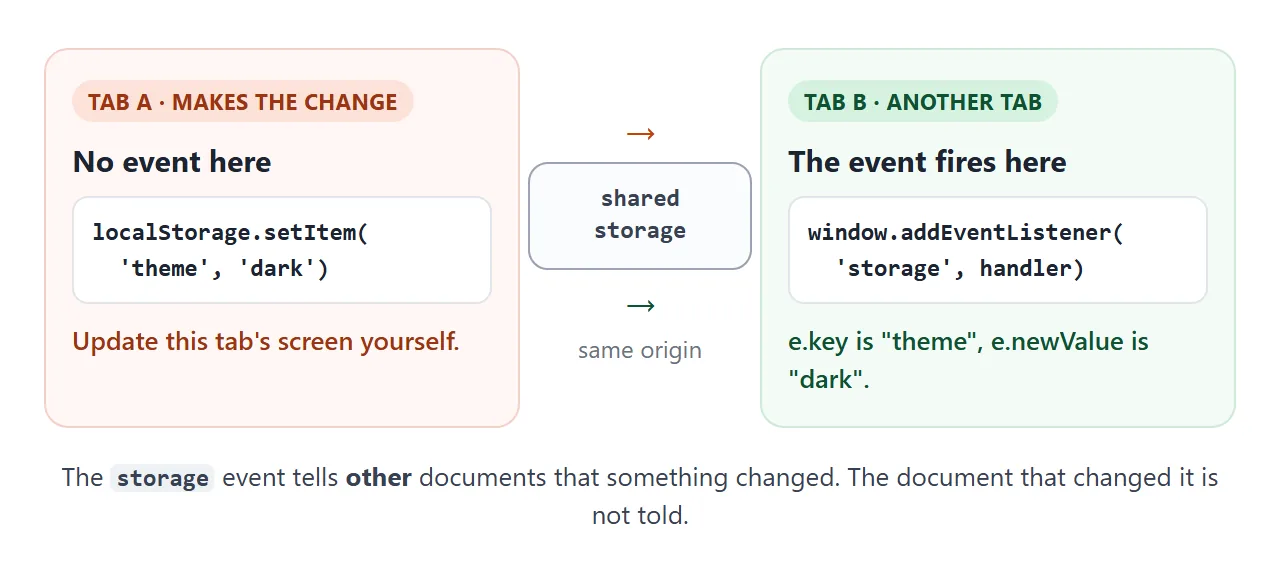
Two more cases send nothing at all. Setting a key to the value it already has is a no-op in the specification, so no event goes out. Calling clear() on an empty storage, or removeItem on a missing key, returns early too.
Compare both sides in the next example. Save from either pane and only the other pane logs an event.
<!doctype html>
<html lang="en">
<head>
<meta charset="utf-8">
<meta name="viewport" content="width=device-width, initial-scale=1">
<title>Two tabs, one storage</title>
<style>
  body { margin: 0; padding: 12px; font-family: system-ui, sans-serif; background: #f4f5f7; color: #1d2330; }
  .note { margin: 0 0 10px; font-size: 13.5px; line-height: 1.45; }
  .tabs { display: grid; grid-template-columns: 1fr 1fr; gap: 10px; }
  @media (max-width: 520px) { .tabs { grid-template-columns: 1fr; } }
  .tab { background: #fff; border: 1px solid #d8dce5; border-radius: 10px; padding: 10px; }
  .tab h2 { margin: 0 0 8px; font-size: 14px; }
  input { width: 100%; box-sizing: border-box; font: inherit; font-size: 14px; padding: 7px 9px; border: 1px solid #c9ced8; border-radius: 6px; }
  .row { display: flex; gap: 6px; margin: 8px 0; }
  button { font: inherit; font-size: 13px; padding: 6px 10px; border: 1px solid #c9ced8; border-radius: 6px; background: #fff; cursor: pointer; }
  button:hover { background: #eef2ff; }
  .log { margin: 0; padding: 0; list-style: none; font: 12.5px/1.4 ui-monospace, Consolas, monospace; min-height: 118px; }
  .log li { padding: 3px 6px; border-radius: 4px; margin-bottom: 3px; }
  .log .got { background: #e4f6ea; color: #0f5132; }
  .log .mine { background: #eef0f4; color: #475066; }
  .log .none { background: #fdeee8; color: #9a3412; }
</style>
</head>
<body>
<p class="note">Two panes share one store. The pane that saves gets no event. The other pane does.</p>

<div class="tabs">
  <section class="tab" id="tabA">
    <h2>Tab A</h2>
    <input type="text" value="hello" aria-label="Value in tab A">
    <div class="row"><button class="save">setItem</button><button class="clear">clear</button></div>
    <ul class="log"></ul>
  </section>
  <section class="tab" id="tabB">
    <h2>Tab B</h2>
    <input type="text" value="hello" aria-label="Value in tab B">
    <div class="row"><button class="save">setItem</button><button class="clear">clear</button></div>
    <ul class="log"></ul>
  </section>
</div>

<script>
  const store = new Map();   // the shared "localStorage"
  const tabs = { A: document.getElementById('tabA'), B: document.getElementById('tabB') };

  function log(tab, cls, text) {
    const li = document.createElement('li');
    li.className = cls;
    li.textContent = text;
    const ul = tab.querySelector('.log');
    ul.prepend(li);
    while (ul.children.length > 4) ul.lastChild.remove();
  }

  // In a real page this listener sits on window.
  Object.values(tabs).forEach((tab) => {
    tab.addEventListener('storage', (e) => {
      log(tab, 'got', 'event: key=' + JSON.stringify(e.key) + ' ' +
        JSON.stringify(e.oldValue) + ' -> ' + JSON.stringify(e.newValue));
    });
  });

  function send(from, key, oldValue, newValue) {
    const other = from === 'A' ? tabs.B : tabs.A;
    other.dispatchEvent(new StorageEvent('storage', { key, oldValue, newValue, url: location.href }));
  }

  ['A', 'B'].forEach((name) => {
    const tab = tabs[name];
    tab.querySelector('.save').addEventListener('click', () => {
      const value = tab.querySelector('input').value;
      const old = store.has('note') ? store.get('note') : null;
      if (old === value) {                       // same value: nothing is sent to anyone
        log(tab, 'none', 'setItem: same value, no event anywhere');
        return;
      }
      store.set('note', value);
      log(tab, 'mine', 'setItem done. No event here.');
      send(name, 'note', old, value);
    });
    tab.querySelector('.clear').addEventListener('click', () => {
      if (store.size === 0) {                    // nothing to clear: nothing is sent
        log(tab, 'none', 'clear: already empty, no event anywhere');
        return;
      }
      store.clear();
      log(tab, 'mine', 'clear done. No event here.');
      send(name, null, null, null);
    });
  });
</script>
</body>
</html>
Which tabs count
For localStorage, the event reaches every other browsing context with the same origin as the changing document, including other tabs. The origin includes the protocol, so http and https versions of one site are separate.
For sessionStorage, the event reaches only documents in the same origin and the same top-level browsing context. That means iframes inside the tab, not other tabs.
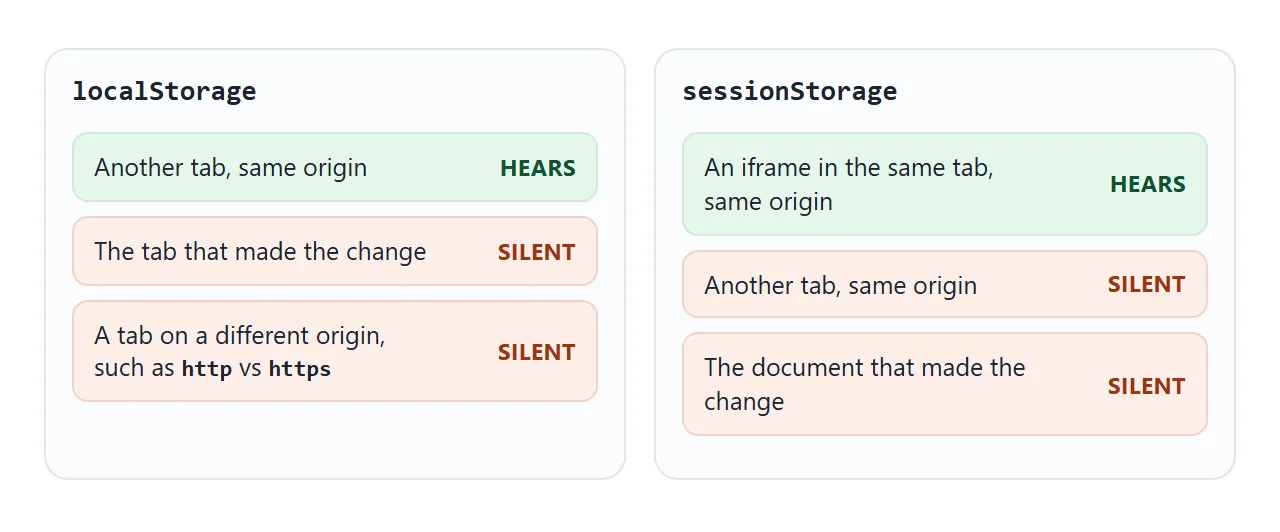
The event is also not cancelable and does not bubble. Attach the listener to window; a listener on document or an element will not receive it.
A finished example: keep tabs in sync
This pair of panes keeps a theme and a sign-in name in step. Each pane writes with setItem, removeItem or clear, updates itself, and learns about the other pane's changes from its storage listener.
<!doctype html>
<html lang="en">
<head>
<meta charset="utf-8">
<meta name="viewport" content="width=device-width, initial-scale=1">
<title>Keep two tabs in sync</title>
<style>
  body { margin: 0; padding: 12px; font-family: system-ui, sans-serif; background: #f4f5f7; color: #1d2330; }
  .note { margin: 0 0 10px; font-size: 13.5px; line-height: 1.45; }
  .tabs { display: grid; grid-template-columns: 1fr 1fr; gap: 10px; }
  @media (max-width: 520px) { .tabs { grid-template-columns: 1fr; } }
  .tab { border: 1px solid #d8dce5; border-radius: 10px; padding: 10px; background: #fff; color: #1d2330; transition: background .2s; }
  .tab[data-theme="dark"] { background: #1f2937; color: #f3f4f6; border-color: #111827; }
  .tab h2 { margin: 0 0 8px; font-size: 14px; }
  .who { margin: 0 0 10px; font-size: 15px; font-weight: 600; min-height: 22px; }
  label { display: block; font-size: 12.5px; margin-bottom: 3px; }
  select, input { width: 100%; box-sizing: border-box; font: inherit; font-size: 14px; padding: 6px 8px; border: 1px solid #c9ced8; border-radius: 6px; margin-bottom: 8px; }
  .row { display: flex; flex-wrap: wrap; gap: 6px; }
  button { font: inherit; font-size: 13px; padding: 6px 10px; border: 1px solid #c9ced8; border-radius: 6px; background: #fff; color: #1d2330; cursor: pointer; }
  .via { margin: 10px 0 0; font: 12px/1.4 ui-monospace, Consolas, monospace; opacity: .85; min-height: 17px; }
</style>
</head>
<body>
<p class="note">Change something in one tab. The other tab updates through its <code>storage</code> listener.</p>

<div class="tabs">
  <section class="tab" id="tabA" data-theme="light"></section>
  <section class="tab" id="tabB" data-theme="light"></section>
</div>

<script>
  const store = new Map();   // the shared "localStorage"
  const tabs = [];

  // A tiny stand-in for localStorage that tells the OTHER tab, like the browser does.
  function makeStorage(self) {
    const tell = (key, oldValue, newValue) => {
      tabs.filter((t) => t !== self).forEach((t) =>
        t.el.dispatchEvent(new StorageEvent('storage', { key, oldValue, newValue, url: location.href })));
    };
    return {
      setItem(key, value) {
        const old = store.has(key) ? store.get(key) : null;
        if (old === value) return;
        store.set(key, value);
        tell(key, old, value);
      },
      removeItem(key) {
        if (!store.has(key)) return;
        const old = store.get(key);
        store.delete(key);
        tell(key, old, null);
      },
      clear() {
        if (store.size === 0) return;
        store.clear();
        tell(null, null, null);
      }
    };
  }

  function makeTab(id, title) {
    const el = document.getElementById(id);
    el.innerHTML =
      '<h2>' + title + '</h2>' +
      '<p class="who"></p>' +
      '<label>Theme</label>' +
      '<select><option value="light">light</option><option value="dark">dark</option></select>' +
      '<label>Name</label><input type="text" value="Ada">' +
      '<div class="row"><button class="in">Sign in</button><button class="out">Sign out</button><button class="wipe">Clear all</button></div>' +
      '<p class="via"></p>';
    const tab = { el };
    const storage = makeStorage(tab);
    const who = el.querySelector('.who');
    const via = el.querySelector('.via');
    const select = el.querySelector('select');

    function showTheme(theme) { el.dataset.theme = theme || 'light'; select.value = theme || 'light'; }
    function showUser(name) { who.textContent = name ? 'Signed in as ' + name : 'Signed out'; }
    showUser(null);

    // Other tabs' changes arrive here. In a real page, listen on window instead of el.
    el.addEventListener('storage', (e) => {
      if (e.key === null) {                      // clear() was called elsewhere
        showTheme(null); showUser(null);
        via.textContent = 'storage event: clear()';
        return;
      }
      if (e.key === 'theme') showTheme(e.newValue);
      if (e.key === 'user') showUser(e.newValue);   // null after removeItem
      via.textContent = 'storage event: ' + e.key + ' -> ' + JSON.stringify(e.newValue);
    });

    // Local actions update this tab directly, because no event comes back to it.
    select.addEventListener('change', () => { showTheme(select.value); storage.setItem('theme', select.value); via.textContent = ''; });
    el.querySelector('.in').addEventListener('click', () => {
      const name = el.querySelector('input').value.trim();
      if (!name) return;
      showUser(name); storage.setItem('user', name); via.textContent = '';
    });
    el.querySelector('.out').addEventListener('click', () => { showUser(null); storage.removeItem('user'); via.textContent = ''; });
    el.querySelector('.wipe').addEventListener('click', () => { showTheme(null); showUser(null); storage.clear(); via.textContent = ''; });
    tabs.push(tab);
  }

  makeTab('tabA', 'Tab A');
  makeTab('tabB', 'Tab B');
</script>
</body>
</html>
The handler has three parts worth copying:
- Filter by key: ignore keys the page does not use.
- Handle
nullfirst: a null key means everything was cleared. - Use
e.newValue: it already holds the new value, so there is no need to read storage again.
When it does not work
| What you see | Cause | Fix |
|---|---|---|
| Nothing logs in the tab you clicked in | The event skips the tab that made the change | Update that tab directly after setItem |
| Nothing logs in any tab | The new value equals the old value | Test with a value that actually differs |
SecurityError on first storage access |
The page has no usable origin, such as a sandboxed frame or a file: page |
Serve it over http, and wrap storage calls in try |
| The other tab is on a different address | The origin differs, for example http and https |
Open both tabs on the same origin |
| The handler crashes after Clear | e.key is null |
Check e.key === null before using it |
JSON.parse fails on e.newValue |
The value was removed, so it is null |
Guard the null case first |
Nothing arrives in a second tab with sessionStorage |
It only reaches iframes in the same tab | Use localStorage |
A document listener never runs |
The event does not bubble and targets window |
Use window.addEventListener |
For storage that throws, see localStorage in JavaScript and the sandbox attribute. If a script does nothing at all, HTML JavaScript not working lists the usual causes.
Share it as a link
A two-tab behavior is hard to explain in words, and a screenshot cannot show it. The examples here run as plain HTML, so the person you send them to can press the buttons and see each listener fire.
To send the working version, paste the page into a NOS document and choose Create share link. HTML to link walks through it. The page renders as written and its scripts run. If you change the code later, the same link shows the new version.
For the real two-tab version, open your link in two tabs to test it. Keep every storage call in a try block, in case a page is not allowed to use storage.