SvelteKit is the application framework for the Svelte component language: routing, server rendering and a build step through Vite. People searching "SvelteKit 3" are usually checking whether the next major version is out. As of 2026-10-01 it is a prerelease, and stable SvelteKit is 2.70.3.
Either version is something you build on your computer, not something you paste into a page. What does run from one HTML file is Svelte itself, loaded from a CDN and compiled in the browser. Click the button.
<!doctype html>
<html lang="en">
<head>
<meta charset="utf-8">
<meta name="viewport" content="width=device-width, initial-scale=1">
<title>Svelte 5 in one HTML file</title>
<!-- Map the bare imports in Svelte's source to pinned CDN files -->
<script type="importmap">
{
  "imports": {
    "svelte": "https://cdn.jsdelivr.net/npm/svelte@5.57.1/src/index-client.js",
    "svelte/internal/client": "https://cdn.jsdelivr.net/npm/svelte@5.57.1/src/internal/client/index.js",
    "svelte/internal/disclose-version": "https://cdn.jsdelivr.net/npm/svelte@5.57.1/src/internal/disclose-version.js",
    "#client/constants": "https://cdn.jsdelivr.net/npm/svelte@5.57.1/src/internal/client/constants.js",
    "clsx": "https://cdn.jsdelivr.net/npm/clsx@2.1.1/dist/clsx.mjs",
    "esm-env": "data:text/javascript,export const BROWSER=true,DEV=false,NODE=false;"
  }
}
</script>
<!-- The Svelte compiler, as one browser script -->
<script src="https://cdn.jsdelivr.net/npm/svelte@5.57.1/compiler/index.js"></script>
<style>
  body { font: 16px/1.5 system-ui, sans-serif; margin: 0; padding: 20px; color: #1f2937; }
  #app { min-height: 140px; }
  .status { font-size: 13px; color: #6b7280; }
</style>
</head>
<body>

<div id="app"></div>
<p class="status" id="status">Compiling…</p>

<script type="module">
  import { mount } from 'svelte';

  // A Svelte component, the same text you would put in App.svelte
  const source = `
<script>
  let count = $state(0);
  let double = $derived(count * 2);
<\/script>

<button onclick={() => count++}>Clicked {count} times</button>
<p>Double: {double}</p>

<style>
  button { font: inherit; padding: 10px 18px; border: 0; border-radius: 8px;
           background: #ff3e00; color: #fff; cursor: pointer; }
  p { margin: 12px 0 0; }
</style>`;

  // 1. Compile the component source to a JavaScript module
  const { js } = window.svelte.compile(source, { generate: 'client', css: 'injected' });

  // 2. Load that module and mount it into #app
  const url = 'data:text/javascript,' + encodeURIComponent(js.code);
  const { default: App } = await import(url);
  mount(App, { target: document.getElementById('app') });

  document.getElementById('status').textContent = 'Compiled in the browser by Svelte ' + window.svelte.VERSION;
</script>
</body>
</html>
The rest of this guide covers what changed in SvelteKit 3, why its source cannot be pasted, how the example above works, and how to get a real single HTML file out of a SvelteKit project.
SvelteKit 3: where it stands
The npm registry lists two dist-tags for @sveltejs/kit. latest is what npm install picks by default; next holds the prerelease.
SvelteKit 2 (latest) |
SvelteKit 3 (next) |
|
|---|---|---|
| Version on 2026-10-01 | 2.70.3 | 3.0.0-next.31 |
| Node | 18.13 or newer | 22.17 or newer |
| Svelte | 4 or 5 | ^5.57.1 |
| Vite | ^5.0.3, 6, 7 or 8 | ^8.0.12 |
| Licence | MIT | MIT |
The current docs also name two things planned for SvelteKit 3. The $app/stores module is deprecated in favour of $app/state. The $env/* modules and $app/environment will be removed, with explicit environment variables becoming the default.
To try the prerelease in an existing project, install the next tag:
npm install -D @sveltejs/kit@next
Why SvelteKit cannot be pasted into a page
A SvelteKit app starts as a project folder. Pages are .svelte files inside src/routes, and npx sv create my-app makes the folder for you. A browser understands none of that directly.
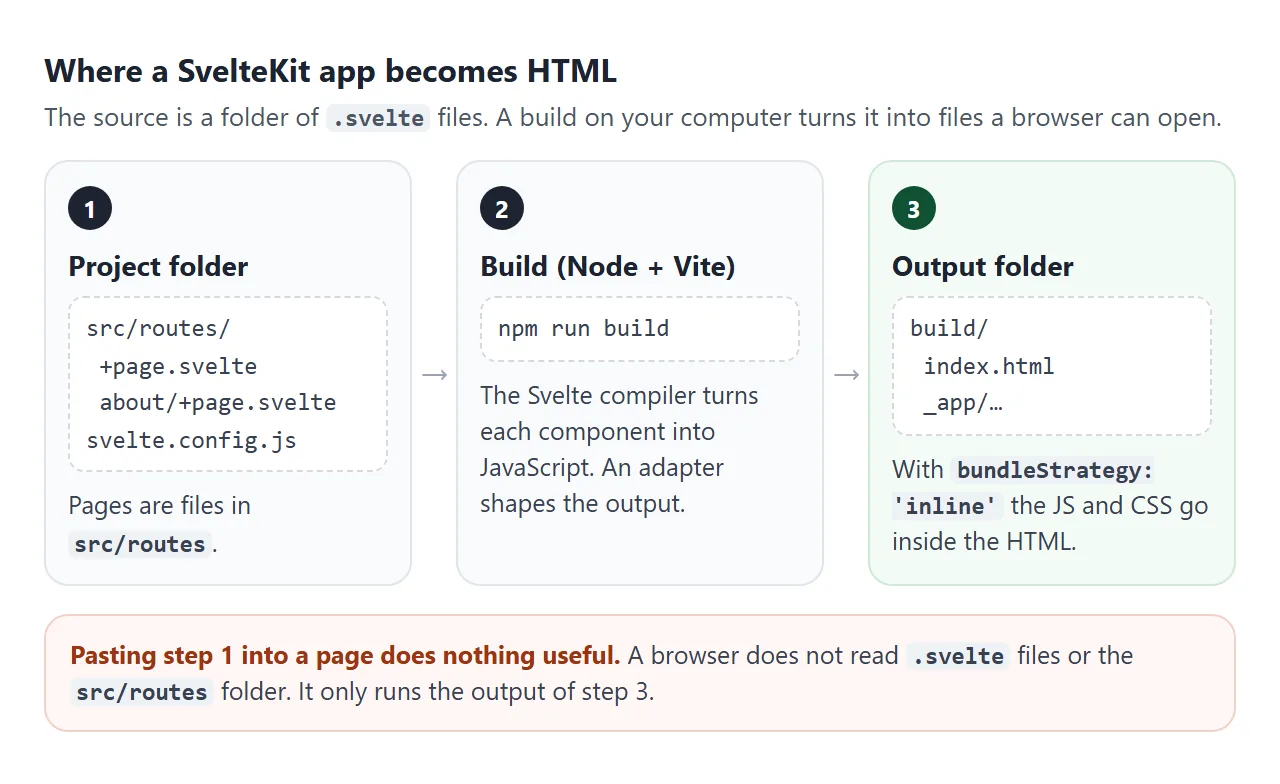
The build does the work. The Svelte compiler turns each component into JavaScript and CSS, Vite bundles them, and an adapter decides the shape of the output. adapter-static writes plain files to a build folder by default.
So the honest answer to "SvelteKit in one HTML file" has two parts. You can run Svelte components in a page without SvelteKit, or you can let SvelteKit build a page and share what it produced.
Svelte in one HTML file: how the example works
The counter needs no install. The page loads the Svelte compiler from cdn.jsdelivr.net, compiles the component text, and mounts the result. Four pieces do it.
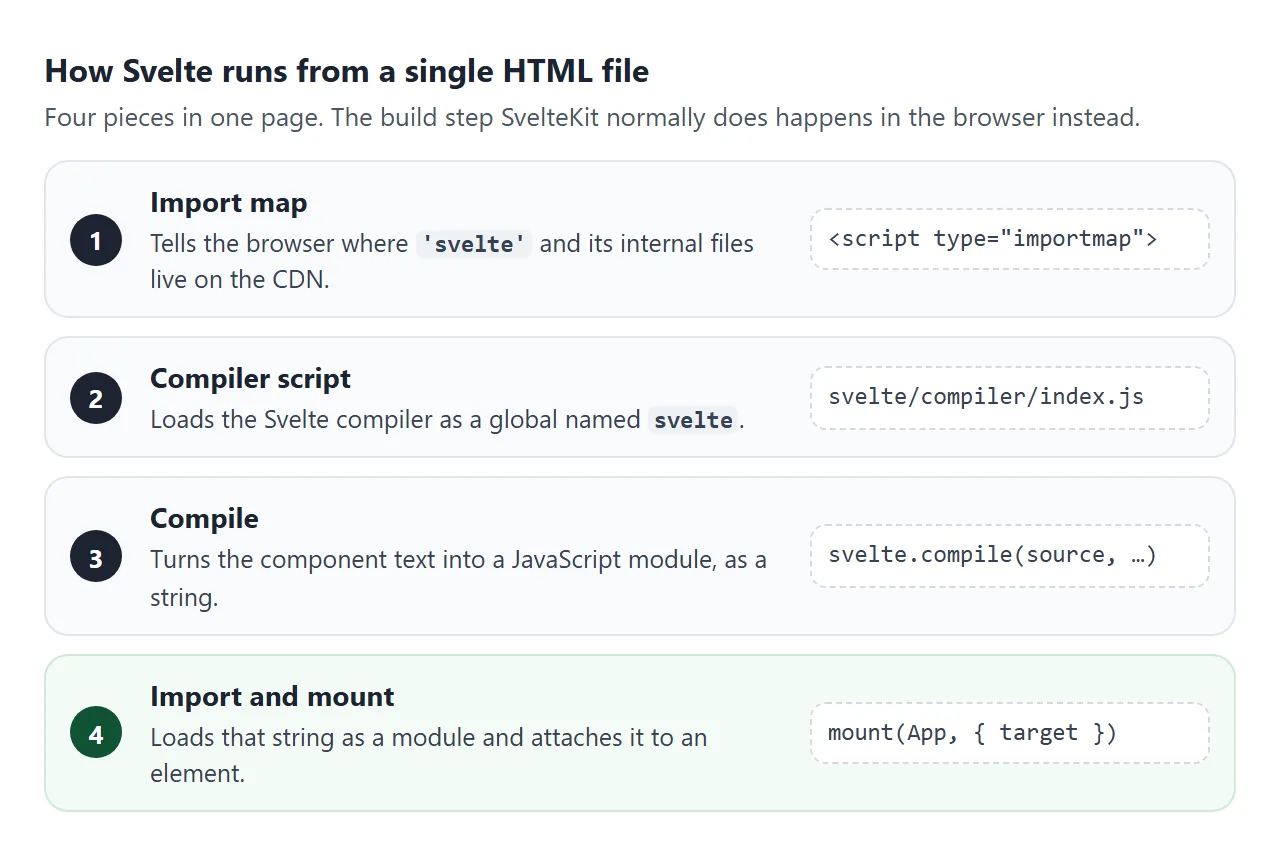
- An import map. Svelte's runtime files import each other by bare names such as
'svelte/internal/client'. The import map tells the browser which CDN file each name means. - The compiler script.
compiler/index.jsis one browser script that creates a global namedsvelte. - Compile.
svelte.compile()returns the component as a JavaScript module, as a string. - Import and mount. The page imports that string as a
data:URL module, then callsmount().
The import map is the part people get wrong. It must appear before any module script that uses it. This page pins the same version, 5.57.1, in every URL and in the compiler:
<script type="importmap">
{
  "imports": {
    "svelte": "https://cdn.jsdelivr.net/npm/svelte@5.57.1/src/index-client.js",
    "svelte/internal/client": "https://cdn.jsdelivr.net/npm/svelte@5.57.1/src/internal/client/index.js",
    "svelte/internal/disclose-version": "https://cdn.jsdelivr.net/npm/svelte@5.57.1/src/internal/disclose-version.js",
    "#client/constants": "https://cdn.jsdelivr.net/npm/svelte@5.57.1/src/internal/client/constants.js",
    "clsx": "https://cdn.jsdelivr.net/npm/clsx@2.1.1/dist/clsx.mjs",
    "esm-env": "data:text/javascript,export const BROWSER=true,DEV=false,NODE=false;"
  }
}
</script>
<script src="https://cdn.jsdelivr.net/npm/svelte@5.57.1/compiler/index.js"></script>
The esm-env line replaces a tiny package with three constants, so production mode is on and nothing else needs fetching. The compile and mount step is short:
import { mount } from 'svelte';

const { js } = svelte.compile(source, { generate: 'client', css: 'injected' });
const { default: App } = await import('data:text/javascript,' + encodeURIComponent(js.code));
mount(App, { target: document.getElementById('app') });
css: 'injected' matters here. Without it, the component's <style> block comes back separately and nothing adds it to the page.
See what the build step produces
The compiler is the piece SvelteKit runs for you during a build. This example runs it on every click. Change the component, press the button, and read the JavaScript it turns into.
<!doctype html>
<html lang="en">
<head>
<meta charset="utf-8">
<meta name="viewport" content="width=device-width, initial-scale=1">
<title>Svelte source in, JavaScript out</title>
<!-- Map the bare imports in Svelte's source to pinned CDN files -->
<script type="importmap">
{
  "imports": {
    "svelte": "https://cdn.jsdelivr.net/npm/svelte@5.57.1/src/index-client.js",
    "svelte/internal/client": "https://cdn.jsdelivr.net/npm/svelte@5.57.1/src/internal/client/index.js",
    "svelte/internal/disclose-version": "https://cdn.jsdelivr.net/npm/svelte@5.57.1/src/internal/disclose-version.js",
    "#client/constants": "https://cdn.jsdelivr.net/npm/svelte@5.57.1/src/internal/client/constants.js",
    "clsx": "https://cdn.jsdelivr.net/npm/clsx@2.1.1/dist/clsx.mjs",
    "esm-env": "data:text/javascript,export const BROWSER=true,DEV=false,NODE=false;"
  }
}
</script>
<!-- The Svelte compiler, as one browser script -->
<script src="https://cdn.jsdelivr.net/npm/svelte@5.57.1/compiler/index.js"></script>
<style>
  body { font: 15px/1.5 system-ui, sans-serif; margin: 0; padding: 16px; color: #1f2937; }
  label { font-weight: 600; font-size: 13px; display: block; margin: 0 0 4px; }
  textarea, pre { width: 100%; box-sizing: border-box; font: 12px/1.45 ui-monospace, Consolas, monospace;
                  border: 1px solid #d1d5db; border-radius: 8px; padding: 10px; margin: 0; }
  textarea { height: 150px; resize: vertical; }
  pre { height: 150px; overflow: auto; background: #f9fafb; white-space: pre; }
  .row { display: flex; gap: 8px; align-items: center; margin: 8px 0 12px; }
  .run { font: inherit; padding: 8px 16px; border: 0; border-radius: 8px; background: #ff3e00; color: #fff; cursor: pointer; white-space: nowrap; flex: none; }
  #msg { font-size: 13px; color: #6b7280; min-width: 0; overflow-wrap: anywhere; }
  #msg.err { color: #b45309; }
  #out { border: 2px dashed #d1d5db; border-radius: 8px; padding: 12px; min-height: 48px; margin-bottom: 12px; }
</style>
</head>
<body>

<label for="src">Svelte component (edit me)</label>
<textarea id="src" spellcheck="false"><script>
  let name = $state('world');
</script>

<input bind:value={name}>
<h2>Hello {name}!</h2>

<style>
  h2 { color: #ff3e00; margin: 8px 0 0; }
</style></textarea>

<div class="row"><button class="run" id="run">Compile and run</button><span id="msg"></span></div>

<label>Result</label>
<div id="out"></div>

<label>What the compiler produced</label>
<pre id="js"></pre>

<script type="module">
  import { mount, unmount } from 'svelte';

  const src = document.getElementById('src');
  const msg = document.getElementById('msg');
  let app = null;

  async function run() {
    let js;
    try {
      // Svelte source -> plain JavaScript
      js = window.svelte.compile(src.value, { generate: 'client', css: 'injected' }).js.code;
    } catch (err) {
      msg.textContent = err.message;
      msg.className = 'err';
      return;
    }
    document.getElementById('js').textContent = js;

    // Replace the old component with the new one
    if (app) unmount(app);
    const { default: App } = await import('data:text/javascript,' + encodeURIComponent(js));
    app = mount(App, { target: document.getElementById('out') });
    msg.textContent = js.split('\n').length + ' lines of JavaScript';
    msg.className = '';
  }

  document.getElementById('run').addEventListener('click', run);
  run();
</script>
</body>
</html>
The output imports from 'svelte/internal/client'. That is why the import map needs that entry. A syntax mistake shows the compiler's error message instead.
Get one HTML file out of SvelteKit
If you already have a SvelteKit project, the docs describe a setting for exactly this. output.bundleStrategy accepts 'split', 'single' or 'inline', and has been available since 2.13.0. The 3.0.0-next.31 types still include it.
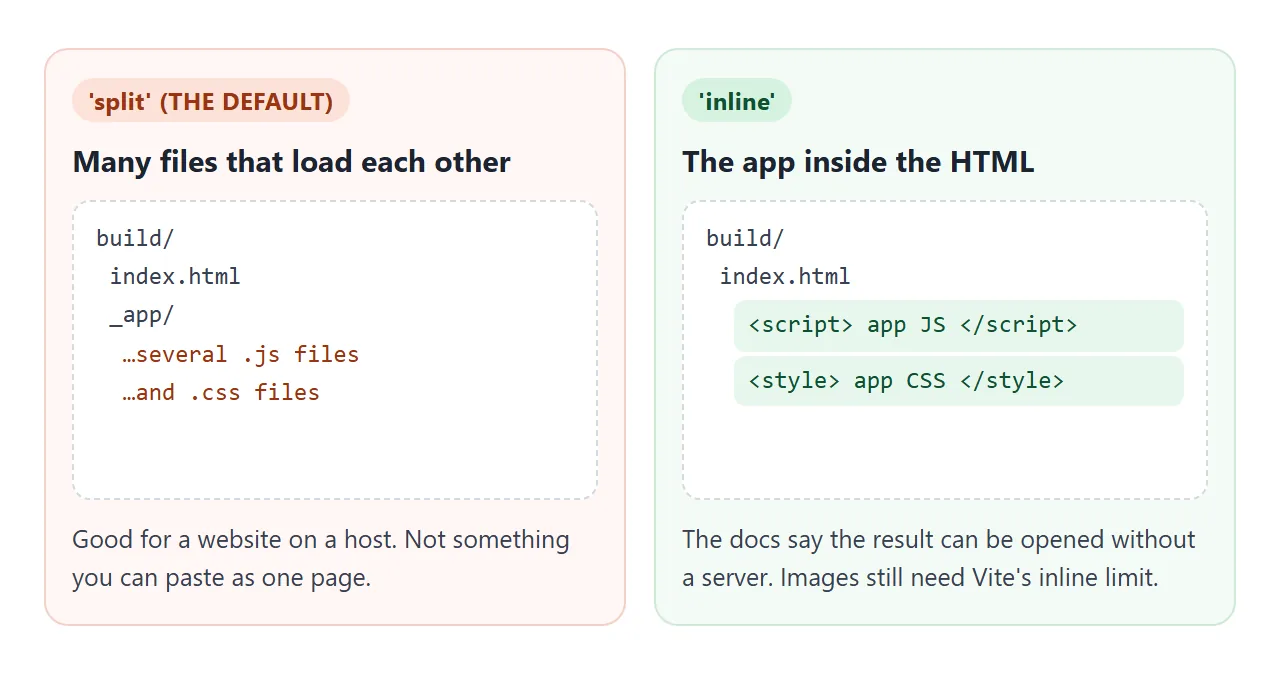
With 'inline', the docs say all JavaScript and CSS of the app go into the HTML, and the result can be opened without a server. Pair it with the hash router, so routes live after the # and no server has to answer /about:
// svelte.config.js
import adapter from '@sveltejs/adapter-static';

export default {
  kit: {
    adapter: adapter({ fallback: 'index.html' }),
    output: { bundleStrategy: 'inline' },
    router: { type: 'hash' }
  }
};
fallback names the page adapter-static writes when nothing is prerendered. The docs advise against index.html because it can clash with a prerendered home page, and the hash router turns prerendering off.
Then run npm run build and look in the build folder. This needs Node and the project's packages, so it is not a live example here. Check the generated HTML yourself before sharing it.
The hash router comes with conditions from the docs. Server-side rendering and prerendering are off, there is no server logic, and every link in the app must start with #/. Images also stay separate unless you raise Vite's build.assetsInlineLimit and import them through Vite.
A finished single-file app with hash routes
The same idea, without a build: one component, two pages chosen by location.hash, and inputs tied to state with bind:value. The links follow the #/ pattern SvelteKit's hash router expects.
<!doctype html>
<html lang="en">
<head>
<meta charset="utf-8">
<meta name="viewport" content="width=device-width, initial-scale=1">
<title>Tip splitter: a single-file Svelte app</title>
<!-- Map the bare imports in Svelte's source to pinned CDN files -->
<script type="importmap">
{
  "imports": {
    "svelte": "https://cdn.jsdelivr.net/npm/svelte@5.57.1/src/index-client.js",
    "svelte/internal/client": "https://cdn.jsdelivr.net/npm/svelte@5.57.1/src/internal/client/index.js",
    "svelte/internal/disclose-version": "https://cdn.jsdelivr.net/npm/svelte@5.57.1/src/internal/disclose-version.js",
    "#client/constants": "https://cdn.jsdelivr.net/npm/svelte@5.57.1/src/internal/client/constants.js",
    "clsx": "https://cdn.jsdelivr.net/npm/clsx@2.1.1/dist/clsx.mjs",
    "esm-env": "data:text/javascript,export const BROWSER=true,DEV=false,NODE=false;"
  }
}
</script>
<!-- The Svelte compiler, as one browser script -->
<script src="https://cdn.jsdelivr.net/npm/svelte@5.57.1/compiler/index.js"></script>
<style>
  body { font: 16px/1.5 system-ui, sans-serif; margin: 0; color: #1f2937; background: #fff7f3; }
  #status { font-size: 12px; color: #6b7280; padding: 0 16px; }
</style>
</head>
<body>

<div id="app"></div>
<p id="status">Compiling…</p>

<script type="module">
  import { mount } from 'svelte';

  const App = `
<script>
  // Read the page from the hash, like SvelteKit's hash router (#/ and #/about)
  let route = $state(location.hash.slice(1) || '/');

  let bill = $state(48);
  let tip = $state(15);
  let people = $state(3);
  let each = $derived((bill * (1 + tip / 100)) / Math.max(people, 1));
<\/script>

<svelte:window onhashchange={() => (route = location.hash.slice(1) || '/')} />

<nav>
  <a href="#/" class:on={route === '/'}>Split</a>
  <a href="#/about" class:on={route === '/about'}>About</a>
</nav>

<main>
  {#if route === '/about'}
    <h1>About</h1>
    <p>One HTML file. Svelte compiles this component in the browser, and the
       hash in the address picks the page.</p>
  {:else}
    <h1>Split the bill</h1>
    <label>Bill <input type="number" min="0" bind:value={bill}></label>
    <label>Tip {tip}% <input type="range" min="0" max="30" bind:value={tip}></label>
    <label>People <input type="number" min="1" bind:value={people}></label>
    <p class="each">Each pays <strong>{each.toFixed(2)}</strong></p>
  {/if}
</main>

<style>
  nav { display: flex; gap: 4px; padding: 12px 16px 0; }
  nav a { padding: 6px 14px; border-radius: 999px; color: #1f2937; text-decoration: none; }
  nav a.on { background: #ff3e00; color: #fff; }
  main { margin: 12px 16px; padding: 16px; background: #fff; border-radius: 12px;
         box-shadow: 0 1px 4px rgba(0,0,0,.08); max-width: 420px; }
  h1 { font-size: 20px; margin: 0 0 12px; }
  label { display: flex; justify-content: space-between; align-items: center; gap: 12px; margin: 10px 0; }
  input[type=number] { width: 90px; font: inherit; padding: 4px 8px; }
  input[type=range] { width: 150px; }
  .each { font-size: 20px; margin: 16px 0 0; }
</style>`;

  const { js } = window.svelte.compile(App, { generate: 'client', css: 'injected' });
  const { default: Component } = await import('data:text/javascript,' + encodeURIComponent(js.code));
  mount(Component, { target: document.getElementById('app') });
  document.getElementById('status').textContent = '';
</script>
</body>
</html>
The route is plain state read from location.hash, updated by an onhashchange listener on <svelte:window>. location.hash in JavaScript covers the browser side of that.
When it does not work
| What you see | Cause | Fix |
|---|---|---|
Console: Failed to resolve module specifier |
No import map, or it comes after the module script | Put the import map first in <head> |
| Component shows but has no styles | Compiled without css: 'injected' |
Add that option to compile() |
Runes such as $state are not recognised |
A compiler older than Svelte 5 | Pin a Svelte 5 version |
The <script> in the component ends the page's script |
</script> inside a JS string |
Write it as <\/script> |
npm install @sveltejs/kit gives version 2 |
latest still points to 2.x |
Install @sveltejs/kit@next |
| Built app links lead nowhere | Hash router links without #/ |
Start every link with #/ |
Share it as a link
A Svelte page is easier to show than to describe. A screenshot cannot be clicked, and a .svelte file means nothing to someone without a build.
A finished HTML file, whether written by hand or built by SvelteKit, is what people can open. Single HTML file apps has more on that format.
To send the working version, paste the page into a NOS document and choose Create share link. HTML to link walks through it. Anyone with the link can open it without an account.
The page renders as written and its scripts run, including scripts loaded from cdn.jsdelivr.net, so the people you send it to can click the buttons themselves. If you change the code later, the same link shows the new version.