A vacation rental guide is one page that holds what a guest needs between booking and check-out: how to arrive, the wifi, the house rules, how things work, and a few places nearby.
Put it behind one link and send that link in your booking message, so the answer is already on the guest's phone.
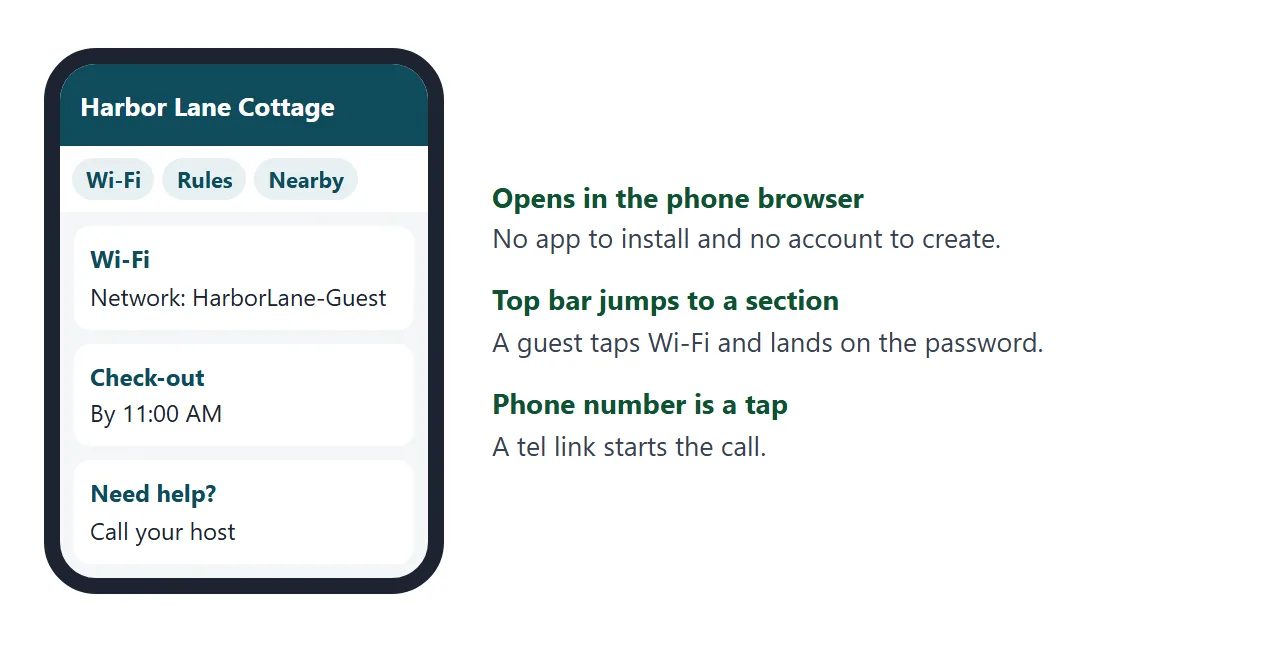
Here is a finished example for a fictional cottage. Tap the top bar to jump to a section, and try the Show button under Wi-Fi.
<!doctype html>
<html lang="en">
<head>
<meta charset="utf-8">
<meta name="viewport" content="width=device-width, initial-scale=1">
<title>Harbor Lane Cottage - Guest guide</title>
<style>
  * { box-sizing: border-box; }
  body { margin: 0; font-family: system-ui, sans-serif; color: #1f2937; background: #f3f6f8; line-height: 1.5; }
  header { background: #0f4c5c; color: #fff; padding: 22px 18px 18px; }
  header h1 { margin: 0 0 2px; font-size: 22px; }
  header p { margin: 0; opacity: .85; font-size: 14px; }
  nav { position: sticky; top: 0; z-index: 2; display: flex; gap: 8px; overflow-x: auto; padding: 10px 14px; background: #fff; border-bottom: 1px solid #dde3e8; }
  nav a { flex: none; padding: 6px 12px; border-radius: 999px; background: #e8f0f3; color: #0f4c5c; font-size: 14px; text-decoration: none; font-weight: 600; }
  main { max-width: 560px; margin: 0 auto; padding: 14px; }
  section { background: #fff; border-radius: 12px; padding: 16px 16px 12px; margin-bottom: 14px; box-shadow: 0 1px 3px rgba(0,0,0,.08); scroll-margin-top: 58px; }
  h2 { margin: 0 0 10px; font-size: 18px; color: #0f4c5c; }
  dl { margin: 0; display: grid; grid-template-columns: 112px 1fr; gap: 6px 10px; font-size: 15px; }
  dt { color: #6b7280; }
  dd { margin: 0; font-weight: 600; }
  .pw { font-family: ui-monospace, Consolas, monospace; background: #f3f6f8; padding: 2px 8px; border-radius: 6px; }
  button { font: inherit; font-size: 14px; margin-left: 6px; padding: 3px 10px; border: 1px solid #0f4c5c; background: #fff; color: #0f4c5c; border-radius: 6px; cursor: pointer; }
  ul { margin: 0; padding-left: 20px; font-size: 15px; }
  li { margin-bottom: 6px; }
  details { border-top: 1px solid #e5e9ed; padding: 10px 0; font-size: 15px; }
  details:first-of-type { border-top: 0; }
  summary { cursor: pointer; font-weight: 600; }
  details p { margin: 6px 0 0; color: #4b5563; }
  .tip { padding: 8px 0; border-top: 1px solid #e5e9ed; font-size: 15px; }
  .tip:first-of-type { border-top: 0; }
  .tip b { display: block; }
  .tip span { color: #6b7280; font-size: 14px; }
  .call { display: inline-block; margin-top: 4px; padding: 8px 14px; border-radius: 8px; background: #0f4c5c; color: #fff; text-decoration: none; font-weight: 600; }
  footer { text-align: center; color: #6b7280; font-size: 13px; padding: 4px 14px 24px; }
</style>
</head>
<body>
<header>
  <h1>Harbor Lane Cottage</h1>
  <p>Your guide for the stay. Keep this page open on your phone.</p>
</header>
<nav>
  <a href="#arrive">Arrive</a>
  <a href="#wifi">Wi-Fi</a>
  <a href="#rules">House rules</a>
  <a href="#home">In the house</a>
  <a href="#local">Nearby</a>
  <a href="#help">Need help</a>
</nav>
<main>
  <section id="arrive">
    <h2>Arriving and leaving</h2>
    <dl>
      <dt>Address</dt><dd>14 Harbor Lane</dd>
      <dt>Check-in</dt><dd>from 3:00 PM</dd>
      <dt>Check-out</dt><dd>by 11:00 AM</dd>
      <dt>Parking</dt><dd>Two spots in the gravel drive, left of the gate</dd>
    </dl>
    <p style="font-size:14px;color:#6b7280">The door code arrives in a separate message on the day of check-in.</p>
  </section>

  <section id="wifi">
    <h2>Wi-Fi</h2>
    <dl>
      <dt>Network</dt><dd>HarborLane-Guest</dd>
      <dt>Password</dt><dd><span class="pw" id="pw">hidden</span><button type="button" id="toggle">Show</button></dd>
    </dl>
  </section>

  <section id="rules">
    <h2>House rules</h2>
    <ul>
      <li>Quiet hours are 10 PM to 8 AM. The neighbours on both sides are year-round residents.</li>
      <li>No smoking inside. There is an ashtray on the back porch.</li>
      <li>Up to 4 guests overnight. Please ask before inviting visitors.</li>
      <li>Shoes off in the hallway, please. The floors are light oak.</li>
    </ul>
  </section>

  <section id="home">
    <h2>In the house</h2>
    <details><summary>Heating and hot water</summary><p>The dial in the hallway sets the temperature. Turn it up one notch at a time; the radiators take about 20 minutes to warm.</p></details>
    <details><summary>Coffee machine</summary><p>Fill the tank, put a pod in the top, press the large button. Pods are in the drawer under the kettle.</p></details>
    <details><summary>Bins and recycling</summary><p>Grey bin for rubbish, blue bin for recycling. Both go by the gate on Thursday evening.</p></details>
    <details><summary>Before you check out</summary><p>Start the dishwasher, put used towels in the bath, and close all windows.</p></details>
  </section>

  <section id="local">
    <h2>Nearby</h2>
    <div class="tip"><b>Saltmarsh Bakery</b><span>6 minute walk. Good for breakfast; check its opening hours before you go.</span></div>
    <div class="tip"><b>Pier Walk</b><span>Flat path along the water, about a mile each way. Suits strollers.</span></div>
    <div class="tip"><b>Corner Grocer</b><span>2 minute walk, for milk, bread and the basics.</span></div>
    <div class="tip"><b>Rainy day</b><span>The Lighthouse Museum is a short drive away.</span></div>
  </section>

  <section id="help">
    <h2>Need help?</h2>
    <p style="margin:0;font-size:15px">Message through the booking app, or call Mara, your host.</p>
    <a class="call" href="tel:+15550142">Call 555-0142</a>
    <p style="font-size:14px;color:#6b7280">In an emergency, call your local emergency number first.</p>
  </section>
</main>
<footer>Last updated for this season. Enjoy your stay.</footer>

<script>
  // Show or hide the Wi-Fi password so it is not on screen all the time
  const pw = document.getElementById('pw');
  const toggle = document.getElementById('toggle');
  let shown = false;
  toggle.addEventListener('click', () => {
    shown = !shown;
    pw.textContent = shown ? 'tidepool-482' : 'hidden';
    toggle.textContent = shown ? 'Hide' : 'Show';
  });
</script>
</body>
</html>
It is plain HTML, so it works on a phone without an app.
The top bar uses ordinary in-page links, the appliance answers use the <details> element, which needs no JavaScript to open and close, and the phone number is a tel: link that starts a call on devices that can place one.
What goes in the guide
Order the sections by what a guest needs first, not by what you wrote first. Someone standing at the door wants the address and the parking. Someone at ten at night wants the wifi.
| Section | Put in it | Leave out |
|---|---|---|
| Arriving and leaving | Address, parking, check-in and check-out times | The door code (send it separately) |
| Wifi | Network name and password | Router admin details |
| House rules | Quiet hours, smoking, guest numbers, shoes | Long legal wording |
| In the house | Heating, hot water, coffee machine, bins | Manuals for every gadget |
| Nearby | A short list of places you have actually been | A directory of the whole town |
| Need help | A phone number and what to do in an emergency | Several ways to reach you |
Make it with AI
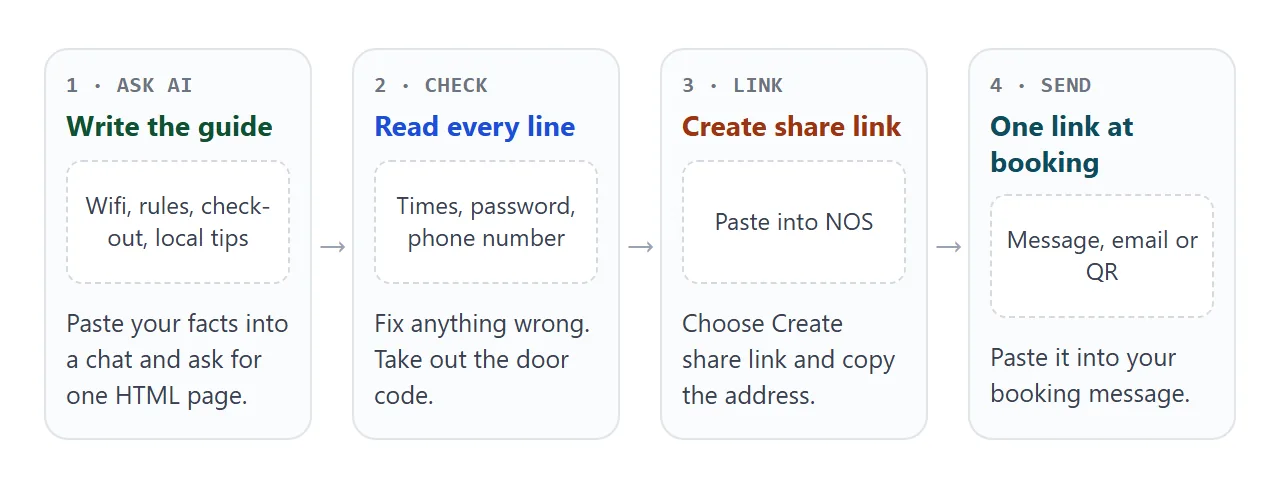
You do not need to write HTML. Gather your facts in plain text, paste them into ChatGPT, Claude or Gemini, and ask for one page. This prompt works as a starting point:
Make one self-contained HTML page, a guest guide for my vacation rental.
It must read well on a phone. Use a sticky top bar that jumps to each
section. Sections: Arriving and leaving, Wi-Fi (hide the password behind
a Show button), House rules, In the house (one collapsible item per
appliance), Nearby, Need help (phone number as a tap-to-call link).
No external images, fonts or scripts. Do not invent any facts; use only
the details below and leave a clear [FILL IN] where something is missing.

My details:
[paste address, times, wifi, rules, appliance notes, local tips, phone]
Then check the result before anyone sees it:
- Every number and time. AI chats fill gaps with believable guesses. Compare check-in, check-out and the phone number against your own notes.
- The wifi password. One wrong character and the guest messages you anyway.
- Anything marked [FILL IN]. Replace it or delete the line.
- The door code. Remove it if it slipped in.
- Your phone. Open the page on a phone and tap each section in the top bar.
Send it as a link
Paste the finished HTML into a NOS document and choose Create share link. HTML to link walks through it.
The page opens as written, with its scripts running, in a normal browser on a phone or a laptop. The guest needs no account, and cannot edit your page.
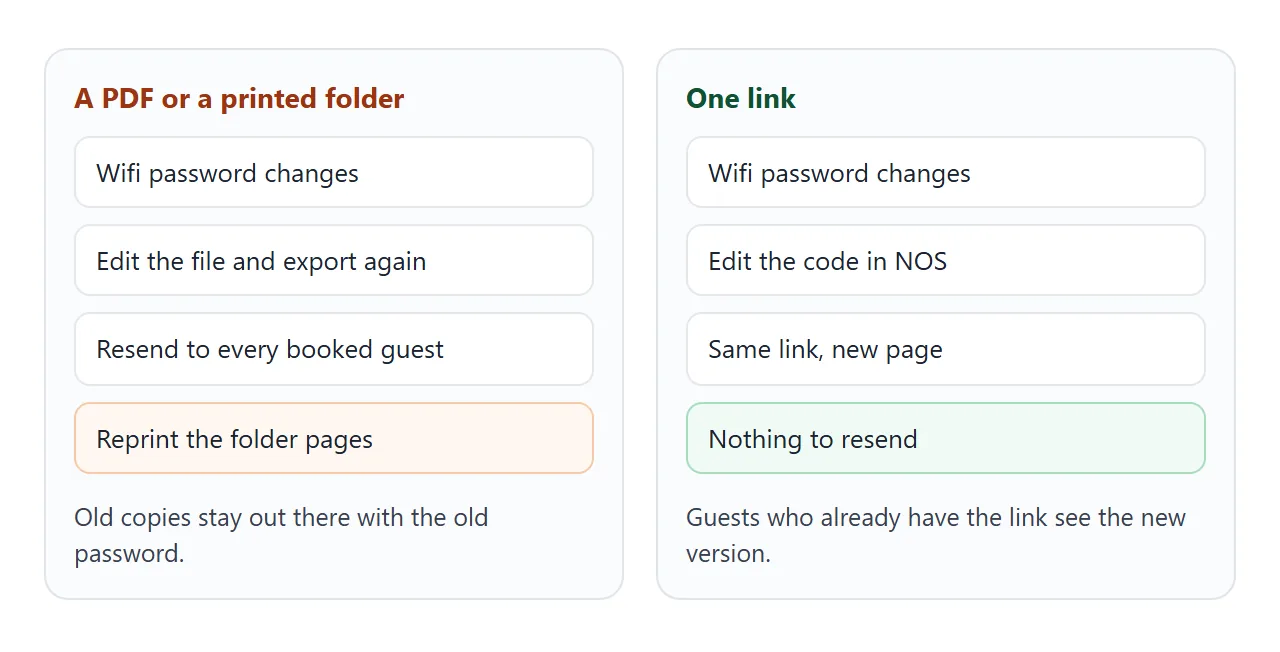
Changing something later is easy. Edit the code and the same link shows the new version, which is where a link beats a PDF.
If you also want something on paper, put the link on a QR code by the front door. HTML file to QR code shows how, and wifi password link covers the wifi part on its own.
Ways to get the guide to guests
| Way | Guest sees | When it fits |
|---|---|---|
| Link in the booking message | Your page in the browser, nothing to install | The main route, sent once |
| PDF attachment | A file to download and open | When the guest asked for something printable |
| Platform house manual | The platform's own layout | Alongside your page, as of October 2026 |
| QR code in the house | Your page, after one scan | For guests who did not keep the message |
On Airbnb, scheduled quick replies can send a saved message automatically after a new booking, before check-in or before check-out, and the host can skip, edit or send each one early.
As of October 2026 that is a convenient place to paste your link. Platform rules about messages can change, so read your platform's current help pages first.
What to keep in mind about a public link
A link is easy to use because it needs no login. For the same reason, anyone who gets the link can read the page.
Treat it like a note taped inside the front door: fine for wifi and house rules, wrong for the door code or anything private.
The owner's changes in View mode are saved, but a visitor's are not. That is why a tick-box page, like this check-out card, works as a reminder for each guest and leaves your copy untouched.
<!doctype html>
<html lang="en">
<head>
<meta charset="utf-8">
<meta name="viewport" content="width=device-width, initial-scale=1">
<title>Check-out card</title>
<style>
  * { box-sizing: border-box; }
  body { margin: 0; padding: 16px; font-family: system-ui, sans-serif; background: #f3f6f8; color: #1f2937; }
  .card { max-width: 440px; margin: 0 auto; background: #fff; border-radius: 14px; padding: 18px; box-shadow: 0 2px 8px rgba(0,0,0,.1); }
  h1 { margin: 0; font-size: 20px; color: #0f4c5c; }
  .sub { margin: 2px 0 14px; color: #6b7280; font-size: 14px; }
  label { display: flex; gap: 12px; align-items: center; padding: 12px 4px; border-top: 1px solid #e5e9ed; font-size: 16px; cursor: pointer; }
  label:first-of-type { border-top: 0; }
  input { width: 22px; height: 22px; flex: none; accent-color: #0f4c5c; }
  input:checked + span { color: #6b7280; text-decoration: line-through; }
  .bar { height: 8px; background: #e5e9ed; border-radius: 99px; overflow: hidden; margin-top: 14px; }
  .bar i { display: block; height: 100%; width: 0; background: #16a34a; transition: width .2s; }
  #msg { margin: 10px 0 0; font-size: 15px; font-weight: 600; color: #374151; }
</style>
</head>
<body>
<div class="card">
  <h1>Check-out by 11:00 AM</h1>
  <p class="sub">Tick each item as you go. Nothing is sent to anyone.</p>

  <label><input type="checkbox"><span>Start the dishwasher</span></label>
  <label><input type="checkbox"><span>Put used towels in the bath</span></label>
  <label><input type="checkbox"><span>Take rubbish to the grey bin</span></label>
  <label><input type="checkbox"><span>Close all windows</span></label>
  <label><input type="checkbox"><span>Turn the heating dial down</span></label>
  <label><input type="checkbox"><span>Lock the door and leave the key in the box</span></label>

  <div class="bar"><i id="fill"></i></div>
  <p id="msg">0 of 6 done</p>
</div>

<script>
  const boxes = document.querySelectorAll('input[type=checkbox]');
  const fill = document.getElementById('fill');
  const msg = document.getElementById('msg');

  function update() {
    const done = [...boxes].filter((b) => b.checked).length;
    fill.style.width = (done / boxes.length * 100) + '%';
    msg.textContent = done === boxes.length ? 'All done. Safe travels!' : done + ' of ' + boxes.length + ' done';
  }
  boxes.forEach((b) => b.addEventListener('change', update));
</script>
</body>
</html>
For a longer treatment of the house-side content, see house manual.
When it does not work
| What you see | Cause | Fix |
|---|---|---|
| The guide looks tiny on a phone | The page has no viewport tag | Ask the AI to add the viewport meta tag |
| The chat's explanation shows above the guide | It was pasted along with the code | Paste only the code that starts with the doctype line |
| Images do not appear | The page points to images on other sites, which are blocked | Use inline SVG or CSS instead of outside images |
| A map embed is blank | Iframes are blocked | Use a plain link to the map instead |
| Guests cannot find the wifi | It is far down the page | Move Wi-Fi up and keep the top bar |
| The old password still shows | You edited a different document from the one the link was made from | Edit the original document, then reload the link |
| A guest ticks a box and it vanishes | A visitor's changes are not saved | Expected: it is a per-visit reminder |