WebAssembly (Wasm) is a compact binary format that browsers run alongside JavaScript. A C, C++, Rust or hand-written module compiles to a .wasm file, and JavaScript loads it and calls the functions it exports.
Most guides load that file with fetch(), which needs a server. For one HTML file, skip the fetch: put the module's bytes in the page and pass them to WebAssembly.instantiate().
Try it. Change either number. The sum is computed by a 41-byte WebAssembly module written out inside the page.
<!doctype html>
<html lang="en">
<head>
<meta charset="utf-8">
<meta name="viewport" content="width=device-width, initial-scale=1">
<title>WebAssembly in one HTML file</title>
<style>
  body { margin: 0; padding: 20px; font-family: system-ui, sans-serif; background: #f4f5f7; color: #1d2330; }
  .box { max-width: 420px; background: #fff; border-radius: 12px; padding: 18px; box-shadow: 0 4px 16px rgba(0, 0, 0, .08); }
  .row { display: flex; align-items: center; gap: 8px; flex-wrap: wrap; font-size: 20px; }
  input { width: 90px; font: inherit; padding: 6px 8px; border: 1px solid #cfd4dc; border-radius: 8px; }
  #out { font-weight: 700; color: #0f5132; }
  p { font-size: 14px; color: #4b5563; margin: 14px 0 0; line-height: 1.5; }
  code { background: #eef1f5; border-radius: 4px; padding: 0 3px; }
</style>
</head>
<body>
<div class="box">
  <div class="row">
    <input id="a" type="number" value="20"> + <input id="b" type="number" value="22"> = <span id="out">…</span>
  </div>
  <p id="note">Loading the module…</p>
</div>

<script>
  // The whole .wasm file, 41 bytes. It exports one function: add(i32, i32) -> i32
  const bytes = new Uint8Array([
    0,97,115,109, 1,0,0,0,              // "\0asm", version 1
    1,7,1,96,2,127,127,1,127,           // type: (i32, i32) -> i32
    3,2,1,0,                            // one function of that type
    7,7,1,3,97,100,100,0,0,             // export it as "add"
    10,9,1,7,0,32,0,32,1,106,11         // body: local.get 0, local.get 1, i32.add
  ]);

  const a = document.getElementById('a');
  const b = document.getElementById('b');
  const out = document.getElementById('out');

  WebAssembly.instantiate(bytes).then(({ instance }) => {
    const add = instance.exports.add;  // a normal JavaScript function now
    const update = () => { out.textContent = add(Number(a.value), Number(b.value)); };
    a.addEventListener('input', update);
    b.addEventListener('input', update);
    update();
    document.getElementById('note').innerHTML =
      'The sum comes from <code>instance.exports.add</code>, compiled from ' + bytes.length + ' bytes in this page.';
  });
</script>
</body>
</html>
The add function on instance.exports behaves like any JavaScript function. The page has no other files and makes no requests.
What WebAssembly is, in one paragraph
MDN describes WebAssembly as a low-level, assembly-like language with a compact binary format. Its job is to be a compilation target: code written in C/C++, C# or Rust is compiled to it and runs in the browser.
It does not replace JavaScript. It has no access to the page by itself. JavaScript loads the module, gives it any functions it needs, and calls what it exports.
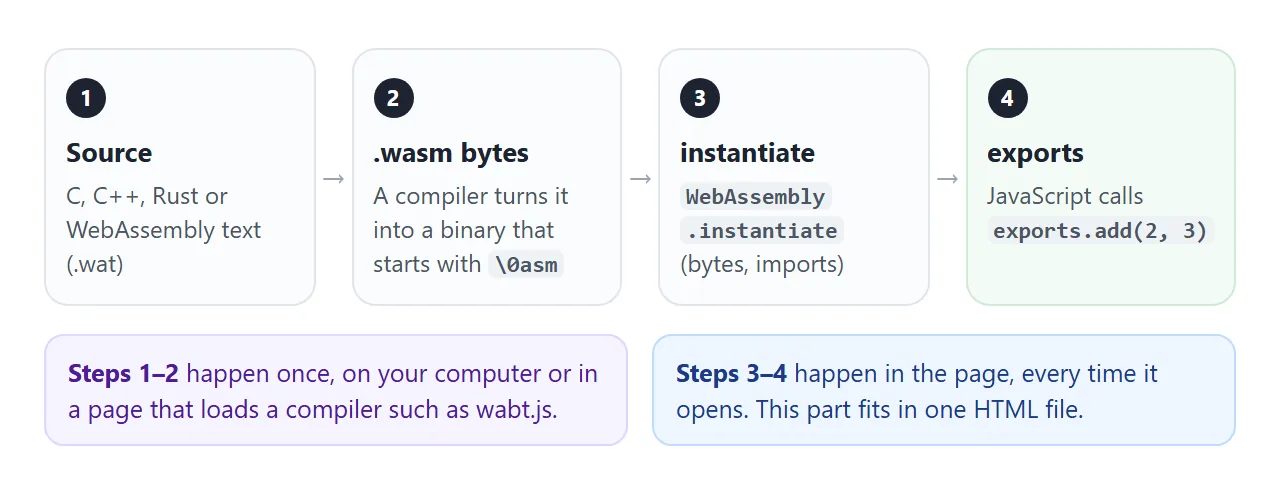
The first two steps happen once, with a compiler. The last two run every time the page opens, and that part fits in one HTML file.
The smallest working example
Every .wasm file starts with the same eight bytes: \0asm and the version number 1. The specification calls these the magic number and the version. The rest describes functions, exports and code.
The text form of the module in the first example looks like this. It is the same add function MDN uses to explain the text format:
(module
  (func (export "add") (param i32 i32) (result i32)
    local.get 0
    local.get 1
    i32.add))
A tool such as wat2wasm from wabt turns that into 41 bytes. The page needs only those bytes and three lines of JavaScript:
const bytes = new Uint8Array([0, 97, 115, 109, 1, 0, 0, 0 /* ... */]);
const { instance } = await WebAssembly.instantiate(bytes);
console.log(instance.exports.add(20, 22)); // 42
WebAssembly.instantiate() returns a promise. Called with bytes, it resolves to an object holding the compiled module and the instance with its exports.
Why fetching a .wasm file fails in one HTML file
The usual tutorial code loads the module from its own file:
WebAssembly.instantiateStreaming(fetch('add.wasm'));
MDN calls this the quickest, most efficient way, and on a server it is. In a single-file page it fails.
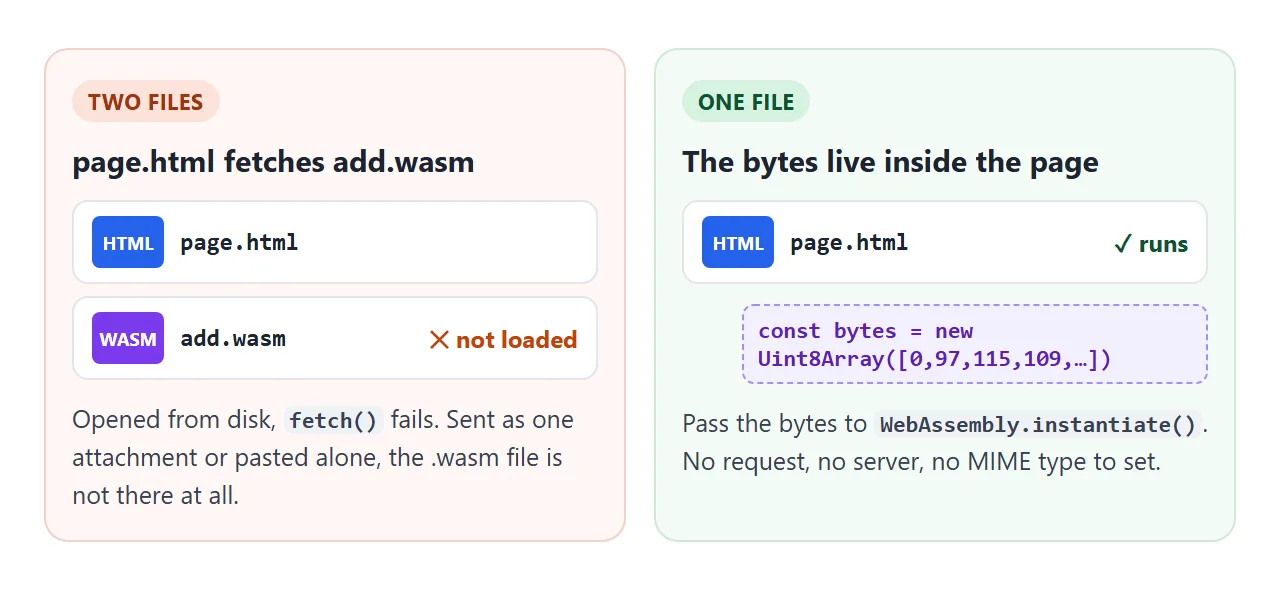
- Opened from disk,
fetch()of a local file is refused. Chrome reportsFailed to fetch, Firefox aNetworkError, and WebKit, the engine behind Safari,Load failed. The file:// protocol explains why. - Served, but with the wrong type,
instantiateStreaming()rejects with aTypeErrorunless the response isapplication/wasm. - Sent as one file, the
.wasmsimply is not there. The page arrives alone.
Embedding the bytes removes the request, so none of these can happen.
Passing arrays and text: imports and memory
WebAssembly functions take and return only numbers: i32, i64, f32 and f64. To hand over a list or a string, write it into the module's memory and pass its position and length.
This module needs one thing from JavaScript: an env.log function that it calls with each running total. It exports sum(ptr, len) and its memory.
<!doctype html>
<html lang="en">
<head>
<meta charset="utf-8">
<meta name="viewport" content="width=device-width, initial-scale=1">
<title>WebAssembly imports and memory</title>
<style>
  body { margin: 0; padding: 18px; font-family: system-ui, sans-serif; background: #f4f5f7; color: #1d2330; }
  .box { max-width: 520px; background: #fff; border-radius: 12px; padding: 16px; box-shadow: 0 4px 16px rgba(0, 0, 0, .08); }
  label { font-size: 14px; color: #4b5563; }
  input { width: 100%; box-sizing: border-box; font: 16px system-ui, sans-serif; padding: 8px; margin: 6px 0 12px; border: 1px solid #cfd4dc; border-radius: 8px; }
  button { font: 600 14px system-ui, sans-serif; padding: 9px 12px; border-radius: 8px; border: 0; cursor: pointer; margin: 0 6px 6px 0; }
  #run { background: #16a34a; color: #fff; }
  #broken { background: #fde2da; color: #9a3412; }
  pre { background: #1d2330; color: #e5e7eb; border-radius: 8px; padding: 10px; font-size: 13px; min-height: 120px; white-space: pre-wrap; word-break: break-word; margin: 8px 0 0; }
  .err { color: #fca5a5; }
</style>
</head>
<body>
<div class="box">
  <label for="nums">Numbers to add up (whole numbers, comma separated)</label>
  <input id="nums" value="5, 10, 20, 7">
  <button id="run">Sum in WebAssembly</button>
  <button id="broken">Load without the import</button>
  <pre id="log">Press a button.</pre>
</div>

<script>
  // A compiled module pasted as base64 (112 bytes).
  // It imports env.log, exports its memory and sum(ptr, len).
  const wasmBase64 = 'AGFzbQEAAAABCwJgAX8AYAJ/fwF/AgsBA2VudgNsb2cAAAMCAQEFAwEAAQcQAgZtZW1vcnkCAANzdW0AAQoxAS8BAX8CQANAIAFFDQEgAiAAKAIAaiECIAIQACAAQQRqIQAgAUEBayEBDAALCyACCw==';
  const bytes = Uint8Array.from(atob(wasmBase64), (c) => c.charCodeAt(0));

  const log = document.getElementById('log');
  const show = (text, cls) => {
    const line = document.createElement('div');
    line.textContent = text;
    if (cls) line.className = cls;
    log.append(line);
  };

  document.getElementById('run').addEventListener('click', async () => {
    log.textContent = '';
    // Every import the module declares must be supplied here
    const imports = { env: { log: (n) => show('running total: ' + n) } };
    const { instance } = await WebAssembly.instantiate(bytes, imports);
    const { memory, sum } = instance.exports;

    // Copy the numbers into wasm memory, 4 bytes each, starting at byte 0
    const nums = document.getElementById('nums').value.split(',').map(Number).filter(Number.isFinite);
    new Int32Array(memory.buffer, 0, nums.length).set(nums);

    // Pass only where the data is and how long it is
    show('sum(0, ' + nums.length + ') = ' + sum(0, nums.length));
  });

  document.getElementById('broken').addEventListener('click', async () => {
    log.textContent = '';
    try {
      await WebAssembly.instantiate(bytes);  // no import object
    } catch (err) {
      show(err.name + ': ' + err.message, 'err');
    }
  });
</script>
</body>
</html>
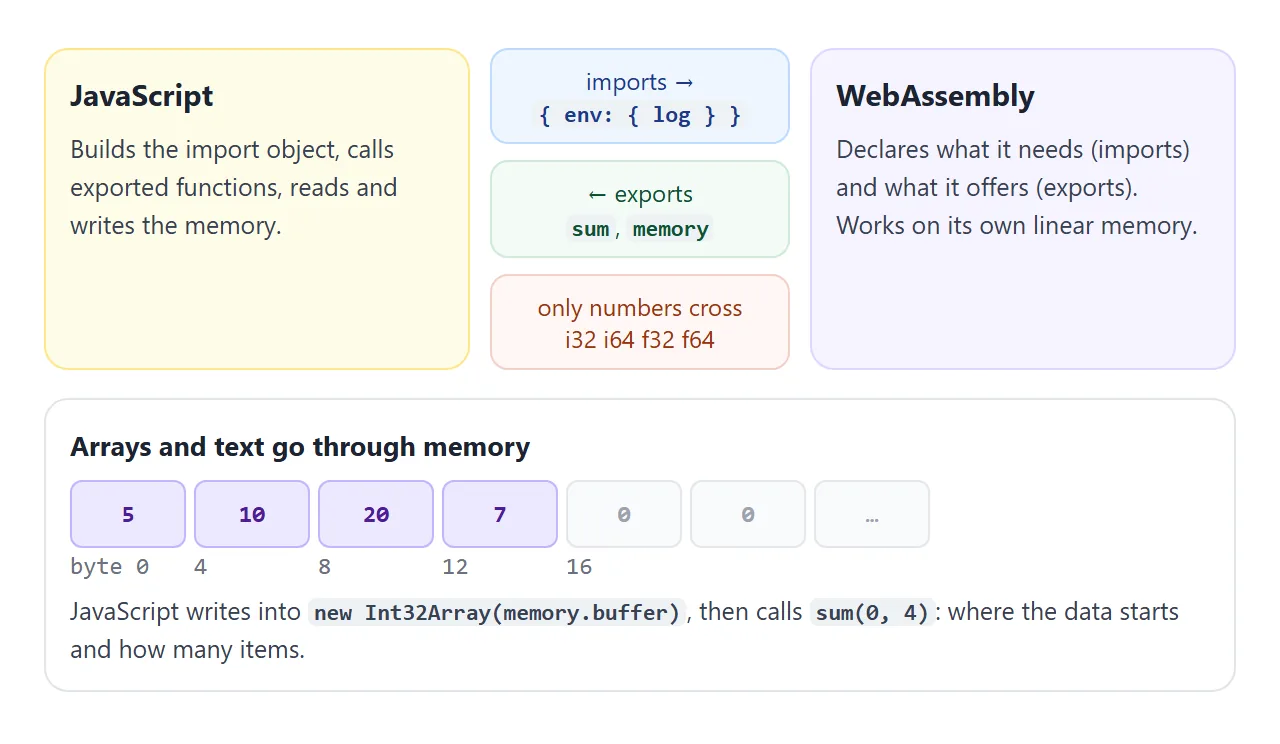
The key lines are short:
const imports = { env: { log: (n) => console.log(n) } };
const { instance } = await WebAssembly.instantiate(bytes, imports);
const { memory, sum } = instance.exports;
new Int32Array(memory.buffer, 0, 4).set([5, 10, 20, 7]);
sum(0, 4); // 42
The module is stored as a base64 string this time and decoded with atob(). That is the form most people paste, because it is shorter than a list of numbers.
Press the red button. Without the import object, the browser refuses to create the instance. MDN states the rule: every import the module declares needs a matching property, or a LinkError is thrown.
Number rules that surprise people
Exported functions convert their arguments. For an i32 parameter, the test results were:
| You pass | The function receives | Why |
|---|---|---|
2.7 |
2 |
The fraction is dropped |
'20' |
20 |
The string is converted to a number |
'x' |
0 |
Not a number becomes 0 |
2147483647 + 1 |
-2147483648 |
i32 wraps around at 32 bits |
An i64 result |
A BigInt |
A plain number cannot hold every 64-bit value |
Convert input values with Number() yourself, as the first example does, so the conversion is visible in your code.
A finished example: a WebAssembly text playground
You do not need a compiler on your computer to try your own module. wabt.js is the WebAssembly Binary Toolkit built for the browser. Loaded from jsDelivr with a pinned version, it turns WebAssembly text into .wasm bytes inside the page.
<!doctype html>
<html lang="en">
<head>
<meta charset="utf-8">
<meta name="viewport" content="width=device-width, initial-scale=1">
<title>WebAssembly text playground</title>
<!-- wabt.js: the WebAssembly Binary Toolkit compiled for the browser -->
<script src="https://cdn.jsdelivr.net/npm/wabt@1.0.39/index.js"></script>
<style>
  body { margin: 0; padding: 16px; font-family: system-ui, sans-serif; background: #f4f5f7; color: #1d2330; }
  .box { max-width: 640px; background: #fff; border-radius: 12px; padding: 14px; box-shadow: 0 4px 16px rgba(0, 0, 0, .08); }
  textarea { width: 100%; box-sizing: border-box; height: 190px; font: 13px/1.45 ui-monospace, Consolas, monospace; padding: 10px; border: 1px solid #cfd4dc; border-radius: 8px; resize: vertical; }
  .bar { display: flex; flex-wrap: wrap; gap: 8px; align-items: center; margin: 10px 0; font-size: 14px; }
  input { width: 70px; font: 15px system-ui, sans-serif; padding: 6px; border: 1px solid #cfd4dc; border-radius: 8px; }
  button { font: 600 14px system-ui, sans-serif; padding: 8px 12px; border: 0; border-radius: 8px; cursor: pointer; background: #16a34a; color: #fff; }
  button:disabled { background: #9ca3af; cursor: wait; }
  select { font: 14px system-ui, sans-serif; padding: 6px; border-radius: 8px; border: 1px solid #cfd4dc; }
  #out { background: #1d2330; color: #e5e7eb; border-radius: 8px; padding: 10px; font: 13px/1.45 ui-monospace, Consolas, monospace; white-space: pre-wrap; word-break: break-all; min-height: 140px; margin: 0; }
  .ok { color: #86efac; } .err { color: #fca5a5; } .dim { color: #9ca3af; }
</style>
</head>
<body>
<div class="box">
  <div class="bar">
    <label>Example <select id="pick">
      <option value="fac">factorial</option>
      <option value="broken">typo (compile error)</option>
    </select></label>
  </div>
  <textarea id="src" spellcheck="false"></textarea>
  <div class="bar">
    <label>main( <input id="arg" type="number" value="10"> )</label>
    <button id="run" disabled>Loading wabt…</button>
  </div>
  <pre id="out"><span class="dim">Write WebAssembly text, then compile and run it.</span></pre>
</div>

<script>
  const samples = {
    fac: `(module
  ;; main(n) = 1 * 2 * ... * n, with 64-bit integers
  (func (export "main") (param $n i32) (result i64)
    (local $acc i64)
    (local.set $acc (i64.const 1))
    (block $done
      (loop $next
        (br_if $done (i32.le_s (local.get $n) (i32.const 1)))
        (local.set $acc (i64.mul (local.get $acc) (i64.extend_i32_s (local.get $n))))
        (local.set $n (i32.sub (local.get $n) (i32.const 1)))
        (br $next)))
    (local.get $acc)))`,
    broken: `(module
  (func (export "main") (param $n i32) (result i32)
    (i32.ad (local.get $n) (i32.const 1))))`
  };

  const src = document.getElementById('src');
  const out = document.getElementById('out');
  const run = document.getElementById('run');
  const pick = document.getElementById('pick');
  const print = (text, cls) => {
    const span = document.createElement('span');
    span.textContent = text + '\n';
    if (cls) span.className = cls;
    out.append(span);
  };

  src.value = samples.fac;
  pick.addEventListener('change', () => { src.value = samples[pick.value]; });

  WabtModule().then((wabt) => {
    run.disabled = false;
    run.textContent = 'Compile and run';

    run.addEventListener('click', async () => {
      out.textContent = '';
      let bytes;
      try {
        // Text format -> binary .wasm bytes
        const mod = wabt.parseWat('main.wat', src.value);
        bytes = mod.toBinary({}).buffer;
        mod.destroy();
      } catch (err) {
        print('Compile error:\n' + err.message, 'err');
        return;
      }
      print(bytes.length + ' bytes of .wasm', 'dim');
      try {
        const { instance } = await WebAssembly.instantiate(bytes);
        const n = Number(document.getElementById('arg').value);
        print('main(' + n + ') = ' + instance.exports.main(n), 'ok');
      } catch (err) {
        print(err.name + ': ' + err.message, 'err');
      }
      // Base64 you can paste into another page and decode with atob()
      let bin = '';
      bytes.forEach((byte) => { bin += String.fromCharCode(byte); });
      print('\nbase64:\n' + btoa(bin), 'dim');
    });
  });
</script>
</body>
</html>
<script src="https://cdn.jsdelivr.net/npm/wabt@1.0.39/index.js"></script>
The script defines a global WabtModule(). Its promise gives you parseWat(), which reads the text, and toBinary(), which returns the bytes. Pick the typo example to see the compile error with the line and column.
The base64 under the result is the step that links this playground to the earlier examples. Copy it into a page, decode it with atob(), and that page runs the module without loading wabt.js.
Bigger programs: C, C++ and Rust
For real code you compile on your own computer. Emscripten is a compiler toolchain to WebAssembly. Run with -o hello.js, it writes two files, hello.js and hello.wasm. Its SINGLE_FILE setting puts the wasm inside the JavaScript file instead:
emcc hello.c -o hello.js -sSINGLE_FILE
Paste the resulting hello.js into a <script> tag and the page needs no separate .wasm. This build runs on your machine, not in the example frames above, so treat it as a recipe rather than something tested here.
Large modules become large pages. If the module does heavy work, run it inside a Web Worker so the page stays responsive.
When it does not work
| What you see | Cause | Fix |
|---|---|---|
TypeError: Failed to fetch |
The page fetches a .wasm file from disk |
Embed the bytes in the page |
Incorrect response MIME type |
The server does not send application/wasm |
Embed the bytes, or fix the server's type |
CompileError about the magic word |
The bytes are not a wasm file, often an HTML error page | Check the base64 or the array |
LinkError on instantiate |
An import is missing or has the wrong kind | Supply every import the module lists |
TypeError about the imports argument |
No import object passed, but the module has imports | Pass the import object as the second argument |
exports.add is not a function |
The export name differs | Log Object.keys(instance.exports) |
| Wrong or negative results | Number conversion or i32 wrap-around |
Use Number(), or i64 / f64 |
For script errors that are not about WebAssembly, see JavaScript not working in HTML.
Share it as a link
A page that runs WebAssembly is hard to send as a file. An .html attachment may open as plain code on a phone, and a separate .wasm file is easy to lose on the way.
With the bytes embedded, everything is in one page. Paste it into a NOS document and choose Create share link. HTML to link walks through it.
The page renders as written and its scripts run, so the people you send it to can use the module themselves, without an account. Scripts from cdn.jsdelivr.net load, so the playground works too. If you change the code later, the same link shows the new version.