In Webflow, "embed" means the Code Embed element. It holds your own HTML, CSS inside <style> tags and JavaScript inside <script> tags, and places it where you drop it in the design. Paste one self-contained snippet, with no <html>, <head> or <body> tags.
Here is a snippet in that shape. Switch between monthly and yearly, then edit the prices and run it again.
<!doctype html>
<html lang="en">
<head>
<meta charset="utf-8">
<meta name="viewport" content="width=device-width, initial-scale=1">
<title>Pricing toggle snippet</title>
</head>
<body style="margin:0;padding:16px;background:#f4f5f7;font-family:system-ui,sans-serif">

<!-- Paste from here ... -->
<style>
  /* every rule starts with .pt so it cannot restyle the rest of the page */
  .pt { max-width: 340px; padding: 18px; border-radius: 14px; background: #fff; color: #1d2330; box-shadow: 0 6px 20px rgba(0, 0, 0, .1); }
  .pt-switch { display: flex; gap: 4px; padding: 4px; border-radius: 99px; background: #eef1f5; }
  .pt-switch button { flex: 1; padding: 8px; border: 0; border-radius: 99px; background: none; font: inherit; cursor: pointer; }
  .pt-switch button[aria-pressed="true"] { background: #1d4ed8; color: #fff; }
  .pt-price { margin: 16px 0 4px; font-size: 40px; font-weight: 700; }
  .pt-note { margin: 0; color: #6b7280; font-size: 14px; }
</style>

<div class="pt">
  <div class="pt-switch">
    <button type="button" data-plan="month" aria-pressed="true">Monthly</button>
    <button type="button" data-plan="year" aria-pressed="false">Yearly</button>
  </div>
  <p class="pt-price">$12</p>
  <p class="pt-note">per month, billed monthly</p>
</div>

<script>
  // look things up inside .pt only, so a second copy of the snippet still works
  document.querySelectorAll('.pt').forEach((box) => {
    const price = box.querySelector('.pt-price');
    const note = box.querySelector('.pt-note');
    const buttons = box.querySelectorAll('.pt-switch button');

    buttons.forEach((btn) => btn.addEventListener('click', () => {
      const yearly = btn.dataset.plan === 'year';
      buttons.forEach((b) => b.setAttribute('aria-pressed', b === btn));
      price.textContent = yearly ? '$120' : '$12';
      note.textContent = yearly ? 'per year, two months free' : 'per month, billed monthly';
    }));
  });
</script>
<!-- ... to here -->

</body>
</html>
The page around the snippet is only there so the file also opens on its own. In Webflow, you paste from <style> down to the closing </script> tag.
How to add a Code Embed in Webflow
These steps follow Webflow's help page for the Code Embed element. It is available with a Core, Growth, Agency or Freelancer Workspace, or on a site with an active Site plan.
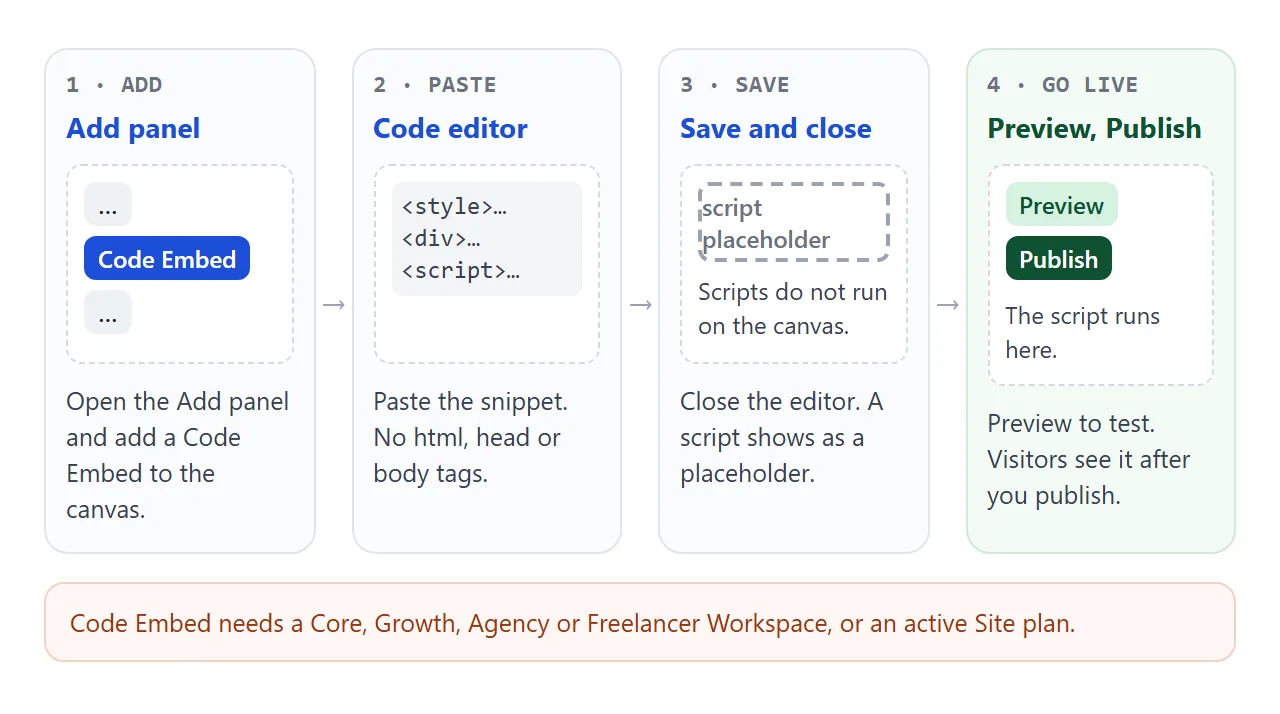
- Copy the snippet you want to embed.
- Open the Add panel and add a Code Embed element to the canvas.
- Paste your code into the editor.
- Save and close the editor.
- Preview the site to see the script run, then publish so visitors see it.
To edit it later, select the element on the canvas and double-click it, or press Enter. A rich text element can also hold custom code, from the plus icon's insert menu.
Why the script does nothing on the canvas
Webflow shows a placeholder for any <script> in a Code Embed while you design, so a button that should react just sits there.
The script runs once you preview, publish or export the site. Its effects only go live for visitors after you publish. Custom code also does not run in expand canvas view.
Code inside <style> or <iframe> tags does show a preview on the canvas. So your snippet can look right in the Designer while its script has not run yet.
If a script should run only on the live site, Webflow documents a comment pair that keeps it out of preview and comment modes:
<!-- EXCLUDE FROM PREVIEW: START -->
<script>
  // analytics or other live-only code
</script>
<!-- EXCLUDE FROM PREVIEW: END -->
Leave out html, head and body
A snippet copied from a full HTML file starts with <!doctype html> and <html>. Webflow's help is direct about this: do not include <html>, <body> or <head> tags in custom code, or the layout will break.
The Code Embed sits inside a Webflow page that already has those tags. Keep only what belongs in the body:
<style>
  .cw { padding: 16px; }
</style>

<div class="cw">...</div>

<script>
  // your JavaScript
</script>
Anything that was in your file's <head>, such as a <link> to a font or stylesheet, goes into the page or site Head code instead. The section on placement below covers where.
Scope your CSS to the snippet
A <style> element applies to the whole document it is in, and a Code Embed puts your snippet into the Webflow page. A rule such as button { ... } therefore reaches every button on the page, not only yours.
Switch between the two versions below and watch the site's own heading and button.
<!doctype html>
<html lang="en">
<head>
<meta charset="utf-8">
<meta name="viewport" content="width=device-width, initial-scale=1">
<title>Unscoped vs scoped snippet CSS</title>
<style>
  /* the "site" around the snippet */
  body { margin: 0; padding: 14px; font-family: system-ui, sans-serif; background: #f4f5f7; color: #1d2330; }
  .pick { display: flex; flex-wrap: wrap; gap: 14px; margin-bottom: 12px; font-size: 14px; }
  .site { border: 1px solid #d5d9e0; border-radius: 12px; background: #fff; overflow: hidden; }
  .site-nav { display: flex; justify-content: space-between; align-items: center; padding: 10px 14px; background: #111827; color: #fff; }
  .site-nav button { padding: 7px 12px; border: 0; border-radius: 8px; background: #fff; color: #111827; font: inherit; font-size: 14px; }
  .site-hero { padding: 14px; }
  .site-hero h2 { margin: 0 0 6px; font-size: 20px; }
  .site-hero p { margin: 0; color: #4b5563; font-size: 14px; }
  .label { display: inline-block; margin: 0 14px 6px; font: 600 12px ui-monospace, Consolas, monospace; color: #6b7280; }
</style>

<!-- snippet CSS, version A: bare element selectors -->
<style id="unscoped">
  h2, p { font-family: Georgia, serif; font-style: italic; }
  button { text-transform: uppercase; outline: 3px solid #ea580c; }
</style>

<!-- snippet CSS, version B: every rule starts with the snippet's own class -->
<style id="scoped">
  .cw h2, .cw p { font-family: Georgia, serif; font-style: italic; }
  .cw button { text-transform: uppercase; outline: 3px solid #ea580c; }
</style>
</head>
<body>
<div class="pick">
  <label><input type="radio" name="v" value="unscoped" checked> Snippet CSS: <code>button</code>, <code>p</code></label>
  <label><input type="radio" name="v" value="scoped"> Snippet CSS: <code>.cw button</code>, <code>.cw p</code></label>
</div>

<div class="site">
  <div class="site-nav"><b>Acme</b><button type="button">Sign in</button></div>
  <div class="site-hero">
    <h2>Welcome to Acme</h2>
    <p>This header and text belong to the site, not the snippet.</p>
  </div>
  <span class="label">Code Embed below</span>
  <div class="cw" style="margin:0 14px 14px;padding:12px;border:2px dashed #1d4ed8;border-radius:10px">
    <p style="margin:0 0 8px">The snippet's own text.</p>
    <button type="button" style="padding:7px 12px;border:0;font:inherit">Snippet button</button>
  </div>
</div>

<script>
  const sheets = { unscoped: document.getElementById('unscoped'), scoped: document.getElementById('scoped') };

  function show(which) {
    // switch one style element on and the other off
    sheets.unscoped.disabled = which !== 'unscoped';
    sheets.scoped.disabled = which !== 'scoped';
  }

  document.querySelectorAll('input[name=v]').forEach((r) => {
    r.addEventListener('change', () => show(r.value));
  });
  show('unscoped');
</script>
</body>
</html>
A rule that starts with a bare tag still loses where a more specific rule sets the same property. The leaks show up in the properties the site did not set, which makes them easy to miss.
The fix is a wrapper class. Give the snippet's outer element a short, unusual class and start every rule with it.
The same goes for JavaScript. getElementById returns the first element with that ID, so a snippet used twice, for example as a component, only wires up the first copy. Look up elements inside the wrapper instead:
document.querySelectorAll('.cw').forEach((box) => {
  const btn = box.querySelector('button');
  // ...
});
If the snippet sets no size of its own, Webflow notes that its content can take up the full width of its parent element. A max-width on the wrapper keeps it in check.
Code Embed, Head code or Footer code
Besides the Code Embed, Webflow has Head code and Footer code sections. Each one puts your code in a different spot in the published page.
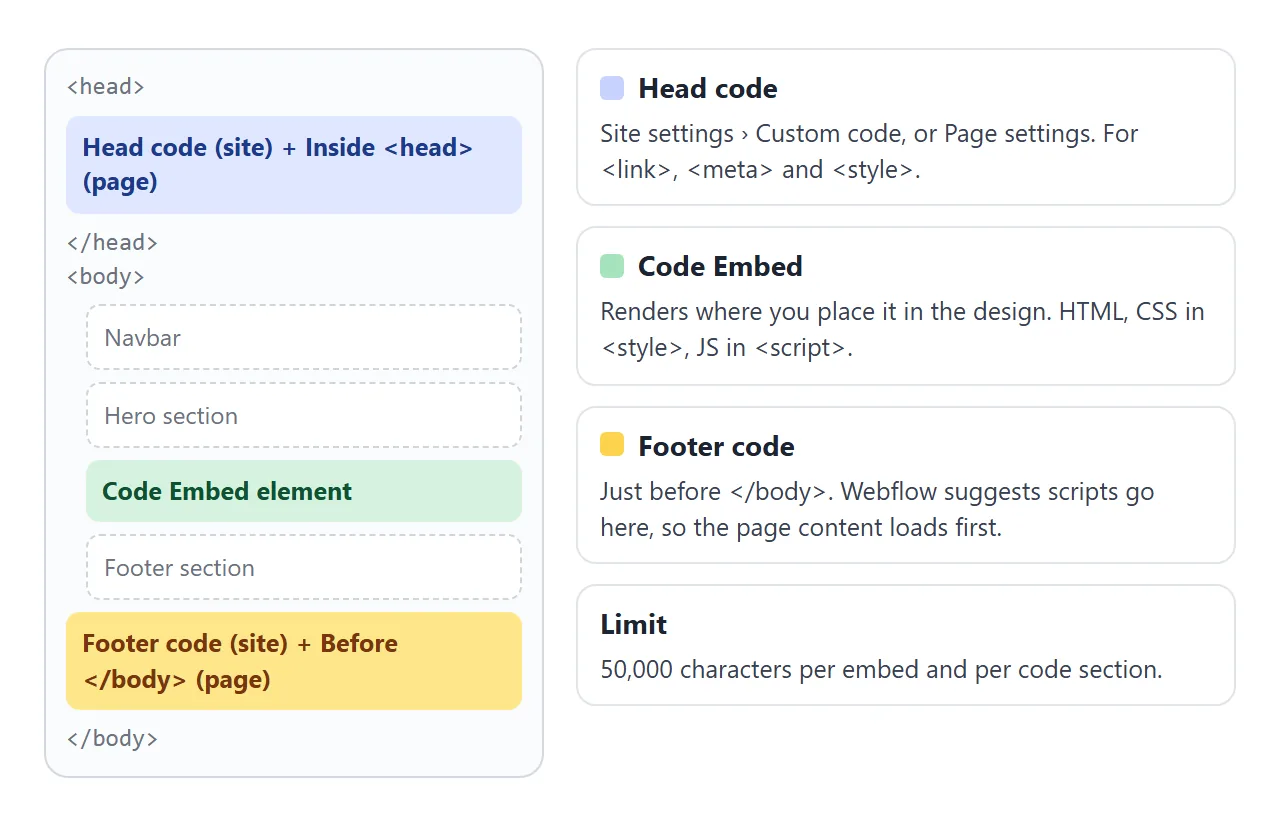
| Place | Where it ends up | Good for |
|---|---|---|
| Code Embed element | Where you put it in the design | A widget with its own markup |
| Head code (Site settings or Page settings) | Before </head> |
<link>, <meta> and <style> |
Footer code, or Before </body> |
Just before </body> |
Scripts that should run after the content |
Site settings code applies to every page. Page settings code applies to one page and appears after the site-wide code.
Each of these sections, and each Code Embed, takes up to 50,000 characters. Webflow suggests putting <script> tags before the closing </body> tag, so the page content loads before the JavaScript is processed.
jQuery is already on the page
Webflow's help says newly published Webflow sites have included jQuery since August 2020. Importing another version in custom code may cause conflicts and unexpected behaviour.
So if a snippet from somewhere else starts with a <script> that loads jQuery, try it without that line first. Plain JavaScript, as in the examples here, does not depend on jQuery at all.
The help page also notes that scripts which affect DOM events like onClick or onHover can cause unexpected behaviour, so test interactions in preview.
Check your snippet before you paste it
This checker looks for the Webflow-specific mistakes above: page tags, a second copy of jQuery, files referenced by a relative path, http:// addresses, and bare tag selectors in your CSS. It also counts characters against the 50,000 limit.
<!doctype html>
<html lang="en">
<head>
<meta charset="utf-8">
<meta name="viewport" content="width=device-width, initial-scale=1">
<title>Webflow Code Embed checker</title>
<style>
  body { margin: 0; padding: 16px; font-family: system-ui, sans-serif; background: #f4f5f7; color: #1d2330; }
  label { font-weight: 600; font-size: 14px; }
  textarea {
    display: block; box-sizing: border-box; width: 100%; height: 190px; margin: 6px 0 10px;
    padding: 10px; border: 1px solid #cfd4dc; border-radius: 8px;
    font: 13px/1.45 ui-monospace, Consolas, monospace;
  }
  .row { display: flex; flex-wrap: wrap; gap: 8px; }
  .row button { font: inherit; font-size: 14px; padding: 8px 13px; border: 1px solid #cfd4dc; border-radius: 8px; background: #fff; cursor: pointer; }
  .row button.main { background: #1d4ed8; border-color: #1d4ed8; color: #fff; }
  ul { list-style: none; margin: 14px 0 0; padding: 0; }
  li { margin-bottom: 8px; padding: 9px 12px; border-radius: 8px; font-size: 14px; line-height: 1.4; overflow-wrap: anywhere; }
  li.info { background: #eef1f5; color: #374151; }
  li.bad { background: #fff1ec; color: #9a3412; }
  li.good { background: #e8f7ee; color: #0f5132; }
</style>
</head>
<body>
<label for="code">Paste the code you plan to put in a Code Embed</label>
<textarea id="code" spellcheck="false"></textarea>
<div class="row">
  <button class="main" id="check">Check it</button>
  <button id="load-bad">Broken example</button>
  <button id="load-good">Fixed example</button>
</div>
<ul id="out"></ul>

<script>
  const code = document.getElementById('code');
  const out = document.getElementById('out');
  const end = '</' + 'script>';  // split so this page's own script tag does not close early
  const LIMIT = 50000;           // Webflow's Code Embed character limit

  const broken = [
    '<html><head><link rel="stylesheet" href="widget.css"></head><body>',
    '<style>',
    '  button { background: #ea580c; }',
    '  .cw { padding: 16px; }',
    '</style>',
    '<div class="cw"><button>Go</button></div>',
    '<script src="https://code.jquery.com/jquery.min.js">' + end,
    '<script src="http://example.com/widget.js">' + end,
    '</body></html>'
  ].join('\n');

  const fixed = [
    '<style>',
    '  .cw { padding: 16px; }',
    '  .cw button { background: #ea580c; }',
    '</style>',
    '<div class="cw"><button>Go</button></div>',
    '<script>',
    "  document.querySelectorAll('.cw button').forEach((b) =>",
    "    b.addEventListener('click', () => b.textContent = 'Done'));",
    end
  ].join('\n');

  // CSS selectors that start with a bare tag name (button, p, h1, *) hit the whole page
  function bareSelectors(css) {
    const found = new Set();
    css = css.replace(/\/\*[\s\S]*?\*\//g, '');
    for (const m of css.matchAll(/(?:^|[{}])\s*([^{}@]+)\{/g)) {
      m[1].split(',').forEach((sel) => {
        sel = sel.trim();
        if (/^(\*|[a-z][a-z0-9]*)(?![\w-])/i.test(sel) && !/^(from|to)$/i.test(sel)) found.add(sel);
      });
    }
    return [...found];
  }

  const isRelative = (url) => !/^(https?:|data:|mailto:|tel:|#|\/\/)/i.test(url.trim());

  function check() {
    const src = code.value;
    const problems = [];

    if (/<\/?(html|head|body)[\s>]/i.test(src))
      problems.push('Remove the <html>, <head> and <body> tags. Webflow says they break the page layout.');

    if (src.length > LIMIT)
      problems.push('Over the 50,000 character limit. Host the script elsewhere, minify it, or split it across embeds.');

    // Parse without running anything
    const doc = new DOMParser().parseFromString(src, 'text/html');

    doc.querySelectorAll('script[src], link[href]').forEach((el) => {
      const url = el.getAttribute('src') || el.getAttribute('href');
      if (/jquery/i.test(url)) problems.push('"' + url + '" loads jQuery again. Newly published Webflow sites already include it, and a second copy can conflict.');
      else if (isRelative(url)) problems.push('"' + url + '" is a file next to your page. The embed has no such folder. Paste the file\'s contents in instead.');
      else if (/^http:/i.test(url)) problems.push('"' + url + '" uses http://. Use the https:// address.');
    });

    doc.querySelectorAll('style').forEach((st) => {
      bareSelectors(st.textContent).forEach((sel) =>
        problems.push('"' + sel + '" styles every match on the whole page. Start it with your snippet\'s class, such as ".cw ' + sel + '".'));
    });

    if (!src.trim()) problems.length = 0, problems.push('The box is empty.');

    out.innerHTML = '';
    const add = (cls, msg) => { const li = document.createElement('li'); li.className = cls; li.textContent = msg; out.append(li); };
    add('info', src.length.toLocaleString('en-US') + ' of 50,000 characters');
    if (problems.length) problems.forEach((p) => add('bad', p));
    else add('good', 'No problems found. This snippet is ready for a Code Embed.');
  }

  document.getElementById('check').addEventListener('click', check);
  document.getElementById('load-bad').addEventListener('click', () => { code.value = broken; check(); });
  document.getElementById('load-good').addEventListener('click', () => { code.value = fixed; check(); });
  code.value = broken;
  check();
</script>
</body>
</html>
The checker reads the code with DOMParser, which builds a document without running its scripts. It then reads each <style> block and lists selectors that start with a tag name.
Code Embed cannot run server-side languages such as PHP or Python, so a snippet that needs one will not work there however it is pasted. For script errors that are not about Webflow, HTML JavaScript not working goes through the usual causes.
When it does not work
| What you see | Cause | Fix |
|---|---|---|
| A placeholder, and buttons do nothing | Scripts do not run on the canvas | Preview or publish the site |
| Works in preview, not for visitors | The site was not published | Publish |
| The page layout breaks | The snippet has <html>, <head> or <body> |
Remove those tags |
| Other parts of the site change style | Bare tag selectors such as button |
Start every rule with a wrapper class |
| Only the first copy of a widget works | Repeated IDs and getElementById |
Look up elements inside each wrapper |
| Odd behaviour after adding a library | A second copy of jQuery | Remove the extra jQuery script |
| The editor will not take all the code | Over 50,000 characters | Host the script elsewhere, minify, or split it |
If the snippet you are embedding is an <iframe> from another service, the iframe guide explains its attributes.
Share it as a link
A Code Embed is the right home when the widget belongs on a Webflow site you already run. Visitors see it at the site address after you publish.
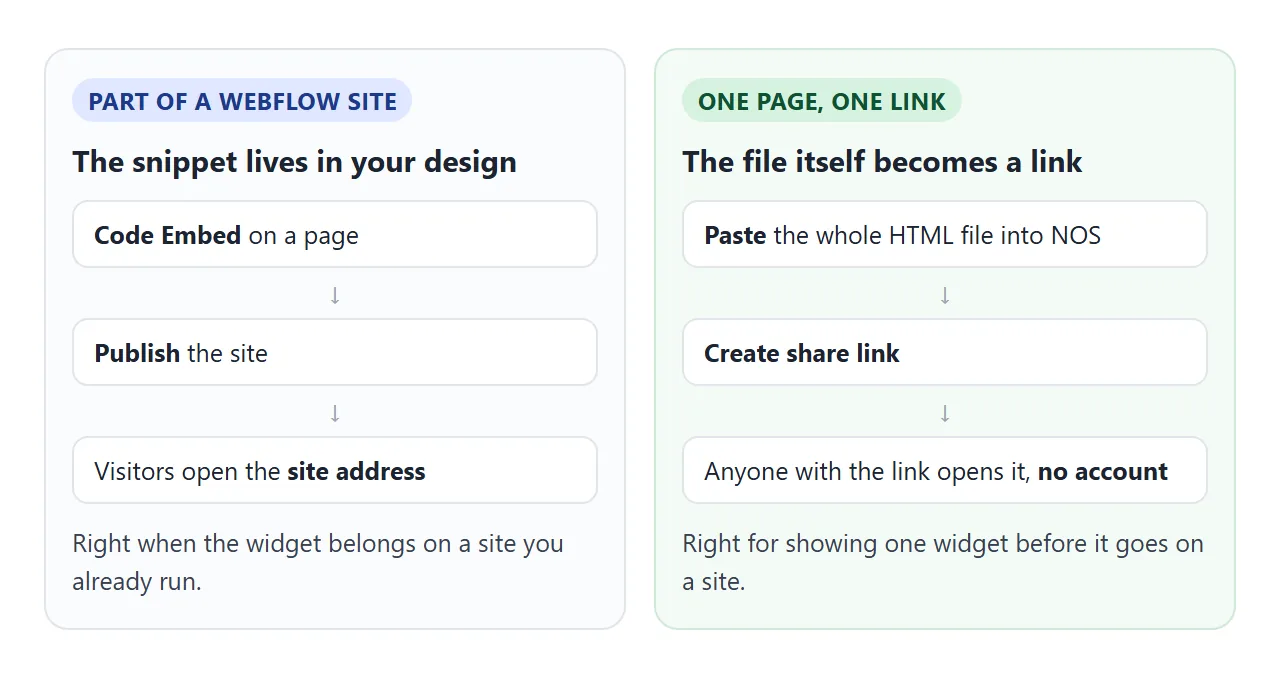
If you only want someone to try the widget, for a review before it goes on the site, you do not need a site around it. A full HTML file, with its head and body, works as it is.
Paste the page into a NOS document and choose Create share link. HTML to link walks through it.
The page renders as written and its scripts run, so the people you send it to can click the toggle themselves without an account. If you change the code later, the same link shows the new version.