CSS 변수(사양에서는 사용자 정의 속성이라고 함)는 이름이 --로 시작하는 속성입니다. :root에서 한 번 선언하고, var(--name)를 사용하여 어디서나 읽고, 하나의 값을 변경하면 이를 사용하는 모든 규칙이 업데이트됩니다.
:root {
  --brand: #2563eb;
  --radius: 10px;
}
.button {
  background: var(--brand);
  border-radius: var(--radius);
}
시도해 보세요. 아래 선택기는 :root의 세 가지 변수를 변경하며, 드래그하면 전체 샘플의 스타일이 변경됩니다. 아래 상자에는 현재 :root 블록이 인쇄됩니다.
<!doctype html>
<html lang="en">
<head>
<meta charset="utf-8">
<meta name="viewport" content="width=device-width, initial-scale=1">
<title>CSS variables theme editor</title>
<style>
  /* 1. Define the variables once, on :root */
  :root {
    --brand: #2563eb;
    --radius: 10px;
    --space: 16px;
  }

  body { margin: 0; padding: 14px; font-family: system-ui, sans-serif; background: #f4f5f7; color: #1d2330; }
  .wrap { display: grid; grid-template-columns: 1fr 1fr; gap: 14px; }
  @media (max-width: 560px) { .wrap { grid-template-columns: 1fr; } }

  .controls label { display: flex; align-items: center; justify-content: space-between; gap: 10px; margin-bottom: 10px; font-size: 14px; }
  .controls input[type=range] { flex: 1; max-width: 140px; }
  pre { margin: 6px 0 0; padding: 10px 12px; background: #1d2330; color: #e5e7eb; border-radius: 8px; font-size: 13px; line-height: 1.5; }

  /* 2. Use them with var(), everywhere */
  .card {
    background: #fff;
    padding: var(--space);
    border-radius: var(--radius);
    border-top: 4px solid var(--brand);
    box-shadow: 0 4px 14px rgba(0, 0, 0, .08);
  }
  .card h3 { margin: 0 0 calc(var(--space) / 2); color: var(--brand); }
  .card p { margin: 0 0 var(--space); font-size: 14px; line-height: 1.5; }
  .card input {
    width: 100%; box-sizing: border-box; margin-bottom: var(--space);
    padding: calc(var(--space) / 2); border: 1px solid #d5d9e0; border-radius: var(--radius); font: inherit;
  }
  .btn {
    padding: calc(var(--space) / 2) var(--space);
    border: 0; border-radius: var(--radius);
    background: var(--brand); color: #fff; font: 600 14px system-ui, sans-serif; cursor: pointer;
  }
  .btn.ghost { background: transparent; color: var(--brand); box-shadow: inset 0 0 0 2px var(--brand); }
</style>
</head>
<body>
<div class="wrap">
  <div class="controls">
    <label>--brand <input type="color" id="brand" value="#2563eb"></label>
    <label>--radius <input type="range" id="radius" min="0" max="24" value="10"></label>
    <label>--space <input type="range" id="space" min="8" max="32" value="16"></label>
    <pre id="out"></pre>
  </div>

  <div class="card">
    <h3>Newsletter</h3>
    <p>Every colour, corner and gap here reads from three variables on :root.</p>
    <input placeholder="you@example.com">
    <button class="btn">Subscribe</button>
    <button class="btn ghost">Later</button>
  </div>
</div>

<script>
  const root = document.documentElement;
  const units = { brand: '', radius: 'px', space: 'px' };

  function show() {
    // read the current values back from :root
    const css = getComputedStyle(root);
    document.getElementById('out').textContent =
      ':root {\n' +
      Object.keys(units).map((k) => '  --' + k + ': ' + css.getPropertyValue('--' + k).trim() + ';').join('\n') +
      '\n}';
  }

  Object.keys(units).forEach((k) => {
    document.getElementById(k).addEventListener('input', (e) => {
      // 3. Change a variable from JavaScript: everything using it updates
      root.style.setProperty('--' + k, e.target.value + units[k]);
      show();
    });
  });

  show();
</script>
</body>
</html>
:root에 변수를 정의하고 var()로 변수 읽기
변수는 규칙 내에서 다른 속성과 마찬가지로 선언됩니다. 이름은 두 개의 대시로 시작해야 하며 대소문자를 구분합니다. --Brand와 --brand는 서로 다른 두 변수입니다.
:root는 <html> 요소와 일치합니다. 사용자 정의 속성은 상속되므로 여기에 선언된 변수는 페이지의 모든 요소에 적용됩니다. 이것이 바로 대부분의 스타일시트가 상단에 있는 하나의 :root 블록에 공유 값을 유지하는 이유입니다.
값을 사용하려면 값이 들어갈 위치에 var(--name)를 작성하십시오. 전체 값, 속기의 일부 또는 calc() 내부에서 작동합니다.
.card {
  padding: var(--space);
  border: 1px solid var(--brand);
  margin-bottom: calc(var(--space) * 2);
}
var()의 대체 값
var()는 변수가 전혀 정의되지 않은 경우 사용되는 선택적 두 번째 인수를 사용합니다.
color: var(--text, #1d2330);
font-family: var(--font, Georgia, serif);
padding: var(--pad, var(--space, 12px));
첫 번째 쉼표 이후의 모든 내용은 쉼표를 포함한 대체이므로 Georgia, serif는 하나의 대체입니다. 폴백 자체가 또 다른 var()일 수 있습니다.
변수가 존재하지만 잘못된 값을 보유하는 경우 폴백이 개입되지 않습니다. 그 사건은 다르게 행동하며, 사람들을 놀라게 하는 사건입니다.
범위: 구성 요소 또는 미디어 쿼리의 변수 재정의
변수는 color와 동일한 상속을 따릅니다. 요소는 트리에서 그 위에 가장 가까운 선언을 봅니다.
클래스의 변수를 재정의하면 해당 요소와 그 안에 있는 모든 항목이 새 값을 가져오고 페이지의 나머지 부분은 이전 값을 유지합니다.
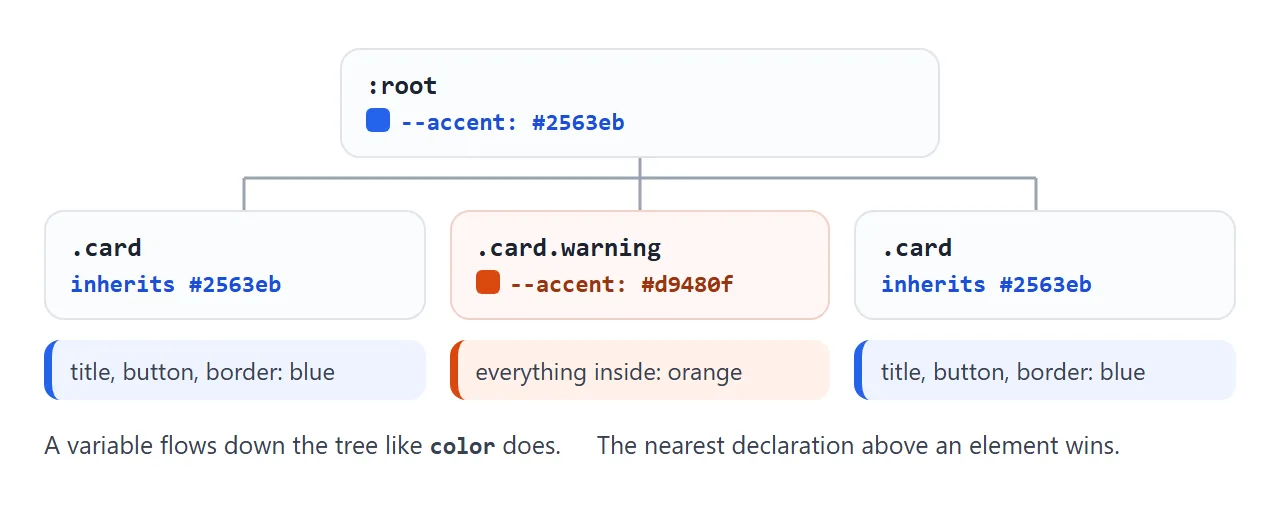
아래에는 동일한 카드가 세 번 나타납니다. 중간 항목은 자체적으로 --accent를 설정합니다. 버튼은 3개를 모두 담는 행에 --accent를 설정하고, 자신의 값이 없는 2장의 카드만 그 뒤를 따릅니다.
<!doctype html>
<html lang="en">
<head>
<meta charset="utf-8">
<meta name="viewport" content="width=device-width, initial-scale=1">
<title>CSS variable scope</title>
<style>
  :root {
    --accent: #2563eb;
    --pad: 20px;
  }

  /* Narrow screens: one override, every card gets smaller padding */
  @media (max-width: 560px) {
    :root { --pad: 10px; }
  }

  body { margin: 0; padding: 14px; font-family: system-ui, sans-serif; background: #f4f5f7; color: #1d2330; }
  .row { display: grid; grid-template-columns: repeat(3, 1fr); gap: 12px; }
  @media (max-width: 560px) { .row { grid-template-columns: 1fr; } }

  .card {
    background: #fff;
    padding: var(--pad);
    border-radius: 10px;
    border-left: 5px solid var(--accent);
  }
  .card b { color: var(--accent); }
  .card code { display: block; white-space: pre; margin-top: 6px; font-size: 12.5px; color: #4b5563; }

  /* Override inside one card only. Its children inherit the new value. */
  .card.warning { --accent: #d9480f; }

  button { margin-top: 14px; padding: 8px 14px; border-radius: 8px; border: 1px solid #c9ced6; background: #fff; font: inherit; cursor: pointer; }
</style>
</head>
<body>
<div class="row" id="row">
  <div class="card"><b>Default</b><code></code></div>
  <div class="card warning"><b>.warning</b><code></code></div>
  <div class="card"><b>Default</b><code></code></div>
</div>
<button id="toggle">Set --accent on the row</button>

<script>
  const row = document.getElementById('row');
  const cards = row.querySelectorAll('.card');

  function show() {
    // each card reports the value it actually sees
    cards.forEach((c) => {
      const s = getComputedStyle(c);
      c.querySelector('code').textContent =
        '--accent: ' + s.getPropertyValue('--accent').trim() + '\n--pad: ' + s.getPropertyValue('--pad').trim();
    });
  }

  document.getElementById('toggle').addEventListener('click', (e) => {
    const on = row.style.getPropertyValue('--accent');
    if (on) { row.style.removeProperty('--accent'); e.target.textContent = 'Set --accent on the row'; }
    else { row.style.setProperty('--accent', '#0f9d58'); e.target.textContent = 'Remove it again'; }
    show();
  });

  addEventListener('resize', show);
  show();
</script>
</body>
</html>
.card.warning { --accent: #d9480f; }

@media (max-width: 560px) {
  :root { --pad: 10px; }
}
미디어 쿼리 줄은 반응형 간격에 대한 일반적인 패턴입니다. 조건은 일반 숫자로 유지되고 그 안에서 변수의 값만 변경됩니다. 미디어 쿼리에서 조건 자체를 다룹니다.
JavaScript로 CSS 변수 변경하기
변수가 살아있습니다. 스크립트에서 하나를 설정하면 클래스 토글이나 요소에 대한 루프 없이 이를 읽는 모든 규칙이 업데이트됩니다.
const root = document.documentElement;

// write
root.style.setProperty('--brand', '#e11d48');

// read the value an element actually sees
getComputedStyle(root).getPropertyValue('--brand').trim();

// remove the inline value, so the stylesheet value applies again
root.style.removeProperty('--brand');
두 가지 세부 사항이 중요합니다. root.style.brand 및 root.style['--brand']는 사용자 정의 특성을 설정하지 않습니다. setProperty를 사용하세요. 그리고 이런 방식으로 설정된 값은 요소의 인라인 스타일에 있으므로 이를 제거할 때까지 스타일시트의 :root 규칙보다 우선합니다.
중첩된 요소가 보는 내용을 읽으려면 :root가 아닌 해당 요소에서 getComputedStyle를 호출하세요. 위의 범위 지정 예는 각 카드에 대해 정확히 해당 작업을 수행합니다.
테마: 데이터 테마를 사용하여 밝음, 어두움 등
색상이 아닌 역할의 이름을 지정하십시오: --bg, --surface, --text, --brand. 구성 요소는 해당 이름만 사용합니다. 테마는 <html>의 속성에 의해 선택된 역할을 재정의하는 하나의 규칙입니다.
:root { --bg: #f4f5f7; --text: #1d2330; --brand: #2563eb; }
[data-theme="dark"] { --bg: #16181d; --text: #e8eaed; --brand: #7aa2ff; }
document.documentElement.dataset.theme = 'dark';
<!doctype html>
<html lang="en" data-theme="light">
<head>
<meta charset="utf-8">
<meta name="viewport" content="width=device-width, initial-scale=1">
<title>Design tokens with CSS variables</title>
<style>
  /* Tokens: the default theme */
  :root {
    --bg: #f4f5f7;  --surface: #ffffff;  --text: #1d2330;  --muted: #5b6472;  --border: #e1e4ea;
    --brand: #2563eb;  --on-brand: #ffffff;
    --ok: #0f7b3f;  --ok-bg: #e3f6ea;
    --warn: #9a5b00;  --warn-bg: #fff3d6;
    --danger: #b42318;  --danger-bg: #fde8e6;
    --radius: 10px;  --space: 14px;
  }
  /* Each theme only redefines the tokens that change */
  [data-theme="dark"] {
    --bg: #16181d;  --surface: #20242b;  --text: #e8eaed;  --muted: #a0a7b3;  --border: #343a44;
    --brand: #7aa2ff;  --on-brand: #10131a;
    --ok: #6fdc9b;  --ok-bg: #173325;
    --warn: #ffcf66;  --warn-bg: #3a2e12;
    --danger: #ff8f84;  --danger-bg: #3d1c1a;
  }
  [data-theme="forest"] {
    --bg: #eef3ec;  --surface: #fbfdf9;  --text: #1f2a1c;  --muted: #56644f;  --border: #d3dfcd;
    --brand: #2f6b3a;  --on-brand: #ffffff;
    --radius: 2px;  --space: 16px;
  }

  /* Components: only var(), no colour written twice */
  body { margin: 0; padding: var(--space); font-family: system-ui, sans-serif; background: var(--bg); color: var(--text); transition: background .2s, color .2s; }
  .bar { display: flex; flex-wrap: wrap; gap: 8px; margin-bottom: var(--space); }
  .btn {
    padding: 8px 14px; border-radius: var(--radius); font: 600 14px system-ui, sans-serif; cursor: pointer;
    border: 1px solid var(--border); background: var(--surface); color: var(--text);
  }
  .btn.primary { background: var(--brand); border-color: var(--brand); color: var(--on-brand); }
  .btn[aria-pressed="true"] { box-shadow: inset 0 0 0 2px var(--brand); }

  .grid { display: grid; grid-template-columns: 1fr 1fr; gap: var(--space); }
  @media (max-width: 520px) { .grid { grid-template-columns: 1fr; } }
  .card { background: var(--surface); border: 1px solid var(--border); border-radius: var(--radius); padding: var(--space); }
  .card h3 { margin: 0 0 6px; font-size: 16px; }
  .card p { margin: 0 0 12px; color: var(--muted); font-size: 14px; line-height: 1.5; }

  .alert { margin-top: 10px; padding: 10px 12px; border-radius: var(--radius); font-size: 14px; border-left: 4px solid currentColor; }
  .alert.ok { color: var(--ok); background: var(--ok-bg); }
  .alert.warn { color: var(--warn); background: var(--warn-bg); }
  .alert.danger { color: var(--danger); background: var(--danger-bg); }
</style>
</head>
<body>
<div class="bar" id="themes">
  <button class="btn" data-set="light" aria-pressed="true">Light</button>
  <button class="btn" data-set="dark" aria-pressed="false">Dark</button>
  <button class="btn" data-set="forest" aria-pressed="false">Forest</button>
</div>

<div class="grid">
  <div class="card">
    <h3>Starter plan</h3>
    <p>Buttons, cards and alerts share one set of tokens.</p>
    <button class="btn primary">Choose plan</button>
    <button class="btn">Details</button>
  </div>
  <div class="card">
    <h3>Status</h3>
    <div class="alert ok">Payment received.</div>
    <div class="alert warn">Card expires next month.</div>
    <div class="alert danger">Two invoices are overdue.</div>
  </div>
</div>

<script>
  // Switching theme = changing one attribute. CSS does the rest.
  document.getElementById('themes').addEventListener('click', (e) => {
    const name = e.target.dataset.set;
    if (!name) return;
    document.documentElement.dataset.theme = name;
    document.querySelectorAll('[data-set]').forEach((b) =>
      b.setAttribute('aria-pressed', b.dataset.set === name));
  });
</script>
</body>
</html>
테마는 변경되는 토큰만 나열하면 됩니다. 위의 숲 테마는 색상과 --radius도 변경하므로 구성 요소 규칙을 건드리지 않고 모서리가 정사각형이 됩니다.
이 기사에서는 독자의 시스템 설정을 따르는 방법을 반복하지 않습니다. 다크 모드 CSS는 prefers-color-scheme와 다크 팔레트의 세부 사항을 다루고, CSS 색상 변수는 생성된 페이지의 팔레트를 교체하는 방법을 보여줍니다.
잘못된 값: 변수가 자동으로 무시되는 이유
--space: 20는 무엇이든 의미할 수 있으므로 브라우저는 스타일시트를 읽을 때 변수 값을 확인하지 않습니다. 속성이 사용되는 경우에만 확인합니다. 해당 속성에 대한 결과가 유효하지 않은 경우 해당 속성은 계산된 값 시간에 유효하지 않음이 됩니다.
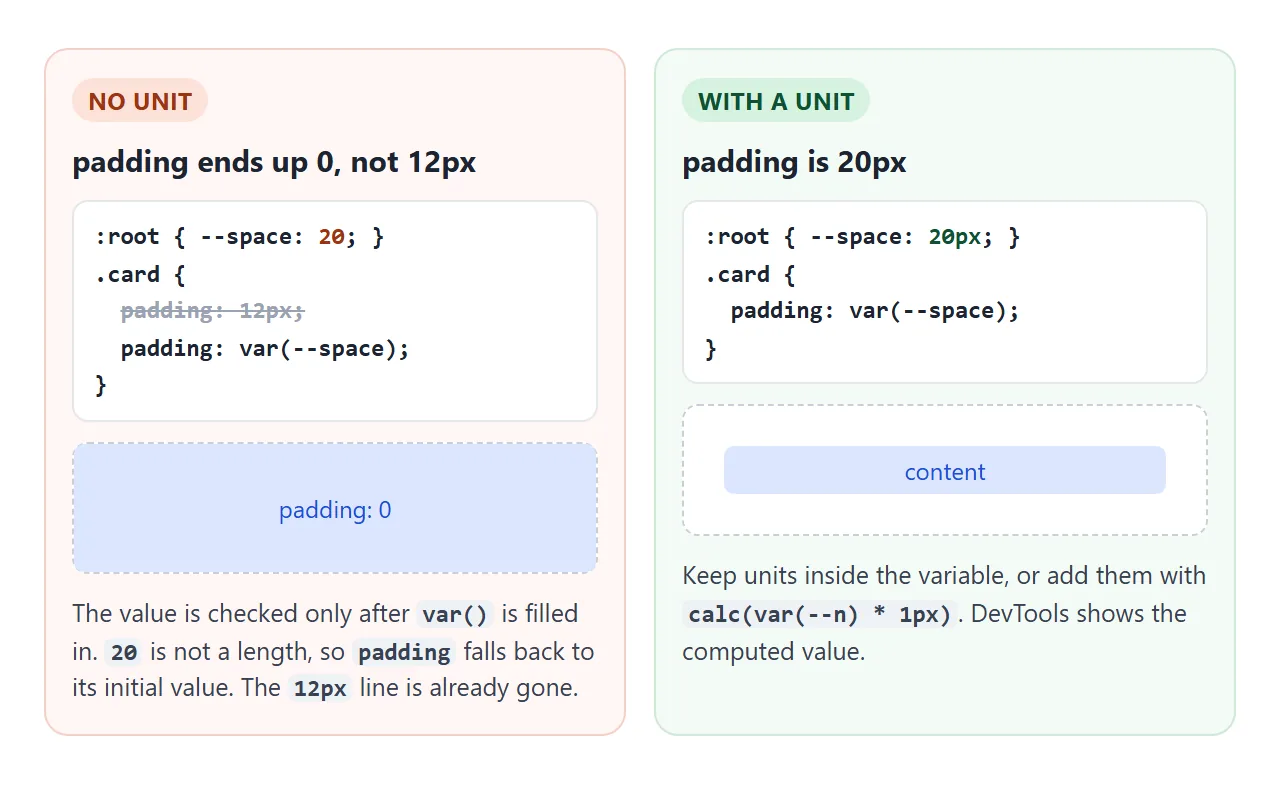
이 경우 속성은 unset인 것처럼 작동합니다. color와 같은 상속된 속성은 상위 값을 사용하고 padding와 같은 상속되지 않은 속성은 초기 값을 사용합니다.
캐스케이드가 이미 해당 속성을 삭제했기 때문에 동일한 속성의 이전 선언으로 돌아가지 않습니다.
해결 방법은 단위를 변수(--space: 20px) 내부에 유지하거나 calc(var(--space) * 1px)를 사용하여 추가하는 것입니다. var(--space)px를 작성해도 두 개가 서로 붙지 않습니다.
var()가 작동하지 않는 곳
var()는 속성 선언 내부의 값을 대체합니다. 미디어 쿼리 조건, 선택기, 속성 이름 등 선언 외부의 모든 항목은 제한이 없습니다.
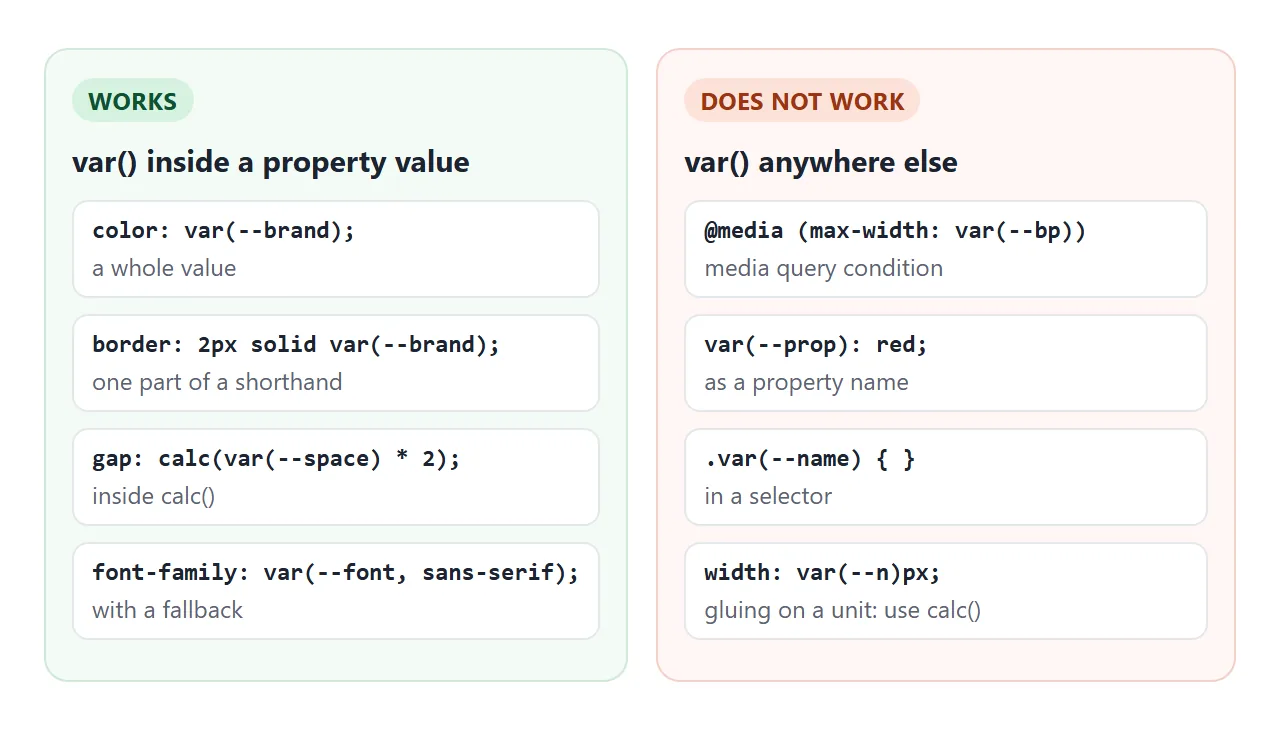
| 어디에 | 작동합니까? | 대신 사용 |
|---|---|---|
| 속성 값 | 예 | - |
calc() 내부 |
예 | - |
| 미디어 쿼리 조건 | 아니요 | 숫자를 쓰고, 쿼리 내부의 변수를 변경하세요. |
| 선택기 또는 속성 이름 | 아니요 | 클래스 또는 속성 선택자 |
var(--n)px와 같이 장치에 결합됨 |
아니요 | calc(var(--n) * 1px) |
작동하지 않을 때
| 당신이 보는 것 | 원인 | 수정 |
|---|---|---|
| 규칙은 효과가 없습니다 | 이름에 --가 없거나 값에 var()가 없습니다. |
--brand: red 정의, var(--brand) 사용 |
| 값 대신 대체가 표시됩니다. | 오타 또는 --Brand와 같은 대소문자 차이 |
정의에서 정확한 이름을 복사하세요. |
| 속성이 기본값으로 재설정됩니다. | 해당 속성에 대한 값이 유효하지 않습니다. | 단위를 확인하세요. DevTools에서 계산된 값을 검사합니다. |
| 미디어 쿼리가 일치하지 않습니다. | 조건에 사용되는 var() |
조건에 숫자를 쓰세요 |
| 한 요소가 변수를 무시합니다. | 조상이 아닌 형제자매로 정의됩니다. | :root 또는 공유 상위로 이동 |
| 스크립트 변경은 아무 작업도 수행하지 않습니다. | setProperty 대신 style.name로 설정 |
el.style.setProperty('--name', value) |
특히 배경색의 경우 CSS background-color에는 변수가 보유할 수 있는 형식이 나열되어 있습니다.
링크로 공유하세요
16진수 코드를 읽는 것보다 클릭하는 것이 테마를 판단하기 더 쉽습니다. 스크린샷에는 하나의 테마가 표시되며, .html 첨부 파일은 전화기에서 일반 코드로 열릴 수 있습니다.
작업 버전을 보내려면 페이지를 NOS 문서에 붙여넣고 공유 링크 만들기를 선택하세요. 링크할 HTML이 이를 안내합니다.
페이지는 작성된 대로 렌더링되고 스크립트가 실행되므로 페이지를 받는 사람은 테마를 전환하고 슬라이더를 직접 끌 수 있습니다. 나중에 코드를 변경하면 동일한 링크에 새 버전이 표시됩니다.