HTML 엔터티(사양에서는 문자 참조라고 부름)는 한 문자를 나타내는 짧은 코드입니다.
&로 시작하고 ;로 끝납니다. <는 미만 기호이고, ©는 ©이며, ©와 ©는 동일 ©를 숫자로 표기합니다.
브라우저가 마크업으로 읽을 몇 문자에 대한 엔터티만 필요합니다. UTF-8 페이지에서는 다른 모든 내용을 직접 입력할 수 있습니다.
시도해 보세요: 상자에 무엇이든 입력하고 세 가지 이스케이프된 양식과 브라우저가 이를 어떻게 만드는지 확인하세요.
<!doctype html>
<html lang="en">
<head>
  <meta charset="utf-8">
<meta name="viewport" content="width=device-width, initial-scale=1">
<title>HTML entity encoder and decoder</title>
<style>
body { margin: 0; padding: 14px; font-family: system-ui, sans-serif; background: #f4f5f7; color: #1d2330; }
label { display: block; font-size: 13px; font-weight: 600; margin: 0 0 4px; }
textarea, input[type=text] {
width: 100%; box-sizing: border-box; padding: 8px 10px; font: 14px/1.4 ui-monospace, Consolas, monospace;
border: 1px solid #cfd4dc; border-radius: 8px; background: #fff;
}
textarea { height: 58px; resize: vertical; }
.opt { font-size: 13px; margin: 8px 0 10px; display: flex; gap: 6px; align-items: center; }
.out { display: grid; grid-template-columns: 70px 1fr; gap: 6px 8px; font-size: 13px; }
.out b { padding-top: 6px; }
.out code {
display: block; padding: 6px 8px; background: #fff; border: 1px solid #e1e4ea; border-radius: 6px;
font: 13px/1.4 ui-monospace, Consolas, monospace; word-break: break-all; min-height: 18px;
}
.preview { margin: 10px 0 16px; padding: 10px 12px; background: #fff; border-radius: 8px; border: 1px dashed #9aa3b2; font-size: 16px; min-height: 22px; }
.muted { color: #6b7280; font-size: 12px; font-weight: 400; }
hr { border: 0; border-top: 1px solid #dde1e7; margin: 4px 0 12px; }
</style>
</head>
<body>
<label for="src">Text to escape</label>
<textarea id="src">Tom & Jerry <3 "cheese" © 2026 — café</textarea>
<div class="opt"><input type="checkbox" id="all"><label for="all" style="margin:0;font-weight:400">Also escape every non-ASCII character</label></div>
<div class="out">
<b>Named</b><code id="named"></code>
<b>Decimal</b><code id="dec"></code>
<b>Hex</b><code id="hex"></code>
</div>
<div class="muted" style="margin-top:10px">What the browser shows for the named version:</div>
<div class="preview" id="preview" style="margin-top:4px"></div>
<hr>
<label for="enc">Entities to decode</label>
<input type="text" id="enc" value="5 < 7 && 7 > 5 → ✓ ❤">
<div class="muted" style="margin-top:8px">Decoded text:</div>
<div class="preview" id="decoded" style="margin-top:4px"></div>
<script>
// A few names. Characters without a name here fall back to a number.
const NAMES = { '&': 'amp', '<': 'lt', '>': 'gt', '"': 'quot', "'": 'apos',
'\u00A0': 'nbsp', '©': 'copy', '®': 'reg', '™': 'trade', '—': 'mdash', '–': 'ndash',
'…': 'hellip', '€': 'euro', '£': 'pound', '×': 'times', '→': 'rarr', 'é': 'eacute' };
const MUST = /[&<>"']/; // the characters that can break markup
function escape(text, style, all) {
let out = '';
for (const ch of text) { // for...of walks whole characters, emoji included
const cp = ch.codePointAt(0);
if (!MUST.test(ch) && !(all && cp > 127)) { out += ch; continue; }
if (style === 'named' && NAMES[ch]) out += '&' + NAMES[ch] + ';';
else if (style === 'hex') out += '&#x' + cp.toString(16).toUpperCase() + ';';
else out += '&#' + cp + ';';
}
return out;
}
function decode(html) {
const t = document.createElement('textarea');
t.innerHTML = html; // the parser turns entities back into characters
return t.value;
}
const src = document.getElementById('src');
const all = document.getElementById('all');
const enc = document.getElementById('enc');
function update() {
const named = escape(src.value, 'named', all.checked);
document.getElementById('named').textContent = named; // textContent: show the code as typed
document.getElementById('dec').textContent = escape(src.value, 'dec', all.checked);
document.getElementById('hex').textContent = escape(src.value, 'hex', all.checked);
document.getElementById('preview').innerHTML = named; // innerHTML: let the browser render it
}
function updateDecode() {
document.getElementById('decoded').textContent = decode(enc.value);
}
src.addEventListener('input', update);
all.addEventListener('change', update);
enc.addEventListener('input', updateDecode);
update();
updateDecode();
</script>
</body>
</html>
엔터티를 작성하는 세 가지 방법
모든 엔터티는 동일한 모양을 갖습니다. 앰퍼샌드, 이름 또는 숫자, 세미콜론 순입니다.
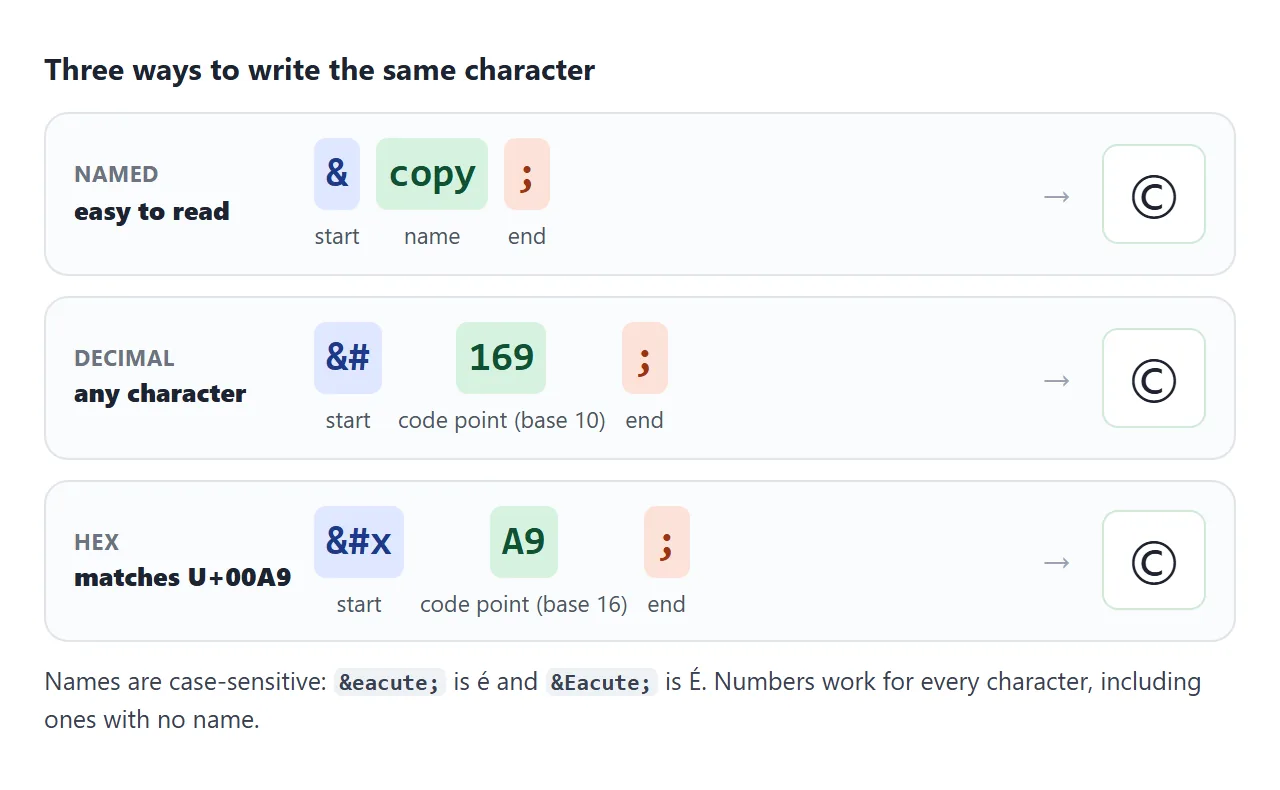
- 이름:
©,—,→. 읽기는 쉽지만 이름이 없는 캐릭터가 많습니다. 이름은 대소문자를 구분합니다.é는 é이고É는 É입니다. - 십진수:
&#에 10진수의 유니코드 코드 포인트(예: 이름이 없는 ₹의 경우₹). - 16진수:
&#x에₹와 같이 16진수의 코드 포인트를 더한 것입니다. 16진수는 유니코드 차트가 인쇄하는 방식과 일치합니다(U+20B9).
숫자는 모든 캐릭터에 적용되므로 이름을 찾을 수 없을 때 대체용으로 사용됩니다.
이스케이프해야 할 문자
브라우저는 <를 태그의 시작으로 읽고 &를 엔터티의 시작으로 읽습니다. 그 두 가지는 텍스트의 내용을 깨뜨리는 것입니다. 속성 값 내에서 값을 묶는 따옴표가 일찍 끝납니다.
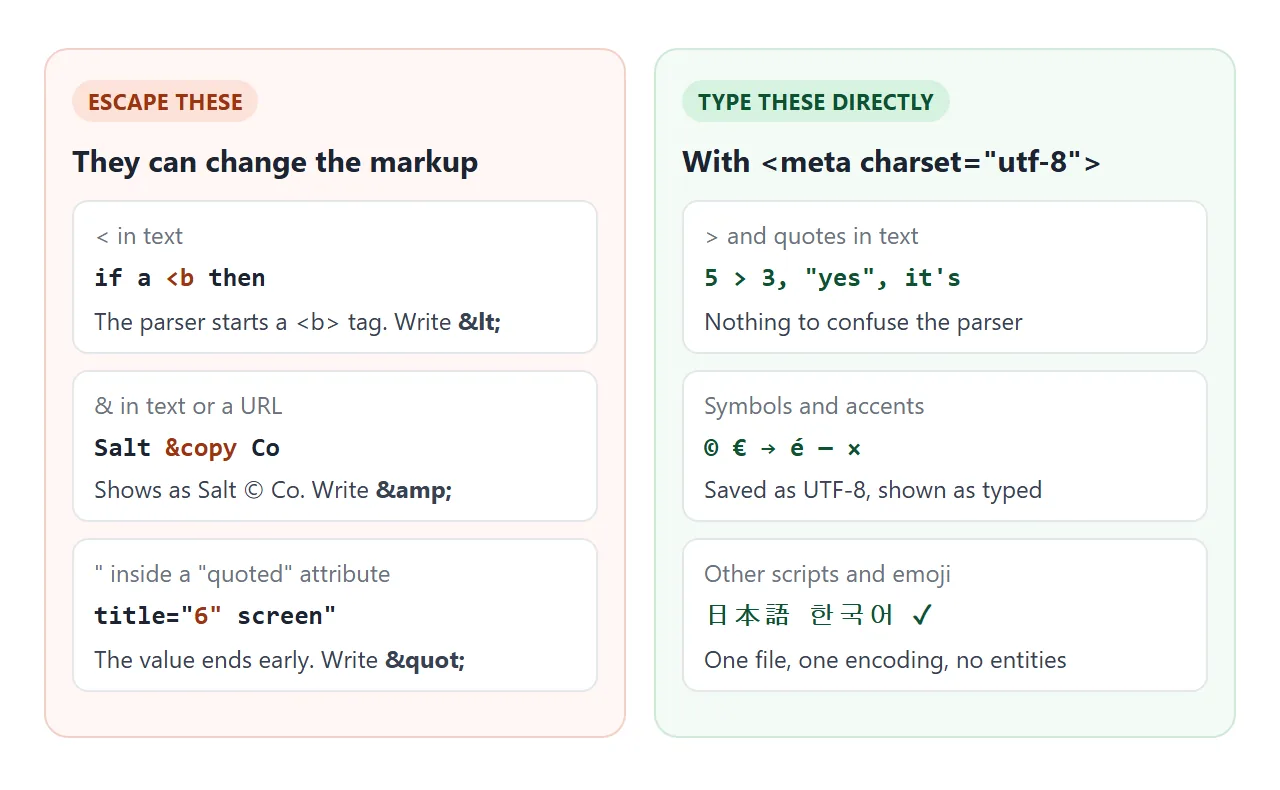
| 캐릭터 | 문제를 일으키는 곳 | 다음과 같이 쓰세요 |
|---|---|---|
< |
텍스트에서는 문자 또는 / 앞에 태그가 시작됩니다. |
< |
& |
href 내부의 텍스트 및 URL |
& |
" |
"로 래핑된 속성 내부 |
" |
' |
'로 래핑된 속성 내부 |
' 또는 ' |
> |
일반 텍스트 어디에도 없음 | >는 선택 사항입니다. |
"Tom & Jerry"에서처럼 & 뒤에 공백이 있으면 올바르게 표시됩니다. 위험은 그 뒤의 문자가 이름을 형성할 때 발생합니다.
© 2026는 세미콜론 없이도 © 2026을 표시합니다. 왜냐하면 몇몇 오래된 이름은 세미콜론 없이도 여전히 작동하기 때문입니다. 매번 &를 작성하면 추측이 제거됩니다.
여러 쿼리 매개변수가 포함된 링크가 전형적인 경우입니다. 소스의 올바른 형식은 다음과 같습니다.
<a href="/search?q=shoes&size=42">Shoes in size 42</a>
직접 입력할 수 있는 내용
페이지에서 UTF-8을 선언하고 파일이 UTF-8로 저장되면 ©, é, →, ×, 日本어 또는 이모티콘을 HTML에 직접 입력할 수 있습니다. 엔터티가 필요하지 않으며 소스를 계속 읽을 수 있습니다.
<!doctype html>
<html lang="en">
<head>
<meta charset="utf-8">
문자 세트 행은 <head>의 상단 근처에 속합니다. DOCTYPE 가이드는 전체 스타터 헤드를 보여줍니다.
엔터티에는 와 같은 보이지 않는 문자와 코드에서 유사하게 보이는 문자를 위한 공간이 있습니다. 여기서 − 또는 –는 정확히 어떤 대시를 의미하는지 알려줍니다.
줄바꿈하지 않는 공백:
는 브라우저가 줄을 끊지 않는 공간입니다. 숫자와 단위처럼 함께 있어야 하는 두 단어 사이에 넣으면 하나의 조각으로 다음 줄로 이동합니다. 너비 슬라이더를 드래그하여 비교해 보세요.
<!doctype html>
<html lang="en">
<head>
<meta charset="utf-8">
<meta name="viewport" content="width=device-width, initial-scale=1">
<title>Normal space vs &nbsp;</title>
<style>
body { margin: 0; padding: 14px; font-family: system-ui, sans-serif; background: #f4f5f7; color: #1d2330; }
.ctl { display: flex; align-items: center; gap: 10px; font-size: 14px; margin-bottom: 12px; flex-wrap: wrap; }
.ctl input[type=range] { flex: 1; min-width: 140px; }
h3 { font-size: 13px; margin: 0 0 4px; }
h3 code { font-size: 12px; background: #e6e9ee; padding: 0 4px; border-radius: 4px; }
.box {
width: 240px; max-width: 100%; box-sizing: border-box; margin-bottom: 14px;
padding: 10px 12px; background: #fff; border: 1px solid #cfd4dc; border-radius: 8px;
font-size: 16px; line-height: 1.5;
}
.show .nb { background: #d6f2df; border-radius: 3px; } /* highlight the glued groups */
</style>
</head>
<body>
<div class="ctl">
<label for="w">Box width</label>
<input type="range" id="w" min="160" max="340" value="240">
<output id="wv">240px</output>
<label><input type="checkbox" id="mark" checked> Highlight glued words</label>
</div>
<h3>Normal spaces</h3>
<div class="box">The train leaves at 10 AM from platform 4, and the fare is 25 EUR.</div>
<h3>With <code>&nbsp;</code> inside each group</h3>
<div class="box show" id="glued">The train leaves at <span class="nb">10 AM</span> from <span class="nb">platform 4</span>, and the fare is <span class="nb">25 EUR</span>.</div>
<h3>Indented with <code>&nbsp;&nbsp;&nbsp;&nbsp;</code> (don't)</h3>
<div class="box"> Step one: open the file and read the first line out loud.</div>
<h3>Indented with CSS <code>text-indent: 2em</code></h3>
<div class="box" style="text-indent: 2em">Step one: open the file and read the first line out loud.</div>
<script>
const w = document.getElementById('w');
const boxes = document.querySelectorAll('.box');
w.addEventListener('input', () => {
boxes.forEach((b) => { b.style.width = w.value + 'px'; });
document.getElementById('wv').textContent = w.value + 'px';
});
document.getElementById('mark').addEventListener('change', (e) => {
document.getElementById('glued').classList.toggle('show', e.target.checked);
});
</script>
</body>
</html>
두 가지 행동이 더 중요합니다. 실행은 일반 공간처럼 축소되지 않으므로 사람들은 텍스트를 옆으로 밀어내는 데 사용합니다.
그리고 그것은 바로 피해야 할 습관이다. 간격은 공백 문자 수이므로 글꼴 및 텍스트 크기에 따라 너비가 변경되고 공백은 줄 바꿈 대신 다음 단어에 붙습니다. 대신 CSS를 사용하세요.
- 문단 들여쓰기:
text-indent: 2em. - 항목 공간 확보: 플렉스 또는 그리드 컨테이너의
gap또는margin. <span>의white-space: nowrap: 전체 문구를 한 줄에 유지하세요.
반대 문제, 줄 바꿈을 거부하는 긴 단어에 대해서는 줄 바꿈되지 않는 텍스트를 참조하세요. 다른 공간 엔터티는  (절반 em),  (1 em) 및  (thin)이며 모두 줄 바꿈을 허용합니다.
JavaScript의 엔터티는 디코딩되지 않습니다.
엔터티는 HTML 파서에 속합니다. JavaScript 문자열은 HTML이 아니므로 스크립트의 '©'는 6개의 일반 문자입니다. ©로 바뀔지 여부는 페이지에 어떻게 배치하는지에 따라 다릅니다.
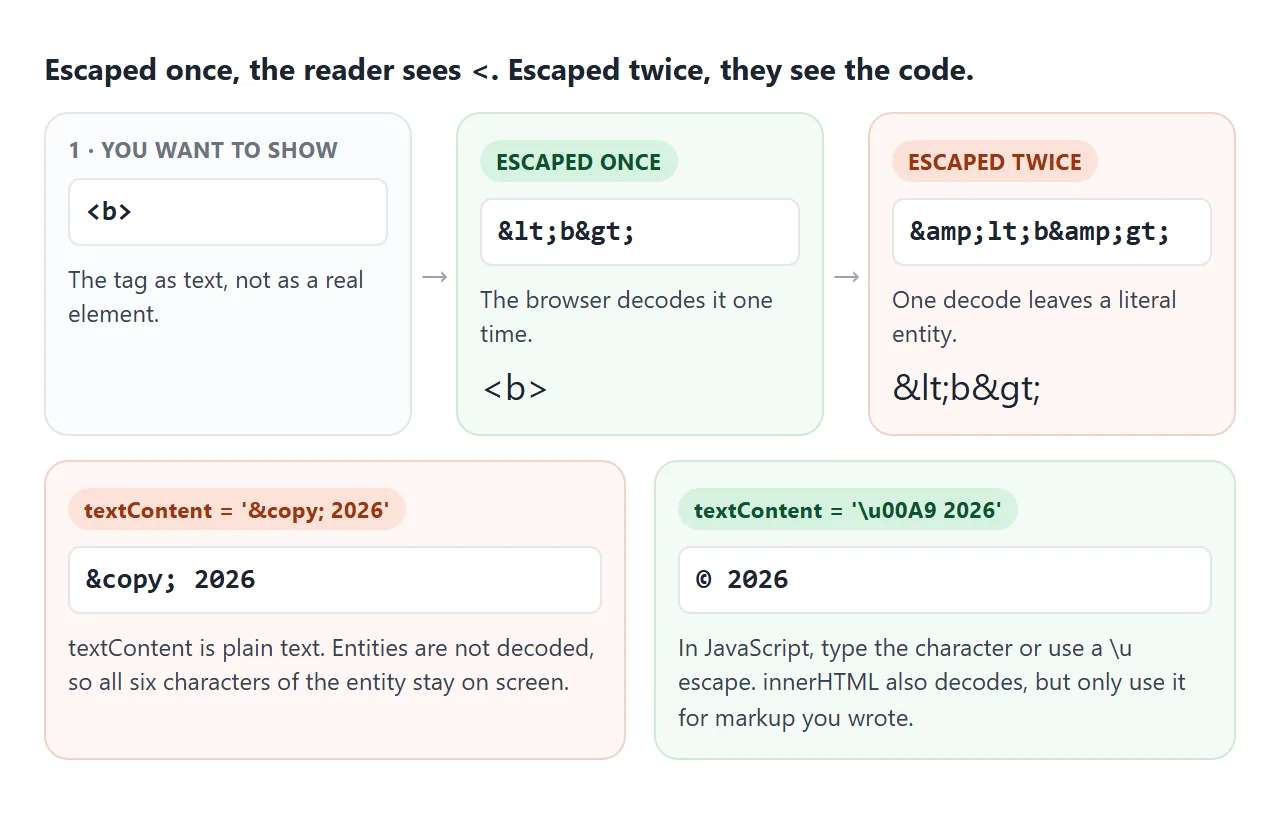
el.textContent = '© 2026';   // shows: © 2026
el.innerHTML   = '© 2026';   // shows: © 2026
el.textContent = '\u00A9 2026';  // shows: © 2026
el.textContent = '© 2026';        // shows: © 2026 (file saved as UTF-8)
textContent는 텍스트, 특히 사용자가 입력하는 모든 항목에 적합한 선택입니다. 이를 유지하고 문자를 입력하거나 \u 이스케이프를 사용하십시오. 하나의 기호를 디코딩하기 위해 innerHTML로 전환하지 마십시오. innerHTML 대 textContent는 사용자 텍스트가 innerHTML에 절대 들어가지 말아야 하는 이유를 설명합니다.
페이지의 <script> 및 <style> 요소 내부에도 동일한 규칙이 적용됩니다. 해당 콘텐츠에서는 엔터티가 검색되지 않습니다.
일반적인 HTML 엔터티: 화살표, 통화, 수학
| 그룹 | 캐릭터와 엔터티 |
|---|---|
| 화살 | ← ← → → ↑ ↑ ↓ ↓ ⇒ ⇒ |
| 통화 | € € £ £ € ¥ ¢ ¢ ₩ ₩ |
| 수학 | × × ¼ ÷ ± ± ≠ ≠ ≤ ≤ ≥ ≥ |
| 더 많은 수학 | ¼ ∞ ° ° ² ² ½ ½ − − |
| 타이포그래피 | © © ® ® ™ ™ — — – – … … |
| 인용문 | “ “ ” ” ‘ ‘ ’ ’ « « » » |
완성된 예: 검색 가능한 기호 선택기
이 선택기에는 사람들이 가장 많이 찾는 기호가 들어 있습니다. 이름으로 검색하고, 그룹으로 필터링하고, 기호를 클릭하세요. 명명된 형식, 10진수 및 16진수 형식을 표시하고 명명된 형식(또는 이름이 없는 경우 숫자)을 복사합니다.
<!doctype html>
<html lang="en">
<head>
<meta charset="utf-8">
<meta name="viewport" content="width=device-width, initial-scale=1">
<title>HTML entity symbol picker</title>
<style>
  body { margin: 0; padding: 14px; font-family: system-ui, sans-serif; background: #f4f5f7; color: #1d2330; }
  input[type=search] {
    width: 100%; box-sizing: border-box; padding: 9px 11px; font-size: 15px;
    border: 1px solid #cfd4dc; border-radius: 8px;
  }
  .tabs { display: flex; flex-wrap: wrap; gap: 6px; margin: 10px 0; }
  .tabs button {
    border: 1px solid #cfd4dc; background: #fff; border-radius: 99px; padding: 5px 11px; font-size: 13px; cursor: pointer;
  }
  .tabs button[aria-pressed=true] { background: #1d2330; color: #fff; border-color: #1d2330; }
  .grid {
    display: grid; grid-template-columns: repeat(auto-fill, minmax(46px, 1fr)); gap: 6px;
    height: 196px; overflow-y: auto; padding: 2px; align-content: start;
  }
  .grid button {
    height: 46px; font-size: 22px; background: #fff; border: 1px solid #e1e4ea; border-radius: 8px; cursor: pointer;
  }
  .grid button:hover, .grid button.on { border-color: #2563eb; box-shadow: 0 0 0 2px rgba(37, 99, 235, .25); }
  .card {
    display: grid; grid-template-columns: 64px 1fr; gap: 4px 12px; align-items: center;
    margin-top: 12px; padding: 12px; background: #fff; border-radius: 10px; border: 1px solid #e1e4ea;
  }
  .card .big { grid-row: span 3; font-size: 44px; text-align: center; }
  .card div { font-size: 13px; }
  .card code { font: 14px ui-monospace, Consolas, monospace; background: #eef1f5; padding: 1px 5px; border-radius: 4px; }
  .status { margin-top: 8px; font-size: 13px; color: #0f5132; min-height: 18px; }
  .empty { grid-column: 1 / -1; color: #6b7280; font-size: 14px; }
</style>
</head>
<body>
<input type="search" id="q" placeholder="Search: arrow, euro, times, dash" aria-label="Search symbols">
<div class="tabs" id="tabs"></div>
<div class="grid" id="grid"></div>

<div class="card">
  <div class="big" id="big"></div>
  <div id="title"></div>
  <div>Named <code id="cName"></code></div>
  <div>Number <code id="cDec"></code> <code id="cHex"></code></div>
</div>
<div class="status" id="status">Click a symbol to copy its entity.</div>

<script>
  // [character, entity name ('' if HTML has none), words to search, group]
  const SYMBOLS = [
    ['←', 'larr', 'left arrow', 'Arrows'], ['→', 'rarr', 'right arrow', 'Arrows'],
    ['↑', 'uarr', 'up arrow', 'Arrows'], ['↓', 'darr', 'down arrow', 'Arrows'],
    ['↔', 'harr', 'left right arrow', 'Arrows'], ['⇐', 'lArr', 'double left arrow', 'Arrows'],
    ['⇒', 'rArr', 'double right arrow implies', 'Arrows'], ['⇔', 'hArr', 'double left right arrow', 'Arrows'],
    ['↵', 'crarr', 'return enter arrow', 'Arrows'],
    ['€', 'euro', 'euro', 'Currency'], ['£', 'pound', 'pound sterling', 'Currency'],
    ['¥', 'yen', 'yen yuan', 'Currency'], ['¢', 'cent', 'cent', 'Currency'],
    ['₹', '', 'indian rupee', 'Currency'], ['₩', '', 'korean won', 'Currency'], ['₿', '', 'bitcoin', 'Currency'],
    ['×', 'times', 'times multiply', 'Math'], ['÷', 'divide', 'divide', 'Math'],
    ['±', 'plusmn', 'plus minus', 'Math'], ['−', 'minus', 'minus sign', 'Math'],
    ['≠', 'ne', 'not equal', 'Math'], ['≤', 'le', 'less than or equal', 'Math'],
    ['≥', 'ge', 'greater than or equal', 'Math'], ['≈', 'asymp', 'almost equal approximately', 'Math'],
    ['∞', 'infin', 'infinity', 'Math'], ['√', 'radic', 'square root', 'Math'],
    ['°', 'deg', 'degree', 'Math'], ['²', 'sup2', 'squared superscript two', 'Math'],
    ['½', 'frac12', 'one half fraction', 'Math'], ['π', 'pi', 'pi', 'Math'], ['‰', 'permil', 'per mille', 'Math'],
    ['©', 'copy', 'copyright', 'Typography'], ['®', 'reg', 'registered', 'Typography'],
    ['™', 'trade', 'trademark', 'Typography'], ['—', 'mdash', 'em dash', 'Typography'],
    ['–', 'ndash', 'en dash range', 'Typography'], ['…', 'hellip', 'ellipsis dots', 'Typography'],
    ['“', 'ldquo', 'left double quote', 'Typography'], ['”', 'rdquo', 'right double quote', 'Typography'],
    ['‘', 'lsquo', 'left single quote', 'Typography'], ['’', 'rsquo', 'right single quote apostrophe', 'Typography'],
    ['«', 'laquo', 'left angle quote guillemet', 'Typography'], ['»', 'raquo', 'right angle quote guillemet', 'Typography'],
    ['•', 'bull', 'bullet', 'Typography'], ['·', 'middot', 'middle dot', 'Typography'],
    ['§', 'sect', 'section', 'Typography'], ['¶', 'para', 'paragraph pilcrow', 'Typography'],
    ['†', 'dagger', 'dagger footnote', 'Typography'], ['✓', 'check', 'check mark tick', 'Typography'],
    ['<', 'lt', 'less than', 'Must escape'], ['>', 'gt', 'greater than', 'Must escape'],
    ['&', 'amp', 'ampersand and', 'Must escape'], ['"', 'quot', 'double quote', 'Must escape'],
    ['\u00A0', 'nbsp', 'non-breaking space', 'Spaces'], ['\u2002', 'ensp', 'en space', 'Spaces'],
    ['\u2003', 'emsp', 'em space', 'Spaces'], ['\u2009', 'thinsp', 'thin space', 'Spaces'],
  ];
  const GROUPS = ['All', 'Arrows', 'Currency', 'Math', 'Typography', 'Must escape', 'Spaces'];
  let group = 'All';

  const $ = (id) => document.getElementById(id);
  const face = (ch) => (ch.trim() ? ch : '␣');  // spaces are invisible, so show a marker

  function codes(ch, name) {
    const cp = ch.codePointAt(0);
    return {
      named: name ? '&' + name + ';' : '',
      dec: '&#' + cp + ';',
      hex: '&#x' + cp.toString(16).toUpperCase() + ';',
    };
  }

  function show([ch, name, words]) {
    const c = codes(ch, name);
    $('big').textContent = face(ch);
    $('title').textContent = words;
    $('cName').textContent = c.named || 'none, use a number';
    $('cDec').textContent = c.dec;
    $('cHex').textContent = c.hex;
    return c.named || c.dec;  // what gets copied
  }

  async function copy(text) {
    try {
      await navigator.clipboard.writeText(text);
      $('status').textContent = 'Copied ' + text;
    } catch (err) {
      $('status').textContent = 'Copying is blocked here. Select the code above: ' + text;
    }
  }

  function render() {
    const q = $('q').value.trim().toLowerCase();
    const list = SYMBOLS.filter((s) =>
      (group === 'All' || s[3] === group) &&
      (!q || s[2].includes(q) || s[1].toLowerCase().includes(q) || s[0] === q));
    $('grid').replaceChildren();
    if (!list.length) {
      const p = document.createElement('div');
      p.className = 'empty';
      p.textContent = 'No match. Try another word.';
      $('grid').append(p);
    }
    list.forEach((s) => {
      const b = document.createElement('button');
      b.textContent = face(s[0]);
      b.title = s[2];
      b.addEventListener('click', () => {
        document.querySelectorAll('.grid .on').forEach((x) => x.classList.remove('on'));
        b.classList.add('on');
        copy(show(s));
      });
      $('grid').append(b);
    });
  }

  GROUPS.forEach((g) => {
    const b = document.createElement('button');
    b.textContent = g;
    b.setAttribute('aria-pressed', g === group);
    b.addEventListener('click', () => {
      group = g;
      document.querySelectorAll('#tabs button').forEach((x) => x.setAttribute('aria-pressed', x === b));
      render();
    });
    $('tabs').append(b);
  });

  $('q').addEventListener('input', render);
  render();
  show(SYMBOLS[1]);
</script>
</body>
</html>
- 데이터:
[character, name, words, group]어레이 1개. 기호를 추가하려면 행을 추가하세요. - 숫자:
codePointAt(0)는 코드 포인트를 제공합니다.toString(16)는 이를 16진수로 변환합니다. - 복사 중:
navigator.clipboard.writeText. 복사 버튼 안내에서는 복사가 차단된 경우 수행할 작업에 대해 설명합니다.
작동하지 않을 때
| 당신이 보는 것 | 원인 | 수정 |
|---|---|---|
페이지에 < 또는 &가 표시됩니다. |
텍스트가 두 번 이스케이프되었습니다. | 출력 전 마지막 단계에서 한 번 탈출 |
&mdash가 입력된 대로 표시됩니다. |
세미콜론 누락 | ;로 모든 엔터티 종료 |
| JavaScript의 엔터티 세트가 코드로 표시됩니다. | textContent는 디코딩되지 않습니다. |
문자를 입력하거나 \u 이스케이프를 사용하세요. |
| é는 é 또는 물음표가 있는 상자로 표시됩니다. | 파일 인코딩과 선언된 문자 세트가 다름 | UTF-8로 저장하고 <meta charset="utf-8">를 추가하세요. |
< 이후의 텍스트가 사라집니다. |
브라우저는 이를 태그로 읽습니다. | < 쓰기 |
로 만든 간격은 화면마다 다르게 보입니다. |
너비는 레이아웃이 아닌 글꼴을 따릅니다. | text-indent, gap 또는 margin를 사용하세요. |
왜곡된 악센트는 엔터티 문제인 경우가 거의 없습니다. 이는 바이트가 저장된 인코딩과 다른 인코딩으로 읽혔다는 것을 의미합니다. 메타 태그 목록은 문자 세트 행이 가는 위치를 보여줍니다.
링크로 공유하세요
기호로 가득 찬 페이지는 공유가 기호를 그대로 유지하는지 여부를 테스트하는 좋은 테스트입니다. 잘못된 인코딩으로 첨부 파일을 열 수 있으며 스크린샷을 검색하거나 복사할 수 없습니다.
작업 버전을 보내려면 페이지를 NOS 문서에 붙여넣고 공유 링크 만들기를 선택하세요. 링크할 HTML이 이를 안내합니다.
페이지는 작성된 대로 렌더링되고 해당 스크립트가 실행되므로 페이지를 보내는 사람들은 선택기를 검색하고 기호를 직접 복사할 수 있습니다. 나중에 코드를 변경하면 동일한 링크에 새 버전이 표시됩니다.